door lock HONDA CR-V 2017 RM1, RM3, RM4 / 4.G Service Manual
[x] Cancel search | Manufacturer: HONDA, Model Year: 2017, Model line: CR-V, Model: HONDA CR-V 2017 RM1, RM3, RM4 / 4.GPages: 657
Page 190 of 657
189
uuOperating the Switches Around the Steering Wheel uDriving Position Memory System*
Continued
Controls
Driving Position Memory System*
You can store two driver’s seat positions (except for power lumbar) with the driving
position memory system.
When you unlock and open th e driver’s door with a remote transmitter or the smart
entry system, the seat adjusts automatica lly to one of the two preset positions.
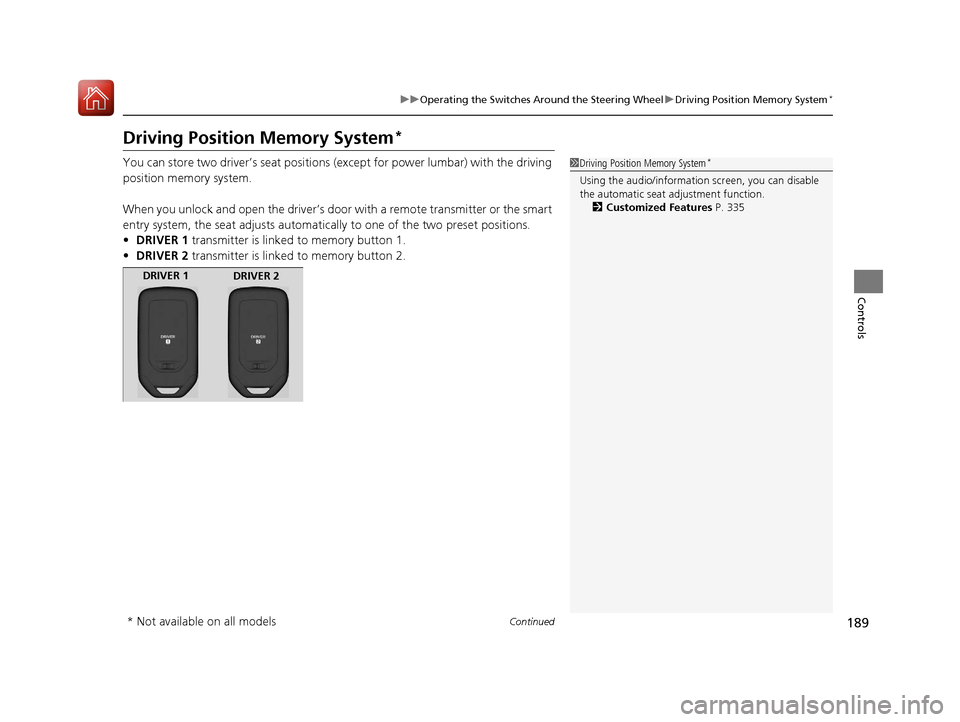
• DRIVER 1 transmitter is linked to memory button 1.
• DRIVER 2 transmitter is linked to memory button 2.1Driving Position Memory System*
Using the audio/informati on screen, you can disable
the automatic seat adjustment function.
2 Customized Features P. 335
DRIVER 1
DRIVER 2
* Not available on all models
17 CR-V-31TLA6000.book 189 ページ 2016年10月11日 火曜日 午後6時37分
Page 204 of 657
203Continued
Controls
Interior Lights/Interior Convenience Items
Interior Lights
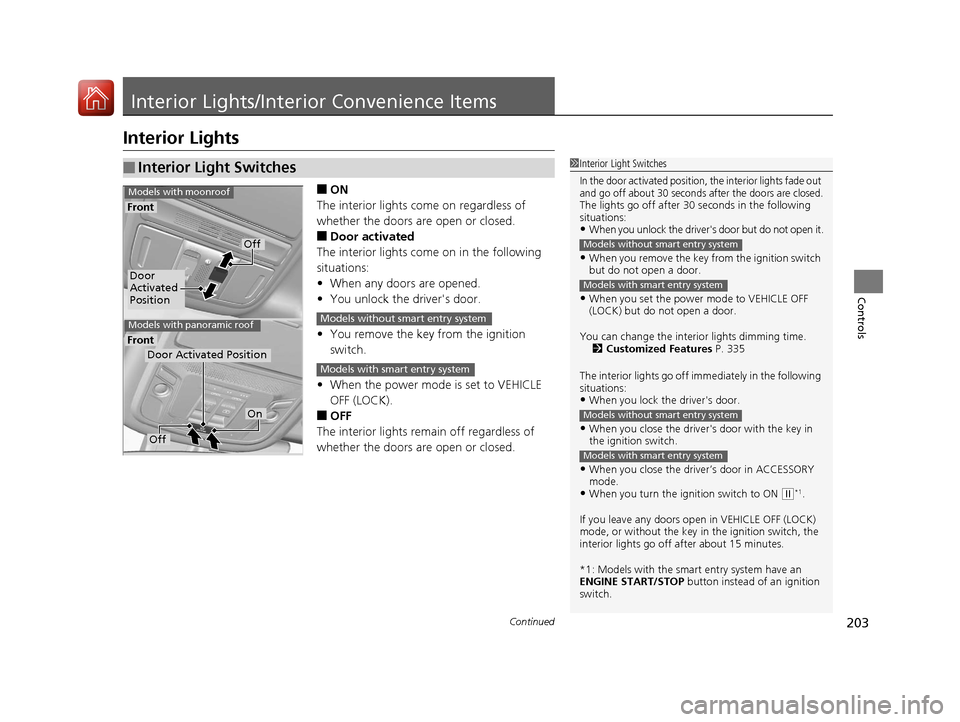
■ON
The interior lights come on regardless of
whether the doors are open or closed.
■Door activated
The interior lights come on in the following
situations:
• When any doors are opened.
• You unlock the driver's door.
• You remove the key from the ignition
switch.
• When the power mode is set to VEHICLE
OFF (LOCK).
■OFF
The interior lights remain off regardless of
whether the doors are open or closed.
■Interior Light Switches1 Interior Light Switches
In the door activated position, the interior lights fade out
and go off about 30 seconds after the doors are closed.
The lights go off after 30 seconds in the following
situations:
•When you unlock the driver's door but do not open it.
•When you remove the key from the ignition switch
but do not open a door.
•When you set the power mode to VEHICLE OFF
(LOCK) but do not open a door.
You can change the interi or lights dimming time.
2 Customized Features P. 335
The interior lights go off i mmediately in the following
situations:
•When you lock the driver's door.
•When you close the driver's door with the key in
the ignition switch.
•When you close the driver’s door in ACCESSORY
mode.
•When you turn the ignition switch to ON ( w*1.
If you leave any doors open in VEHICLE OFF (LOCK)
mode, or without the key in the ignition switch, the
interior lights go off after about 15 minutes.
*1: Models with the smart entry system have an
ENGINE START/STOP button instead of an ignition
switch.
Models without smart entry system
Models with smart entry system
Models without smart entry system
Models with smart entry system
Door
Activated
Position
Off
Front
Front
Models with moonroof
Models with panoramic roof
Door Activated Position
Off
On
Models without smart entry system
Models with smart entry system
17 CR-V-31TLA6000.book 203 ページ 2016年10月11日 火曜日 午後6時37分
Page 351 of 657
350
uuCustomized Features u
Features
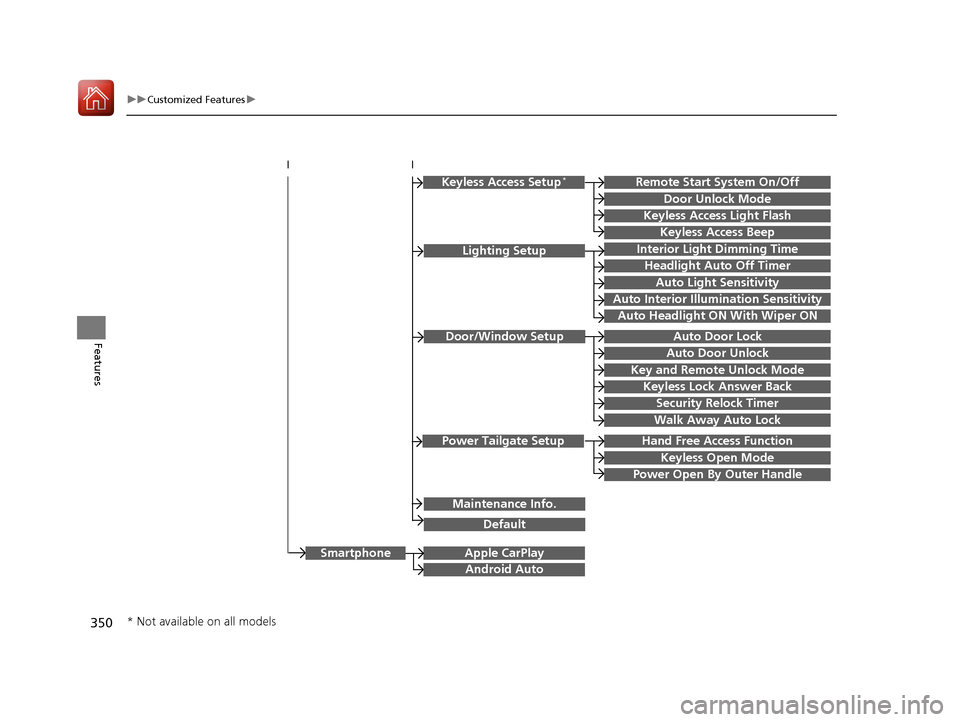
Hand Free Access Function
Keyless Open Mode
Lighting SetupInterior Light Dimming Time
Headlight Auto Off Timer
Auto Light Sensitivity
Auto Interior Illumination Sensitivity
Auto Door Lock
Key and Remote Unlock Mode
Door/Window Setup
Apple CarPlay
Maintenance Info.
Android Auto
Keyless Lock Answer Back
Security Relock Timer
Walk Away Auto Lock
Keyless Access Setup*
Keyless Access Light Flash
Door Unlock Mode
Remote Start System On/Off
Keyless Access Beep
Smartphone
Power Tailgate Setup
Power Open By Outer Handle
Default
Auto Door Unlock
Auto Headlight ON With Wiper ON
* Not available on all models
17 CR-V-31TLA6000.book 350 ページ 2016年10月11日 火曜日 午後6時37分
Page 365 of 657
364
uuCustomized Features u
Features
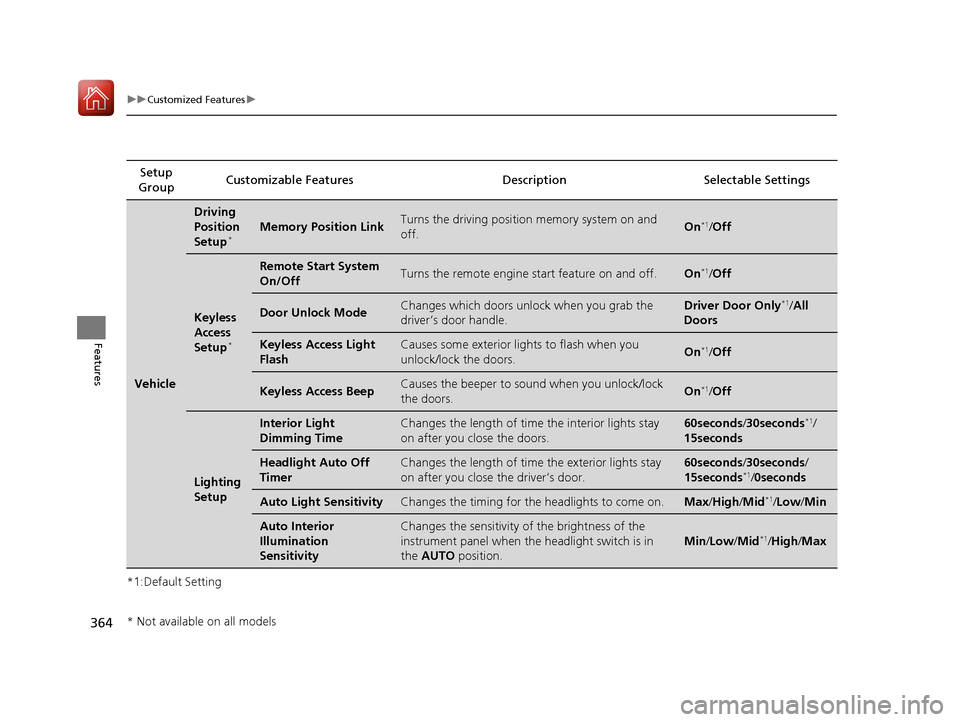
*1:Default SettingSetup
Group Customizable Features Descri
ption Selectable Settings
Vehicle
Driving
Position
Setup
*Memory Position LinkTurns the driving position memory system on and
off.On*1/Off
Keyless
Access
Setup
*
Remote Start System
On/OffTurns the remote engine start feature on and off.On*1/Off
Door Unlock ModeChanges which doors unlock when you grab the
driver’s door handle.Driver Door Only*1/All
Doors
Keyless Access Light
FlashCauses some exterior lights to flash when you
unlock/lock the doors.On*1/ Off
Keyless Access BeepCauses the beeper to so und when you unlock/lock
the doors.On*1/ Off
Lighting
Setup
Interior Light
Dimming TimeChanges the length of time the interior lights stay
on after you close the doors.60seconds /30seconds*1/
15seconds
Headlight Auto Off
TimerChanges the length of time the exterior lights stay
on after you close the driver’s door.60seconds /30seconds /
15seconds*1/ 0seconds
Auto Light SensitivityChanges the timing for the headlights to come on.Max /High /Mid*1/Low /Min
Auto Interior
Illumination
SensitivityChanges the sensitivity of the brightness of the
instrument panel when the headlight switch is in
the AUTO position.
Min/Low /Mid*1/High/ Max
* Not available on all models
17 CR-V-31TLA6000.book 364 ページ 2016年10月11日 火曜日 午後6時37分
Page 366 of 657
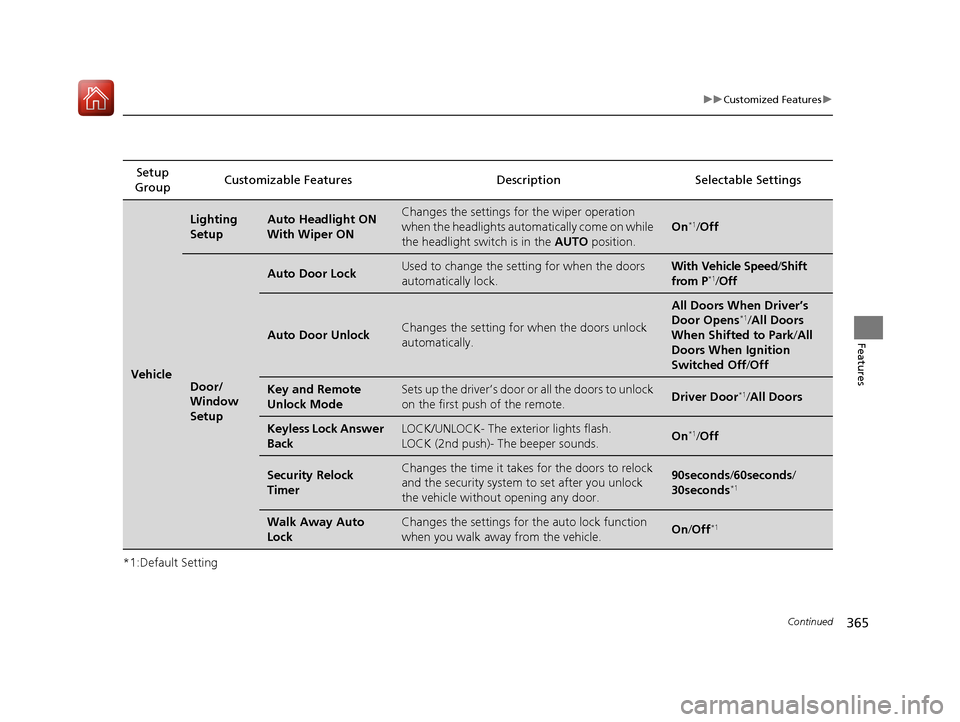
365
uuCustomized Features u
Continued
Features
*1:Default SettingSetup
Group Customizable Features Descri
ption Selectable Settings
Vehicle
Lighting
SetupAuto Headlight ON
With Wiper ONChanges the settings for the wiper operation
when the headlights automatically come on while
the headlight switch is in the AUTO position.
On*1/Off
Door/
Window
Setup
Auto Door LockUsed to change the se tting for when the doors
automatically lock.With Vehicle Speed /Shift
from P*1/ Off
Auto Door UnlockChanges the setting for when the doors unlock
automatically.
All Doors When Driver’s
Door Opens*1/ All Doors
When Shifted to Park /All
Doors When Ignition
Switched Off /Off
Key and Remote
Unlock ModeSets up the driver’s door or all the doors to unlock
on the first push of the remote.Driver Door*1/All Doors
Keyless Lock Answer
BackLOCK/UNLOCK- The exterior lights flash.
LOCK (2nd push)- The beeper sounds.On*1/Off
Security Relock
TimerChanges the time it takes for the doors to relock
and the security system to set after you unlock
the vehicle without opening any door.90seconds /60seconds /
30seconds*1
Walk Away Auto
LockChanges the settings for the auto lock function
when you walk away from the vehicle.On /Off*1
17 CR-V-31TLA6000.book 365 ページ 2016年10月11日 火曜日 午後6時37分
Page 433 of 657
432
Driving
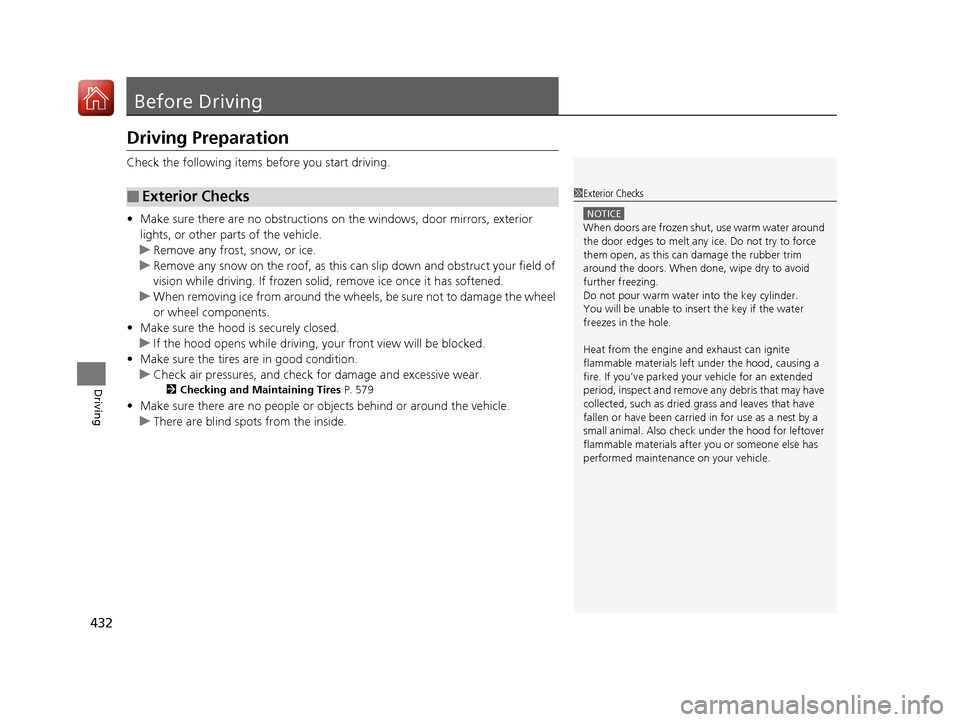
Before Driving
Driving Preparation
Check the following items before you start driving.
• Make sure there are no obstructions on th e windows, door mirrors, exterior
lights, or other parts of the vehicle.
u Remove any frost, snow, or ice.
u Remove any snow on the roof, as this can slip down and obstruct your field of
vision while driving. If frozen solid , remove ice once it has softened.
u When removing ice from around the wheel s, be sure not to damage the wheel
or wheel components.
• Make sure the hood is securely closed.
u If the hood opens while driving, your front view will be blocked.
• Make sure the tires are in good condition.
u Check air pressures, and check for damage and excessive wear.
2Checking and Maintaining Tires P. 579
•Make sure there are no people or ob jects behind or around the vehicle.
u There are blind spots from the inside.
■Exterior Checks1Exterior Checks
NOTICE
When doors are frozen s hut, use warm water around
the door edges to melt any ice. Do not try to force
them open, as this can damage the rubber trim
around the doors. When done, wipe dry to avoid
further freezing.
Do not pour warm water into the key cylinder.
You will be unable to insert the key if the water
freezes in the hole.
Heat from the engine and exhaust can ignite
flammable material s left under the hood, causing a
fire. If you've parked y our vehicle for an extended
period, inspect and remove any debris that may have
collected, such as dried grass and leaves that have
fallen or have been carried in for use as a nest by a
small animal. Also check under the hood for leftover
flammable materials after you or someone else has
performed maintenance on your vehicle.
17 CR-V-31TLA6000.book 432 ページ 2016年10月11日 火曜日 午後6時37分
Page 434 of 657
Continued433
uuBefore Driving uDriving Preparation
Driving
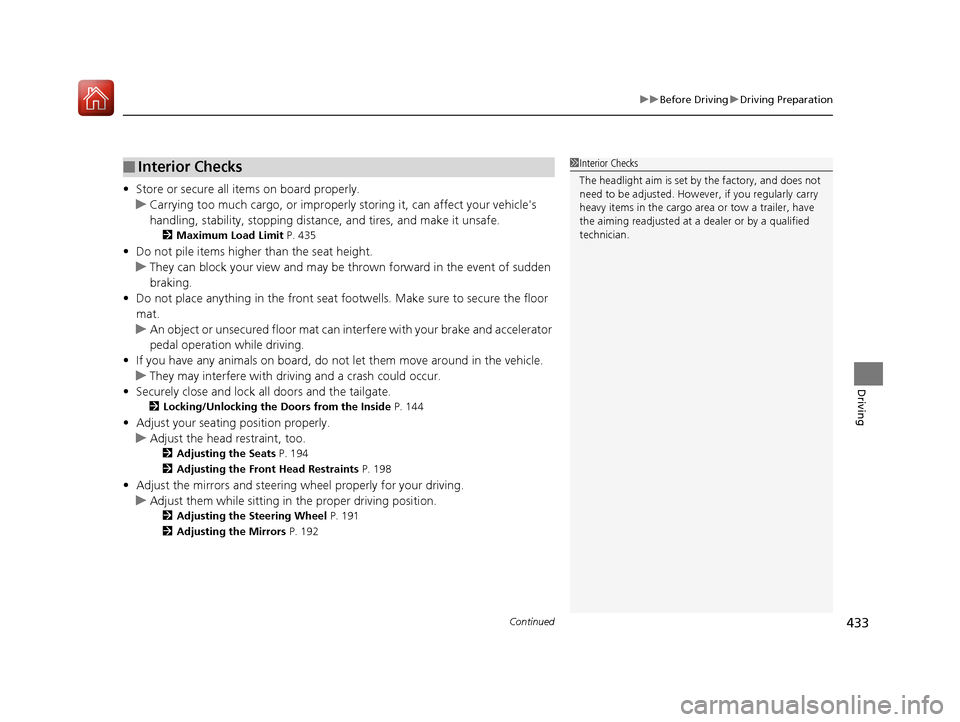
• Store or secure all items on board properly.
u Carrying too much cargo, or improperly storing it, can affect your vehicle's
handling, stability, sto pping distance, and tires, and make it unsafe.
2Maximum Load Limit P. 435
•Do not pile items higher than the seat height.
u They can block your view and may be thrown forward in the event of sudden
braking.
• Do not place anything in the front seat footwells. Make sure to secure the floor
mat.
u An object or unsecured floor mat can in terfere with your brake and accelerator
pedal operation while driving.
• If you have any animals on board, do not let them move around in the vehicle.
u They may interfere with driv ing and a crash could occur.
• Securely close and lock al l doors and the tailgate.
2Locking/Unlocking the Doors from the Inside P. 144
•Adjust your seating position properly.
u Adjust the head restraint, too.
2Adjusting the Seats P. 194
2 Adjusting the Front Head Restraints P. 198
•Adjust the mirrors and steering wh eel properly for your driving.
u Adjust them while sitting in the proper driving position.
2 Adjusting the Steering Wheel P. 191
2 Adjusting the Mirrors P. 192
■Interior Checks1Interior Checks
The headlight aim is set by the factory, and does not
need to be adjusted. Howeve r, if you regularly carry
heavy items in the cargo area or tow a trailer, have
the aiming readjusted at a dealer or by a qualified
technician.
17 CR-V-31TLA6000.book 433 ページ 2016年10月11日 火曜日 午後6時37分
Page 449 of 657
uuWhen Driving uStarting the Engine
448
Driving
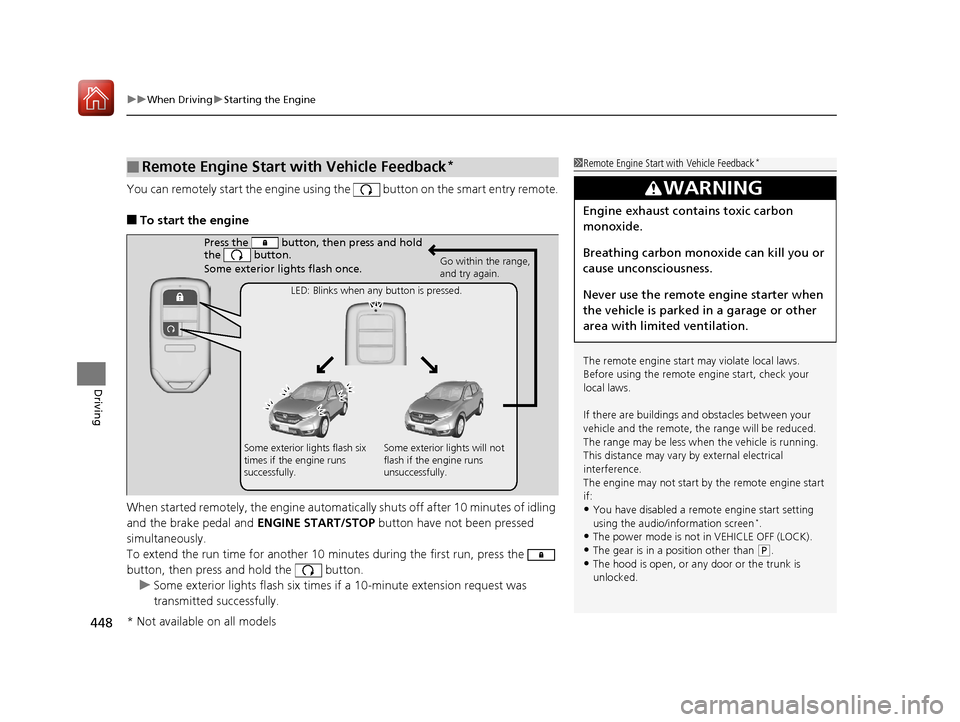
You can remotely start the engine using the button on the smart entry remote.
■To start the engine
When started remotely, the engine automati cally shuts off after 10 minutes of idling
and the brake pedal and ENGINE START/STOP button have not been pressed
simultaneously.
To extend the run time for another 10 minutes during the first run, press the
button, then press and hold the button. u Some exterior lights flash six times if a 10-minute extension request was
transmitted successfully.
■Remote Engine Start with Vehicle Feedback*1Remote Engine Start with Vehicle Feedback*
The remote engine start may violate local laws.
Before using the remote e ngine start, check your
local laws.
If there are buildings an d obstacles between your
vehicle and the remote, th e range will be reduced.
The range may be less when the vehicle is running.
This distance may vary by external electrical
interference.
The engine may not start by the remote engine start
if:
•You have disabled a remo te engine start setting
using the audio/information screen*.
•The power mode is not in VEHICLE OFF (LOCK).•The gear is in a position other than ( P.
•The hood is open, or any door or the trunk is
unlocked.
3WARNING
Engine exhaust contains toxic carbon
monoxide.
Breathing carbon monoxide can kill you or
cause unconsciousness.
Never use the remote engine starter when
the vehicle is parked in a garage or other
area with limited ventilation.
Press the button, th en press and hold
the button.
Some exterior lights flash once.
Go within the range,
and try again.
LED: Blinks when any button is pressed.
Some exterior lights flash six
times if the engine runs
successfully. Some exterior lights will not
flash if the engine runs
unsuccessfully.
* Not available on all models
17 CR-V-31TLA6000.book 448 ページ 2016年10月11日 火曜日 午後6時37分
Page 450 of 657
Continued449
uuWhen Driving uStarting the Engine
Driving
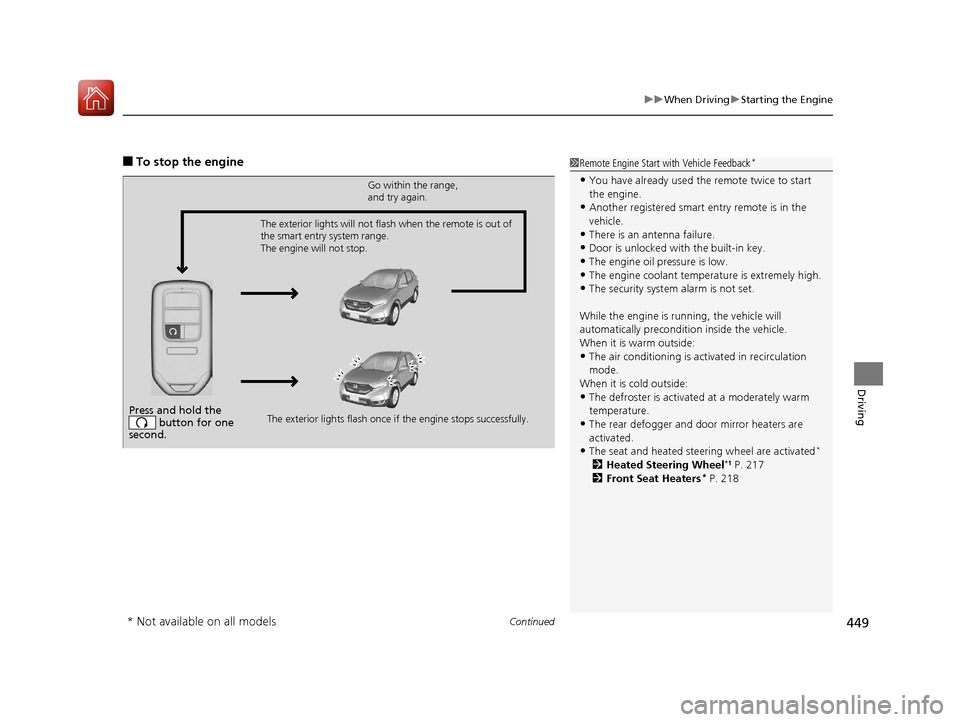
■To stop the engine1Remote Engine Start with Vehicle Feedback*
•You have already used the remote twice to start
the engine.
•Another registered smart entry remote is in the
vehicle.
•There is an antenna failure.
•Door is unlocked with the built-in key.
•The engine oil pressure is low.•The engine coolant temper ature is extremely high.
•The security system alarm is not set.
While the engine is running, the vehicle will
automatically preconditi on inside the vehicle.
When it is warm outside:
•The air conditioning is acti vated in recirculation
mode.
When it is cold outside:
•The defroster is activated at a moderately warm
temperature.
•The rear defogger and door mirror heaters are
activated.
•The seat and heated steering wheel are activated*
2 Heated Steering Wheel*1 P. 217
2 Front Seat Heaters* P. 218
Press and hold the
button for one
second.
Go within the range,
and try again.
The exterior lights flash once if the engine stops successfully.
The exterior lights will not flash when the remote is out of
the smart entry system range.
The engine will not stop.
* Not available on all models
17 CR-V-31TLA6000.book 449 ページ 2016年10月11日 火曜日 午後6時37分
Page 627 of 657
626
uuFuses uFuse Locations
Handling the Unexpected
*1:Canadian models with rear seat heater
*2:Models without rear seat heater
*3:Models with fog lights
*4:Models without smart entry system
Circuit ProtectedAmps
21Rear Seat Heater*1
−*2(20 A)
−
22Front Fog Lights*3/Lower
Shutter Grille(15 A)
23A/C Compressor/Upper
Shutter Grille10 A
24Horn10 A
25Cooling Fan7.5 A
26−−
27−−
28ST Magnetic Switch*4(7.5 A)
29−−
30−−
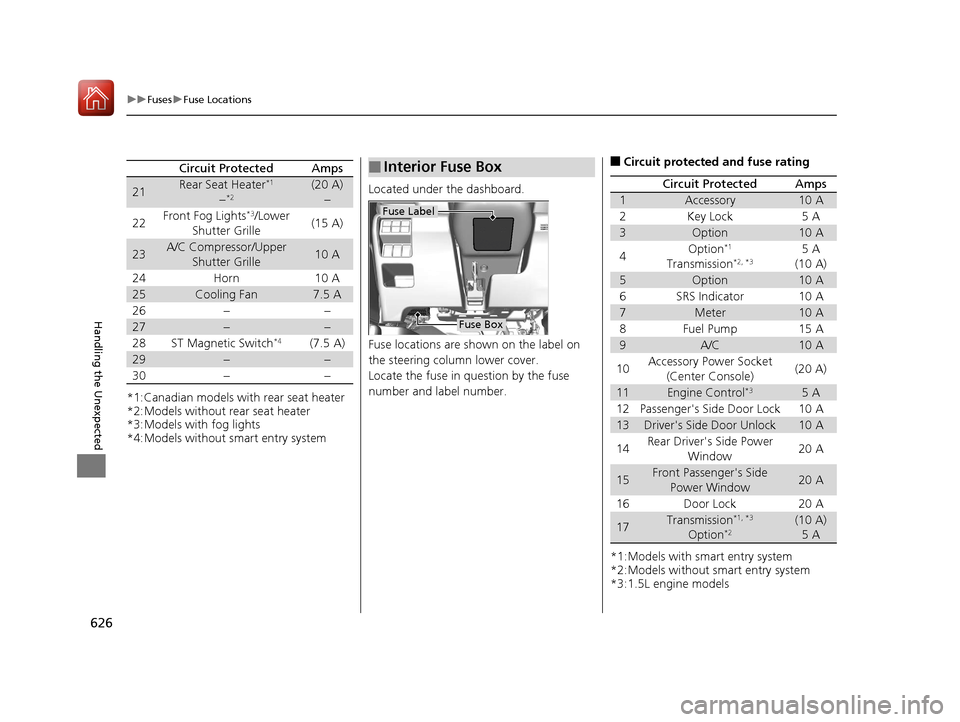
Located under the dashboard.
Fuse locations are shown on the label on
the steering column lower cover.
Locate the fuse in question by the fuse
number and label number.
■Interior Fuse Box
Fuse Label
Fuse Box
■Circuit protected and fuse rating
*1:Models with smart entry system
*2:Models without smart entry system
*3:1.5L engine models
Circuit ProtectedAmps
1Accessory10 A
2Key Lock5 A
3Option10 A
4Option*1
Transmission*2, *35 A
(10 A)
5Option10 A
6SRS Indicator10 A
7Meter10 A
8Fuel Pump15 A
9A/C10 A
10Accessory Power Socket (Center Console)(20 A)
11Engine Control*35 A
12Passenger's Side Door Lock10 A
13Driver's Side Door Unlock10 A
14Rear Driver's Side Power Window20 A
15Front Passenger's Side
Power Window20 A
16Door Lock20 A
17Transmission*1, *3
Option*2(10 A)5 A
17 CR-V-31TLA6000.book 626 ページ 2016年10月11日 火曜日 午後6時37分