transmission HONDA CR-V 2017 RM1, RM3, RM4 / 4.G Owners Manual
[x] Cancel search | Manufacturer: HONDA, Model Year: 2017, Model line: CR-V, Model: HONDA CR-V 2017 RM1, RM3, RM4 / 4.GPages: 657
Page 12 of 657
11
Quick Reference Guide
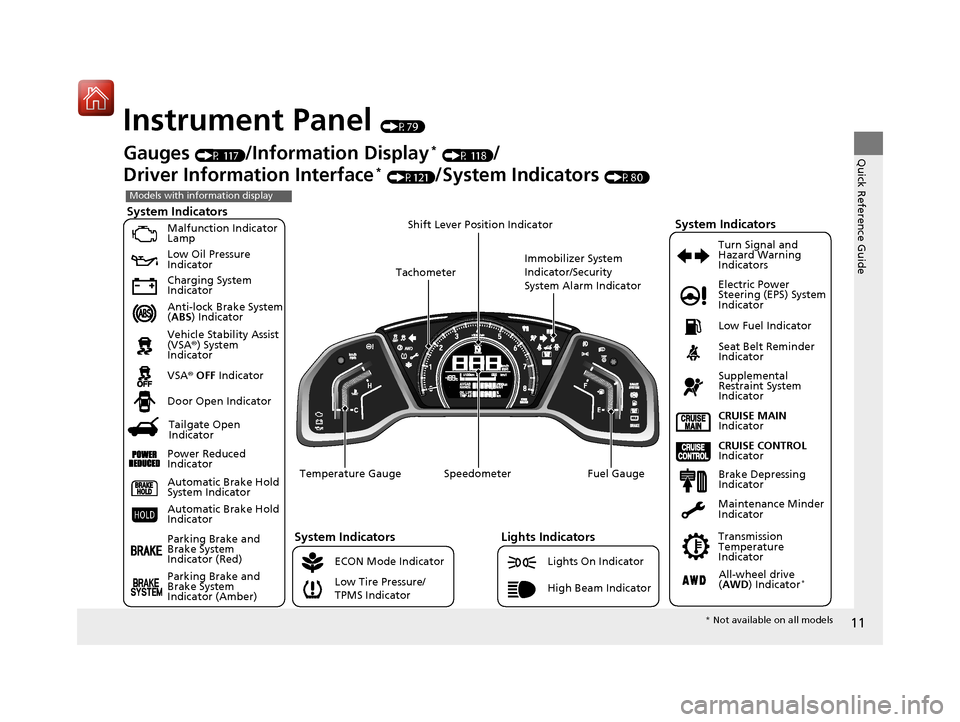
Instrument Panel (P79)
System Indicators
Malfunction Indicator
Lamp
Low Oil Pressure
Indicator
Charging System
Indicator
Anti-lock Brake System
(ABS ) Indicator
Vehicle Stability Assist
(VSA ®) System
Indicator
VSA ® OFF Indicator
Low Tire Pressure/
TPMS Indicator Electric Power
Steering (EPS) System
Indicator
Lights Indicators
Lights On Indicator
High Beam Indicator
Seat Belt Reminder
Indicator
System Indicators
CRUISE CONTROL
Indicator
Parking Brake and
Brake System
Indicator (Red) Supplemental
Restraint System
Indicator
Door Open Indicator
CRUISE MAIN
Indicator
Immobilizer System
Indicator/Security
System Alarm Indicator
Speedometer Fuel Gauge
Tachometer
Shift Lever Position Indicator
Low Fuel Indicator
Gauges (P 117)/Information Display* (P 118)/
Driver Information Interface
* (P121)/System Indicators (P80)
ECON Mode Indicator Turn Signal and
Hazard Warning
Indicators
Maintenance Minder
Indicator
Transmission
Temperature
Indicator
Models with information display
Parking Brake and
Brake System
Indicator (Amber)
System Indicators
Automatic Brake Hold
System Indicator
Automatic Brake Hold
Indicator
Temperature Gauge
Brake Depressing
Indicator
Tailgate Open
Indicator
Power Reduced
Indicator
All-wheel drive
( AWD ) Indicator*
* Not available on all models
17 CR-V-31TLA6000.book 11 ページ 2016年10月11日 火曜日 午後6時37分
Page 24 of 657
23
Quick Reference Guide
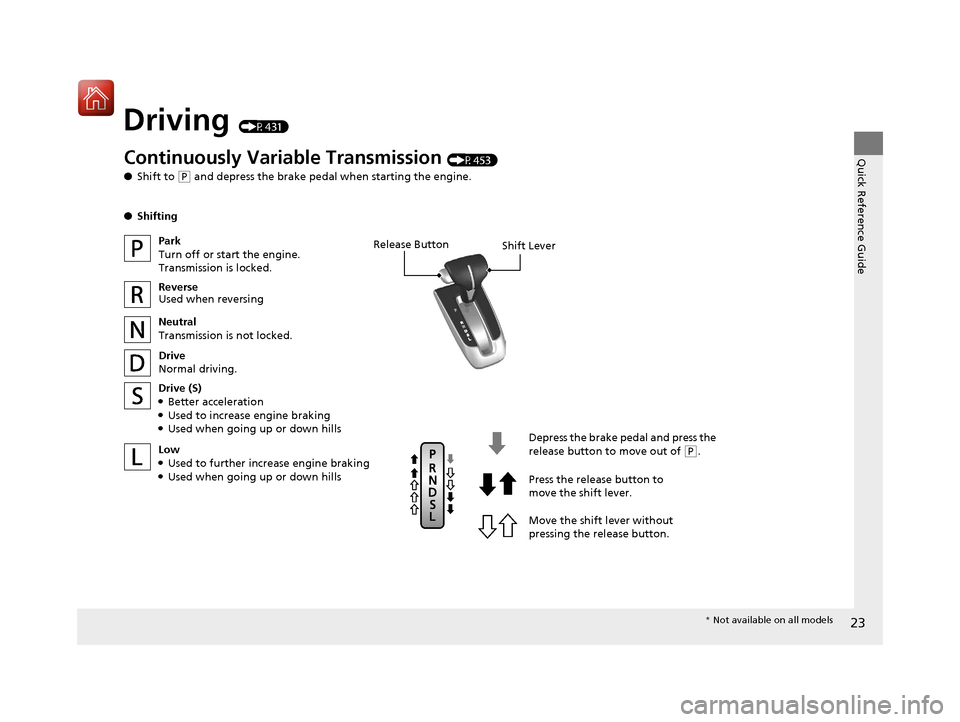
Driving (P431)
Release ButtonShift Lever
Depress the brake pedal and press the
release button to move out of
(P.
Move the shift lever without
pressing the release button. Press the release button to
move the shift lever.
Continuously Variable Transmission (P453)
● Shift to
(P and depress the brake pedal when starting the engine.
● Shifting
Park
Turn off or start the engine.
Transmission is locked.
Reverse
Used when reversing
Neutral
Transmission is not locked.
Drive
Normal driving.
Drive (S)
●Better acceleration●Used to increase engine braking●Used when going up or down hills
Low
●Used to further increase engine braking●Used when going up or down hills
* Not available on all models
17 CR-V-31TLA6000.book 23 ページ 2016年10月11日 火曜日 午後6時37分
Page 32 of 657
31
Quick Reference Guide
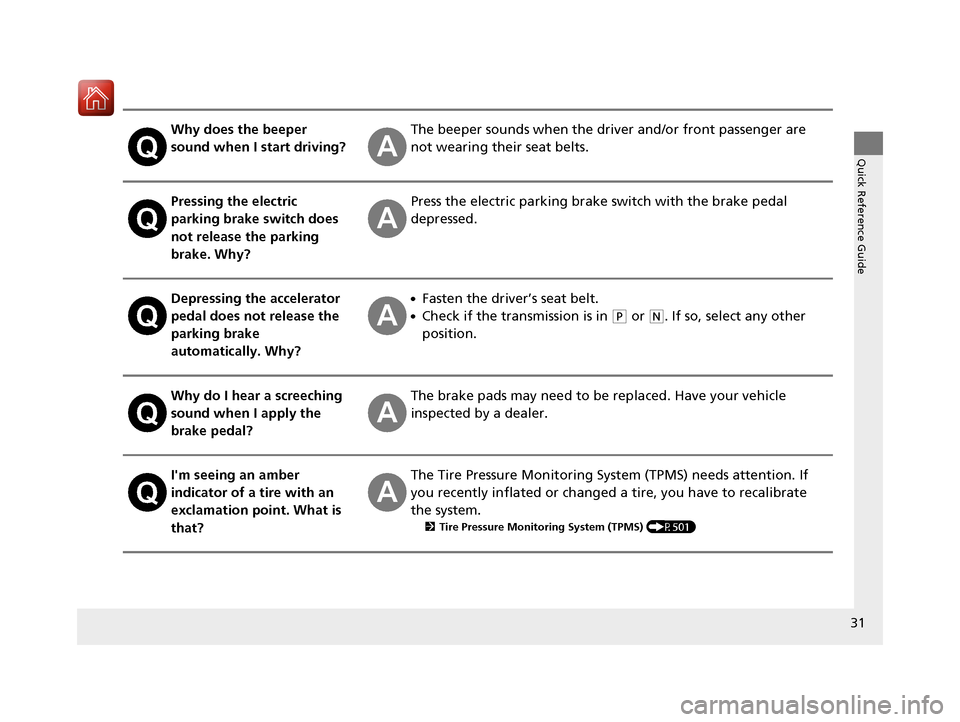
Why does the beeper
sound when I start driving?The beeper sounds when the driver and/or front passenger are
not wearing their seat belts.
Pressing the electric
parking brake switch does
not release the parking
brake. Why?Press the electric parking brake switch with the brake pedal
depressed.
Depressing the accelerator
pedal does not release the
parking brake
automatically. Why?●Fasten the driver’s seat belt.
●Check if the transmission is in (P or (N. If so, select any other
position.
Why do I hear a screeching
sound when I apply the
brake pedal?The brake pads may need to be replaced. Have your vehicle
inspected by a dealer.
I'm seeing an amber
indicator of a tire with an
exclamation point. What is
that?The Tire Pressure Monitoring Syst em (TPMS) needs attention. If
you recently inflated or changed a tire, you have to recalibrate
the system.
2 Tire Pressure Monitoring System (TPMS) (P501)
17 CR-V-31TLA6000.book 31 ページ 2016年10月11日 火曜日 午後6時37分
Page 85 of 657
84
uuIndicators u
Instrument Panel
*1:Models with the smart entry system have an ENGINE START/STOP button instead of an ignition switch.
IndicatorNameOn/BlinkingExplanationMessage*
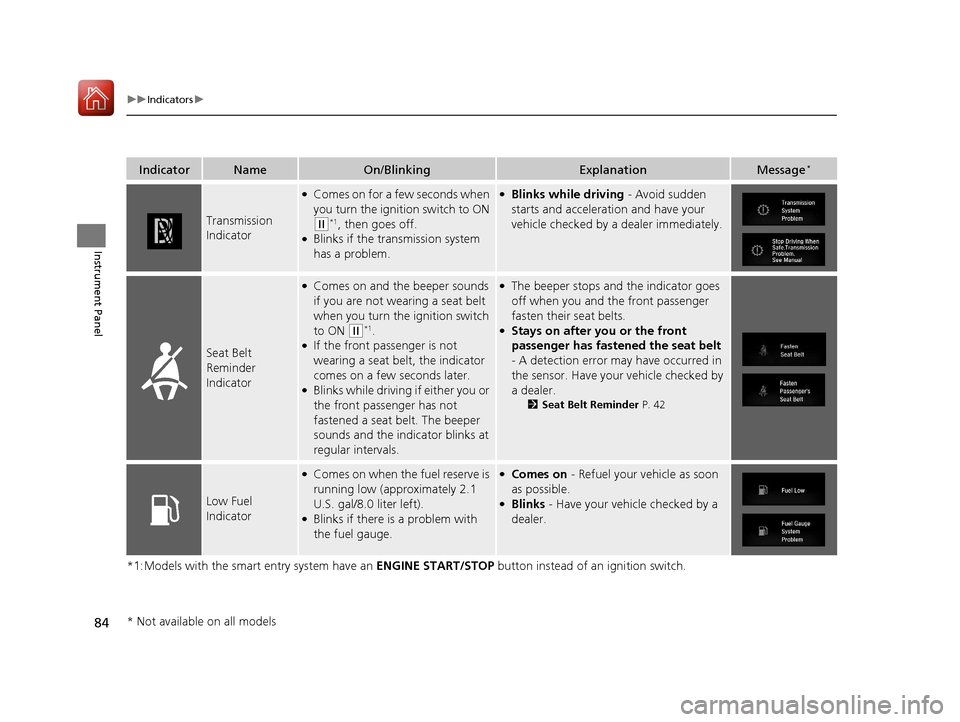
Transmission
Indicator
●Comes on for a few seconds when
you turn the ignition switch to ON
(w*1, then goes off.●Blinks if the transmission system
has a problem.
●Blinks while driving - Avoid sudden
starts and acceleration and have your
vehicle checked by a dealer immediately.
Seat Belt
Reminder
Indicator
●Comes on and the beeper sounds
if you are not wearing a seat belt
when you turn the ignition switch
to ON
(w*1.●If the front passenger is not
wearing a seat belt, the indicator
comes on a few seconds later.
●Blinks while driving if either you or
the front passenger has not
fastened a seat belt. The beeper
sounds and the indicator blinks at
regular intervals.
●The beeper stops and the indicator goes
off when you and the front passenger
fasten their seat belts.
●Stays on after you or the front
passenger has fastened the seat belt
- A detection error may have occurred in
the sensor. Have your vehicle checked by
a dealer.
2 Seat Belt Reminder P. 42
Low Fuel
Indicator
●Comes on when the fuel reserve is
running low (approximately 2.1
U.S. gal/8.0 liter left).
●Blinks if there is a problem with
the fuel gauge.
●Comes on - Refuel your vehicle as soon
as possible.
●Blinks - Have your vehicle checked by a
dealer.
* Not available on all models
17 CR-V-31TLA6000.book 84 ページ 2016年10月11日 火曜日 午後6時37分
Page 94 of 657
93
uuIndicators u
Continued
Instrument Panel
*1:Models with the smart entry system have an ENGINE START/STOP button instead of an ignition switch.
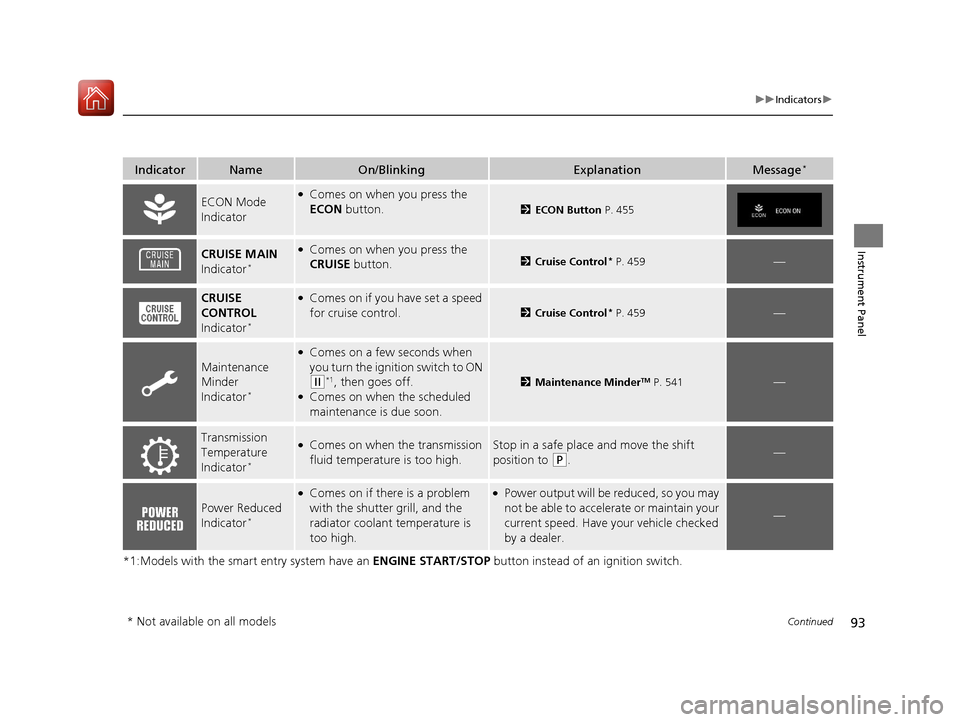
IndicatorNameOn/BlinkingExplanationMessage*
ECON Mode
Indicator●Comes on when you press the
ECON button.
2ECON Button P. 455
CRUISE MAIN
Indicator*
●Comes on when you press the
CRUISE button.2 Cruise Control* P. 459—
CRUISE
CONTROL
Indicator
*
●Comes on if you have set a speed
for cruise control.
2 Cruise Control* P. 459—
Maintenance
Minder
Indicator
*
●Comes on a few seconds when
you turn the igniti on switch to ON
(w*1, then goes off.●Comes on when the scheduled
maintenance is due soon.
2Maintenance MinderTM P. 541—
Transmission
Temperature
Indicator
*
●Comes on when the transmission
fluid temperature is too high.Stop in a safe place and move the shift
position to
(P.—
Power Reduced
Indicator*
●Comes on if there is a problem
with the shutter grill, and the
radiator coolant temperature is
too high.●Power output will be reduced, so you may
not be able to accelerate or maintain your
current speed. Have your vehicle checked
by a dealer.
—
* Not available on all models
17 CR-V-31TLA6000.book 93 ページ 2016年10月11日 火曜日 午後6時37分
Page 149 of 657
uuOpening and Closing the Tailgate uPrecautions for Openi ng/Closing the Tailgate
148
Controls
The power tailgate can be operated by pressing the power tailgate button on the
remote transmitter, pressing the power tail gate button in the driver side control
panel, pressing the button on the tailgate, or by raising and lowering your foot
under the center of the rear bumper for hands free access.
The power tailgate can be opened/c losed when the transmission is in
(P.
1Precautions for Opening/Closing the Tailgate
NOTICE
Do not push or pull on the power tailgate when it is
being automatically opened or closed.
Forcibly opening or closing the power tailgate while
in operation can deform the tailgate frame.
When operating the power tailgate, make sure there
is enough space around your ve hicle. People near the
tailgate may be se riously hurt if the tailgate hits or
closes on their heads. Be especially cautious if
children are around.
The power tailgate may not open or close under the
following conditions:
•You start the engine while the tailgate is
automatically openi ng or closing.
•The vehicle is parked on a steep hill.•The vehicle is swayed in a strong wind.
•The tailgate or the roof is covered with snow or ice.
If you close the power tail gate with all the doors
locked, the power tailgate locks automatically.
Models with power tailgate
17 CR-V-31TLA6000.book 148 ページ 2016年10月11日 火曜日 午後6時37分
Page 185 of 657
184
uuOperating the Switches Around the Steering Wheel uWipers and Washers
Controls
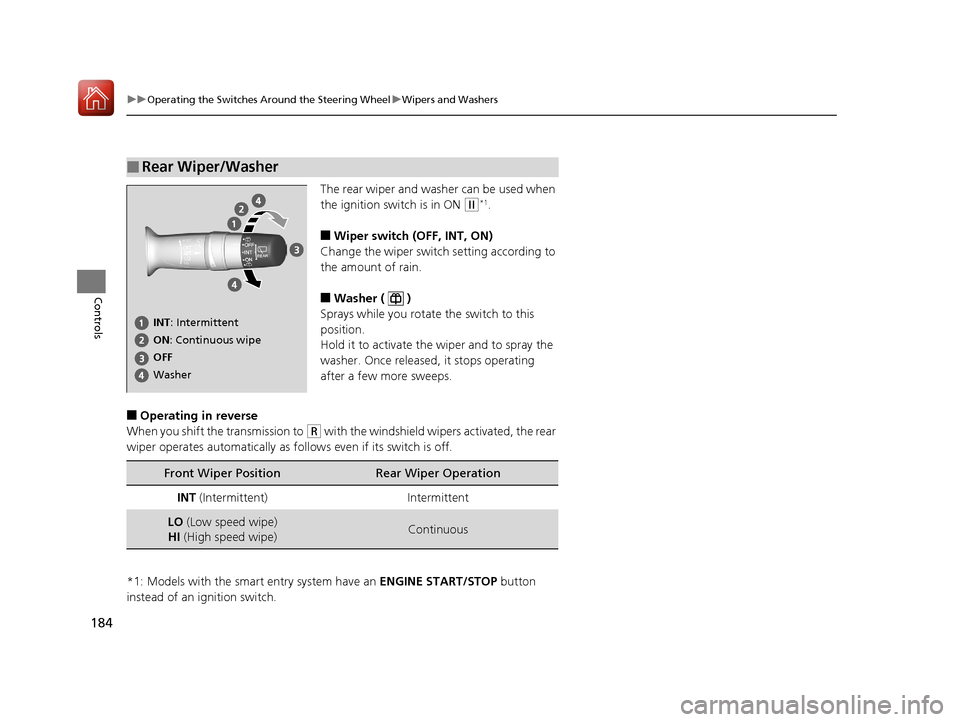
The rear wiper and washer can be used when
the ignition switch is in ON
(w*1.
■Wiper switch (OFF, INT, ON)
Change the wiper switch setting according to
the amount of rain.
■Washer ( )
Sprays while you rotate the switch to this
position.
Hold it to activate the wiper and to spray the
washer. Once released, it stops operating
after a few more sweeps.
■Operating in reverse
When you shift th e transmission to
(R with the windshield wipe rs activated, the rear
wiper operates automatically as fo llows even if its switch is off.
*1: Models with the smart entry system have an ENGINE START/STOP button
instead of an ignition switch.
■Rear Wiper/Washer
INT : Intermittent
OFF ON : Continuous wipe
Washer
Front Wiper PositionRear Wiper Operation
INT (Intermittent)Intermittent
LO (Low speed wipe)
HI (High speed wipe)Continuous
17 CR-V-31TLA6000.book 184 ページ 2016年10月11日 火曜日 午後6時37分
Page 312 of 657
311
uuAudio System Basic Operation uHondaLink ®
Continued
Features
■Messages from Honda
Displays helpful and important information from Honda.
■Weather*
Displays a weekly five-day weather forecast for any lo cation you want. You can
change the ZIP Code at any time.
Use the following procedure to connect to the HondaLink® service.
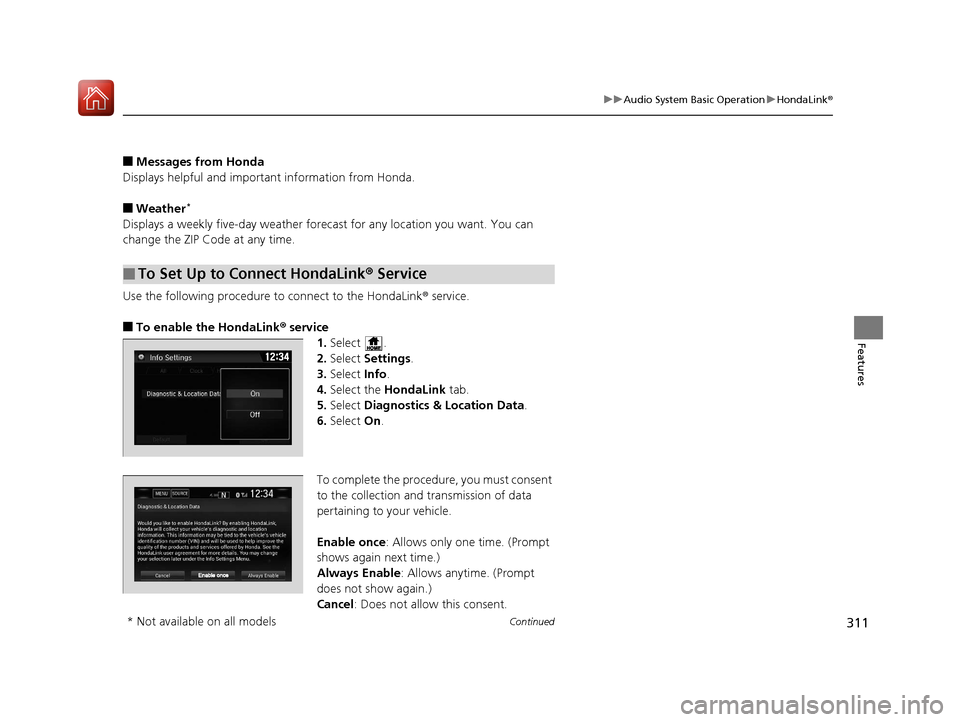
■To enable the HondaLink ® service
1.Select .
2. Select Settings .
3. Select Info.
4. Select the HondaLink tab.
5. Select Diagnostics & Location Data .
6. Select On.
To complete the proced ure, you must consent
to the collection and transmission of data
pertaining to your vehicle.
Enable once : Allows only one time. (Prompt
shows again next time.)
Always Enable: Allows anytime. (Prompt
does not show again.)
Cancel: Does not allow this consent.
■To Set Up to Connect HondaLink ® Service
* Not available on all models
17 CR-V-31TLA6000.book 311 ページ 2016年10月11日 火曜日 午後6時37分
Page 320 of 657
Continued319
uuAudio System Basic Operation uApple CarPlayTM
Features
■Maps
Display Apple CarPlayTM map and use the navigation function just as you would on
your iPhone.
Only one navigation system (pre-ins talled navigation or Apple CarPlay
TM) can give
directions at a time. When you are using one system, directions to any prior
destination set on the other system will be canceled, and the system you are
currently using will direct you to your destination.
After you have connected your iPhone to th e system via the 1.5A USB port, use the
following procedure to set up Apple CarPlay
TM. Use of Apple CarPlayTM will result in
the transmission of certain user and vehicle information (such as vehicle location,
speed, and status) to your iPhone to enhance the Apple CarPlay
TM experience. You
will need to consent to the sharing of th is information on the Display Audio Screen.
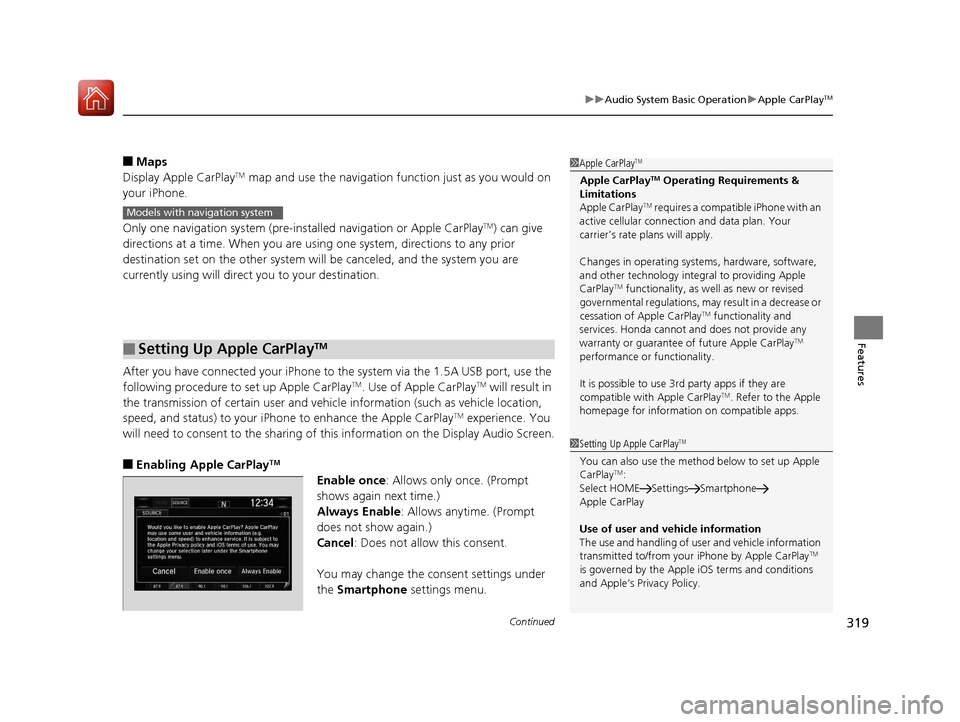
■Enabling Apple CarPlayTM
Enable once: Allows only once. (Prompt
shows again next time.)
Always Enable: Allows anytime. (Prompt
does not show again.)
Cancel: Does not allow this consent.
You may change the consent settings under
the Smartphone settings menu.
■Setting Up Apple CarPlayTM
1Apple CarPlayTM
Apple CarPlayTM Operating Requirements &
Limitations
Apple CarPlay
TM requires a compatible iPhone with an
active cellular connecti on and data plan. Your
carrier’s rate plans will apply.
Changes in operating system s, hardware, software,
and other technology integral to providing Apple
CarPlay
TM functionality, as we ll as new or revised
governmental regulations, may result in a decrease or
cessation of Apple CarPlay
TM functionality and
services. Honda cannot a nd does not provide any
warranty or guarantee of future Apple CarPlay
TM
performance or functionality.
It is possible to use 3r d party apps if they are
compatible with Apple CarPlay
TM. Refer to the Apple
homepage for information on compatible apps.
Models with navigation system
1 Setting Up Apple CarPlayTM
You can also use the method below to set up Apple
CarPlayTM:
Select HOME Settings Smartphone
Apple CarPlay
Use of user and vehicle information
The use and handling of user and vehicle information
transmitted to/from your iPhone by Apple CarPlay
TM
is governed by the Appl e iOS terms and conditions
and Apple’s Privacy Policy.
17 CR-V-31TLA6000.book 319 ページ 2016年10月11日 火曜日 午後6時37分
Page 432 of 657
431
Driving
This chapter discusses driving, refueling, and information on items such as accessories.
Before Driving................................... 432
Towing a Trailer Towing Preparation .......................... 437
Driving Safely with a Trailer .............. 440
Towing Your Vehicle ........................ 441
Off-Highway Driving Guidelines
General Information ......................... 442
Important Safety Precautions............ 442
Avoiding Trouble ............................. 443
When Driving
Starting the Engine .......................... 444
Starting the Engine .......................... 446
Precautions While Driving................. 451
Models without smart entry system
Models with smart entry system
Continuously Variable Transmission... 452
Shifting ............................................ 453
ECON Button ................................... 455
Cruise Control
*............................... 456
Front Sensor Camera*..................... 463
Adaptive Cruise Control (ACC) with Low
Speed Follow (LSF)
*....................... 465Road Departure Mitigation (RDM) System*..................................... 480Lane Keeping Assist System (LKAS)*.. 484Vehicle Stability Assist (VSA®), aka Electronic
Stability Control (ESC), System............. 492
LaneWatchTM*.................................. 498
Real Time AWD with Intelligent Control System
TM*...................................... 500
Tire Pressure Monitoring System (TPMS) ... 501Tire Pressure Monitoring System (TPMS) - Required Federal Explanation ......... 504
Braking Brake System ................................... 506
Anti-lock Brake System (ABS) ........... 512
Brake Assist System ......................... 513
Collision Mitigation Braking System
TM
(CMBSTM)*..................................... 514
Parking Your Vehicle When Stopped ................................ 524
Multi-View Rear Camera .................. 529
Refueling ........................................... 531
Fuel Economy and CO
2 Emissions .... 534
Turbo Engine Vehicle*...................... 535
* Not available on all models
17 CR-V-31TLA6000.book 431 ページ 2016年10月11日 火曜日 午後6時37分