steering HONDA CR-V 2018 (in English) User Guide
[x] Cancel search | Manufacturer: HONDA, Model Year: 2018, Model line: CR-V, Model: HONDA CR-V 2018Pages: 679, PDF Size: 23.22 MB
Page 52 of 679
50
uuAirbags uAirbag System Components
Safe Driving
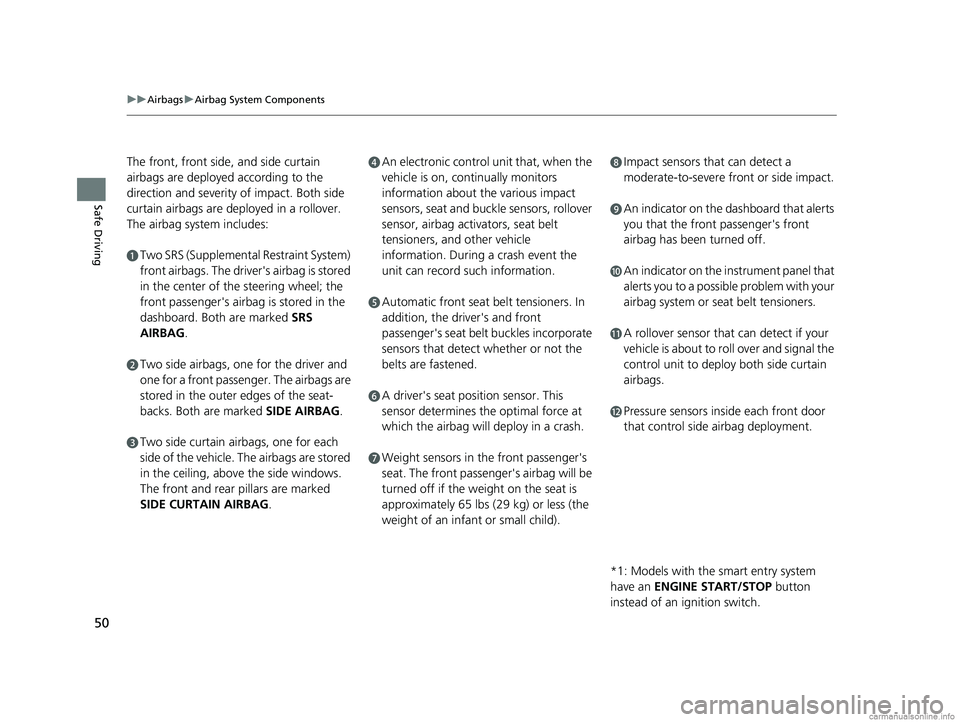
The front, front side, and side curtain
airbags are deployed according to the
direction and severity of impact. Both side
curtain airbags are deployed in a rollover.
The airbag system includes:
aTwo SRS (Supplemental Restraint System)
front airbags. The driver's airbag is stored
in the center of the steering wheel; the
front passenger's airbag is stored in the
dashboard. Both are marked SRS
AIRBAG.
bTwo side airbags, one for the driver and
one for a front passenger. The airbags are
stored in the outer edges of the seat-
backs. Both are marked SIDE AIRBAG .
cTwo side curtain airbags, one for each
side of the vehicle. The airbags are stored
in the ceiling, above the side windows.
The front and rear pillars are marked
SIDE CURTAIN AIRBAG.
dAn electronic control unit that, when the
vehicle is on, continually monitors
information about the various impact
sensors, seat and buckle sensors, rollover
sensor, airbag activators, seat belt
tensioners, and other vehicle
information. During a crash event the
unit can record such information.
eAutomatic front seat belt tensioners. In
addition, the driver's and front
passenger's seat belt buckles incorporate
sensors that detect whether or not the
belts are fastened.
fA driver's seat position sensor. This
sensor determines the optimal force at
which the airbag will deploy in a crash.
gWeight sensors in the front passenger's
seat. The front passenger's airbag will be
turned off if the weight on the seat is
approximately 65 lbs (29 kg) or less (the
weight of an infant or small child).
hImpact sensors that can detect a
moderate-to-severe front or side impact.
iAn indicator on the dashboard that alerts
you that the front passenger's front
airbag has been turned off.
jAn indicator on the instrument panel that
alerts you to a possible problem with your
airbag system or seat belt tensioners.
kA rollover sensor that can detect if your
vehicle is about to roll over and signal the
control unit to deploy both side curtain
airbags.
lPressure sensors inside each front door
that control side airbag deployment.
*1: Models with the smart entry system
have an ENGINE START/STOP button
instead of an ignition switch.
18 CR-V-31TLA6100.book 50 ページ 2017年9月7日 木曜日 午後3時56分
Page 53 of 679
51
uuAirbags uAirbag System Components
Safe DrivingAirbags can pose serious hazards. To do their job, airbags must inflate with
tremendous force. So, while airbags help sa ve lives, they can cause burns, bruises,
and other minor injuries, sometimes even fatal ones if occupants are not wearing
their seat belts properl y and sitting correctly.
What you should do: Always wear your seat belt properly, and sit upright and as
far back from the steering wheel as possi ble while allowing full control of the
vehicle. A front passenger should move their seat as far back from the dashboard as
possible.
Remember, however, that no safety system ca n prevent all injuries or deaths that
can occur in a severe crash, even when s eat belts are properly worn and the airbags
deploy.
Do not place hard or sharp objects between yourself and a front airbag.
Carrying hard or sharp objects on your lap, or driving with a pipe or other sharp
object in your mouth, can result in in juries if your front airbag inflates.
Do not attach or place objects on the front airbag covers. Objects on the
covers marked SRS AIRBAG could interfere with the prop er operation of the airbags
or be propelled inside the vehicle an d hurt someone if the airbags inflate.
■Important Facts About Your Airbags1Important Facts About Your Airbags
Do not attempt to deactivate your airbags. Together,
airbags and seat belts pr ovide the best protection.
When driving, keep hands and arms out of the
deployment path of the fro nt airbag by holding each
side of the steering wheel. Do not cross an arm over
the airbag cover.
18 CR-V-31TLA6100.book 51 ページ 2017年9月7日 木曜日 午後3時56分
Page 54 of 679
52
uuAirbags uTypes of Airbags
Safe Driving
Types of Airbags
Your vehicle is equipped with three types of airbags:
• Front airbags: Airbags in front of the driver 's and front passenger's seats.
• Side airbags: Airbags in the driver's and front passenger's seat-backs.
• Side curtain airbags: Airbags above the side windows.
Each is discussed in the following pages.
Front Airbags (SRS)
The front SRS airbags inflate in a moderate-to -severe frontal collision to help protect
the head and chest of the driver and/or front passenger.
SRS (Supplemental Restraint System) indicates that the airbags are designed to
supplement seat belts, not replace them. Seat belts are the occupant's primary
restraint system.
The front airbags are housed in the center of the steering wheel for the driver, and
in the dashboard for the front pass enger. Both airbags are marked SRS AIRBAG.
■Housing Locations
1Types of Airbags
The airbags can inflate whenever the ignition switch
is in ON
(w*1.
After an airbag inflates in a crash, you may see a
small amount of smoke. This is from the combustion
process of the infl ator material and is not harmful.
People with respiratory pr oblems may experience
some temporary discomfort. If this occurs, get out of
the vehicle as soon as it is safe to do so.
1 Front Airbags (SRS)
During a frontal crash severe enough to cause one or
both front airbags to deploy, the airbags can inflate
at different rates, dependi ng on the severity of the
crash, whether or not the se at belts are latched, and/
or other factors. Frontal airbags are designed to
supplement the seat belts to help reduce the
likelihood of head and chest injuries in frontal
crashes.
*1: Models with the smart entry system have an
ENGINE START/STOP button instead of an ignition
switch.
18 CR-V-31TLA6100.book 52 ページ 2017年9月7日 木曜日 午後3時56分
Page 90 of 679
88
uuIndicators u
Instrument Panel
*1:Models with the smart entry system have an ENGINE START/STOP button instead of an ignition switch.
IndicatorNameOn/BlinkingExplanationMessage*
Electric Power
Steering (EPS)
System Indicator
●Comes on when you turn the
ignition switch to ON
(w*1, and
goes off when the engine starts.
●Comes on if there is a problem
with the EPS system.
●Stays on constantly or does not come
on at all - Have your vehicle checked by
a dealer.
2 If the Electric Power Steering (EPS)
System Indicator Comes On P. 641
* Not available on all models
18 CR-V-31TLA6100.book 88 ページ 2017年9月7日 木曜日 午後3時56分
Page 109 of 679
107
uuIndicators uDriver Information Interface Wa rning and Information Messages*
Continued
Instrument Panel
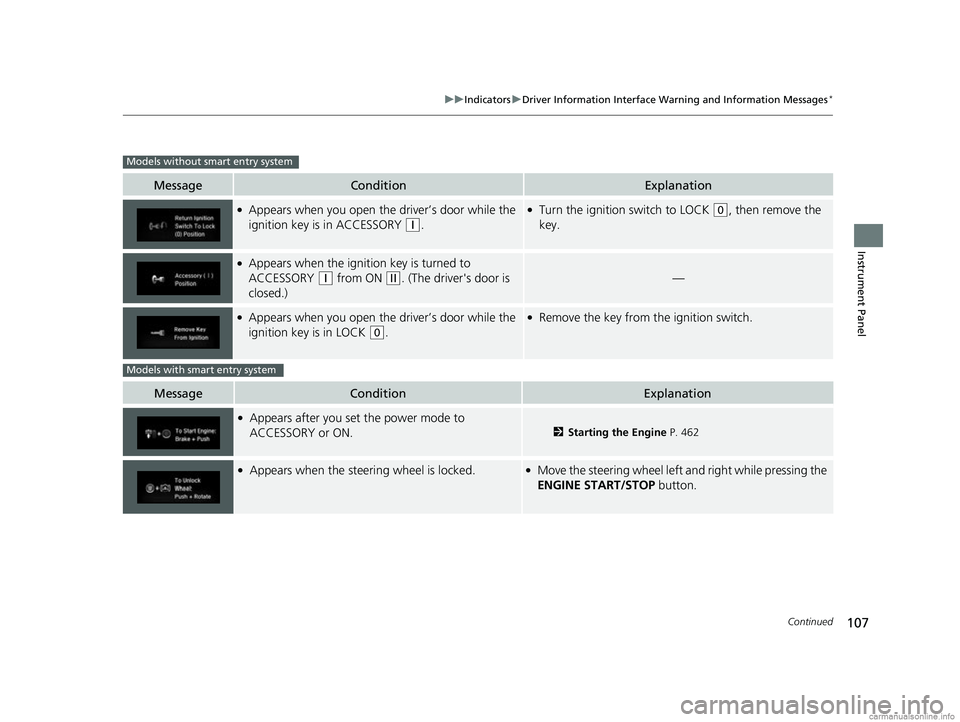
MessageConditionExplanation
●Appears when you open the driver’s door while the
ignition key is in ACCESSORY
(q.
●Turn the ignition switch to LOCK (0, then remove the
key.
●Appears when the ignition key is turned to
ACCESSORY
(q from ON (w. (The driver's door is
closed.)—
●Appears when you open the driver’s door while the
ignition key is in LOCK
(0.
●Remove the key from th e ignition switch.
MessageConditionExplanation
●Appears after you set the power mode to
ACCESSORY or ON.
2Starting the Engine P. 462
●Appears when the steering wheel is locked.●Move the steering wheel left an d right while pressing the
ENGINE START/STOP button.
Models without smart entry system
Models with smart entry system
18 CR-V-31TLA6100.book 107 ページ 2017年9月7日 木曜日 午後3時56分
Page 117 of 679
115
uuIndicators uDriver Information Interface Wa rning and Information Messages*
Continued
Instrument Panel
MessageConditionExplanation
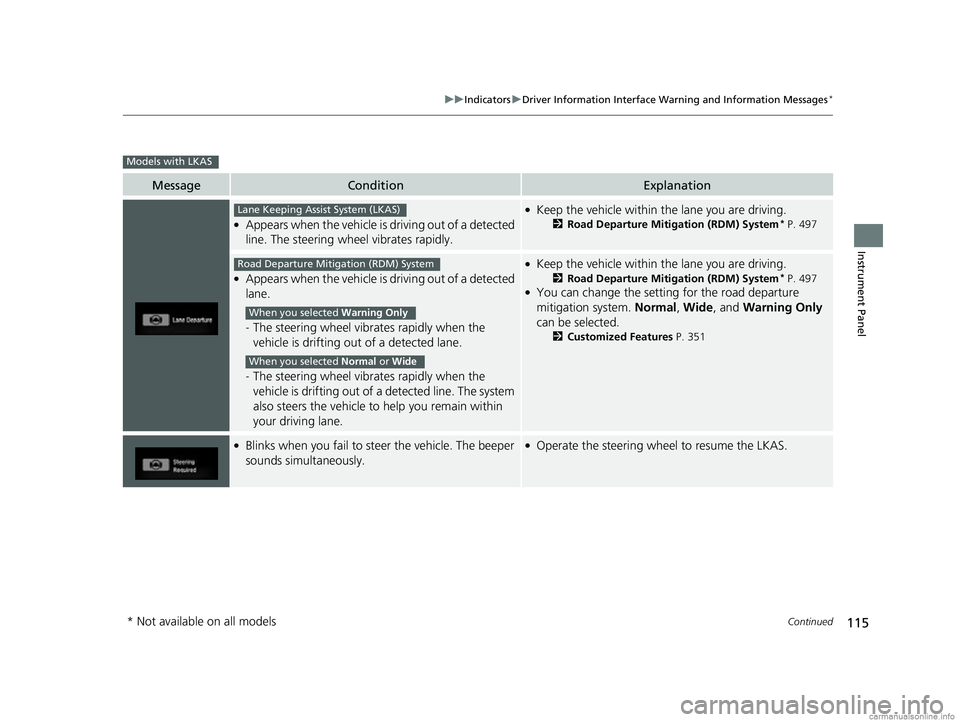
●Appears when the vehicle is driving out of a detected
line. The steering wheel vibrates rapidly.
●Keep the vehicle within the lane you are driving.
2Road Departure Mitigation (RDM) System* P. 497
●Appears when the vehicle is driving out of a detected
lane.
-The steering wheel vibrates rapidly when the
vehicle is drifting out of a detected lane.
- The steering wheel vibrates rapidly when the
vehicle is drifting out of a detected line. The system
also steers the vehicle to help you remain within
your driving lane.
●Keep the vehicle within the lane you are driving.
2 Road Departure Mitigation (RDM) System* P. 497●You can change the setting for the road departure
mitigation system. Normal, Wide , and Warning Only
can be selected.
2 Customized Features P. 351
●Blinks when you fail to steer the vehicle. The beeper
sounds simultaneously.●Operate the steering wheel to resume the LKAS.
Models with LKAS
Lane Keeping Assist System (LKAS)
Road Departure Mitigation (RDM) System
When you selected Warning Only
When you selected Normal or Wide
* Not available on all models
18 CR-V-31TLA6100.book 115 ページ 2017年9月7日 木曜日 午後3時56分
Page 129 of 679
127
uuGauges and Displays uDriver Information Interface*
Continued
Instrument Panel
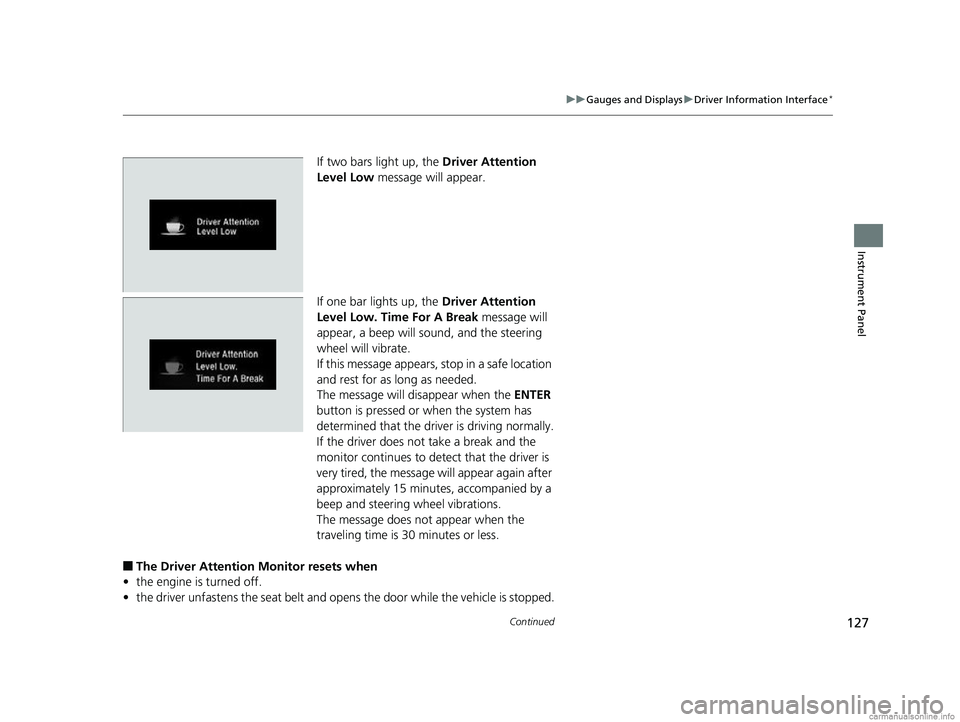
If two bars light up, the Driver Attention
Level Low message will appear.
If one bar lights up, the Driver Attention
Level Low. Time For A Break message will
appear, a beep will sound, and the steering
wheel will vibrate.
If this message appears, stop in a safe location
and rest for as long as needed.
The message will disappear when the ENTER
button is pressed or when the system has
determined that the driver is driving normally.
If the driver does not take a break and the
monitor continues to detect that the driver is
very tired, the message will appear again after
approximately 15 minutes, accompanied by a
beep and steering wheel vibrations.
The message does not appear when the
traveling time is 30 minutes or less.
■The Driver Attention Monitor resets when
• the engine is turned off.
• the driver unfastens the seat belt and op ens the door while the vehicle is stopped.
18 CR-V-31TLA6100.book 127 ページ 2017年9月7日 木曜日 午後3時56分
Page 130 of 679
uuGauges and Displays uDriver Information Interface*
128
Instrument Panel
■For the Driver Attention Monitor to function
• the vehicle must be traveling above 25 mph (40 km/h).
• the electric power steering (EPS) system indicator must be off.
■Depending on driving conditions or other factors, the Driver Attention
Monitor may not function in the following circumstances.
• the steering assist function of the Lane Keeping Assist System (LKAS)
* is active.
2Lane Keeping Assist System (LKAS)* P. 501
•the condition of the road is poor, e.g. the surface is unpaved or bumpy.
• it is windy.
• the driver is frequently operating the vehicle in an assertive manner such as
changing lanes or accelerating.
■Customizing
You can change the Driver Attention Monitor settings. Select Tactile And Audible
Alert , Tactile Alert , or OFF.
2Customized Features P. 351
1For the Driver Attention Monitor to function
The bars in the Driver Information Interface remain
grayed out unless the Driv er Attention Monitor is
functioning.
* Not available on all models
18 CR-V-31TLA6100.book 128 ページ 2017年9月7日 木曜日 午後3時56分
Page 133 of 679
131
Controls
This chapter explains how to operate the various controls necessary for driving.
Clock.................................................. 132
Locking and Unlocking the Doors
Key Types and Functions .................. 134
Low Smart Entry Remote Signal Strength*...136Locking/Unlocking the Doors from the Outside .......................................... 137
Locking/Unlocking the Doors from the Inside ... 144Childproof Door Locks ..................... 145
Auto Door Locking/Unlocking .......... 146
Customizing the Auto Door Locking/Unlocking Setting ........................... 147
Opening and Closing the Tailgate ... 150
Security System Immobilizer System .......................... 161 Security System Alarm
*.................... 161Opening and Closing the Windows
.... 164Moonroof*.............................................. 167Panoramic Roof*1.................................... 168Operating the Switches Around the Steering WheelIgnition Switch*............................... 171
ENGINE START/STOP Button*........... 172
Ignition Switch and Power Mode
Comparison ................................... 175
Turn Signals ..................................... 176
Light Switches.................................. 177
Fog Lights
*...................................... 180
Auto High-Beam System*................ 181
Daytime Running Lights ................... 184 Wipers and Washers ........................ 185
Brightness Control ........................... 188
Defogger/Heated Door Mirror
*........ 190
Driving Position Memory System*.... 192
Adjusting the Steering Wheel .......... 194
Adjusting the Mirrors ....................... 195
Adjusting the Seats .......................... 197
Interior Lights/Interior Convenience Items.. 207Climate Control System
Using Automatic Climate Control .... 226
Synchronization Mode
*................... 229Automatic Climate Control Sensors ...... 230
(*1: Canadian models only, if equipped)
* Not available on all models
18 CR-V-31TLA6100.book 131 ページ 2017年9月7日 木曜日 午後3時56分
Page 173 of 679
171
Controls
Operating the Switches Around the Steering Wheel
Ignition Switch*
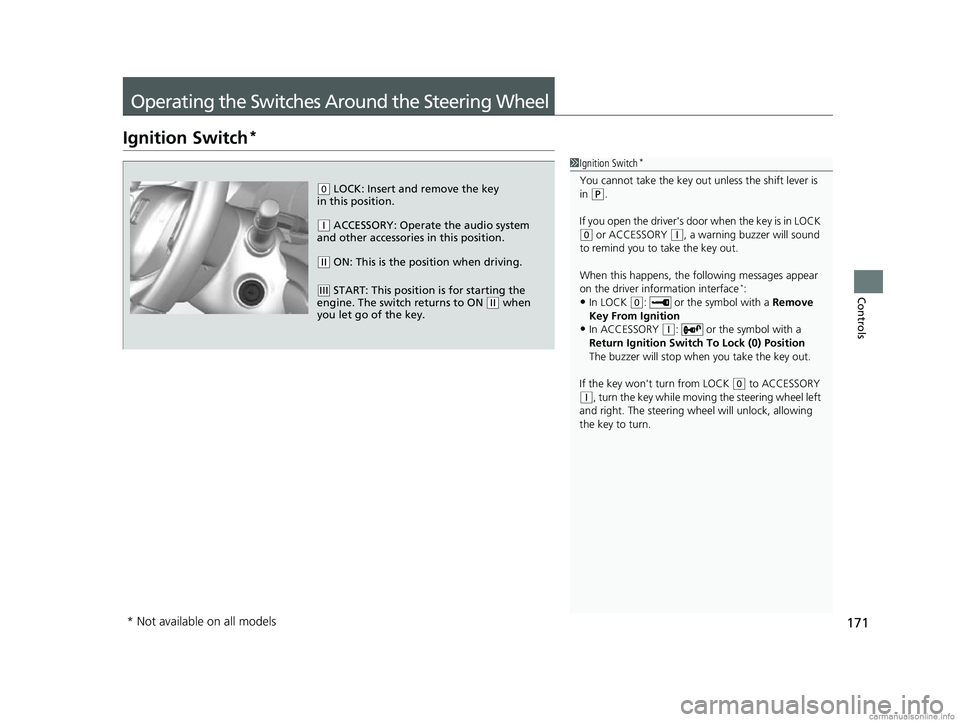
1Ignition Switch*
You cannot take the key out unless the shift lever is
in ( P.
If you open the driver's door when the key is in LOCK
(0 or ACCESSORY (q, a warning buzzer will sound
to remind you to take the key out.
When this happens, the following messages appear
on the driver information interface
*:
•In LOCK ( 0: or the symbol with a Remove
Key From Ignition
•In ACCESSORY ( q: or the symbol with a
Return Ignition Switch To Lock (0) Position
The buzzer will stop when you take the key out.
If the key won't turn from LOCK
( 0 to ACCESSORY (q, turn the key while moving the steering wheel left
and right. The steering wh eel will unlock, allowing
the key to turn.
( 0 LOCK: Insert and remove the key
in this position.
( q ACCESSORY: Operate the audio system
and other accessories in this position.
( w ON: This is the position when driving.
(e START: This position is for starting the
engine. The switch returns to ON ( w when
you let go of the key.
* Not available on all models
18 CR-V-31TLA6100.book 171 ページ 2017年9月7日 木曜日 午後3時56分