Screen HONDA CR-V 2018 Owner's Manual (in English)
[x] Cancel search | Manufacturer: HONDA, Model Year: 2018, Model line: CR-V, Model: HONDA CR-V 2018Pages: 679, PDF Size: 23.22 MB
Page 20 of 679
18
Quick Reference Guide
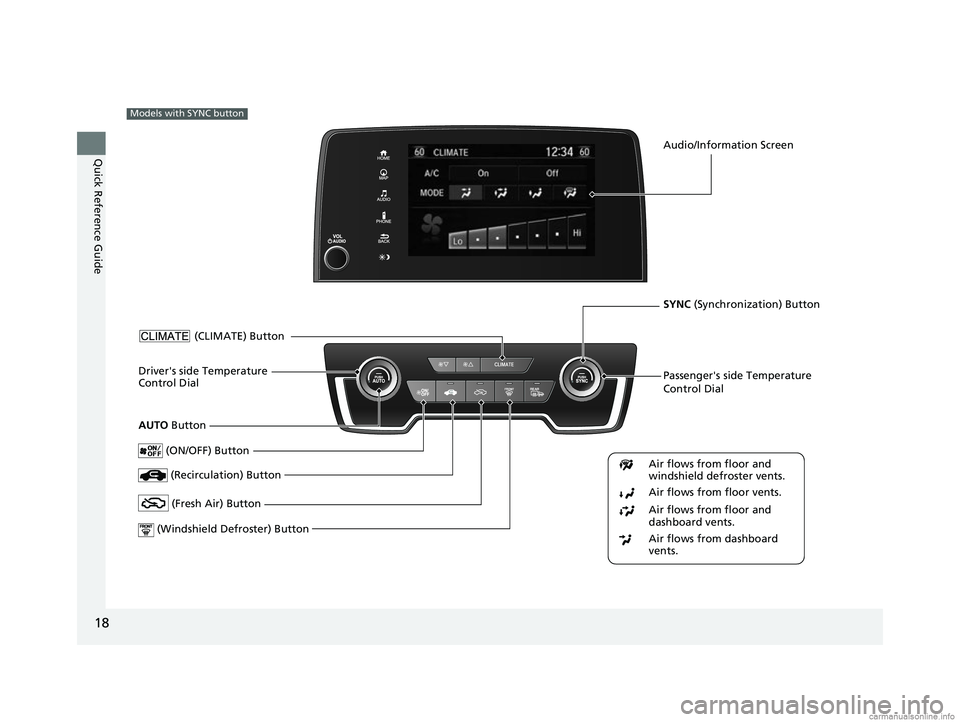
Models with SYNC button
Passenger's side Temperature
Control Dial
(Windshield De froster) ButtonDriver's side Temperature
Control Dial
(Recirculation) Button
(CLIMATE) Button
(ON/OFF) Button
AUTO Button
Audio/Information Screen
SYNC (Synchronization) Button
Air flows from floor and
windshield defroster vents.
Air flows from floor vents.
Air flows from floor and
dashboard vents.
Air flows from dashboard
vents.
(Fresh Air) Button
18 CR-V-31TLA6100.book 18 ページ 2017年9月7日 木曜日 午後3時56分
Page 23 of 679
21
Quick Reference Guide
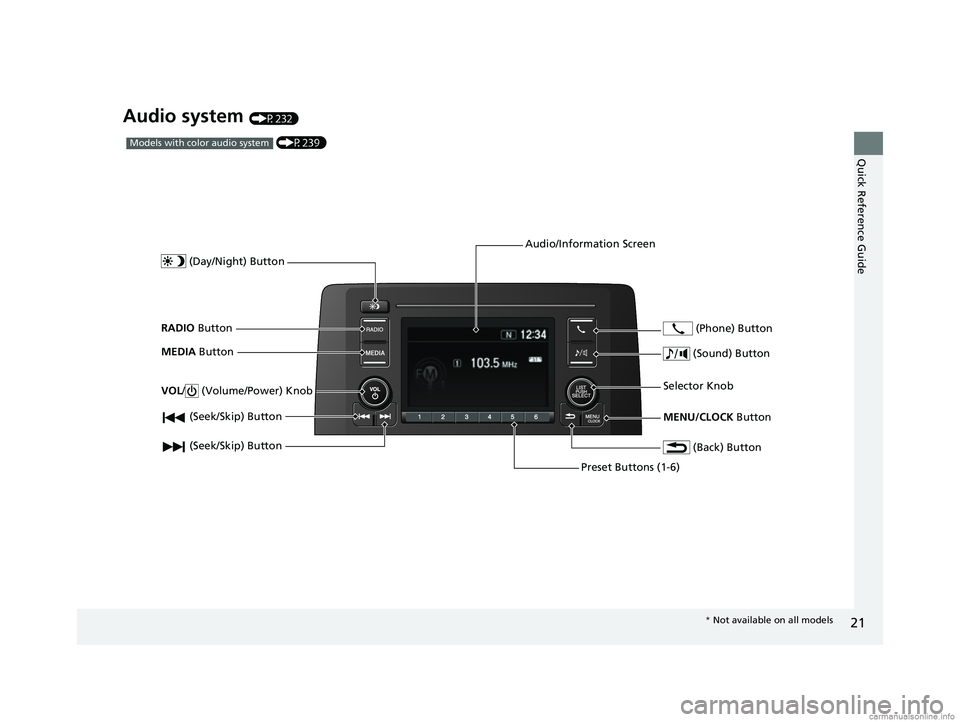
Audio system (P232)
(P239)Models with color audio system
(Seek/Skip) Button
RADIO Button
(Day/Night) Button
MEDIA Button
Preset Buttons (1-6)
(Seek/Skip) Button
VOL
/ (Volume/Power) Knob
Audio/Information Screen
(Back) Button
(Sound) Button
MENU/CLOCK Button
Selector Knob (Phone) Button
*
Not available on all models
18 CR-V-31TLA6100.book 21 ページ 2017年9月7日 木曜日 午後3時56分
Page 24 of 679
22
Quick Reference Guide
(P260)
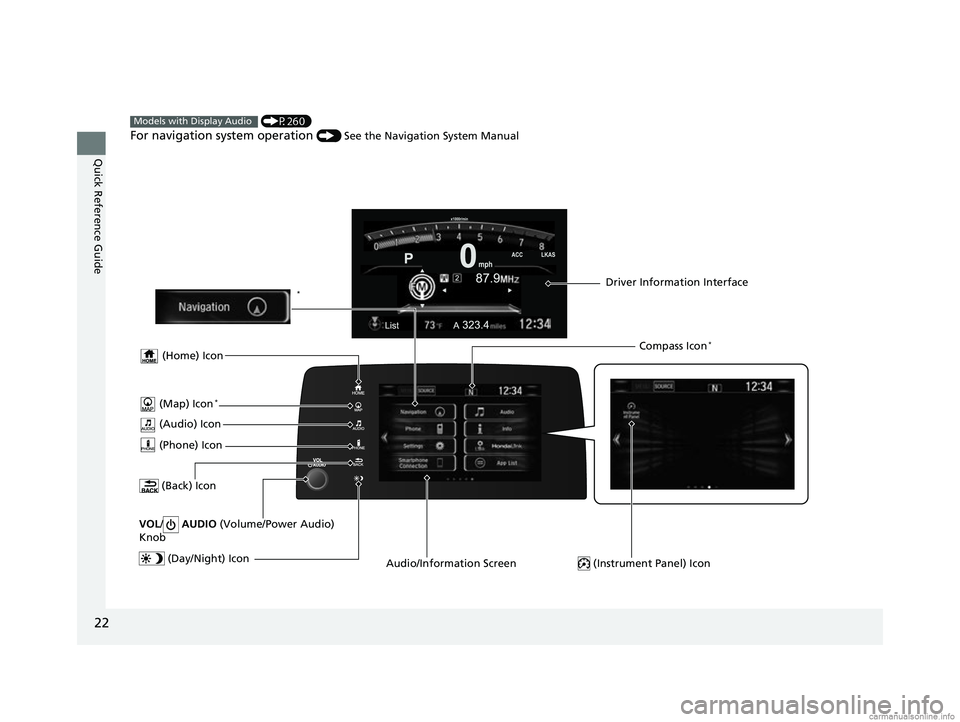
For navigation system operation () See the Navigation System Manual
Models with Display Audio
(Audio) Icon
(Back) Icon
Audio/Information Screen Driver Information Interface
(Instrument Panel) Icon (Day/Night) Icon
*
VOL / AUDIO (Volume/Power Audio)
Knob
(Home) Icon
(Map) Icon*
(Phone) Icon
Compass Icon*
18 CR-V-31TLA6100.book 22 ページ 2017年9月7日 木曜日 午後3時56分
Page 92 of 679
90
uuIndicators u
Instrument Panel
*1:Models with the smart entry system have an ENGINE START/STOP button instead of an ignition switch.
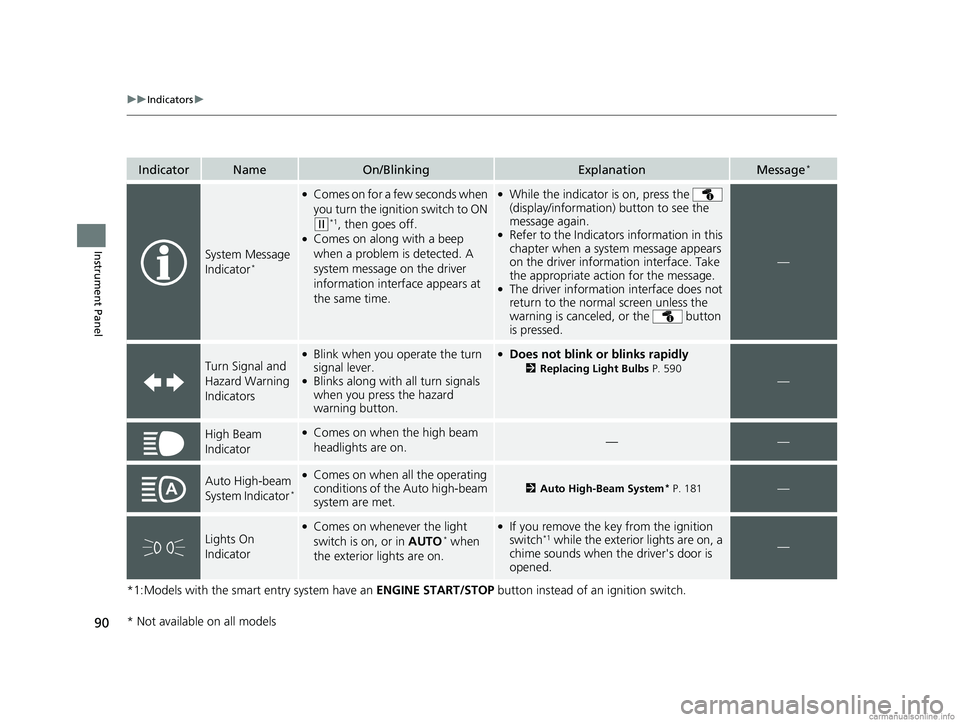
IndicatorNameOn/BlinkingExplanationMessage*
System Message
Indicator*
●Comes on for a few seconds when
you turn the ignition switch to ON
(w*1, then goes off.●Comes on along with a beep
when a problem is detected. A
system message on the driver
information interface appears at
the same time.
●While the indicator is on, press the
(display/information ) button to see the
message again.
●Refer to the Indicators information in this
chapter when a system message appears
on the driver information interface. Take
the appropriate action for the message.
●The driver information interface does not
return to the normal screen unless the
warning is canceled, or the button
is pressed.
—
Turn Signal and
Hazard Warning
Indicators
●Blink when you op erate the turn
signal lever.
●Blinks along with all turn signals
when you press the hazard
warning button.
●Does not blink or blinks rapidly
2 Replacing Light Bulbs P. 590—
High Beam
Indicator●Comes on when the high beam
headlights are on.——
Auto High-beam
System Indicator*
●Comes on when all the operating
conditions of the Auto high-beam
system are met.2 Auto High-Beam System* P. 181—
Lights On
Indicator
●Comes on whenever the light
switch is on, or in AUTO* when
the exterior lights are on.
●If you remove the key from the ignition
switch*1 while the exterior lights are on, a
chime sounds when the driver's door is
opened.—
* Not available on all models
18 CR-V-31TLA6100.book 90 ページ 2017年9月7日 木曜日 午後3時56分
Page 135 of 679

133
uuClock uAdjusting the Clock
Controls
■Using the Settings menu on the audio/
information screen
1. Select Settings .
2. Select Clock.
3. Select Clock Adjustment .
4. Select or to change hour.
5. Select or to change minute, then
select OK.
Models with Display Audio1Using the Settings menu on the audio/information screen
You can customize the clock display to show the 12
hour clock or 24 hour clock and turn the clock display
on and off.
2 Customized Features P. 351
The clock is automatica lly updated when your
smartphone is connected to the audio system.
You can also adjust the clock by touching the clock
displayed on the upper right corner of the display.
1. Touch the clock on the display for a few seconds.
2. Select Clock Adjustment .
3. Select or to change hour.
4. Select or to change minute, then select OK.
Models with Display Audio
Models with Display Audio
34
34
34
34
18 CR-V-31TLA6100.book 133 ページ 2017年9月7日 木曜日 午後3時56分
Page 140 of 679
uuLocking and Unlocking the Doors uLocking/Unlocking the Doors from the Outside
138
Controls
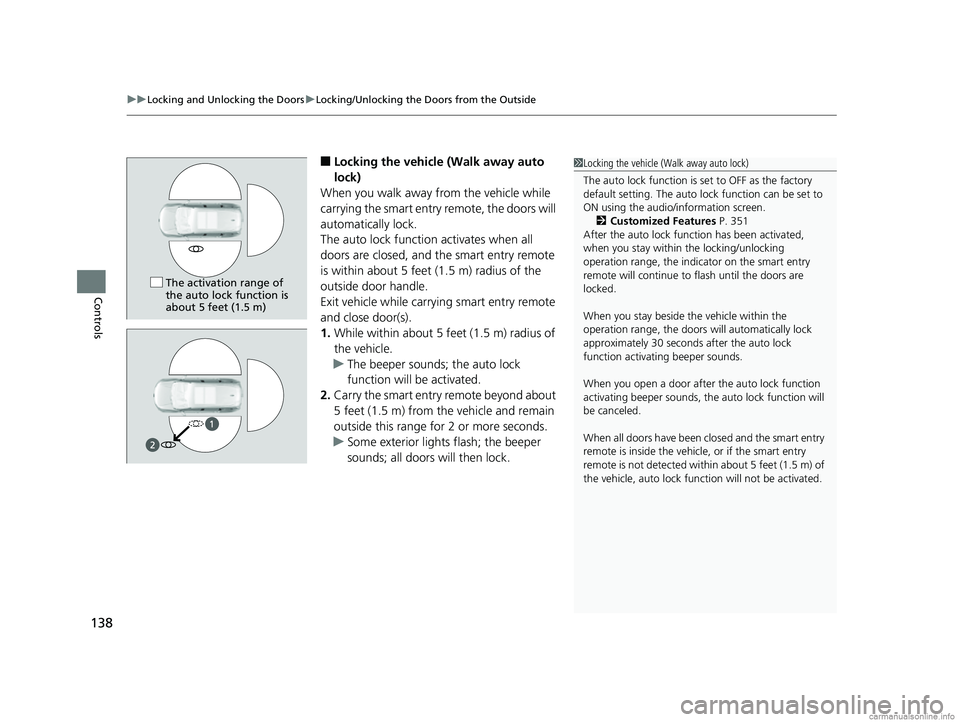
■Locking the vehicle (Walk away auto
lock)
When you walk away from the vehicle while
carrying the smart entry remote, the doors will
automatically lock.
The auto lock function activates when all
doors are closed, and the smart entry remote
is within about 5 feet (1.5 m) radius of the
outside door handle.
Exit vehicle while carrying smart entry remote
and close door(s).
1. While within about 5 feet (1.5 m) radius of
the vehicle.
u The beeper sounds; the auto lock
function will be activated.
2. Carry the smart entry remote beyond about
5 feet (1.5 m) from the vehicle and remain
outside this range fo r 2 or more seconds.
u Some exterior lights flash; the beeper
sounds; all doors will then lock.1Locking the vehicle (Walk away auto lock)
The auto lock function is set to OFF as the factory
default setting. The auto lo ck function can be set to
ON using the audio/information screen. 2 Customized Features P. 351
After the auto lock function has been activated,
when you stay within the locking/unlocking
operation range, the indicator on the smart entry
remote will continue to flash until the doors are
locked.
When you stay beside the vehicle within the
operation range, the doors wi ll automatically lock
approximately 30 seconds after the auto lock
function activating beeper sounds.
When you open a door after the auto lock function
activating beeper sounds, the auto lock function will
be canceled.
When all doors have been closed and the smart entry
remote is inside the vehicle, or if the smart entry
remote is not detect ed within about 5 feet (1.5 m) of
the vehicle, auto lock func tion will not be activated.
The activation range of
the auto lock function is
about 5 feet (1.5 m)
18 CR-V-31TLA6100.book 138 ページ 2017年9月7日 木曜日 午後3時56分
Page 142 of 679
uuLocking and Unlocking the Doors uLocking/Unlocking the Doors from the Outside
140
Controls
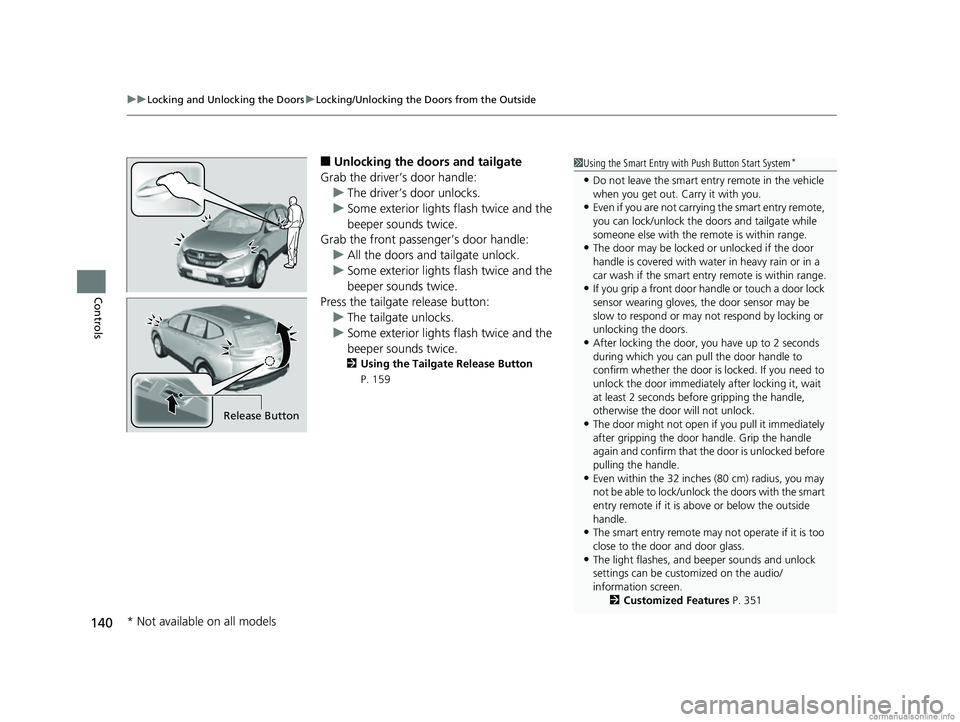
■Unlocking the doors and tailgate
Grab the driver’s door handle: u The driver’s door unlocks.
u Some exterior lights flash twice and the
beeper sounds twice.
Grab the front passenger’s door handle:
u All the doors and tailgate unlock.
u Some exterior lights flash twice and the
beeper sounds twice.
Press the tailgate release button: u The tailgate unlocks.
u Some exterior lights flash twice and the
beeper sounds twice.
2 Using the Tailgate Release Button
P. 159
1 Using the Smart Entry with Push Button Start System*
•Do not leave the smart entry remote in the vehicle
when you get out. Carry it with you.
•Even if you are not carrying the smart entry remote,
you can lock/unlock the doors and tailgate while
someone else with the remote is within range.
•The door may be locked or unlocked if the door
handle is covered with wate r in heavy rain or in a
car wash if the smart entry remote is within range.
•If you grip a front door ha ndle or touch a door lock
sensor wearing gloves, the door sensor may be
slow to respond or may no t respond by locking or
unlocking the doors.
•After locking the door, you have up to 2 seconds
during which you can pull the door handle to
confirm whether the door is locked. If you need to
unlock the door immediately after locking it, wait
at least 2 seconds befo re gripping the handle,
otherwise the door will not unlock.
•The door might not open if you pull it immediately
after gripping the door handle. Grip the handle
again and confirm that th e door is unlocked before
pulling the handle.
•Even within the 32 inches (80 cm) radius, you may
not be able to lock/unlock the doors with the smart
entry remote if it is a bove or below the outside
handle.
•The smart entry remote may not operate if it is too
close to the door and door glass.
•The light flashes, and beeper sounds and unlock
settings can be customized on the audio/
information screen. 2Customized Features P. 351
Release Button
* Not available on all models
18 CR-V-31TLA6100.book 140 ページ 2017年9月7日 木曜日 午後3時56分
Page 148 of 679
146
uuLocking and Unlocking the Doors uAuto Door Locking/Unlocking
Controls
Auto Door Locking/Unlocking
Your vehicle locks all doors and unlocks the all doors automatically when a certain
condition is met.
■Drive lock mode
All doors and tailgate lock when the vehicle’s speed reaches about 10 mph (15 km/h).
■Driver’s door open mode
All doors unlock when the driver’s door is opened.
■Auto Door Locking
■Auto Door Unlocking
1 Auto Door Locking/Unlocking
You can turn off or cha nge to another auto door
locking/unlocking setting us ing the master door lock
switch. 2 Customizing the Auto Door Locking/
Unlocking Setting P. 147
You can turn off or cha nge to another auto door
locking/unlocking sett ing using the audio/
information screen. 2 Customized Features P. 351
Models with Display Audio
18 CR-V-31TLA6100.book 146 ページ 2017年9月7日 木曜日 午後3時56分
Page 154 of 679
152
uuOpening and Closing the Tailgate uOpening/Closing the Power Tailgate*
Controls
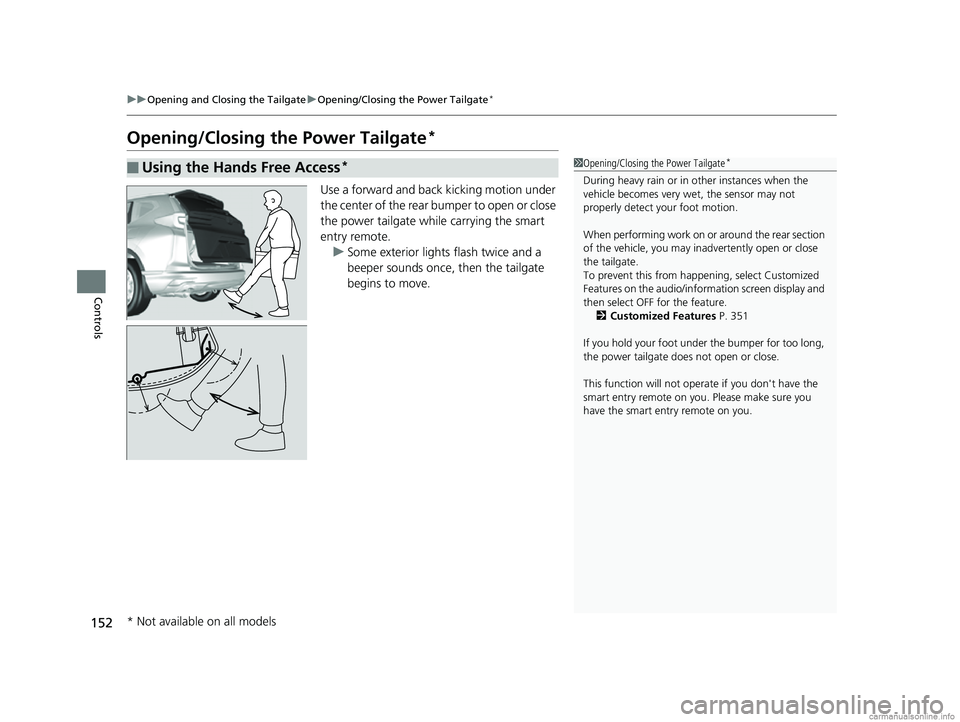
Opening/Closing the Power Tailgate*
Use a forward and back kicking motion under
the center of the rear bumper to open or close
the power tailgate while carrying the smart
entry remote.
u Some exterior lights flash twice and a
beeper sounds once, then the tailgate
begins to move.
■Using the Hands Free Access*1Opening/Closing the Power Tailgate*
During heavy rain or in other instances when the
vehicle becomes very wet, the sensor may not
properly detect your foot motion.
When performing work on or around the rear section
of the vehicle, you may in advertently open or close
the tailgate.
To prevent this from happe ning, select Customized
Features on the audio/info rmation screen display and
then select OFF for the feature. 2 Customized Features P. 351
If you hold your foot under the bumper for too long,
the power tailgate does not open or close.
This function will not opera te if you don't have the
smart entry remote on you. Please make sure you
have the smart entry remote on you.
* Not available on all models
18 CR-V-31TLA6100.book 152 ページ 2017年9月7日 木曜日 午後3時56分
Page 190 of 679
188
uuOperating the Switches Around the Steering Wheel uBrightness Control
Controls
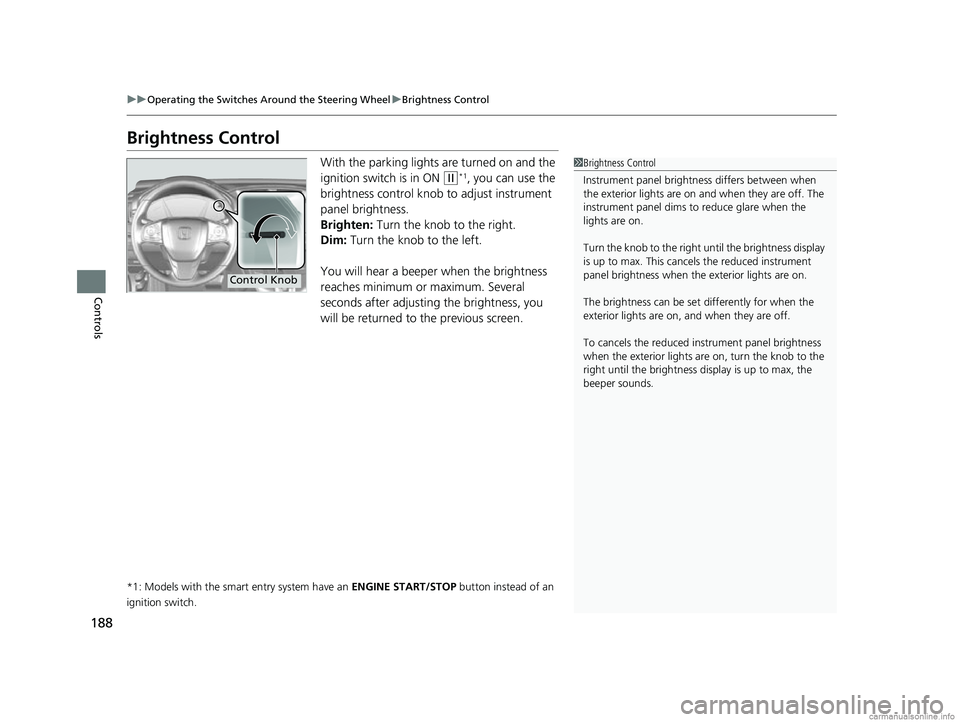
Brightness Control
With the parking lights are turned on and the
ignition switch is in ON
(w*1, you can use the
brightness control knob to adjust instrument
panel brightness.
Brighten: Turn the knob to the right.
Dim: Turn the knob to the left.
You will hear a beeper when the brightness
reaches minimum or maximum. Several
seconds after adjusting the brightness, you
will be returned to the previous screen.
*1: Models with the smart entry system have an ENGINE START/STOP button instead of an
ignition switch.
1 Brightness Control
Instrument panel brightne ss differs between when
the exterior lights are on a nd when they are off. The
instrument panel dims to reduce glare when the
lights are on.
Turn the knob to the right until the brightness display
is up to max. This canc els the reduced instrument
panel brightness when the exterior lights are on.
The brightness can be set differently for when the
exterior lights are on, and when they are off.
To cancels the reduced in strument panel brightness
when the exterior lights are on, turn the knob to the
right until the brightness display is up to max, the
beeper sounds.
Control Knob
18 CR-V-31TLA6100.book 188 ページ 2017年9月7日 木曜日 午後3時56分