back up HONDA CR-V 2018 Owner's Manual (in English)
[x] Cancel search | Manufacturer: HONDA, Model Year: 2018, Model line: CR-V, Model: HONDA CR-V 2018Pages: 679, PDF Size: 23.22 MB
Page 10 of 679
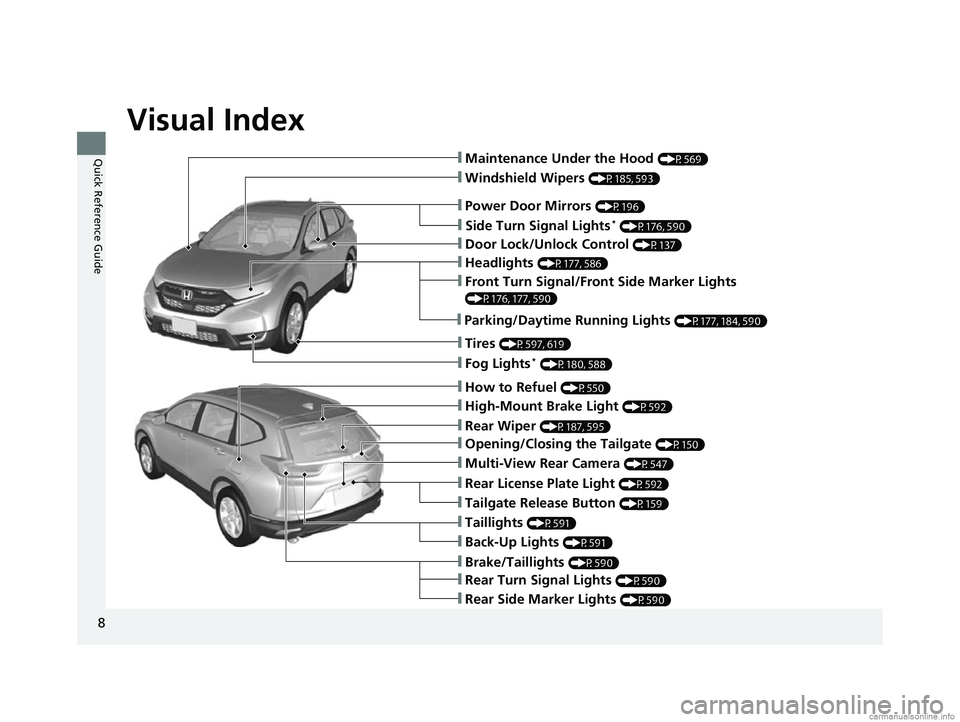
Visual Index
8
Quick Reference Guide
❙Windshield Wipers (P185, 593)
❙Door Lock/Unlock Control (P137)
❙How to Refuel (P550)
❙High-Mount Brake Light (P592)
❙Rear Wiper (P187, 595)
❙Brake/Taillights (P590)
❙Power Door Mirrors (P196)
❙Maintenance Under the Hood (P569)
❙Fog Lights* (P180, 588)
❙Multi-View Rear Camera (P547)
❙Front Turn Signal/Front Side Marker Lights
(P176, 177, 590)
❙Tires (P597, 619)
❙Opening/Closing the Tailgate (P150)
❙Side Turn Signal Lights* (P176, 590)
❙Headlights (P177, 586)
❙Tailgate Release Button (P159)
❙Taillights (P591)
❙Rear Turn Signal Lights (P590)
❙Rear Side Marker Lights (P590)
❙Back-Up Lights (P591)
❙Rear License Plate Light (P592)
❙Parking/Daytime Running Lights (P177, 184, 590)
18 CR-V-31TLA6100.book 8 ページ 2017年9月7日 木曜日 午後3時56分
Page 12 of 679
10
Quick Reference Guide
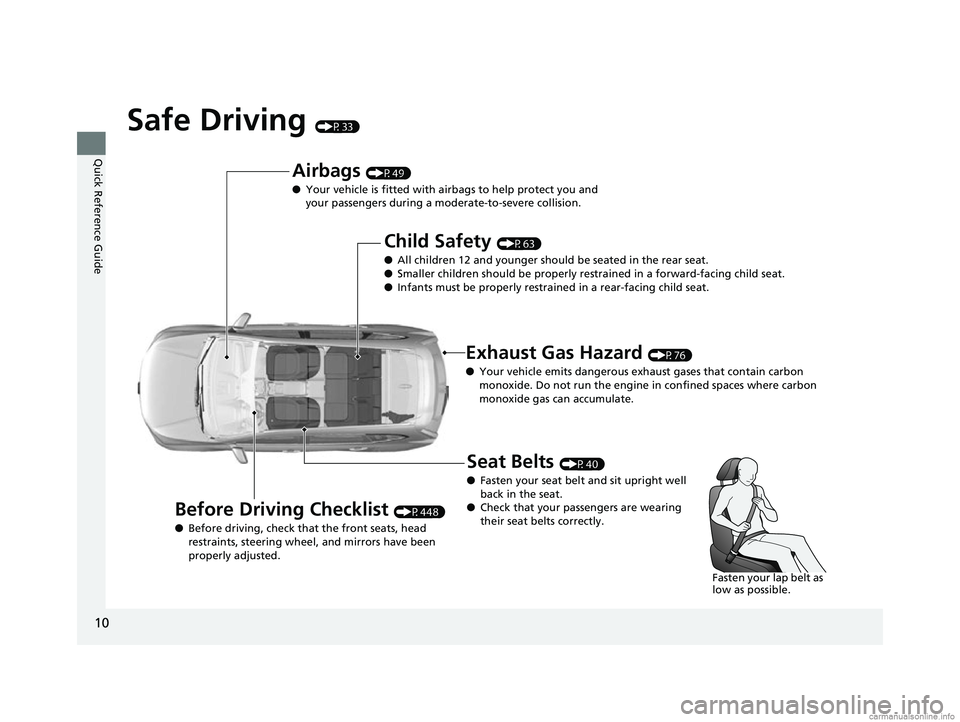
Safe Driving (P33)
Airbags (P49)
● Your vehicle is fitted with ai rbags to help protect you and
your passengers during a moderate-to-severe collision.
Child Safety (P63)
● All children 12 and younger should be seated in the rear seat.
● Smaller children should be properly restra ined in a forward-facing child seat.
● Infants must be properly restraine d in a rear-facing child seat.
Exhaust Gas Hazard (P76)
● Your vehicle emits dangerous exhaust gases that contain carbon
monoxide. Do not run the engine in confined spaces where carbon
monoxide gas can accumulate.
Before Driving Checklist (P448)
● Before driving, check that the front seats, head
restraints, steering whee l, and mirrors have been
properly adjusted.
Seat Belts (P40)
● Fasten your seat belt and sit upright well
back in the seat.
● Check that your passengers are wearing
their seat belts correctly.
Fasten your lap belt as
low as possible.
18 CR-V-31TLA6100.book 10 ページ 2017年9月7日 木曜日 午後3時56分
Page 16 of 679
14
Quick Reference Guide
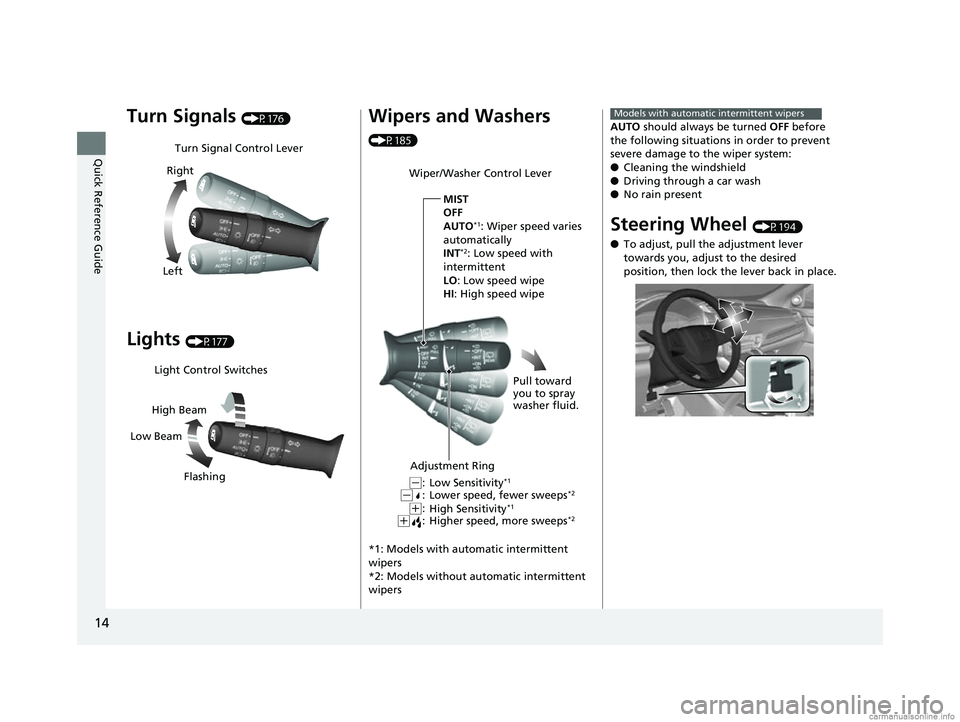
Turn Signals (P176)
Lights (P177)
Turn Signal Control Lever
Right
Left
Light Control Switches
Low Beam High Beam
Flashing
Wipers and Washers
(P185)
*1: Models with automatic intermittent
wipers
*2: Models without automatic intermittent
wipers
Wiper/Washer Control Lever
Adjustment Ring MIST
OFF
AUTO
*1: Wiper speed varies
automatically
INT
*2: Low speed with
intermittent
LO : Low speed wipe
HI: High speed wipe
Pull toward
you to spray
washer fluid.
Low Sensitivity*1
Lower speed, fewer sweeps*2
High Sensitivity*1
Higher speed, more sweeps*2(+:(+:
(-:(-:
AUTO should always be turned OFF before
the following situations in order to prevent
severe damage to the wiper system:
● Cleaning the windshield
● Driving through a car wash
● No rain present
Steering Wheel (P194)
● To adjust, pull the adjustment lever
towards you, adjust to the desired
position, then lock the lever back in place.
Models with automatic intermittent wipers
18 CR-V-31TLA6100.book 14 ページ 2017年9月7日 木曜日 午後3時56分
Page 17 of 679
15
Quick Reference Guide
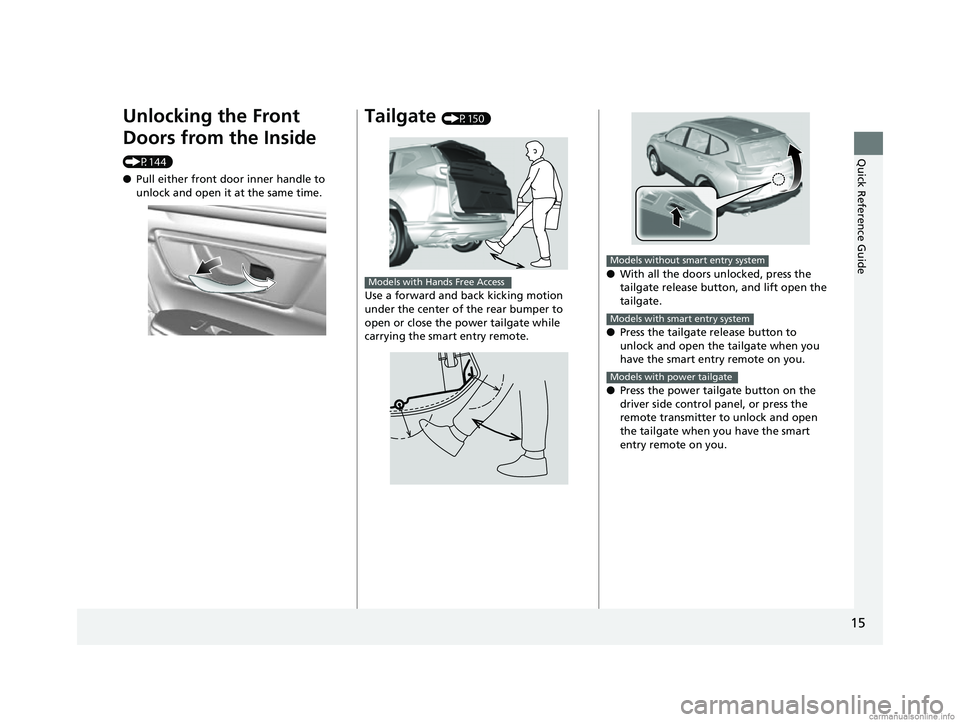
Unlocking the Front
Doors from the Inside
(P144)
●Pull either front door inner handle to
unlock and open it at the same time.
Tailgate (P150)
Use a forward and back kicking motion
under the center of the rear bumper to
open or close the power tailgate while
carrying the smart entry remote.
Models with Hands Free Access● With all the doors unlocked, press the
tailgate release button, and lift open the
tailgate.
● Press the tailgate release button to
unlock and open the tailgate when you
have the smart entry remote on you.
● Press the power tailgate button on the
driver side control panel, or press the
remote transmitter to unlock and open
the tailgate when you have the smart
entry remote on you.
Models without smart entry system
Models with smart entry system
Models with power tailgate
18 CR-V-31TLA6100.book 15 ページ 2017年9月7日 木曜日 午後3時56分
Page 23 of 679
21
Quick Reference Guide
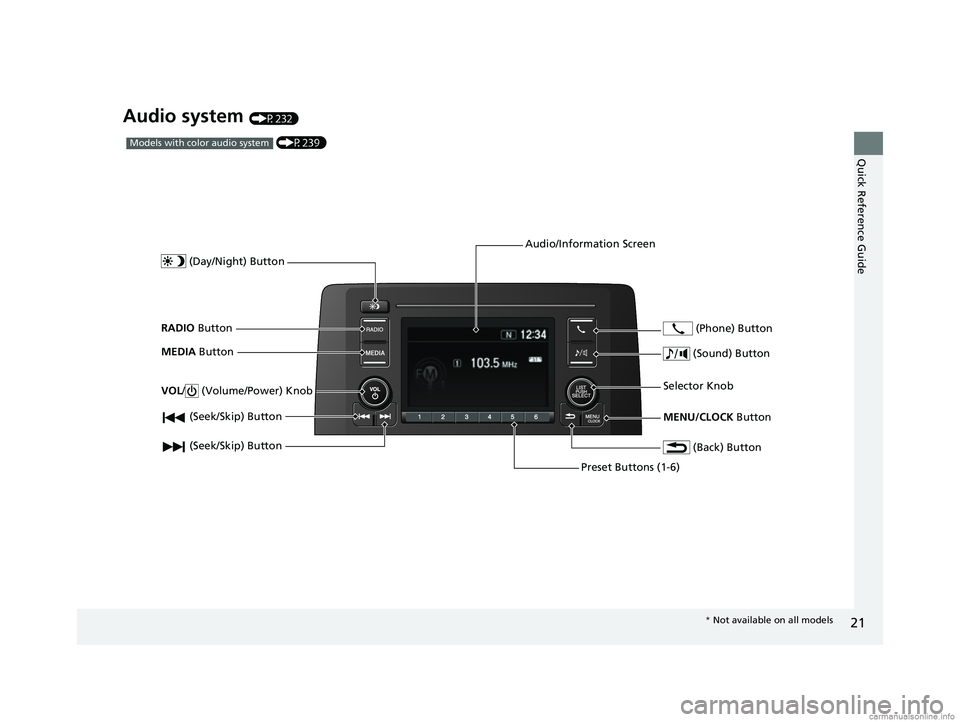
Audio system (P232)
(P239)Models with color audio system
(Seek/Skip) Button
RADIO Button
(Day/Night) Button
MEDIA Button
Preset Buttons (1-6)
(Seek/Skip) Button
VOL
/ (Volume/Power) Knob
Audio/Information Screen
(Back) Button
(Sound) Button
MENU/CLOCK Button
Selector Knob (Phone) Button
*
Not available on all models
18 CR-V-31TLA6100.book 21 ページ 2017年9月7日 木曜日 午後3時56分
Page 24 of 679
22
Quick Reference Guide
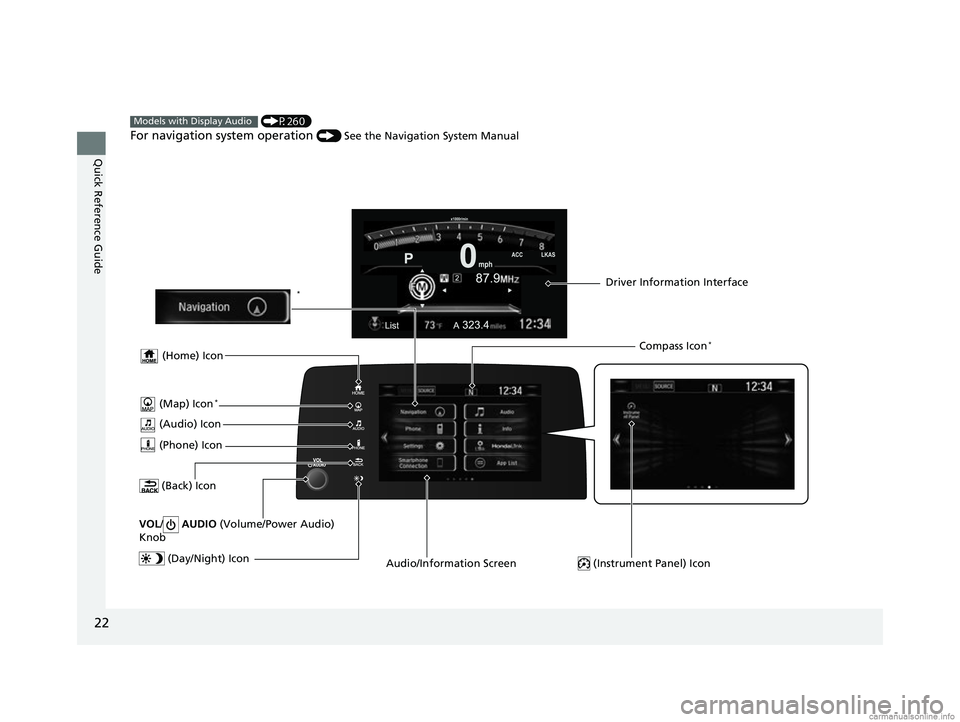
(P260)
For navigation system operation () See the Navigation System Manual
Models with Display Audio
(Audio) Icon
(Back) Icon
Audio/Information Screen Driver Information Interface
(Instrument Panel) Icon (Day/Night) Icon
*
VOL / AUDIO (Volume/Power Audio)
Knob
(Home) Icon
(Map) Icon*
(Phone) Icon
Compass Icon*
18 CR-V-31TLA6100.book 22 ページ 2017年9月7日 木曜日 午後3時56分
Page 36 of 679
34
Safe Driving
For Safe Driving
The following pages explain your vehicle's safety features and how to use them
properly. The safety precautions below are ones that we consider to be among the
most important.
Important Safety Precautions
■Always wear your seat belt
A seat belt is your best protection in all types of collisions. Airbags are designed to
supplement seat belts, not replace them. So even though your vehicle is equipped
with airbags, make sure you and your passengers always wear your seat belts, and
wear them properly.
■Restrain all children
Children ages 12 and under should ride prop erly restrained in a back seat, not the
front seat. Infants and small children should be restrained in a child seat. Larger
children should use a booster seat and a lap/shoulder seat belt until they can use the
belt properly without a booster seat.
■Be aware of airbag hazards
While airbags can save lives, they can cause serious or fatal injuries to occupants
who sit too close to them, or are not prop erly restrained. Infants, young children,
and short adults are at the greatest risk. Be sure to follow all instructions and
warnings in this manual.
■Don't drink and drive
Alcohol and driving don't mix. Even one dr ink can reduce your ability to respond to
changing conditions, and your reaction time gets worse with every additional drink.
So don't drink and drive, and don't let your friends drink and drive, either.
1Important Safety Precautions
Some states, provinces and territories prohibit the use
of cell phones other than hands-free devices by the
driver while driving.
18 CR-V-31TLA6100.book 34 ページ 2017年9月7日 木曜日 午後3時56分
Page 39 of 679
37
uuFor Safe Driving uYour Vehicle's Safety Features
Safe Driving
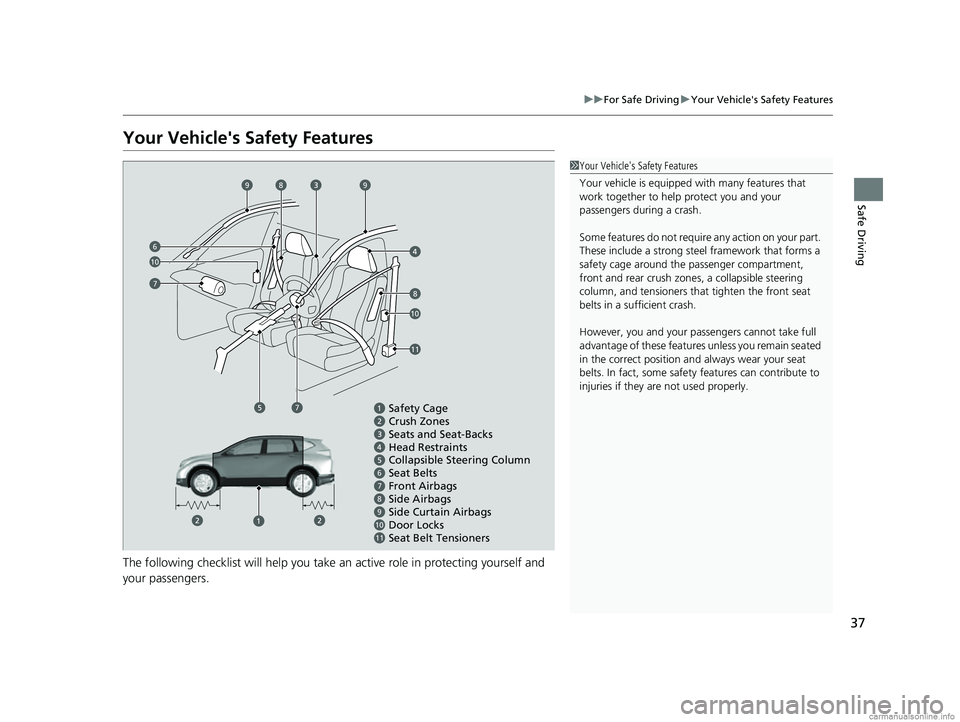
Your Vehicle's Safety Features
The following checklist will help you take an active role in protecting yourself and
your passengers.
1Your Vehicle's Safety Features
Your vehicle is equipped wi th many features that
work together to help protect you and your
passengers during a crash.
Some features do not require any action on your part.
These include a strong steel framework that forms a
safety cage around the passenger compartment,
front and rear crush zone s, a collapsible steering
column, and tensioners that tighten the front seat
belts in a sufficient crash.
However, you and your passe ngers cannot take full
advantage of these features unless you remain seated
in the correct position and always wear your seat
belts. In fact, some safety features can contribute to
injuries if they are not used properly.
Safety Cage
Crush Zones
Seats and Seat-Backs
Head Restraints
Collapsible Steering Column
Seat Belts
Front Airbags
Side Curtain Airbags
Seat Belt Tensioners Side Airbags
11109876
Door Locks
6
10
7
998
10
8
11
7
18 CR-V-31TLA6100.book 37 ページ 2017年9月7日 木曜日 午後3時56分
Page 43 of 679
Continued41
uuSeat Belts uAbout Your Seat Belts
Safe Driving
■Proper use of seat belts
Follow these guidelines for proper use:
• All occupants should sit upright, well back in the seat, and remain in that position
for the duration of the trip. Slouching and leaning reduc e the effectiveness of the
belt and can increase the chance of serious injury in a crash.
• Never place the shoulder part of a lap/shoulder seat belt under your arm or
behind your back. This could cause very serious injuries in a crash.
• Two people should never use the same seat belt. If they do, they could be very
seriously injured in a crash.
• Do not put any accessories on the seat belts. Devices intended to improve comfort
or reposition the shoulder part of a seat belt can reduce the protective capability
and increase the chance of serious injury in a crash.1About Your Seat Belts
If a rear seat passenger moves around and extends
the seat belt, the lockable retractor may activate. If
this happens, release the retractor by unfastening the
seat belt and allow the belt to retract completely.
Then refasten the belt.
18 CR-V-31TLA6100.book 41 ページ 2017年9月7日 木曜日 午後3時56分
Page 46 of 679
44
uuSeat Belts uFastening a Seat Belt
Safe Driving
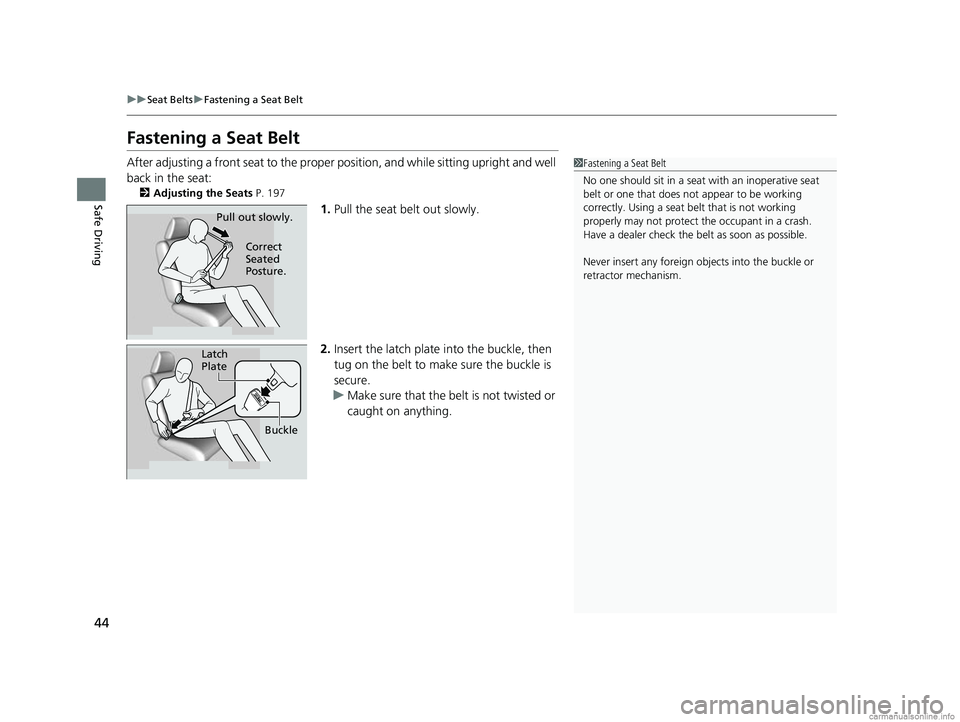
Fastening a Seat Belt
After adjusting a front seat to the proper position, and while sitting upright and well
back in the seat:
2 Adjusting the Seats P. 197
1.Pull the seat belt out slowly.
2. Insert the latch plate into the buckle, then
tug on the belt to make sure the buckle is
secure.
u Make sure that the belt is not twisted or
caught on anything.
1Fastening a Seat Belt
No one should sit in a seat with an inoperative seat
belt or one that does not appear to be working
correctly. Using a seat be lt that is not working
properly may not protect the occupant in a crash.
Have a dealer check the belt as soon as possible.
Never insert any foreign obj ects into the buckle or
retractor mechanism.
Pull out slowly.
Correct
Seated
Posture.
Latch
Plate
Buckle
18 CR-V-31TLA6100.book 44 ページ 2017年9月7日 木曜日 午後3時56分