climate control HONDA CR-V 2019 (in English) Owner's Guide
[x] Cancel search | Manufacturer: HONDA, Model Year: 2019, Model line: CR-V, Model: HONDA CR-V 2019Pages: 675, PDF Size: 36.01 MB
Page 288 of 675
286
uuAudio System Basic Operation uVoice Control Operation
Features
When On Screen Commands is selected,
the explanation screen is displayed.
The system accepts these commands on the
Music Search screen.
■Using Song By Voice
Song By VoiceTM is a feature that allows you
to select music from your iPod or USB device
using Voice Commands. To activate this
mode, you must press the (Talk) button
and say: “ Music search ”.
■Song By Voice Commands
• What am I listening to?
• Who am I listening to?
• Who is this?
• What’s playing?
• Who’s playing?
• What album is this?
*1: Models with navigation system
■On Screen Commands
■Music Search Commands
■Play Commands
• Play artist
• Play track/song
• Play album
• Play genre/category
• Play playlist
• Play composer
■List Commands
• List artist
• List album
• List genre/category
• List playlist
• List composer
• What time is it?
• What is today’s date?
■General Commands
•Climate Control On
• Climate Control Off
• Fan Speed <1-7>
• Temperature max heat
• Temperature max cool
• Temperature <57-87> degrees (U.S.)
• Temperature <18-32> degrees (Canada)
• Defrost On
• Defrost Off
• Air conditioner On
• Air conditioner Off
• More
• Vent
• Dash and floor
• Floor vents
• Floor and Defrost
• Climate Control Automatic
• Fan Speed up/down
• Temperature up
• Temperature down
NOTE:
These commands toggl e the function on
and off, so the command may not match
your intended action.
■Climate Control Commands*1
19 CR-V ELP HCM MAP HMIN-31TLA6200.book 286 ページ 2018年8月22日 水曜日 午後2時59分
Page 377 of 675
375
uuCustomized Features u
Continued
Features
*1:Default Setting
*2:Does not appear when you chan ge the screen interface design.
Setup
Group Customizable Features Descri
ption Selectable Settings
System
OthersRemember Last Screen
*2Selects whether the device remembers the last
screen.
On
/Off*1
Memory Refresh Turns on the audio system
automatically and restores
the fragmentation of a memory when the power
mode is VEHICLE OFF (LOCK). On*1/
Off
Refresh Time Adjustment Sets the time for Memory Refresh . —
Change Skin Changes the screen interface design. Yes/No
Factory Data Reset Resets all the settings to their factory default.
2
Defaulting All the Settings P. 381Yes/No
Climate Screen Timeout Changes the length of time the climate control
display stays on when you press the
CLIMATE
button. Never/
5 Seconds/ 10
Seconds
*1/ 20
Seconds
Detail Information Displays the details of the head unit and operating
system information.
—
Default Cancels /Resets all cust
omized items in the System
group as default. Yes
/No
19 CR-V ELP HCM MAP HMIN-31TLA6200.book 375 ページ 2018年8月22日 水曜日 午後2時59分
Page 456 of 675
454
uuTowing a Trailer uDriving Safely with a Trailer
Driving
Driving Safely with a Trailer
• Have the trailer properly serviced and keep it in good condition.
• Make sure that all the weights and load in the vehicle and trailer are within limits.
2Towing Load Limits P. 451
•Securely attach the hitch, safety chains, and other necessary parts to the trailer.
• Securely store all the items in and on the trailer so that they do not shift while
driving.
• Check if the lights and brakes on the trailer are working properly.
• Check the pressures of the traile r tires, including the spare.
• Drive slower than normal.
• Obey posted speed limits for vehicles with trailers.
• Use the
(D position when towing a trailer on level roads.
• Turn more slowly and with a wider turning arc than normal.
• Allow more time and distance for braking.
• Do not brake or turn suddenly.
• Monitor your temperature gauge. If it nears the white (H) mark, turn off the
climate control system and reduce speed. Pull to the side of the road safely to cool
down the engine if necessary.
■Things You Need To Know Before Towing a Trailer
■Towing Speeds and Gears
■Turning and Braking
■Driving in Hilly Terrain
1 Driving Safely with a Trailer
Operating speed when towing a trailer is restricted
up to 65 mph (100 km/h).
Parking
In addition to the normal precautions, place wheel
chocks at each of the trailer's tires.
19 CR-V ELP HCM MAP HMIN-31TLA6200.book 454 ページ 2018年8月22日 水曜日 午後2時59分
Page 460 of 675
458
Driving
When Driving
Starting the Engine
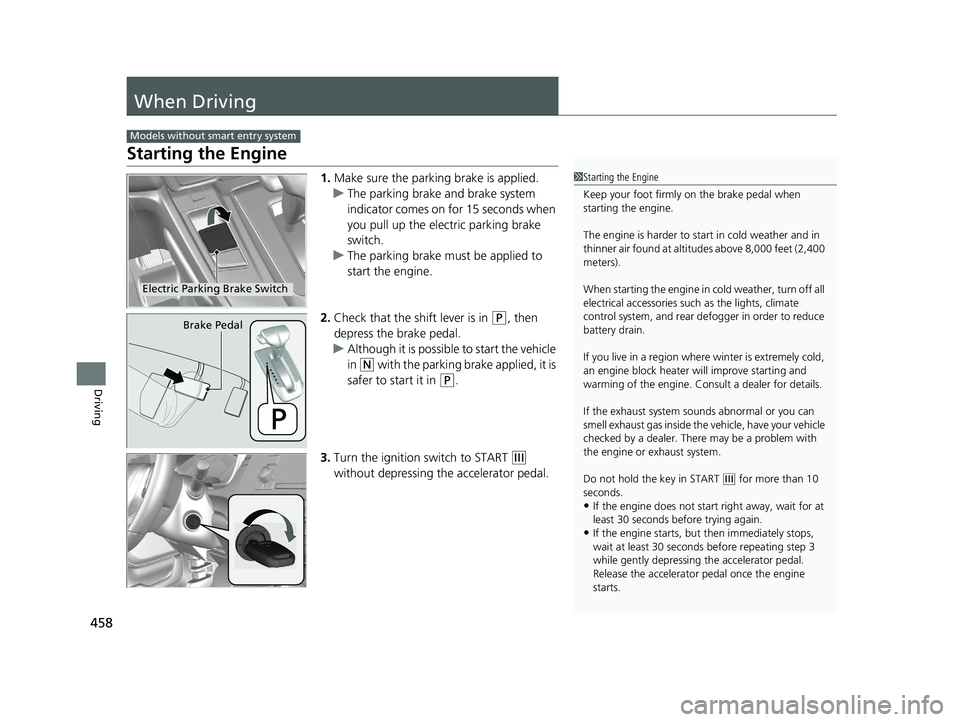
1.Make sure the parking brake is applied.
u The parking brake and brake system
indicator comes on for 15 seconds when
you pull up the electric parking brake
switch.
u The parking brake must be applied to
start the engine.
2. Check that the shift lever is in
(P, then
depress the brake pedal.
u Although it is possibl e to start the vehicle
in
(N with the parking brake applied, it is
safer to start it in
(P.
3. Turn the ignition switch to START
(e
without depressing the accelerator pedal.
Models without smart entry system
1 Starting the Engine
Keep your foot firmly on the brake pedal when
starting the engine.
The engine is harder to st art in cold weather and in
thinner air found at altitudes above 8,000 feet (2,400
meters).
When starting the engine in cold weather, turn off all
electrical accessories such as the lights, climate
control system, and rear de fogger in order to reduce
battery drain.
If you live in a region where winter is extremely cold,
an engine block heater will improve starting and
warming of the engine. Cons ult a dealer for details.
If the exhaust system sounds abnormal or you can
smell exhaust gas inside the vehicle, have your vehicle
checked by a dealer. There may be a problem with
the engine or exhaust system.
Do not hold the key in START
( e for more than 10
seconds.
•If the engine does not sta rt right away, wait for at
least 30 seconds before trying again.
•If the engine starts, but then immediately stops,
wait at least 30 seconds before repeating step 3
while gently depressing the accelerator pedal.
Release the accelerator pedal once the engine
starts.
Electric Parking Brake Switch
Brake Pedal
19 CR-V ELP HCM MAP HMIN-31TLA6200.book 458 ページ 2018年8月22日 水曜日 午後2時59分
Page 462 of 675
460
uuWhen Driving uStarting the Engine
Driving
Starting the Engine
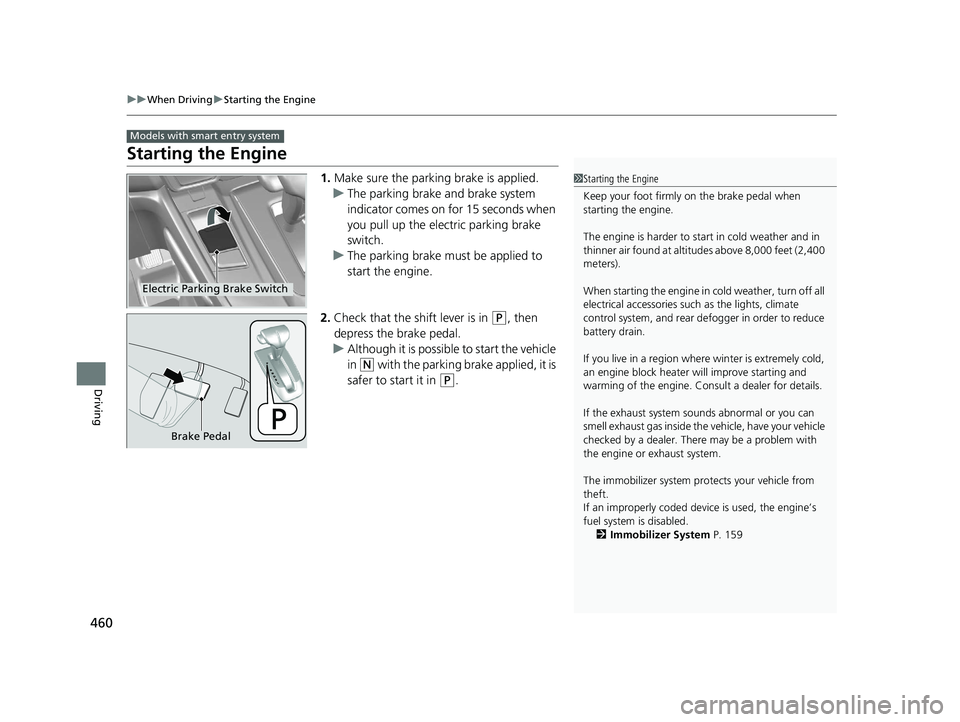
1. Make sure the parking brake is applied.
u The parking brake and brake system
indicator comes on for 15 seconds when
you pull up the electric parking brake
switch.
u The parking brake must be applied to
start the engine.
2. Check that the shift lever is in
(P, then
depress the brake pedal.
u Although it is possibl e to start the vehicle
in
(N with the parking brake applied, it is
safer to start it in
(P.
Models with smart entry system
1 Starting the Engine
Keep your foot firmly on the brake pedal when
starting the engine.
The engine is harder to st art in cold weather and in
thinner air found at altitudes above 8,000 feet (2,400
meters).
When starting the engine in cold weather, turn off all
electrical accessories such as the lights, climate
control system, and rear de fogger in order to reduce
battery drain.
If you live in a region where winter is extremely cold,
an engine block heater will improve starting and
warming of the engine. Cons ult a dealer for details.
If the exhaust system sounds abnormal or you can
smell exhaust gas inside the vehicle, have your vehicle
checked by a dealer. There may be a problem with
the engine or exhaust system.
The immobilizer system pr otects your vehicle from
theft.
If an improperly c oded device is used, the engine’s
fuel system is disabled. 2 Immobilizer System P. 159
Electric Parking Brake Switch
Brake Pedal
19 CR-V ELP HCM MAP HMIN-31TLA6200.book 460 ページ 2018年8月22日 水曜日 午後2時59分
Page 471 of 675
469
uuWhen Driving uECON Button
Driving
ECON Button
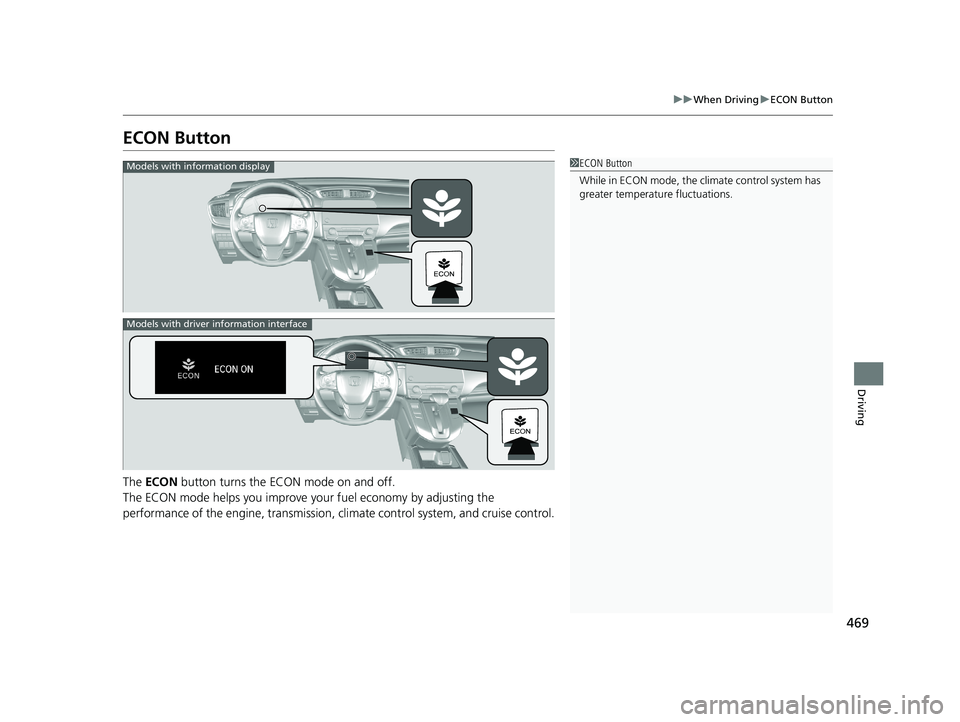
The ECON button turns the ECON mode on and off.
The ECON mode helps you improve yo ur fuel economy by adjusting the
performance of the engine, transmission, c limate control system, and cruise control.
1ECON Button
While in ECON mode, the climate control system has
greater temperature fluctuations.Models with information display
Models with driver information interface
19 CR-V ELP HCM MAP HMIN-31TLA6200.book 469 ページ 2018年8月22日 水曜日 午後2時59分
Page 480 of 675
uuWhen Driving uFront Sensor Camera*
478
Driving
1Front Sensor Camera*
Do not place an object on the top of the instrument
panel. It may reflect onto the windshield and prevent
the system from detecting lane lines properly.
If the Some Driver Assist Systems Cannot
Operate:Camera Temperature Too High :
message appears:
•Use the climate control system to cool down the
interior and, if necessary, also use defroster mode
with the air flow directed toward the camera.
•Start driving the vehicle to lower the windshield
temperature, which cool s down the area around
the camera.
If the Some Driver Assist Systems Cannot
Operate:Clean Front Windshield : message
appears:
•Park your vehicle in a sa fe place, and clean the
windshield. If the message does not disappear after
you have cleaned the winds hield and driven for a
while, have your vehicle checked by a dealer.
* Not available on all models
19 CR-V ELP HCM MAP HMIN-31TLA6200.book 478 ページ 2018年8月22日 水曜日 午後2時59分
Page 555 of 675
553
Maintenance
This chapter discusses basic maintenance.
Before Performing MaintenanceInspection and Maintenance ............ 554
Safety When Performing Maintenance...555Parts and Fluids Used in Maintenance Service ........................................... 556
Maintenance Minder
TM..................... 557
Maintenance Under the Hood Maintenance Items Under the Hood .. 567
Opening the Hood ........................... 569
Recommended Engine Oil ................ 570
Oil Check ......................................... 571
Adding Engine Oil ............................ 573
Changing the Engine Oil and Oil Filter ...574
Engine Coolant ................................ 577
Transmission Fluid ............................ 581
Brake Fluid ....................................... 582
Refilling Window Washer Fluid......... 583
Replacing Light Bulbs ....................... 584
Checking and Maintaining Wiper Blades... 591Checking and Maintaining Tires
Checking Tires ................................. 595
Tire and Loading Information Label ...... 596Tire Labeling .................................... 596DOT Tire Quality Grading (U.S. Vehicles).. 598Wear Indicators................................ 600
Tire Service Life ................................ 600 Tire and Wheel Replacement ........... 601
Tire Rotation .................................... 602
Winter Tires ..................................... 603
Battery ............................................... 604
Remote Transmitter Care Replacing the Button Battery ........... 606
Climate Control System Maintenance .. 608Cleaning
Interior Care .................................... 609
Exterior Care.................................... 611
Accessories and Modifications .......... 614
19 CR-V ELP HCM MAP HMIN-31TLA6200.book 553 ページ 2018年8月22日 水曜日 午後2時59分
Page 600 of 675
598
uuChecking and Maintaining Tires uDOT Tire Quality Grading (U.S. Vehicles)
Maintenance
DOT Tire Quality Grading (U.S. Vehicles)
The tires on your vehicle meet all U.S. Federal Safety
Requirements. All tires are also graded for treadwear, traction,
and temperature performance a ccording to Department of
Transportation (DOT) standards. The following explains these
gradings.
Quality grades can be found where applicable on the tire sidewall
between tread shoulder an d maximum section width.
The treadwear grade is a comparative rating based on the wear
rate of the tire when tested un der controlled conditions on a
specified government test course. For example, a tire graded 150
would wear one and one-half (1 1/2) times as well on the
government course as a tire graded 100. The relative performance
of tires depends upon the actual conditions of their use, however,
and may depart significantly from the norm due to variations in
driving habits, service practices and differences in road
characteristics and climate.
■Uniform Tire Quality Grading
■Treadwear
1 Uniform Tire Quality Grading
For example:
Treadwear 200
Traction AA
Temperature A
All passenger car tires must conform
to Federal Safety Requirements in
addition to these grades.
19 CR-V ELP HCM MAP HMIN-31TLA6200.book 598 ページ 2018年8月22日 水曜日 午後2時59分
Page 610 of 675
608
Maintenance
Climate Control System Maintenance
Air Conditioning
To ensure proper and safe operation, th e Society of Automotive Engineers (SAE
J2845) recommends that the refrigerant sy stem only be serviced by trained and
certified technicians.
Never repair or replace the air conditioning evaporator (cooling coil) with one
removed from a used or salvaged vehicle.
New replacement mobile air conditioning evaporators must be certified (and
labeled) as meeting SAE Standard J2842.
Dust and Pollen Filter
The climate control system is equipped wi th a dust and pollen filter that collects
pollen, dust, and other debris in the air. The Maintenance MinderTM messages will let
you know when to replace the filter.
We recommend that you replace the dust and pollen filter sooner when using your
vehicle in areas with high concentrations of dust.
1Climate Control System Maintenance
NOTICE
Vented refrigerant is harmful to the environment.
To avoid refrigerant from venting, never replace the
evaporator with one re moved from a used or
salvaged vehicle.
Refrigerant in your vehicle’s air conditioning system is
flammable and can be igni ted during servicing if
proper procedures are not followed.
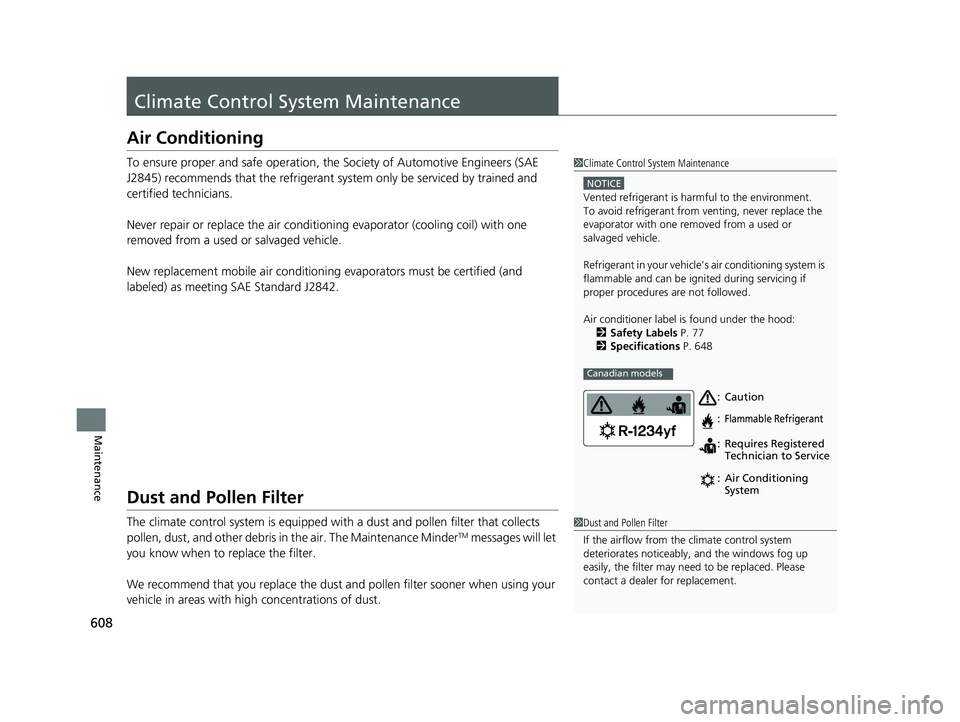
Air conditioner label is found under the hood: 2 Safety Labels P. 77
2 Specifications P. 648
Canadian models
Caution
Flammable Refrigerant
Requires Registered
Technician to Service
Air Conditioning
System
:
:
:
:
1
Dust and Pollen Filter
If the airflow from the climate control system
deteriorates noticeably, and the windows fog up
easily, the filter may need to be replaced. Please
contact a dealer for replacement.
19 CR-V ELP HCM MAP HMIN-31TLA6200.book 608 ページ 2018年8月22日 水曜日 午後2時59分