phone HONDA CR-V 2020 Owner's Manual (in English)
[x] Cancel search | Manufacturer: HONDA, Model Year: 2020, Model line: CR-V, Model: HONDA CR-V 2020Pages: 671, PDF Size: 33.11 MB
Page 438 of 671
uuBluetooth ® HandsFreeLink ®u HFL Menus
436
Features
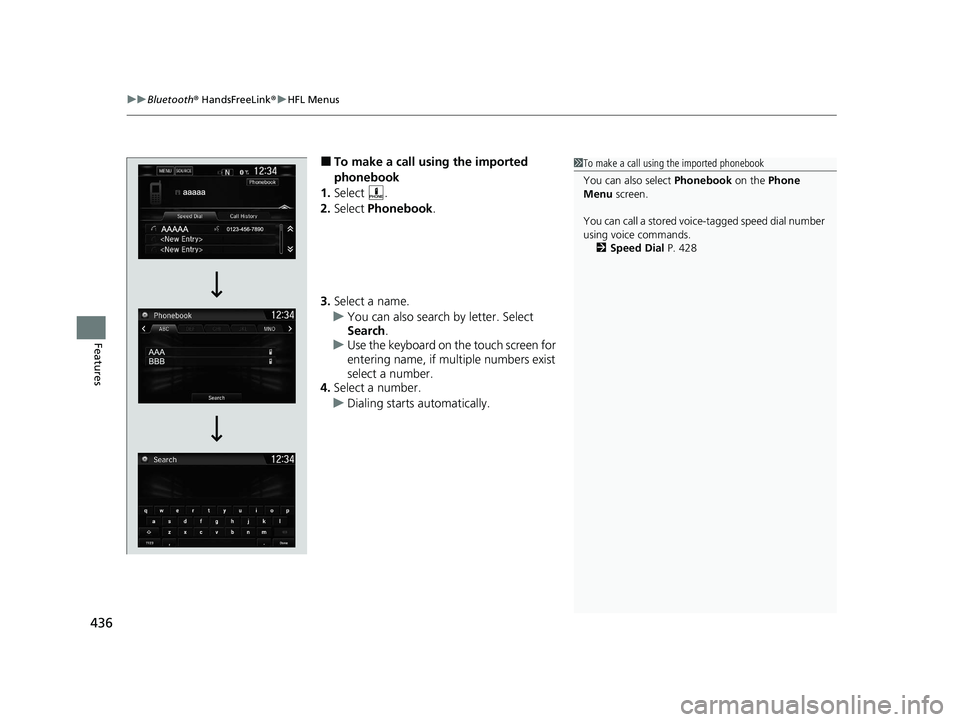
■To make a call using the imported
phonebook
1. Select .
2. Select Phonebook .
3. Select a name.
u You can also search by letter. Select
Search .
u Use the keyboard on the touch screen for
entering name, if multiple numbers exist
select a number.
4. Select a number.
u Dialing starts automatically.1To make a call using the imported phonebook
You can also select Phonebook on the Phone
Menu screen.
You can call a stored voice-tagged speed dial number
using voice commands. 2 Speed Dial P. 428
20 CR-V PET ELP_MAP_HMIN_HCM_J-31TLA6310.book 436 ページ 2019年10月3日 木曜日 午後4時55分
Page 439 of 671
Continued437
uuBluetooth ® HandsFreeLink ®u HFL Menus
Features
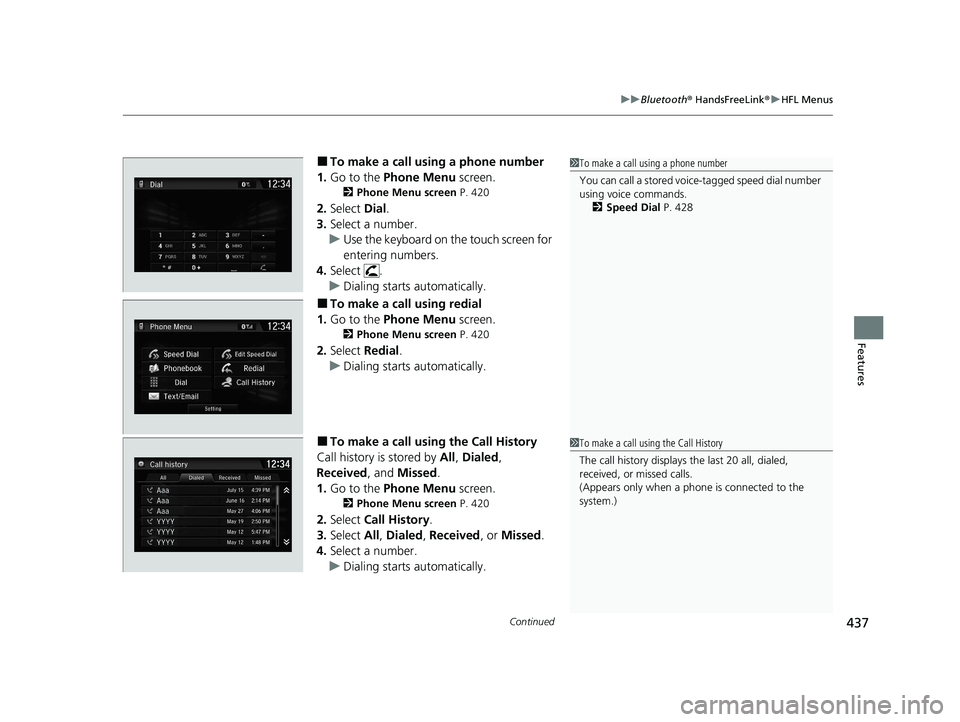
■To make a call using a phone number
1. Go to the Phone Menu screen.
2Phone Menu screen P. 420
2.Select Dial.
3. Select a number.
u Use the keyboard on the touch screen for
entering numbers.
4. Select .
u Dialing starts automatically.
■To make a call using redial
1. Go to the Phone Menu screen.
2Phone Menu screen P. 420
2.Select Redial .
u Dialing starts automatically.
■To make a call using the Call History
Call history is stored by All, Dialed ,
Received , and Missed .
1. Go to the Phone Menu screen.
2Phone Menu screen P. 420
2.Select Call History .
3. Select All, Dialed , Received , or Missed .
4. Select a number.
u Dialing starts automatically.
1To make a call using a phone number
You can call a stored voice-tagged speed dial number
using voice commands.
2 Speed Dial P. 428
1To make a call using the Call History
The call history displays the last 20 all, dialed,
received, or missed calls.
(Appears only when a phone is connected to the
system.)
20 CR-V PET ELP_MAP_HMIN_HCM_J-31TLA6310.book 437 ページ 2019年10月3日 木曜日 午後4時55分
Page 440 of 671
uuBluetooth ® HandsFreeLink ®u HFL Menus
438
Features
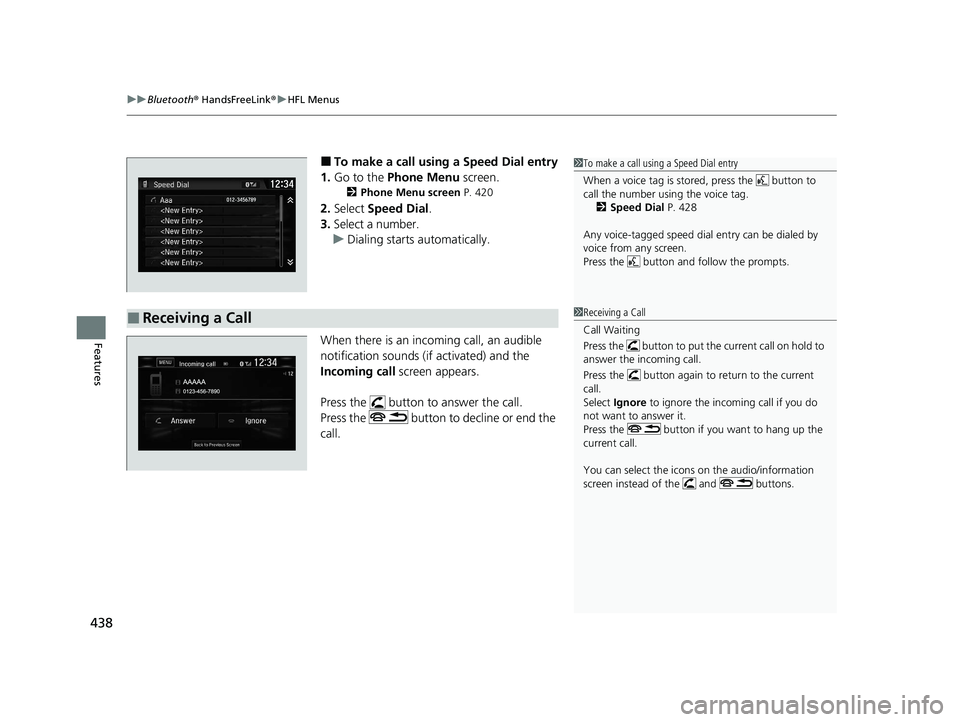
■To make a call using a Speed Dial entry
1. Go to the Phone Menu screen.
2Phone Menu screen P. 420
2.Select Speed Dial .
3. Select a number.
u Dialing starts automatically.
When there is an incoming call, an audible
notification sounds (if activated) and the
Incoming call screen appears.
Press the button to answer the call.
Press the button to decline or end the
call.
1 To make a call using a Speed Dial entry
When a voice tag is stored, press the button to
call the number using the voice tag.
2 Speed Dial P. 428
Any voice-tagged speed dial entry can be dialed by
voice from any screen.
Press the button and follow the prompts.
■Receiving a Call1Receiving a Call
Call Waiting
Press the button to put the current call on hold to
answer the incoming call.
Press the button again to return to the current
call.
Select Ignore to ignore the incoming call if you do
not want to answer it.
Press the button if you want to hang up the
current call.
You can select the icons on the audio/information
screen instead of the and buttons.
20 CR-V PET ELP_MAP_HMIN_HCM_J-31TLA6310.book 438 ページ 2019年10月3日 木曜日 午後4時55分
Page 441 of 671
Continued439
uuBluetooth ® HandsFreeLink ®u HFL Menus
Features
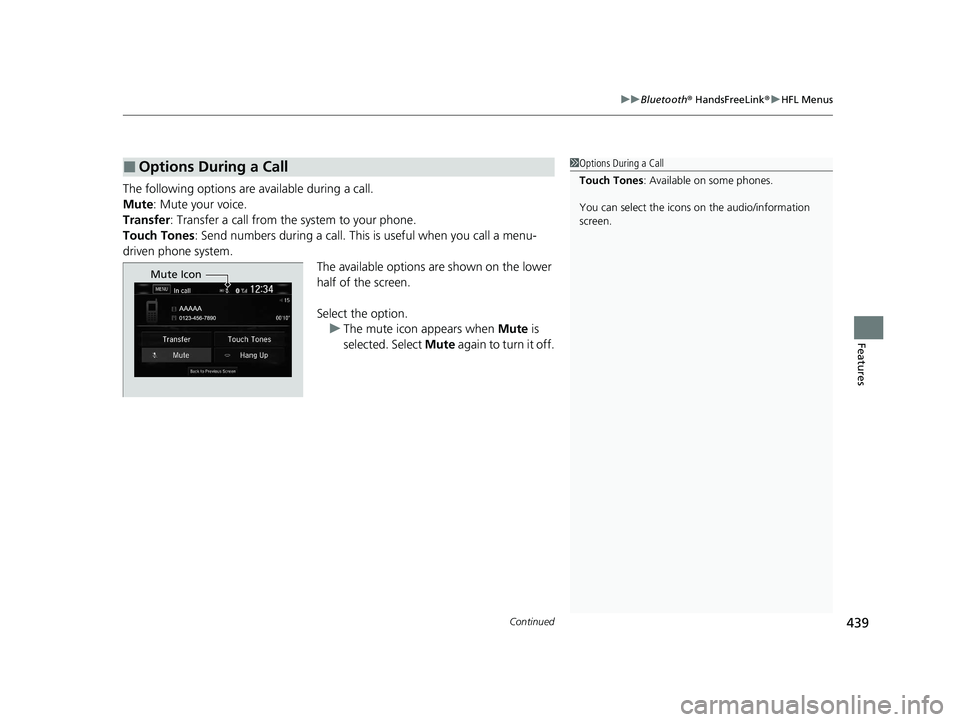
The following options ar e available during a call.
Mute : Mute your voice.
Transfer: Transfer a call from the system to your phone.
Touch Tones : Send numbers during a call. This is useful when you call a menu-
driven phone system. The available options are shown on the lower
half of the screen.
Select the option.u The mute icon appears when Mute is
selected. Select Mute again to turn it off.
■Options During a Call1Options During a Call
Touch Tones : Available on some phones.
You can select the icons on the audio/information
screen.
Mute Icon
20 CR-V PET ELP_MAP_HMIN_HCM_J-31TLA6310.book 439 ページ 2019年10月3日 木曜日 午後4時55分
Page 442 of 671
uuBluetooth ® HandsFreeLink ®u HFL Menus
440
Features
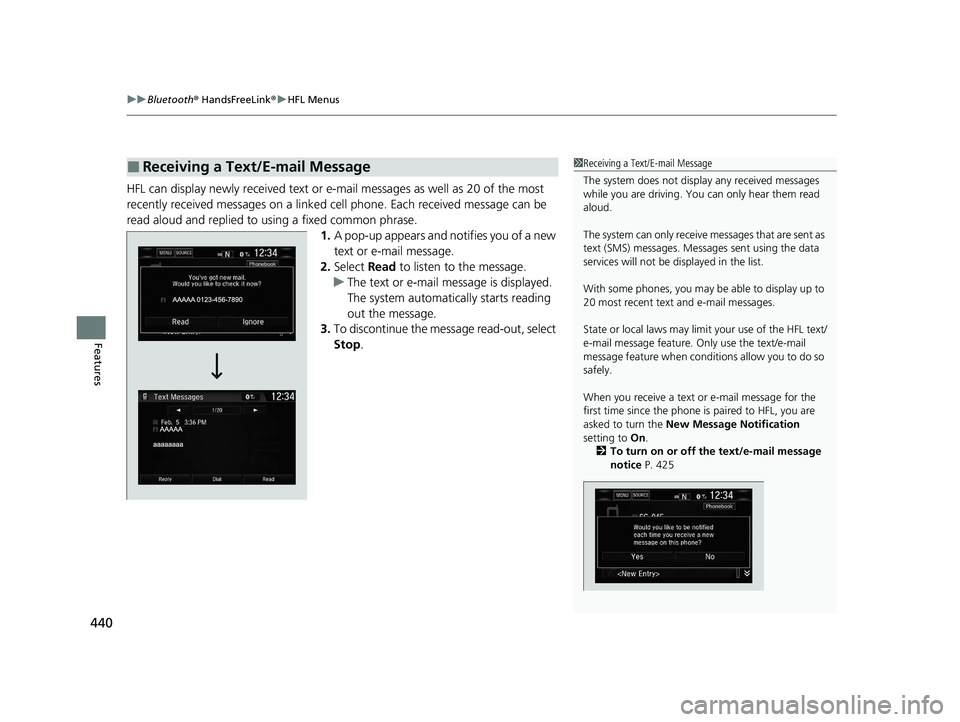
HFL can display newly received text or e- mail messages as well as 20 of the most
recently received messages on a linked cell phone. Each received message can be
read aloud and replied to using a fixed common phrase. 1.A pop-up appears and notifies you of a new
text or e-mail message.
2. Select Read to listen to the message.
u The text or e-mail message is displayed.
The system automatically starts reading
out the message.
3. To discontinue the mess age read-out, select
Stop .
■Receiving a Text/E-mail Message1Receiving a Text/E-mail Message
The system does not display any received messages
while you are driving. You can only hear them read
aloud.
The system can only receive messages that are sent as
text (SMS) messages. Messages sent using the data
services will not be displayed in the list.
With some phones, you may be able to display up to
20 most recent text and e-mail messages.
State or local laws may limi t your use of the HFL text/
e-mail message feature. Only use the text/e-mail
message feature when conditions allow you to do so
safely.
When you receive a text or e-mail message for the
first time since the phone is paired to HFL, you are
asked to turn the New Message Notification
setting to On.
2 To turn on or off the text/e-mail message
notice P. 425
20 CR-V PET ELP_MAP_HMIN_HCM_J-31TLA6310.book 440 ページ 2019年10月3日 木曜日 午後4時55分
Page 443 of 671
Continued441
uuBluetooth ® HandsFreeLink ®u HFL Menus
Features
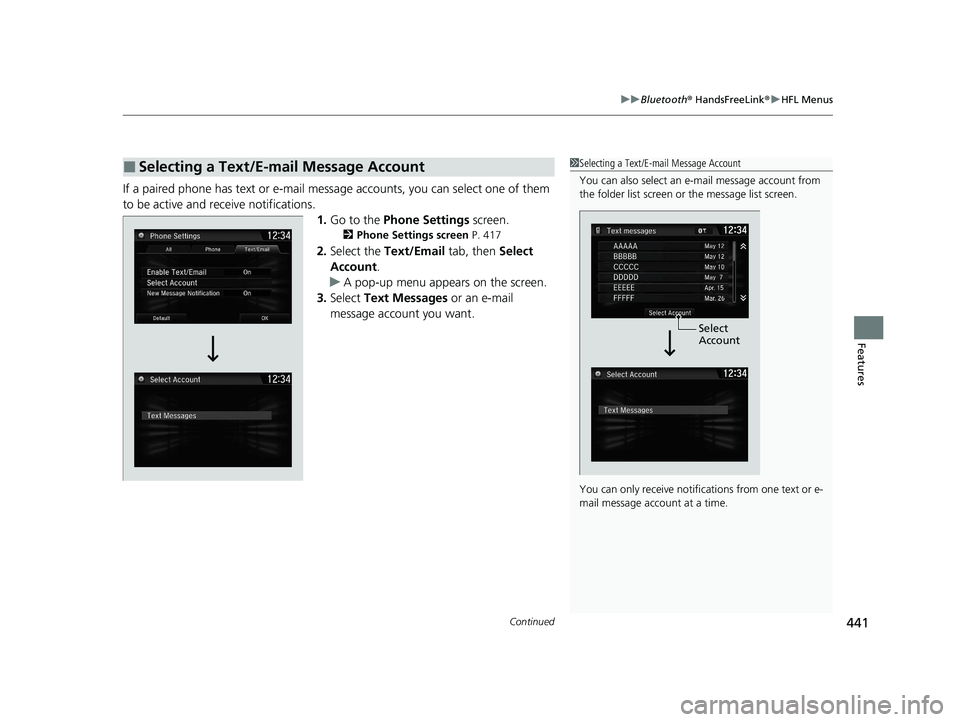
If a paired phone has text or e-mail messa ge accounts, you can select one of them
to be active and receive notifications. 1.Go to the Phone Settings screen.
2Phone Settings screen P. 417
2.Select the Text/Email tab, then Select
Account .
u A pop-up menu appears on the screen.
3. Select Text Messages or an e-mail
message account you want.
■Selecting a Text/E-mail Message Account1 Selecting a Text/E-mail Message Account
You can also select an e- mail message account from
the folder list screen or the message list screen.
You can only receive notificat ions from one text or e-
mail message account at a time.
Select
Account
20 CR-V PET ELP_MAP_HMIN_HCM_J-31TLA6310.book 441 ページ 2019年10月3日 木曜日 午後4時55分
Page 444 of 671
uuBluetooth ® HandsFreeLink ®u HFL Menus
442
Features
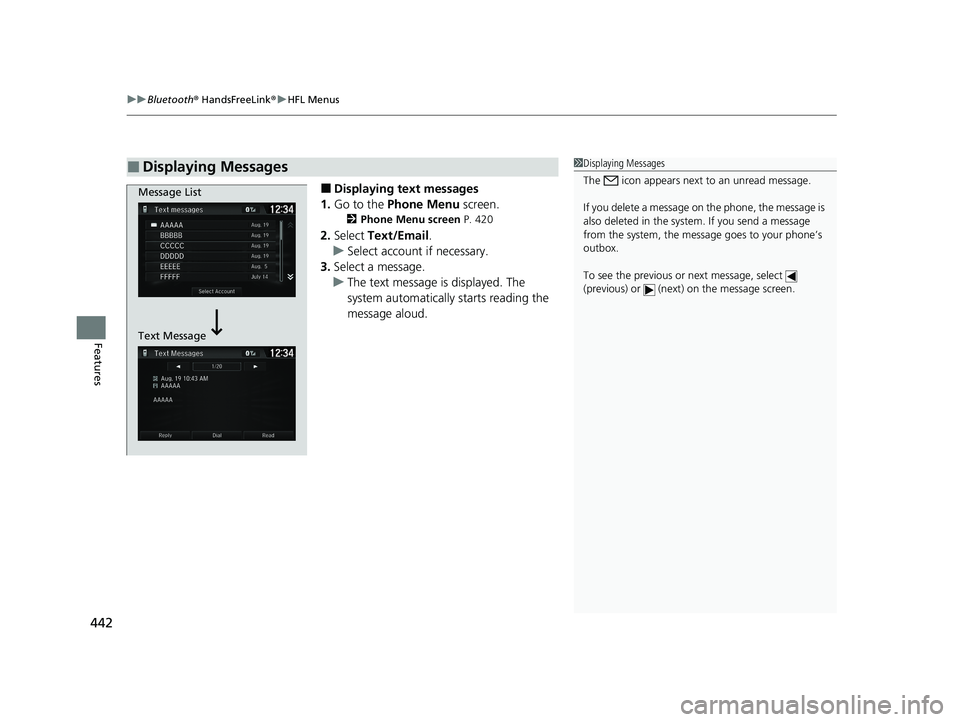
■Displaying text messages
1. Go to the Phone Menu screen.
2Phone Menu screen P. 420
2.Select Text/Email .
u Select account if necessary.
3. Select a message.
u The text message is displayed. The
system automatically starts reading the
message aloud.
■Displaying Messages1Displaying Messages
The icon appears next to an unread message.
If you delete a message on the phone, the message is
also deleted in the system. If you send a message
from the system, the message goes to your phone’s
outbox.
To see the previous or next message, select
(previous) or (next) on the message screen.
Message List
Text Message
20 CR-V PET ELP_MAP_HMIN_HCM_J-31TLA6310.book 442 ページ 2019年10月3日 木曜日 午後4時55分
Page 445 of 671
443
uuBluetooth ® HandsFreeLink ®u HFL Menus
Continued
Features
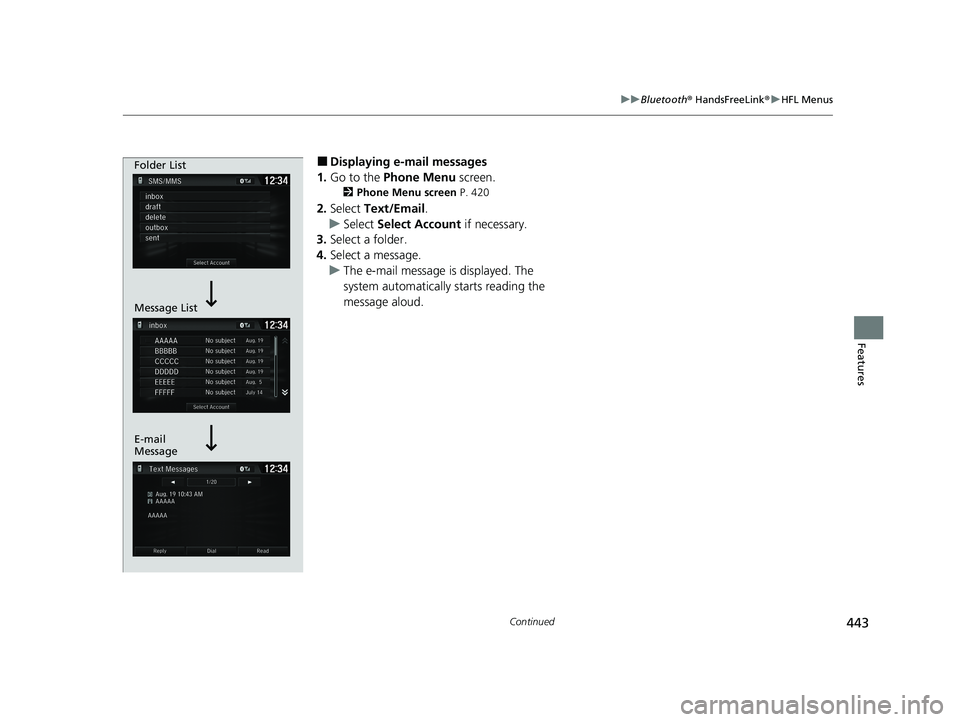
■Displaying e-mail messages
1. Go to the Phone Menu screen.
2Phone Menu screen P. 420
2.Select Text/Email .
u Select Select Account if necessary.
3. Select a folder.
4. Select a message.
u The e-mail message is displayed. The
system automatically starts reading the
message aloud.
Folder List
Message List
E-mail
Message
20 CR-V PET ELP_MAP_HMIN_HCM_J-31TLA6310.book 443 ページ 2019年10月3日 木曜日 午後4時55分
Page 446 of 671
uuBluetooth ® HandsFreeLink ®u HFL Menus
444
Features
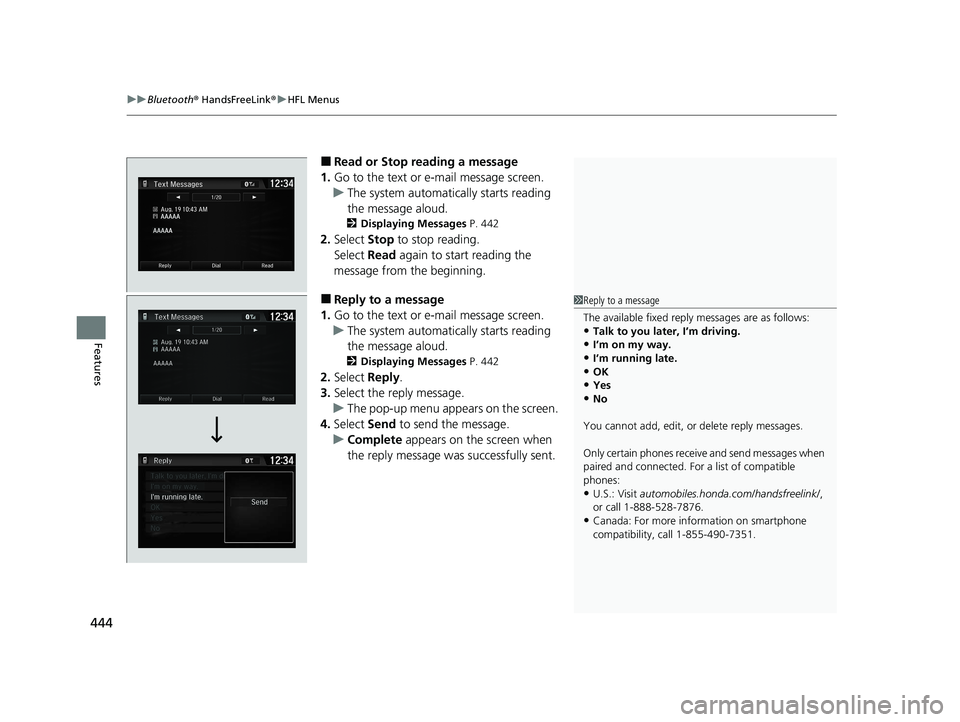
■Read or Stop reading a message
1. Go to the text or e-mail message screen.
u The system automatically starts reading
the message aloud.
2 Displaying Messages P. 442
2.Select Stop to stop reading.
Select Read again to start reading the
message from the beginning.
■Reply to a message
1. Go to the text or e-mail message screen.
u The system automatically starts reading
the message aloud.
2 Displaying Messages P. 442
2.Select Reply.
3. Select the reply message.
u The pop-up menu appears on the screen.
4. Select Send to send the message.
u Complete appears on the screen when
the reply message was successfully sent.
1 Reply to a message
The available fixed reply messages are as follows:
•Talk to you later, I’m driving.•I’m on my way.
•I’m running late.
•OK•Yes
•No
You cannot add, edit, or delete reply messages.
Only certain phones receive and send messages when
paired and connected. For a list of compatible
phones:
•U.S.: Visit automobiles.honda.com /handsfreelink/,
or call 1-888-528-7876.
•Canada: For more info rmation on smartphone
compatibility, call 1-855-490-7351.
20 CR-V PET ELP_MAP_HMIN_HCM_J-31TLA6310.book 444 ページ 2019年10月3日 木曜日 午後4時55分
Page 448 of 671
uuBluetooth ® HandsFreeLink ®u HFL Menus
446
Features
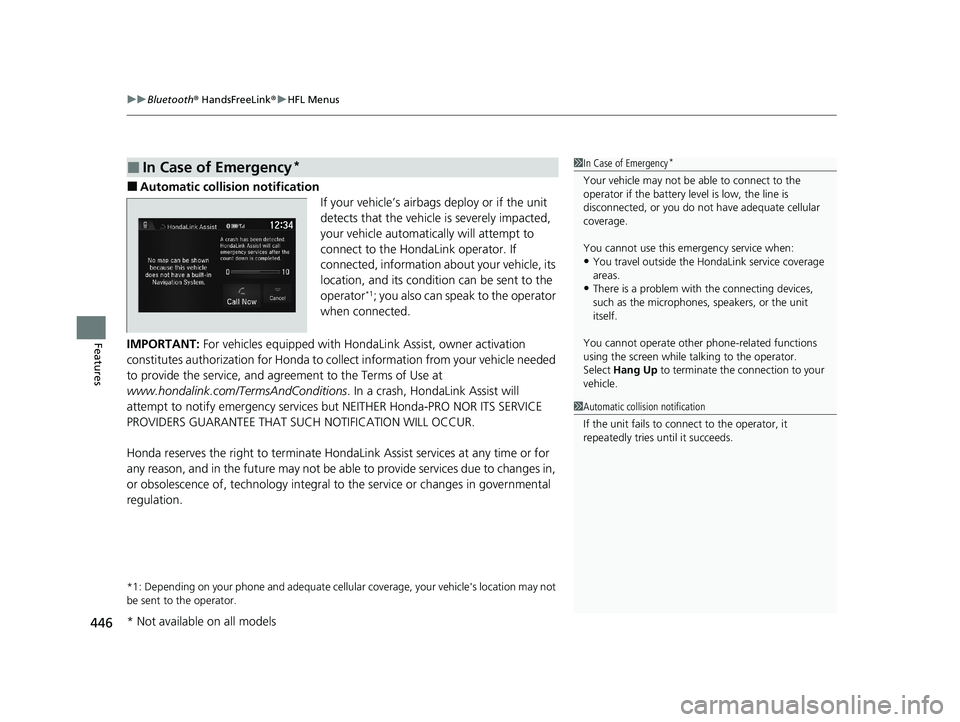
■Automatic collision notification
If your vehicle’s airbags deploy or if the unit
detects that the vehicle is severely impacted,
your vehicle automatically will attempt to
connect to the HondaLink operator. If
connected, information about your vehicle, its
location, and its condition can be sent to the
operator
*1; you also can speak to the operator
when connected.
IMPORTANT: For vehicles equipped with Hond aLink Assist, owner activation
constitutes authorization for Honda to co llect information from your vehicle needed
to provide the service, and agr eement to the Terms of Use at
www.hondalink.com/TermsAndConditions . In a crash, HondaLink Assist will
attempt to notify emergency services but NEITHER Honda-PRO NOR ITS SERVICE
PROVIDERS GUARANTEE THAT S UCH NOTIFICATION WILL OCCUR.
Honda reserves the right to terminate HondaLink Assist services at any time or for
any reason, and in the future may not be ab le to provide services due to changes in,
or obsolescence of, technology integral to the service or changes in governmental
regulation.
*1: Depending on your phone and adequate cellular coverage, y our vehicle's location may not
be sent to the operator.
■In Case of Emergency*1 In Case of Emergency*
Your vehicle may not be able to connect to the
operator if the battery level is low, the line is
disconnected, or you do not have adequate cellular
coverage.
You cannot use this emergency service when:
•You travel outside the HondaLink service coverage
areas.
•There is a problem with the connecting devices,
such as the microphones, speakers, or the unit
itself.
You cannot operate othe r phone-related functions
using the screen while talking to the operator.
Select Hang Up to terminate the connection to your
vehicle.
1 Automatic collision notification
If the unit fails to connect to the operator, it
repeatedly tries until it succeeds.
* Not available on all models
20 CR-V PET ELP_MAP_HMIN_HCM_J-31TLA6310.book 446 ページ 2019年10月3日 木曜日 午後4時55分