light HONDA CR-V 2020 (in English) Manual PDF
[x] Cancel search | Manufacturer: HONDA, Model Year: 2020, Model line: CR-V, Model: HONDA CR-V 2020Pages: 671, PDF Size: 33.11 MB
Page 288 of 671
286
uuAudio System Basic Operation uVoice Control Operation
Features
Voice Control Operation
Your vehicle has a voice control system that allows hands-free operation.
The voice control system uses the ( Talk) and (hang-up/back) buttons on
the steering wheel and a microphone near the map lights on the ceiling.
To achieve optimum voice recognition when using the voice control system:
• Make sure the correct screen is displa yed for the voice command that you are
using.
The system recognizes only certain commands.
Available voice commands.
2 Voice Portal Screen P. 287
•Close the windows and moonroof*.
• Adjust the dashboard and side vents so air does not blow onto the microphone
on the ceiling.
• Speak clearly in a natural speaking vo ice without pausing between words.
• Reduce any background noise if possible. The system may misinterpret your
command if more than one person is speaking at the same time.
■Voice Recognition
1Voice Control Operation
When you press the button, a helpful prompt asks
what you would like to do. Press and release the
button again to bypass this prompt and give a
command.
1 Voice Recognition
The voice control system can only be used from the
driver’s seat because the microphone unit removes
noises from the front passenger’s side.
* Not available on all models
20 CR-V PET ELP_MAP_HMIN_HCM_J-31TLA6310.book 286 ページ 2019年10月3日 木曜日 午後4時55分
Page 363 of 671
361
uuCustomized Features u
Continued
Features
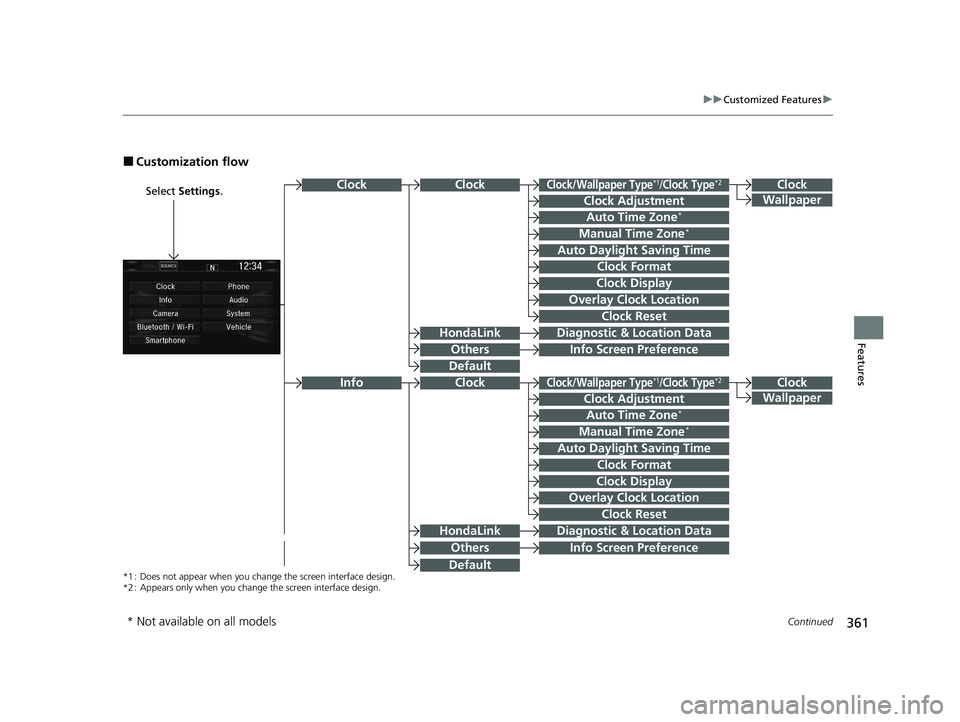
■Customization flow
Select Settings .Clock
Wallpaper
Others
Clock/Wallpaper Type*1/Clock Type*2
Clock Adjustment
Clock Format
ClockClock
Auto Time Zone*
Manual Time Zone*
Auto Daylight Saving Time
Clock Display
Overlay Clock Location
Clock Reset
Info Screen Preference
Clock
Wallpaper
Others
Clock/Wallpaper Type*1/Clock Type*2
Clock Adjustment
Clock Format
Clock
Auto Time Zone*
Manual Time Zone*
Auto Daylight Saving Time
Clock Display
Overlay Clock Location
Clock Reset
Info Screen Preference
Info
HondaLinkDiagnostic & Location Data
HondaLinkDiagnostic & Location Data
*1 : Does not appear when you chang e the screen interface design.
*2 : Appears only when you change the screen interface design.
Default
Default
* Not available on all models
20 CR-V PET ELP_MAP_HMIN_HCM_J-31TLA6310.book 361 ページ 2019年10月3日 木曜日 午後4時55分
Page 367 of 671
365
uuCustomized Features u
Continued
Features
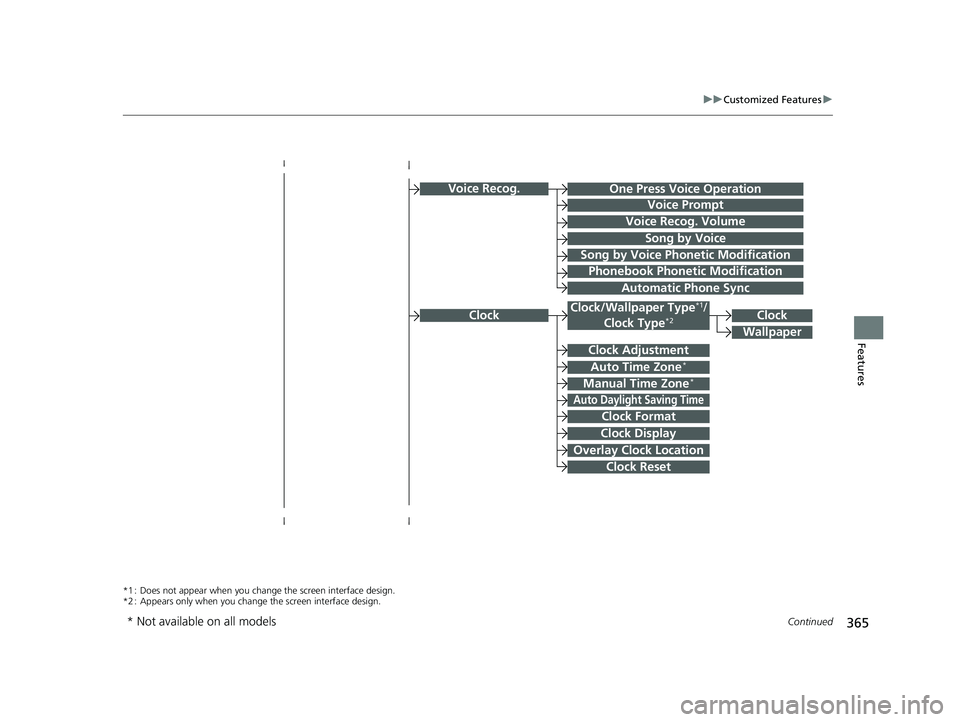
Voice Recog.
Voice Prompt
Voice Recog. Volume
Song by Voice
Song by Voice Phonetic Modification
Phonebook Phonetic Modification
Automatic Phone Sync
ClockClock/Wallpaper Type*1/
Clock Type*2
Clock Adjustment
Clock Format
Auto Time Zone*
Manual Time Zone*
Auto Daylight Saving Time
Clock Display
Overlay Clock Location
Clock Reset
Clock
Wallpaper
One Press Voice Operation
*1 : Does not appear when you chang e the screen interface design.
*2 : Appears only when you change the screen interface design.
* Not available on all models
20 CR-V PET ELP_MAP_HMIN_HCM_J-31TLA6310.book 365 ページ 2019年10月3日 木曜日 午後4時55分
Page 369 of 671
367
uuCustomized Features u
Continued
Features
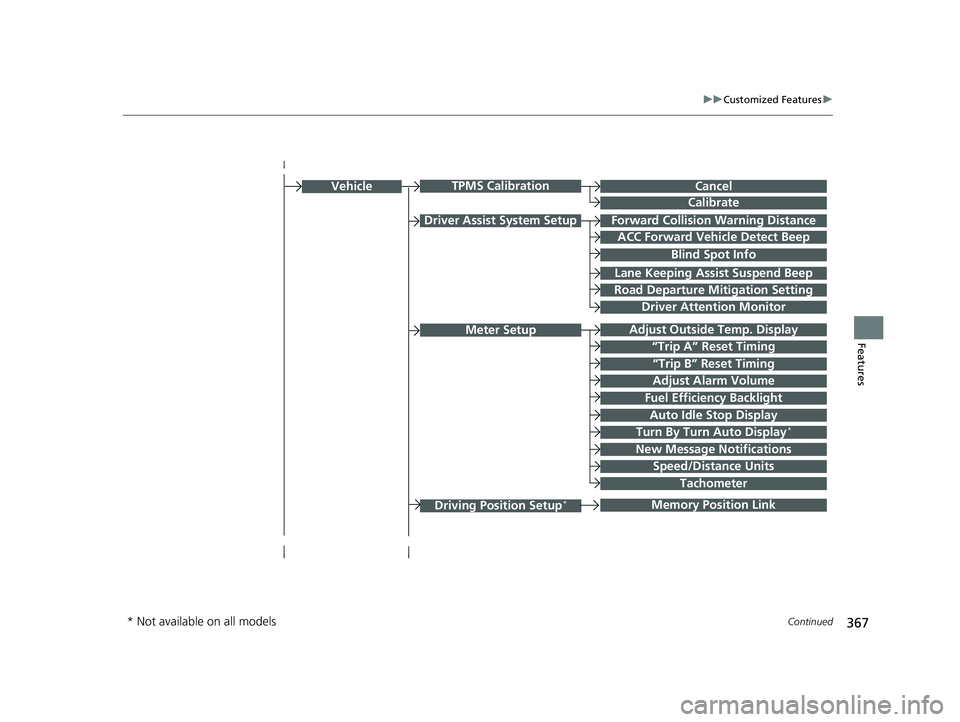
Driver Assist System SetupForward Collision Warning Distance
ACC Forward Vehicle Detect Beep
Lane Keeping Assi st Suspend Beep
Road Departure Mitigation Setting
Adjust Outside Temp. Display
“Trip A” Reset Timing
“Trip B” Reset Timing
Vehicle
Meter Setup
Adjust Alarm Volume
Speed/Distance Units
Fuel Efficiency Backlight
New Message Notifications
Tachometer
CancelTPMS Calibration
Calibrate
Blind Spot Info
Turn By Turn Auto Display*
Driving Position Setup*Memory Position Link
Driver Attention Monitor
Auto Idle Stop Display
* Not available on all models
20 CR-V PET ELP_MAP_HMIN_HCM_J-31TLA6310.book 367 ページ 2019年10月3日 木曜日 午後4時55分
Page 370 of 671
368
uuCustomized Features u
Features
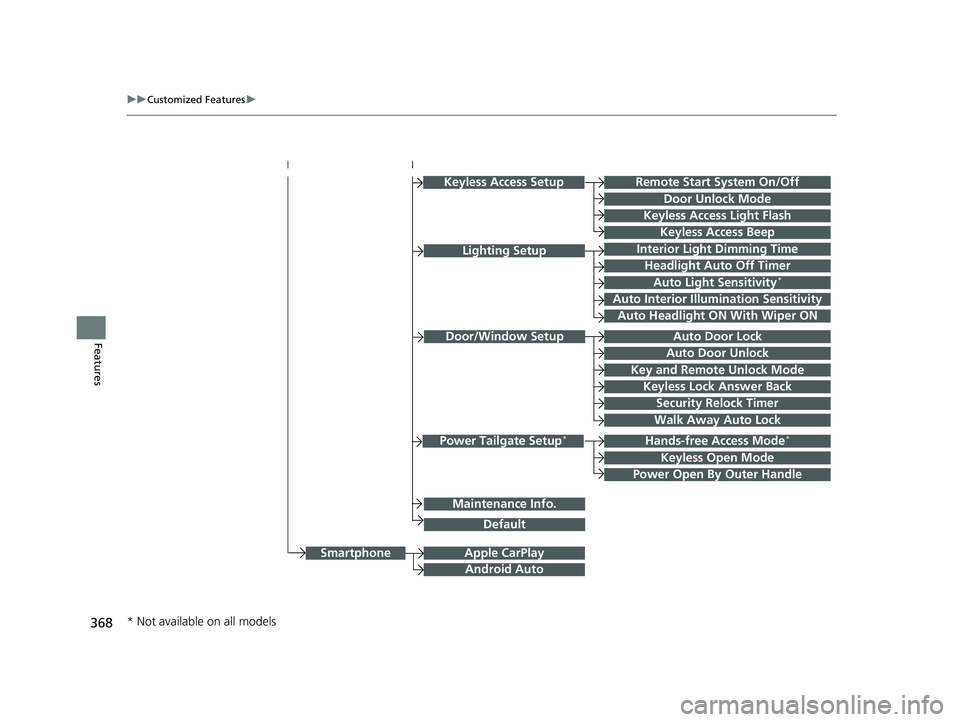
Hands-free Access Mode*
Keyless Open Mode
Lighting SetupInterior Light Dimming Time
Headlight Auto Off Timer
Auto Light Sensitivity*
Auto Interior Illumination Sensitivity
Auto Door Lock
Key and Remote Unlock Mode
Door/Window Setup
Apple CarPlay
Maintenance Info.
Android Auto
Keyless Lock Answer Back
Security Relock Timer
Walk Away Auto Lock
Keyless Access Setup
Keyless Access Light Flash
Door Unlock Mode
Remote Start System On/Off
Keyless Access Beep
Smartphone
Power Tailgate Setup*
Power Open By Outer Handle
Default
Auto Door Unlock
Auto Headlight ON With Wiper ON
* Not available on all models
20 CR-V PET ELP_MAP_HMIN_HCM_J-31TLA6310.book 368 ページ 2019年10月3日 木曜日 午後4時55分
Page 371 of 671
369
uuCustomized Features u
Continued
Features
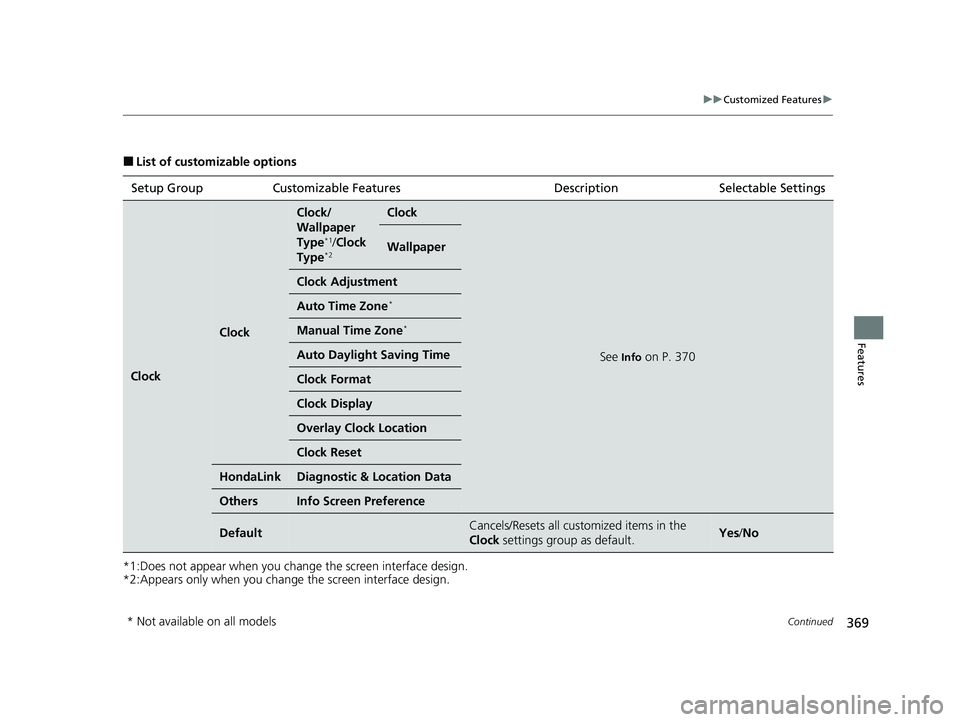
■List of customizable options
*1:Does not appear when you chan ge the screen interface design.
*2:Appears only when you change the screen interface design. Setup Group Customizable Features
Description Selectable Settings
Clock
Clock
Clock/
Wallpaper
Type
*1/Clock
Type*2
Clock
See Info on P. 370
Wallpaper
Clock Adjustment
Auto Time Zone*
Manual Time Zone*
Auto Daylight Saving Time
Clock Format
Clock Display
Overlay Clock Location
Clock Reset
HondaLinkDiagnostic & Location Data
OthersInfo Screen Preference
DefaultCancels/Resets all customized items in the
Clock settings group as default.Yes/No
* Not available on all models
20 CR-V PET ELP_MAP_HMIN_HCM_J-31TLA6310.book 369 ページ 2019年10月3日 木曜日 午後4時55分
Page 372 of 671
370
uuCustomized Features u
Features
*1:Default Setting
*2:Does not appear when you change the screen interface design.
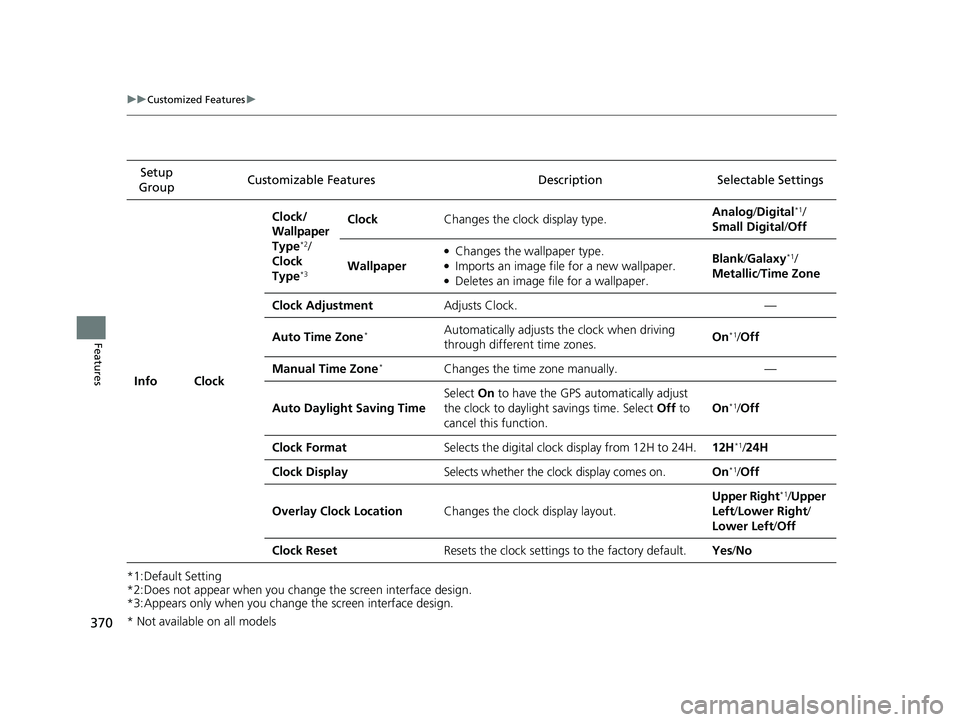
*3:Appears only when you change the screen interface design.Setup
Group Customizable Features Desc
ription Selectable Settings
Info Clock Clock/
Wallpaper
Type
*2/
Clock
Type
*3
Clock Changes the clock display type. Analog
/Digital*1/
Small Digital /Off
Wallpaper
●Changes the wallpaper type.●Imports an image file for a new wallpaper.●Deletes an image file for a wallpaper. Blank
/Galaxy
*1/
Metallic /Time Zone
Clock Adjustment Adjusts Clock. —
Auto Time Zone
*Automatically adjusts th e clock when driving
through different time zones. On*1/
Off
Manual Time Zone
*Changes the time zone manually. —
Auto Daylight Saving Time Select
On to have the GPS automatically adjust
the clock to daylight savings time. Select Off to
cancel this function. On
*1/
Off
Clock Format Selects the digital clock display from 12H to 24H. 12H
*1/24H
Clock Display Selects whether the clock display comes on. On
*1/Off
Overlay Clock Location Changes the clock display layout. Upper Right
*1/
Upper
Left/ Lower Right/
Lower Left /Off
Clock Reset Resets the clock settings to the factory default. Yes/No
* Not available on all models
20 CR-V PET ELP_MAP_HMIN_HCM_J-31TLA6310.book 370 ページ 2019年10月3日 木曜日 午後4時55分
Page 381 of 671
379
uuCustomized Features u
Continued
Features
*1:Default Setting
*2:Does not appear when you chan ge the screen interface design.
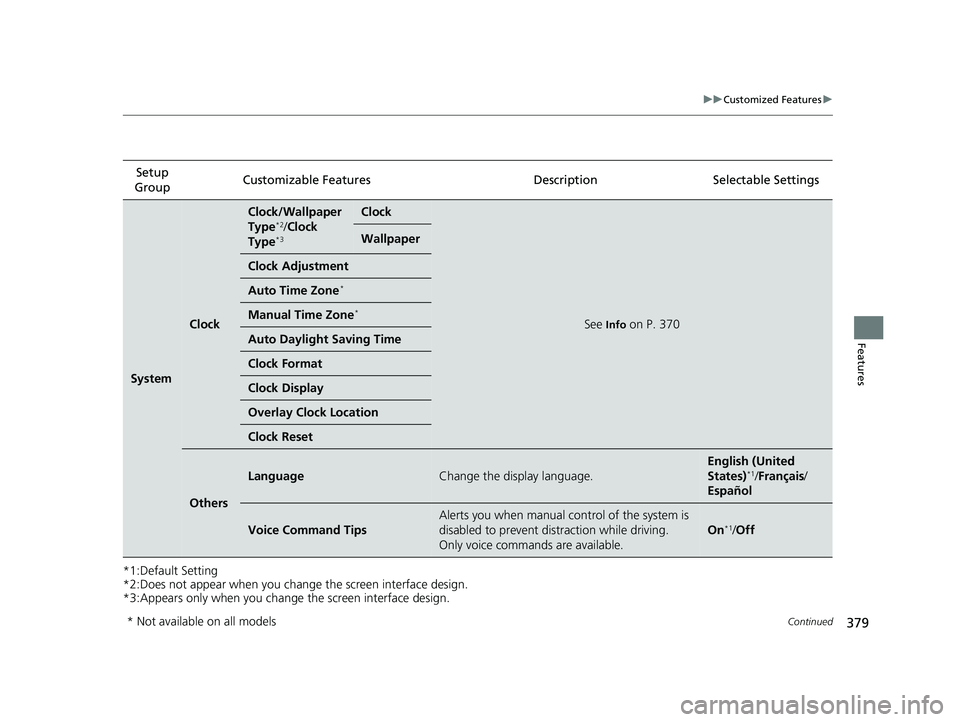
*3:Appears only when you change the screen interface design. Setup
Group Customizable Featur
es Description Selectable Settings
System
Clock
Clock/Wallpaper
Type*2/Clock
Type*3
Clock
See Info on P. 370
Wallpaper
Clock Adjustment
Auto Time Zone*
Manual Time Zone*
Auto Daylight Saving Time
Clock Format
Clock Display
Overlay Clock Location
Clock Reset
Others
LanguageChange the display language.
English (United
States)*1/Français /
Español
Voice Command Tips
Alerts you when manual co ntrol of the system is
disabled to prevent distraction while driving.
Only voice commands are available.
On*1/ Off
* Not available on all models
20 CR-V PET ELP_MAP_HMIN_HCM_J-31TLA6310.book 379 ページ 2019年10月3日 木曜日 午後4時55分
Page 384 of 671
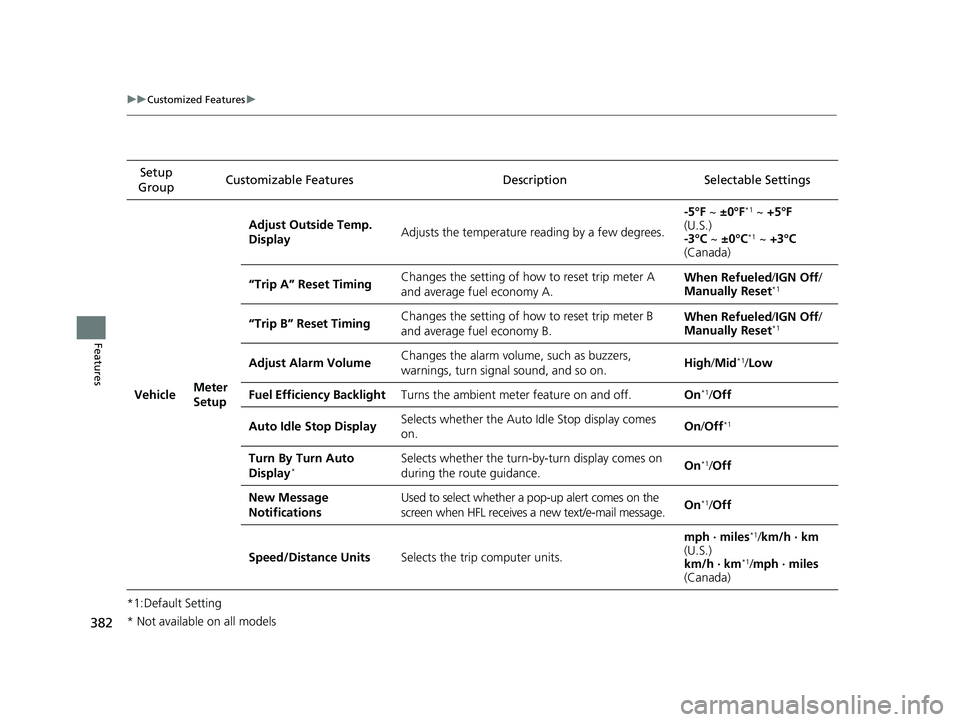
382
uuCustomized Features u
Features
*1:Default SettingSetup
Group Customizable Features Desc
ription Selectable Settings
VehicleMeter
Setup
Adjust Outside Temp.
DisplayAdjusts the temperature reading by a few degrees.
-5°F ~ ±0°F*1 ~ +5°F
(U.S.)
-3°C ~ ±0°C
*1 ~ +3°C
(Canada)
“Trip A” Reset TimingChanges the setting of how to reset trip meter A
and average fuel economy A.When Refueled /IGN Off /
Manually Reset*1
“Trip B” Reset TimingChanges the setting of how to reset trip meter B
and average fuel economy B.When Refueled /IGN Off /
Manually Reset*1
Adjust Alarm VolumeChanges the alarm volume, such as buzzers,
warnings, turn signal sound, and so on.High /Mid*1/Low
Fuel Efficiency BacklightTurns the ambient meter feature on and off.On*1/Off
Auto Idle Stop DisplaySelects whether the Auto Idle Stop display comes
on.On /Off*1
Turn By Turn Auto
Display*Selects whether the turn-by-turn display comes on
during the route guidance.On*1/Off
New Message
NotificationsUsed to select whether a pop-up alert comes on the
screen when HFL receives a new text/e-mail message.On*1/Off
Speed/Distance UnitsSelects the trip computer units.
mph · miles*1/km/h · km
(U.S.)
km/h · km
*1/ mph · miles
(Canada)
* Not available on all models
20 CR-V PET ELP_MAP_HMIN_HCM_J-31TLA6310.book 382 ページ 2019年10月3日 木曜日 午後4時55分
Page 385 of 671
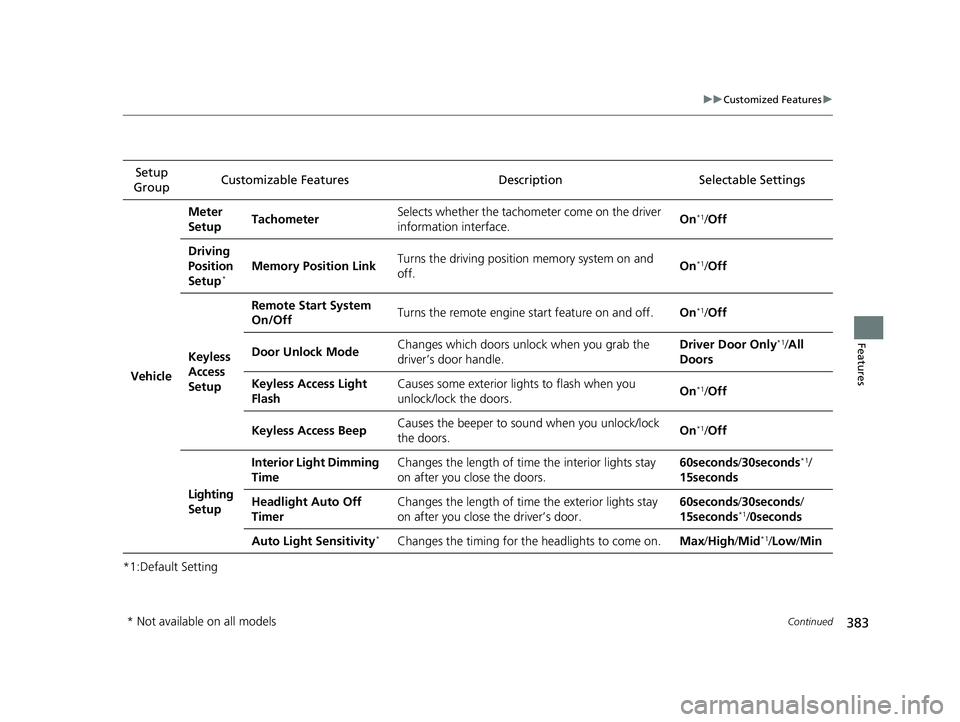
383
uuCustomized Features u
Continued
Features
*1:Default SettingSetup
Group Customizable Features Description Selectable Settings
Vehicle
Meter
SetupTachometerSelects whether the tachometer come on the driver
information interface.On*1/
Off
Driving
Position
Setup
*Memory Position LinkTurns the driving position memory system on and
off.On*1/Off
Keyless
Access
Setup
Remote Start System
On/OffTurns the remote engine start feature on and off.On*1/Off
Door Unlock ModeChanges which doors unlock when you grab the
driver’s door handle.Driver Door Only*1/All
Doors
Keyless Access Light
FlashCauses some exterior lights to flash when you
unlock/lock the doors.On*1/ Off
Keyless Access BeepCauses the beeper to sound when you unlock/lock
the doors.On*1/Off
Lighting
Setup
Interior Light Dimming
TimeChanges the length of time the interior lights stay
on after you close the doors.60seconds/ 30seconds*1/
15seconds
Headlight Auto Off
TimerChanges the length of time the exterior lights stay
on after you close the driver’s door.60seconds/ 30seconds/
15seconds*1/ 0seconds
Auto Light Sensitivity*Changes the timing for th e headlights to come on.Max/High /Mid*1/Low /Min
* Not available on all models
20 CR-V PET ELP_MAP_HMIN_HCM_J-31TLA6310.book 383 ページ 2019年10月3日 木曜日 午後4時55分