chang battery HONDA CR-V 2020 Owner's Manual (in English)
[x] Cancel search | Manufacturer: HONDA, Model Year: 2020, Model line: CR-V, Model: HONDA CR-V 2020Pages: 671, PDF Size: 33.11 MB
Page 107 of 671
105
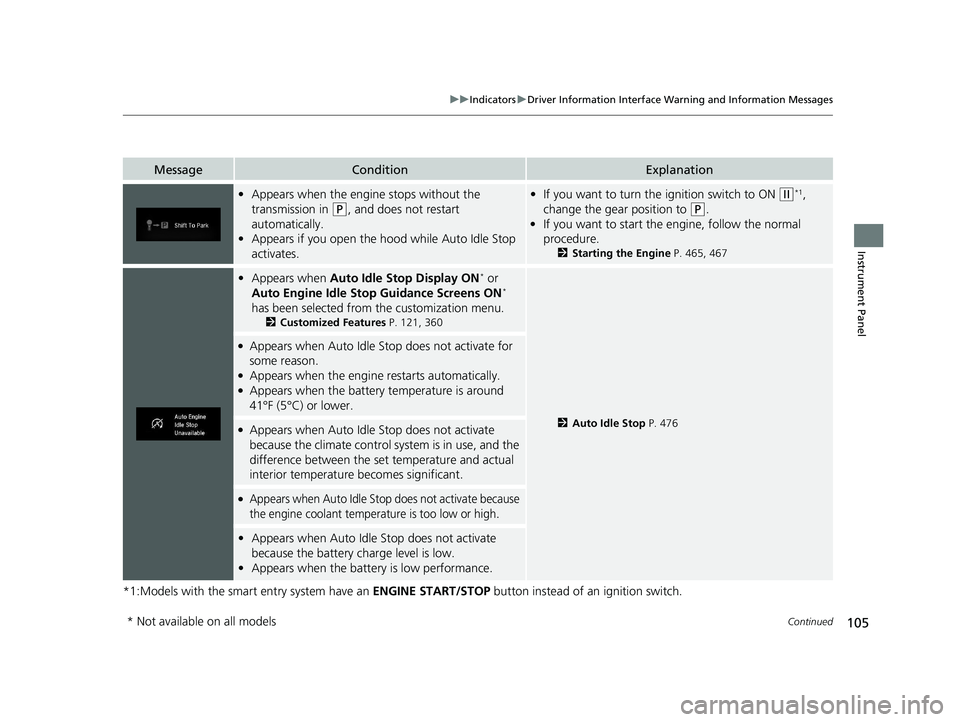
uuIndicators uDriver Information Interface Wa rning and Information Messages
Continued
Instrument Panel
*1:Models with the smart entry system have an ENGINE START/STOP button instead of an ignition switch.
MessageConditionExplanation
•Appears when the engine stops without the
transmission in
(P, and does not restart
automatically.
• Appears if you open the h ood while Auto Idle Stop
activates.
• If you want to turn the ignition switch to ON (w*1,
change the gear position to
(P.
• If you want to start the engine, follow the normal
procedure.
2 Starting the Engine P. 465, 467
•Appears when Auto Idle Stop Display ON* or
Auto Engine Idle Stop Guidance Screens ON*
has been selected from the customization menu.
2 Customized Features P. 121, 360
2Auto Idle Stop P. 476
●Appears when Auto Idle St op does not activate for
some reason.
●Appears when the engine restarts automatically.●Appears when the battery temperature is around
41°F (5°C) or lower.
●Appears when Auto Idle Stop does not activate
because the climate control system is in use, and the
difference between the set temperature and actual
interior temperature becomes significant.
●Appears when Auto Idle Stop does not activate because
the engine coolant temperature is too low or high.
• Appears when Auto Idle Stop does not activate
because the battery charge level is low.
• Appears when the batte ry is low performance.
* Not available on all models
20 CR-V PET ELP_MAP_HMIN_HCM_J-31TLA6310.book 105 ページ 2019年10月3日 木曜日 午後4時55分
Page 110 of 671
108
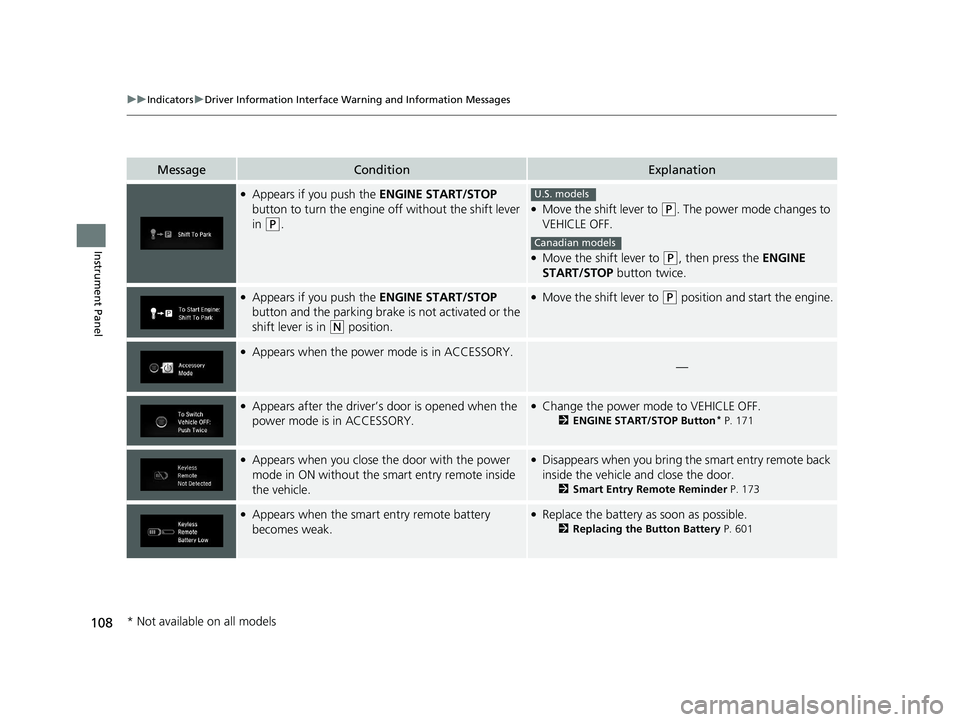
uuIndicators uDriver Information Interface Wa rning and Information Messages
Instrument Panel
MessageConditionExplanation
●Appears if you push the ENGINE START/STOP
button to turn the engine off without the shift lever
in
(P.
●Move the shift lever to (P. The power mode changes to
VEHICLE OFF.
●Move the shift lever to (P, then press the ENGINE
START/STOP button twice.
●Appears if you push the ENGINE START/STOP
button and the parking brake is not activated or the
shift lever is in
(N position.
●Move the shift lever to (P position and start the engine.
●Appears when the power mode is in ACCESSORY.
—
●Appears after the driver’s door is opened when the
power mode is in ACCESSORY.●Change the power mode to VEHICLE OFF.
2 ENGINE START/STOP Button* P. 171
●Appears when you close the door with the power
mode in ON without the smart entry remote inside
the vehicle.●Disappears when you bring the smart entry remote back
inside the vehicle and close the door.
2Smart Entry Remote Reminder P. 173
●Appears when the smart entry remote battery
becomes weak.●Replace the battery as soon as possible.
2Replacing the Button Battery P. 601
U.S. models
Canadian models
* Not available on all models
20 CR-V PET ELP_MAP_HMIN_HCM_J-31TLA6310.book 108 ページ 2019年10月3日 木曜日 午後4時55分
Page 144 of 671
uuLocking and Unlocking the Doors uLocking/Unlocking the Doors from the Outside
142
Controls
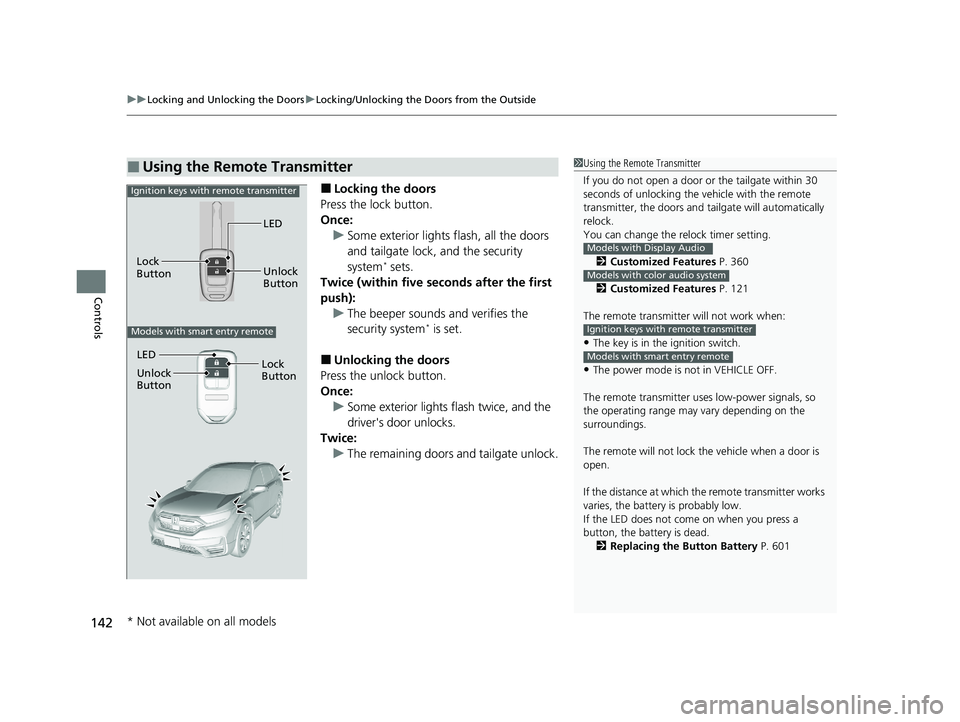
■Locking the doors
Press the lock button.
Once: u Some exterior lights flash, all the doors
and tailgate lock, and the security
system
* sets.
Twice (within five seco nds after the first
push): u The beeper sounds and verifies the
security system
* is set.
■Unlocking the doors
Press the unlock button.
Once:
u Some exterior lights flash twice, and the
driver's door unlocks.
Twice: u The remaining doors and tailgate unlock.
■Using the Remote Transmitter1Using the Remote Transmitter
If you do not open a door or the tailgate within 30
seconds of unlocking the vehicle with the remote
transmitter, the doors and ta ilgate will automatically
relock.
You can change the relock timer setting.
2 Customized Features P. 360
2 Customized Features P. 121
The remote transmitter will not work when:
•The key is in the ignition switch.
•The power mode is not in VEHICLE OFF.
The remote transmitter us es low-power signals, so
the operating range may vary depending on the
surroundings.
The remote will not lock th e vehicle when a door is
open.
If the distance at which the remote transmitter works
varies, the batter y is probably low.
If the LED does not come on when you press a
button, the battery is dead. 2 Replacing the Button Battery P. 601
Models with Display Audio
Models with color audio system
Ignition keys with remote transmitter
Models with smart entry remote
LED
Unlock
Button
Lock
Button
Ignition keys with remote transmitter
Models with smart entry remote
LED
Unlock
Button
Lock
Button
* Not available on all models
20 CR-V PET ELP_MAP_HMIN_HCM_J-31TLA6310.book 142 ページ 2019年10月3日 木曜日 午後4時55分
Page 163 of 671
Continued161
uuSecurity System uSecurity System Alarm*
Controls
■To deactivate the security system alarm
Unlock the vehicle using the key, remote transmitter or smart entry system. The
system, along with the horn and flashing lights, is deactivated.
■Setting the security system alarm
The security system alarm automatically sets when the following conditions have
been met:
• The power mode is set to VEHICLE OFF (LOCK).
• The hood and tailgate are closed.
• All doors and tailgate are lo cked with the key, the remo te transmitter, or smart
entry system.
■When the security system alarm sets
The security system alarm in dicator in the instrument panel blinks and the blinking
interval changes after about 15 seconds.
■To cancel the security system alarm
The security system alarm is canceled when the vehicle is unlocked using the remote
transmitter or smart entry system, or wh en the power mode is set to ON. The
security system alarm indicato r goes off at the same time.
1Security System Alarm*
Do not set the security system alarm when someone
is in the vehicle or a window is open. The system can
accidentally activate when:
•Unlocking the door with the lock tab.•Opening the hood with the hood release handle.
•Moving the shift lever out of ( P.
If the battery goes dead after you have set the
security system alarm, the security alarm may go off
once the battery is re charged or replaced.
If this occurs, deactivate the security system alarm by
unlocking a door using the ke y or remote transmitter.
Do not alter the system or add other devices to it.
Doing so may damage the system and make your
vehicle inoperable.
* Not available on all models
20 CR-V PET ELP_MAP_HMIN_HCM_J-31TLA6310.book 161 ページ 2019年10月3日 木曜日 午後4時55分
Page 173 of 671
171
uuOperating the Switches Around the Steering Wheel uENGINE START/STOP Button*
Continued
Controls
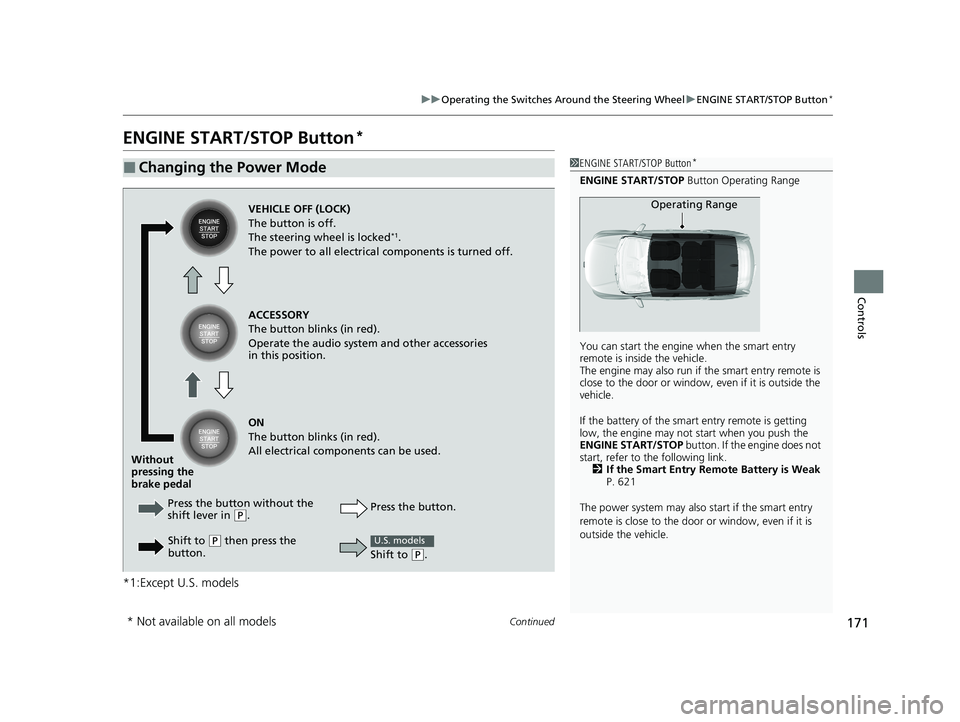
ENGINE START/STOP Button*
*1:Except U.S. models
■Changing the Power Mode1ENGINE START/STOP Button*
ENGINE START/STOP Button Operating Range
You can start the engine when the smart entry
remote is inside the vehicle.
The engine may also run if the smart entry remote is
close to the door or window, ev en if it is outside the
vehicle.
If the battery of the smar t entry remote is getting
low, the engine may not start when you push the
ENGINE START/STOP button. If the engine does not
start, refer to the following link. 2 If the Smart Entry Remote Battery is Weak
P. 621
The power system may also start if the smart entry
remote is close to the door or window, even if it is
outside the vehicle.
Operating RangeVEHICLE OFF (LOCK)
The button is off.
The steering wheel is locked
*1.
The power to all electrical components is turned off.
ACCESSORY
The button blinks (in red).
Operate the audio system and other accessories
in this position.
ON
The button blinks (in red).
All electrical components can be used.
Press the button without the
shift lever in
( P.
Without
pressing the
brake pedal
Shift to
(P then press the
button. Press the button.
Shift to
(
P.
U.S. models
* Not available on all models
20 CR-V PET ELP_MAP_HMIN_HCM_J-31TLA6310.book 171 ページ 2019年10月3日 木曜日 午後4時55分
Page 174 of 671
uuOperating the Switches Around the Steering Wheel uENGINE START/STOP Button*
172
Controls
If you leave the vehicle for 30 to 60 minutes with the shift lever in (P and the power
mode in ACCESSORY, the vehicle automati cally goes into the mode similar to
VEHICLE OFF (LOCK) to avoid the battery drain.
When in this mode:
The steering wheel does not lock.
You cannot lock or unlock doors with th e remote transmitter or the smart entry
system.
Press the ENGINE START/STOP button three times to swit ch the mode to VEHICLE
OFF (LOCK).
■Automatic Power Off1 ENGINE START/STOP Button*
If the power mode does not change from VEHICLE
OFF to ACCESSORY, press the ENGINE START/STOP
button while moving the st eering wheel left and
right. The steering wheel will unlock, allowing the
mode to change.
Do not leave the power mode in ACCESSORY or ON
when you get out.
Canadian models
Canadian models
* Not available on all models
20 CR-V PET ELP_MAP_HMIN_HCM_J-31TLA6310.book 172 ページ 2019年10月3日 木曜日 午後4時55分
Page 448 of 671
uuBluetooth ® HandsFreeLink ®u HFL Menus
446
Features
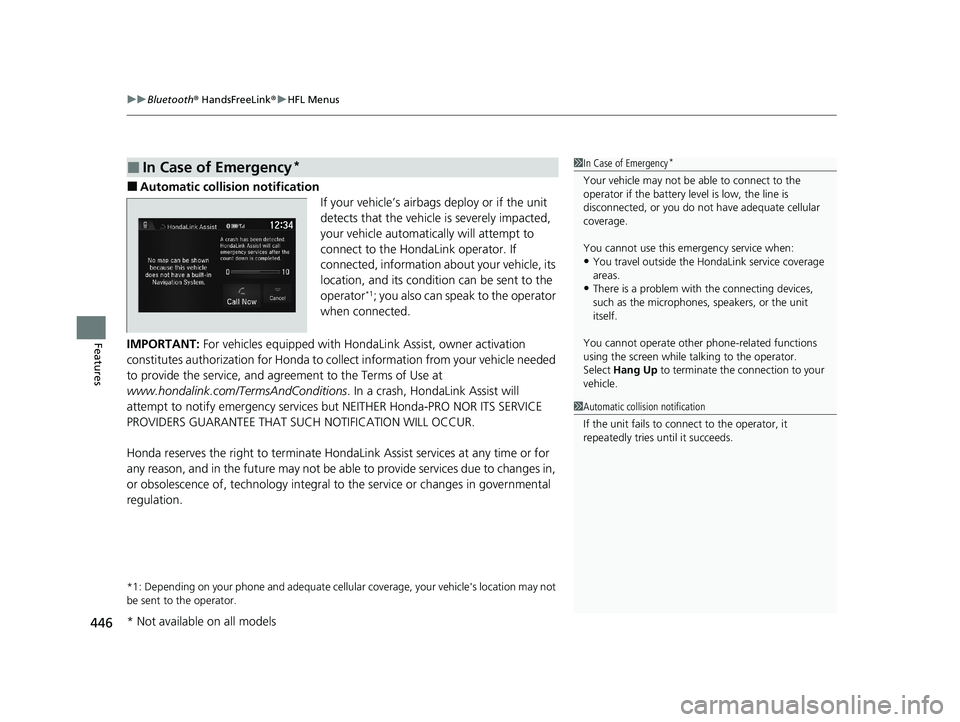
■Automatic collision notification
If your vehicle’s airbags deploy or if the unit
detects that the vehicle is severely impacted,
your vehicle automatically will attempt to
connect to the HondaLink operator. If
connected, information about your vehicle, its
location, and its condition can be sent to the
operator
*1; you also can speak to the operator
when connected.
IMPORTANT: For vehicles equipped with Hond aLink Assist, owner activation
constitutes authorization for Honda to co llect information from your vehicle needed
to provide the service, and agr eement to the Terms of Use at
www.hondalink.com/TermsAndConditions . In a crash, HondaLink Assist will
attempt to notify emergency services but NEITHER Honda-PRO NOR ITS SERVICE
PROVIDERS GUARANTEE THAT S UCH NOTIFICATION WILL OCCUR.
Honda reserves the right to terminate HondaLink Assist services at any time or for
any reason, and in the future may not be ab le to provide services due to changes in,
or obsolescence of, technology integral to the service or changes in governmental
regulation.
*1: Depending on your phone and adequate cellular coverage, y our vehicle's location may not
be sent to the operator.
■In Case of Emergency*1 In Case of Emergency*
Your vehicle may not be able to connect to the
operator if the battery level is low, the line is
disconnected, or you do not have adequate cellular
coverage.
You cannot use this emergency service when:
•You travel outside the HondaLink service coverage
areas.
•There is a problem with the connecting devices,
such as the microphones, speakers, or the unit
itself.
You cannot operate othe r phone-related functions
using the screen while talking to the operator.
Select Hang Up to terminate the connection to your
vehicle.
1 Automatic collision notification
If the unit fails to connect to the operator, it
repeatedly tries until it succeeds.
* Not available on all models
20 CR-V PET ELP_MAP_HMIN_HCM_J-31TLA6310.book 446 ページ 2019年10月3日 木曜日 午後4時55分
Page 505 of 671
Continued503
uuWhen Driving uRoad Departure Mitigation (RDM) System
Driving
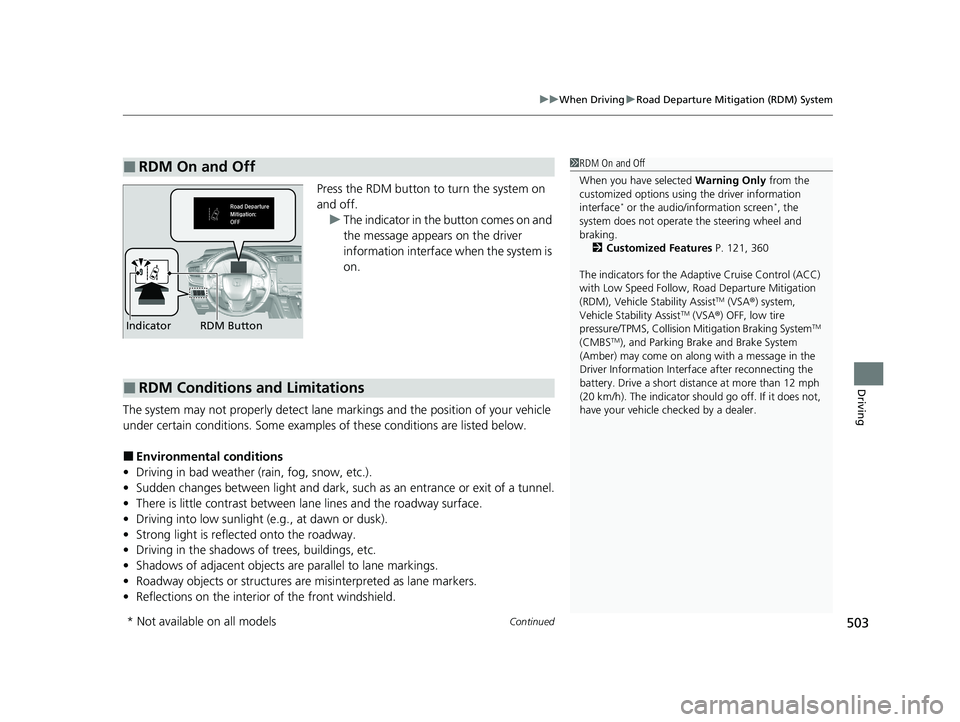
Press the RDM button to turn the system on
and off.
u The indicator in the button comes on and
the message appears on the driver
information interface when the system is
on.
The system may not properly detect lane ma rkings and the position of your vehicle
under certain conditions. Some examples of these conditions are listed below.
■Environmental conditions
• Driving in bad weather (rain, fog, snow, etc.).
• Sudden changes between light and dark, such as an entrance or exit of a tunnel.
• There is little contrast between lane lines and the roadway surface.
• Driving into low sunlight (e.g., at dawn or dusk).
• Strong light is reflec ted onto the roadway.
• Driving in the shadows of trees, buildings, etc.
• Shadows of adjacent objects are parallel to lane markings.
• Roadway objects or structures are misinterpreted as lane markers.
• Reflections on the interior of the front windshield.
■RDM On and Off1RDM On and Off
When you have selected Warning Only from the
customized options using the driver information
interface
* or the audio/information screen*, the
system does not operate the steering wheel and
braking. 2 Customized Features P. 121, 360
The indicators for the Adaptive Cruise Control (ACC)
with Low Speed Follow, Road Departure Mitigation
(RDM), Vehicle Stability Assist
TM (VSA ®) system,
Vehicle Stability AssistTM (VSA ®) OFF, low tire
pressure/TPMS, Collision Mitigation Braking SystemTM
(CMBSTM), and Parking Brake and Brake System
(Amber) may come on along with a message in the
Driver Information Interf ace after reconnecting the
battery. Drive a short distance at more than 12 mph
(20 km/h). The indicator shoul d go off. If it does not,
have your vehicle ch ecked by a dealer.
RDM Button
Indicator
■RDM Conditions and Limitations
* Not available on all models
20 CR-V PET ELP_MAP_HMIN_HCM_J-31TLA6310.book 503 ページ 2019年10月3日 木曜日 午後4時55分
Page 561 of 671
559
Maintenance
This chapter discusses basic maintenance.
Before Performing MaintenanceInspection and Maintenance ............ 560
Safety When Performing Maintenance ..561Parts and Fluids Used in Maintenance Service ........................................... 562
Maintenance Minder
TM..................... 563
Maintenance Under the Hood Maintenance Items Under the Hood .. 569
Opening the Hood ........................... 570
Recommended Engine Oil ................ 571
Oil Check ......................................... 572
Adding Engine Oil ............................ 573
Changing the Engine Oil and Oil Filter ...574
Engine Coolant ................................ 576
Transmission Fluid ............................ 578
Brake Fluid ....................................... 579
Refilling Window Wa sher Fluid......... 580
Replacing Light Bulbs ....................... 581
Checking and Maintaining Wiper Blades.. 586Checking and Maintaining Tires
Checking Tires ................................. 590
Tire and Loading Information Label ...... 591Tire Labeling .................................... 591DOT Tire Quality Grading (U.S. Vehicles).. 593Wear Indicators................................ 595
Tire Service Life ................................ 595 Tire and Wheel Replacement ........... 596
Tire Rotation .................................... 597
Winter Tires ..................................... 598
Battery ............................................... 599
Remote Transmitter Care Replacing the Button Battery ........... 601
Climate Control System Maintenance .. 603Cleaning
Interior Care .................................... 604
Exterior Care.................................... 606
Accessories and Modifications .......... 609
20 CR-V PET ELP_MAP_HMIN_HCM_J-31TLA6310.book 559 ページ 2019年10月3日 木曜日 午後4時55分
Page 613 of 671
611
Handling the Unexpected
This chapter explains how to handle unexpected troubles.
ToolsTypes of Tools .................................. 612
If a Tire Goes Flat Changing a Flat Tire ......................... 613
Engine Does Not Start Checking the Engine ........................ 620
If the Smart Entry Remote Battery is Weak .......................................... 621
Emergency Engine Stop ................... 622
Jump Starting .................................... 623
Shift Lever Does Not Move .............. 626
Overheating How to Handle Overheating ............. 627 Indicator, Coming On/Blinking
If the Low Oil Pressu
re Indicator Comes
On................................................ 629
If the Charging System Indicator Comes
On ................................................. 629
If the Malfunction Indicator Lamp Comes On or Blinks ................................... 630
If the Brake System Indicator (Red) Comes On or Blinks ....................................... 631
If the Brake System Indicator (Red) Comes On or
Blinks at the Same Time When the Brake
System Indicator (Amber) Comes On ..... 632
If the Electric Power Steering (EPS) System Indicator Comes On ........................... 633
If the Low Tire Pressure/TPMS Indicator Comes On or Blinks ....................... 634
Fuses Fuse Locations ................................. 635
Inspecting and Changing Fuses ........ 639
Emergency Towing ........................... 640
When You Cannot Open the Tailgate.. 641Refueling................................................. 642
20 CR-V PET ELP_MAP_HMIN_HCM_J-31TLA6310.book 611 ページ 2019年10月3日 木曜日 午後4時55分