lane assist HONDA CR-V HYBRID 2020 (in English) User Guide
[x] Cancel search | Manufacturer: HONDA, Model Year: 2020, Model line: CR-V HYBRID, Model: HONDA CR-V HYBRID 2020Pages: 687, PDF Size: 41.59 MB
Page 457 of 687
455
Driving
This chapter discusses driving and refueling.
Before Driving................................... 456
Towing a Trailer ................................ 461
Towing Your Vehicle ........................ 462
Off-Highway Driving Guidelines General Information ......................... 463
Important Safety Precautions............ 463
Avoiding Trouble ............................. 464
When Driving Turning on the Power ...................... 465
Precautions While Driving................. 471
Transmission .................................... 472
Shifting ............................................ 473
SPORT Mode.................................... 479 Deceleration Paddl
e Selector ............ 480
ECON Mode .................................... 483
Acoustic Vehicle Alerting System...... 484
Vehicle Stability AssistTM (VSA®), aka Electronic
Stability Control (ESC), System .............. 485
Agile Handling Assist ....................... 487
Real Time AWD with Intelligent Control System
TM........................................ 488Tire Pressure Monitoring System (TPMS) .. 489Tire Pressure Monitoring System (TPMS) - Required Federal Explanation ......... 493
Blind spot information System*........... 495High Voltage Battery ........................ 498 Honda Sensing
®................................ 499
Collision Mitigation Braking SystemTM (CMBSTM) .... 502Adaptive Cruise Control (ACC) with Low Speed Follow ....... 513Lane Keeping Assist System (LKAS) .. 530Road Departure Mitigation (RDM) System.... 539Front Sensor Camera ....................... 544
Radar Sensor ................................... 546
Braking Brake System ................................... 547
Anti-lock Brake System (ABS) ........... 553
Brake Assist System ......................... 554
Parking Your Vehicle ........................ 555
Multi-View Rear Camera .................. 566
Refueling ........................................... 568
Fuel Economy and CO
2 Emissions .... 571
* Not available on all models
20 CR-V HYBRID HMIN-31TPG6000.book 455 ページ 2019年11月28日 木曜日 午後1時50分
Page 497 of 687
495
uuWhen Driving uBlind spot information System*
Continued
Driving
Blind spot information System*
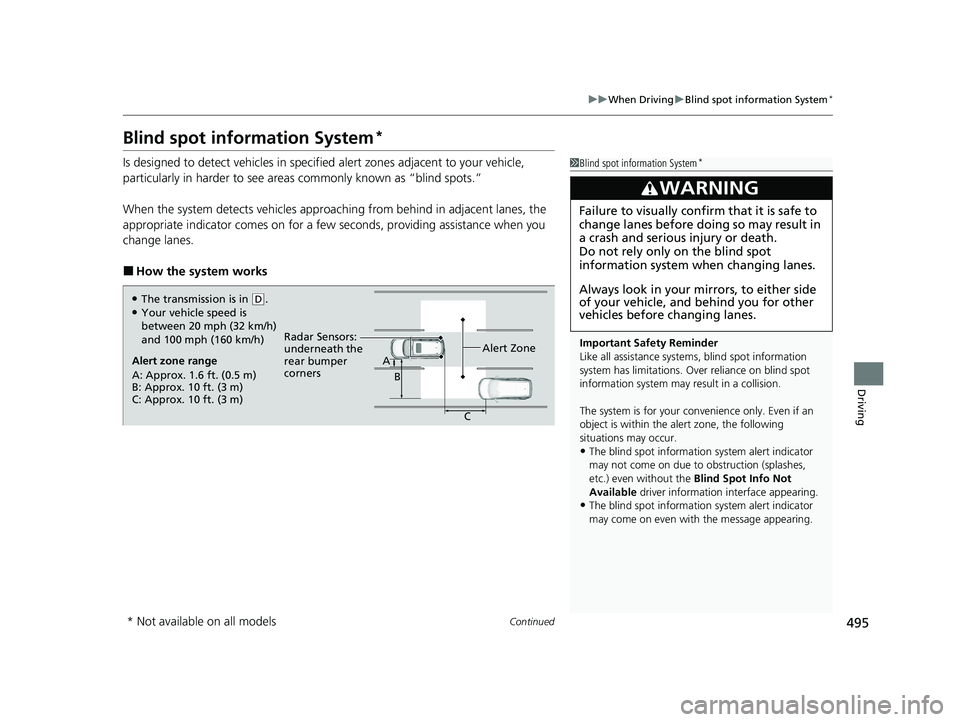
Is designed to detect vehicles in specified alert zones adjacent to your vehicle,
particularly in harder to see areas commonly known as “blind spots.”
When the system detects vehicles approach ing from behind in adjacent lanes, the
appropriate indicator comes on for a few seconds, providing assistance when you
change lanes.
■How the system works
1 Blind spot information System*
Important Safety Reminder
Like all assistance systems, blind spot information
system has limitations. Over reliance on blind spot
information system may result in a collision.
The system is for your convenience only. Even if an
object is within the alert zone, the following
situations may occur.
•The blind spot informatio n system alert indicator
may not come on due to obstruction (splashes,
etc.) even without the Blind Spot Info Not
Available driver information interface appearing.
•The blind spot informatio n system alert indicator
may come on even with the message appearing.
3WARNING
Failure to visually confirm that it is safe to
change lanes before doing so may result in
a crash and serious injury or death.
Do not rely only on the blind spot
information system wh en changing lanes.
Always look in your mi rrors, to either side
of your vehicle, and behind you for other
vehicles before changing lanes.
Alert zone range
A: Approx. 1.6 ft. (0.5 m)
B: Approx. 10 ft. (3 m)
C: Approx. 10 ft. (3 m) Radar Sensors:
underneath the
rear bumper
corners
Alert ZoneA
B
C
●The transmission is in (D.●Your vehicle speed is
between 20 mph (32 km/h)
and 100 mph (160 km/h)
* Not available on all models
20 CR-V HYBRID HMIN-31TPG6000.book 495 ページ 2019年11月28日 木曜日 午後1時50分
Page 501 of 687
499Continued
Driving
Honda Sensing®
Honda Sensing® is a driver support system which employs the use of two distinctly
different kinds of sensors: a radar sensor located inside the front grille and a front
sensor camera mounted to the interior side of the windshield, behind the rearview
mirror.
Honda Sensing ® has following functions.
■The functions which do not requir e switch operations to activate
• Collision Mitigation Braking SystemTM (CMBSTM) 2 P. 502
• Road Departure Mitigation (RDM) System 2 P. 539
■The functions wh ich require switch operations to activate
• Adaptive Cruise Control ( ACC) with Low Speed Follow
2 P. 513
• Lane Keeping Assist System (LKAS) 2 P. 530
20 CR-V HYBRID HMIN-31TPG6000.book 499 ページ 2019年11月28日 木曜日 午後1時50分
Page 516 of 687
uuHonda Sensing ®u Adaptive Cruise Control (ACC) with Low Speed Follow
514
Driving
■How to activate the system1Adaptive Cruise Control (ACC) with Low Speed Follow
You can read about handling information for the
camera equipped with this system.
2 Front Sensor Camera P. 544
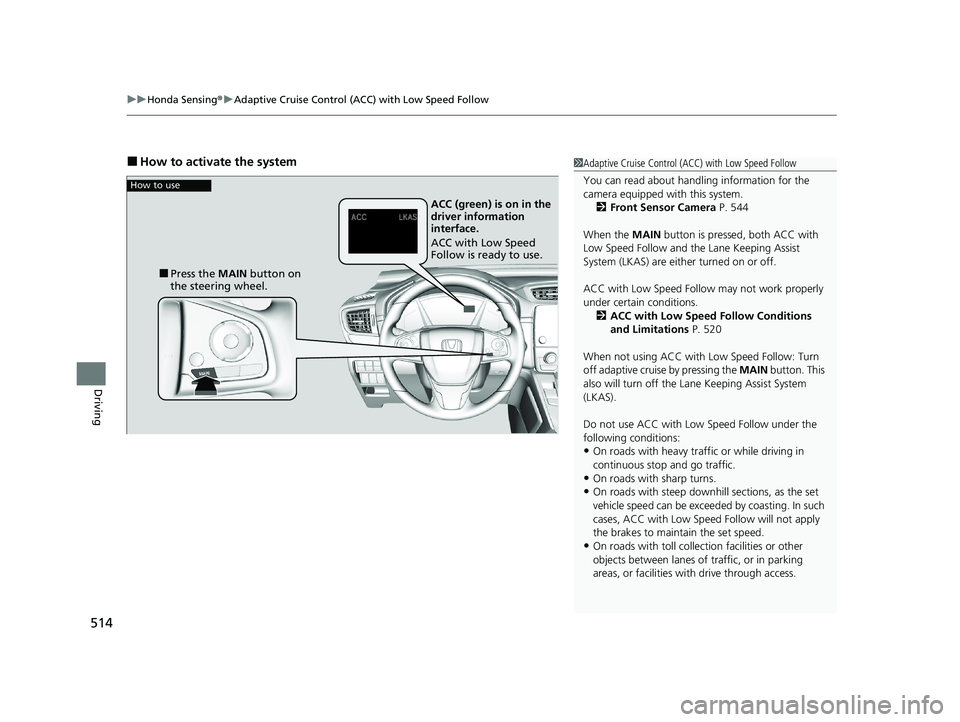
When the MAIN button is pressed, both ACC with
Low Speed Follow and the Lane Keeping Assist
System (LKAS) are either turned on or off.
ACC with Low Speed Follow may not work properly
under certain conditions.
2 ACC with Low Speed Follow Conditions
and Limitations P. 520
When not using ACC with Low Speed Follow: Turn
off adaptive cruise by pressing the MAIN button. This
also will turn off the Lane Keeping Assist System
(LKAS).
Do not use ACC with Low Speed Follow under the
following conditions:
•On roads with heavy traf fic or while driving in
continuous stop and go traffic.
•On roads with sharp turns.•On roads with steep downhill sections, as the set
vehicle speed can be exceeded by coasting. In such
cases, ACC with Low Speed Follow will not apply
the brakes to maintain the set speed.
•On roads with toll collection facilities or other
objects between lanes of traffic, or in parking
areas, or faci lities with driv e through access.
How to use
■Press the MAIN button on
the steering wheel. ACC (green) is on in the
driver information
interface.
ACC with Low Speed
Follow is ready to use.
20 CR-V HYBRID HMIN-31TPG6000.book 514 ページ 2019年11月28日 木曜日 午後1時50分
Page 532 of 687
530
uuHonda Sensing ®u Lane Keeping Assist System (LKAS)
Driving
Lane Keeping Assist System (LKAS)
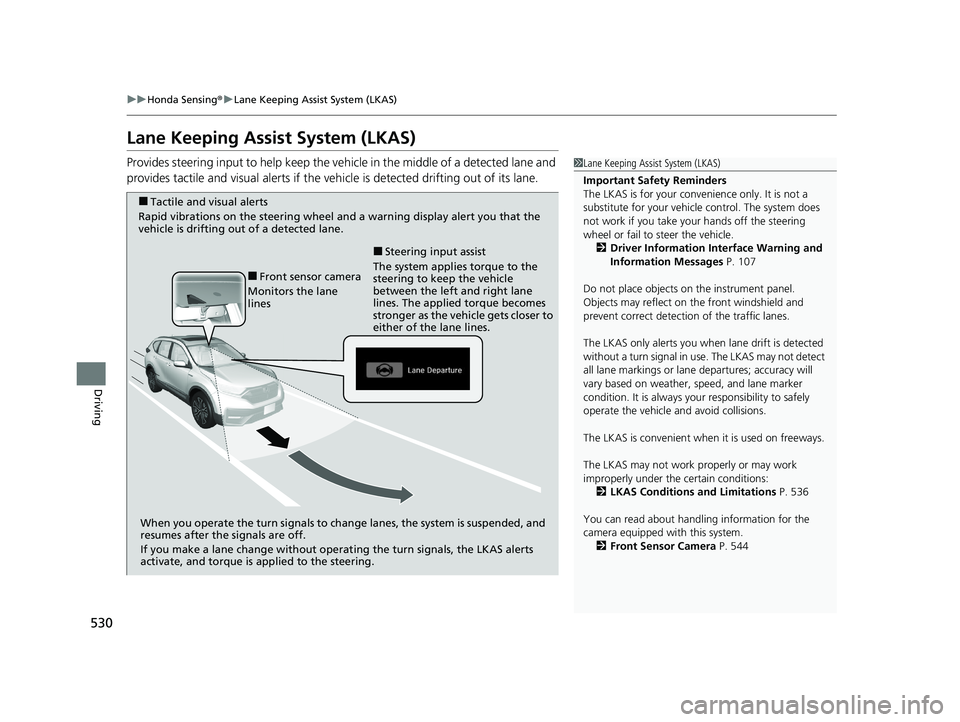
Provides steering input to help keep the vehicle in the middle of a detected lane and
provides tactile and visual alerts if the ve hicle is detected drifting out of its lane.1Lane Keeping Assist System (LKAS)
Important Safety Reminders
The LKAS is for your convenience only. It is not a
substitute for your vehicl e control. The system does
not work if you take y our hands off the steering
wheel or fail to steer the vehicle.
2 Driver Information Interface Warning and
Information Messages P. 107
Do not place objects on the instrument panel.
Objects may reflect on th e front windshield and
prevent correct detectio n of the traffic lanes.
The LKAS only alerts you when lane drift is detected
without a turn signal in use. The LKAS may not detect
all lane markings or lane departures; accuracy will
vary based on weather, speed, and lane marker
condition. It is always your responsibility to safely
operate the vehicle an d avoid collisions.
The LKAS is convenient when it is used on freeways.
The LKAS may not work properly or may work
improperly under the certain conditions: 2 LKAS Conditions and Limitations P. 536
You can read about handling information for the
camera equipped with this system. 2 Front Sensor Camera P. 544
■Tactile and visual alerts
Rapid vibrations on the steering wheel and a warning display alert you that the
vehicle is drifting out of a detected lane.
When you operate the turn signals to chan ge lanes, the system is suspended, and
resumes after the signals are off.
If you make a lane change without operat ing the turn signals, the LKAS alerts
activate, and torque is applied to the steering.
■Front sensor camera
Monitors the lane
lines The system applies torque to the
steering to keep the vehicle
between the left and right lane
lines. The applied torque becomes
stronger as the vehicle gets closer to
either of the lane lines.
■Steering input assist
20 CR-V HYBRID HMIN-31TPG6000.book 530 ページ 2019年11月28日 木曜日 午後1時50分
Page 533 of 687
Continued531
uuHonda Sensing ®u Lane Keeping Assist System (LKAS)
Driving
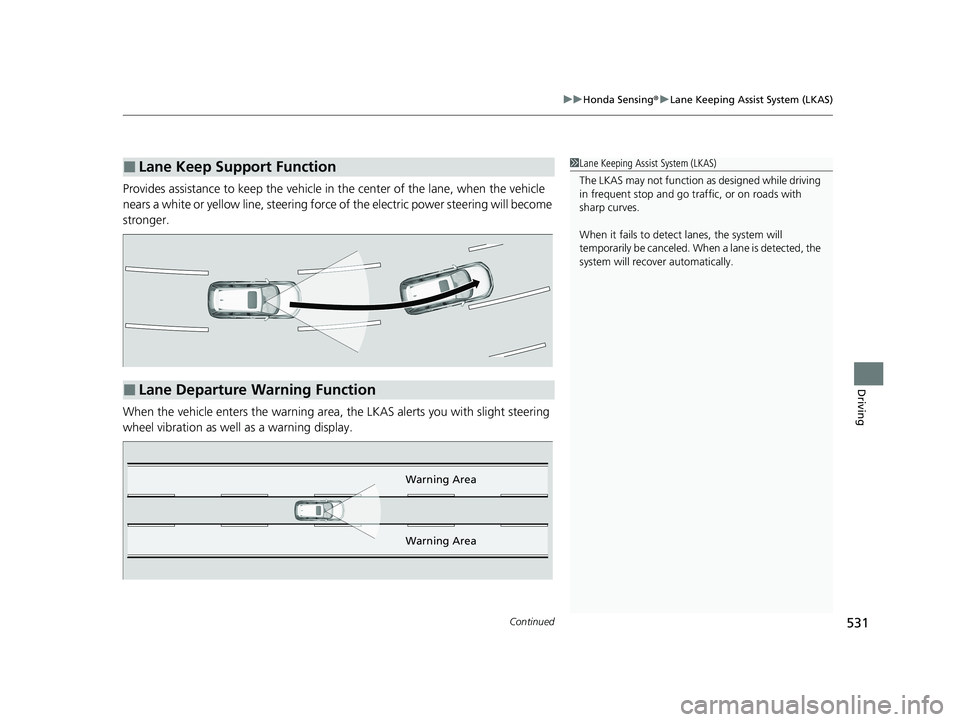
Provides assistance to keep the vehicle in the center of the lane, when the vehicle
nears a white or yellow line, steering force of the electric power steering will become
stronger.
When the vehicle enters the warning area, the LKAS alerts you with slight steering
wheel vibration as well as a warning display.
■Lane Keep Support Function1 Lane Keeping Assist System (LKAS)
The LKAS may not function as designed while driving
in frequent stop and go traf fic, or on roads with
sharp curves.
When it fails to detect lanes, the system will
temporarily be canceled. When a lane is detected, the
system will recover automatically.
■Lane Departure Warning Function
Warning Area
Warning Area
20 CR-V HYBRID HMIN-31TPG6000.book 531 ページ 2019年11月28日 木曜日 午後1時50分
Page 534 of 687
uuHonda Sensing ®u Lane Keeping Assist System (LKAS)
532
Driving
The system can be used when the following conditions are met.
• The lane in which you are driving has dete ctable lane markers on both sides, and
your vehicle is in the center of the lane.
• The vehicle is traveling between about 45 and 90 mph (72 and 145 km/h).
• You are driving on a straight or slightly curved road.
• The turn signals are off.
• The brake pedal is not depressed.
• The wipers are not in continuous operation.
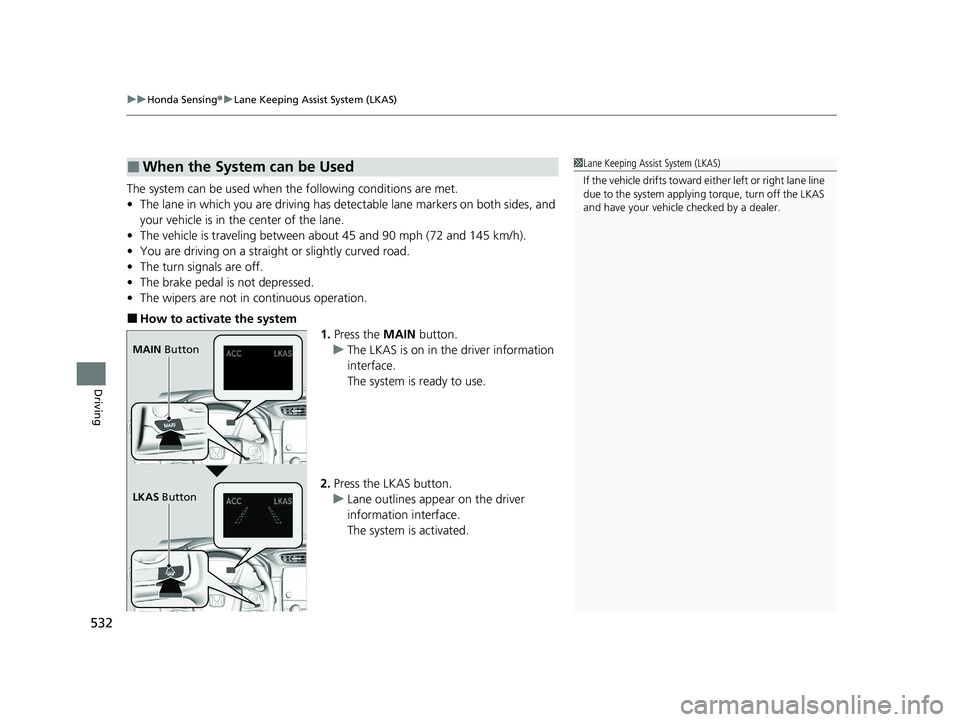
■How to activate the system
1.Press the MAIN button.
u The LKAS is on in the driver information
interface.
The system is ready to use.
2. Press the LKAS button.
u Lane outlines appear on the driver
information interface.
The system is activated.
■When the System can be Used1Lane Keeping Assist System (LKAS)
If the vehicle drifts toward ei t h e r l ef t o r r ight lane line
due to the system applying torque, turn off the LKAS
and have your vehicle checked by a dealer.
MAIN Button
LKAS Button
20 CR-V HYBRID HMIN-31TPG6000.book 532 ページ 2019年11月28日 木曜日 午後1時50分
Page 535 of 687
Continued533
uuHonda Sensing ®u Lane Keeping Assist System (LKAS)
Driving
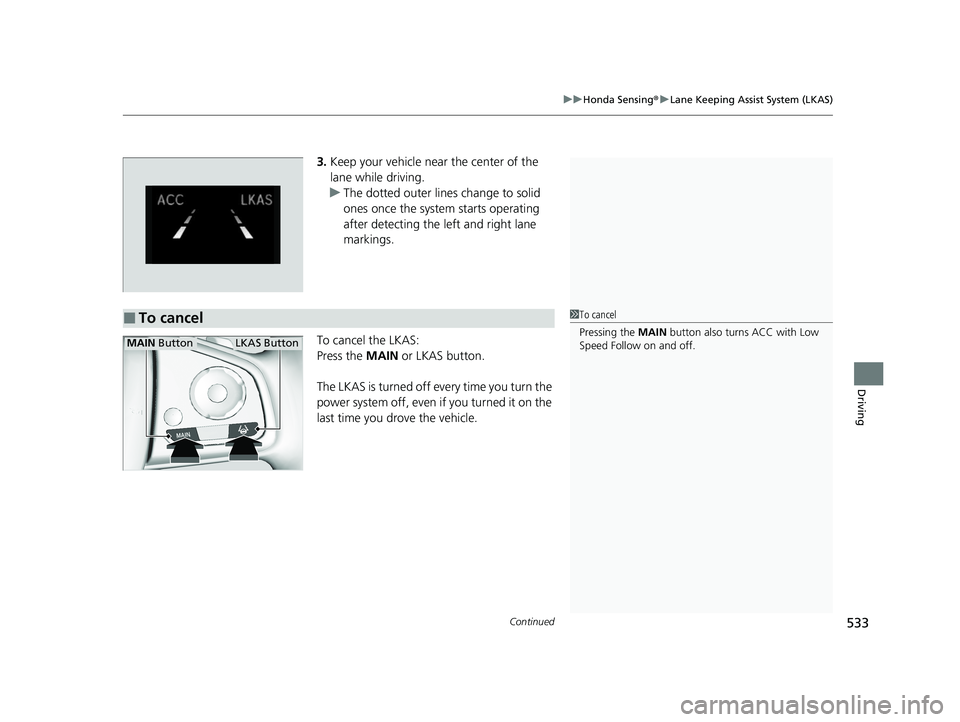
3. Keep your vehicle near the center of the
lane while driving.
u The dotted outer lines change to solid
ones once the system starts operating
after detecting the left and right lane
markings.
To cancel the LKAS:
Press the MAIN or LKAS button.
The LKAS is turned off every time you turn the
power system off, even if you turned it on the
last time you drove the vehicle.
■To cancel1 To cancel
Pressing the MAIN button also turns ACC with Low
Speed Follow on and off.
MAIN ButtonLKAS Button
20 CR-V HYBRID HMIN-31TPG6000.book 533 ページ 2019年11月28日 木曜日 午後1時50分
Page 536 of 687
534
uuHonda Sensing ®u Lane Keeping Assist System (LKAS)
Driving
■The system operation is suspended if
you:
• Set the wipers to HI.
u Turning the wipers off or setting it to LO
resumes the LKAS.
• Set the wiper switch to AUTO and the
wipers operate at high speed.
u The LKAS resumes when the wipers stop
or operate at low speed.
• Decrease the vehicle speed to 40 mph (64
km/h) or less.
u Increasing the vehicle speed to 45 mph
(72 km/h) or more resumes the LKAS.
• Depress the brake pedal.
u The LKAS resumes and starts detecting
the lane lines again once you release the
brake pedal.
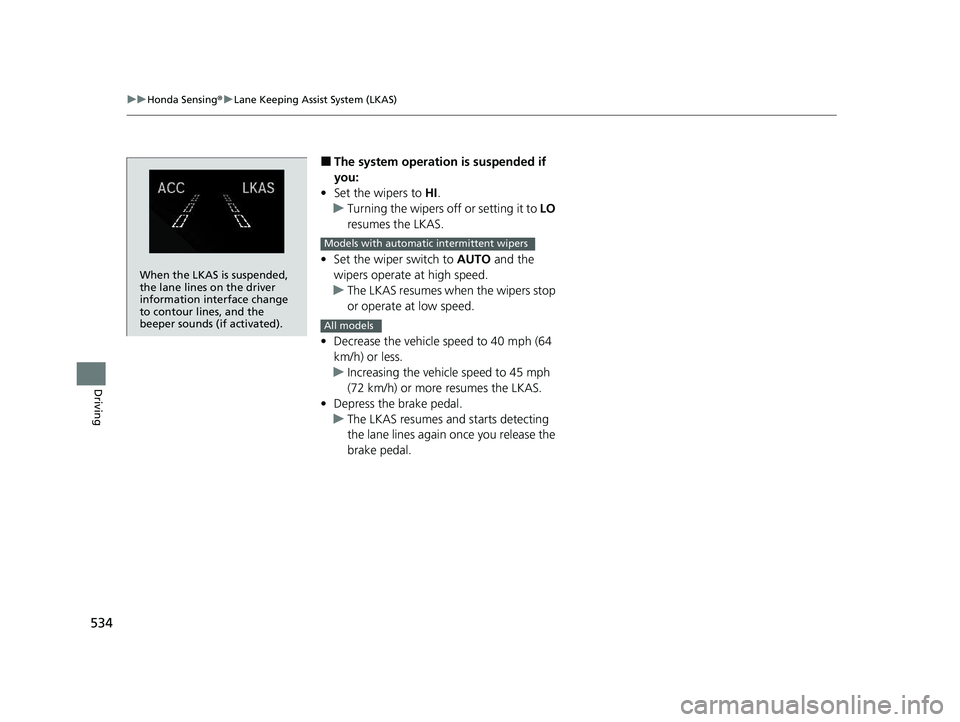
When the LKAS is suspended,
the lane lines on the driver
information interface change
to contour lines, and the
beeper sounds (if activated).
Models with automatic intermittent wipers
All models
20 CR-V HYBRID HMIN-31TPG6000.book 534 ページ 2019年11月28日 木曜日 午後1時50分
Page 537 of 687
535
uuHonda Sensing ®u Lane Keeping Assist System (LKAS)
Continued
Driving
■The LKAS may automatica lly be suspended when:
• The system fails to detect lane lines.
• The steering wheel is quickly turned.
• You fail to steer the vehicle.
• Driving through a sharp curve.
• Driving at a speed in excess of approximately 90 mph (145 km/h).
Once these conditions no longer exist, the LKAS automatically resumes.
■The LKAS may automatically be canceled when:
• The camera temperature gets extremely high or low.
• The camera behind the rearview mirror, or the area around the camera, including
the windshield, gets dirty.
• The ABS or VSA ® systems engage.
The beeper sounds if the LKAS is automatically canceled.
20 CR-V HYBRID HMIN-31TPG6000.book 535 ページ 2019年11月28日 木曜日 午後1時50分