battery HONDA CR-V HYBRID 2020 (in English) Workshop Manual
[x] Cancel search | Manufacturer: HONDA, Model Year: 2020, Model line: CR-V HYBRID, Model: HONDA CR-V HYBRID 2020Pages: 687, PDF Size: 41.59 MB
Page 467 of 687
465Continued
Driving
When Driving
Turning on the Power
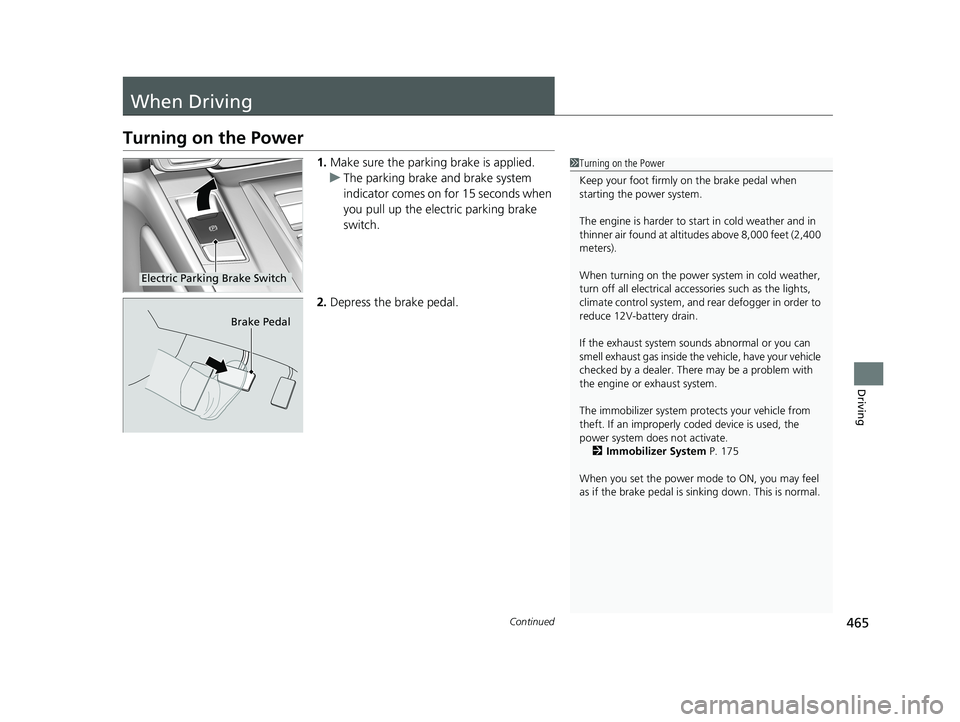
1.Make sure the parkin g brake is applied.
u The parking brake and brake system
indicator comes on for 15 seconds when
you pull up the electric parking brake
switch.
2. Depress the brake pedal.1Turning on the Power
Keep your foot firmly on the brake pedal when
starting the power system.
The engine is harder to st art in cold weather and in
thinner air found at altit udes above 8,000 feet (2,400
meters).
When turning on the power system in cold weather,
turn off all electrical accessories such as the lights,
climate control system, and rear defogger in order to
reduce 12V-battery drain.
If the exhaust system sounds abnormal or you can
smell exhaust gas inside the vehicle, have your vehicle
checked by a dealer. There may be a problem with
the engine or exhaust system.
The immobilizer system pr otects your vehicle from
theft. If an improperly c oded device is used, the
power system does not activate.
2 Immobilizer System P. 175
When you set the power mode to ON, you may feel
as if the brake pedal is sinking down. This is normal.
Electric Parking Brake Switch
Brake Pedal
20 CR-V HYBRID HMIN-31TPG6000.book 465 ページ 2019年11月28日 木曜日 午後1時50分
Page 468 of 687
uuWhen Driving uTurning on the Power
466
Driving
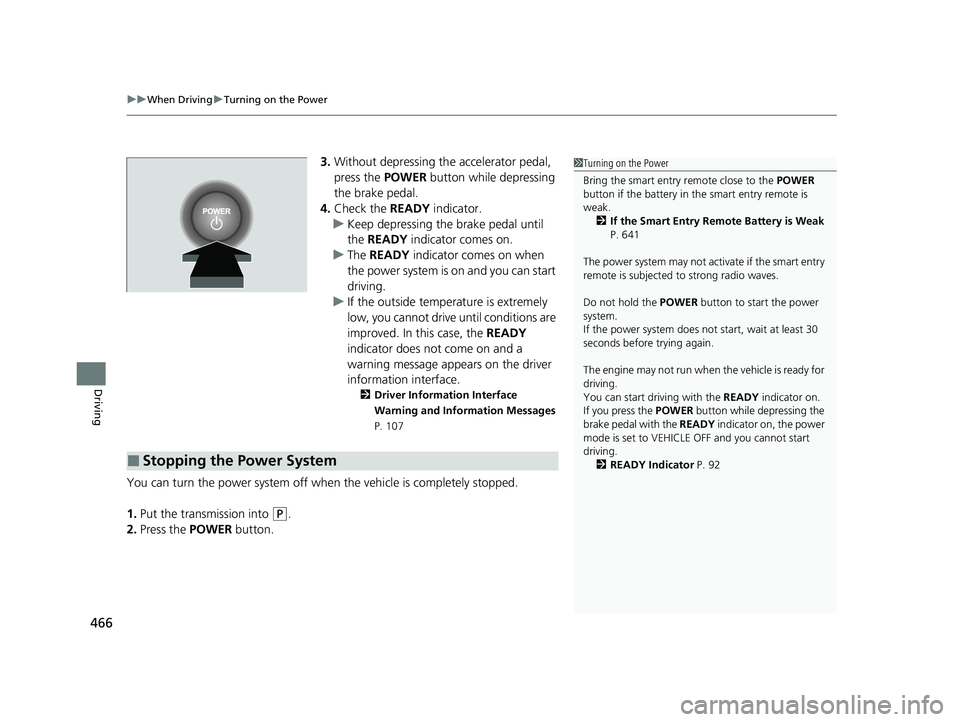
3. Without depressing th e accelerator pedal,
press the POWER button while depressing
the brake pedal.
4. Check the READY indicator.
u Keep depressing the brake pedal until
the READY indicator comes on.
u The READY indicator comes on when
the power system is on and you can start
driving.
u If the outside temperature is extremely
low, you cannot drive until conditions are
improved. In this case, the READY
indicator does not come on and a
warning message appears on the driver
information interface.
2 Driver Information Interface
Warning and Information Messages
P. 107
You can turn the power system off when the vehicle is completely stopped.
1. Put the transmission into
(P.
2. Press the POWER button.
■Stopping the Power System
1Turning on the Power
Bring the smart entry remote close to the POWER
button if the battery in the smart entry remote is
weak. 2 If the Smart Entry Remote Battery is Weak
P. 641
The power system may not activate if the smart entry
remote is subjected to strong radio waves.
Do not hold the POWER button to start the power
system.
If the power system does not start, wait at least 30
seconds before trying again.
The engine may not run when the vehicle is ready for
driving.
You can start driving with the READY indicator on.
If you press the POWER button while depressing the
brake pedal with the READY indicator on, the power
mode is set to VEHICLE OFF and you cannot start
driving.
2 READY Indicator P. 92
20 CR-V HYBRID HMIN-31TPG6000.book 466 ページ 2019年11月28日 木曜日 午後1時50分
Page 475 of 687
473
uuWhen Driving uShifting
Continued
Driving
Shifting
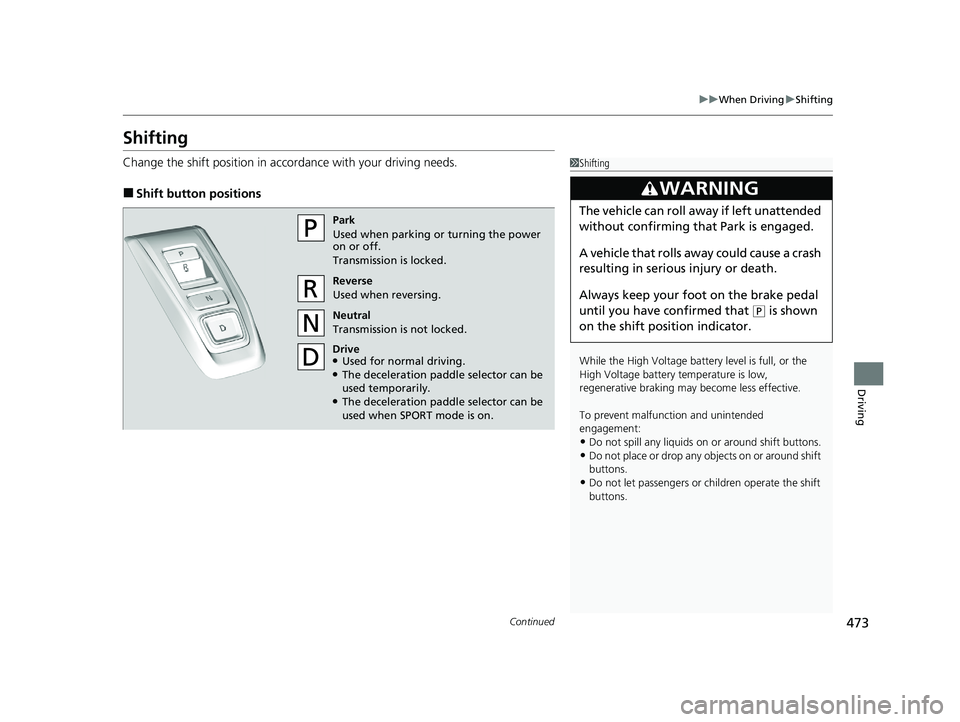
Change the shift position in accordance with your driving needs.
■Shift button positions
1Shifting
While the High Voltage battery level is full, or the
High Voltage battery temperature is low,
regenerative braking ma y become less effective.
To prevent malfunc tion and unintended
engagement:
•Do not spill any liquids on or around shift buttons.
•Do not place or drop any objects on or around shift
buttons.
•Do not let passengers or ch ildren operate the shift
buttons.
3WARNING
The vehicle can roll aw ay if left unattended
without confirming th at Park is engaged.
A vehicle that rolls away could cause a crash
resulting in serious injury or death.
Always keep your foot on the brake pedal
until you have confirmed that
( P is shown
on the shift posi tion indicator.
Park
Used when parking or turning the power
on or off.
Transmission is locked.
Reverse
Used when reversing.
Neutral
Transmission is not locked.
Drive
●Used for normal driving.●The deceleration paddle selector can be
used temporarily.
●The deceleration paddle selector can be
used when SPORT mode is on.
20 CR-V HYBRID HMIN-31TPG6000.book 473 ページ 2019年11月28日 木曜日 午後1時50分
Page 476 of 687
uuWhen Driving uShifting
474
Driving
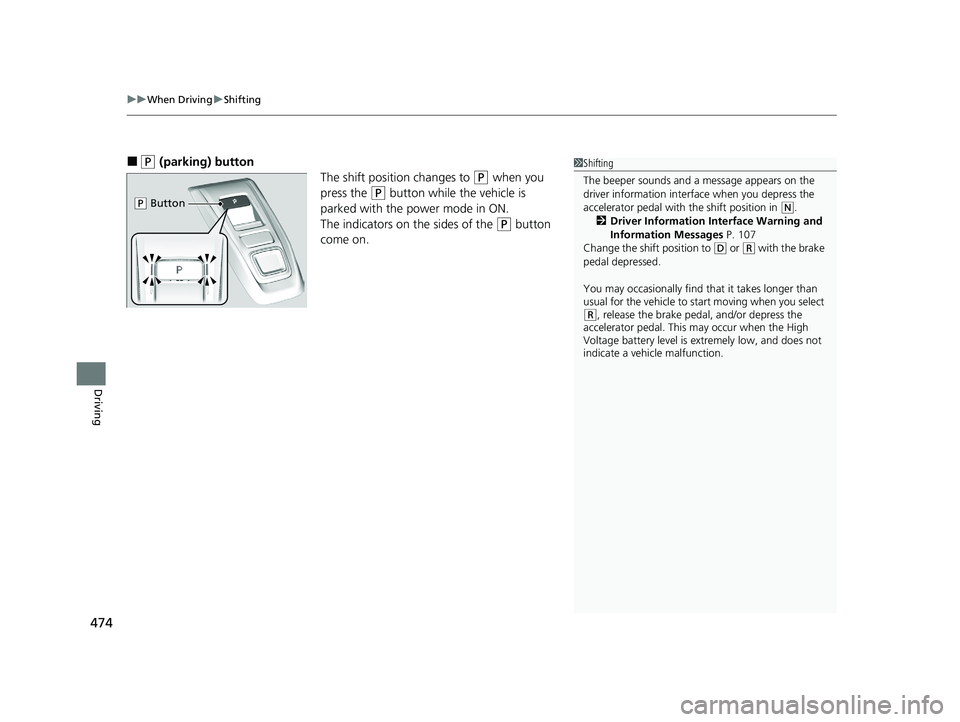
■(P (parking) button
The shift position changes to
(P when you
press the
(P button while the vehicle is
parked with the power mode in ON.
The indicators on the sides of the
(P button
come on.
1 Shifting
The beeper sounds and a message appears on the
driver information interf ace when you depress the
accelerator pedal with the shift position in
( N.
2 Driver Information Interface Warning and
Information Messages P. 107
Change the shift position to
( D or (R with the brake
pedal depressed.
You may occasionally find th at it takes longer than
usual for the vehicle to start moving when you select
( R, release the brake peda l, and/or depress the
accelerator pedal. This may occur when the High
Voltage battery level is extremely low, and does not
indicate a vehicle malfunction.
( P Button
20 CR-V HYBRID HMIN-31TPG6000.book 474 ページ 2019年11月28日 木曜日 午後1時50分
Page 483 of 687
Continued481
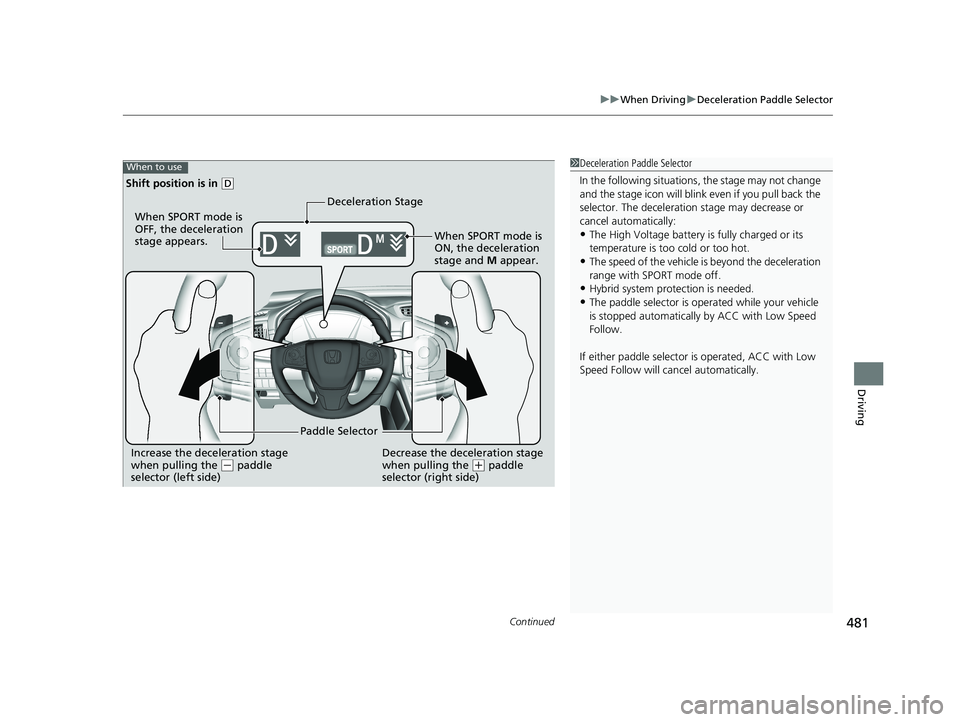
uuWhen Driving uDeceleration Paddle Selector
Driving
1Deceleration Paddle Selector
In the following situations , the stage may not change
and the stage icon will blink even if you pull back the
selector. The dece leration stage may decrease or
cancel automatically:
•The High Voltage battery is fully charged or its
temperature is too cold or too hot.
•The speed of the vehicle is beyond the deceleration
range with SPORT mode off.
•Hybrid system protection is needed.
•The paddle selector is ope rated while your vehicle
is stopped automatically by ACC with Low Speed
Follow.
If either paddle selector is operated, ACC with Low
Speed Follow will ca ncel automatically.
Increase the deceleration stage
when pulling the (- paddle
selector (left side) Paddle SelectorDecrease the deceleration stage
when pulling the (
+ paddle
selector (right side)
When to use
Shift position is in ( D
Deceleration Stage
When SPORT mode is
OFF, the deceleration
stage appears.
When SPORT mode is
ON, the deceleration
stage and M appear.
20 CR-V HYBRID HMIN-31TPG6000.book 481 ページ 2019年11月28日 木曜日 午後1時50分
Page 487 of 687
485
uuWhen Driving uVehicle Stability AssistTM (VSA ®), aka Electronic Stability Control (ESC), System
Continued
Driving
Vehicle Stability AssistTM (VSA ®), aka Electronic
Stability Control (ESC), System
VSA ® helps to stabilize the vehicle during corn ering if the vehicle turns more or less
than what was intended. It also assists in maintaining traction on slippery surfaces.
It does so by regulating engine outp ut and selectively applying the brakes.
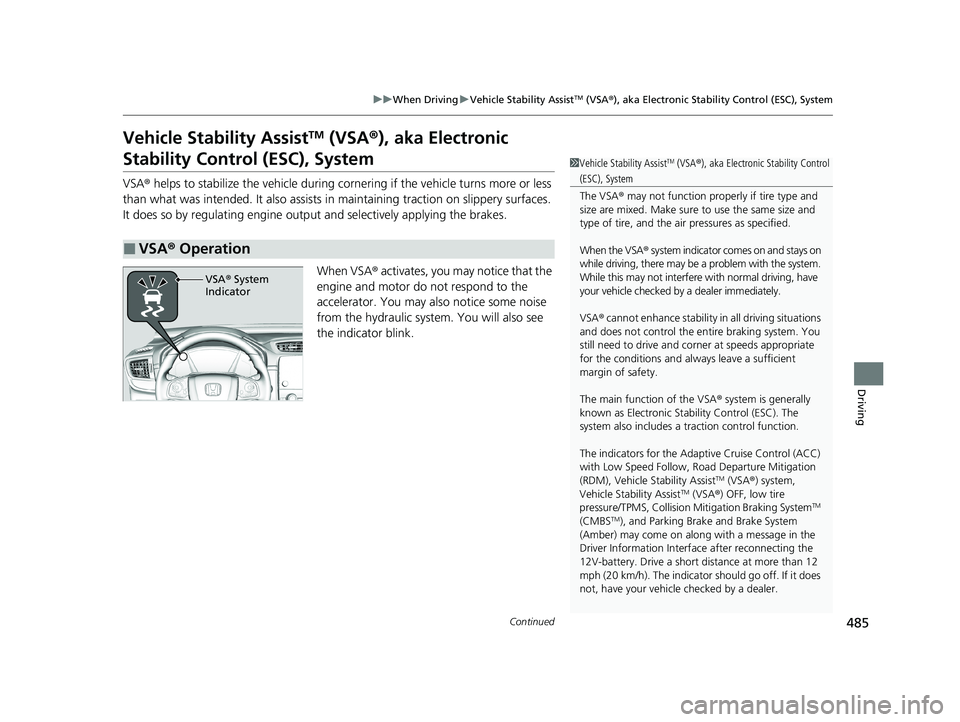
When VSA ® activates, you may notice that the
engine and motor do not respond to the
accelerator. You may also notice some noise
from the hydraulic system. You will also see
the indicator blink.
■VSA ® Operation
1 Vehicle Stability AssistTM (VSA® ), aka Electronic Stability Control
(ESC), System
The VSA ® may not function properl y if tire type and
size are mixed. Make sure to use the same size and
type of tire, and the air pressures as specified.
When the VSA ® system indicator comes on and stays on
while driving, there may be a problem with the system.
While this may not interfere with normal driving, have
your vehicle checked by a dealer immediately.
VSA ® cannot enhance stability in all driving situations
and does not control the entire braking system. You
still need to drive and corner at speeds appropriate
for the conditions and alwa ys leave a sufficient
margin of safety.
The main function of the VSA ® system is generally
known as Electronic Stability Control (ESC). The
system also includes a traction control function.
The indicators for the Adaptive Cruise Control (ACC)
with Low Speed Follow, Road Departure Mitigation
(RDM), Vehicle Stability Assist
TM (VSA ®) system,
Vehicle Stability AssistTM (VSA ®) OFF, low tire
pressure/TPMS, Collision Mitigation Braking SystemTM
(CMBSTM), and Parking Brake and Brake System
(Amber) may come on along with a message in the
Driver Information Interf ace after reconnecting the
12V-battery. Drive a short distance at more than 12
mph (20 km/h). The indicator should go off. If it does
not, have your vehicle checked by a dealer.
VSA® System
Indicator
20 CR-V HYBRID HMIN-31TPG6000.book 485 ページ 2019年11月28日 木曜日 午後1時50分
Page 493 of 687
Continued491
uuWhen Driving uTire Pressure Monitoring System (TPMS)
Driving
1TPMS Calibration
The indicators for the Adaptive Cruise Control (ACC)
with Low Speed Follow, Road Departure Mitigation
(RDM), Vehicle Stability Assist
TM (VSA ®) system,
Vehicle Stability AssistTM (VSA ®) OFF, low tire
pressure/TPMS, Collision Mitigation Braking SystemTM
(CMBSTM), and Parking Brake and Brake System
(Amber) may come on along with a message in the
Driver Information Interf ace after reconnecting the
12V-battery. Drive a short distance at more than 12
mph (20 km/h). The indicator should go off. If it does
not, have your vehicle checked by a dealer.
20 CR-V HYBRID HMIN-31TPG6000.book 491 ページ 2019年11月28日 木曜日 午後1時50分
Page 500 of 687
498
uuWhen Driving uHigh Voltage Battery
Driving
High Voltage Battery
The High Voltage battery gradually discharges even if the vehicle is not in use. As a
result, if your vehicle is parked for an extended period of time, the battery charge
level will become low. Extended periods of ti me at a low state of charge will shorten
battery life. To maintain the battery state of charge, drive your vehicle for more than
30 minutes at least once every three months.
Extreme high temperatures can affect the battery life. You can minimize the effects
by parking the vehicle in the shade during the summer.1 High Voltage Battery
Be careful not to let the High Voltage battery drain
too much. If the battery level becomes close to zero,
it will make it impossible to start the engine.
20 CR-V HYBRID HMIN-31TPG6000.book 498 ページ 2019年11月28日 木曜日 午後1時50分
Page 508 of 687
uuHonda Sensing ®u Collision Mitigation Braking SystemTM (CMBSTM)
506
Driving
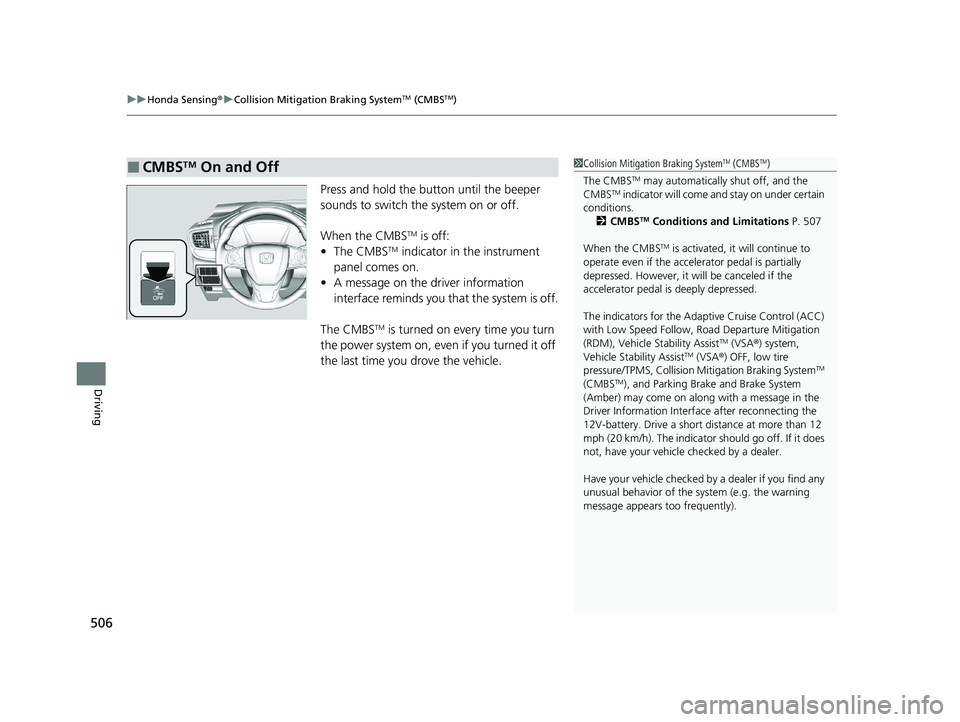
Press and hold the button until the beeper
sounds to switch the system on or off.
When the CMBS
TM is off:
• The CMBSTM indicator in the instrument
panel comes on.
• A message on the driver information
interface reminds you that the system is off.
The CMBS
TM is turned on every time you turn
the power system on, even if you turned it off
the last time you drove the vehicle.
■CMBSTM On and Off1 Collision Mitigation Braking SystemTM (CMBSTM)
The CMBS
TM may automatically shut off, and the
CMBSTM indicator will come an d stay on under certain
conditions.
2 CMBS
TM Conditions and Limitations P. 507
When the CMBS
TM is activated, it will continue to
operate even if the accele rator pedal is partially
depressed. However, it w ill be canceled if the
accelerator pedal is deeply depressed.
The indicators for the Adaptive Cruise Control (ACC)
with Low Speed Follow, Road Departure Mitigation
(RDM), Vehicle Stability Assist
TM (VSA ®) system,
Vehicle Stability AssistTM (VSA ®) OFF, low tire
pressure/TPMS, Collision Mitigation Braking SystemTM
(CMBSTM), and Parking Brake and Brake System
(Amber) may come on along with a message in the
Driver Information Interf ace after reconnecting the
12V-battery. Drive a short distance at more than 12
mph (20 km/h). The indicator should go off. If it does
not, have your vehicle checked by a dealer.
Have your vehicle checked by a dealer if you find any
unusual behavior of the system (e.g. the warning
message appears too frequently).
20 CR-V HYBRID HMIN-31TPG6000.book 506 ページ 2019年11月28日 木曜日 午後1時50分
Page 517 of 687
Continued515
uuHonda Sensing ®u Adaptive Cruise Control (ACC) with Low Speed Follow
Driving
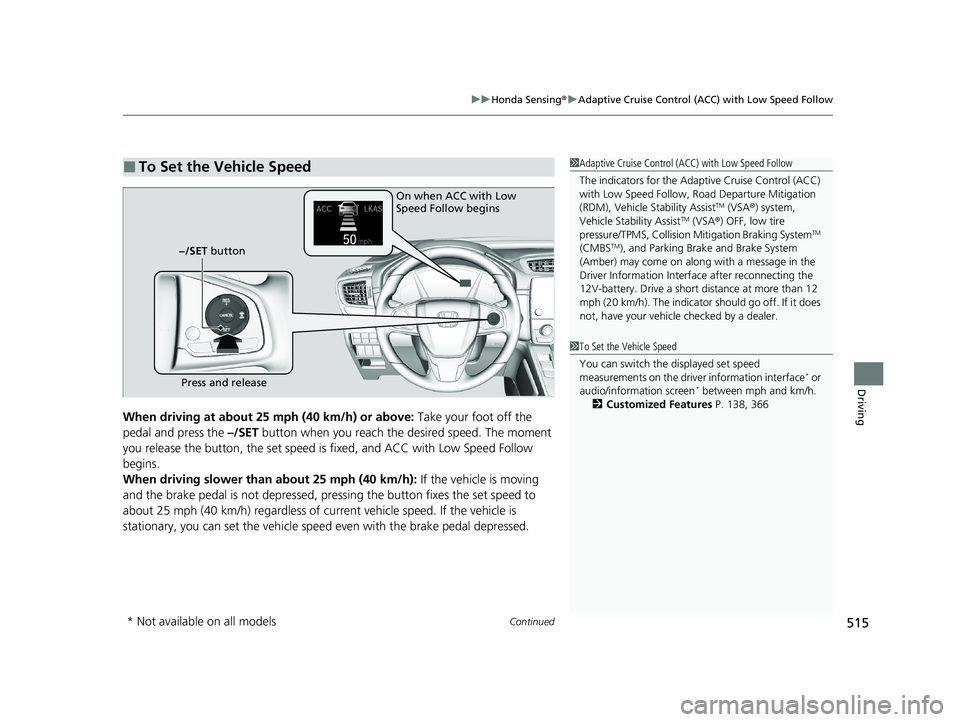
When driving at about 25 mph (40 km/h) or above: Take your foot off the
pedal and press the –/SET button when you reach the desired speed. The moment
you release the button, th e set speed is fixed, and ACC with Low Speed Follow
begins.
When driving slower than about 25 mph (40 km/h): If the vehicle is moving
and the brake pedal is not depressed, pr essing the button fixes the set speed to
about 25 mph (40 km/h) regardless of current vehicle speed. If the vehicle is
stationary, you can set the vehicle speed even with the brake pedal depressed.
■To Set the Vehicle Speed1 Adaptive Cruise Control (ACC) with Low Speed Follow
The indicators for the Adaptive Cruise Control (ACC)
with Low Speed Follow, Road Departure Mitigation
(RDM), Vehicle Stability Assist
TM (VSA ®) system,
Vehicle Stability AssistTM (VSA ®) OFF, low tire
pressure/TPMS, Collision Mitigation Braking SystemTM
(CMBSTM), and Parking Brake and Brake System
(Amber) may come on along with a message in the
Driver Information Interf ace after reconnecting the
12V-battery. Drive a short distance at more than 12
mph (20 km/h). The indicator should go off. If it does
not, have your vehicle checked by a dealer.
On when ACC with Low
Speed Follow begins
Press and release
−/SET button
1
To Set the Vehicle Speed
You can switch the displayed set speed
measurements on the driv er information interface
* or
audio/information screen* between mph and km/h.
2 Customized Features P. 138, 366
* Not available on all models
20 CR-V HYBRID HMIN-31TPG6000.book 515 ページ 2019年11月28日 木曜日 午後1時50分