reset HONDA CR-Z 2011 1.G User Guide
[x] Cancel search | Manufacturer: HONDA, Model Year: 2011, Model line: CR-Z, Model: HONDA CR-Z 2011 1.GPages: 333, PDF Size: 9.97 MB
Page 96 of 333
95
Instrument Panel
Gauges and Multi-Information Display Multi-Information Display
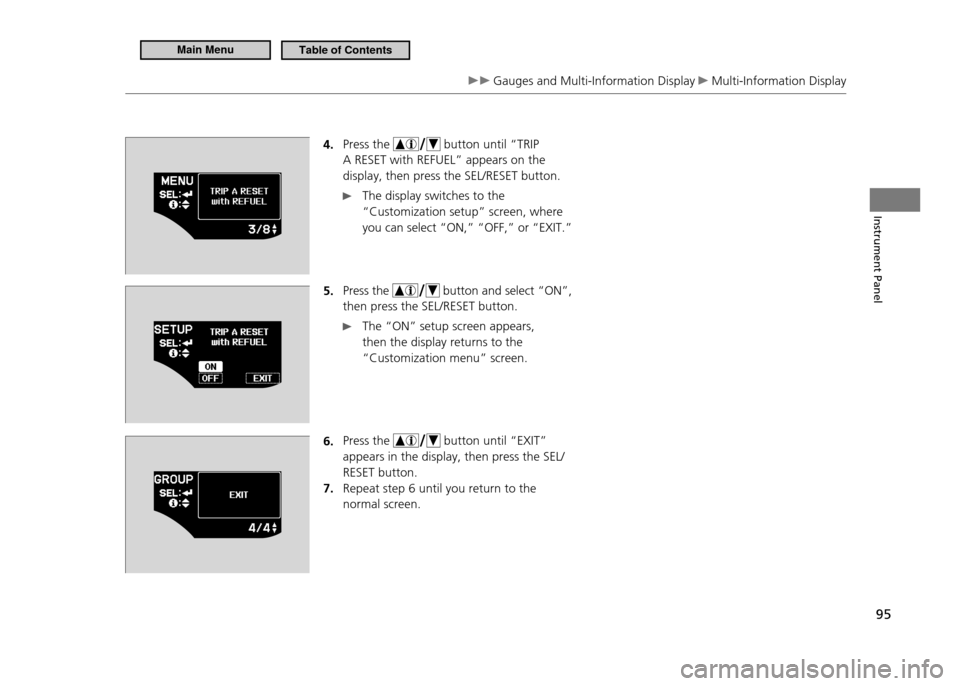
4. Press the
button until “TRIP
A RESET with REFUEL” appears on the display, then press the SEL/RESET button.
The display switches to the
“Customization setup” screen, where you can select “ON,” “OFF,” or “EXIT.”
5. Press the
button and select “ON”,
then press the SEL/RESET button.
The “ON” setup screen appears, then the display returns to the “Customization menu” screen.
6. Press the
button until “EXIT”
appears in the display, then press the SEL/ RESET button.Repeat step 6 until you return to the
7.
normal screen.
Main MenuTable of Contents
Page 99 of 333
98
Controls
Setting the Clock
Clock
Models without navigation system
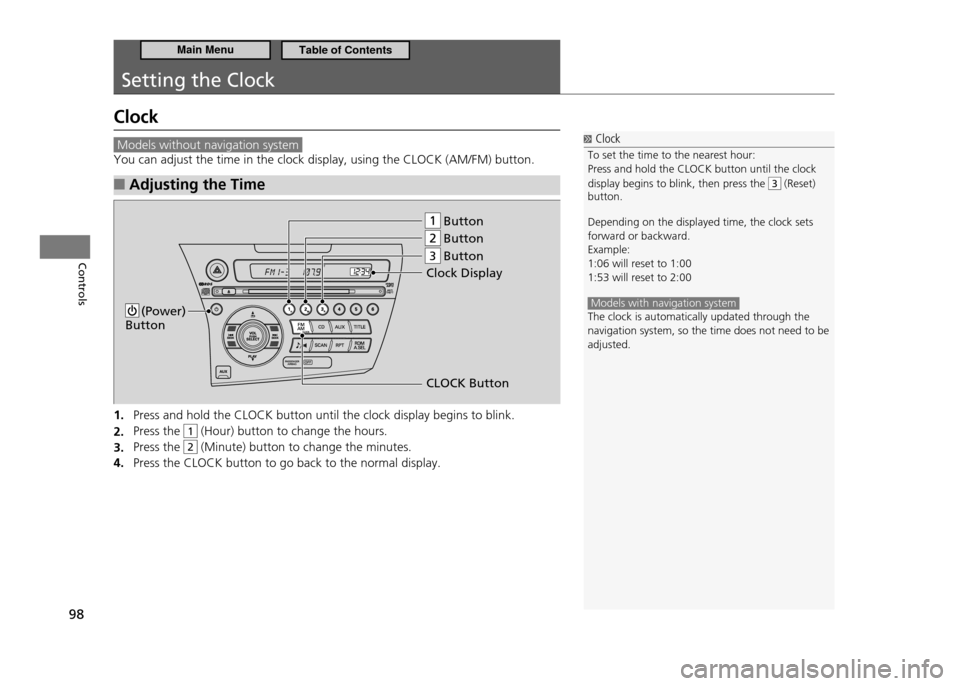
You can adjust the time in the clock display, using the CLOCK (AM/FM) button.Adjusting the Time
■
Press and hold the CLOCK button until the clock display begins to blink.
1.
Press the
2.
1 (Hour) button to change the hours.
Press the
3.
2 (Minute) button to change the minutes.
Press the CLOCK button to go back to the normal display.
4.
Button
Button
Button
(Power) Button
Clock Display
CLOCK Button
3
Clock
To set the time to the nearest hour: Press and hold the CLOCK button until the clock display begins to blink, then press the
3 (Reset)
button. Depending on the displayed time, the clock sets forward or backward.Example:1:06 will reset to 1:001:53 will reset to 2:00
Models with navigation system The clock is automatically updated through the navigation system, so the time does not need to be adjusted.
Main MenuTable of Contents
Page 141 of 333
140
Features
Audio System Audio System Theft Protection
Audio System Theft Protection
The audio system is disabled when it is disconnected from the power source, such as when the 12 volt battery is disconnected or goes dead.Entering the Audio Security Code
■
“ENTER CODE” appears on the display when the power is reconnected.
Turn on the audio system.
1.
Enter the security code using the preset buttons.
2.
Models with navigation system
Touch the icon to enter the code, then touch the Done icon to set it. If you enter an incorrect digit, continue to the last digit, then try again. If you do not enter the code correctly after 10 tries, you need to visit a dealer to have the system reset.
Audio System Theft Protection
Find the audio system's security code and serial number on the radio code card.
Do not store the card in your vehicle. If you lose the
radio code card, you must obtain the information from a dealer.
Main MenuTable of Contents
Page 144 of 333
143
Features
Audio without Navigation System Playing the AM/FM Radio
Playing the AM/FM Radio
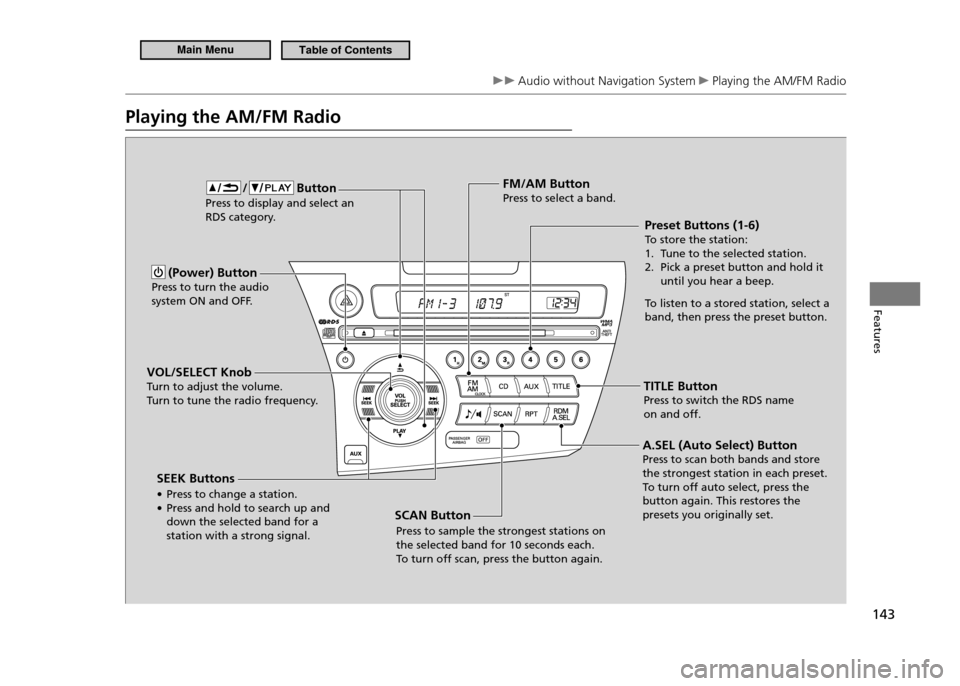
(Power) Button
Press to turn the audio
system ON and OFF.
VOL/SELECT Knob
Turn to adjust the volume.
Turn to tune the radio frequency. Preset Buttons (1-6)To
store the station:
1. Tune to the selected station.
2. Pick a preset button and hold it until you hear a beep.
To listen to a stored station, select a
band, then press the preset button.
FM/AM ButtonPress to select a band.
TITLE ButtonPress to switch the RDS name
on and off.
/ Button Press to display and select an
RDS category.
SCAN ButtonPress to sample the strongest stations on the selected band for 10 seconds each. To turn off scan, press the button again.
SEEK Buttons •
Press to change a station.
• Press and hold to search up and down the selected band for a station with a strong signal. A.SEL (Auto Select) ButtonPress to scan both bands and store the strongest station in each preset.To
turn off auto select, press the
button again. This restores the presets you originally set.
Main MenuTable of Contents
Page 145 of 333
144
Features
Audio without Navigation System Playing the AM/FM Radio
Radio Data System (RDS)
■
Provides text data information related to your selected RDS capable FM station.
RDS INFO ON
■
Press the TITLE button while listening to an RDS capable station. “RDS INFO ON” appears, and the station name is displayed.
To Find an RDS Station from Your Selected Program
■
Category
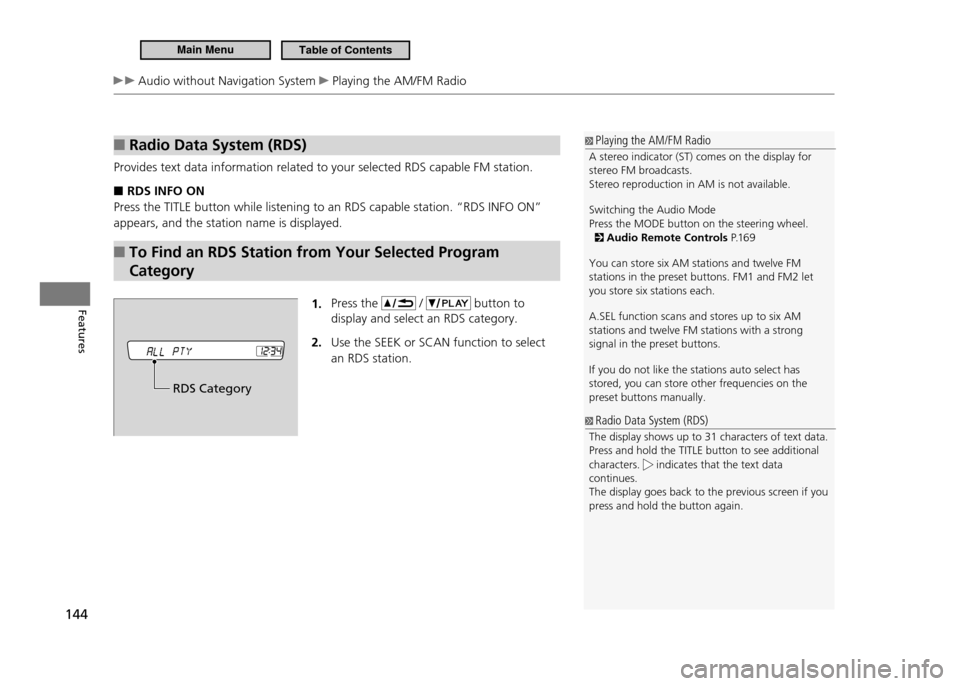
1. Press the
/ button to
display and select an RDS category. Use the SEEK
2. or SCAN function to select
an RDS station.
Playing the AM/FM Radio
A stereo indicator (ST) comes on the display for stereo FM broadcasts. Stereo reproduction in AM is not available. Switching the Audio Mode Press the MODE button on the steering wheel.
Audio Remote Controls P.1 6 9
You can store six AM stations and twelve FM stations in the preset buttons. FM1 and FM2 let you store six stations each. A.SEL function scans and stores up to six AM stations and twelve FM stations with a strong signal in the preset buttons. If you do not like the stations auto select has stored, you can store other frequencies on the preset buttons manually.
Radio Data System (RDS)
The display shows up to 31 characters of text data. Press and hold the TITLE button to see additional characters.
indicates that the text data
continues. The display goes back to the previous screen if you press and hold the button again.
RDS Category
Main MenuTable of Contents
Page 155 of 333
154
Features
Audio with Navigation System Playing the AM/FM Radio
Playing the AM/FM Radio
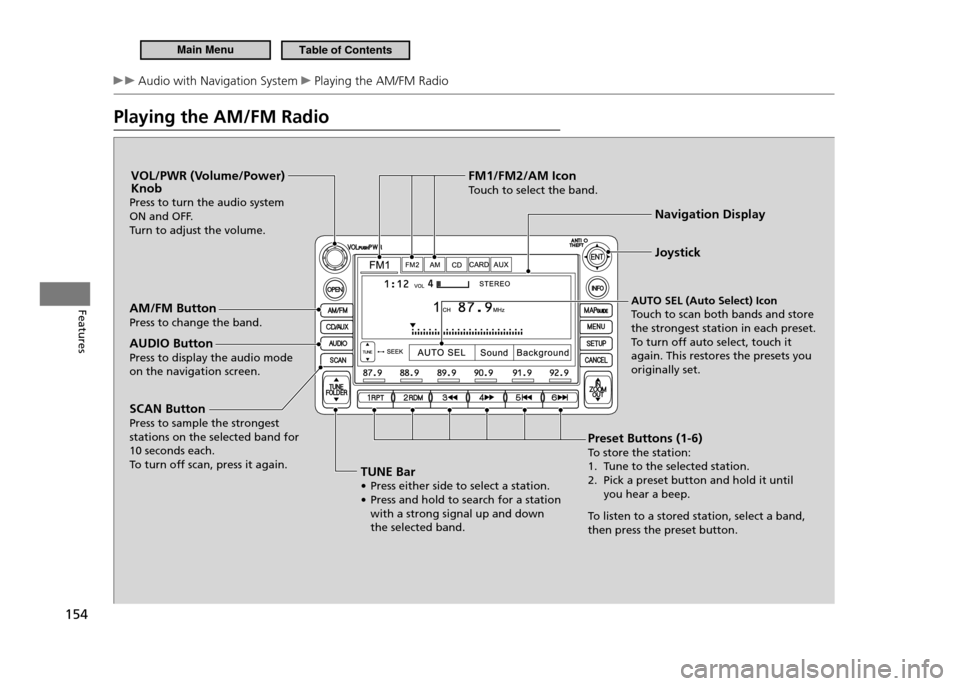
Preset Buttons (1-6) To store the station:
1. Tune to the selected station.
2. Pick a preset button and hold it until you hear a beep.
To listen to a stored station, select a band,
then press the preset button. Joystick
Navigation Display
AUTO SEL (Auto Select) Icon
Touch to scan both bands and store the strongest station in each preset.To turn off auto select, touch it
again. This restores the presets you originally set.
AM/FM ButtonPress to change the band.
AUDIO ButtonPress to display the audio mode on the navigation screen. VOL/PWR (Volume/Power) Knob
Press to turn the audio system
ON and OFF.
Turn to adjust the volume.
TUNE Bar• Press either side to select a station.
• Press and hold to search for a station with a strong signal up and down the selected band.
SCAN ButtonPress to sample the strongest stations on the selected band for 10 seconds each.To
turn off scan, press it again. FM1/FM2/AM Icon
Touch to select the band.
Main MenuTable of Contents
Page 156 of 333
155
Features
Audio with Navigation System Playing the AM/FM Radio
Playing the AM/FM Radio
A stereo indicator (STEREO) comes on the display for stereo FM broadcasts.Stereo reproduction in AM is not available. Switching the Audio Mode Press the MODE button on the steering wheel.
Audio Remote Controls P.1 6 9
You can store six AM stations and twelve FM stations in the preset buttons. FM1 and FM2 let you store six stations each.AUTO SEL scans and stores up to six AM stations and twelve FM stations with a strong signal in the preset buttons. If you do not like the stations auto select has stored, you can store other frequencies on the preset buttons manually.
Main MenuTable of Contents
Page 170 of 333
169
Features
Audio Remote Controls
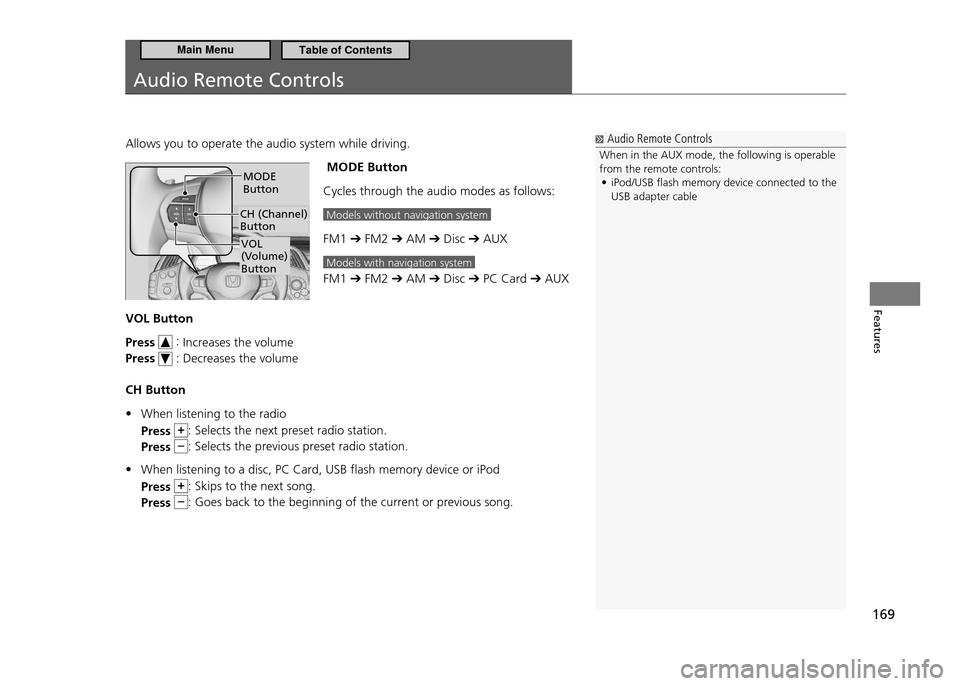
Allows you to operate the audio system while driving. MODE Button
Cycles through the audio modes as follows:
Models without navigation system
FM1 ➔ FM2 ➔ AM ➔ Disc ➔ AUX
Models with navigation system
FM1 ➔ FM2 ➔ AM ➔ Disc ➔ PC Card ➔ AUX
VOL Button Press
:
Increases the volume
Press
: Decreases the volume
CH Button When listening to the radio
•
Press
: Selects the next preset radio station.
Press
: Selects the previous preset radio station.
When listening to a disc, PC Card, USB flash memory device or iPod
•
Press
: Skips to the next song.
Press
: Goes back to the beginning of the current or previous song.
CH (Channel) Button
MODE Button
VOL
(Volume) Button
Audio Remote Controls
When in the AUX mode, the following is operable from the remote controls: iPod/USB lash memory device connected to the
•
USB adapter cable
Main MenuTable of Contents
Page 189 of 333
188
Features
Bluetooth ®
HandsFreeLink ®
HFL Menus
System Setup
■
This command group allows you to change or customize HFL basic settings.
To Set a Four-digit Passcode to Lock the HFL System for Security
■
Say “System Setup.”
1.
Say “Security.”
2.
Follow the HFL prompts and say the four-digit number of your choice.
3.
Follow the HFL prompts and confirm the number.
4.
To Change the Security Passcode
■
Say “System Setup.”
1.
Say “Change Passcode” after the prompts.
2.
Say the new four-digit passcode after the HFL prompts.
3.
Follow the HFL prompts.
4.
To Select a Ring Tone or a Prompt as the Incoming Call Notification
■
Say “System Setup.”
1.
Say “Call Notification” after the prompts.
2.
Say “Ring Tone” or “Prompt” after the prompts. For no audible notification, say
3.
“Off.”
System Setup
Press the
button before a command.
Once a passcode is set, you are required to enter the passcode with every new key cycle to use HFL.If you forget the code, go to your dealer to have the passcode reset. You can also cancel the passcode by clearing all the data stored in the HFL system.
To Clear the System P.1 8 9
The default setting of the incoming notiication is a prompt.
Main MenuTable of Contents
Page 245 of 333
244
Maintenance
Maintenance Minder™
Resetting the Display
■
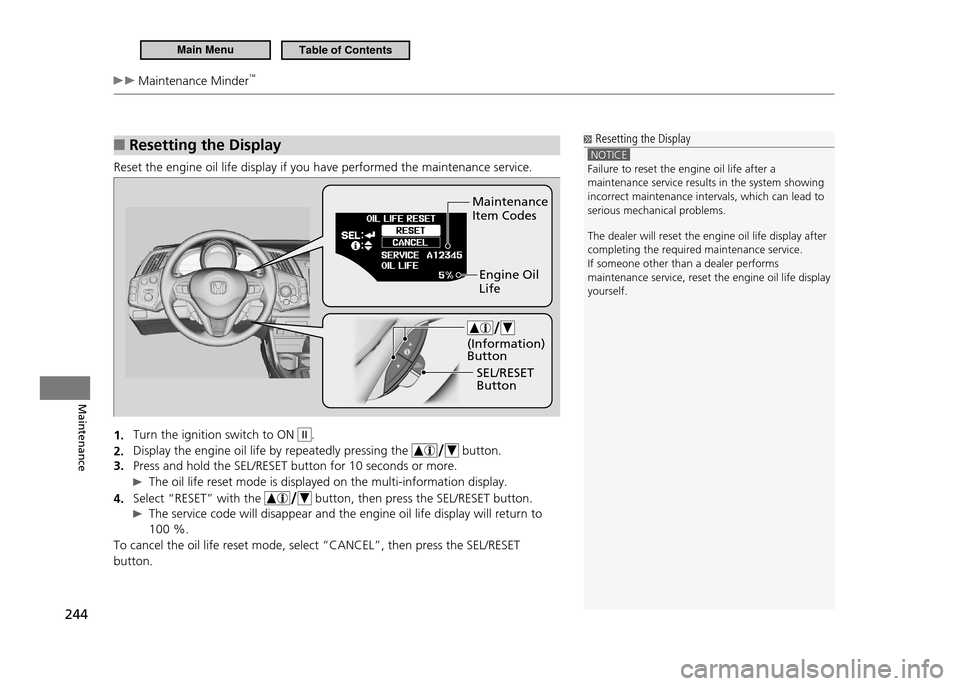
Reset the engine oil life display if you have performed the maintenance service.
Turn the ignition switch to ON
1.
II.
Display the engine oil life by repeatedly pressing the
2.
button.
Press and hold the SEL/RESET button for 10 seconds or more.
3.
The oil life reset mode is displayed on the multi-information display.
Select “RESET” with the
4.
button, then press the SEL/RESET button.
The service code will disappear and the engine oil life display will return to
100 %.
To cancel the oil life reset mode, select “CANCEL”, then press the SEL/RESET button.
Resetting the Display
NOTICE Failure to reset the engine oil life after a maintenance service results in the system showing incorrect maintenance intervals, which can lead to serious mechanical problems. The dealer will reset the engine oil life display after completing the required maintenance service.If someone other than a dealer performs
maintenance service, reset the engine oil life disp lay
yourself.
Maintenance Item Codes
Engine Oil Life
SEL/RESET Button
(Information) Button
Main MenuTable of Contents