sensor HONDA CR-Z 2011 1.G User Guide
[x] Cancel search | Manufacturer: HONDA, Model Year: 2011, Model line: CR-Z, Model: HONDA CR-Z 2011 1.GPages: 333, PDF Size: 9.97 MB
Page 71 of 333

70
Instrument Panel
Indicators
IndicatorName On/Blinking Explanation Message
Seat Belt Reminder Indicator Comes on and the beeper sounds
•
if you are not wearing a seat belt when you turn the ignition switch to ON
II. If the passenger is not
wearing a seat belt, the indicator comes on about six seconds later.Blinks during driving if either you
•
or your passenger has not fastened a seat belt. The beeper sounds and the indicator blinks at regular intervals. The beeper stops and the indicator
•
goes off when you and your passenger fasten your seat belts.Stays on after you or your
•
passenger has fastened the seat belt - A detection error may have
occurred in the sensor. Have the vehicle checked by a dealer.
Seat Belt Reminder Indicator P.35
Low Fuel Indicator Comes on when the fuel reserve is
•
running low (approximately 1.8 U.S. gal./6.9 Liter left).Blinks if there is a problem with the
•
fuel gauge. Comes on
• - Refuel your vehicle as
soon as possible.Blinks
• - Have the vehicle checked by
a dealer.
ABS (Anti-lock Brake System) Indicator Comes on for a few seconds when
•
you turn the ignition switch to ON
II, then goes off.
If it comes at any other time, there
•
is a problem with the ABS. Stays on constantly
• - Have the
vehicle checked by a dealer. With this indicator on, your vehicle still has normal braking ability but no anti-lock function.
ABS (Anti-lock Brake System) P.221
Main MenuTable of Contents
Page 75 of 333

74
Instrument Panel
Indicators
IndicatorName On/Blinking Explanation Message
Low Temperature Indicator Comes on when the engine
•
coolant temperature is low. If the indicator stays on after the
•
engine has reached normal operating temperature, there may be a problem with the temperature sensors. Have the vehicle inspected by a dealer.
—
U.S.
Canada Side Airbag Off Indicator Comes on for a few seconds when
•
you turn the ignition switch to ON
II, then goes off.
Comes on when the passenger side
•
airbag system is automatically shut off. It does not mean there is a problem
•
with your side airbags. Comes on when nobody is sitting
•
in the passenger seat - Have the
vehicle checked by a dealer.Comes on when someone is sitting
•
in the seat - Have the person sit
properly. U.S.
Canada
High Beam Indicator Comes on when the high beam
•
headlights are on.Comes on with reduced brightness
•
when DRL (daytime running lights) are on. —
—
Main MenuTable of Contents
Page 85 of 333

84
Instrument Panel
Gauges and Multi-Information Display Multi-Information Display
Odometer
■
Shows the total number of miles or kilometers that your vehicle has accumulated.
Trip Meter
■
Shows the total number of miles or kilometers driven since the last reset. Meters A and B can be used to measure 2 separate trips.
Resetting a Trip Meter
■
To reset a trip meter, display it, then press and hold the SEL/RESET button. The trip meter is reset to “0.0”.
Outside Temperature
■
Shows the outside temperature in Fahrenheit (U.S.) or Celsius (Canada).
Adjusting the Outside Temperature Display
■
Adjust the temperature reading up to ±5°F or ±3°C if the temperature reading seems incorrect.Use the multi-information display’s customized features to correct the temperature.
Customizing Features P.90
Trip B
Trip A
Odometer
Outside Temperature
Trip Meter
Switch between trip meter A and trip meter B by pressing the SEL/RESET button.
Outside Temperature
The temperature sensor is in the front bumper. Road heat and exhaust from another vehicle can affect the temperature reading when your vehicle speed is less than 19 mph (30 km/h). It may take several minutes for the display to be updated after the temperature reading has stabilized.
Main MenuTable of Contents
Page 98 of 333
Controls
This chapter explains how to operate the various controls necessary for driving.
97
Setting the Clock
....................................... 98
Locking and Unlocking the Doors Key Types and Functions .......................... 99 Locking/Unlocking the Doors from
the Outside ........................................... 100Locking/Unlocking the Doors from
the Inside .............................................. 102
Auto Door Lock/Unlock .......................... 103
Opening and Closing the Hatch ............. 104
Security System ....................................... 105
Immobilizer System ................................ 105
Security Alarm System ............................ 105
Opening and Closing the Windows ....... 107Operating the Switches Around the Steering Wheel
Ignition Switch ....................................... 109
Turn Signals ........................................... 110
Light Switches ........................................ 110Fog Lights * ............................................ 112
Daytime Running Lights .......................... 112
Wipers and Washers ............................... 113
Brightness Control .................................. 115Rear Defogger/Heated Door Mirror *
Button ................................................... 116
Adjusting the Steering Wheel ................. 117 Adjusting the Mirror
Interior Rearview Mirror .......................... 118
Door Mirrors .......................................... 118
Adjusting the Seats Adjusting the Seat Position ..................... 119
Interior Lights/Interior Convenience Items Interior Lights ......................................... 123
Interior Convenience Items ..................... 125
Climate Control System Using Automatic Climate Control ........... 131
Automatic Climate Control Sensors ........ 133
* Not available on all models
Main Menu
Page 112 of 333
111
Controls
Operating the Switches Around the Steering Wheel Light Switches
Automatic Operation (automatic lighting control)
■*
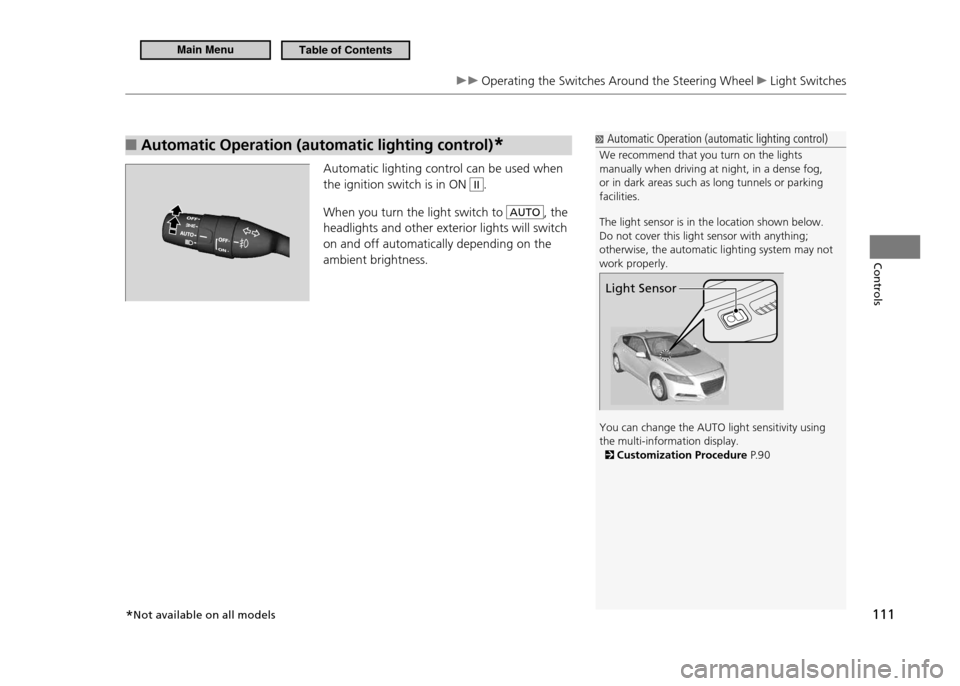
Automatic lighting control can be used when the ignition switch is in ON
II.
When you turn the light switch to
AUTO, the
headlights and other exterior lights will switch on and off automatically depending on the ambient brightness.
Automatic Operation (automatic lighting control)
We recommend that you turn on the lights manually when driving at night, in a dense fog, or in dark areas such as long tunnels or parking facilities. The light sensor is in the location shown below. Do not cover this light sensor with anything; otherwise, the automatic lighting system may not work properly. You can change the AUTO light sensitivity using the multi-information display.
Customization Procedure P. 9 0
Light Sensor
*Not available on all models
Main MenuTable of Contents
Page 129 of 333
128
Controls
Interior Lights/Interior Convenience Items Interior Convenience Items
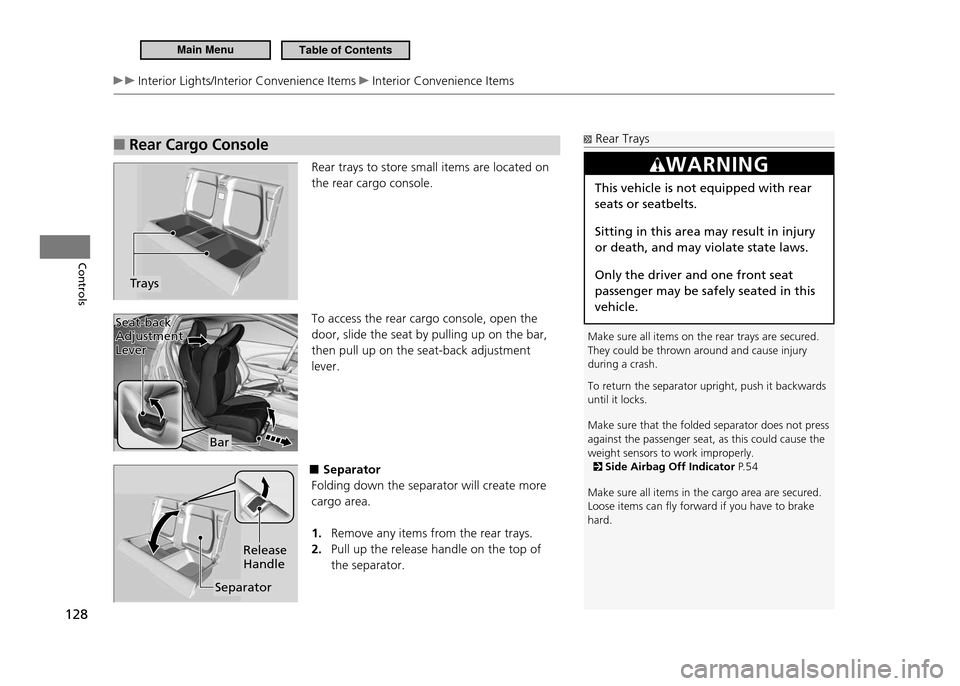
Rear Cargo Console
■
Rear trays to store small items are located on the rear cargo console. To access the rear cargo console, open the door, slide the seat by pulling up on the bar, then pull up on the seat-back adjustment lever.
■Separator
Folding down the separator will create more cargo area.
Remove any items from the rear trays.
1.
Pull up the release handle on the top of
2.
the separator.
Trays
Rear Trays
Make sure all items on the rear trays are secured. They could be thrown around and cause injury during a crash. To return the separator upright, push it backwards until it locks. Make sure that the folded separator does not press against the passenger seat, as this could cause the weight sensors to work improperly.
Side Airbag Off Indicator P. 5 4
Make sure all items in the cargo area are secured. Loose items can ly forward if you have to brake hard.
WARNING
This vehicle is not equipped with rear seats or seatbelts. Sitting in this area may result in injury or death, and may violate state laws. Only the driver and one front seat passenger may be safely seated in this vehicle.
Bar
Seat-back
Adjustment Lever
Seat-back Adjustment Lever
Separator Release Handle
Main MenuTable of Contents
Page 134 of 333

133
Controls
Climate Control System Automatic Climate Control Sensors
Automatic Climate Control SensorsThe automatic climate control system is equipped with a sunlight sensor and an interior temperature/humidity sensor. Do not cover or spill any liquid on them.
Sunlight Sensor
Temperature/
Humidity Sensor
Main MenuTable of Contents
Page 194 of 333
193
Driving
Before Driving Driving Preparation
Do not place anything in the seat footwells. Make sure to secure the floor mats.
•
An object or unsecured floor mat can interfere with your brake and
accelerator pedal operation while driving.
If you have any animals on board, do not let them move around in the vehicle.
•
They may interfere with driving and a crash could occur.
Securely close and lock both doors and the hatch.
•
Locking and Unlocking the Doors from Inside P.102
Adjust your seating position properly.
•
Adjusting the Seats P.119
Adjust the mirrors and steering wheel properly for your driving.
•
Adjust them while sitting in the proper driving position.
Adjusting the Mirrors P.118
Steering Wheel Adjustments P.117
Be sure items placed on the floor behind the driver’s and passenger’s seats
•
cannot roll under the seats.
They can interfere with the driver’s ability to operate the pedals, the operation
of the seats, or the operation of the sensors under the seats.
Everyone in the vehicle must fasten their seat belt.
•
Fastening a Seat Belt P.37
Make sure that the indicators in the instrument panel come on when you start
•
the vehicle, and go off soon after.
Always have a dealer check the vehicle if any of the indicators indicate a
problem.
Indicators P.68
Main MenuTable of Contents
Page 258 of 333
257
Maintenance
Maintenance Under the Hood Reilling Window Washer Fluid
Reilling Window Washer Fluid
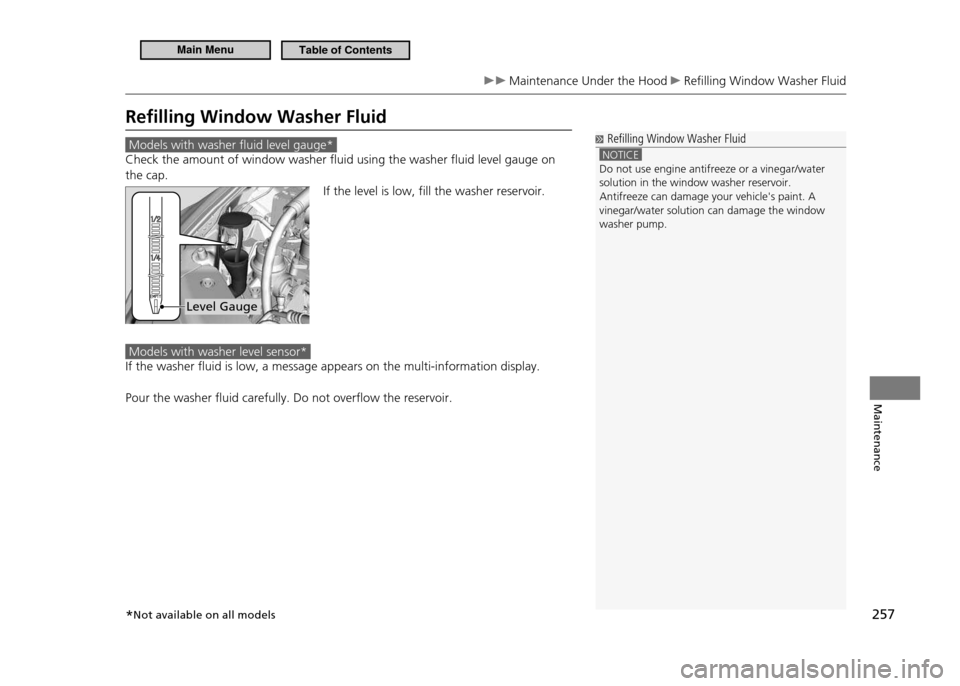
Models with washer fluid level gauge*
Check the amount of window washer fluid using the washer fluid level gauge on the cap.If the level is low, fill the washer reservoir.
Models with washer level sensor*
If the washer fluid is low, a message appears on the multi-information display. Pour the washer fluid carefully. Do not overflow the reservoir.
Reilling Window Washer Fluid
NOTICE Do not use engine antifreeze or a vinegar/water solution in the window washer reservoir.Antifreeze can damage your vehicle's paint. A vinegar/water solution can damage the window washer pump.
Level Gauge
*Not available on all models
Main MenuTable of Contents
Page 293 of 333
292
Handling the Unexpected
If a Tire Goes Flat Changing a Flat Tire
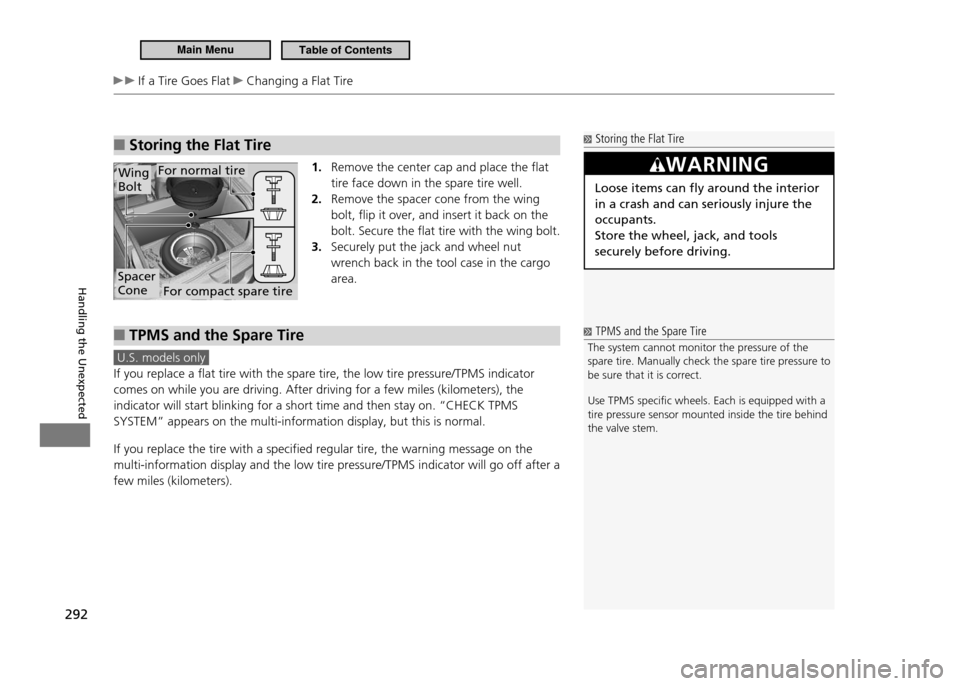
Storing the Flat Tire
■
1. Remove the center cap and place the flat tire face down in the spare tire well.Remove the spacer cone from the wing
2.
bolt, flip it over, and insert it back on the bolt. Secure the flat tire with the wing bolt. Securely put the jack and wheel nut
3.
wrench back in the tool case in the cargo area.
TPMS and the Spare Tire
■
U.S. models only
If you replace a flat tire with the spare tire, the low tire pressure/TPMS indicator comes on while you are driving. After driving for a few miles (kilometers), the indicator will start blinking for a short time and then stay on. “CHECK TPMS SYSTEM” appears on the multi-information display, but this is normal. If you replace the tire with a specified regular tire, the warning message on the multi-information display and the low tire pressure/TPMS indicator will go off after a few miles (kilometers).
Storing the Flat Tire
WARNING
Loose items can fly around the interior in a crash and can seriously injure the occupants. Store the wheel, jack, and tools securely before driving.
Spacer Cone
Wing Bolt
For compact spare tire
For normal tire
TPMS and the Spare Tire
The system cannot monitor the pressure of the
spare tire. Manually check the spare tire pressure to
be sure that it is correct. Use TPMS speciic wheels. Each is equipped with a tire pressure sensor mounted inside the tire behind the valve stem.
Main MenuTable of Contents