steering HONDA CR-Z 2011 1.G User Guide
[x] Cancel search | Manufacturer: HONDA, Model Year: 2011, Model line: CR-Z, Model: HONDA CR-Z 2011 1.GPages: 333, PDF Size: 9.97 MB
Page 45 of 333
Safe Driving
44
Airbags Types of Airbags Front Airbags (SRS)
Types of Airbags
Your vehicle is equipped with three types of airbags:Front airbags:
●
Airbags in front of the driver’s and passenger’s seats.
Side airbags:
●
Airbags in the driver’s and passenger’s seat-backs.
Side curtain airbags:
●
Airbags in the ceiling along side the windows on both
sides of the vehicle.
Each is discussed in the following pages.
Front Airbags (SRS) The front SRS airbags inflate in a moderate to severe frontal collision to help protect the head and chest of the driver and/or passenger. SRS (Supplemental Restraint System) indicates that the airbags are designed to
supplement seat belts, not replace them. Seat belts are the occupant's primary restraint system.
Housing Locations
■
The front airbags are housed in the center of the steering wheel for the driver, and in the dashboard for the passenger. Both airbags are marked SRS AIRBAG.
Type of Airbags
The airbags can inlate whenever the ignition switch is in ON
.
Front Airbags (SRS)
Dual-Stage, Multi-Threshold Front Airbags (SRS)Your vehicle is equipped with dual-stage, multiple-threshold front airbags (SRS).During a frontal crash severe enough to cause one or both front airbags to deploy, the airbags can inlate at different rates, depending on the severity of the crash, whether or not the seat belts are latched, and other factors. Front airbags are designed to supplement the seat belts to help reduce the likelihood of head and chest injuries in frontal crashes.
Main MenuTable of Contents
Page 73 of 333
72
Instrument Panel
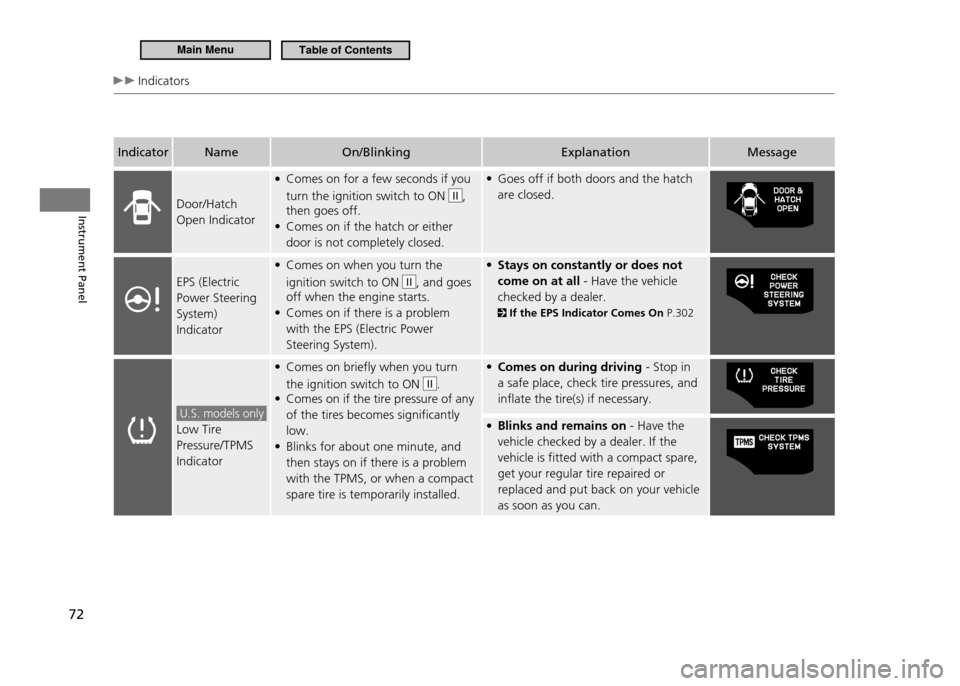
Indicators
IndicatorName On/Blinking Explanation Message
Door/Hatch Open Indicator Comes on for a few seconds if you
•
turn the ignition switch to ON
II,
then goes off. Comes on if the hatch or either
•
door is not completely closed. Goes off if both doors and the hatch
•
are closed.
EPS (Electric Power Steering System) Indicator Comes on when you turn the
•
ignition switch to ON
II, and goes
off when the engine starts. Comes on if there is a problem
•
with the EPS (Electric Power Steering System). Stays on constantly or does not
•
come on at all - Have the vehicle
checked by a dealer.
If the EPS Indicator Comes On P.302
U.S. models only
Low Tire Pressure/TPMS IndicatorComes on briefly when you turn
•
the ignition switch to ON
II.
Comes on if the tire pressure of any
•
of the tires becomes significantly low.Blinks for about one minute, and
•
then stays on if there is a problem with the TPMS, or when a compact spare tire is temporarily installed. Comes on during driving
• - Stop in
a safe place, check tire pressures, and inflate the tire(s) if necessary. Blinks and remains on
• - Have the
vehicle checked by a dealer. If the vehicle is fitted with a compact spare, get your regular tire repaired or replaced and put back on your vehicle as soon as you can.
Main MenuTable of Contents
Page 98 of 333
Controls
This chapter explains how to operate the various controls necessary for driving.
97
Setting the Clock
....................................... 98
Locking and Unlocking the Doors Key Types and Functions .......................... 99 Locking/Unlocking the Doors from
the Outside ........................................... 100Locking/Unlocking the Doors from
the Inside .............................................. 102
Auto Door Lock/Unlock .......................... 103
Opening and Closing the Hatch ............. 104
Security System ....................................... 105
Immobilizer System ................................ 105
Security Alarm System ............................ 105
Opening and Closing the Windows ....... 107Operating the Switches Around the Steering Wheel
Ignition Switch ....................................... 109
Turn Signals ........................................... 110
Light Switches ........................................ 110Fog Lights * ............................................ 112
Daytime Running Lights .......................... 112
Wipers and Washers ............................... 113
Brightness Control .................................. 115Rear Defogger/Heated Door Mirror *
Button ................................................... 116
Adjusting the Steering Wheel ................. 117 Adjusting the Mirror
Interior Rearview Mirror .......................... 118
Door Mirrors .......................................... 118
Adjusting the Seats Adjusting the Seat Position ..................... 119
Interior Lights/Interior Convenience Items Interior Lights ......................................... 123
Interior Convenience Items ..................... 125
Climate Control System Using Automatic Climate Control ........... 131
Automatic Climate Control Sensors ........ 133
* Not available on all models
Main Menu
Page 110 of 333
109
Controls
Operating the Switches Around the Steering Wheel
Ignition Switch
Ignition Switch
Manual transmission models Automatic transmission (CVT) models
You cannot take the key out unless the shift lever is
in .
On all models If you open the driver's door when the key is in LOCK or ACCESSORY , a warning buzzer will
sound to remind you to take the key out. If the key won't turn from LOCK
to ACCESSORY , turn the key while moving the steering wheel
left and right. The steering wheel will unlock, allowing the key to turn.
WARNING
Removing the key from the ignition switch locks the steering. If you do this while the vehicle is in motion, you can lose control of the vehicle. Only remove the key from the ignition switch when parked.
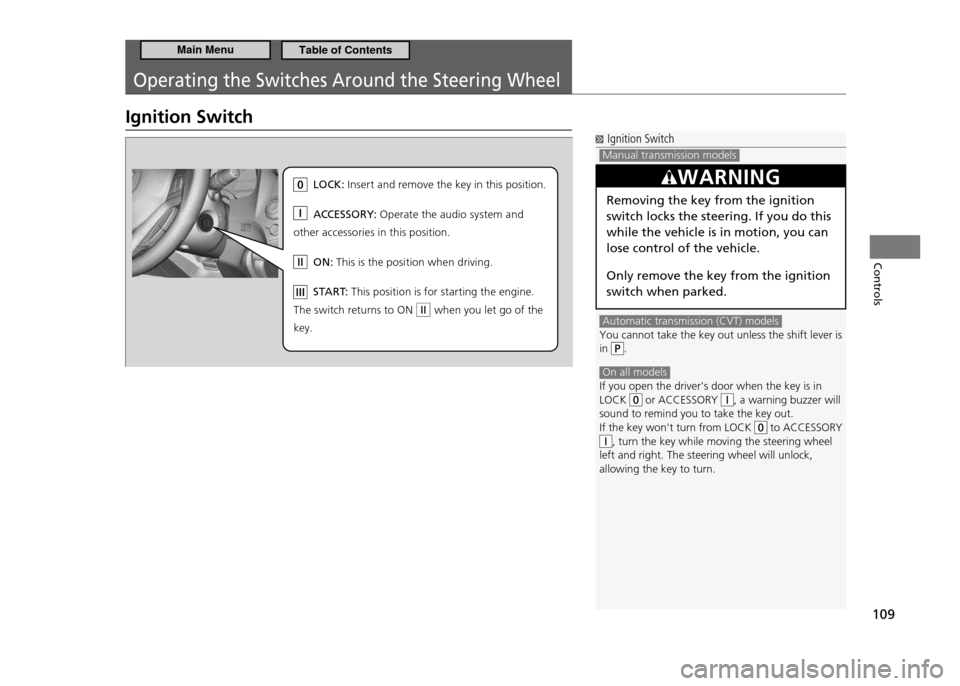
LO CK: In se rt and re move the key in this position.
AC CESSOR Y: Op erate the audio system and
other acce ssories in this position.
ON : Th is is the position when driving.
ST AR T: Th is position is for starting the engine .
Th e sw itch returns to ON when you let go of the
key.
Main MenuTable of Contents
Page 111 of 333
110
Controls
Operating the Switches Around the Steering Wheel Turn Signals Light Switches
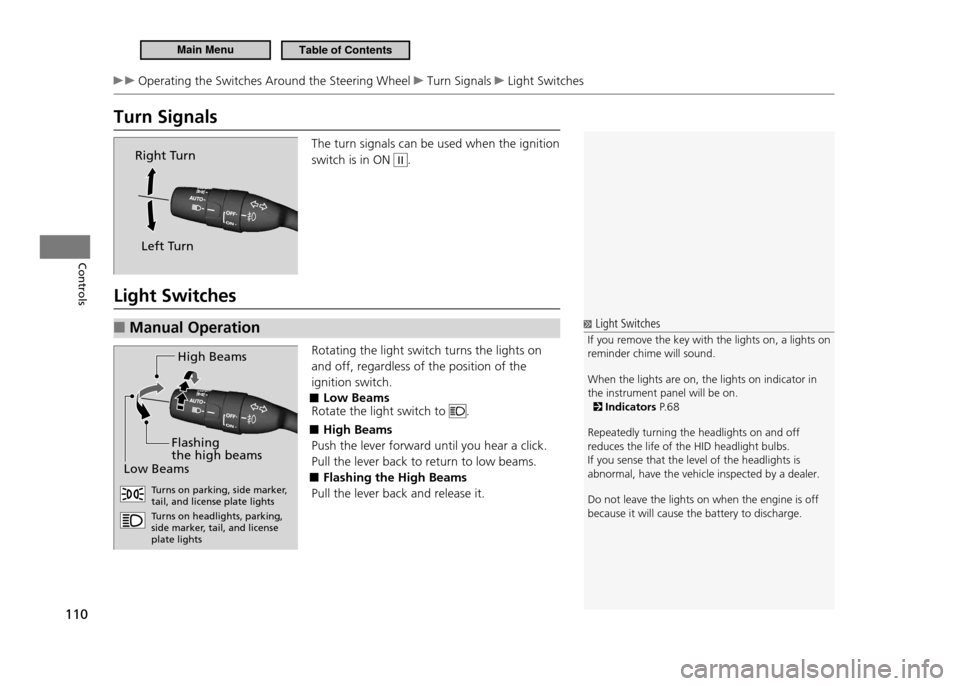
Turn Signals
The turn signals can be used when the ignition switch is in ON
II.
Light Switches Manual Operation
■
Rotating the light switch turns the lights on and off, regardless of the position of the ignition switch.
Low Beams
■
Rotate the light switch to
.
High Beams
■
Push the lever forward until you hear a click. Pull the lever back to return to low beams.
Flashing the High Beams
■
Pull the lever back and release it.
Right Turn
Left Turn
Light Switches
If you remove the key with the lights on, a lights on
reminder chime will sound. When the lights are on, the lights on indicator in the instrument panel will be on.
Indicators P. 6 8
Repeatedly turning the headlights on and off reduces the life of the HID headlight bulbs.If you sense that the level of the headlights is abnormal, have the vehicle inspected by a dealer. Do not leave the lights on when the engine is off because it will cause the battery to discharge.
H igh Beam s
Lo w B eam s
Flashing
the high beam s
Turns on parking, side marke r,
tail, and license plate lights Tu rns on headlights, parking,
side marker, tail, and license plate lights
Main MenuTable of Contents
Page 112 of 333
111
Controls
Operating the Switches Around the Steering Wheel Light Switches
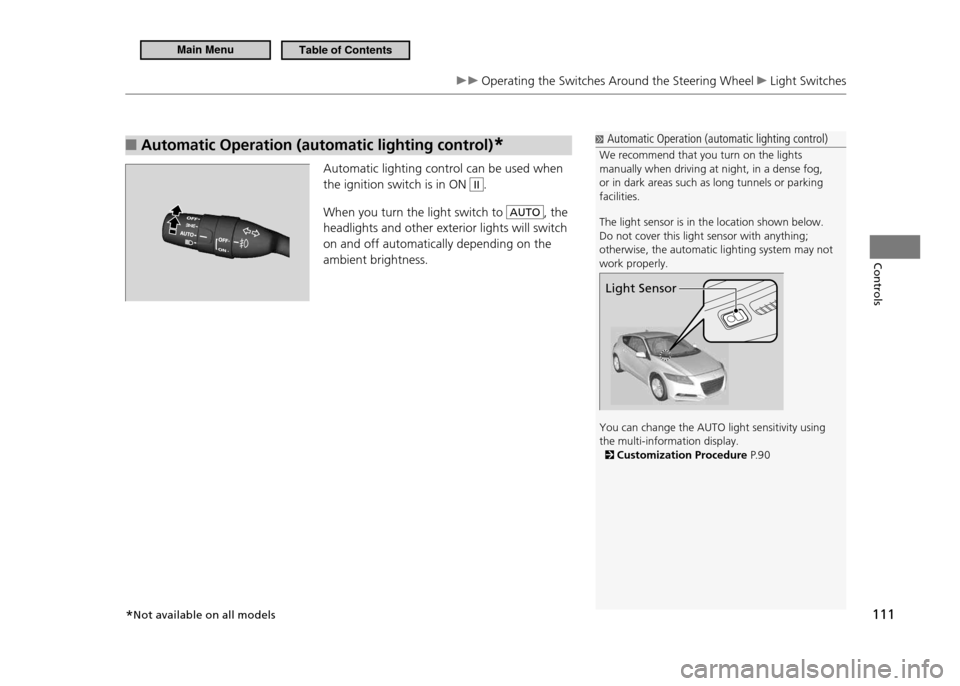
Automatic Operation (automatic lighting control)
■*
Automatic lighting control can be used when the ignition switch is in ON
II.
When you turn the light switch to
AUTO, the
headlights and other exterior lights will switch on and off automatically depending on the ambient brightness.
Automatic Operation (automatic lighting control)
We recommend that you turn on the lights manually when driving at night, in a dense fog, or in dark areas such as long tunnels or parking facilities. The light sensor is in the location shown below. Do not cover this light sensor with anything; otherwise, the automatic lighting system may not work properly. You can change the AUTO light sensitivity using the multi-information display.
Customization Procedure P. 9 0
Light Sensor
*Not available on all models
Main MenuTable of Contents
Page 113 of 333
112
Controls
Operating the Switches Around the Steering Wheel Fog Lights Daytime Running Lights
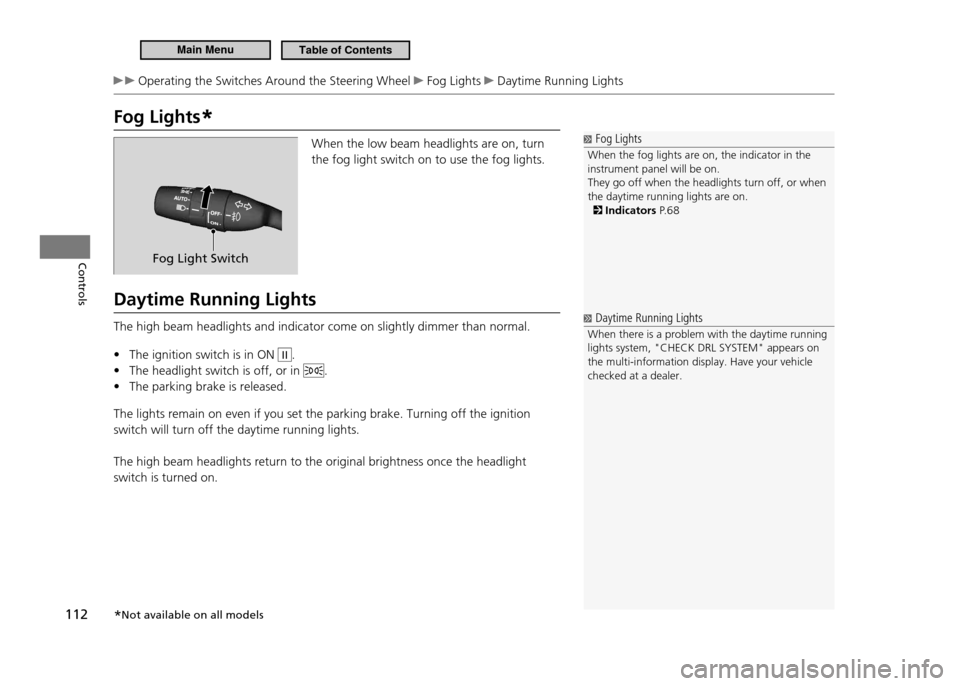
Fog Lights*
Fog Lights
When the fog lights are on, the indicator in the instrument panel will be on.They go off when the headlights turn off, or when the daytime running lights are on.
Indicators P. 6 8
When the low beam headlights are on, turn the fog light switch on to use the fog lights.
Daytime Running Lights The high beam headlights and indicator come on slightly dimmer than normal. The ignition switch is in ON
•
II.
The headlight switch is off, or in
•
.
The parking brake is released.
•
The lights remain on even if you set the parking brake. Turning off the ignition switch will turn off the daytime running lights. The high beam headlights return to the original brightness once the headlight switch is turned on.
Fog Light Switch
Daytime Running Lights
When there is a problem with the daytime running lights system, "CHECK DRL SYSTEM" appears on the multi-information display. Have your vehicle checked at a dealer.
* Not available on all models
Main MenuTable of Contents
Page 114 of 333
113
Controls
Operating the Switches Around the Steering Wheel Wipers and Washers
Wipers and Washers
Wipers and Washers
If the vehicle speeds up while the wipers are operating intermittently, the interval decreases by about four seconds. Also, when the vehicle starts moving, the wipers make a single sweep. In the shortest delay setting (
), the wipers
change to low speed operation when the vehicle speed exceeds 12 mph (20 km/h).
NOTICE Do not use the wipers when the windshield is dry. The windshield will get scratched, or the rubber blades will get damaged. Turn the washers off if no washer luid comes out. The pump may get damaged.
NOTICE In cold weather, the blades may freeze to the windshield, becoming stuck.Operating the wipers in this condition may damage the wipers. Use the defroster to warm the windshield, then turn the wipers on.
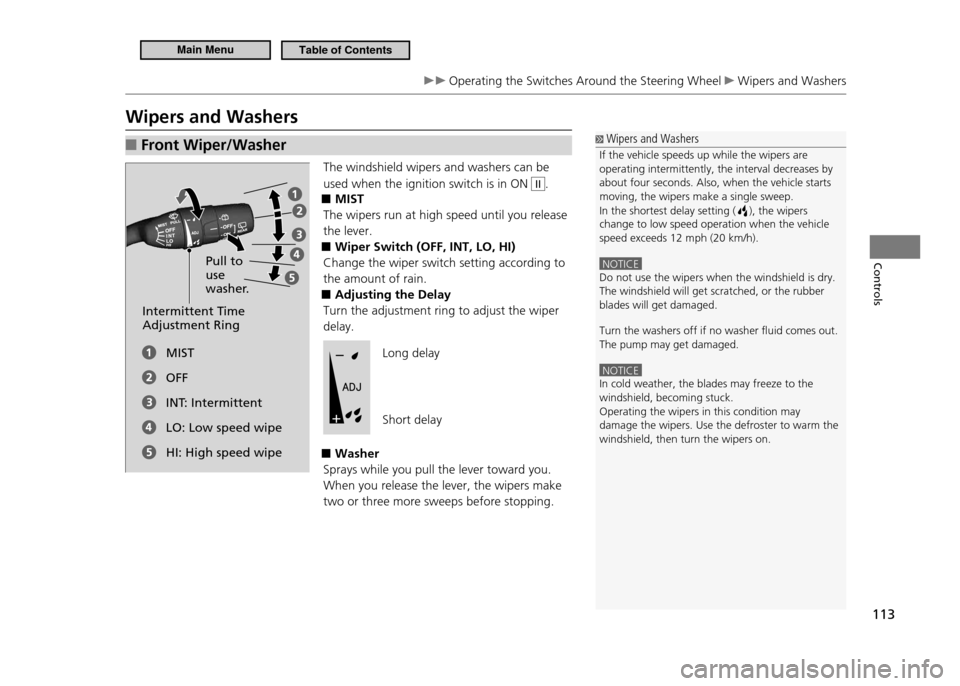
Front Wiper/Washer
■
The windshield wipers and washers can be used when the ignition switch is in ON
II.
MIST
■
The wipers run at high speed until you release the lever.
Wiper Switch (OFF, INT, LO, HI)
■
Change the wiper switch setting according to the amount of rain.
Adjusting the Delay
■
Turn the adjustment ring to adjust the wiper delay.
Washer
■
Sprays while you pull the lever toward you. When you release the lever, the wipers make two or three more sweeps before stopping.
Pull to use
washer.
Intermittent Time Adjustment Ring
MIST OFF
INT: IntermittentLO: Low speed wipeHI: High speed wipeLong delay Short delay
Main MenuTable of Contents
Page 115 of 333
114
Controls
Operating the Switches Around the Steering Wheel Wipers and Washers
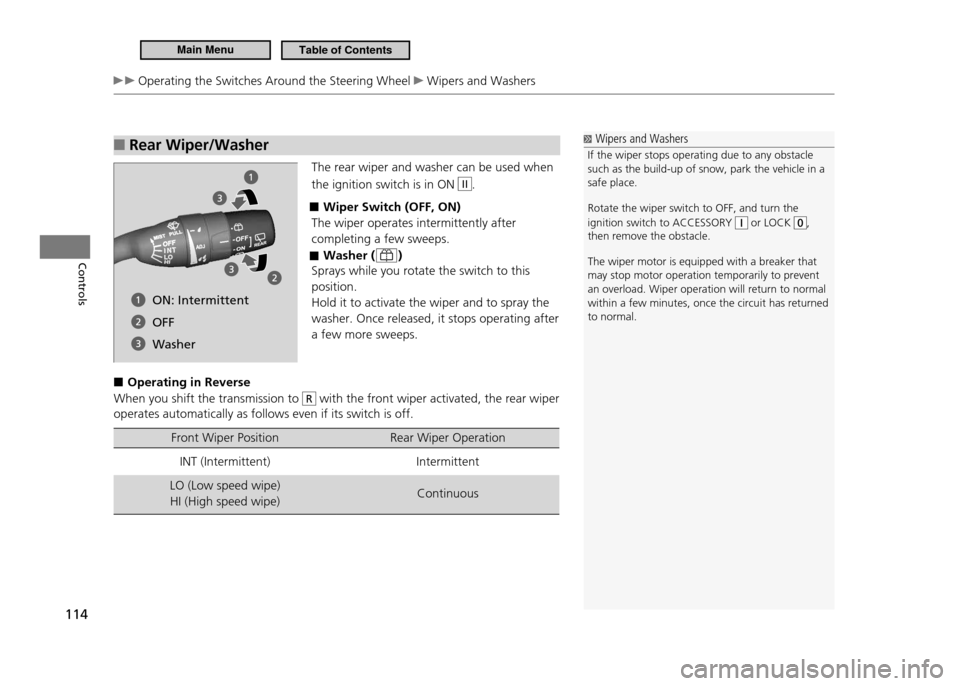
Rear Wiper/Washer
■
The rear wiper and washer can be used when the ignition switch is in ON
II.
Wiper Switch (OFF, ON)
■
The wiper operates intermittently after completing a few sweeps.
Washer (
■
)
Sprays while you rotate the switch to this position.Hold it to activate the wiper and to spray the washer. Once released, it stops operating after a few more sweeps.
Operating in Reverse
■
When you shift the transmission to
R with the front wiper activated, the rear wiper
operates automatically as follows even if its switch is off.
Front Wiper Position Rear Wiper Operation
INT (Intermittent) Intermittent
LO (Low speed wipe) HI (High speed wipe) Continuous
Wipers and Washers
If the wiper stops operating due to any obstacle such as the build-up of snow, park the vehicle in a safe place. Rotate the wiper switch to OFF, and turn the ignition switch to ACCESSORY
or LOCK ,
then remove the obstacle. The wiper motor is equipped with a breaker that may stop motor operation temporarily to prevent an overload. Wiper operation will return to normal within a few minutes, once the circuit has returned to normal.
ON: Intermittent OFF
Washer
Main MenuTable of Contents
Page 116 of 333
115
Controls
Operating the Switches Around the Steering Wheel Brightness Control
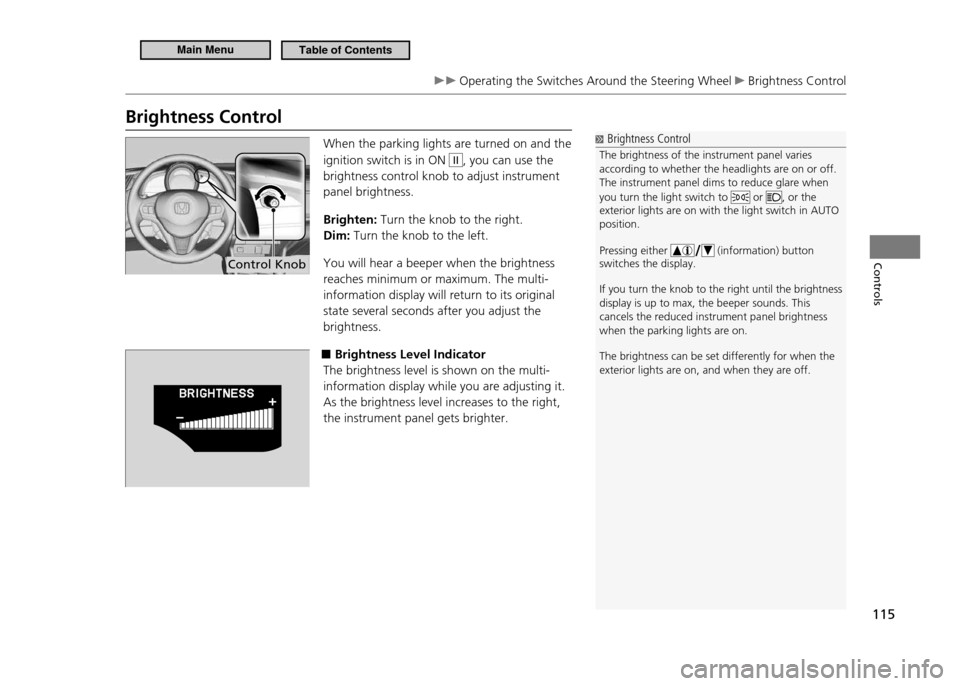
Brightness Control
Brightness Control
The brightness of the instrument panel varies according to whether the headlights are on or off.The instrument panel dims to reduce glare when you turn the light switch to
or , or the
exterior lights are on with the light switch in AUTO position. Pressing either
(information) button
switches the display.
If you turn the knob to the right until the brightn ess
display is up to max, the beeper sounds. This cancels the reduced instrument panel brightness when the parking lights are on. The brightness can be set differently for when the exterior lights are on, and when they are off.
When the parking lights are turned on and the ignition switch is in ON
II, you can use the
brightness control knob to adjust instrument panel brightness. Brighten: Turn the knob to the right.
Dim: Turn the knob to the left.
You will hear a beeper when the brightness reaches minimum or maximum. The multi-information display will return to its original state several seconds after you adjust the brightness.
■Brightness Level Indicator
The brightness level is shown on the multi-information display while you are adjusting it.As the brightness level increases to the right, the instrument panel gets brighter.
Control Knob
Main MenuTable of Contents