transmission HONDA CR-Z 2011 1.G User Guide
[x] Cancel search | Manufacturer: HONDA, Model Year: 2011, Model line: CR-Z, Model: HONDA CR-Z 2011 1.GPages: 333, PDF Size: 9.97 MB
Page 91 of 333
90
Instrument Panel
Gauges and Multi-Information Display Multi-Information Display
Customized Features
■
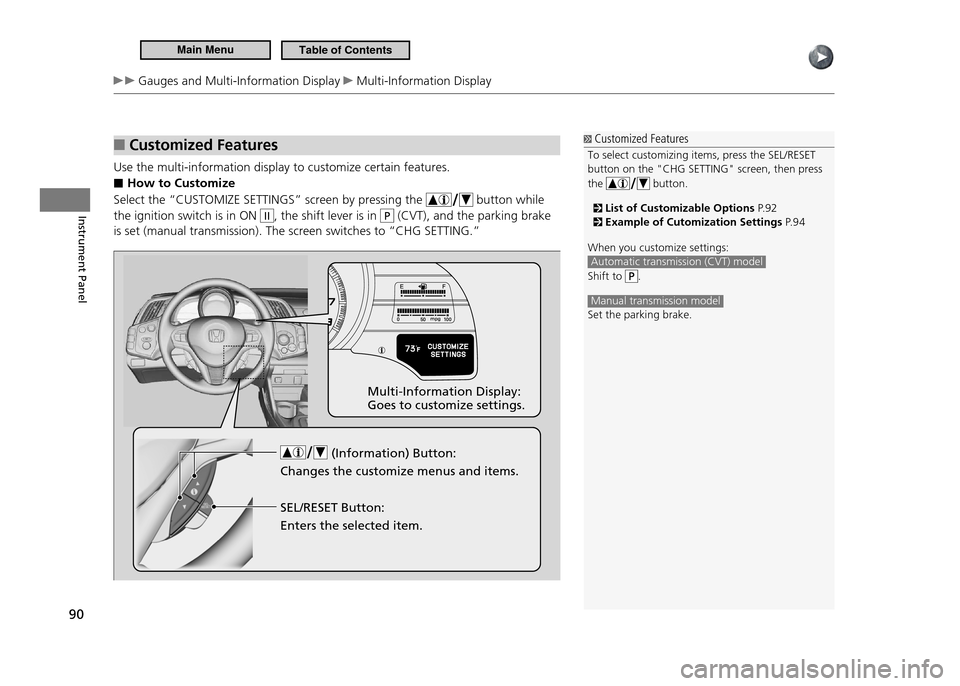
Use the multi-information display to customize certain features.
How to Customize
■
Select the “CUSTOMIZE SETTINGS” screen by pressing the
button while
the ignition switch is in ON
II, the shift lever is in P (CVT), and the parking brake
is set (manual transmission). The screen switches to “CHG SETTING.”
Customized Features
To select customizing items, press the SEL/RESET button on the "CHG SETTING" screen, then press the
button.
List of Customizable Options P. 9 2 Example of Cutomization Settings P. 9 4
When you customize settings:
Automatic transmission (CVT) model
Shift to .
Manual transmission model Set the parking brake.
(Information) Button:
Changes the customize menus and items. Multi-Information Display: Goes to customize settings.
SEL/RESET Button: Enters the selected item.
Main MenuTable of Contents
Page 94 of 333
93
Instrument Panel
Gauges and Multi-Information Display Multi-Information Display
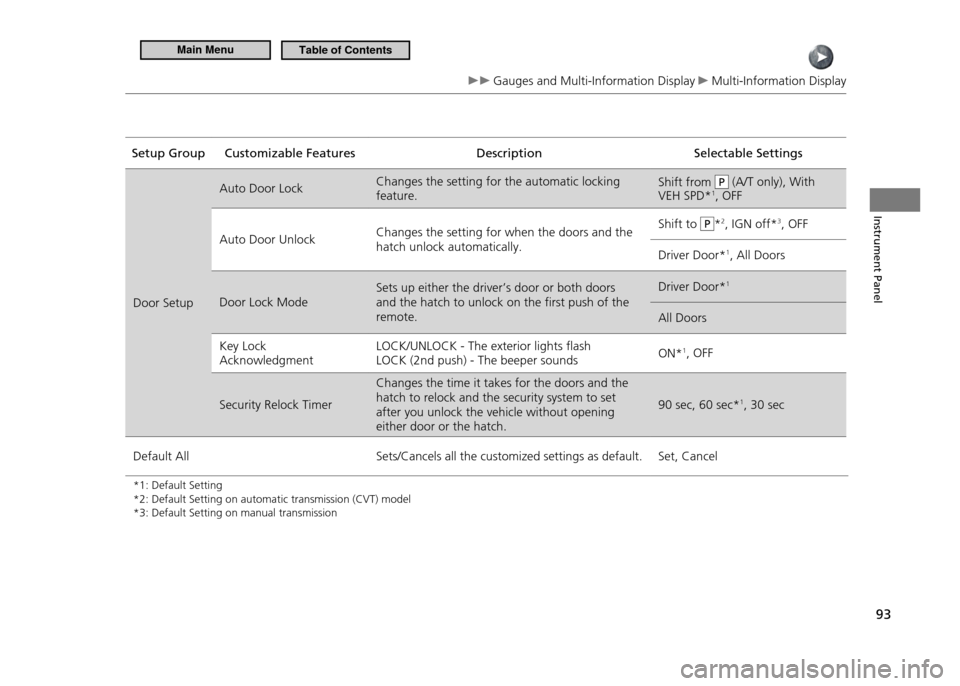
Setup Group Customizable Features Description Selectable SettingsDoor Setup Auto Door Lock
Changes the setting for the automatic locking feature. Shift from
P (A/T only), With
VEH SPD* 1
, OFF
Auto Door Unlock Changes the setting for when the doors and the hatch unlock automatically. Shift to
P*
2
, IGN off* 3
, OFF
Driver Door* 1
, All Doors
Door Lock Mode Sets up either the driver’s door or both doors and the hatch to unlock on the first push of the remote. Driver Door*
1
All Doors
Key Lock Acknowledgment LOCK/UNLOCK - The exterior lights flash LOCK (2nd push) - The beeper sounds
ON*
1
, OFF
Security Relock Timer Changes the time it takes for the doors and the hatch to relock and the security system to set after you unlock the vehicle without opening either door or the hatch. 90 sec, 60 sec*
1
, 30 sec
Default All Sets/Cancels all the customized settings as default. Set, Cancel
*1: Default Setting *2: Default Setting on automatic transmission (CVT) model*3: Default Setting on manual transmission
Main MenuTable of Contents
Page 104 of 333
103
Controls
Locking and Unlocking the Doors Auto Door Lock/Unlock
Auto Door Lock/Unlock
Auto Door Lock/Unlock
The auto door lock/unlock settings can be customized using the multi-information display.
Customization Procedure P. 9 0
Auto Door Lock
■
The auto door lock function automatically locks all the doors and hatch when the vehicle reaches about 9 mph (15 km/h).
Auto Door Unlock
■
Automatic transmission (CVT)
When you depress the brake pedal and move the shift lever in P, the driver’s door
automatically unlocks.
Manual transmission
When you depress the brake pedal and turn the ignition switch to LOCK 0, the
driver’s door automatically unlocks.
Main MenuTable of Contents
Page 110 of 333
109
Controls
Operating the Switches Around the Steering Wheel
Ignition Switch
Ignition Switch
Manual transmission models Automatic transmission (CVT) models
You cannot take the key out unless the shift lever is
in .
On all models If you open the driver's door when the key is in LOCK or ACCESSORY , a warning buzzer will
sound to remind you to take the key out. If the key won't turn from LOCK
to ACCESSORY , turn the key while moving the steering wheel
left and right. The steering wheel will unlock, allowing the key to turn.
WARNING
Removing the key from the ignition switch locks the steering. If you do this while the vehicle is in motion, you can lose control of the vehicle. Only remove the key from the ignition switch when parked.
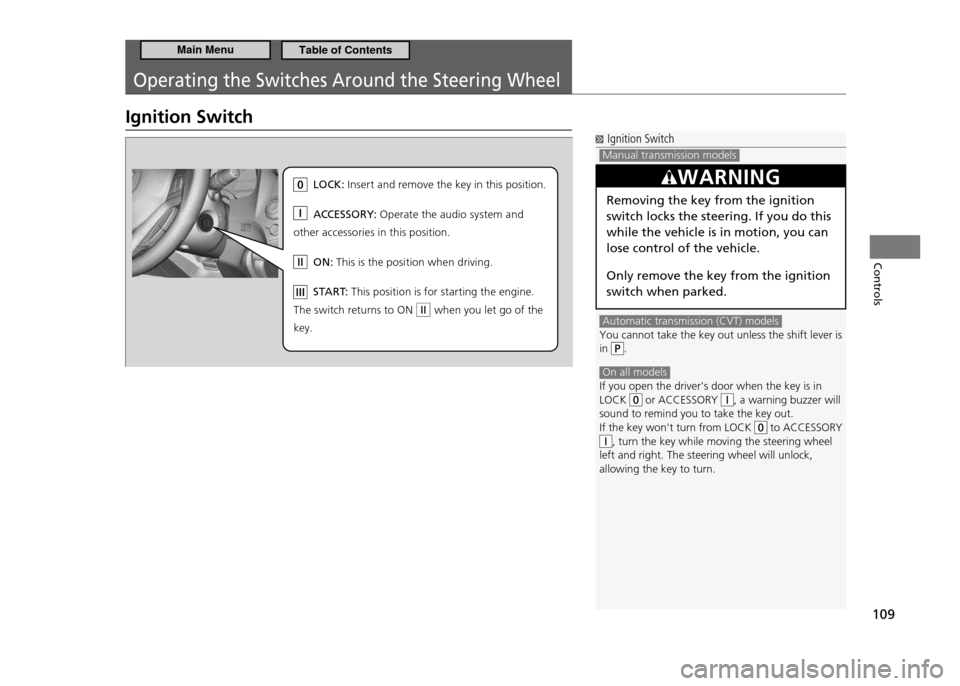
LO CK: In se rt and re move the key in this position.
AC CESSOR Y: Op erate the audio system and
other acce ssories in this position.
ON : Th is is the position when driving.
ST AR T: Th is position is for starting the engine .
Th e sw itch returns to ON when you let go of the
key.
Main MenuTable of Contents
Page 115 of 333
114
Controls
Operating the Switches Around the Steering Wheel Wipers and Washers
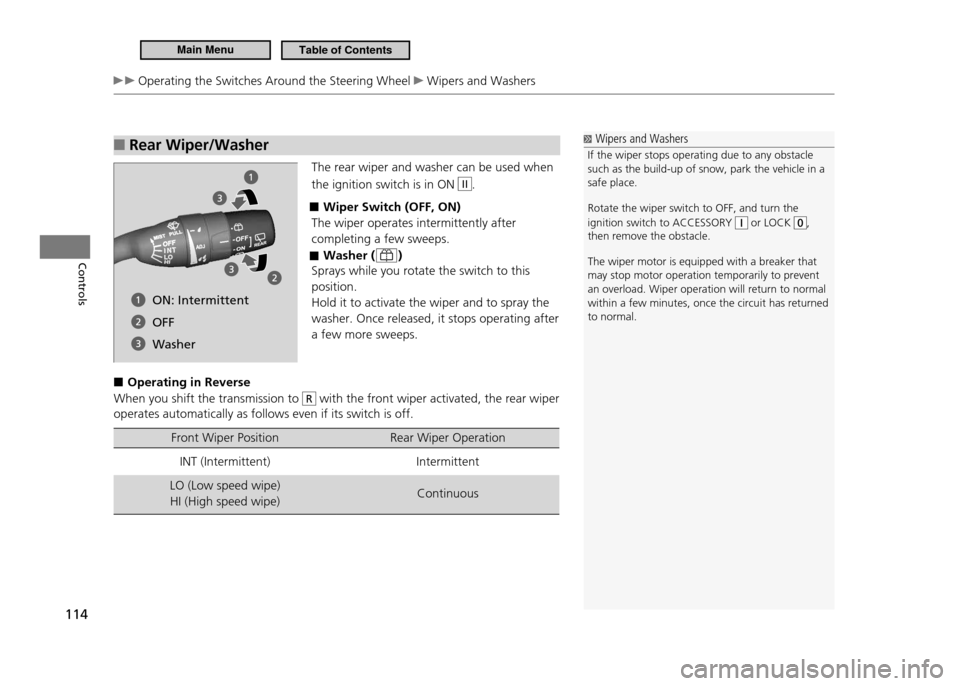
Rear Wiper/Washer
■
The rear wiper and washer can be used when the ignition switch is in ON
II.
Wiper Switch (OFF, ON)
■
The wiper operates intermittently after completing a few sweeps.
Washer (
■
)
Sprays while you rotate the switch to this position.Hold it to activate the wiper and to spray the washer. Once released, it stops operating after a few more sweeps.
Operating in Reverse
■
When you shift the transmission to
R with the front wiper activated, the rear wiper
operates automatically as follows even if its switch is off.
Front Wiper Position Rear Wiper Operation
INT (Intermittent) Intermittent
LO (Low speed wipe) HI (High speed wipe) Continuous
Wipers and Washers
If the wiper stops operating due to any obstacle such as the build-up of snow, park the vehicle in a safe place. Rotate the wiper switch to OFF, and turn the ignition switch to ACCESSORY
or LOCK ,
then remove the obstacle. The wiper motor is equipped with a breaker that may stop motor operation temporarily to prevent an overload. Wiper operation will return to normal within a few minutes, once the circuit has returned to normal.
ON: Intermittent OFF
Washer
Main MenuTable of Contents
Page 133 of 333
132
Controls
Climate Control System Using Automatic Climate Control
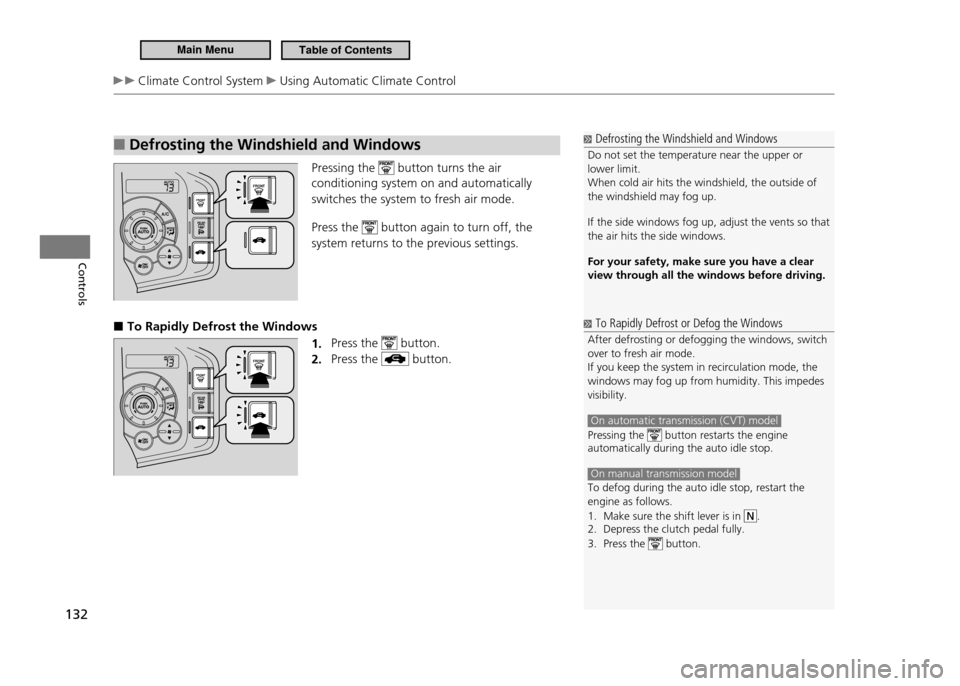
Defrosting the Windshield and Windows
■
Pressing the button turns the air
conditioning system on and automatically switches the system to fresh air mode. Press the
button again to turn off, the
system returns to the previous settings.
To Rapidly Defrost the Windows
■
1. Press the
button.
Press the
2.
button.
Defrosting the Windshield and Windows
Do not set the temperature near the upper or lower limit.When cold air hits the windshield, the outside of the windshield may fog up. If the side windows fog up, adjust the vents so that the air hits the side windows. For your safety, make sure you have a clear view through all the windows before driving.
To Rapidly Defrost or Defog the Windows
After defrosting or defogging the windows, switch over to fresh air mode.If you keep the system in recirculation mode, the windows may fog up from humidity. This impedes visibility.
On automatic transmission (CVT) model
Pressing the button restarts the engine
automatically during the auto idle stop.
On manual transmission model To defog during the auto idle stop, restart the engine as follows.
Make sure the shift lever is in
1.
.
Depress the clutch pedal fully.
2.
Press the
3.
button.
Main MenuTable of Contents
Page 192 of 333
Driving
This chapter describes driving, refueling, and information on items such as accessories.
191
Before Driving
Driving Preparation ................................. 192
Maximum Load Limit .............................. 194
Towing a Trailer Towing Your Vehicle .............................. 196
When Driving Starting the Engine ................................. 197
Precautions While Driving ....................... 200
Automatic Transmission (CVT) ................ 201Shifting (Automatic Transmission - CVT) .202
Shifting (Manual Transmission) ............... 207
3-Mode Drive System ............................. 210
Cruise Control ........................................ 211 VSA
®
(Vehicle Stability Assist), aka ESC
(Electronic Stability Control), System ....... 214TPMS (Tire Pressure Monitoring System) .216
Tire Pressure Monitoring System (TPMS) -
Required Federal Explanation .................. 217
Braking Brake System .......................................... 219
ABS (Anti-lock Brake System) .................. 221
Brake Assist System ................................ 222
Parking Your Vehicle When Stopped ....................................... 223Auto Idle Stop (Automatic Transmission -
CVT) ....................................................... 224 Auto Idle Stop (Manual Transmission) ..... 227
Parking ................................................... 230
Refueling Fuel Information ..................................... 231
How to Refuel ........................................ 232
Fuel Economy Improving Fuel Economy ........................ 234
Accessories and Modifications Accessories ............................................. 235
Modifications ......................................... 235
Main Menu
Page 198 of 333
197
Driving
When Driving
Starting the Engine
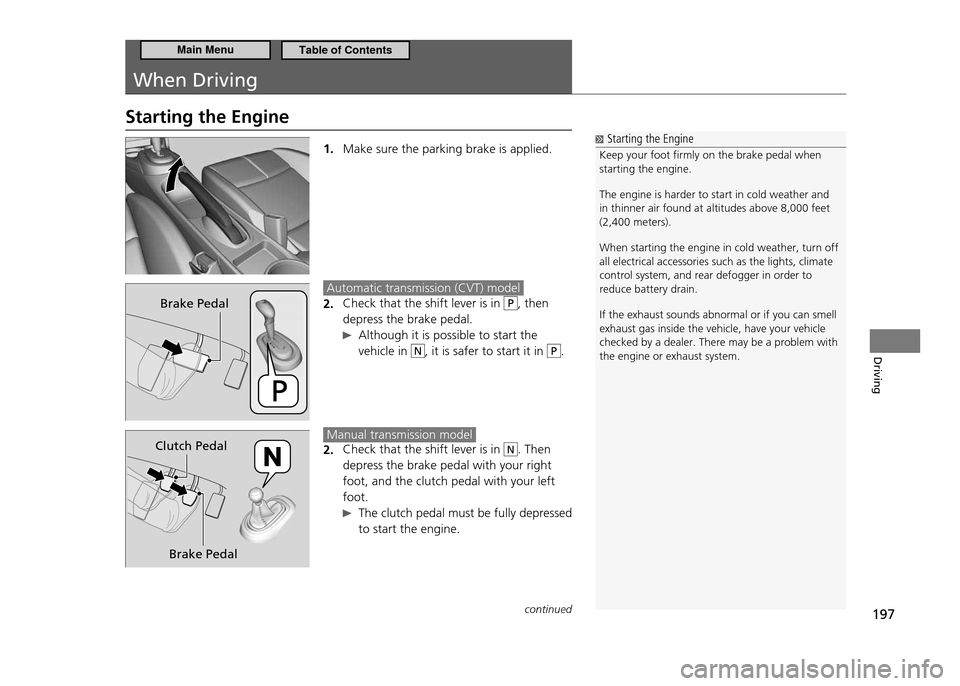
1. Make sure the parking brake is applied.
Automatic transmission (CVT) model
Check that the shift lever is in
2. P, then
depress the brake pedal.
Although it is possible to start the vehicle in
N, it is safer to start it in P.
Manual transmission model
Check that the shift lever is in
2. N. Then
depress the brake pedal with your right foot, and the clutch pedal with your left foot.
The clutch pedal must be fully depressed to start the engine.
Starting the Engine
Keep your foot irmly on the brake pedal when starting the engine. The engine is harder to start in cold weather and in thinner air found at altitudes above 8,000 feet (2,400 meters). When starting the engine in cold weather, turn off all electrical accessories such as the lights, climate control system, and rear defogger in order to reduce battery drain. If the exhaust sounds abnormal or if you can smell exhaust gas inside the vehicle, have your vehicle checked by a dealer. There may be a problem with the engine or exhaust system.
Brake Pedal
Brake Pedal
Clutch Pedal
continued
Main MenuTable of Contents
Page 199 of 333
198
Driving
When Driving Starting the Engine
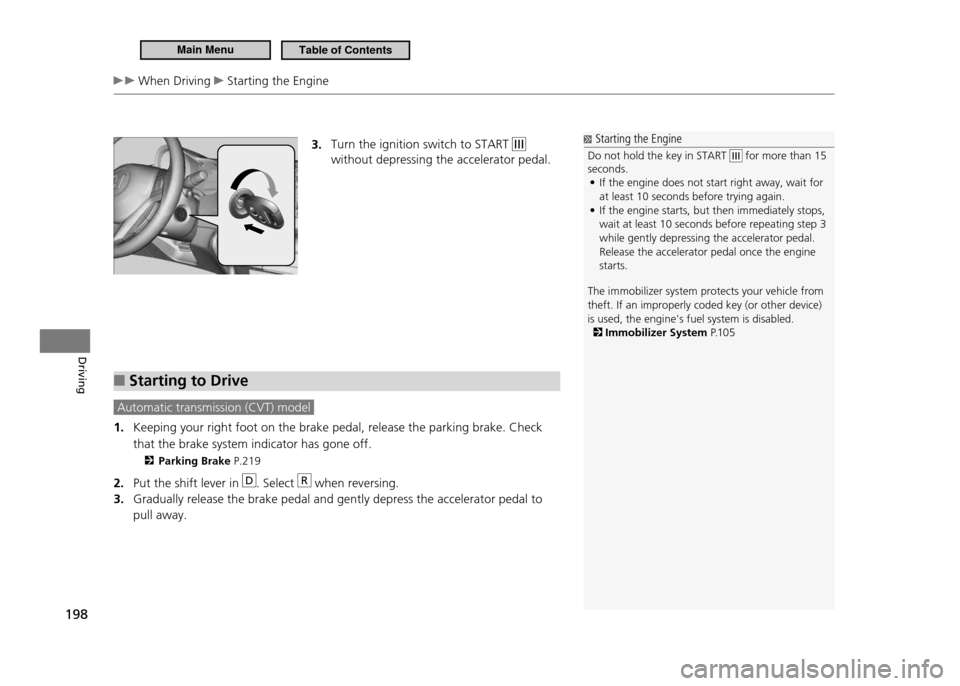
3. Turn the ignition switch to START
without depressing the accelerator pedal.
Starting to Drive
■
Automatic transmission (CVT) model
Keeping your right foot on the brake pedal, release the parking brake. Check
1.
that the brake system indicator has gone off.
Parking Brake P.219
Put the shift lever in
2.
D. Select R when reversing.
Gradually release the brake pedal and gently depress the accelerator pedal to
3.
pull away.
Starting the Engine
Do not hold the key in START
for more than 15
seconds.
If the engine does not start right away, wait for
•
at least 10 seconds before trying again. If the engine starts, but then immediately stops,
•
wait at least 10 seconds before repeating step 3 while gently depressing the accelerator pedal. Release the accelerator pedal once the engine starts.
The immobilizer system protects your vehicle from theft. If an improperly coded key (or other device) is used, the engine's fuel system is disabled.
Immobilizer System P.1 0 5
Main MenuTable of Contents
Page 200 of 333
199
Driving
When Driving Starting the Engine
Creep Aid System
■
Automatic transmission (CVT) model
With the shift lever in D or N, this feature applies brake pressure briefly as you
release the brake pedal to prevent the vehicle from moving unexpectedly.
Hill Start Assist System
■
Manual transmission model
Hill start assist feature helps to prevent the vehicle from rolling on inclines as you move your foot from the brake pedal to the accelerator. Depress the clutch pedal, and shift to
1 when facing uphill, or R when facing
downhill, then release the brake pedal. The brakes remain engaged briefly as you release the brake pedal.
Hill Start Assist System
Hill start assist may not prevent the vehicle from rolling downhill on a very steep or slippery slope, and will not operate on small inclines. Hill start assist is not a replacement for the parking brake. Hill start assist will still operate even when VSA ®
is
switched off.
Main MenuTable of Contents