check engine light HONDA CR-Z 2011 1.G Owners Manual
[x] Cancel search | Manufacturer: HONDA, Model Year: 2011, Model line: CR-Z, Model: HONDA CR-Z 2011 1.GPages: 333, PDF Size: 9.97 MB
Page 2 of 333
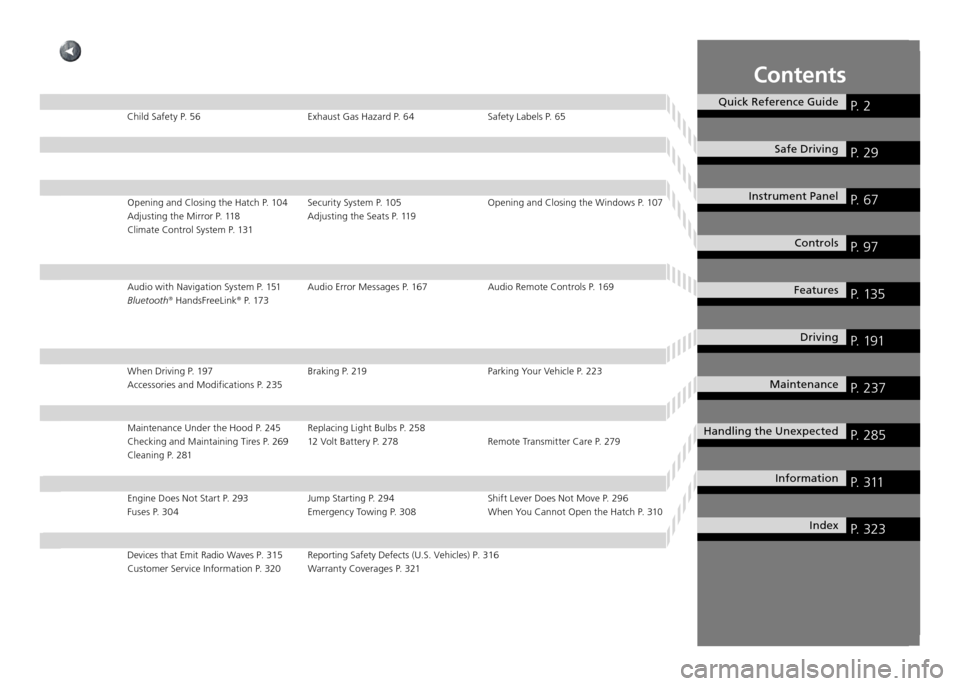
Contents
Quick Reference GuideP. 2
Safe DrivingP. 29
Instrument Panel P. 67
ControlsP. 97
FeaturesP. 135
DrivingP. 191
MaintenanceP. 237
Handling the UnexpectedP. 285
InformationP. 311
IndexP. 323
Child Safety P. 56 Exhaust Gas Hazard P. 64 Safety Labels P. 65Opening and Closing the Hatch P. 104 Security System P. 105 Opening and Clos ing the Windows P. 107
Adjusting the Mirror P. 118 Adjusting the Seats P. 119
Climate Control System P. 131
Audio with Navigation System P. 151 Audio Error Messages P. 167 Audio Rem ote Controls P. 169
Bluetooth ®
HandsFreeLink ®
P. 173
When Driving P. 197 Braking P. 219 Parking Your Vehicle P. 223 Accessories and Modifications P. 235
Maintenance Under the Hood P. 245 Replacing Light Bulbs P. 258
Checking and Maintaining Tires P. 269 12 Volt Battery P. 278 Remote Trans mitter Care P. 279
Cleaning P. 281
Engine Does Not Start P. 293 Jump Starting P. 294 Shift Lever Does Not Move P. 296 Fuses P. 304 Emergency Towing P. 308 When You Cannot Open the Hatch P. 310
Devices that Emit Radio Waves P. 315 Reporting Safety Defects (U.S. Vehicles) P. 316
Customer Service Information P. 320 Warranty Coverages P. 321
Page 23 of 333
Quick Reference Guide
22
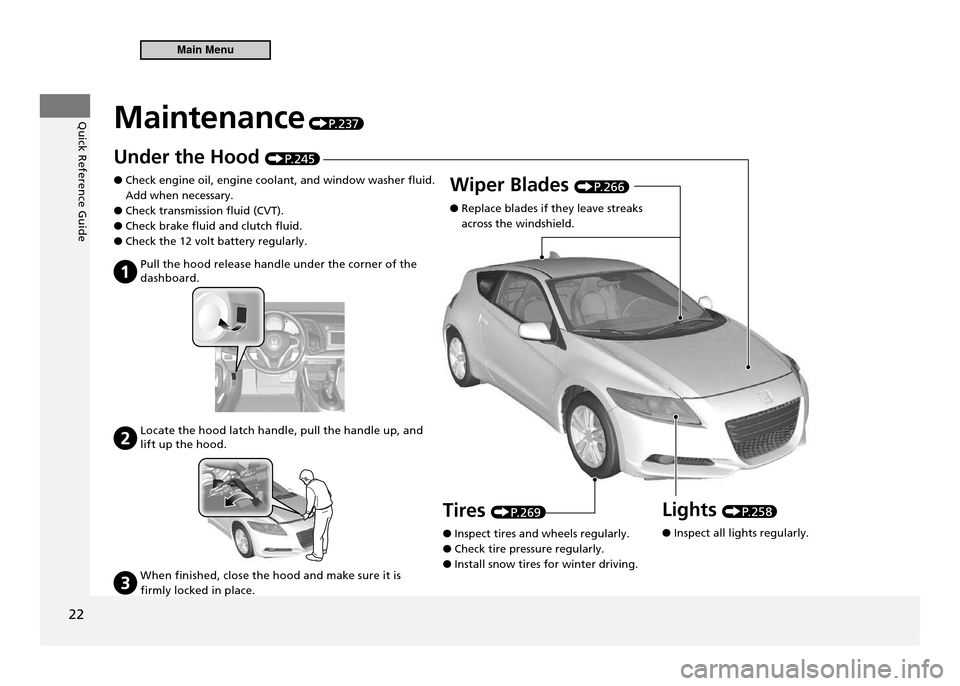
Maintenance P. 2 3 7
Under the Hood P. 2 4 5
Check engine oil, engine coolant, and window washer fluid.
●
Add when necessary. Check transmission fluid (CVT).
●
Check brake fluid and clutch fluid.
●
Check the 12 volt battery regularly.
●
Pull the hood release handle under the corner of the
dashboard.
Locate the hood latch handle, pull the handle up, and lift up the hood.
When finished, close the hood and make sure it is
firmly locked in place.
Wiper Blades P. 2 6 6
Replace blades if they leave streaks
●
across the windshield.
Lights
P. 2 5 8
Inspect all lights regularly.
●
Tires
P. 2 6 9
Inspect tires and wheels regularly.
●
Check tire pressure regularly.
●
Install snow tires for winter driving.
●
Main Menu
Page 75 of 333

74
Instrument Panel
Indicators
IndicatorName On/Blinking Explanation Message
Low Temperature Indicator Comes on when the engine
•
coolant temperature is low. If the indicator stays on after the
•
engine has reached normal operating temperature, there may be a problem with the temperature sensors. Have the vehicle inspected by a dealer.
—
U.S.
Canada Side Airbag Off Indicator Comes on for a few seconds when
•
you turn the ignition switch to ON
II, then goes off.
Comes on when the passenger side
•
airbag system is automatically shut off. It does not mean there is a problem
•
with your side airbags. Comes on when nobody is sitting
•
in the passenger seat - Have the
vehicle checked by a dealer.Comes on when someone is sitting
•
in the seat - Have the person sit
properly. U.S.
Canada
High Beam Indicator Comes on when the high beam
•
headlights are on.Comes on with reduced brightness
•
when DRL (daytime running lights) are on. —
—
Main MenuTable of Contents
Page 76 of 333
75
Instrument Panel
Indicators
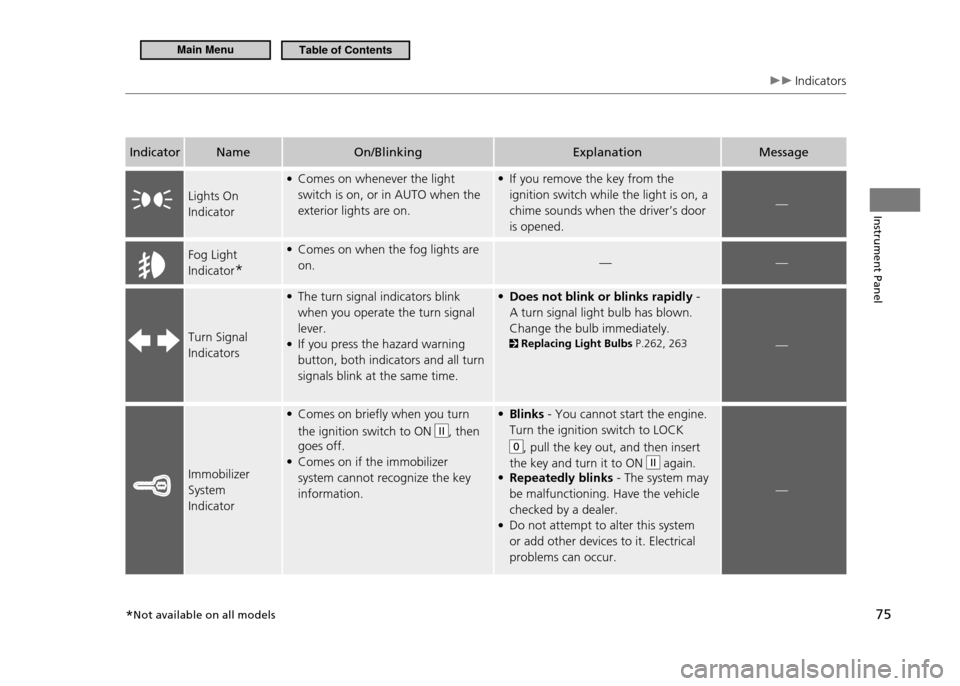
IndicatorName On/Blinking Explanation Message
Lights On Indicator Comes on whenever the light
•
switch is on, or in AUTO when the exterior lights are on. If you remove the key from the
•
ignition switch while the light is on, a chime sounds when the driver’s door is opened.
—
Fog Light Indicator * Comes on when the fog lights are
•
on. ——
Turn Signal IndicatorsThe turn signal indicators blink
•
when you operate the turn signal lever.If you press the hazard warning
•
button, both indicators and all turn signals blink at the same time. Does not blink or blinks rapidly
• -
A turn signal light bulb has blown. Change the bulb immediately. Replacing Light Bulbs P.262, 263—
Immobilizer System IndicatorComes on briefly when you turn
•
the ignition switch to ON
II, then
goes off. Comes on if the immobilizer
•
system cannot recognize the key information. Blinks
• - You cannot start the engine.
Turn the ignition switch to LOCK
0, pull the key out, and then insert
the key and turn it to ON
II again.
Repeatedly blinks
• - The system may
be malfunctioning. Have the vehicle checked by a dealer.Do not attempt to alter this system
•
or add other devices to it. Electrical problems can occur.
—
*Not available on all models
Main MenuTable of Contents
Page 198 of 333
197
Driving
When Driving
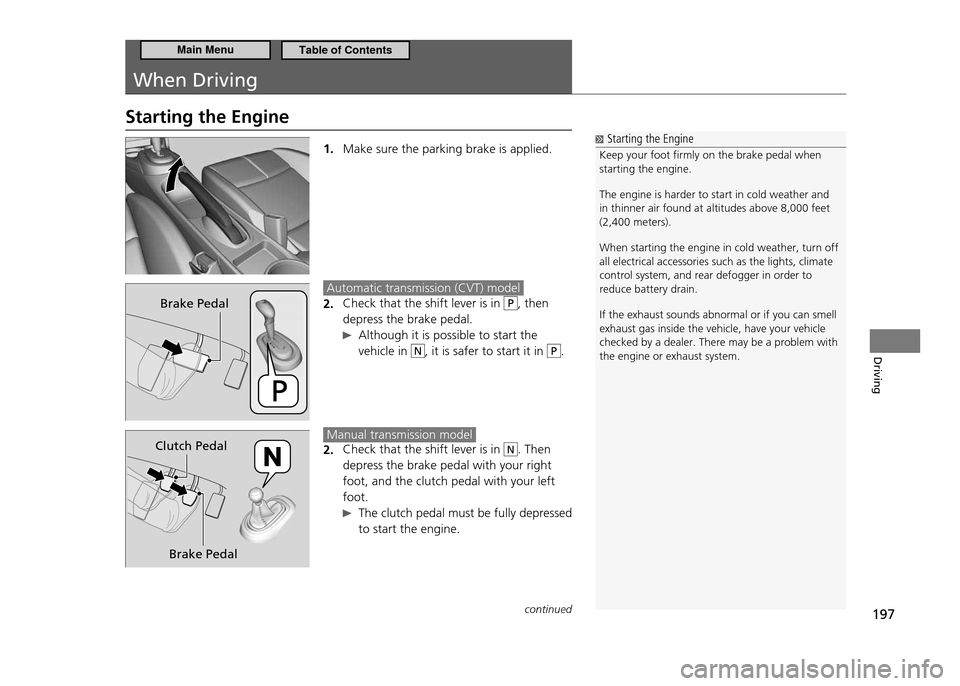
Starting the Engine
1. Make sure the parking brake is applied.
Automatic transmission (CVT) model
Check that the shift lever is in
2. P, then
depress the brake pedal.
Although it is possible to start the vehicle in
N, it is safer to start it in P.
Manual transmission model
Check that the shift lever is in
2. N. Then
depress the brake pedal with your right foot, and the clutch pedal with your left foot.
The clutch pedal must be fully depressed to start the engine.
Starting the Engine
Keep your foot irmly on the brake pedal when starting the engine. The engine is harder to start in cold weather and in thinner air found at altitudes above 8,000 feet (2,400 meters). When starting the engine in cold weather, turn off all electrical accessories such as the lights, climate control system, and rear defogger in order to reduce battery drain. If the exhaust sounds abnormal or if you can smell exhaust gas inside the vehicle, have your vehicle checked by a dealer. There may be a problem with the engine or exhaust system.
Brake Pedal
Brake Pedal
Clutch Pedal
continued
Main MenuTable of Contents
Page 204 of 333
203
Driving
When Driving Shifting
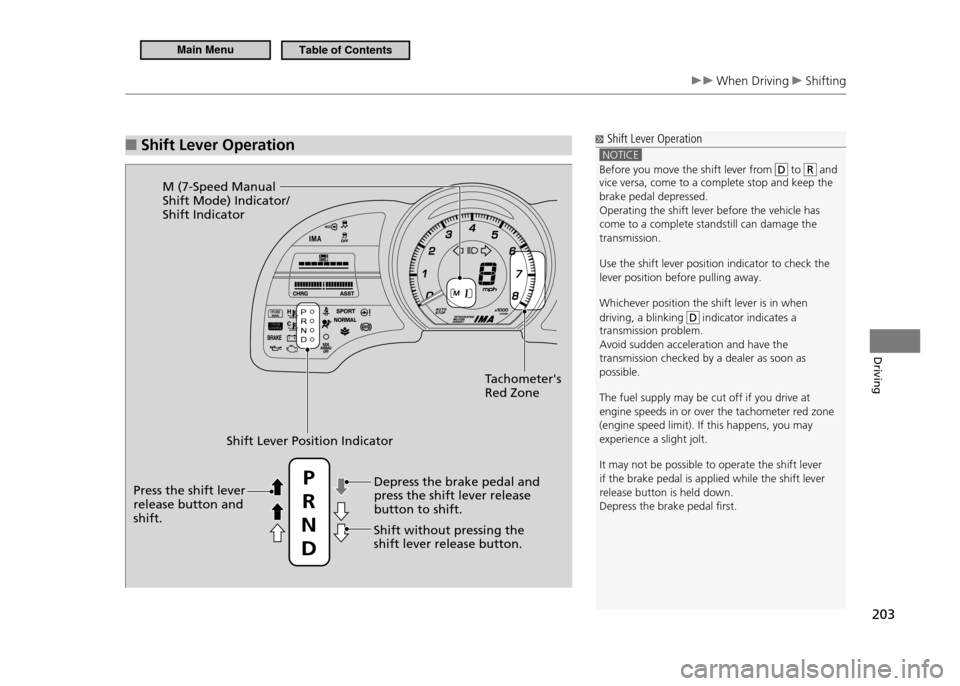
Shift Lever Operation
■ Shift Lever Operation
NOTICE
Before you move the shift lever from to and
vice versa, come to a complete stop and keep the brake pedal depressed.Operating the shift lever before the vehicle has come to a complete standstill can damage the transmission. Use the shift lever position indicator to check the lever position before pulling away. Whichever position the shift lever is in when driving, a blinking
indicator indicates a
transmission problem. Avoid sudden acceleration and have the transmission checked by a dealer as soon as possible. The fuel supply may be cut off if you drive at engine speeds in or over the tachometer red zone (engine speed limit). If this happens, you may experience a slight jolt. It may not be possible to operate the shift lever if the brake pedal is applied while the shift lever release button is held down.Depress the brake pedal irst.
Shift Lever Position Indicator
Tachometer's Red Zone
M (7-Speed Manual Shift Mode) Indicator/Shift Indicator
Depress the brake pedal and press the shift lever release button to shift.
Shift without pressing the shift lever release button.
Press the shift lever release button and shift. P
R
N D
Main MenuTable of Contents
Page 221 of 333
220
Driving
Braking Brake System
Foot Brake
■
Your vehicle is equipped with disc brakes at all four wheels. A power assist helps reduce the effort needed on the brake pedal. The brake assist system increases the stopping force when you depress the brake pedal hard in an emergency situation. The anti-lock brake system (ABS) helps you retain steering control when braking very hard.
Brake Assist System P.222
ABS (Anti-lock Brake System) P.221
Foot Brake
Check the brakes after driving through deep water, or if there is a buildup of road surface water. If necessary, dry the brakes by lightly depressing the pedal several times. If you hear a continuous metallic friction sound when applying the brakes, the brake pads need to be replaced. Have the vehicle checked by a dealer.
Constantly using the brake pedal while going down a long hill builds up heat, which reduces the brake effectiveness. Apply engine braking by taking your foot off the accelerator pedal and downshifting to a lower gear. With manual transmission use a lower gear for greater engine braking. Do not rest your foot on the brake pedal while driving, as it will lightly apply the brakes and cause them to lose effectiveness over time and reduce pad life. It will also confuse drivers behind you.
Main MenuTable of Contents
Page 222 of 333
221
Driving
Braking ABS (Anti-lock Brake System)
ABS (Anti-lock Brake System)
ABS
■
Helps prevent the wheels from locking up, and helps you retain steering control by pumping the brakes rapidly, much faster than you can do. The electronic brake distribution (EBD) system, which is part of the ABS, also balances the front-to-rear braking distribution according to vehicle loading. You should never pump the brake pedal. Let the ABS work for you by always keeping firm, steady pressure on the brake pedal. This is sometimes referred to as “stomp and steer.”
ABS Operation
■
The brake pedal may pulsate slightly when the ABS is working. Keep holding the pedal firmly down. On dry pavement, you will need to press on the brake pedal very hard before the ABS activates. However, you may feel the ABS activate immediately if you are trying to stop on snow or ice. When the vehicle speed goes under 6 mph (10 km/h), the ABS stops.
ABS (Anti-lock Brake System)
NOTICE The ABS may not function correctly if you use an incorrect tire type and size. When the ABS indicator comes on while driving, there may be a problem with the system.While normal braking is not affected, there is a possibility of the ABS not operating. Have the vehicle checked by a dealer immediately. The ABS does not reduce the time or distance it takes to stop the vehicle. It only helps with steering control during hard braking. In the following cases, your vehicle may need more stopping distance than a vehicle without ABS: When driving on rough road surfaces, including
•
when driving on uneven surfaces, such as gravel or snow.When tire chains are installed.
•
You may hear a motor sound coming from the
engine compartment while system checks are being performed immediately after starting the engine or while driving. This is normal.
Main MenuTable of Contents
Page 238 of 333
Maintenance
This chapter discusses basic maintenance.
237
Before Performing Maintenance
Inspection and Maintenance ................... 238
Safety When Performing Maintenance ... 239Parts and Fluids Used in Maintenance
Service .................................................. 240
Maintenance Minder ™
............................ 241
Maintenance Under the Hood Maintenance Items Under the Hood ....... 245
Opening the Hood ................................. 246
Recommended Engine Oil ...................... 247
Oil Check ............................................... 248
Adding Engine Oil .................................. 249
Changing the Engine Oil and Oil Filter .... 250 Engine Coolant ...................................... 252
Transmission Fluid .................................. 254
Brake/Clutch Fluid .................................. 256
Refilling Window Washer Fluid ............... 257
Replacing Light Bulbs ............................. 258
Checking and Maintaining Wiper Blades Checking Wiper Blades ........................... 266
Changing the Front Wiper Blade Rubber 266
Changing the Rear Wiper Blade Rubber .. 268
Checking and Maintaining Tires Checking Tires ........................................ 269
Tire and Loading Information Label ........ 270
Tire Labeling ........................................... 270 DOT Tire Quality Grading (U.S. Vehicles)
.272
Wear Indicators ...................................... 274
Tire Service Life ...................................... 274
Tire and Wheel Replacement .................. 275
Tire Rotation .......................................... 276
Winter Tires ............................................ 277
12 Volt Battery ........................................ 278
Remote Transmitter Care ....................... 279
Replacing the Battery ............................. 279
Climate Control System Maintenance ... 280
Cleaning ................................................... 281
Interior Care ........................................... 281
Exterior Care .......................................... 283
Main Menu
Page 294 of 333
293
Handling the Unexpected
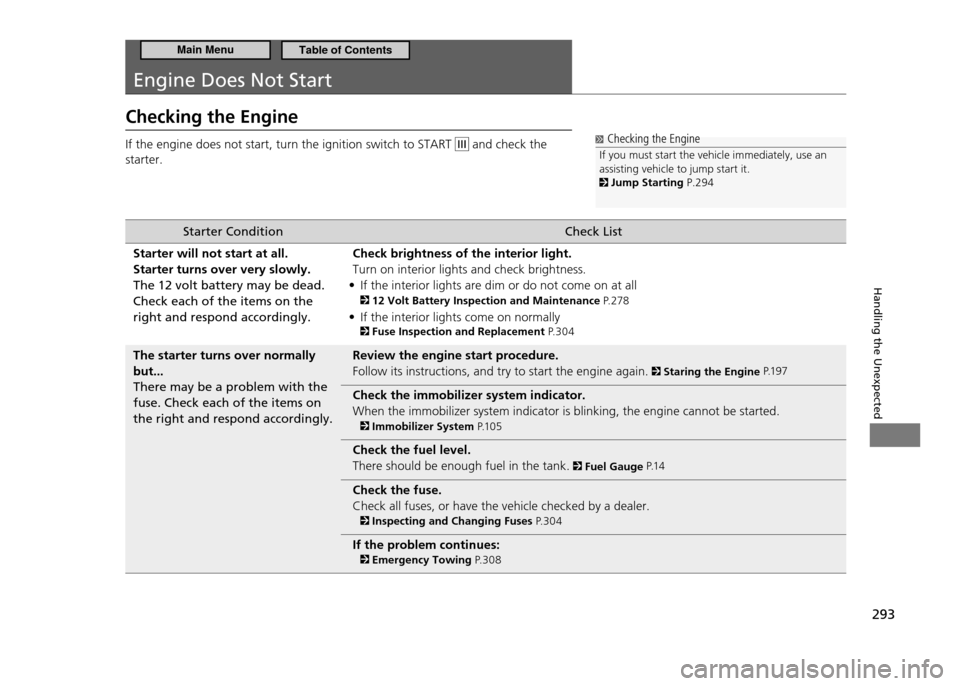
Engine Does Not Start
Checking the Engine If the engine does not start, turn the ignition switch to START
and check the
starter. Checking the Engine
If you must start the vehicle immediately, use an assisting vehicle to jump start it.
Jump Starting P.294
Starter Condition Check List
Starter will not start at all. Starter turns over very slowly.The 12 volt battery may be dead. Check each of the items on the right and respond accordingly. Check brightness of the interior light.Turn on interior lights and check brightness.
If the interior lights are dim or do not come on at all
•
12 Volt Battery Inspection and Maintenance P. 2 7 8
If the interior lights come on normally
•
Fuse Inspection and Replacement P. 3 0 4
The starter turns over normally but...There may be a problem with the fuse. Check each of the items on the right and respond accordingly. Review the engine start procedure.Follow its instructions, and try to start the engine again.
Staring the Engine
P.1 9 7
Check the immobilizer system indicator. When the immobilizer system indicator is blinking, the engine cannot be started.
Immobilizer System P.1 0 5
Check the fuel level. There should be enough fuel in the tank.
Fuel Gauge P.1 4
Check the fuse. Check all fuses, or have the vehicle checked by a dealer.
Inspecting and Changing Fuses P. 3 0 4
If the problem continues:
Emergency Towing P. 3 0 8
Main MenuTable of Contents