power steering HONDA CR-Z 2011 1.G Owners Manual
[x] Cancel search | Manufacturer: HONDA, Model Year: 2011, Model line: CR-Z, Model: HONDA CR-Z 2011 1.GPages: 333, PDF Size: 9.97 MB
Page 15 of 333
Quick Reference Guide
14
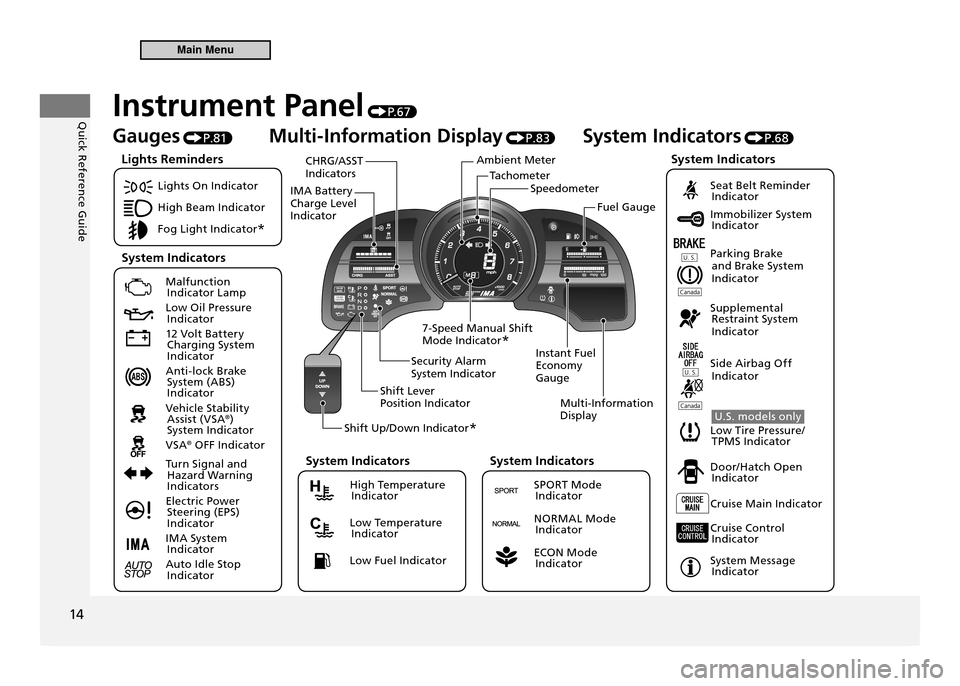
TachometerSpeedometer
Ambient Meter
IMA Battery Charge Level Indicator CHRG/ASST Indicators
Instant Fuel Economy GaugeMulti-Information Display
Security Alarm System Indicator
Shift Lever Position Indicator
Shift Up/Down Indicator *
7-Speed Manual Shift Mode Indicator
* Fuel Gauge
Instrument Panel
P. 6 7
Gauges P.81 Multi-Information Display
P.83 System Indicators
P.68
Lights On Indicator
High Beam Indicator
Fog Light Indicator *
Malfunction
Indicator Lamp
Low Oil Pressure Indicator
12 Volt Battery Charging System
Indicator
Anti-lock Brake System (ABS)
Indicator
Vehicle Stability Assist (VSA ®
)
System Indicator
VSA ®
OFF Indicator
Turn Signal and Hazard Warning
Indicators
Electric Power Steering (EPS)
Indicator
IMA System Indicator
Auto Idle Stop Indicator
Seat Belt Reminder Indicator
Immobilizer System Indicator
Parking Brake and Brake System
Indicator
Supplemental Restraint System
Indicator
Side Airbag Off Indicator
U.S. models only
Low Tire Pressure/ TPMS Indicator
Door/Hatch Open Indicator
Cruise Main Indicator
Cruise Control Indicator
System Message Indicator
Lights Reminders
System Indicators System Indicators
High Temperature
Indicator
Low Temperature Indicator
Low Fuel Indicator
System Indicators
SPORT Mode Indicator
NORMAL Mode Indicator
ECON Mode Indicator
System Indicators
Main Menu
Page 17 of 333
Quick Reference Guide
16
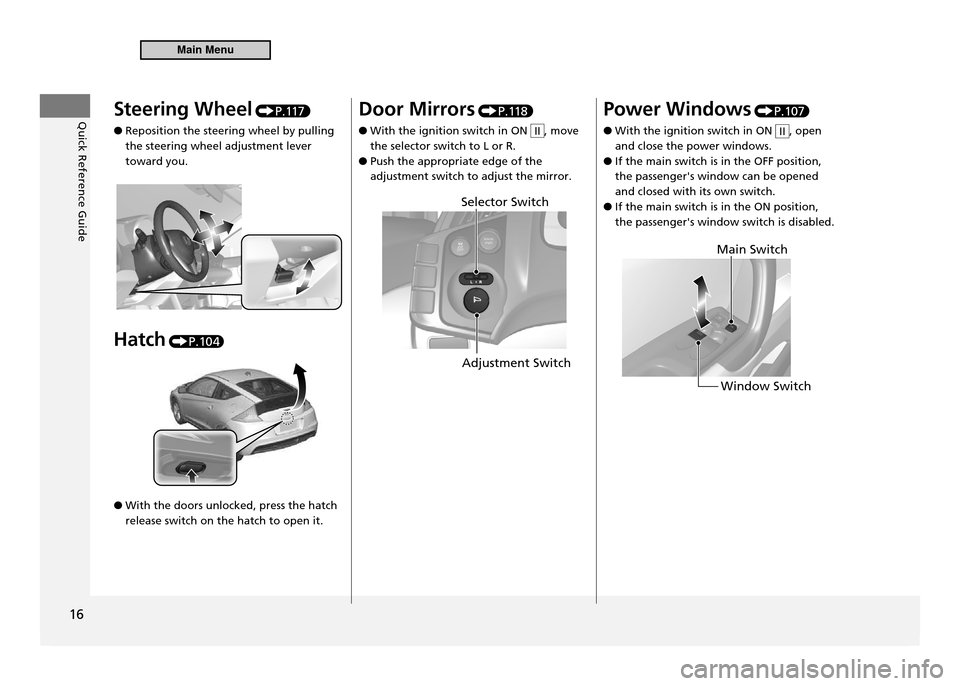
Steering Wheel P.117
Reposition the steering wheel by pulling
●
the steering wheel adjustment lever toward you.
Hatch
P.10 4.
With the doors unlocked, press the hatch
●
release switch on the hatch to open it. Door Mirrors
P.11 8
With the ignition switch in ON
●II, move
the selector switch to L or R. Push the appropriate edge of the
●
adjustment switch to adjust the mirror. Power Windows
P.107
With the ignition switch in ON
●II, open
and close the power windows. If the main switch is in the OFF position,
●
the passenger's window can be opened and closed with its own switch.If the main switch is in the ON position,
●
the passenger's window switch is disabled.
Adjustment Switch
Selector Switch
Window Switch
Main Switch
Main Menu
Page 21 of 333
Quick Reference Guide
20
Driving P.1 9 1
P
D
N
R
M● Shifting
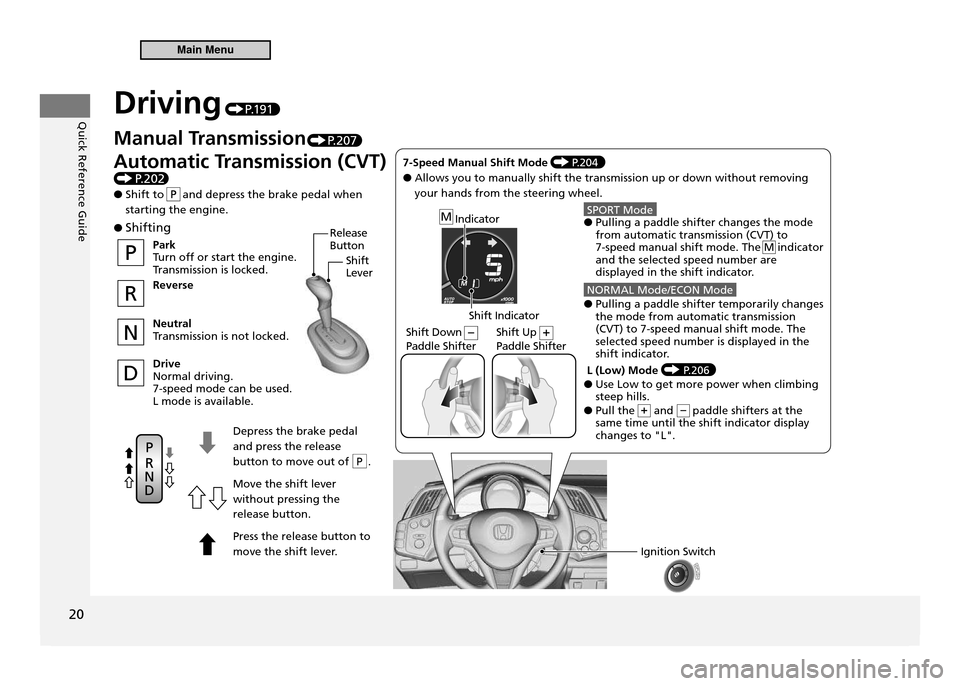
Depress the brake pedal and press the release
button to move out of P .Move the shift lever without pressing the release button. Press the release button to
move the shift lever.
Park
Turn off or start the engine.
Transmission is locked. Reverse Neutral
Transmission is not locked. Drive Normal driving.7-speed mode can be used.L mode is available.
Ignition Switch
Indicator
Shift Indicator
Shift Down (–) Paddle Shifter Shift Up (+)Paddle Shifter
Release
Button
Shift Lever
7-Speed Manual Shift Mode P.204
● Allows you to manually shift the transmission up or down without removing your hands from the steering wheel.
SPORT Mode● Pulling a paddle shifter changes the mode from automatic transmission (CVT) to 7-speed manual shift mode. The M indicator and the selected speed number are
displayed in the shift indicator.
NORMAL Mode/ECON Mode● Pulling a paddle shifter temporarily changes
the mode from automatic transmission (CVT) to 7-speed manual shift mode. The selected speed number is displayed in the
shift indicator.
L (Low) Mode
P.206● Use Low to get more power when climbing steep hills.
● Pull the + and - paddle shifters at the same time until the shift indicator display changes to "L".
Manual Transmission P.207
Automatic Transmission (CVT)
P .202
● Shift to and depress the brake pedal when starting the engine.
Main Menu
Page 43 of 333
Safe Driving
42
Airbags
Airbag System Components
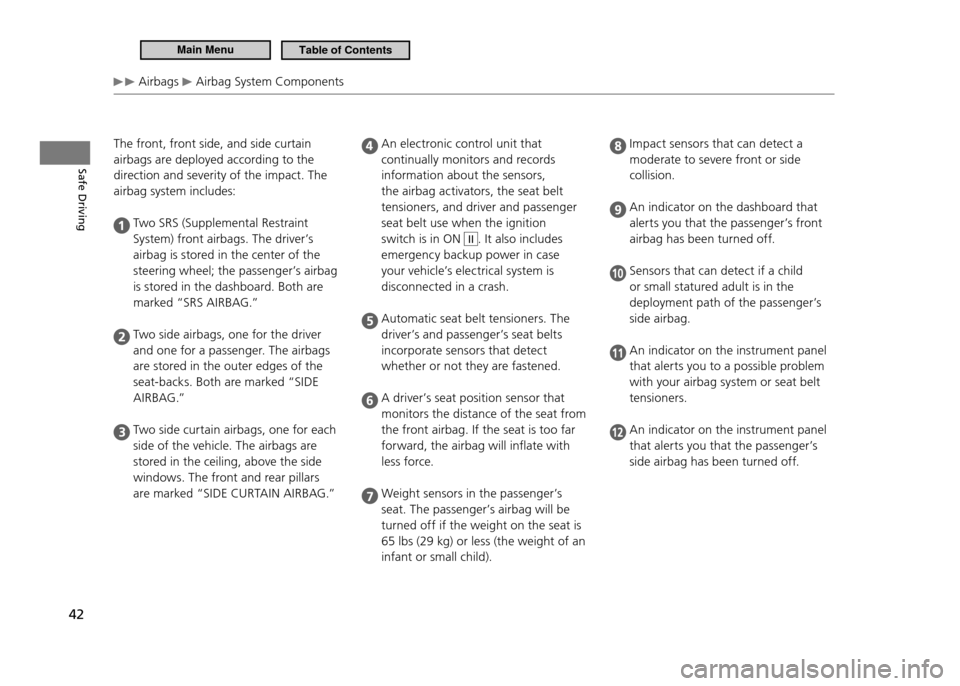
The front, front side, and side curtain airbags are deployed according to the direction and severity of the impact. The airbag system includes:
Two SRS (Supplemental Restraint
System) front airbags. The driver’s
airbag is stored in the center of the
steering wheel; the passenger’s airbag
is stored in the dashboard. Both are
marked “SRS AIRBAG.”
Two side airbags, one for the driver
and one for a passenger. The airbags
are stored in the outer edges of the
seat-backs. Both are marked “SIDE
A I R B A G .”
Two side curtain airbags, one for each
side of the vehicle. The airbags are
stored in the ceiling, above the side
windows. The front and rear pillars
are marked “SIDE CURTAIN AIRBAG.”
An electronic control unit that
continually monitors and records
information about the sensors,
the airbag activators, the seat belt
tensioners, and driver and passenger
seat belt use when the ignition
switch is in ON
II. It also includes
emergency backup power in case
your vehicle’s electrical system is
disconnected in a crash.
Automatic seat belt tensioners. The
driver’s and passenger’s seat belts
incorporate sensors that detect
whether or not they are fastened.
A driver’s seat position sensor that
monitors the distance of the seat from
the front airbag. If the seat is too far
forward, the airbag will inflate with
less force.
Weight sensors in the passenger’s
seat. The passenger’s airbag will be
turned off if the weight on the seat is
65 lbs (29 kg) or less (the weight of an
infant or small child).
Impact sensors that can detect a
moderate to severe front or side
collision.
An indicator on the dashboard that
alerts you that the passenger’s front
airbag has been turned off.
Sensors that can detect if a child
or small statured adult is in the
deployment path of the passenger’s
side airbag.
An indicator on the instrument panel
that alerts you to a possible problem
with your airbag system or seat belt
tensioners.
An indicator on the instrument panel
that alerts you that the passenger’s
side airbag has been turned off.
Main MenuTable of Contents
Page 73 of 333
72
Instrument Panel
Indicators
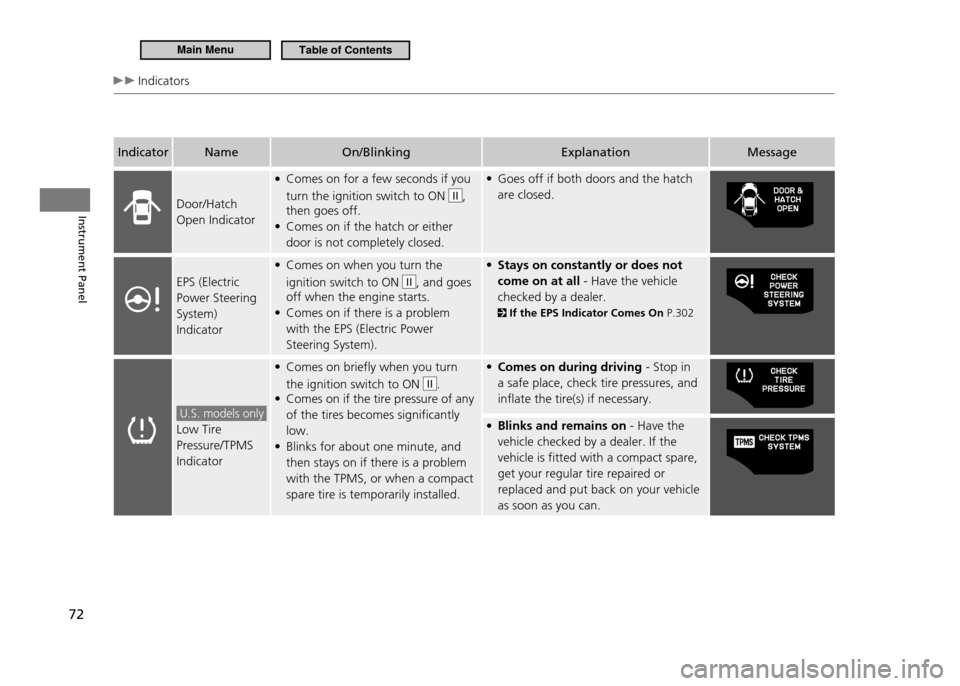
IndicatorName On/Blinking Explanation Message
Door/Hatch Open Indicator Comes on for a few seconds if you
•
turn the ignition switch to ON
II,
then goes off. Comes on if the hatch or either
•
door is not completely closed. Goes off if both doors and the hatch
•
are closed.
EPS (Electric Power Steering System) Indicator Comes on when you turn the
•
ignition switch to ON
II, and goes
off when the engine starts. Comes on if there is a problem
•
with the EPS (Electric Power Steering System). Stays on constantly or does not
•
come on at all - Have the vehicle
checked by a dealer.
If the EPS Indicator Comes On P.302
U.S. models only
Low Tire Pressure/TPMS IndicatorComes on briefly when you turn
•
the ignition switch to ON
II.
Comes on if the tire pressure of any
•
of the tires becomes significantly low.Blinks for about one minute, and
•
then stays on if there is a problem with the TPMS, or when a compact spare tire is temporarily installed. Comes on during driving
• - Stop in
a safe place, check tire pressures, and inflate the tire(s) if necessary. Blinks and remains on
• - Have the
vehicle checked by a dealer. If the vehicle is fitted with a compact spare, get your regular tire repaired or replaced and put back on your vehicle as soon as you can.
Main MenuTable of Contents
Page 117 of 333
116
Controls
Operating the Switches Around the Steering Wheel Rear Defogger/Heated Door Mirror Button
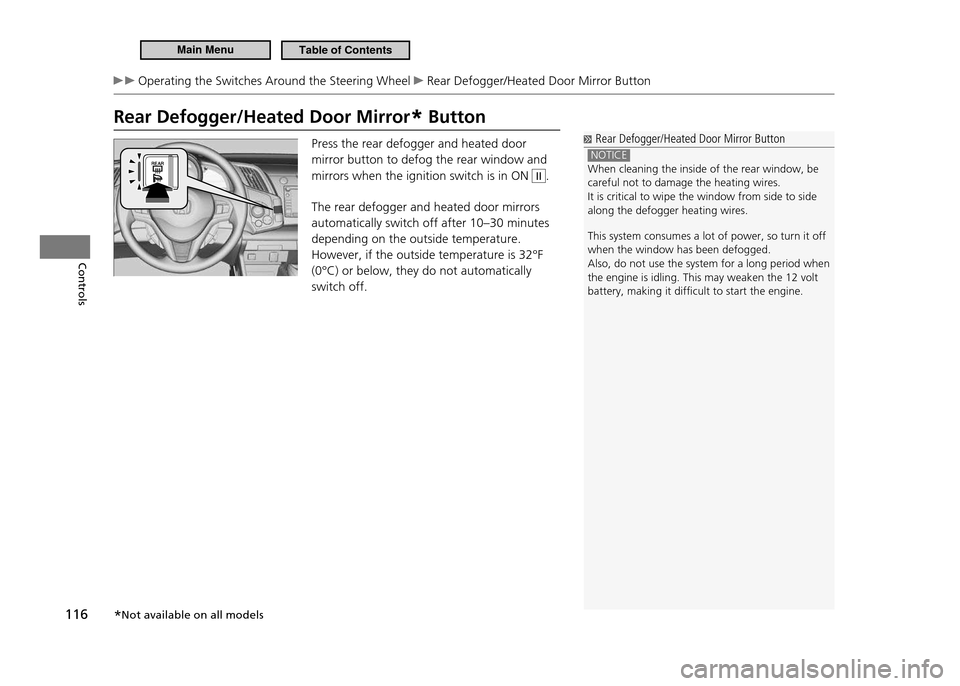
Rear Defogger/Heated Door Mirror* Button
Rear Defogger/Heated Door Mirror Button
NOTICE When cleaning the inside of the rear window, be careful not to damage the heating wires.It is critical to wipe the window from side to side along the defogger heating wires. This system consumes a lot of power, so turn it off when the window has been defogged.Also, do not use the system for a long period when the engine is idling. This may weaken the 12 volt battery, making it dificult to start the engine.
Press the rear defogger and heated door mirror button to defog the rear window and mirrors when the ignition switch is in ON II.
The rear defogger and heated door mirrors automatically switch off after 10–30 minutes depending on the outside temperature. However, if the outside temperature is 32°F (0°C) or below, they do not automatically switch off.
* Not available on all models
Main MenuTable of Contents
Page 137 of 333
136
Features
Audio System
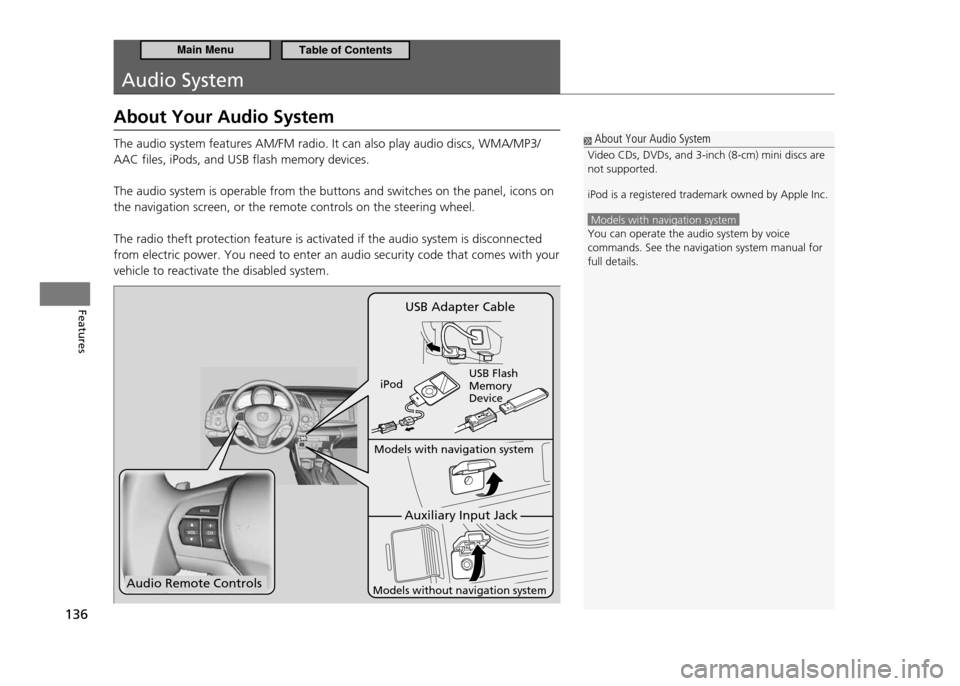
About Your Audio System The audio system features AM/FM radio. It can also play audio discs, WMA/MP3/ AAC files, iPods, and USB flash memory devices. The audio system is operable from the buttons and switches on the panel, icons on the navigation screen, or the remote controls on the steering wheel. The radio theft protection feature is activated if the audio system is disconnected from electric power. You need to enter an audio security code that comes with your vehicle to reactivate the disabled system.
About Your Audio System
Video CDs, DVDs, and 3-inch (8-cm) mini discs are not supported. iPod is a registered trademark owned by Apple Inc.
Models with navigation system You can operate the audio system by voice commands. See the navigation system manual for full details.
Audio Remote Controls
Auxiliary Input Jack
Models with navigation system
Models without navigation system
USB Adapter Cable
iPod USB Flash Memory Device
Main MenuTable of Contents
Page 201 of 333
200
Driving
When Driving Precautions While Driving
Precautions While Driving
In Rain
■
Avoid driving in deep water and on flooded roads. This can damage the engine or cause electrical component failure.
Other Precautions
■
If there is a strong impact with something under the vehicle, stop in a safe location. Check the underside of the vehicle for damage and fuel or brake fluid leaks.
Precautions While Driving
NOTICE Do not operate the shift lever while pressing the accelerator pedal. You could damage the transmission. If the ignition switch is turned to ACCESSORY
or LOCK while driving, the engine will shut
down and all steering and brake power assist functions will stop, making it dificult to control the vehicle. Do not drive with the shift lever in
, as you will
lose engine braking (and acceleration) performance. During the irst 600 miles (1,000 km) of operation, avoid sudden acceleration or full throttle operation so as to not damage the engine or powertrain. Avoid hard braking for the irst 200 miles (300 km). You should also follow this when the brakes are replaced.
Main MenuTable of Contents
Page 221 of 333
220
Driving
Braking Brake System
Foot Brake
■
Your vehicle is equipped with disc brakes at all four wheels. A power assist helps reduce the effort needed on the brake pedal. The brake assist system increases the stopping force when you depress the brake pedal hard in an emergency situation. The anti-lock brake system (ABS) helps you retain steering control when braking very hard.
Brake Assist System P.222
ABS (Anti-lock Brake System) P.221
Foot Brake
Check the brakes after driving through deep water, or if there is a buildup of road surface water. If necessary, dry the brakes by lightly depressing the pedal several times. If you hear a continuous metallic friction sound when applying the brakes, the brake pads need to be replaced. Have the vehicle checked by a dealer.
Constantly using the brake pedal while going down a long hill builds up heat, which reduces the brake effectiveness. Apply engine braking by taking your foot off the accelerator pedal and downshifting to a lower gear. With manual transmission use a lower gear for greater engine braking. Do not rest your foot on the brake pedal while driving, as it will lightly apply the brakes and cause them to lose effectiveness over time and reduce pad life. It will also confuse drivers behind you.
Main MenuTable of Contents
Page 244 of 333
243
Maintenance
Maintenance Minder™
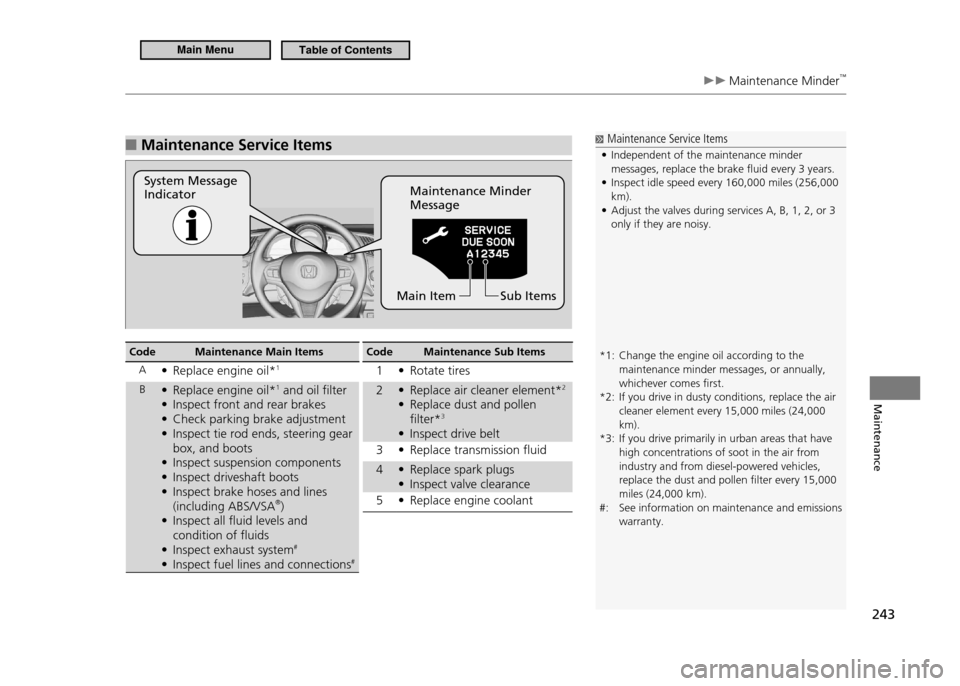
Maintenance Service Items
■
System Message Indicator Maintenance Minder Message
Sub Items
Main Item
Maintenance Service Items
Independent of the maintenance minder
•
messages, replace the brake luid every 3 years. Inspect idle speed every 160,000 miles (256,000
•
km).Adjust the valves during services A, B, 1, 2, or 3
•
only if they are noisy.
*1: Change the engine oil according to the maintenance minder messages, or annually, whichever comes irst.
*2: If you drive in dusty conditions, replace the air cleaner element every 15,000 miles (24,000 km).
*3: If you drive primarily in urban areas that have high concentrations of soot in the air from industry and from diesel-powered vehicles, replace the dust and pollen ilter every 15,000 miles (24,000 km).
#: See information on maintenance and emissions warranty.
Code Maintenance Main Items
A Replace engine oil*
• 1
B Replace engine oil*
• 1
and oil filter
Inspect front and rear brakes
•
Check parking brake adjustment
•
Inspect tie rod ends, steering gear
•
box, and boots
Inspect suspension components
•
Inspect driveshaft boots
•
Inspect brake hoses and lines
•
(including ABS/VSA ®
)
Inspect all fluid levels and
•
condition of fluids
Inspect exhaust system
• #
Inspect fuel lines and connections
• #Code Maintenance Sub Items
1 Rotate tires •
2 Replace air cleaner element* • 2
Replace dust and pollen
•
filter* 3
Inspect drive belt
•
3 Replace transmission fluid •
4 Replace spark plugs •
Inspect valve clearance
•
5 Replace engine coolant •
Main MenuTable of Contents