USB HONDA CR-Z 2012 1.G User Guide
[x] Cancel search | Manufacturer: HONDA, Model Year: 2012, Model line: CR-Z, Model: HONDA CR-Z 2012 1.GPages: 333, PDF Size: 10.43 MB
Page 163 of 333
162
uuAudio with Navigation System*uPlaying an iPod
®
Features
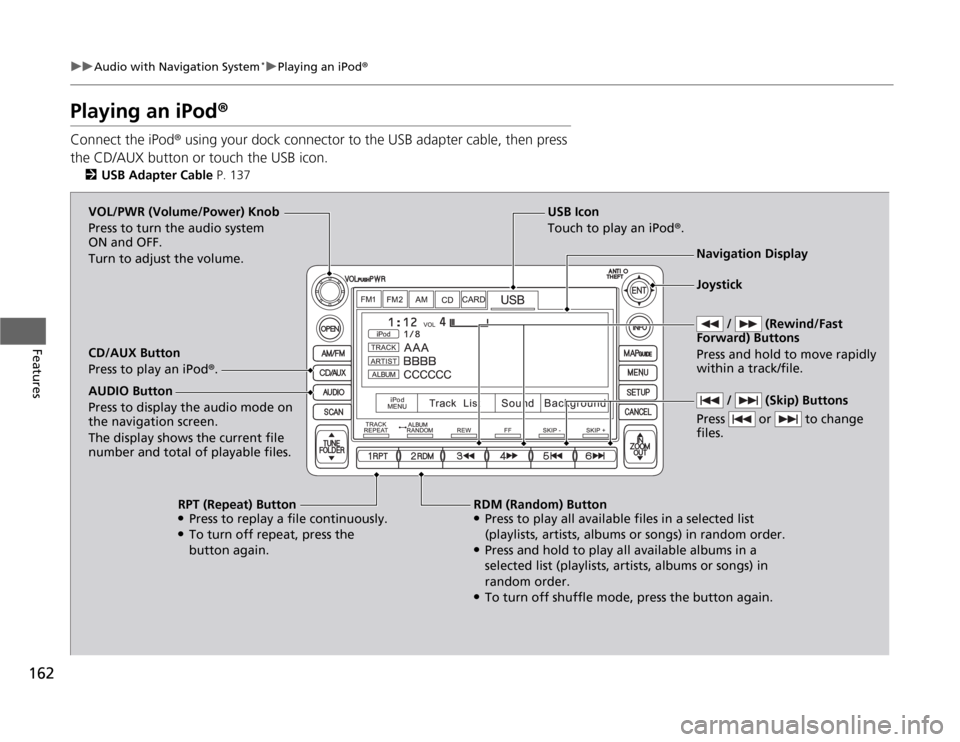
Playing an iPod ®
Connect the iPod ® using your dock connector to the USB adapter cable, then press
the CD/AUX button or touch the USB icon. 2 USB Adapter Cable P. 137
USB Icon
Touch to play an iPod ®.
/ (Rewind/Fast
Forward) Buttons
Press and hold to move rapidly within a track/file. VOL/PWR (Volume/Power) Knob
Press to turn the audio system
ON and OFF.
Turn to adjust the volume. Navigation Display
CD/AUX Button
Press to play an iPod ®.
RDM (Random) Button
● Press to play all available files in a selected list
(playlists, artists, albums or songs) in random order.
● Press and hold to play all available albums in a
selected list (playlists, artists, albums or songs) in
random order.
● To turn off shuffle mode, press the button again.
RPT (Repeat) Button
● Press to replay a file continuously.
● To turn off repeat, press the
button again.
AUDIO Button Press to display the audio mode on
the navigation screen.
The display shows the current file
number and total of playable files.
/ (Skip) Buttons
Press or to change files.
Joystick
Page 164 of 333
Continued163
uuAudio with Navigation System*uPlaying an iPod
®
Features
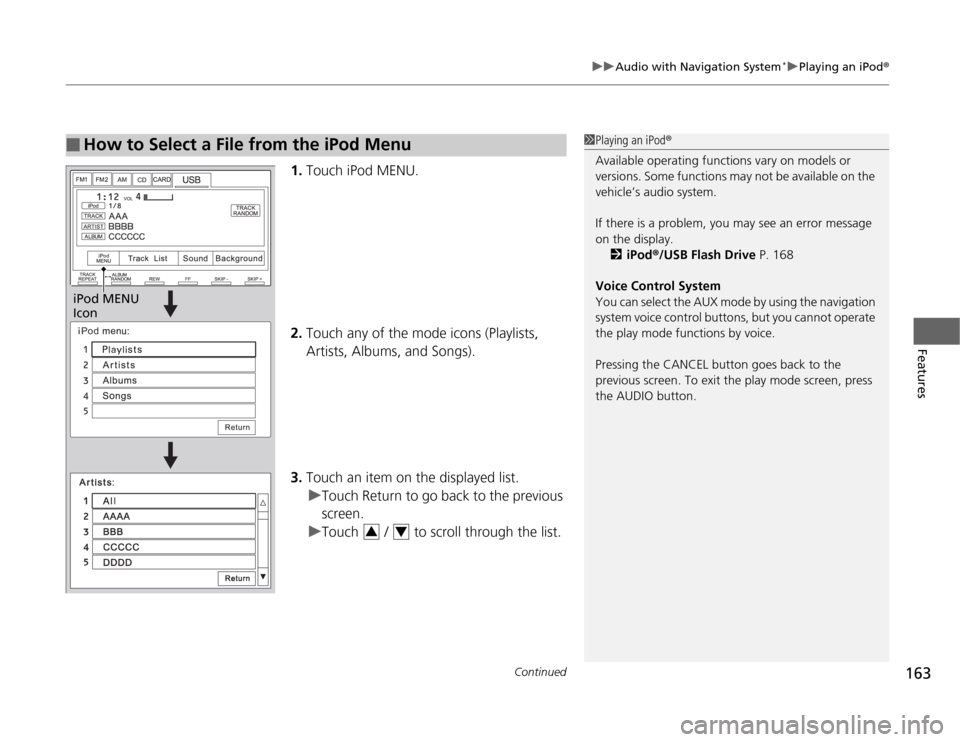
1.Touch iPod MENU.
2. Touch any of the mode icons (Playlists, Artists, Albums, and Songs).
3. Touch an item on the displayed list.
uTouch Return to go back to the previous screen.
uTouch / to scroll through the list.
■How to Select a File from the iPod Menu1Playing an iPod ®
Available operating functions vary on models or
versions. Some functions may not be available on the
vehicle’s audio system.
If there is a problem, you may see an error message
on the display. 2 iPod ®/USB Flash Drive P. 168
Voice Control System
You can select the AUX mode by using the navigation
system voice control buttons, but you cannot operate
the play mode functions by voice.
Pressing the CANCEL button goes back to the
previous screen. To exit the play mode screen, press
the AUDIO button.
iPod MENU
Icon
34
Page 166 of 333
165
uuAudio with Navigation System*uPlaying a USB Flash Drive
Continued
Features
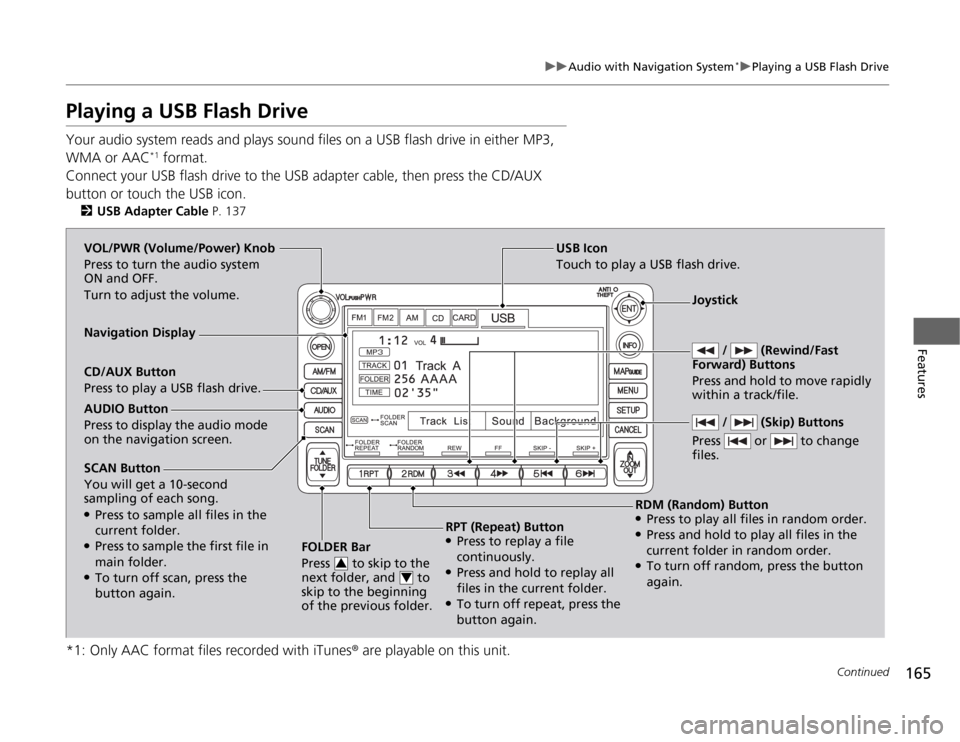
Playing a USB Flash Drive
Your audio system reads and plays sound files on a USB flash drive in either MP3,
WMA or AAC*1
format.
Connect your USB flash drive to the USB adapter cable, then press the CD/AUX
button or touch the USB icon. 2 USB Adapter Cable P. 137
*1: Only AAC format files recorded with iTunes ® are playable on this unit.
SCAN Button You will get a 10-second
sampling of each song. ●
Press to sample all files in the current folder.
● Press to sample the first file in main folder.
● To turn off scan, press the
button again. FOLDER Bar
Press to skip to the
next folder, and to
skip to the beginning
of the previous folder.
3
4
USB Icon
Touch to play a USB flash drive.
/ (Rewind/Fast
Forward) Buttons
Press and hold to move rapidly within a track/file. VOL/PWR (Volume/Power) Knob
Press to turn the audio system
ON and OFF.
Turn to adjust the volume.
Navigation Display CD/AUX Button
Press to play a USB flash drive.
RDM (Random) Button
● Press to play all files in random order.
● Press and hold to play all files in the
current folder in random order.
● To turn off random, press the button
again.
RPT (Repeat) Button
● Press to replay a file
continuously.
● Press and hold to replay all
files in the current folder.
● To turn off repeat, press the
button again.
AUDIO Button
Press to display the audio mode on the navigation screen.
/ (Skip) Buttons
Press or to change files.
Joystick
Page 167 of 333
uuAudio with Navigation System*uPlaying a USB Flash Drive
166
Features
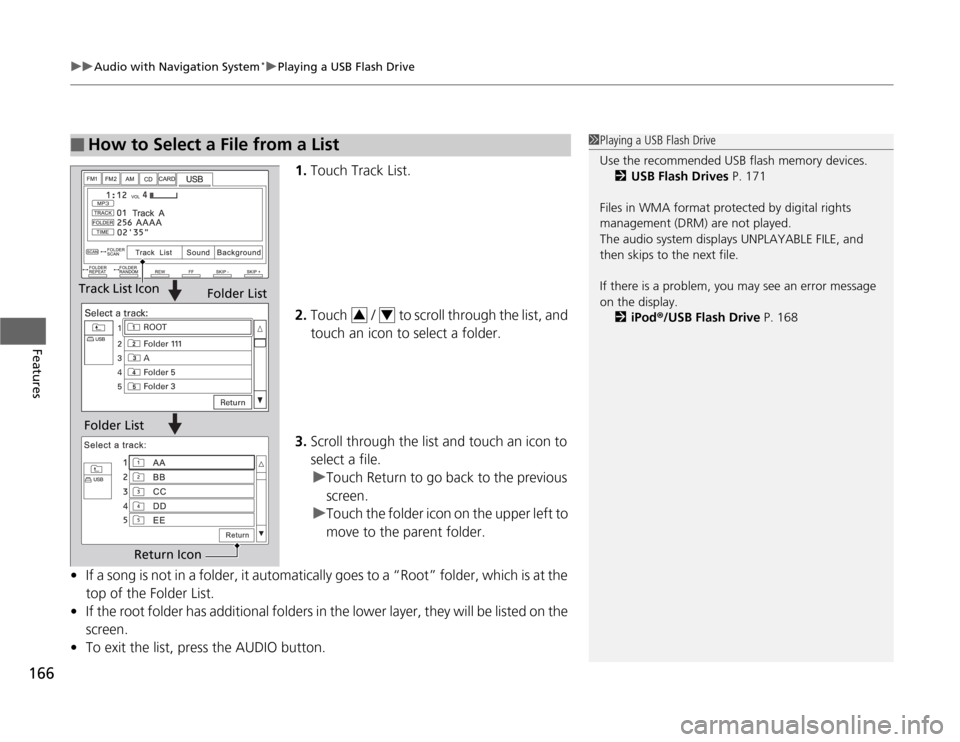
1. Touch Track List.
2. Touch / to scroll through the list, and
touch an icon to select a folder.
3. Scroll through the list and touch an icon to
select a file.
uTouch Return to go back to the previous screen.
uTouch the folder icon on the upper left to
move to the parent folder.
• If a song is not in a folder, it automatically goes to a “Root” folder, which is at the
top of the Folder List.
• If the root folder has additional folders in the lower layer, they will be listed on the screen.
• To exit the list, press the AUDIO button.
■How to Select a File from a List1Playing a USB Flash Drive
Use the recommended USB flash memory devices.
2 USB Flash Drives P. 171
Files in WMA format protected by digital rights
management (DRM) are not played.
The audio system displays UNPLAYABLE FILE, and
then skips to the next file.
If there is a problem, you may see an error message
on the display. 2 iPod ®/USB Flash Drive P. 168
Track List Icon
Folder List
Folder List
Return Icon
34
Page 169 of 333
168
uuAudio Error MessagesuiPod®/USB Flash Drive
Features
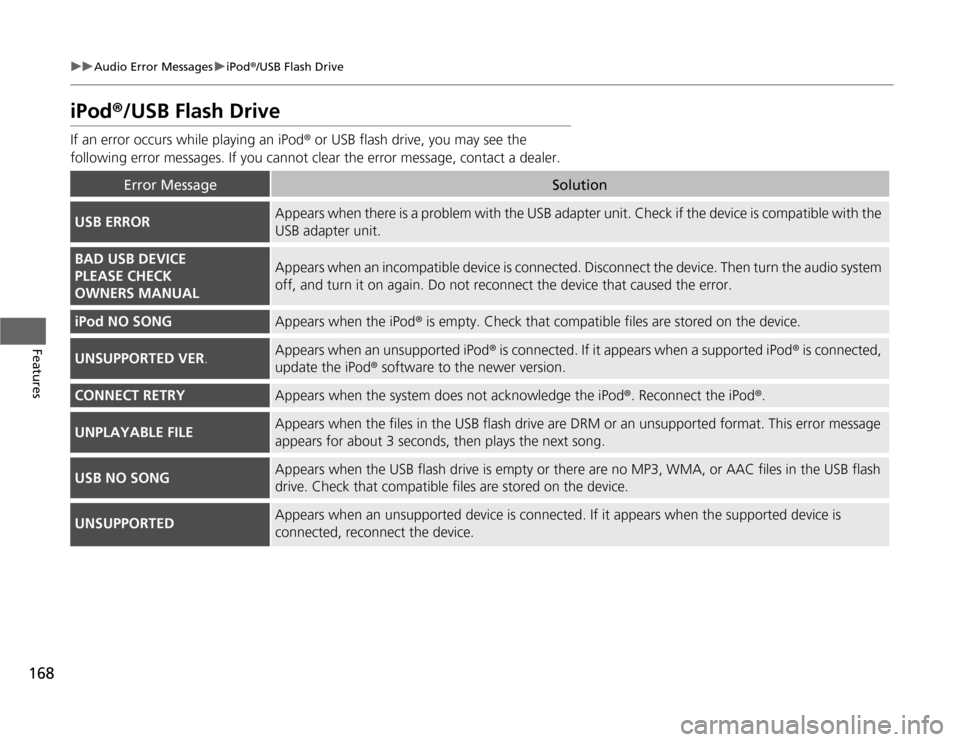
iPod ®/USB Flash Drive
If an error occurs while playing an iPod ® or USB flash drive, you may see the
following error messages. If you cannot clear the error message, contact a dealer.
Error MessageSolution
USB ERRORAppears when there is a problem with the USB adapter unit. Check if the device is compatible with the
USB adapter unit.
BAD USB DEVICE
PLEASE CHECK
OWNERS MANUALAppears when an incompatible device is connected. Disconnec t the device. Then turn the audio system
off, and turn it on again. Do not reconnect the device that caused the error.
iPod NO SONGAppears when the iPod ® is empty. Check that compatible files are stored on the device.
UNSUPPORTED VER .Appears when an unsupported iPod ® is connected. If it appears when a supported iPod ® is connected,
update the iPod ® software to the newer version.
CONNECT RETRYAppears when the system does not acknowledge the iPod ®. Reconnect the iPod ®.
UNPLAYABLE FILEAppears when the files in the USB flash drive are DRM or an unsupported format. This error message
appears for about 3 seconds, then play s the next song.
USB NO SONGAppears when the USB flash drive is empty or there are no MP3, WMA, or AAC files in the USB flash
drive. Check that compatible files are stored on the device.
UNSUPPORTEDAppears when an unsupported device is connected. If it appears when the supported device is connected, reconnect the device.
Page 172 of 333
171
uuGeneral Information on the Audio SystemuCompatible iPod® and USB Flash Drives
Features
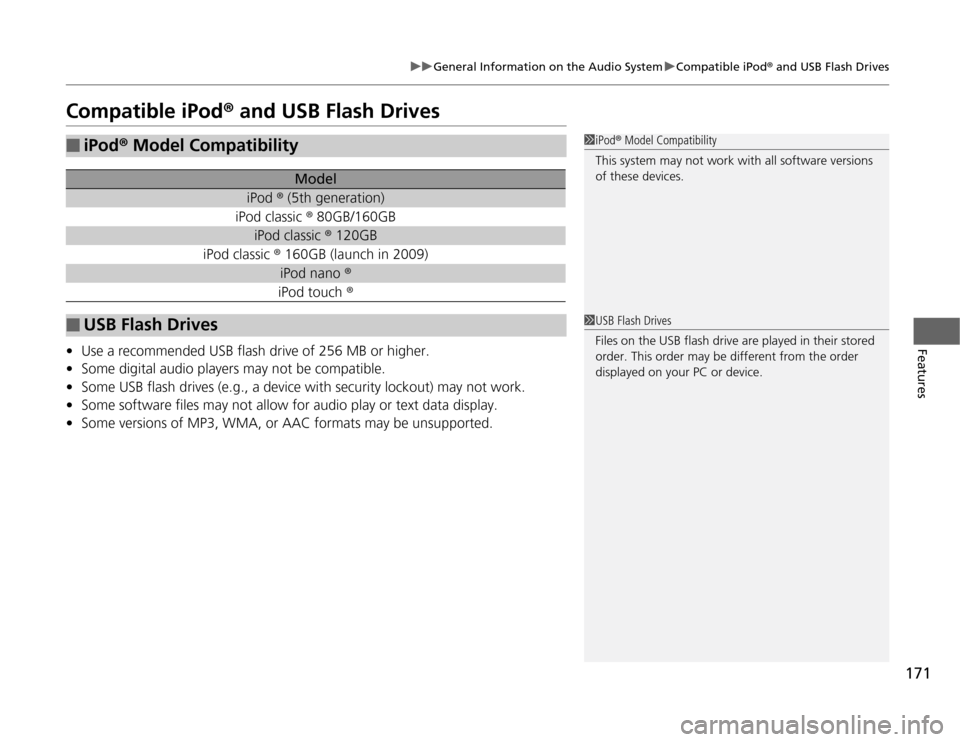
Compatible iPod ® and USB Flash Drives
• Use a recommended USB flash drive of 256 MB or higher.
• Some digital audio players may not be compatible.
• Some USB flash drives (e.g., a device with security lockout) may not work.
• Some software files may not allow for audio play or text data display.
• Some versions of MP3, WMA, or AAC formats may be unsupported.
■iPod ® Model Compatibility
Model
iPod ® (5th generation)
iPod classic ® 80GB/160GB
iPod classic ® 120GB
iPod classic ® 160GB (launch in 2009)
iPod nano ®
iPod touch ®
■USB Flash Drives
1iPod® Model Compatibility
This system may not work with all software versions
of these devices.
1USB Flash Drives
Files on the USB flash drive are played in their stored
order. This order may be different from the order
displayed on your PC or device.
Page 324 of 333

Index
323
Index
Index
Numbers
7-Speed Manual Shift Mode................... 205
A
ABS (Anti-lock Brake System) .................. 222
Accessories and Modifications ................ 236
Accessory Power Socket ........................... 127
Active Head Restraints ............................. 123
Additives
Coolant .................................................. 252
Engine Oil ............................................... 249
Washer ................................................... 257
Additives, Engine Oil ............................... 247
Adjusting
Head Restraints ....................................... 121
Headlights .............................................. 258
Mirrors.................................................... 118
Seats....................................................... 119
Steering Wheel ....................................... 117
Air Conditioning System
(Climate Control System) ....................... 132
Changing the Mode................................ 132 Defrosting the Windscreen and
Windows .............................................. 133
Dust and Pollen Filter .............................. 280
Recirculation/Fresh Air Mode................... 132
Sensors ................................................... 134
Using Automatic Climate Control............ 132
Air Pressure ...................................... 269, 313
Airbags ....................................................... 41 Advanced Airbags ..................................... 47
After a Collision ......................................... 45
Airbag Care ............................................... 55
Event Data Recorders ................................. 26
Front Airbags (SRS) .................................... 44
Indicator ........................................ 52, 70, 74
Passenger Airbag Off Indicator .................. 53
Sensors ...................................................... 47
Side Airbag Cutoff System ......................... 50
Side Airbag Off Indicator ........................... 50
Side Airbags .............................................. 48
Side Curtain Airbags .................................. 51
AM/FM Audio ................................... 143, 154
Anti-lock Brake System (ABS) .................. 222
Indicator .................................................... 70
ASST Indicator ............................................. 82
Audio Remote Controls .............................. 19
Audio System ............................................ 136
Adjusting the Sound ................................ 142
Auxiliary Input Jack .................................. 138
Error Messages ........................................ 167
General Information ................................ 169
MP3/WMA/AAC ...................................... 149
PC Card ................................................... 172
Radio Data System (RDS) ......................... 144
Reactivating ............................................. 139
Recommended CDs ................................. 169
Recommended Drives .............................. 171
Security Code .......................................... 139
Theft Protection ....................................... 139
USB Adapter Cable .................................. 137 USB Flash Drives ...................................... 171
with Navigation System ........................... 151
without Navigation System ...................... 141
Authorized Manuals ................................ 321
Auto Door Locking/Unlocking ................. 103
Customize ................................................. 90
Auto Idle Stop .......................................... 225
Auto Idle Stop Indicator ............................ 76
Automatic Lighting .................................. 111
Automatic Transmission (CVT) ................. 202
Creeping ................................................. 202
Fluid ........................................................ 254
Kickdown ................................................ 202
Operating the Shift Lever......................... 204
Shift Lever Does Not Move ...................... 296
Shifting ................................................... 203
Auxiliary Input Jack .................................. 138
Average Fuel Economy .............................. 88
Average Fuel Economy Records ................ 88
Average Speed ........................................... 85
B
Back-Up Light ........................................... 263
Battery ...................................................... 278
Charging System Indicator................. 69, 300
Jump Starting .......................................... 294 Maintenance }
(Checking the 12 Volt Battery) ............... 278
Maintenance (Replacing) ......................... 279
Battery Charge in Progress (CHRG) ........... 82
Page 330 of 333

329
Index
Cutoff System ........................................... 50
Off Indicator ............................................. 50
Side Curtain Airbags .................................. 51
Snow Tires ................................................ 277
Spare Tire ......................................... 287, 313
Spark Plugs ............................................... 312
Specifications ........................................... 312
Specified Fuel ................................... 232, 312
Speedometer .............................................. 81
SRS Airbags (Airbags) ................................ 41
Starting the Engine .................................. 198
Does Not Start ........................................ 293
Engine Switch Buzzer .............................. 109
Jump Starting ......................................... 294
Steering Wheel ........................................ 117
Adjusting ................................................ 117
Stopping ................................................... 224
Supplemental Restraint System (SRS) ....... 44
Switches
(Around the Steering Wheel) ........ 2, 3, 109
System Message Indicator ......................... 73T
Tachometer
................................................. 81
Temperature High Temperature Indicator ....................... 73
Low Temperature Indicator ........................ 74
Temperature Sensor ................................. 134
Time (Setting) ............................................. 98
Tire Pressure Monitoring System
(TPMS) ..................................................... 217
Indicator ............................................ 72, 303
Tires ........................................................... 269
Air Pressure ..................................... 270, 313
Checking and Maintaining ....................... 269
Compact Spare Tire ......................... 287, 313
Inspection ................................................ 269
Labeling .................................................. 270
Puncture (Flat Tire) ................................... 287
Regulations ............................................. 272
Rotation .................................................. 276
Tire Chains .............................................. 277
Wear Indicators ....................................... 274
Winter ..................................................... 277
Tonneau Cover ......................................... 129
Tools .......................................................... 286
Towing a Trailer ....................................... 197
Towing Hook ............................................ 309
Towing Your Vehicle ................................ 197
Emergency .............................................. 308
TPMS (Tire Pressure Monitoring System) ......... 217
Indicator ............................................ 72, 303 Transmission
............................................. 203
Automatic ............................................... 203
Fluid ........................................................ 254
Number................................................... 314
Shift Lever Position Indicator.................... 204
Trip Meter ................................................... 84
Troubleshooting ....................................... 285
Blown Fuse...................................... 304, 305
Brake Pedal Vibrates .................................. 25
Buzzer Sounds When Opening Door.......... 25
Emergency Towing .................................. 308
Engine Does Not Start ............................. 293
Noise When Braking .................................. 25
Overheating ............................................ 297
Puncture/Flat Tire .................................... 287
Regular Gasoline ............................. 232, 312
Shift Lever Won’t Move ........................... 296
Unable to Open the Hatch....................... 310
Warning Indicators .................................... 68
Turn Signals .............................................. 110
Indicators (Instrument Panel) ..................... 75
U
Unlocking the Doors ................................ 100
USB Adapter Cable ................................... 137
USB Flash Drive ................................. 165, 171