light HONDA CR-Z 2012 1.G User Guide
[x] Cancel search | Manufacturer: HONDA, Model Year: 2012, Model line: CR-Z, Model: HONDA CR-Z 2012 1.GPages: 333, PDF Size: 10.43 MB
Page 26 of 333
25
Quick Reference Guide
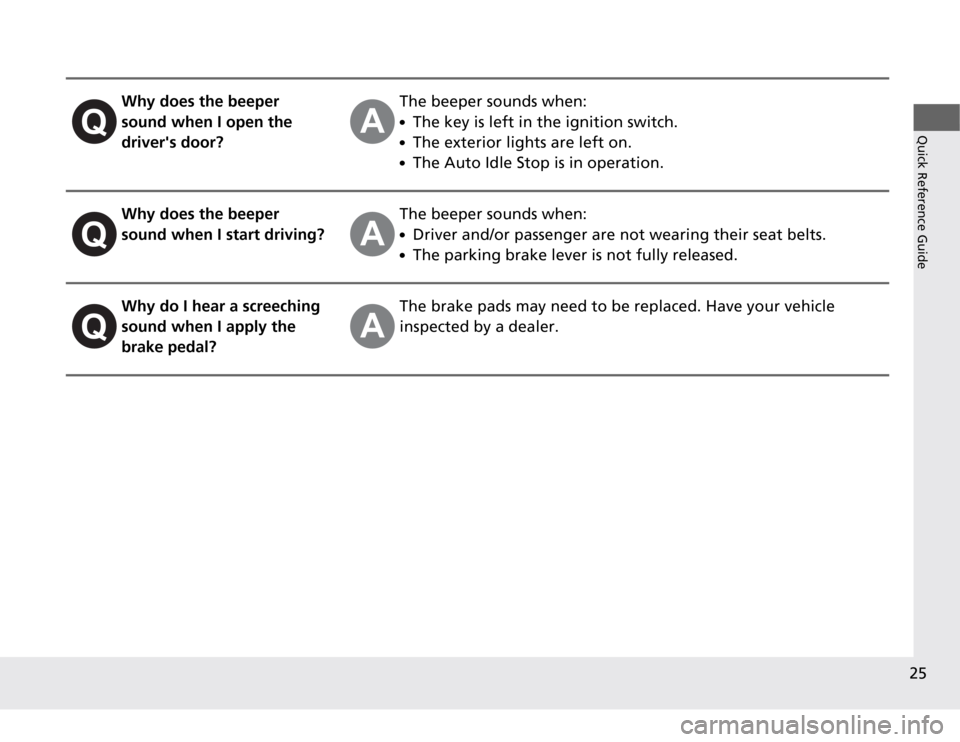
Why does the beeper
sound when I open the driver's door?The beeper sounds when: ●The key is left in the ignition switch.
● The exterior lights are left on.
● The Auto Idle Stop is in operation.
Why does the beeper
sound when I start driving?The beeper sounds when: ●Driver and/or passenger are not wearing their seat belts.
● The parking brake lever is not fully released.
Why do I hear a screeching
sound when I apply the brake pedal?The brake pads may need to be replaced. Have your vehicle
inspected by a dealer.
Page 52 of 333
51
uuAirbagsuSide Curtain Airbags
Safe Driving
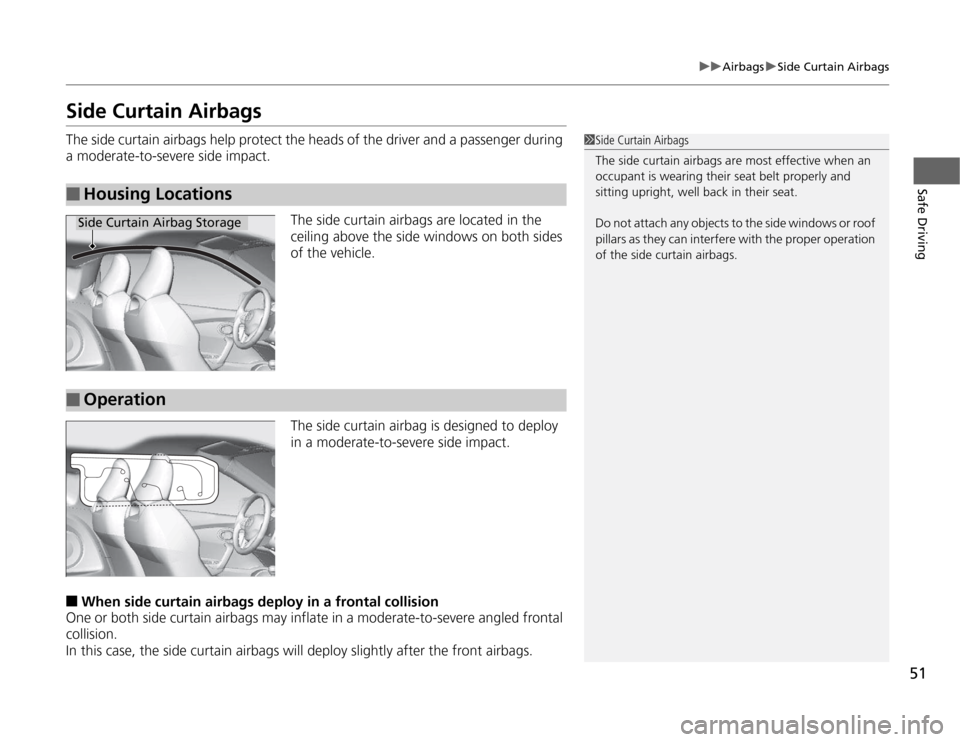
Side Curtain Airbags
The side curtain airbags help protect the heads of the driver and a passenger during
a moderate-to-severe side impact.
The side curtain airbags are located in the
ceiling above the side windows on both sides of the vehicle.
The side curtain airbag is designed to deploy
in a moderate-to-severe side impact.
■ When side curtain airbags de ploy in a frontal collision
One or both side curtain airbags may inflate in a moderate-to-severe angled frontal
collision.
In this case, the side curtain airbags will deploy slightly after the front airbags.
■Housing Locations
1Side Curtain Airbags
The side curtain airbags are most effective when an
occupant is wearing their seat belt properly and
sitting upright, well back in their seat.
Do not attach any objects to the side windows or roof
pillars as they can interf ere with the proper operation
of the side curtain airbags.
Side Curtain Airbag Storage
■Operation
Page 75 of 333
74
uuIndicatorsu
Instrument Panel
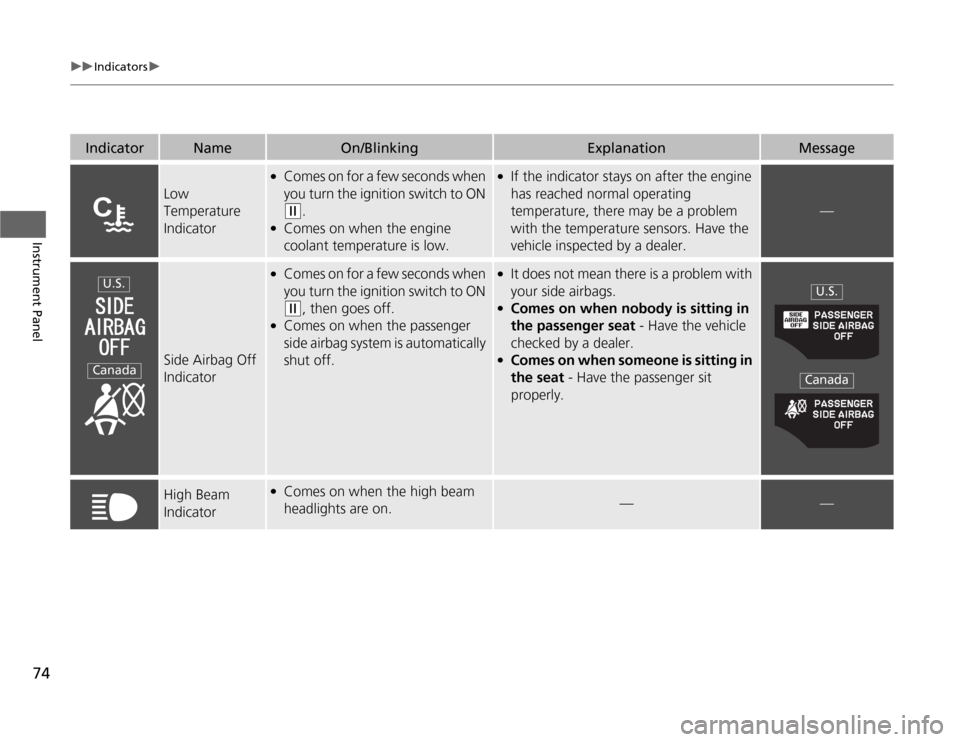
IndicatorNameOn/BlinkingExplanationMessage
Low
Temperature
Indicator
●Comes on for a few seconds when
you turn the ignition switch to ON
(w .
● Comes on when the engine
coolant temperature is low.
● If the indicator stays on after the engine
has reached normal operating
temperature, there may be a problem
with the temperature sensors. Have the
vehicle inspected by a dealer.
—
Side Airbag Off
Indicator
●
Comes on for a few seconds when
you turn the ignition switch to ON
(w , then goes off.
● Comes on when the passenger
side airbag system is automatically shut off.
●
It does not mean there is a problem with
your side airbags.
● Comes on when nobody is sitting in
the passenger seat - Have the vehicle
checked by a dealer.
● Comes on when someone is sitting in
the seat - Have the passenger sit
properly.
High Beam
Indicator● Comes on when the high beam
headlights are on.
——
U.S.
Canada
U.S.
Canada
Page 76 of 333
75
uuIndicatorsu
Continued
Instrument Panel
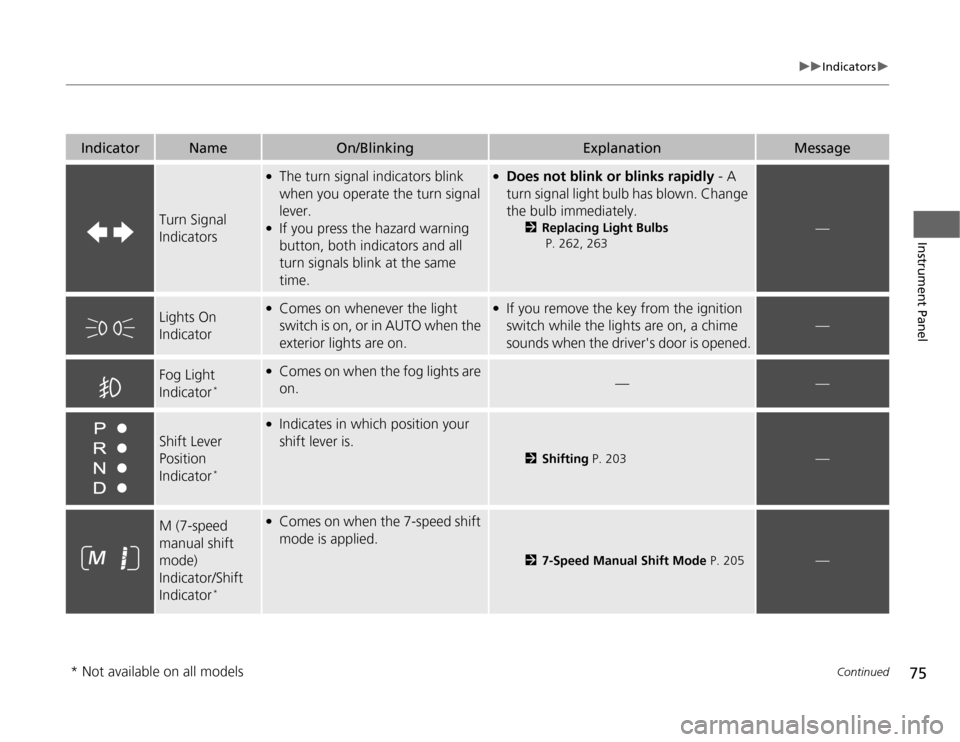
IndicatorNameOn/BlinkingExplanationMessage
Turn Signal Indicators
●The turn signal indicators blink
when you operate the turn signal lever.
● If you press the hazard warning
button, both indicators and all
turn signals blink at the same time.●Does not blink or blinks rapidly - A
turn signal light bulb has blown. Change
the bulb immediately. 2Replacing Light Bulbs
P. 262, 263
—
Lights On
Indicator●
Comes on whenever the light
switch is on, or in AUTO when the
exterior lights are on.●If you remove the key from the ignition
switch while the lights are on, a chime
sounds when the driver's door is opened.
—
Fog Light
Indicator *●
Comes on when the fog lights are
on.
——
Shift Lever Position
Indicator *
●
Indicates in which position your shift lever is.
2 Shifting P. 203—
M (7-speed manual shift mode)
Indicator/Shift
Indicator *●
Comes on when the 7-speed shift
mode is applied.
2 7-Speed Manual Shift Mode P. 205—
* Not available on all models
Page 79 of 333
78
uuIndicatorsuMulti-Information Display Warning and Information Messages
Instrument Panel
Multi-Information Display Warning and Information Messages
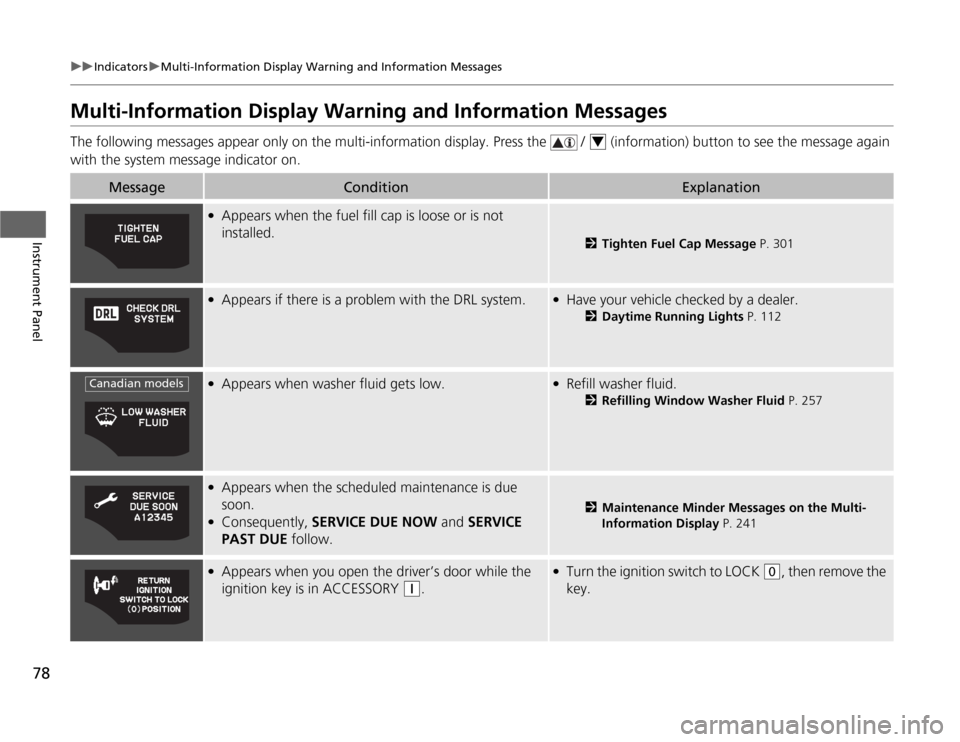
The following messages appear only on the multi-information display. Press the / (information) button to see the message agai n
with the system message indicator on.
MessageConditionExplanation
● Appears when the fuel fill cap is loose or is not installed.
2 Tighten Fuel Cap Message P. 301
●
Appears if there is a problem with the DRL system.●Have your vehicle checked by a dealer.
2Daytime Running Lights P. 112
●
Appears when washer fluid gets low.●Refill washer fluid.
2Refilling Window Washer Fluid P. 257
●
Appears when the scheduled maintenance is due
soon.
● Consequently, SERVICE DUE NOW and SERVICE
PAST DUE follow.
2Maintenance Minder Messages on the Multi-
Information Display P. 241
●
Appears when you open the driver’s door while the
ignition key is in ACCESSORY
(q .
●
Turn the ignition switch to LOCK (0 , then remove the
key.
4
Canadian models
Page 92 of 333
91
uuGauges and Multi-Information DisplayuMulti-Information Display
Continued
Instrument Panel
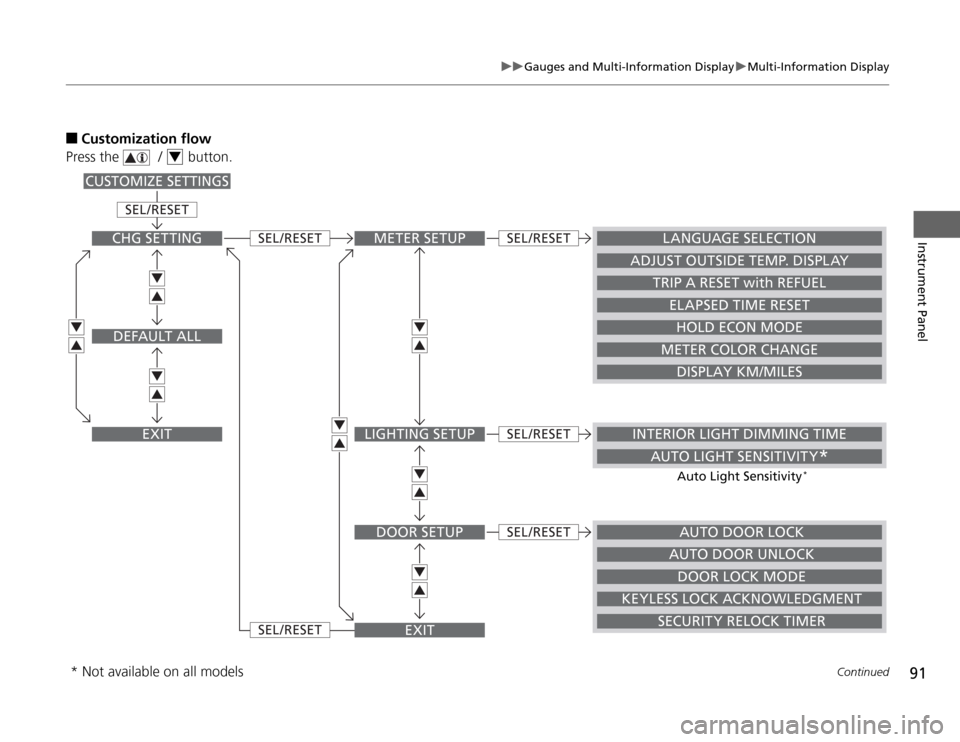
■Customization flow
Press the / button.
4
METER SETUP
AUTO DOOR LOCK
INTERIOR LIGHT DIMMING TIME
AUTO LIGHT SENSITIVITY *
LANGUAGE SELECTION
ADJUST OUTSIDE TEMP. DISPLAY
TRIP A RESET with REFUEL
ELAPSED TIME RESET
HOLD ECON MODE
METER COLOR CHANGE
DISPLAY KM/MILES
LIGHTING SETUP
DOOR SETUP
EXIT
SEL /RESET
SEL /RESET
SEL /RESET
SEL /RESET
SEL /RESET
SEL /RESET
CHG SETTING
DEFAULT ALL
EXIT
CUSTOMIZE SETTINGS
DOOR LOCK MODE
KEYLESS LOCK ACKNOWLEDGMENT SECURITY RELOCK TIMERAUTO DOOR UNLOCK
Auto Light Sensitivity
*
* Not available on all models
Page 93 of 333
92
uuGauges and Multi-Information DisplayuMulti-Information Display
Instrument Panel
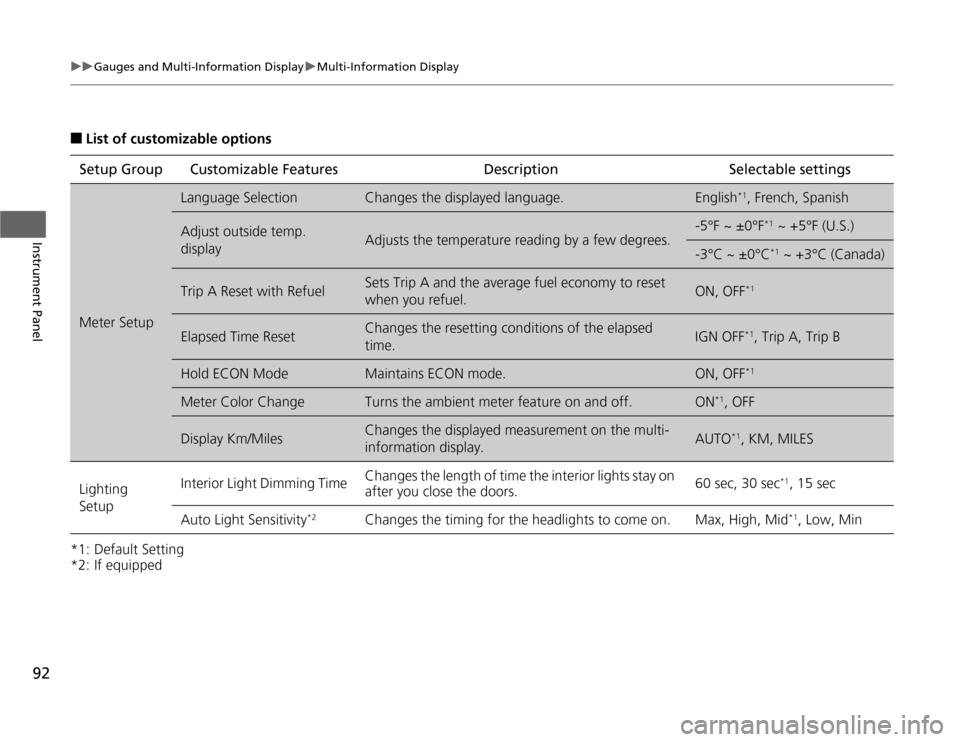
■List of customizable options
*1: Default Setting
*2: If equipped Setup Group Customizable
Features Description Selectable settings
Meter Setup
Language SelectionChanges the displayed language.English*1
, French, Spanish
Adjust outside temp.
displayAdjusts the temperature reading by a few degrees.
-5°F ~ ±0°F *1
~ +5°F (U.S.)
-3°C ~ ±0°C *1
~ +3°C (Canada)
Trip A Reset with RefuelSets Trip A and the average fuel economy to reset
when you refuel.ON, OFF *1
Elapsed Time ResetChanges the resetting conditions of the elapsed time.IGN OFF*1
, Trip A, Trip B
Hold ECON ModeMaintains ECON mode.ON, OFF *1
Meter Color ChangeTurns the ambient meter feature on and off.ON*1
, OFF
Display Km/MilesChanges the displayed measurement on the multi-
information display.AUTO *1
, KM, MILES
Lighting Setup Interior Light Dimming Time
Changes the length of time the interior lights stay on
after you close the doors. 60 sec, 30 sec
*1
, 15 sec
Auto Light Sensitivity *2
Changes the timing for the headlights to come on. Max, High, Mid *1
, Low, Min
Page 94 of 333
93
uuGauges and Multi-Information DisplayuMulti-Information Display
Continued
Instrument Panel
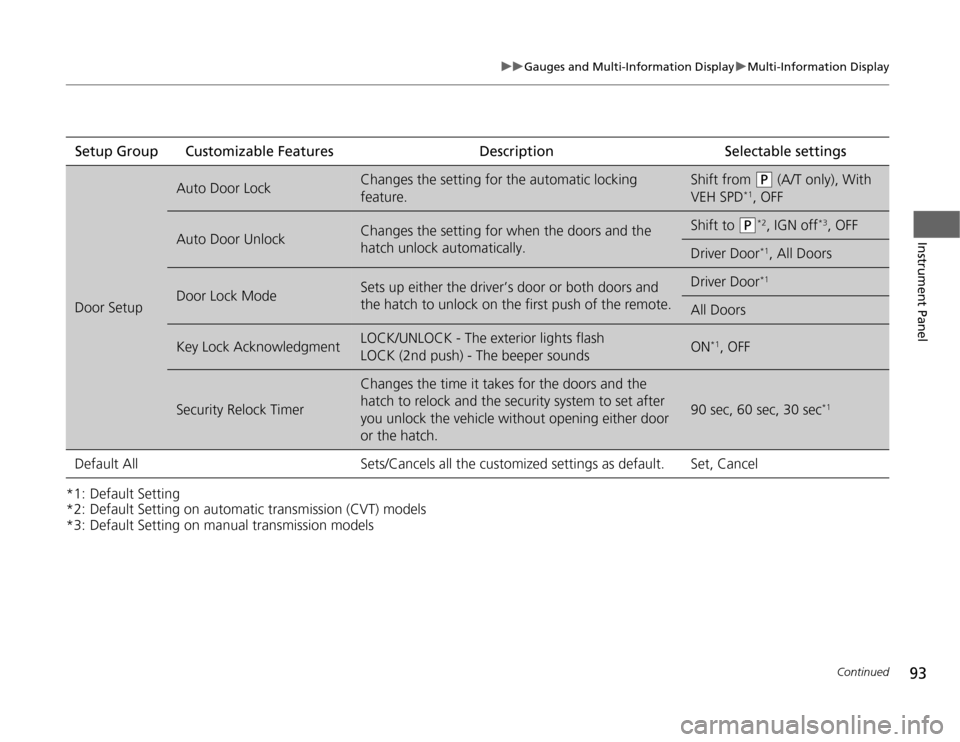
*1: Default Setting
*2: Default Setting on automatic transmission (CVT) models
*3: Default Setting on manual transmission modelsSetup Group Customizable Features Description Selectable settings
Door Setup
Auto Door LockChanges the setting for the automatic locking
feature.Shift from (P
(A/T only), With
VEH SPD *1
, OFF
Auto Door UnlockChanges the setting for when the doors and the
hatch unlock automatically.Shift to (P *2
, IGN off *3
, OFF
Driver Door *1
, All Doors
Door Lock ModeSets up either the driver’s door or both doors and
the hatch to unlock on the first push of the remote.Driver Door *1
All Doors
Key Lock AcknowledgmentLOCK/UNLOCK - The exterior lights flash
LOCK (2nd push) - The beeper soundsON*1
, OFF
Security Relock Timer
Changes the time it takes for the doors and the
hatch to relock and the security system to set after
you unlock the vehicle without opening either door
or the hatch.
90 sec, 60 sec, 30 sec *1
Default All Sets/Cancels all the customized settings as default. Set, Cancel
Page 98 of 333
97
Controls
This chapter explains how to operate the various controls necessary for driving.
Setting the Clock................................ 98
Locking and Unlocking the Doors
Key Types and Functions .................... 99
Locking/Unlocking the Doors from the Outside .......................................... 100
Locking/Unlocking the Doors from the Inside ............................................. 102
Auto Door Locking/Unlocking .......... 103
Opening and Closing the Hatch ....... 104
Security System Immobilizer System .......................... 105
Security System Alarm ...................... 105
Opening and Closing the Windows ..... 107Operating the Switches Around the
Steering Wheel
Ignition Switch ................................. 109
Turn Signals ..................................... 110
Light Switches.................................. 110 Fog Lights *
...................................... 112
Daytime Running Lights ................... 112
Wipers and Washers ........................ 113
Brightness Control ........................... 115
Rear Defogger/Heated Door Mirror *
Button ........................................... 116
Adjusting the Steering Wheel........... 117 Adjusting the Mirrors
Interior Rearview Mirror ................... 118
Power Door Mirrors ......................... 118
Adjusting the Seats Adjusting the Seat Positions ............. 119
Interior Lights/Interior Convenience ItemsInterior Lights .................................. 124
Interior Convenience Items .............. 125
Climate Control System Using Automatic Climate Control .... 132
Automatic Climate Control Sensors ...... 134
* Not available on all models
Page 100 of 333
99
Controls
Locking and Unlocking the Doors
Key Types and Functions
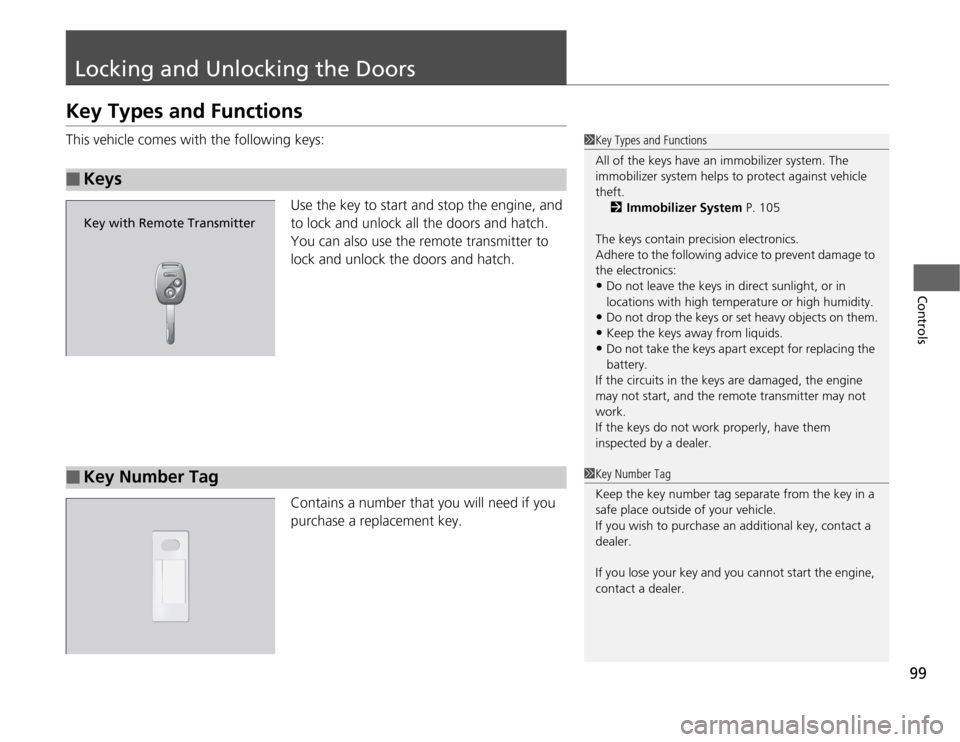
This vehicle comes with the following keys:Use the key to start and stop the engine, and
to lock and unlock all the doors and hatch.
You can also use the remote transmitter to
lock and unlock the doors and hatch.
Contains a number that you will need if you
purchase a replacement key.
■Keys
1Key Types and Functions
All of the keys have an immobilizer system. The
immobilizer system helps to protect against vehicle
theft.2 Immobilizer System P. 105
The keys contain precision electronics.
Adhere to the following advice to prevent damage to
the electronics:
• Do not leave the keys in direct sunlight, or in
locations with high temperature or high humidity.
• Do not drop the keys or set heavy objects on them.
• Keep the keys away from liquids.
• Do not take the keys apa rt except for replacing the
battery.
If the circuits in the keys are damaged, the engine
may not start, and the re mote transmitter may not
work.
If the keys do not work properly, have them
inspected by a dealer.
Key with Remote Transmitter
■Key Number Tag1Key Number Tag
Keep the key number tag separate from the key in a
safe place outside of your vehicle.
If you wish to purchase an additional key, contact a
dealer.
If you lose your key and you cannot start the engine,
contact a dealer.