light HONDA CR-Z 2012 1.G Repair Manual
[x] Cancel search | Manufacturer: HONDA, Model Year: 2012, Model line: CR-Z, Model: HONDA CR-Z 2012 1.GPages: 333, PDF Size: 10.43 MB
Page 260 of 333
259
uuReplacing Light BulbsuHeadlight Bulbs
Maintenance
High voltage can remain in the circuit for a long period of time after the light is
switched off. Do not attempt to inspect or replace the high voltage discharge type
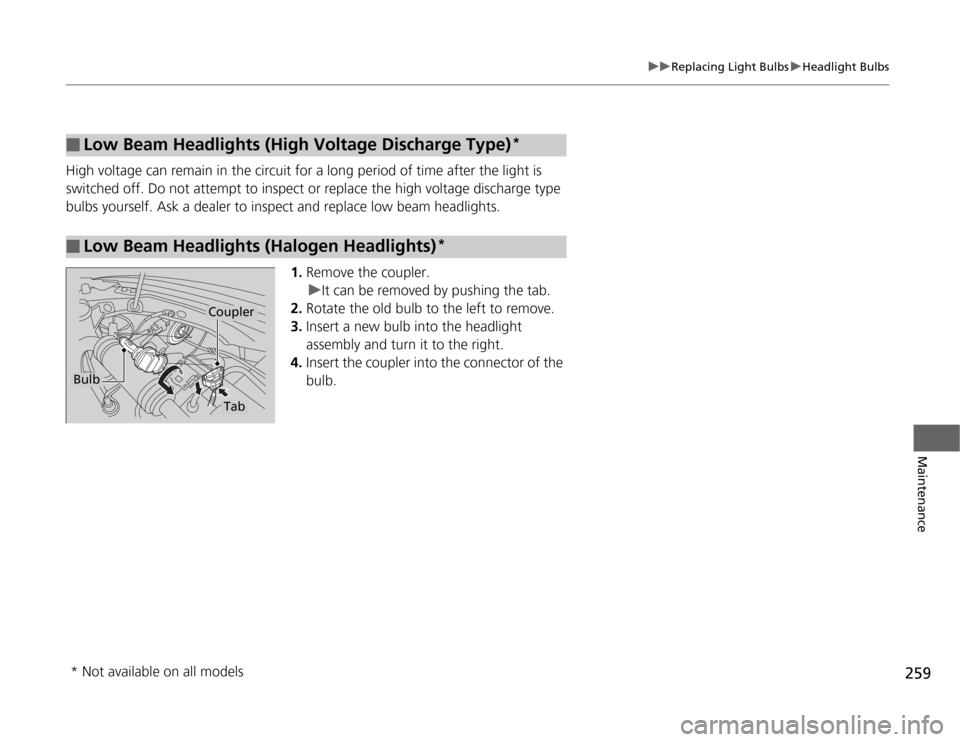
bulbs yourself. Ask a dealer to inspect and replace low beam headlights.1.Remove the coupler.
uIt can be removed by pushing the tab.
2. Rotate the old bulb to the left to remove.
3. Insert a new bulb into the headlight
assembly and turn it to the right.
4. Insert the coupler into the connector of the
bulb.
■Low Beam Headlights (High Vol tage Discharge Type)*
■Low Beam Headlights (Halogen Headlights) *
Bulb
Coupler
Tab
* Not available on all models
Page 261 of 333
260
uuReplacing Light BulbsuFog Light Bulbs*
Maintenance
Fog Light Bulbs *
When replacing, use the following bulbs.
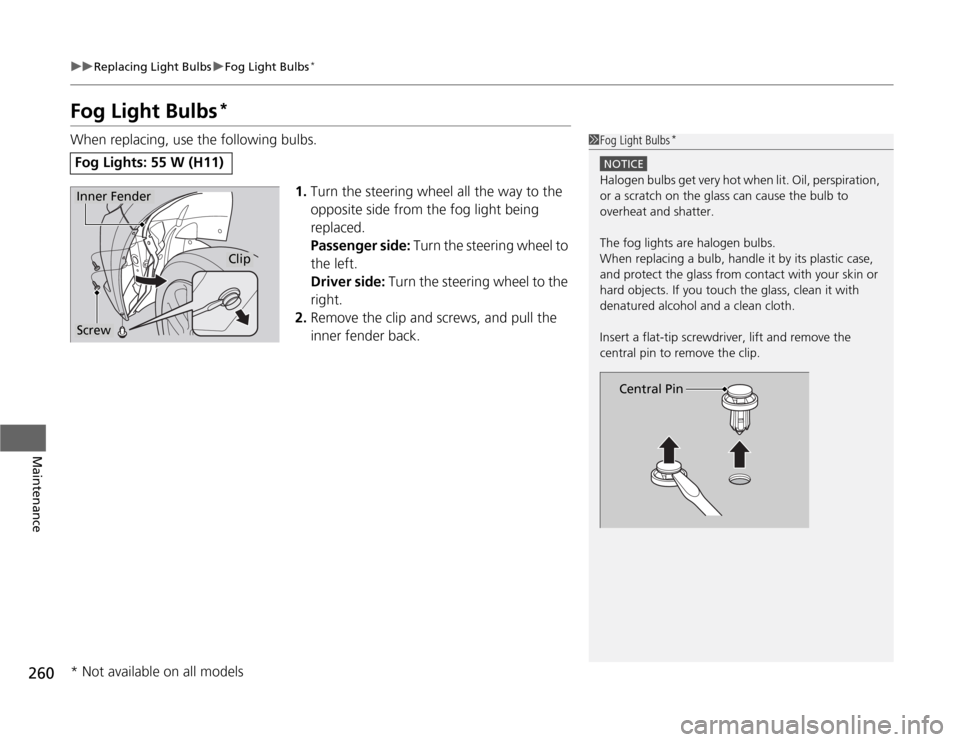
1.Turn the steering wheel all the way to the
opposite side from the fog light being
replaced.
Passenger side: Turn the steering wheel to
the left.
Driver side: Turn the steering wheel to the
right.
2. Remove the clip and screws, and pull the
inner fender back.
Fog Lights: 55 W (H11)
1Fog Light Bulbs *
NOTICE
Halogen bulbs get very hot when li
t. Oil, perspiration,
or a scratch on the glass can cause the bulb to
overheat and shatter.
The fog lights are halogen bulbs.
When replacing a bulb, handle it by its plastic case,
and protect the glass from contact with your skin or
hard objects. If you touch the glass, clean it with
denatured alcohol and a clean cloth.
Insert a flat-tip screwdri ver, lift and remove the
central pin to remove the clip.
Central Pin
Inner Fender
Screw
Clip
* Not available on all models
Page 262 of 333
261
uuReplacing Light BulbsuFog Light Bulbs*
Maintenance
3.
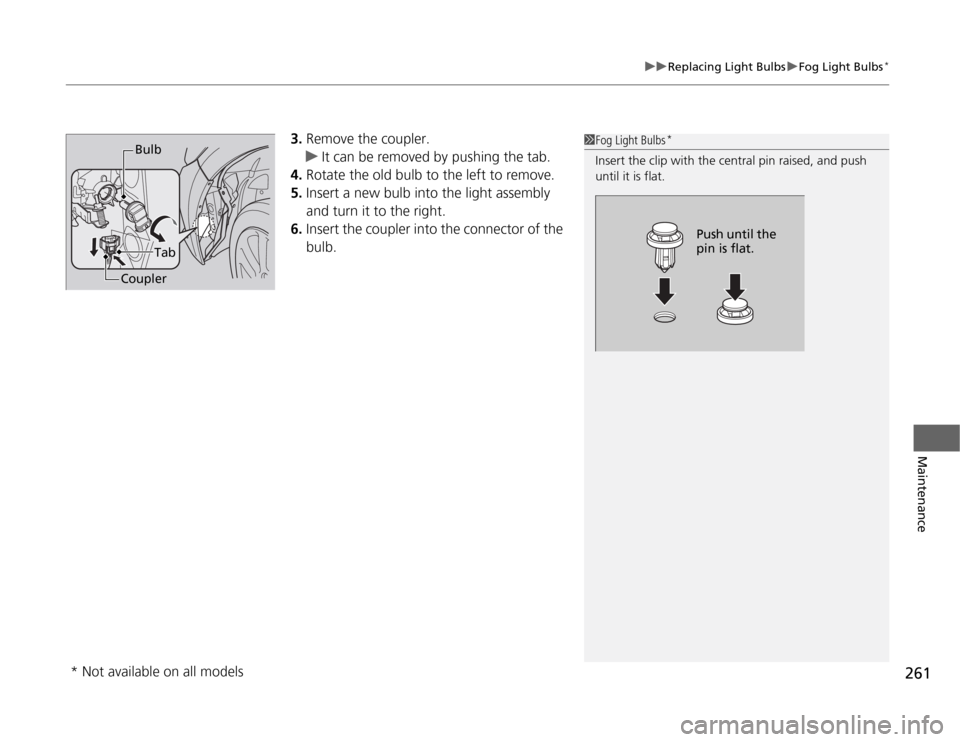
Remove the coupler.
uIt can be removed by pushing the tab.
4. Rotate the old bulb to the left to remove.
5. Insert a new bulb into the light assembly
and turn it to the right.
6. Insert the coupler into the connector of the
bulb.
1Fog Light Bulbs *
Insert the clip wi th the central pin raised, and push
until it is flat.
Push until the
pin is flat.
Bulb
Tab
Coupler
* Not available on all models
Page 263 of 333
262
uuReplacing Light BulbsuFront Turn Signal/Parking/Side Marker Light Bulbs
Maintenance
Front Turn Signal/Parking/Side Marker Light Bulbs
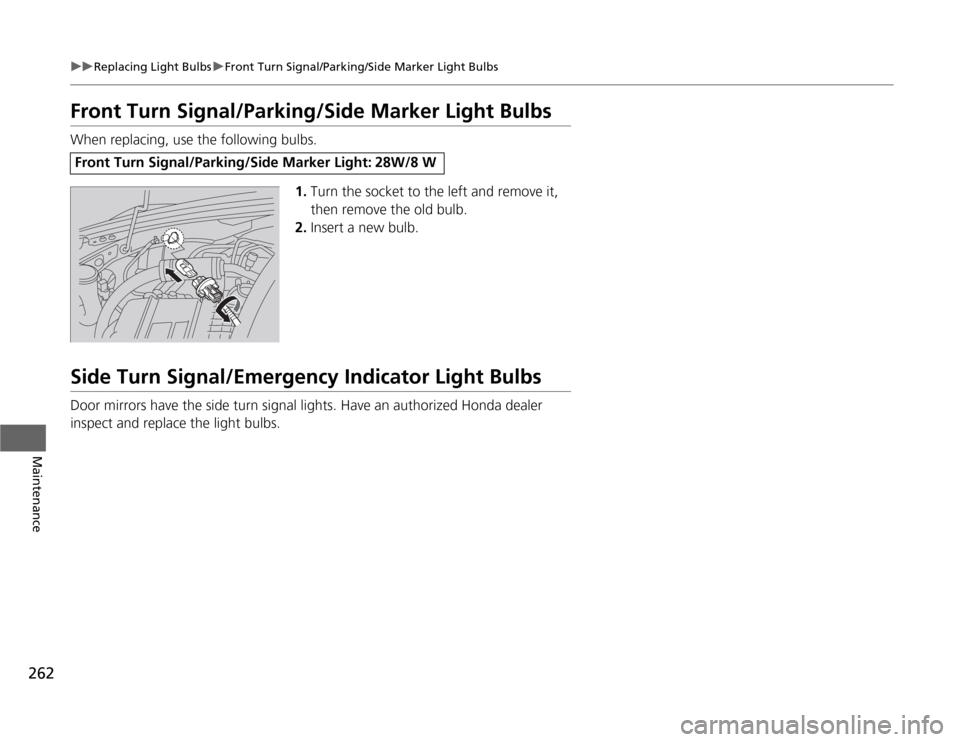
When replacing, use the following bulbs.1.Turn the socket to the left and remove it,
then remove the old bulb.
2. Insert a new bulb.
Side Turn Signal/Emergency Indicator Light Bulbs
Door mirrors have the side turn signal lights. Have an authorized Honda dealer
inspect and replace the light bulbs.
Front Turn Signal/Parking/Side Marker Light: 28W/8 W
Page 264 of 333
263
uuReplacing Light BulbsuBack-Up Light, Rear Turn Signal Light and Rear Side Marker Light Bulbs
Continued
Maintenance
Back-Up Light, Rear Turn Signal Light and Rear Side
Marker Light Bulbs
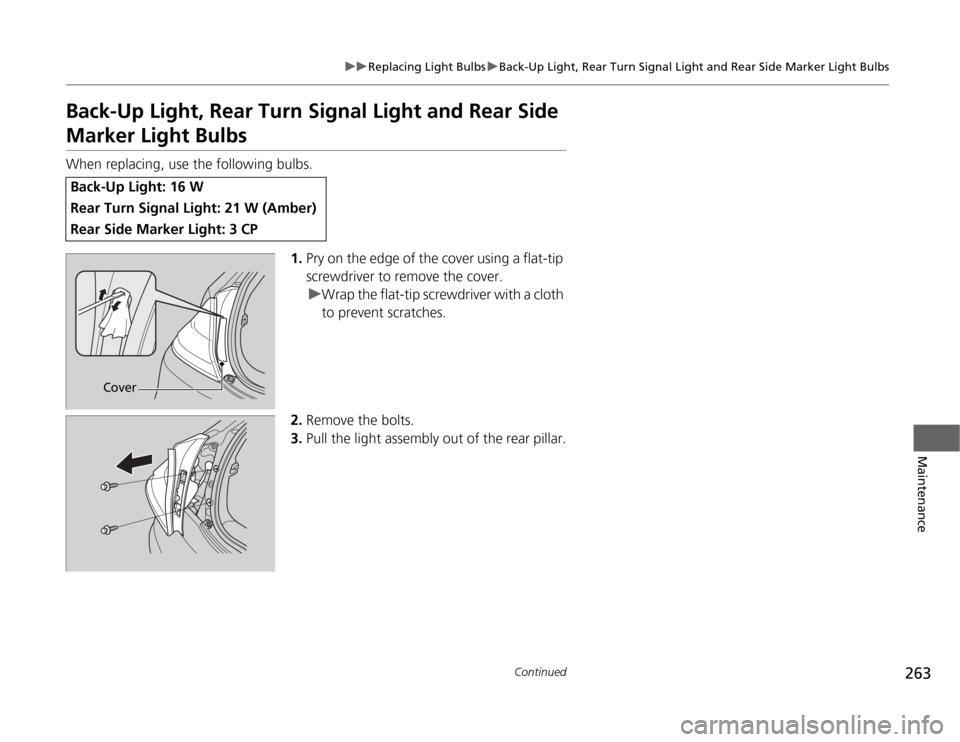
When replacing, use the following bulbs.1.Pry on the edge of the cover using a flat-tip
screwdriver to remove the cover.
uWrap the flat-tip screwdriver with a cloth to prevent scratches.
2. Remove the bolts.
3. Pull the light assembly out of the rear pillar.
Back-Up Light: 16 W
Rear Turn Signal Light: 21 W (Amber)
Rear Side Marker Light: 3 CP
Cover
Page 265 of 333
264
uuReplacing Light BulbsuBrake/Taillight Bulbs
Maintenance
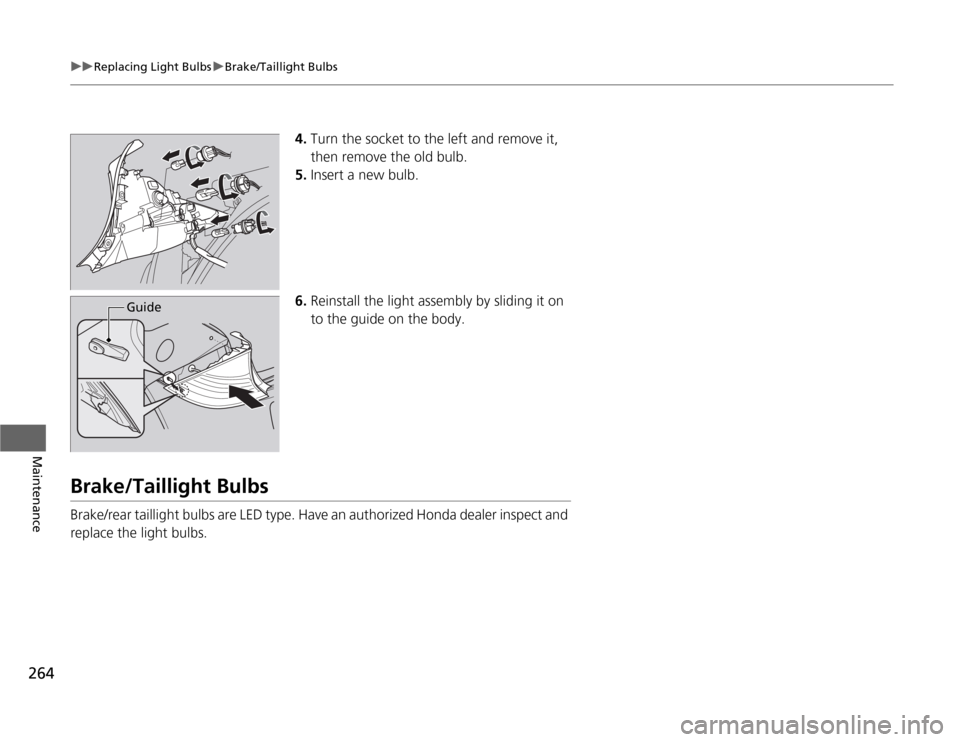
4.Turn the socket to the left and remove it,
then remove the old bulb.
5. Insert a new bulb.
6. Reinstall the light assem bly by sliding it on
to the guide on the body.
Brake/Taillight Bulbs
Brake/rear taillight bulbs are LED type. Have an authorized Honda dealer inspect and
replace the light bulbs.
Guide
Page 266 of 333
265
uuReplacing Light BulbsuRear License Plate Light Bulbs
Maintenance
Rear License Plate Light Bulbs
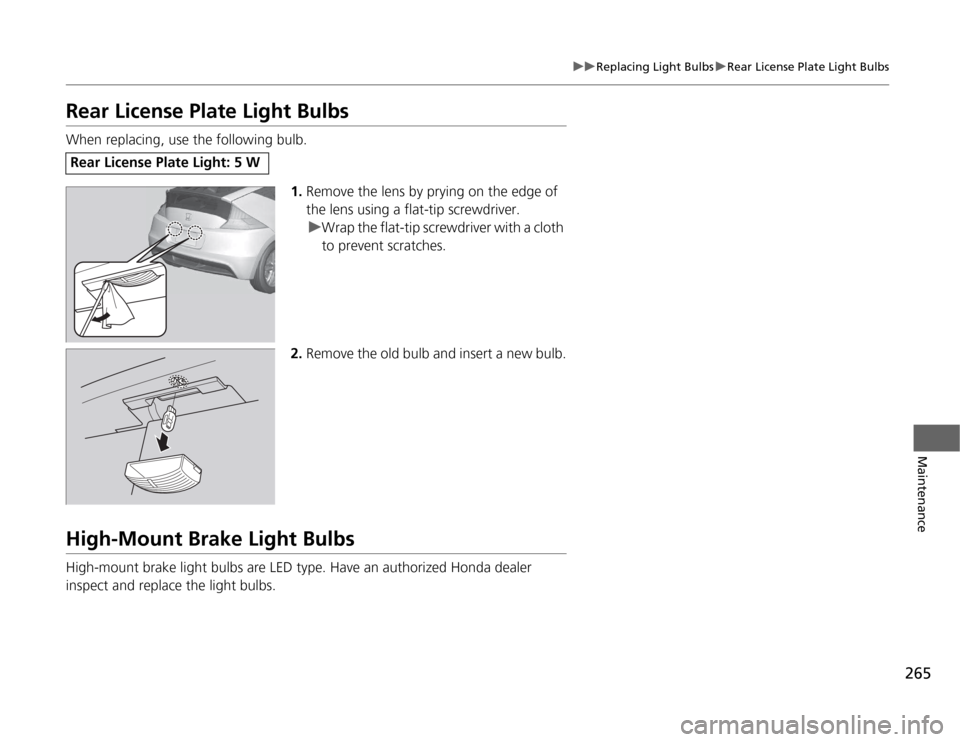
When replacing, use the following bulb.1.Remove the lens by prying on the edge of
the lens using a flat-tip screwdriver.
uWrap the flat-tip screwdriver with a cloth to prevent scratches.
2. Remove the old bulb and insert a new bulb.
High-Mount Brake Light Bulbs
High-mount brake light bulbs are LED type. Have an authorized Honda dealer
inspect and replace the light bulbs.
Rear License Plate Light: 5 W
Page 288 of 333
287
Continued
Handling the Unexpected
If a Tire Goes Flat
Changing a Flat Tire
If a tire goes flat while driving, grasp the steering wheel firmly, and brake gradually
to reduce speed. Then, stop in a safe place. Replace the flat tire with a compact
spare tire. Go to a dealer as soon as possible to have the full-size tire repaired or
replaced. 1.
Park the vehicle on firm, level, and non-slippery ground.
2. Put the shift lever in
(P .
2. Put the shift lever in
(R .
3. Set the parking brake.
4. Turn on the hazard warning lights and turn the ignition switch to LOCK
(0 .
1Changing a Flat Tire
Follow compact spare precautions:
Periodically check the tire pressure of the compact
spare. It should be set to the specified pressure.
Specified Pressure: 60 psi (420 kPa, 4.2 kgf/cm 2
)
When driving with the compact spare tire, keep the
vehicle speed under 50 mph (80 km/h). Replace with
a full-size tire as soon as possible.
The compact spare tire and wheel in your vehicle are
specifically for this model.
Do not use them with another vehicle.
Do not use another type of compact spare tire or
wheel with your vehicle.
Do not mount tire chains on a compact spare tire.
If a chain-mounted front tire goes flat, remove one of
the full-size rear tires and replace it with the compact
spare tire. Remove the flat front tire and replace it
with the full-size tire th at was removed from the rear.
Mount the tire chains on the front tire.
Do not use a puncture-repairing agent on a flat tire,
as it can damage the tire pressure sensor.
U.S. models only
Automatic transmiss ion (CVT) models
Manual transmission models
All models
Page 294 of 333
293
Handling the Unexpected
Engine Does Not Start
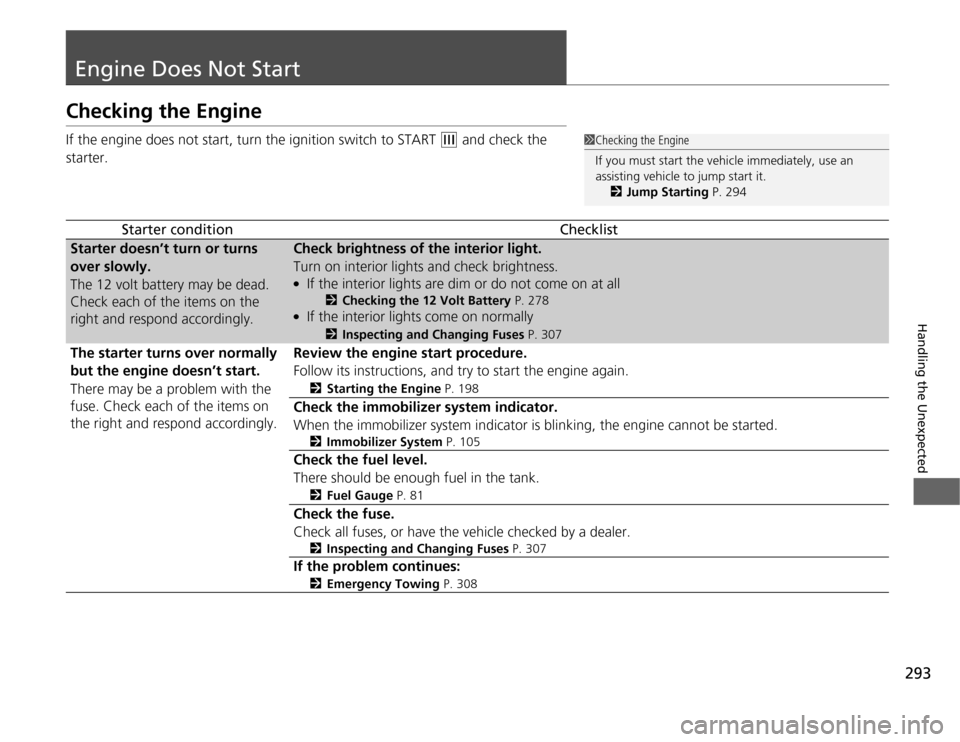
Checking the Engine
If the engine does not start, turn the ignition switch to START
(e and check the
starter.
Starter conditionChecklist
Starter doesn’t turn or turns
over slowly.
The 12 volt battery may be dead.
Check each of the items on the
right and respond accordingly.Check brightness of the interior light.
Turn on interior lights and check brightness. ● If the interior lights are dim or do not come on at all
2Checking the 12 Volt Battery P. 278
● If the interior lights come on normally 2
Inspecting and Changing Fuses P. 307
The starter turns over normally
but the engine doesn’t start.
There may be a problem with the
fuse. Check each of the items on the right and respond accordingly.Review the engine start procedure.
Follow its instructions, and try to start the engine again. 2Starting the Engine P. 198
Check the immobilizer system indicator.
When the immobilizer system indicator is blinking, the engine cannot be started.
2Immobilizer System P. 105
Check the fuel level.
There should be enough fuel in the tank. 2Fuel Gauge P. 81
Check the fuse.
Check all fuses, or have the vehicle checked by a dealer.
2Inspecting and Changing Fuses P. 307
If the problem continues:
2Emergency Towing P. 308
1Checking the Engine
If you must start the vehicle immediately, use an assisting vehicle to jump start it.
2 Jump Starting P. 294
Page 295 of 333
294
Handling the Unexpected
Jump Starting
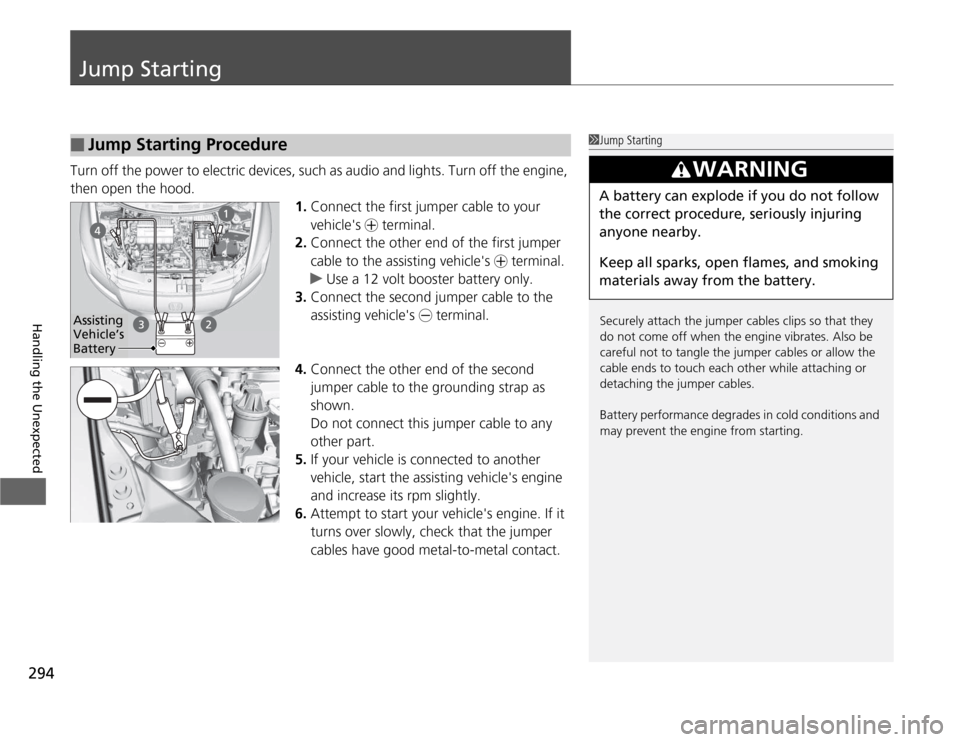
Turn off the power to electric devices, such as audio and lights. Turn off the engine,
then open the hood.1.Connect the first jumper cable to your
vehicle's + terminal.
2. Connect the other end of the first jumper
cable to the assisting vehicle's + terminal.
uUse a 12 volt booster battery only.
3. Connect the second jumper cable to the
assisting vehicle's - terminal.
4. Connect the other end of the second
jumper cable to the grounding strap as
shown.
Do not connect this jumper cable to any
other part.
5. If your vehicle is c onnected to another
vehicle, start the assisting vehicle's engine
and increase its rpm slightly.
6. Attempt to start your vehicle's engine. If it
turns over slowly, check that the jumper
cables have good metal-to-metal contact.
■Jump Starting Procedure1Jump Starting
Securely attach the jumper cables clips so that they
do not come off when the engine vibrates. Also be
careful not to tangle the jumper cables or allow the
cable ends to touch each other while attaching or
detaching the jumper cables.
Battery performance degrades in cold conditions and
may prevent the engine from starting.
3WARNING
A battery can explode if you do not follow the correct procedure, seriously injuring anyone nearby.
Keep all sparks, open flames, and smoking
materials away from the battery.
Assisting
Vehicle’s
Battery