ad blue HONDA CR-Z 2013 1.G User Guide
[x] Cancel search | Manufacturer: HONDA, Model Year: 2013, Model line: CR-Z, Model: HONDA CR-Z 2013 1.GPages: 325, PDF Size: 11.73 MB
Page 162 of 325
161
uuBluetooth® HandsFreeLink ®uHFL Menus
Continued
Features
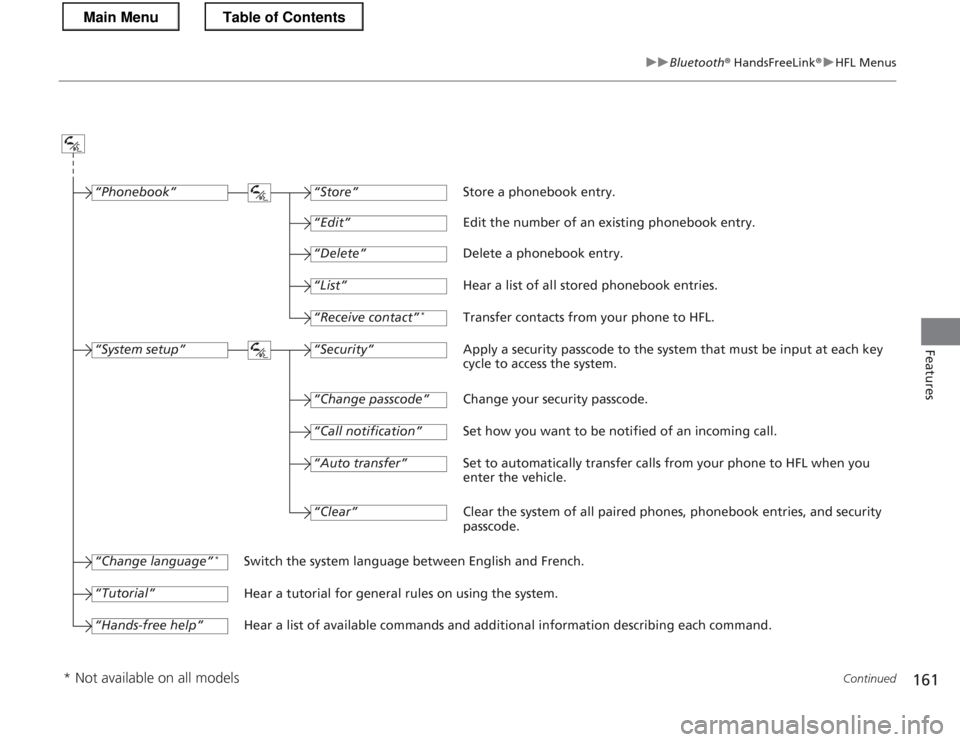
“Change passcode”
Store a phonebook entry.
Edit the number of an existing phonebook entry. Delete a phonebook entry.
Hear a list of all stored phonebook entries.Transfer contacts from your phone to HFL.
Apply a security passcode to the system that must be input at each key
cycle to access the system.
Change your security passcode.
Set how you want to be notified of an incoming call.
Set to automatically transfer calls from your phone to HFL when you
enter the vehicle.
Switch the system language between English and French.
Hear a tutorial for general rules on using the system.
Hear a list of available commands and additional information describing each command. “Store”
“Edit”
“Delete”
“List”
“Receive contact”
*
“Security”
“Call notification”
“Auto transfer”
“Phonebook”
“System setup”
“Change language” *
“Tutorial”
“Hands-free help”
Clear the system of all paired phones, phonebook entries, and security passcode.
“Clear”
* Not available on all models
Main MenuTable of Contents
Page 163 of 325
uuBluetooth® HandsFreeLink ®uHFL Menus
162
Features
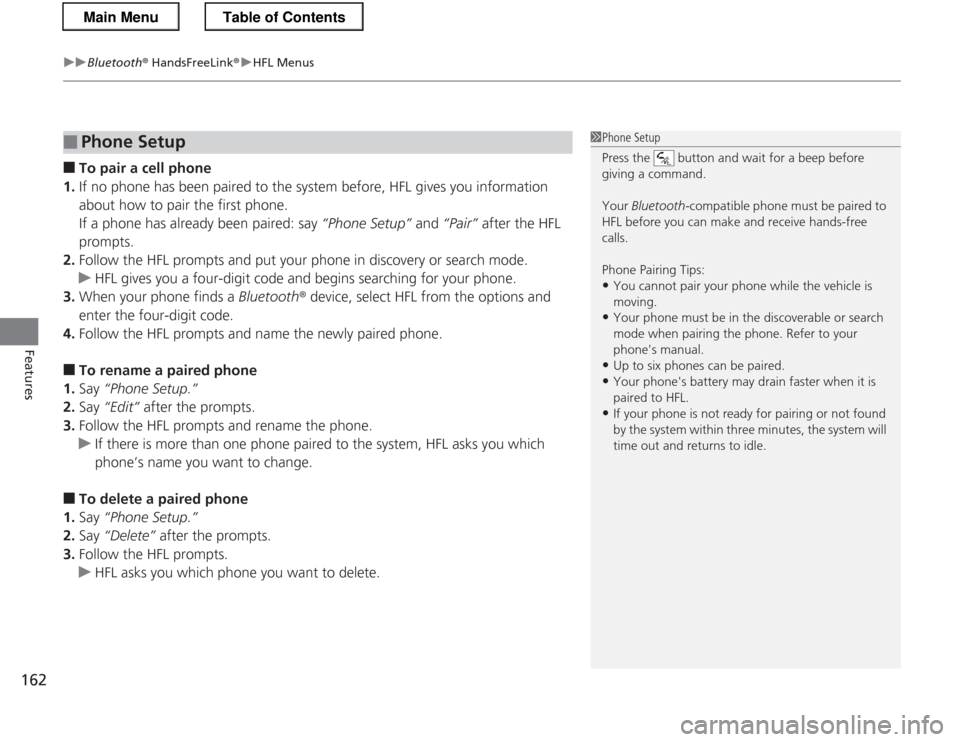
■ To pair a cell phone
1. If no phone has been paired to the system before, HFL gives you information
about how to pair the first phone.
If a phone has already been paired: say “Phone Setup” and “Pair” after the HFL
prompts.
2. Follow the HFL prompts and put your phone in discovery or search mode.
uHFL gives you a four-digit code and begins searching for your phone.
3. When your phone finds a Bluetooth® device, select HFL from the options and
enter the four-digit code.
4. Follow the HFL prompts and name the newly paired phone.
■ To rename a paired phone
1. Say “Phone Setup.”
2. Say “Edit” after the prompts.
3. Follow the HFL prompts and rename the phone.
uIf there is more than one phone paired to the system, HFL asks you which
phone’s name you want to change.
■ To delete a paired phone
1. Say “Phone Setup.”
2. Say “Delete” after the prompts.
3. Follow the HFL prompts.
uHFL asks you which phone you want to delete.
■Phone Setup1Phone Setup
Press the button and wait for a beep before
giving a command. Your Bluetooth -compatible phone must be paired to
HFL before you can make and receive hands-free calls.
Phone Pairing Tips:
• You cannot pair your phone while the vehicle is moving.
• Your phone must be in the discoverable or search
mode when pairing the phone. Refer to your phone's manual.
• Up to six phones can be paired.
• Your phone's battery may drain faster when it is
paired to HFL.
• If your phone is not ready for pairing or not found
by the system within three minutes, the system will
time out and returns to idle.
Main MenuTable of Contents
Page 164 of 325
Continued163
uuBluetooth® HandsFreeLink ®uHFL Menus
Features
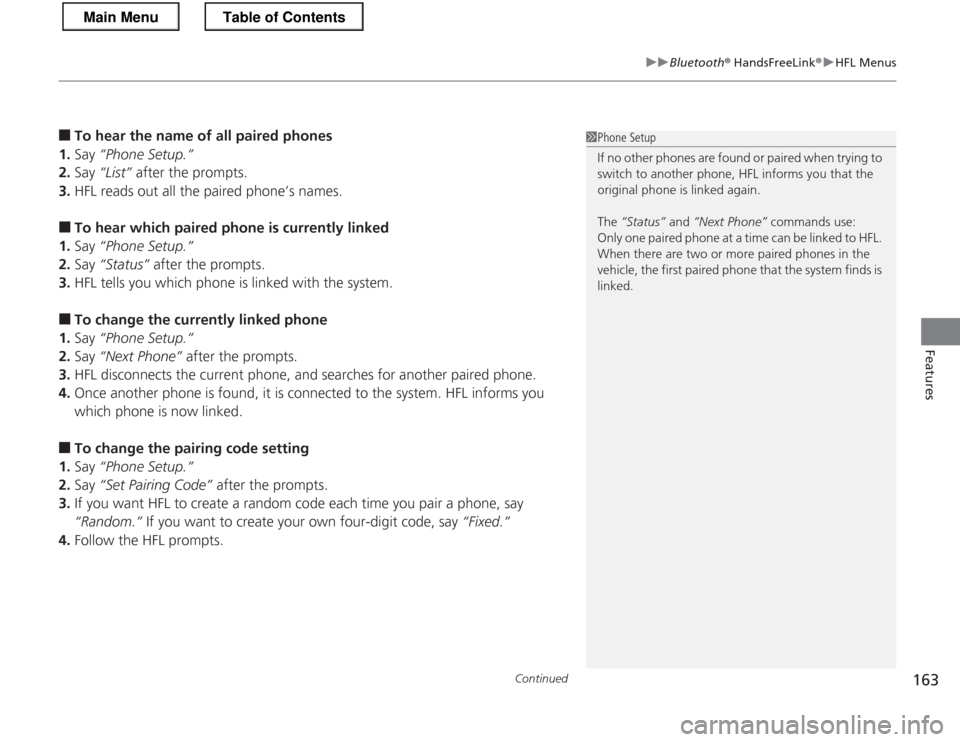
■To hear the name of all paired phones
1. Say “Phone Setup.”
2. Say “List” after the prompts.
3. HFL reads out all the paired phone’s names.
■ To hear which paired phone is currently linked
1. Say “Phone Setup.”
2. Say “Status” after the prompts.
3. HFL tells you which phone is linked with the system.
■ To change the currently linked phone
1. Say “Phone Setup.”
2. Say “Next Phone” after the prompts.
3. HFL disconnects the current phone, an d searches for another paired phone.
4. Once another phone is fo und, it is connected to the system. HFL informs you
which phone is now linked.
■ To change the pairing code setting
1. Say “Phone Setup.”
2. Say “Set Pairing Code” after the prompts.
3. If you want HFL to create a random co de each time you pair a phone, say
“Random.” If you want to create your own four-digit code, say “Fixed.”
4. Follow the HFL prompts.1Phone Setup
If no other phones are found or paired when trying to
switch to another phone, HFL informs you that the
original phone is linked again.
The “Status” and “Next Phone” commands use:
Only one paired phone at a time can be linked to HFL.
When there are two or more paired phones in the
vehicle, the first paired phone that the system finds is
linked.
Main MenuTable of Contents
Page 165 of 325
uuBluetooth® HandsFreeLink ®uHFL Menus
164
Features
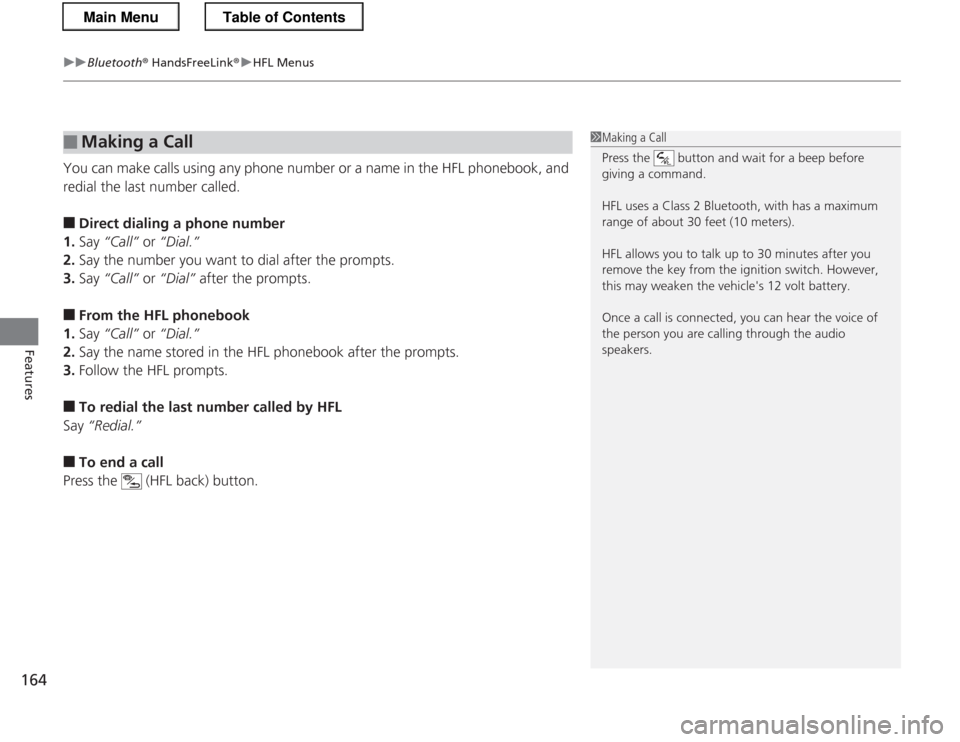
You can make calls using any phone number or a name in the HFL phonebook, and
redial the last number called.
■ Direct dialing a phone number
1. Say “Call” or “Dial.”
2. Say the number you want to dial after the prompts.
3. Say “Call” or “Dial” after the prompts.
■ From the HFL phonebook
1. Say “Call” or “Dial.”
2. Say the name stored in the HFL phonebook after the prompts.
3. Follow the HFL prompts.
■ To redial the last number called by HFL
Say “Redial.”
■ To end a call
Press the (HFL back) button.
■Making a Call1Making a Call
Press the button and wait for a beep before
giving a command.
HFL uses a Class 2 Bluetooth, with has a maximum range of about 30 feet (10 meters).
HFL allows you to talk up to 30 minutes after you
remove the key from the ignition switch. However,
this may weaken the vehicle's 12 volt battery.
Once a call is connected, you can hear the voice of
the person you are calling through the audio
speakers.
Main MenuTable of Contents
Page 166 of 325
Continued165
uuBluetooth® HandsFreeLink ®uHFL Menus
Features
Press the button to answer the call, or the button to hang up. When there
is an incoming call, a call notification (if activated) sounds and a message appears on the display.
You can transfer a call from HFL to your phone, or from your phone to HFL. Press the
button and say “Transfer.”
To mute or unmute your voice during a call, press and release the button and say “Mute.”
■Receiving a Call
■Transferring a Call
■Muting a Call
1Receiving a Call
Call Waiting
Press the button to put the current call on hold
to answer the incoming call.
Press the button again to return to the current call.
Ignore the incoming call if you do not want to answer
it.
Press the button if you want to hang up the
current call and answer the incoming call.
Main MenuTable of Contents
Page 167 of 325
uuBluetooth® HandsFreeLink ®uHFL Menus
166
Features
You can send numbers and names during a call. This is useful when calling a menu-
driven phone system. ■ To send a number or name during a call
1. Say “Send.”
2. Say the number or name you want to send after the prompts.
3. Follow the HFL prompts.
You can store up to 50 names with their associated numbers in HFL. The numbers
you store can be account numbers or passwords. These numbers can be sent to a
menu-driven call. ■ To store a phonebook entry
1. Say “Phonebook.”
2. Say “Store” after the prompts.
3. Say a name you want to list as your phonebook entry.
4. Say the number you want to store for the name entry.
5. Follow the HFL prompts and say “Enter” to store the entry.
■ To edit the number stored for a name
1. Say “Phonebook.”
2. Say “Edit” after the prompts.
3. Say a name you want to edit. When asked, say the new number for that name.
4. Follow the HFL prompts and say “Enter” to store the entry.
■Sending Numbers or Name During a Call
■HFL Phonebook
1Sending Numbers or Name During a Call
Press the button before a command.
To send a , say “Pound.” To send a , say “Star.”
1HFL Phonebook
• Avoid using duplicate name entries.
• Avoid using “home” as a name entry.
• It is easier for HFL to recognize a multisyllabic or
longer name. For example, use “Peter” instead of
“Pete,” or “John Smith” instead of “John.”
Main MenuTable of Contents
Page 168 of 325
167
uuBluetooth® HandsFreeLink ®uHFL Menus
Continued
Features
■To delete a name
1. Say “Phonebook.”
2. Say “Delete” after the prompts.
3. Say a name you want to delete.
4. Say “Yes,” and follow the HFL prompts.
■ To list all names in the phonebook
1. Say “Phonebook.”
2. Say “List” after the prompts.
3. HFL begins reading the names in the order they were stored.
4. When you hear a name you want to call, say “Call.”
■ To store a specific phone number from your cell phone directly to the HFL
phonebook *
1. Say “Phonebook.”
2. Say “Receive Contact” after the prompts.
3. Follow the HFL prompts, select a number from your cell phone, and send it to HFL.
uIf it is not the number you want to store, say “Discard.”
4. Say the name for that number.
5. Follow the HFL prompts to continue.
* Not available on all models
Main MenuTable of Contents
Page 169 of 325
uuBluetooth® HandsFreeLink ®uHFL Menus
168
Features
This command group allows you to change or customize HFL basic settings. ■ To set a four-digi t passcode to lock the HFL system for security
1. Say “System Setup.”
2. Say “Security.”
3. Follow the HFL prompts and say the four-digit number of your choice.
4. Follow the HFL prompts and confirm the number.
■ To change the security passcode
1. Say “System Setup.”
2. Say “Change Passcode” after the prompts.
3. Say the new four-digit passc ode after the HFL prompts.
4. Follow the HFL prompts.
■ To select a ring tone or a prompt as the incoming call notification
1. Say “System Setup.”
2. Say “Call Notification” after the prompts.
3. Say “Ring Tone” or “Prompt” after the prompts. For no audible notification, say
“Off.”
■System Setup1System Setup
Press the button before a command.
Once a passcode is set, you are required to enter the
passcode with every new key cycle to use HFL.
If you forget the code, go to your dealer to have the
passcode reset. You can also cancel the passcode by clearing all the data stored in the HFL system.
2 To clear the system P. 169
The default setting of the incoming notification is a
prompt.
Main MenuTable of Contents
Page 170 of 325
169
uuBluetooth® HandsFreeLink ®uHFL Menus
Features
■To activate or deactiva te the auto transfer function
The call on your cell phone can be automatically transferred to HFL when you get
into the vehicle and turn on the ignition switch. 1. Say “System Setup.”
2. Say “Auto Transfer” after the prompts. HFL lets you know the current status.
3. Follow the HFL prompts to change the setting.
■ To clear the system
Paired phones, all stored or imported phonebook data, and any passcodes are
erased. 1. Say “System Setup.”
2. Say “Clear” after the prompts.
3. Follow the HFL prompts.
You can set the system la nguage to French or English.
1. Say “Change Language.”
2. Follow the HFL prompts.
If you have not named your paired phone in the selected language, HFL will ask you to name it in that language.
■Change Language *
1System Setup
Press the button before a command.
You can clear the system when you have forgotten
the passcode and cannot access HFL.
When HFL asks you for the passcode, say
“System
Clear.”
1Change Language *
Press the button before a command.
Quick Language Selection
If you want to change the language, to French for
example, say “Fran
Page 230 of 325
229
Maintenance
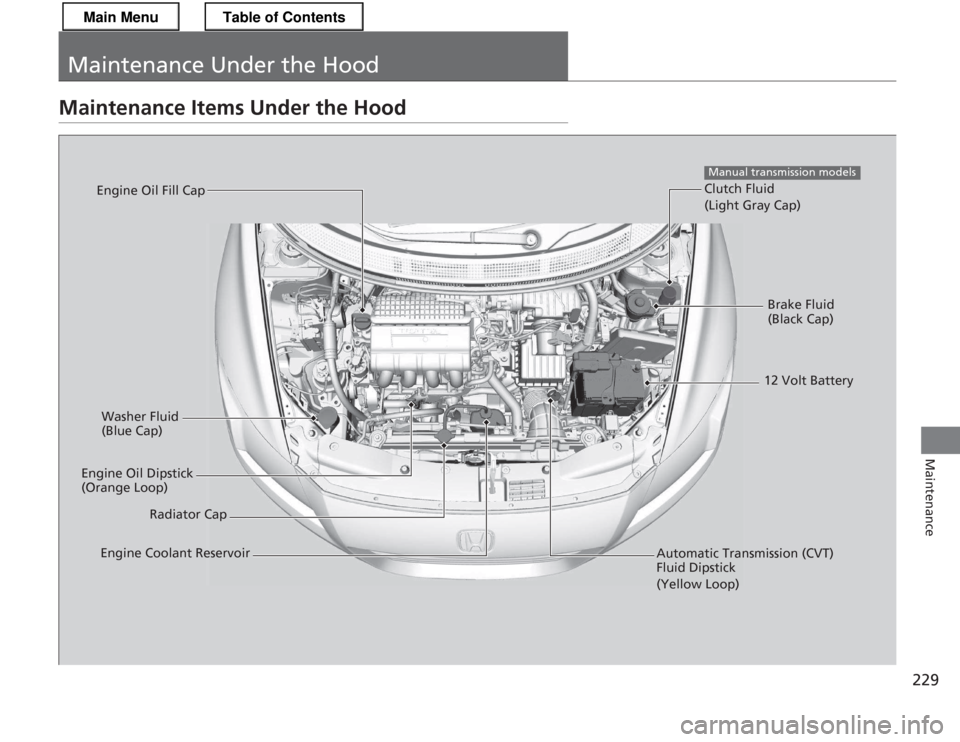
Maintenance Under the Hood
Maintenance Items Under the Hood
Brake Fluid
(Black Cap)
Clutch Fluid (Light Gray Cap)
Manual transmission models
Washer Fluid
(Blue Cap)
Engine Oil Dipstick
(Orange Loop) Radiator Cap
Engine Oil Fill Cap
Automatic Transmission (CVT) Fluid Dipstick (Yellow Loop)
Engine Coolant Reservoir 12 Volt Battery
Main MenuTable of Contents