headlights HONDA CR-Z 2013 1.G Owners Manual
[x] Cancel search | Manufacturer: HONDA, Model Year: 2013, Model line: CR-Z, Model: HONDA CR-Z 2013 1.GPages: 325, PDF Size: 11.73 MB
Page 4 of 325
3
Quick Reference Guide
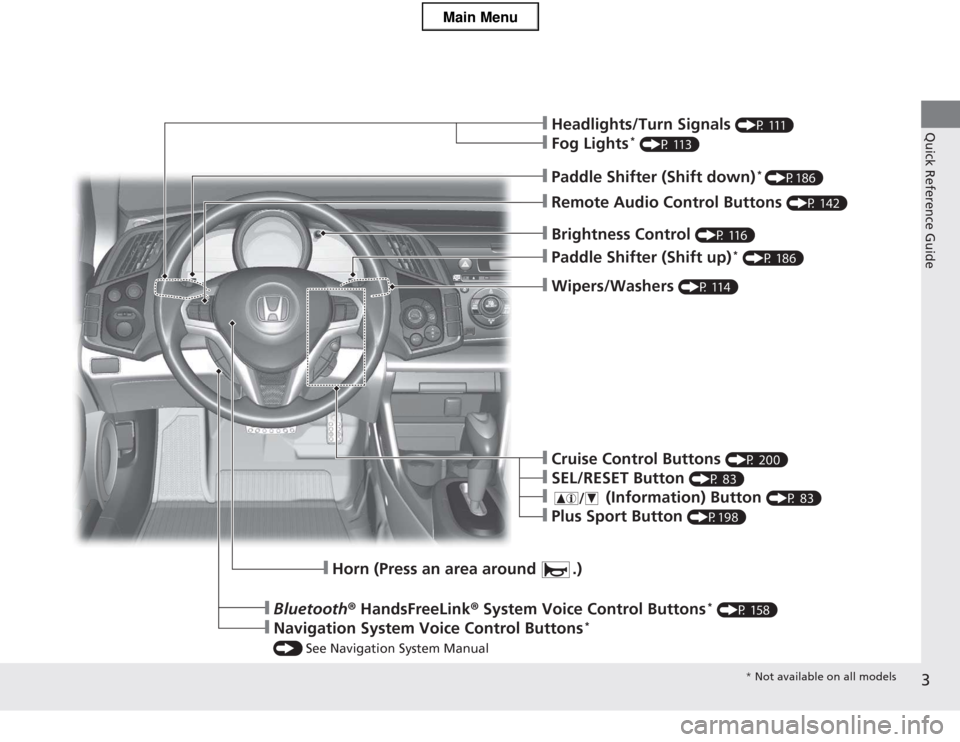
❙Wipers/Washers (P 114)
❙Paddle Shifter (Shift up) *
(P 186)
❙Brightness Control (P 116)
❙Headlights/Turn Signals (P 111)
❙Fog Lights*
(P 113)
❙Remote Audio Control Buttons (P 142)
❙Paddle Shifter (Shift down)*
(P186)
❙Horn (Press an area around .)
❙Bluetooth ® HandsFreeLink ® System Voice Control Buttons *
(P 158)
❙Navigation System Voice Control Buttons *
() See Navigation System Manual
❙Cruise Control Buttons (P 200)
❙SEL/RESET Button (P 83)
❙ (Information) Button (P 83)
❙Plus Sport Button (P198)
* Not available on all models
Main Menu
Page 7 of 325
Visual Index
6
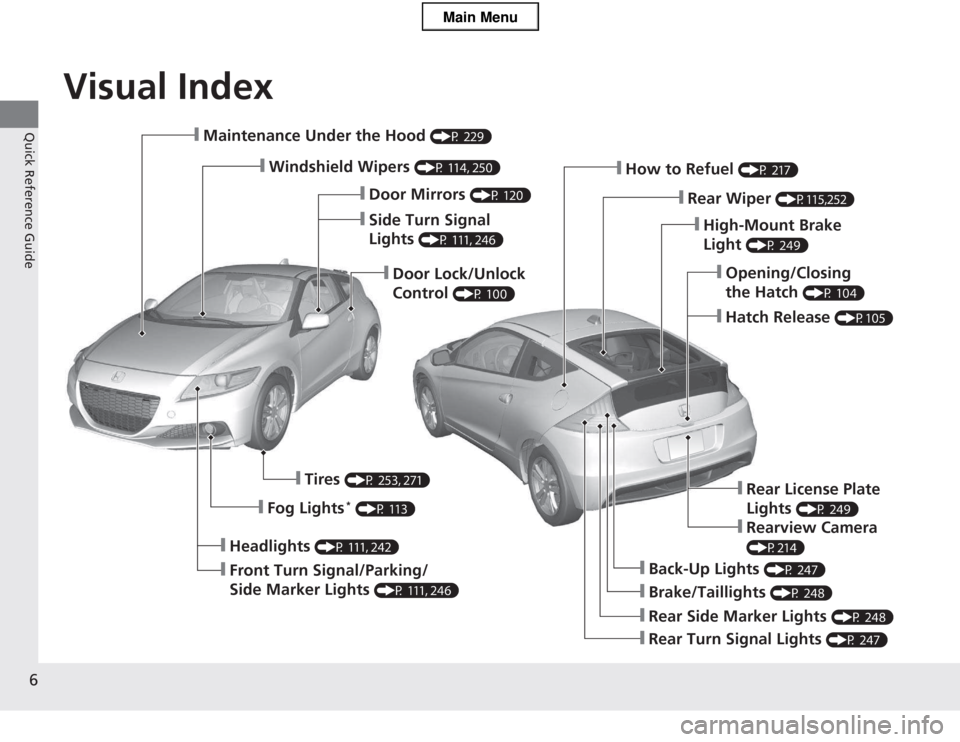
Quick Reference Guide❙Maintenance Under the Hood (P 229)
❙Windshield Wipers (P 114, 250)
❙Door Lock/Unlock Control (P 100)
❙Headlights
(P 111, 242)
❙Front Turn Signal/Parking/
Side Marker Lights (P 111, 246)
❙Tires
(P 253, 271)
❙Fog Lights *
(P 113)
❙Brake/Taillights (P 248)
❙Back-Up Lights (P 247)
❙Rear Turn Signal Lights (P 247)
❙Rear Side Marker Lights (P 248)
❙High-Mount Brake Light (P 249)
❙How to Refuel
(P 217)
❙Rear Wiper (P115,252)
❙Opening/Closing the Hatch (P 104)
❙Hatch Release
(P105)
❙Side Turn Signal Lights (P 111, 246)
❙Door Mirrors
(P 120)
❙Rear License Plate Lights (P 249)
❙Rearview Camera
(P214)
Main Menu
Page 74 of 325
73
uuIndicatorsu
Continued
Instrument Panel
IndicatorNameOn/BlinkingExplanationMessage
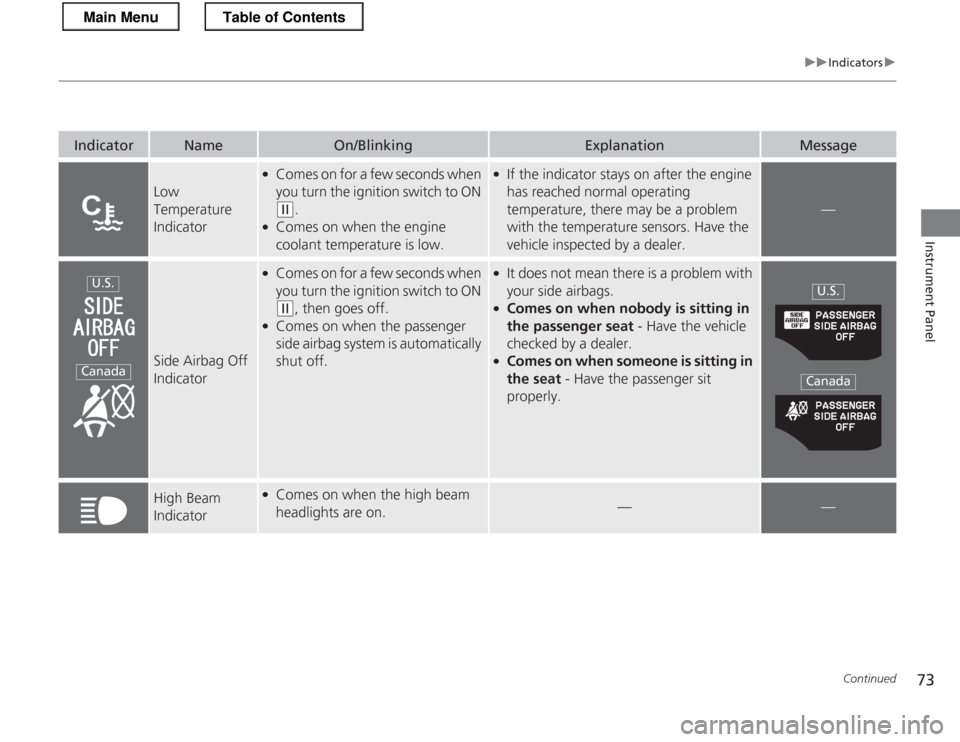
Low Temperature
Indicator
●Comes on for a few seconds when
you turn the ignition switch to ON
(w .
● Comes on when the engine coolant temperature is low.
●If the indicator stays on after the engine
has reached normal operating
temperature, there may be a problem
with the temperature sensors. Have the
vehicle inspected by a dealer.
—
Side Airbag Off
Indicator
●
Comes on for a few seconds when
you turn the ignition switch to ON
(w , then goes off.
● Comes on when the passenger
side airbag system is automatically shut off.
●
It does not mean there is a problem with
your side airbags.
● Comes on when nobody is sitting in
the passenger seat - Have the vehicle
checked by a dealer.
● Comes on when someone is sitting in
the seat - Have the passenger sit
properly.
High Beam
Indicator● Comes on when the high beam
headlights are on.
——
U.S.
Canada
U.S.
Canada
Main MenuTable of Contents
Page 112 of 325
111
uuOperating the Switches Around the Steering WheeluTurn Signals
Continued
Controls
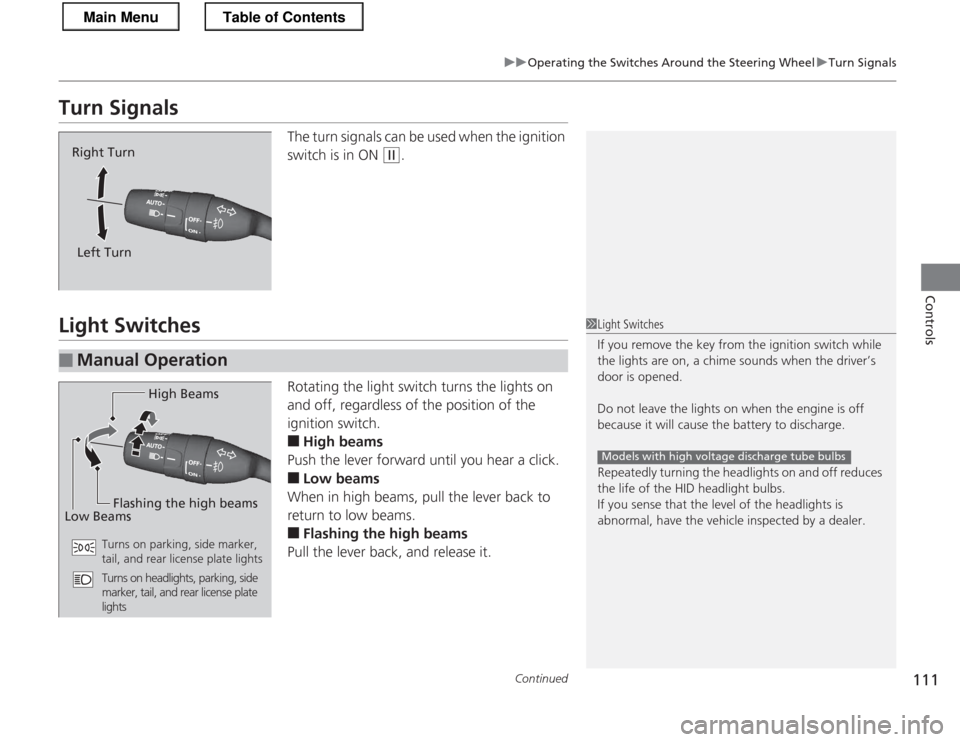
Turn SignalsThe turn signals can be used when the ignition
switch is in ON
(w.
Light Switches
Rotating the light switch turns the lights on
and off, regardless of the position of the
ignition switch. ■High beams
Push the lever forward until you hear a click. ■ Low beams
When in high beams, pull the lever back to
return to low beams. ■ Flashing the high beams
Pull the lever back, and release it.
Right Turn
Left Turn
■Manual Operation
1Light Switches
If you remove the key fr om the ignition switch while
the lights are on, a chime sounds when the driver’s door is opened.
Do not leave the lights on when the engine is off
because it will cause the battery to discharge.
Repeatedly turning the headlights on and off reduces
the life of the HID headlight bulbs.
If you sense that the level of the headlights is
abnormal, have the vehicle inspected by a dealer.
Models with high voltage discharge tube bulbs
High Beams
Flashing the high beams
Low Beams
Turns on parking, side marker,
tail, and rear license plate lights
Turns on headlights, parking, side
marker, tail, and rear license plate
lights
Main MenuTable of Contents
Page 113 of 325
uuOperating the Switches Around the Steering WheeluLight Switches
112
Controls
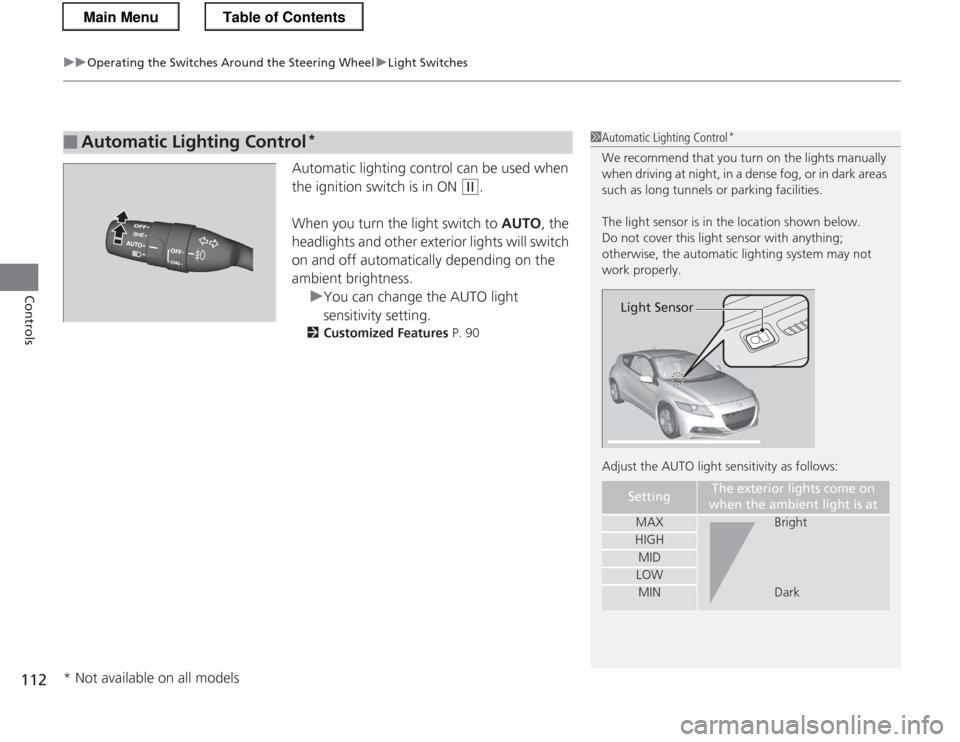
Automatic lighting control can be used when
the ignition switch is in ON
(w .
When you turn the light switch to AUTO, the
headlights and other exterior lights will switch
on and off automatically depending on the ambient brightness.
uYou can change the AUTO light
sensitivity setting.
2 Customized Features P. 90
■Automatic Lighting Control *1Automatic Lighting Control
*
We recommend that you turn on the lights manually
when driving at night, in a dense fog, or in dark areas
such as long tunnels or parking facilities.
The light sensor is in the location shown below.
Do not cover this light sensor with anything;
otherwise, the automatic lighting system may not work properly.
Adjust the AUTO light sensitivity as follows:
SettingThe exterior lights come on
when the ambient light is at
MAXBright
HIGH
MID
LOW
MINDark
Light Sensor
* Not available on all models
Main MenuTable of Contents
Page 114 of 325
113
uuOperating the Switches Around the Steering WheeluFog Lights*
Controls
Fog Lights *
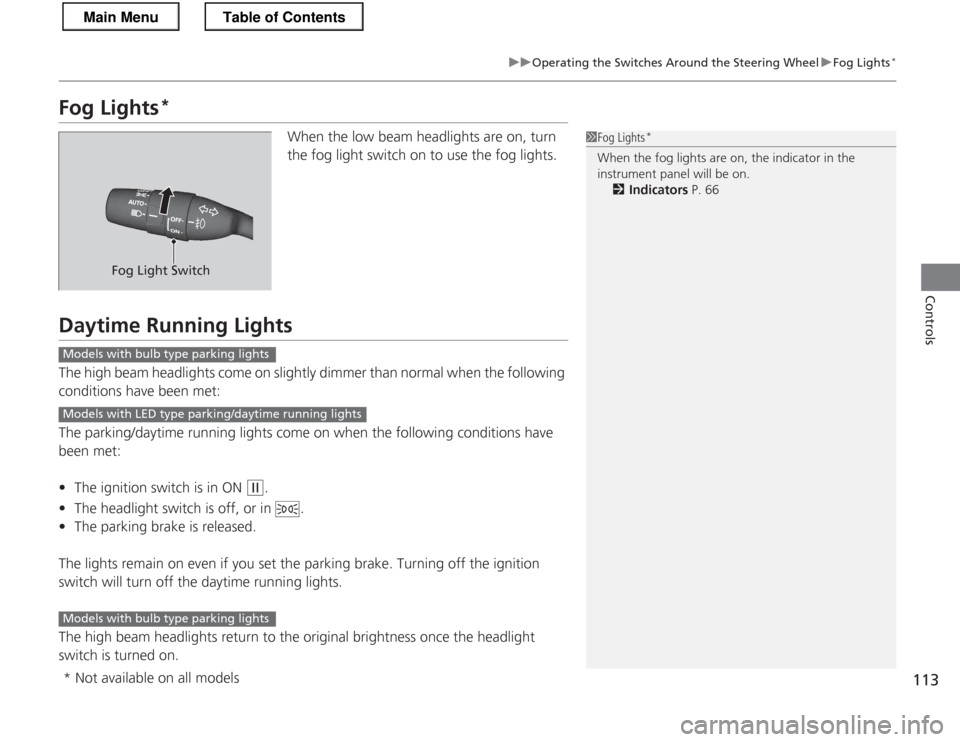
When the low beam headlights are on, turn
the fog light switch on to use the fog lights.
Daytime Running Lights
The high beam headlights come on slightly dimmer than normal when the following
conditions have been met:
The parking/daytime running lights come on when the following conditions have
been met: •The ignition switch is in ON
(w .
• The headlight switch is off, or in .
• The parking brake is released.
The lights remain on even if you set the parking brake. Turning off the ignition
switch will turn off the daytime running lights.
The high beam headlights return to the original brightness once the headlight
switch is turned on.
1Fog Lights *
When the fog lights are on, the indicator in the
instrument panel will be on. 2 Indicators P. 66
Fog Light Switch
Models with bulb type parking lights
Models with LED type parking/daytime running lights
Models with bulb type parking lights
* Not available on all models
Main MenuTable of Contents
Page 120 of 325
119
Controls
Adjusting the Mirrors
Interior Rearview Mirror
Adjust the angle of the rearview mirror when you are sitting in the correct driving
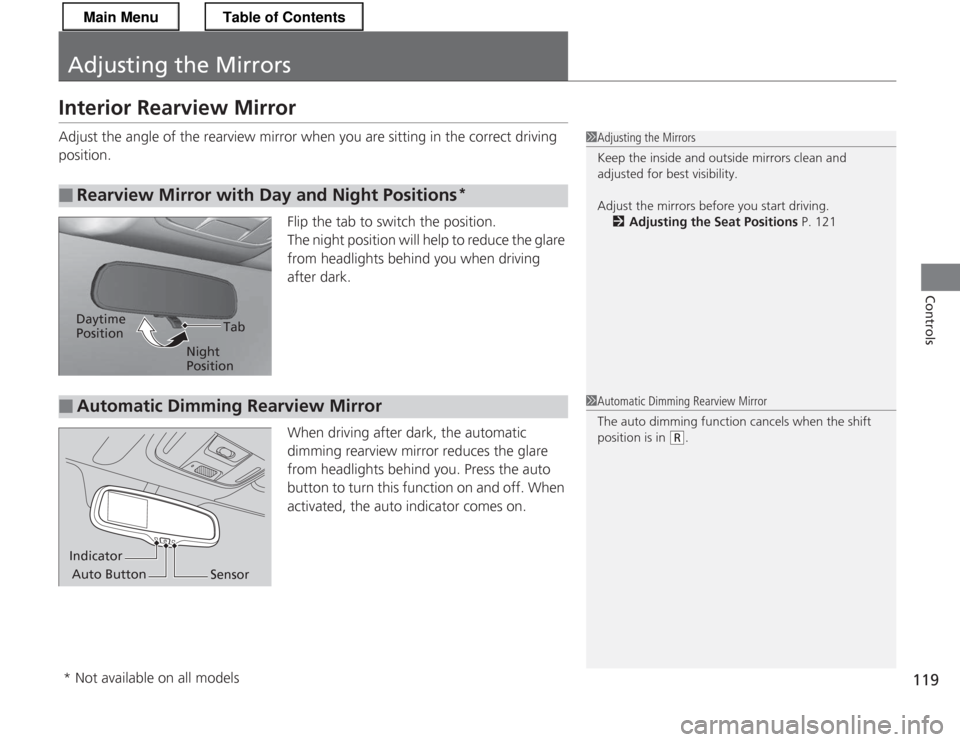
position.Flip the tab to switch the position.
The night position will help to reduce the glare
from headlights behind you when driving
after dark.
When driving after dark, the automatic
dimming rearview mirror reduces the glare
from headlights behind you. Press the auto
button to turn this function on and off. When
activated, the auto indicator comes on.
■Rearview Mirror with Day and Night Positions *
1Adjusting the Mirrors
Keep the inside and outside mirrors clean and
adjusted for best visibility.
Adjust the mirrors before you start driving.
2 Adjusting the Seat Positions P. 121
Tab
Daytime Position
Night Position
■Automatic Dimming Rearview Mirror1Automatic Dimming Rearview Mirror
The auto dimming function cancels when the shift
position is in
(R.
Indicator
Auto Button Sensor
* Not available on all models
Main MenuTable of Contents
Page 243 of 325
242
Maintenance
Replacing Light Bulbs
Headlight Bulbs
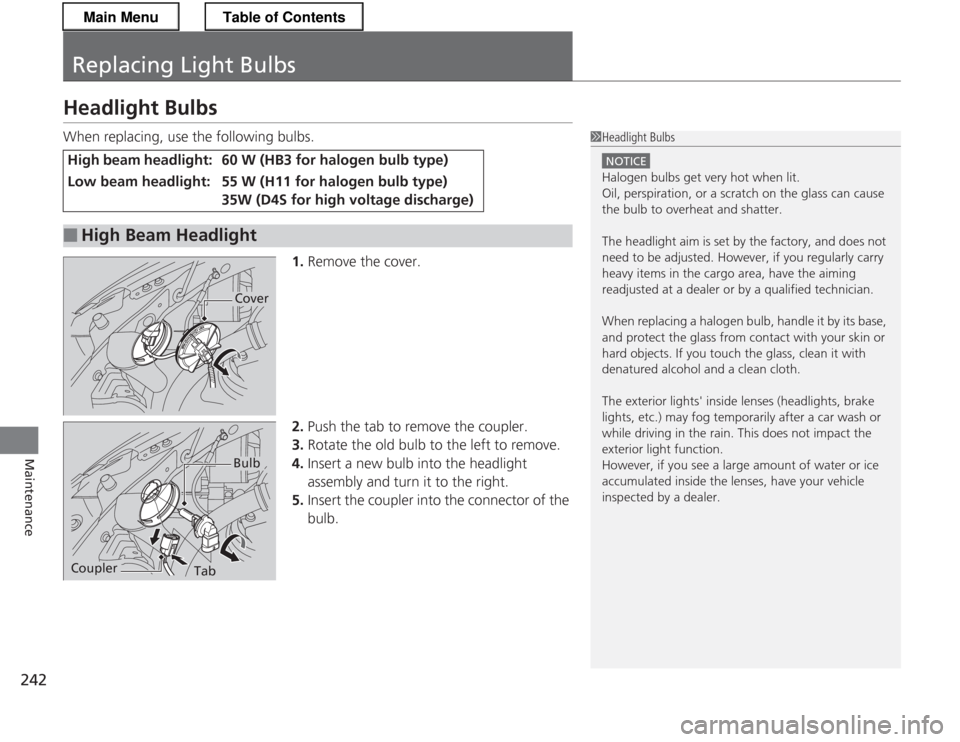
When replacing, use the following bulbs.1.Remove the cover.
2. Push the tab to remove the coupler.
3. Rotate the old bulb to the left to remove.
4. Insert a new bulb into the headlight
assembly and turn it to the right.
5. Insert the coupler into the connector of the
bulb.
High beam headlight:60 W (HB3 for halogen bulb type)
Low beam headlight:55 W (H11 for halogen bulb type)
35W (D4S for high voltage discharge)
■High Beam Headlight
1Headlight Bulbs
NOTICE
Halogen bulbs get very hot when lit.
Oil, perspiration, or a scratch on the glass can cause
the bulb to overheat and shatter.
The headlight aim is set by the factory, and does not
need to be adjusted. However, if you regularly carry
heavy items in the cargo area, have the aiming
readjusted at a dealer or by a qualified technician.
When replacing a halogen bulb, handle it by its base,
and protect the glass from contact with your skin or
hard objects. If you touch the glass, clean it with
denatured alcohol and a clean cloth.
The exterior lights' inside lenses (headlights, brake
lights, etc.) may fog temporarily after a car wash or
while driving in the rain. This does not impact the
exterior light function.
However, if you see a large amount of water or ice
accumulated inside the lenses, have your vehicle
inspected by a dealer.
Cover
TabCoupler
Bulb
Main MenuTable of Contents
Page 244 of 325
243
uuReplacing Light BulbsuHeadlight Bulbs
Maintenance
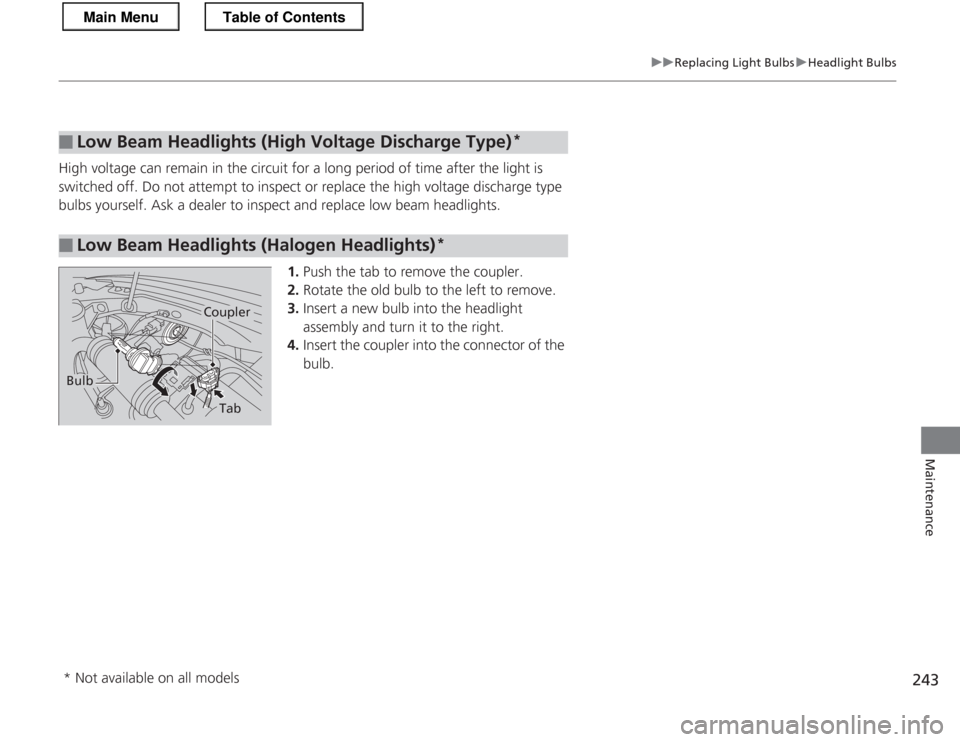
High voltage can remain in the circuit for a long period of time after the light is
switched off. Do not attempt to inspect or replace the high voltage discharge type
bulbs yourself. Ask a dealer to inspect and replace low beam headlights.1.Push the tab to remove the coupler.
2. Rotate the old bulb to the left to remove.
3. Insert a new bulb into the headlight
assembly and turn it to the right.
4. Insert the coupler into the connector of the
bulb.
■Low Beam Headlights (High Vol tage Discharge Type)*
■Low Beam Headlights (Halogen Headlights)
*
Bulb
Coupler
Tab
* Not available on all models
Main MenuTable of Contents
Page 299 of 325
298
uuFusesuFuse Locations
Handling the Unexpected
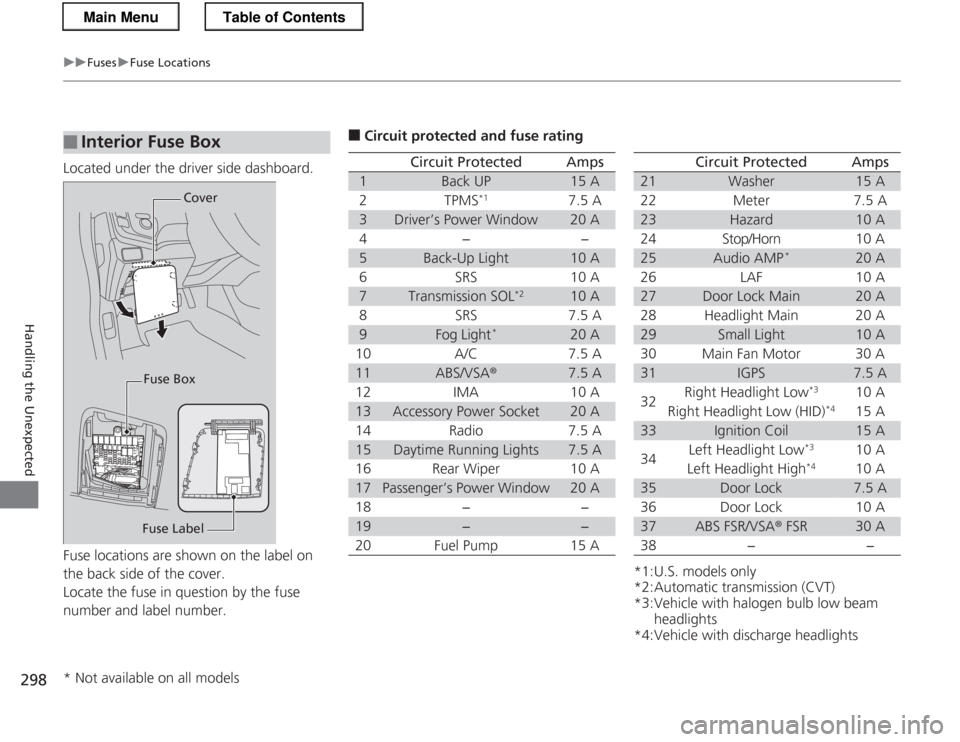
Located under the driver side dashboard.
Fuse locations are shown on the label on
the back side of the cover.
Locate the fuse in question by the fuse
number and label number.
■Interior Fuse Box
Fuse LabelCover
Fuse Box
■ Circuit protected and fuse rating
Circuit ProtectedAmps
1Back UP15 A
2TPMS *17.5 A
3Driver’s Power Window20 A
4−−
5Back-Up Light10 A
6SRS10 A
7Transmission SOL *210 A
8SRS7.5 A
9Fog Light*20 A
10 A/C 7.5 A
11ABS/VSA ®7.5 A
12 IMA 10 A
13Accessory Power Socket20 A
14 Radio 7.5 A
15Daytime Running Lights7.5 A
16 Rear Wiper 10 A
17Passenger’s Power Window20 A
18 − −
19−−
20 Fuel Pump 15 A
*1:U.S. models only
*2:Automatic transmission (CVT)
*3:Vehicle with halogen bulb low beam headlights
*4:Vehicle with discharge headlights
Circuit ProtectedAmps
21Washer15 A
22 Meter 7.5 A
23Hazard10 A
24 Stop/Horn 10 A
25Audio AMP *20 A
26 LAF 10 A
27Door Lock Main20 A
28 Headlight Main 20 A
29Small Light10 A
30 Main Fan Motor 30 A
31IGPS7.5 A
32 Right Headlight Low
*3
10 A
Right Headlight Low (HID) *4
15 A
33Ignition Coil15 A
34 Left Headlight Low
*3
10 A
Left Headlight High *4
10 A
35Door Lock7.5 A
36 Door Lock 10 A
37ABS FSR/VSA ® FSR30 A
38 − −
* Not available on all models
Main MenuTable of Contents