interior lights HONDA CR-Z 2013 1.G Owners Manual
[x] Cancel search | Manufacturer: HONDA, Model Year: 2013, Model line: CR-Z, Model: HONDA CR-Z 2013 1.GPages: 325, PDF Size: 11.73 MB
Page 1 of 325
Contents
This owner’s manual should be considered a permanent part of the
vehicle and should remain with the vehicle when it is sold.
This owner’s manual covers all models of your vehicle. You may find
descriptions of equipment and features that are not on your
particular model.
Images throughout this owner’s manual (including the front cover)
represent features and equipment that are available on some, but
not all, models. Your particular model may not have some of these features.
This owner's manual is for vehicles sold in the United States and Canada.
The information and specifications included in this publication were
in effect at the time of approval for printing. Honda Motor Co., Ltd.
reserves the right, however, to discontinue or change specifications
or design at any time without notice and without incurring any
obligation.2 Safe Driving P. 27
For Safe Driving P. 28 Seat Belts P. 32 Airbags P. 39
2Instrument Panel P. 65
Indicators P. 66 Gauges and Multi-Information Display P. 81
2Controls P. 97
Setting the Clock P. 98 Locking and Unlocking the Doors P. 99
Operating the Switches Around the Steering Wheel P. 110
Interior Lights/Interior Convenience Items P. 126
2Features P. 137
Audio System P. 138 Audio Error Messages P. 153
2Driving P. 171
Before Driving P. 172 Towing a Trailer P. 177
Multi-View Rear Camera P. 213
Refueling P. 216 Fuel Economy P. 219
2Maintenance P. 221
Before Performing Maintenance P. 222 Maintenance Minder
Page 6 of 325
5
Quick Reference Guide
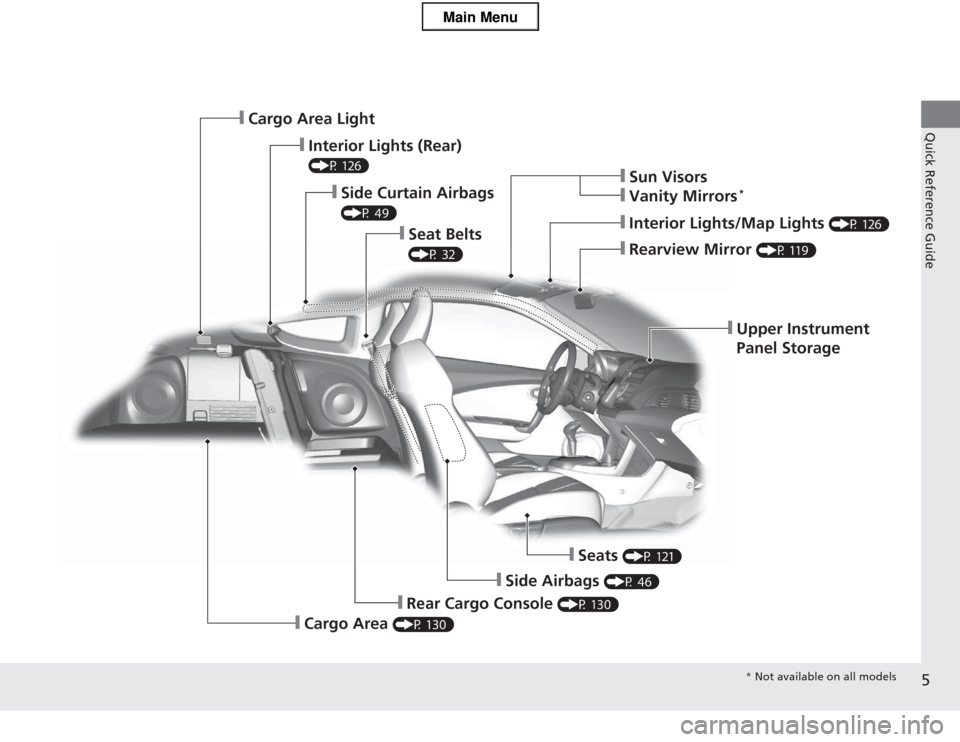
❙Upper Instrument
Panel Storage
❙Rearview Mirror (P 119)
❙Interior Lights/Map Lights (P 126)
❙Sun Visors
❙Vanity Mirrors*
❙Seat Belts
(P 32)
❙Side Curtain Airbags
(P 49)
❙Interior Lights (Rear)
(P 126)
❙Cargo Area Light
❙Seats
(P 121)
❙Side Airbags (P 46)
❙Rear Cargo Console (P 130)
❙Cargo Area (P 130)
* Not available on all models
Main Menu
Page 98 of 325
97
Controls
This chapter explains how to operate the various controls necessary for driving.
Setting the Clock................................ 98
Locking and Unlocking the Doors
Key Types and Functions .................... 99
Locking/Unlocking the Doors from the Outside .......................................... 100
Locking/Unlocking the Doors from the Inside ............................................. 102
Auto Door Locking/Unlocking .......... 103
Opening and Closing the Hatch ....... 104
Security System Immobilizer System .......................... 106
Security System Alarm ...................... 106
Opening and Closing the Windows ..... 108Operating the Switches Around the
Steering Wheel
Ignition Switch ................................. 110
Turn Signals ..................................... 111
Light Switches.................................. 111 Fog Lights *
...................................... 113
Daytime Running Lights ................... 113
Wipers and Washers ........................ 114
Brightness Control ........................... 116
Rear Defogger/Heated Door Mirror *
Button ........................................... 117
Adjusting the Steering Wheel........... 118 Adjusting the Mirrors
Interior Rearview Mirror ................... 119
Power Door Mirrors ......................... 120
Adjusting the Seats Adjusting the Seat Positions ............. 121
Interior Lights/Interior Convenience ItemsInterior Lights .................................. 126
Interior Convenience Items .............. 127
Climate Control System Using Automatic Climate Control .... 134
Automatic Climate Control Sensors ...... 136
* Not available on all models
Main Menu
Page 101 of 325
100
uuLocking and Unlocking the DoorsuLocking/Unlocking the Doors from the Outside
Controls
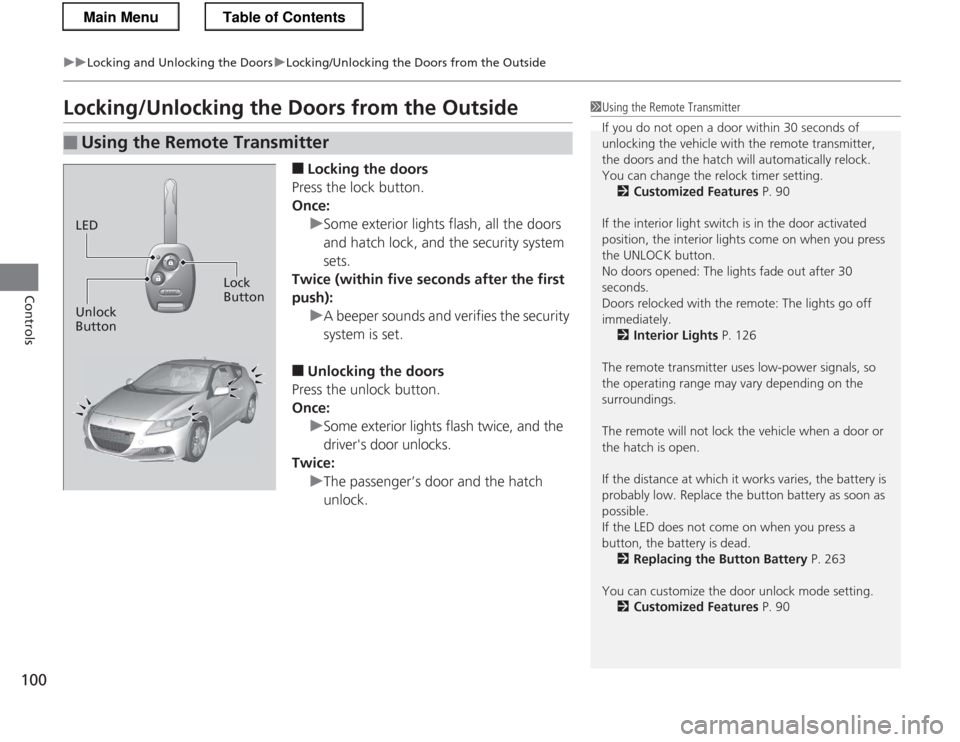
Locking/Unlocking the Doors from the Outside■Locking the doors
Press the lock button.
Once:
uSome exterior lights flash, all the doors
and hatch lock, and the security system sets.
Twice (within five seconds after the first push):
uA beeper sounds and verifies the security system is set.
■ Unlocking the doors
Press the unlock button.
Once:
uSome exterior lights flash twice, and the
driver's door unlocks.
Twice:
uThe passenger’s door and the hatch unlock.
■Using the Remote Transmitter
1Using the Remote Transmitter
If you do not open a door within 30 seconds of
unlocking the vehicle with the remote transmitter,
the doors and the hatch will automatically relock.
You can change the relock timer setting. 2 Customized Features P. 90
If the interior light switch is in the door activated
position, the interior lights come on when you press
the UNLOCK button.
No doors opened: The lights fade out after 30
seconds.
Doors relocked with the remote: The lights go off
immediately. 2 Interior Lights P. 126
The remote transmitter uses low-power signals, so
the operating range may vary depending on the surroundings.
The remote will not lock the vehicle when a door or the hatch is open.
If the distance at which it works varies, the battery is
probably low. Replace the button battery as soon as possible.
If the LED does not come on when you press a
button, the battery is dead. 2 Replacing the Button Battery P. 263
You can customize the door unlock mode setting. 2 Customized Features P. 90
LED
Unlock Button Lock
Button
Main MenuTable of Contents
Page 120 of 325
119
Controls
Adjusting the Mirrors
Interior Rearview Mirror
Adjust the angle of the rearview mirror when you are sitting in the correct driving
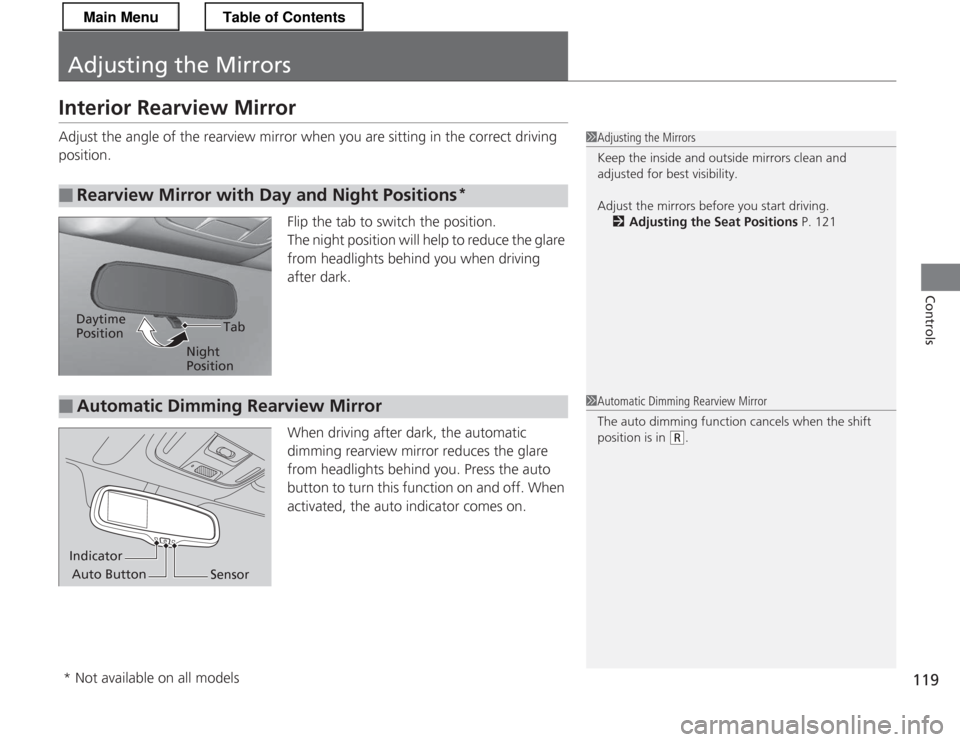
position.Flip the tab to switch the position.
The night position will help to reduce the glare
from headlights behind you when driving
after dark.
When driving after dark, the automatic
dimming rearview mirror reduces the glare
from headlights behind you. Press the auto
button to turn this function on and off. When
activated, the auto indicator comes on.
■Rearview Mirror with Day and Night Positions *
1Adjusting the Mirrors
Keep the inside and outside mirrors clean and
adjusted for best visibility.
Adjust the mirrors before you start driving.
2 Adjusting the Seat Positions P. 121
Tab
Daytime Position
Night Position
■Automatic Dimming Rearview Mirror1Automatic Dimming Rearview Mirror
The auto dimming function cancels when the shift
position is in
(R.
Indicator
Auto Button Sensor
* Not available on all models
Main MenuTable of Contents
Page 127 of 325
126
Controls
Interior Lights/Interior Convenience Items
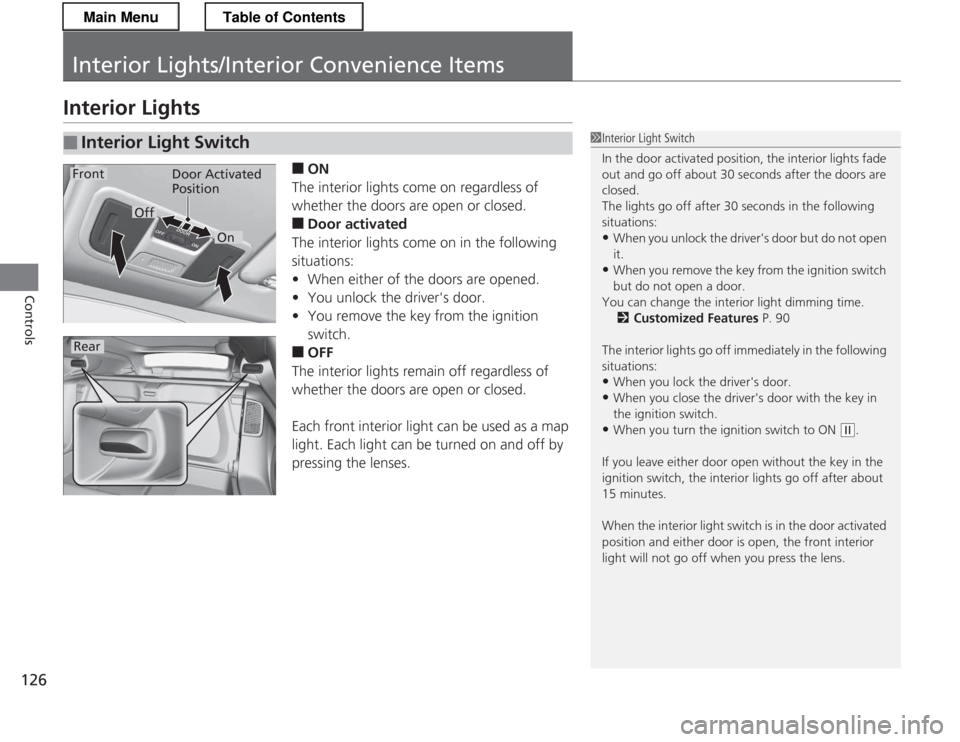
Interior Lights■ON
The interior lights come on regardless of
whether the doors are open or closed. ■ Door activated
The interior lights come on in the following
situations: • When either of the doors are opened.
• You unlock the driver's door.
• You remove the key from the ignition switch.
■ OFF
The interior lights remain off regardless of
whether the doors are open or closed.
Each front interior light can be used as a map
light. Each light can be turned on and off by
pressing the lenses.
■Interior Light Switch1Interior Light Switch
In the door activated position, the interior lights fade
out and go off about 30 seconds after the doors are closed.
The lights go off after 30 seconds in the following
situations: • When you unlock the driver's door but do not open
it.
• When you remove the key from the ignition switch
but do not open a door.
You can change the interior light dimming time. 2 Customized Features P. 90
The interior lights go off immediately in the following
situations: • When you lock the driver's door.
• When you close the driver's door with the key in
the ignition switch.
• When you turn the ignition switch to ON
(w .
If you leave either door open without the key in the
ignition switch, the interior lights go off after about 15 minutes.
When the interior light switch is in the door activated
position and either door is open, the front interior
light will not go off when you press the lens.
Door Activated
Position
On
Off
Rear
Front
Main MenuTable of Contents
Page 128 of 325
127
uuInterior Lights/Interior Convenience ItemsuInterior Convenience Items
Continued
Controls
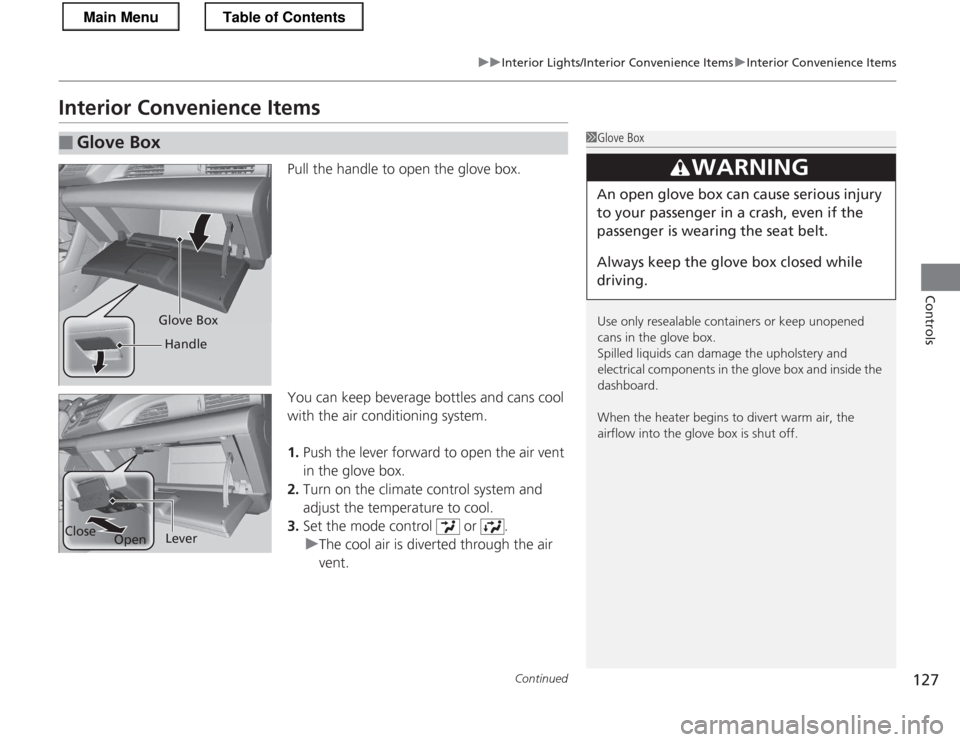
Interior Convenience ItemsPull the handle to open the glove box.
You can keep beverage bottles and cans cool
with the air conditioning system. 1.Push the lever forward to open the air vent
in the glove box.
2. Turn on the climate control system and
adjust the temperature to cool.
3. Set the mode control or .
uThe cool air is diverted through the air vent.
■Glove Box1Glove Box
Use only resealable containers or keep unopened
cans in the glove box.
Spilled liquids can damage the upholstery and
electrical components in the glove box and inside the
dashboard.
When the heater begins to divert warm air, the
airflow into the glove box is shut off.
3WARNING
An open glove box can cause serious injury
to your passenger in a crash, even if the
passenger is wearing the seat belt.
Always keep the glove box closed while
driving.
Glove Box
Handle
Close OpenLever
Main MenuTable of Contents
Page 129 of 325
uuInterior Lights/Interior Convenience ItemsuInterior Convenience Items
128
Controls
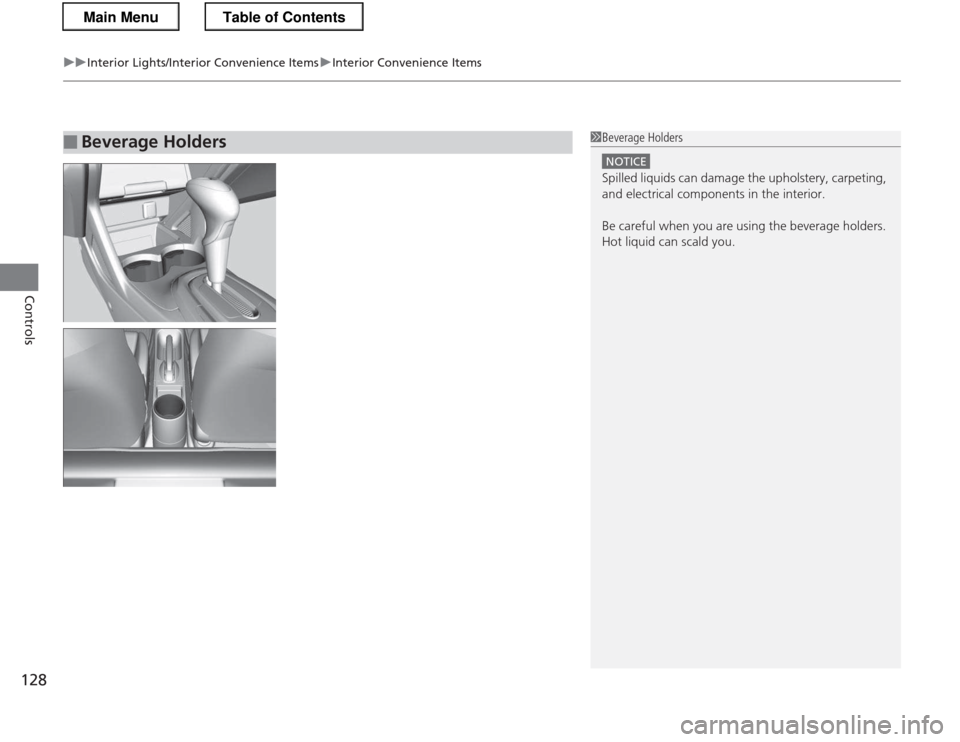
■Beverage Holders1Beverage Holders
NOTICE
Spilled liquids can damage the upholstery, carpeting,
and electrical components in the interior.
Be careful when you are using the beverage holders.
Hot liquid can scald you.
Main MenuTable of Contents
Page 130 of 325
Continued129
uuInterior Lights/Interior Convenience ItemsuInterior Convenience Items
Controls
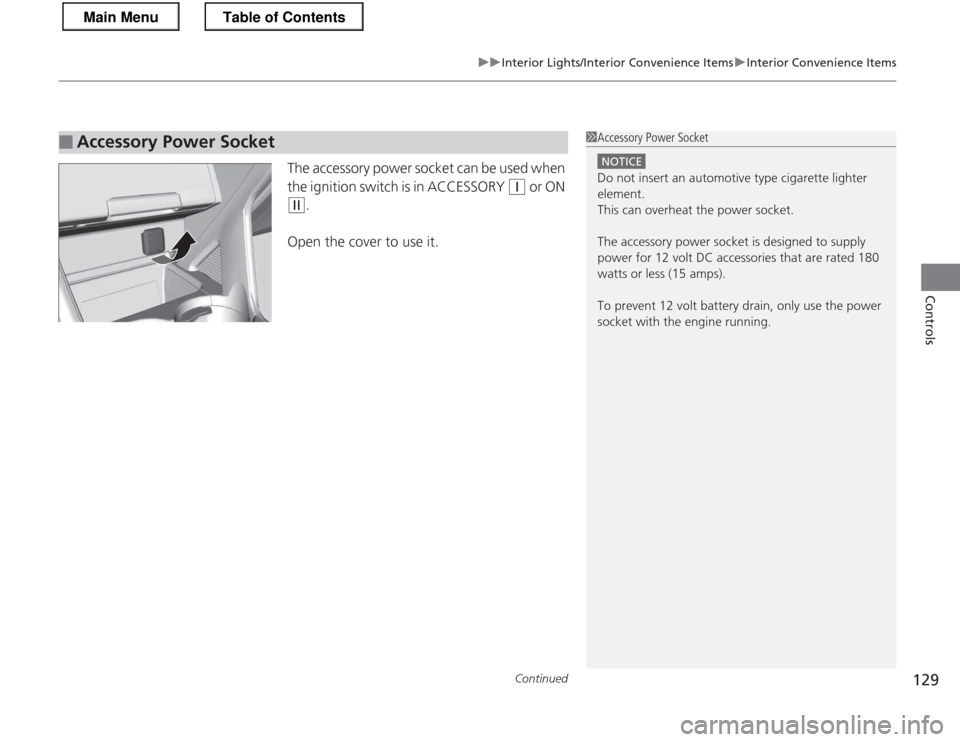
The accessory power socket can be used when
the ignition switch is in ACCESSORY
(q or ON
(w.
Open the cover to use it.
■Accessory Power Socket1Accessory Power Socket
NOTICE
Do not insert an automotive type cigarette lighter
element.
This can overheat the power socket.
The accessory power socket is designed to supply
power for 12 volt DC accessories that are rated 180
watts or less (15 amps).
To prevent 12 volt battery drain, only use the power socket with the engine running.
Main MenuTable of Contents
Page 131 of 325
uuInterior Lights/Interior Convenience ItemsuInterior Convenience Items
130
Controls
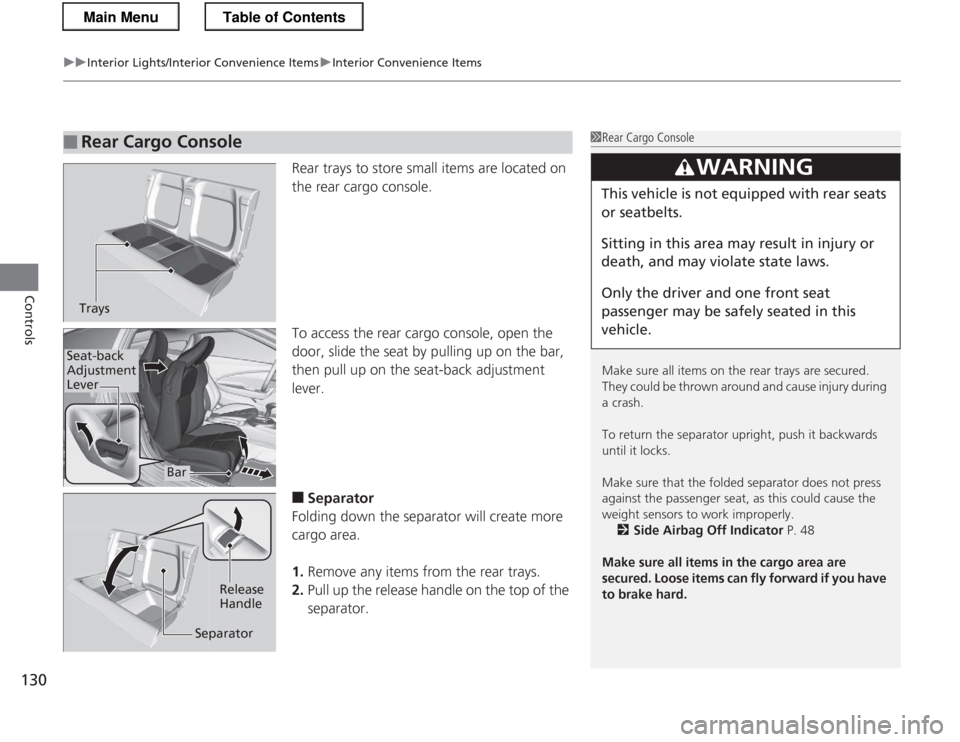
Rear trays to store small items are located on
the rear cargo console.
To access the rear cargo console, open the
door, slide the seat by pulling up on the bar, then pull up on the seat-back adjustment lever. ■ Separator
Folding down the separator will create more cargo area. 1. Remove any items from the rear trays.
2. Pull up the release handle on the top of the
separator.
■Rear Cargo Console1Rear Cargo Console
Make sure all items on the rear trays are secured.
They could be thrown around and cause injury during a crash.
To return the sepa rator upright, push it backwards
until it locks.
Make sure that the fol ded separator does not press
against the passenger seat, as this could cause the
weight sensors to work improperly.
2 Side Airbag Off Indicator P. 48
Make sure all items in the cargo area are
secured. Loose items can fly forward if you have
to brake hard.
3WARNING
This vehicle is not equipped with rear seats
or seatbelts.
Sitting in this area may result in injury or
death, and may violate state laws.
Only the driver and one front seat
passenger may be safely seated in this vehicle.
Trays
Bar
Seat-back Adjustment
Lever
Release Handle
Separator
Main MenuTable of Contents