display HONDA CR-Z 2015 1.G Service Manual
[x] Cancel search | Manufacturer: HONDA, Model Year: 2015, Model line: CR-Z, Model: HONDA CR-Z 2015 1.GPages: 329, PDF Size: 17.44 MB
Page 149 of 329
uuAudio System uPlaying the AM/FM Radio
148
Features
Use the auto select feature to scan both bands and store the strongest station in
each preset.
Press the A.SEL button to activate the feature.
To turn off auto select, press the A.SEL button again. This restores the presets you
originally set.
Provides text data information related to your selected RDS capable FM station.
■RDS INFO ON
Press the TITLE button while listening to an RDS capable station. RDS INFO ON
appears, and the station name is displayed.
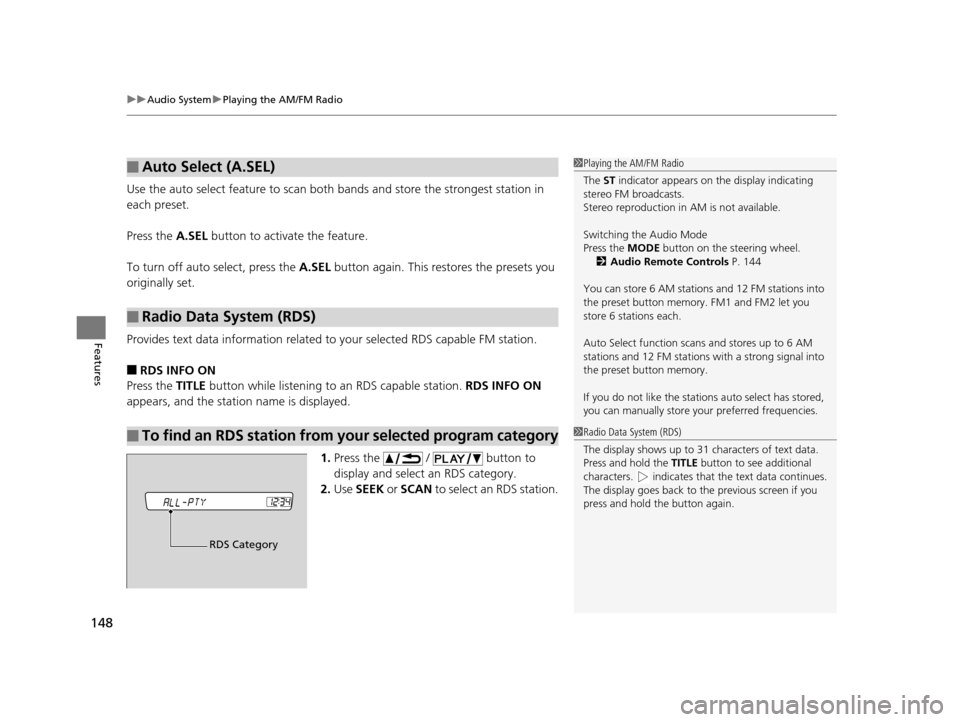
1.Press the / button to
display and select an RDS category.
2. Use SEEK or SCAN to select an RDS station.
■Auto Select (A.SEL)
■Radio Data System (RDS)
■To find an RDS station from your selected program category
1Playing the AM/FM Radio
The ST indicator appears on the display indicating
stereo FM broadcasts.
Stereo reproduction in AM is not available.
Switching the Audio Mode
Press the MODE button on the steering wheel.
2 Audio Remote Controls P. 144
You can store 6 AM stations and 12 FM stations into
the preset button memory. FM1 and FM2 let you
store 6 stations each.
Auto Select function scans and stores up to 6 AM
stations and 12 FM stations with a strong signal into
the preset button memory.
If you do not like the stati ons auto select has stored,
you can manually store your preferred frequencies.
1Radio Data System (RDS)
The display shows up to 31 ch aracters of text data.
Press and hold the TITLE button to see additional
characters. indicates that the text data continues.
The display goes back to th e previous screen if you
press and hold the button again.
RDS Category
15 CR-Z-31SZT6400.book 148 ページ 2014年8月1日 金曜日 午後1時59分
Page 150 of 329
149
uuAudio System uPlaying a CD
Continued
Features
Playing a CD
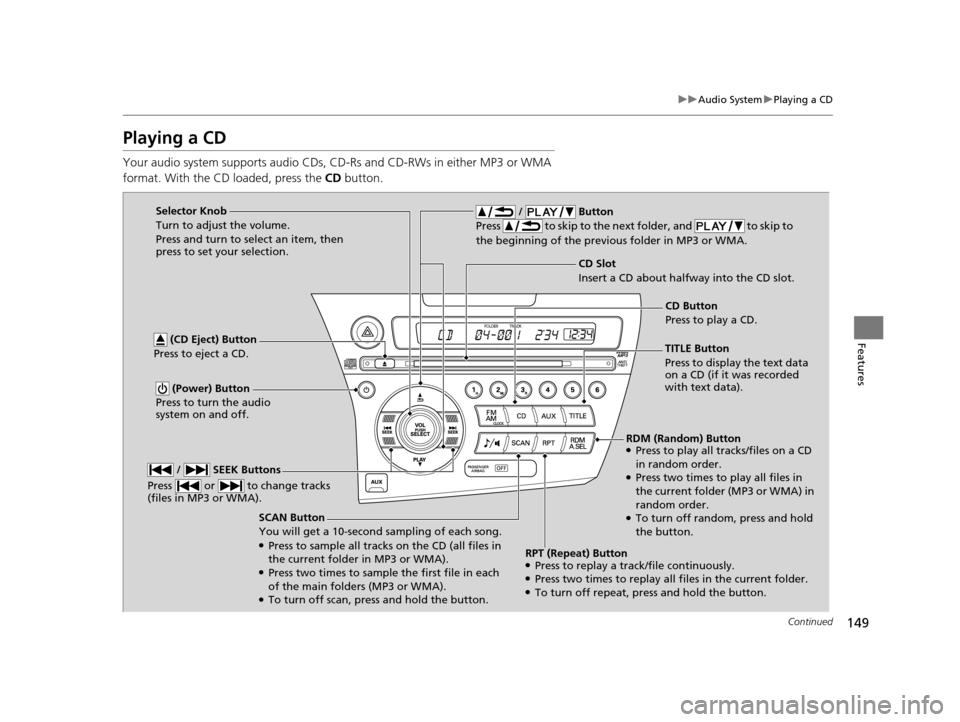
Your audio system supports audio CDs, CD-Rs and CD-RWs in either MP3 or WMA
format. With the CD loaded, press the CD button.
SCAN Button
You will get a 10-second sampling of each song.
●Press to sample all tracks on the CD (all files in
the current folder in MP3 or WMA).
●Press two times to sample the first file in each
of the main folders (MP3 or WMA).
●To turn off scan, press and hold the button.
(CD Eject) Button
Press to eject a CD.
/ Button
Press to skip to the next folder, and to skip to
the beginning of the previous folder in MP3 or WMA.
(Power) Button
Press to turn the audio
system on and off.
CD Slot
Insert a CD about halfway into the CD slot.
/ SEEK Buttons
Press or to change tracks
(files in MP3 or WMA).
Selector Knob
Turn to adjust the volume.
Press and turn to select an item, then
press to set your selection.
TITLE Button
Press to display the text data
on a CD (if it was recorded
with text data).CD Button
Press to play a CD.
RDM (Random) Button
●Press to play all tracks/files on a CD
in random order.
●Press two times to play all files in
the current folder (MP3 or WMA) in
random order.
●To turn off random , press and hold
the button.
RPT (Repeat) Button
●Press to replay a track/file continuously.●Press two times to replay all files in the current folder.●To turn off repeat, press and hold the button.
15 CR-Z-31SZT6400.book 149 ページ 2014年8月1日 金曜日 午後1時59分
Page 151 of 329
uuAudio System uPlaying a CD
150
Features
1. Press to switch the display to a folder list.
2. Rotate to select a folder.
u Press button to play the firs t file on the selected folder.
3. Press to change the display to a list of files in that folder.
4. Rotate to select a file, then press .
■How to Select a File from a Fo lder with the Selector Knob
(MP3/WMA)1 Playing a CD
NOTICE
Do not use CDs with adhesive labels. The label can
cause the CD to jam in the unit.
WMA files protected by di gital rights management
(DRM) cannot be played.
The audio system displays UNSUPPORTED, then
skips to the next file.
Text data appears on the di splay under the following
circumstances:
•When you select a new folder, file, or track.
•When you change the audio mode to CD.
•When you insert a CD.
The display shows up to 31 ch aracters of text data.
Press and hold the TITLE button to see additional
characters. indicates that the text data continues.
The display goes back to th e previous screen if you
press and hold the button again.
If you eject the CD but do not remove it from the slot,
the system reloads the CD automatically after several
seconds.
15 CR-Z-31SZT6400.book 150 ページ 2014年8月1日 金曜日 午後1時59分
Page 152 of 329
151
uuAudio System uPlaying an iPod
Continued
Features
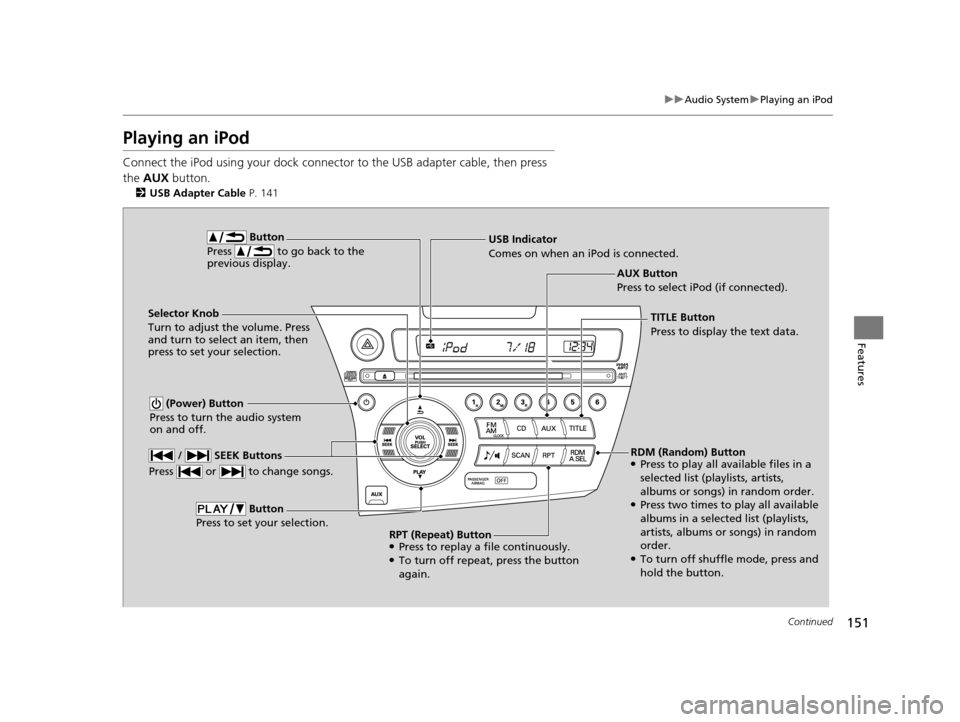
Playing an iPod
Connect the iPod using your dock connector to the USB adapter cable, then press
the AUX button.
2USB Adapter Cable P. 141
AUX Button
Press to select iPod (if connected).
Button
Press to go back to the
previous display.
(Power) Button
Press to turn the audio system
on and off.
Selector Knob
Turn to adjust the volume. Press
and turn to select an item, then
press to set your selection. USB Indicator
Comes on when an iPod is connected.
/ SEEK Buttons
Press or to change songs.
Button
Press to set your selection.
TITLE Button
Press to display the text data.
RDM (Random) Button
●Press to play all available files in a
selected list (playlists, artists,
albums or songs) in random order.
●Press two times to play all available
albums in a selected list (playlists,
artists, albums or songs) in random
order.
●To turn off shuffle mode, press and
hold the button.
RPT (Repeat) Button
●Press to replay a file continuously.●To turn off repeat, press the button
again.
15 CR-Z-31SZT6400.book 151 ページ 2014年8月1日 金曜日 午後1時59分
Page 153 of 329
uuAudio System uPlaying an iPod
152
Features
1. Press to display the iPod menu.
2. Rotate to select a menu.
3. Press to display the items on that menu.
4. Rotate to select an item, then press .
■How to Select a File from the iPod Menu1Playing an iPod
Available operating functi ons vary on models or
versions. Some functions ma y not be available on the
vehicle's audio system.
If there is a problem, you may see an error message
on the display. 2 iPod/USB Flash Drive P. 156
15 CR-Z-31SZT6400.book 152 ページ 2014年8月1日 金曜日 午後1時59分
Page 154 of 329
153
uuAudio System uPlaying a USB Flash Drive
Continued
Features
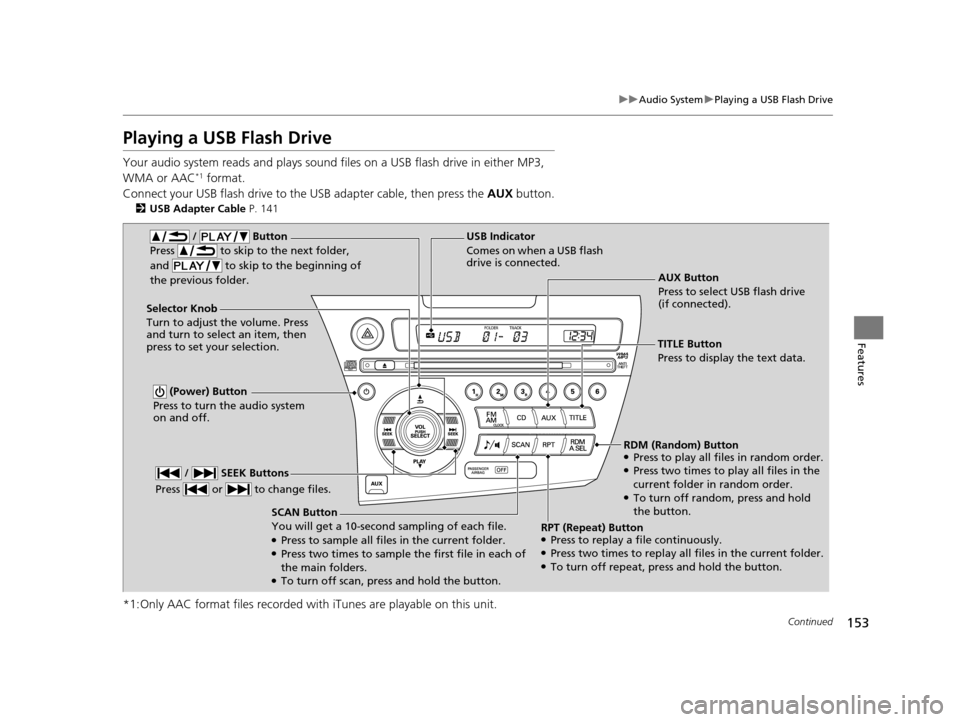
Playing a USB Flash Drive
Your audio system reads and plays sound files on a USB flash drive in either MP3,
WMA or AAC*1 format.
Connect your USB flash drive to the USB adapter cable, then press the AUX button.
2USB Adapter Cable P. 141
*1:Only AAC format files recorded with iTunes are playable on this unit.
AUX Button
Press to select USB flash drive
(if connected).
SCAN Button
You will get a 10-second sampling of each file.
●Press to sample all files in the current folder.●Press two times to sample the first file in each of
the main folders.
●To turn off scan, pres s and hold the button.
(Power) Button
Press to turn the audio system
on and off.
Selector Knob
Turn to adjust the volume. Press
and turn to select an item, then
press to set your selection. USB Indicator
Comes on when a USB flash
drive is connected.
/ Button
Press to skip to the next folder,
and to skip to the beginning of
the previous folder.
/ SEEK Buttons
Press or to change files.
TITLE Button
Press to display the text data.
RDM (Random) Button
●Press to play all files in random order.●Press two times to play all files in the
current folder in random order.
●To turn off random, press and hold
the button.
RPT (Repeat) Button
●Press to replay a file continuously.●Press two times to replay all files in the current folder.●To turn off repeat, pr ess and hold the button.
15 CR-Z-31SZT6400.book 153 ページ 2014年8月1日 金曜日 午後1時59分
Page 155 of 329
uuAudio System uPlaying a USB Flash Drive
154
Features
1. Press to switch the display to a folder list.
2. Rotate to select a folder.
u Press button to play the firs t file on the selected folder.
3. Press to change the display to a list of files in that folder.
4. Rotate to select a file, then press .
■How to Select a File from a Folder with the Selector Knob1Playing a USB Flash Drive
Use the recommended USB flash drives.
2 USB Flash Drives P. 159
Files in WMA format prot ected by digital rights
management (DRM) are not played.
The audio system displays UNPLAYABLE FILE, and
then skips to the next file.
If there is a problem, you may see an error message
on the display. 2 iPod/USB Flash Drive P. 156
15 CR-Z-31SZT6400.book 154 ページ 2014年8月1日 金曜日 午後1時59分
Page 158 of 329
157Continued
Features
General Information on the Audio System
Recommended CDs
•Use only high-quality CD-R or CD-RW discs labeled for audio use.
• Use only CD-R or CD-RW discs on wh ich the recordings are closed.
• Play only standard round-shaped CDs.
• Some software files may not allow for audio play or text data display.
• Some versions of MP3 or WMA formats may be unsupported.1Recommended CDs
A Dual-disc cannot play on th is audio unit. If recorded
under certain conditions, a CD-R or CD-RW may not
play either.
■CDs with MP3 or WMA files
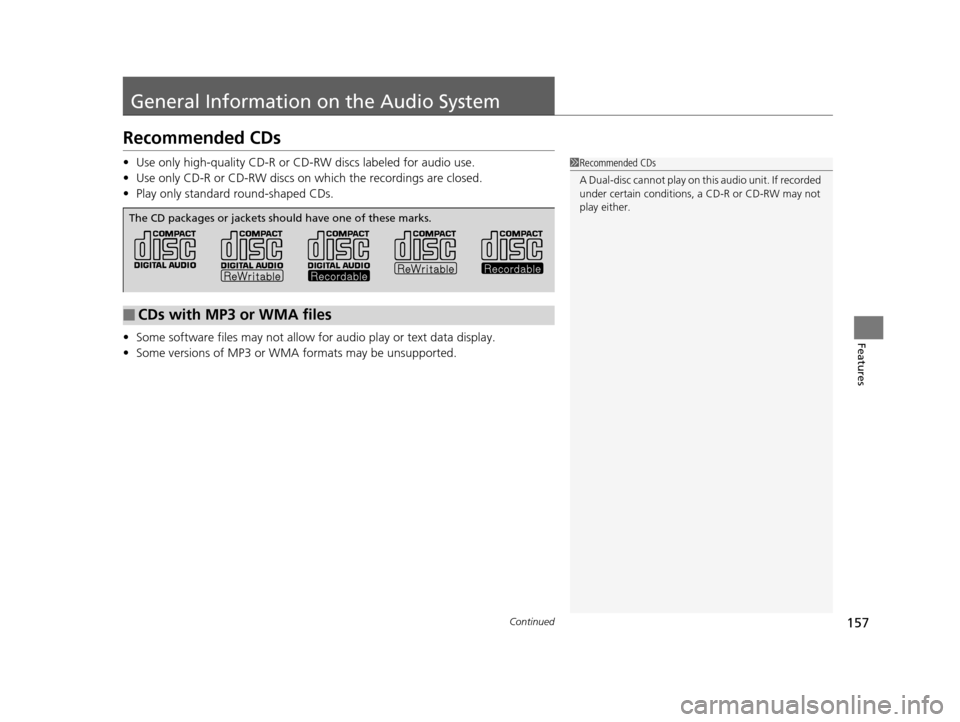
The CD packages or jackets should have one of these marks.
15 CR-Z-31SZT6400.book 157 ページ 2014年8月1日 金曜日 午後1時59分
Page 160 of 329
159
uuGeneral Information on the Audio System uCompatible iPod and USB Flash Drives
Features
Compatible iPod and USB Flash Drives
• Use a recommended USB flash drive of 256 MB or higher.
• Some digital audio players may not be compatible.
• Some USB flash drives (e.g., a device with security lockout) may not work.
• Some software files may not allow for audio play or text data display.
• Some versions of MP3, WMA, or AAC formats may be unsupported.
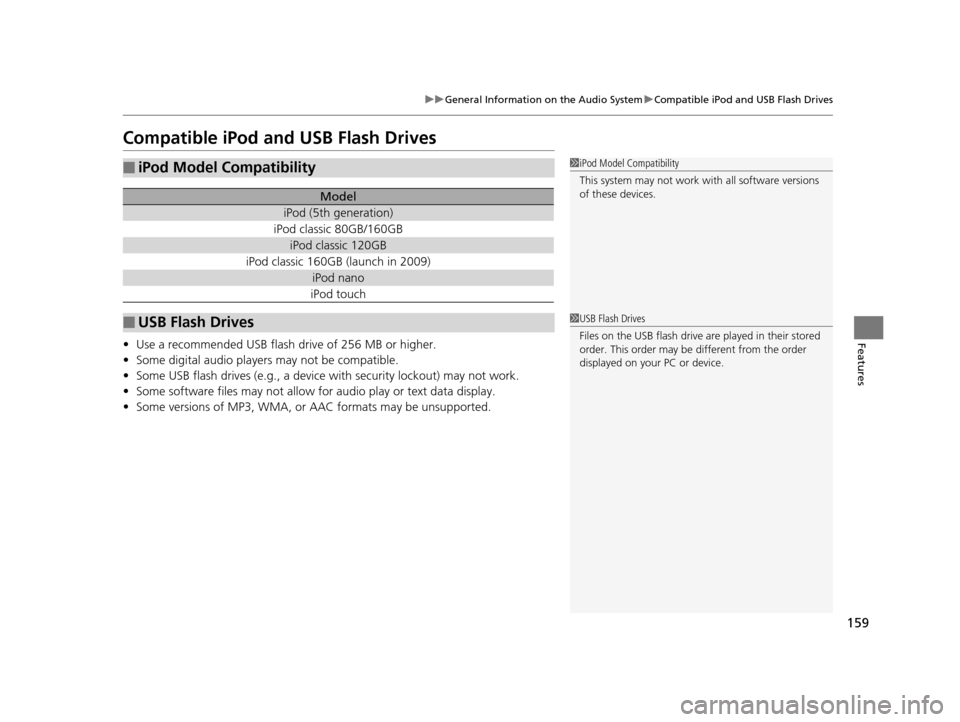
■iPod Model Compatibility
Model
iPod (5th generation)
iPod classic 80GB/160GB
iPod classic 120GB
iPod classic 160GB (launch in 2009)
iPod nano
iPod touch
■USB Flash Drives
1iPod Model Compatibility
This system may not work with all software versions
of these devices.
1USB Flash Drives
Files on the USB flash drive are played in their stored
order. This order may be different from the order
displayed on your PC or device.
15 CR-Z-31SZT6400.book 159 ページ 2014年8月1日 金曜日 午後1時59分
Page 162 of 329
161
uuBluetooth ® HandsFreeLink ®u Using HFL
Features
• To hear general HFL information and help, say “Tutorial.”
• Say “Hands-free help” or “Help” any time to get help or hear a list of commands.
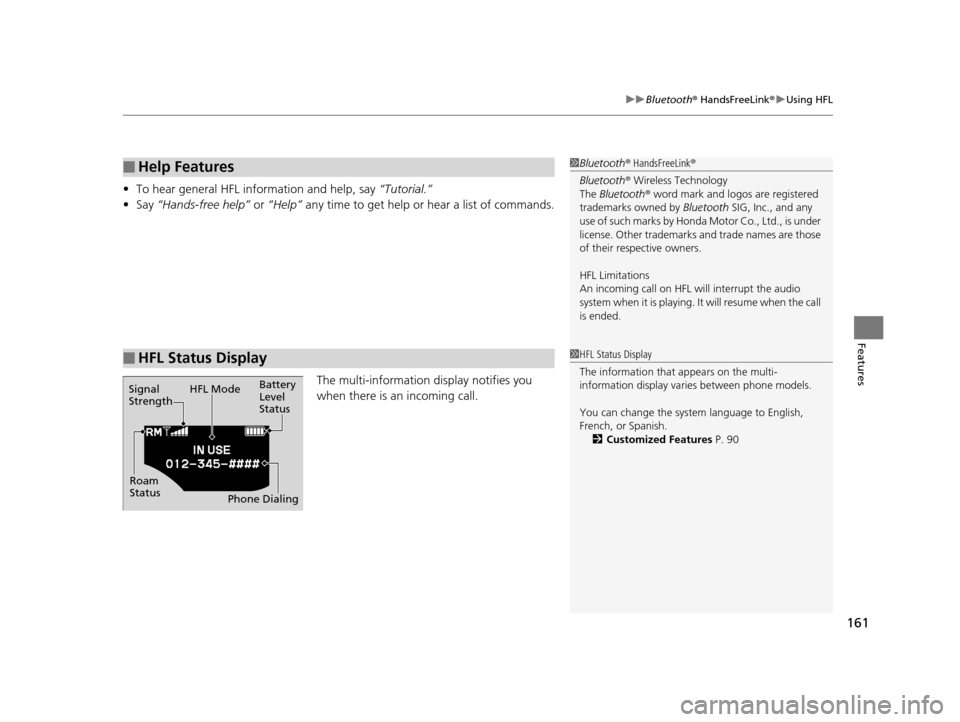
The multi-information display notifies you
when there is an incoming call.
■Help Features
■HFL Status Display
1Bluetooth ® HandsFreeLink ®
Bluetooth ® Wireless Technology
The Bluetooth ® word mark and logos are registered
trademarks owned by Bluetooth SIG, Inc., and any
use of such marks by Honda Motor Co., Ltd., is under
license. Other trademarks and trade names are those
of their respective owners.
HFL Limitations
An incoming call on HFL will interrupt the audio
system when it is playing. It will resume when the call
is ended.
Signal
Strength HFL Mode
Battery
Level
Status
Roam
Status Phone Dialing
1HFL Status Display
The information that appears on the multi-
information display vari es between phone models.
You can change the system language to English,
French, or Spanish. 2 Customized Features P. 90
15 CR-Z-31SZT6400.book 161 ページ 2014年8月1日 金曜日 午後1時59分