ESP HONDA CR-Z 2016 1.G User Guide
[x] Cancel search | Manufacturer: HONDA, Model Year: 2016, Model line: CR-Z, Model: HONDA CR-Z 2016 1.GPages: 409, PDF Size: 19.68 MB
Page 215 of 409
uuBluetooth ® HandsFreeLink ®u Using HFL
214
Features
To go to the Phone menu screen:
1. Press the button.
2. Select Phone to switch the display to the phone screen.
3. Press the button.
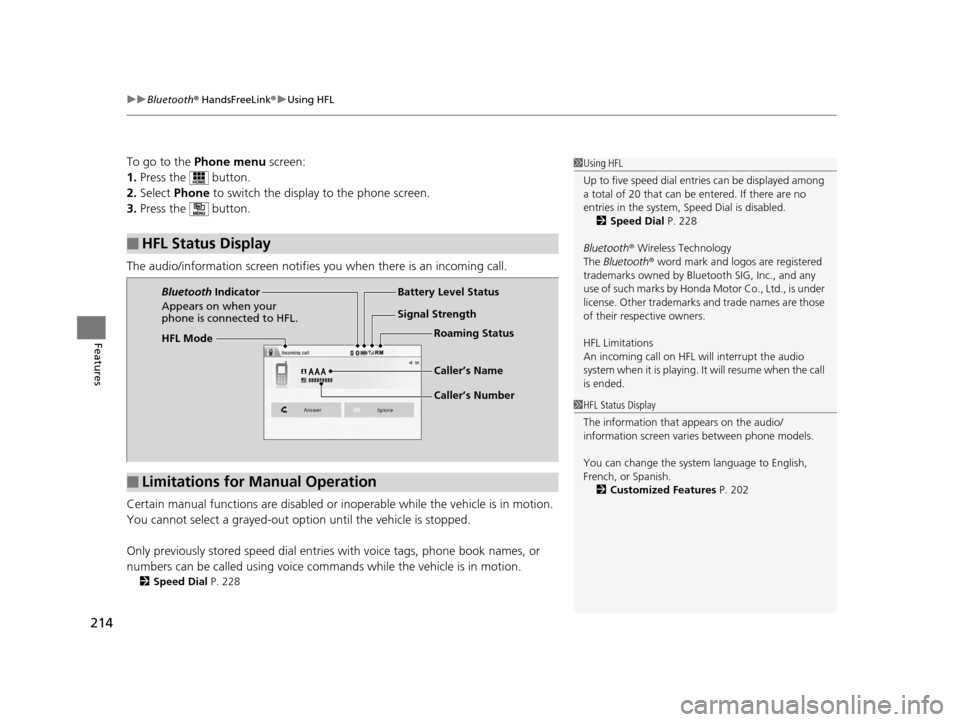
The audio/information screen notifies you when there is an incoming call.
Certain manual functions are disabled or inoperable while the ve hicle is in motion.
You cannot select a grayed-out option until the vehicle is stopped.
Only previously stored speed dial entries with voice tags, phone book names, or
numbers can be called using voice commands while the vehicle is in motion.
2 Speed Dial P. 228
■HFL Status Display
1Using HFL
Up to five speed dial entries can be displayed among
a total of 20 that can be entered. If there are no
entries in the system, Speed Dial is disabled. 2 Speed Dial P. 228
Bluetooth ® Wireless Technology
The Bluetooth ® word mark and logos are registered
trademarks owned by Blue tooth SIG, Inc., and any
use of such marks by Honda Motor Co., Ltd., is under
license. Other trademarks and trade names are those
of their respective owners.
HFL Limitations
An incoming call on HFL will interrupt the audio
s y s te m wh e n it is p la y i n g . It wi ll re s u m e w h en t h e c a l l
is ended.
1 HFL Status Display
The information that appears on the audio/
information screen vari es between phone models.
You can change the system language to English,
French, or Spanish. 2 Customized Features P. 202
HFL Mode Battery Level Status
Signal Strength
Bluetooth
Indicator
Appears on when your
phone is connected to HFL.
Caller’s Name
Caller’s NumberRoaming Status
■Limitations for Manual Operation
16 CR-Z-31SZT6500.book 214 ページ 2015年9月11日 金曜日 午前11時47分
Page 259 of 409
uuWhen Driving uShifting
258
Driving
Use the paddle shifters to change between 1st and 7th speeds without removing
your hands from the steering wheel. The transmission switches to the 7-speed
manual shift mode when you pull a paddle shi fter while driving. This mode is useful
when engine braking is needed.
You can cancel this mode by pressing any of the three driving mode buttons, or
pulling the
(+ paddle shifter for a few seconds.
■When the driving mode is in ECON or NORMAL
The shift mode goes into the 7-speed ma nual shift mode temporarily, and the
number is displayed in the shift indicator.
The 7-speed manual shift mode is canceled automatically if you drive at constant
speed or accelerate, and the number in the shift indicator goes off.
The 7-speed manual shift mode is especially useful when reducing the vehicle speed
temporarily before making a turn.
■When the driving mode is in SPORT
The shift mode goes into the 7- speed manual shift mode. The M indicator and the
speed number are displayed in the shift indicator. As the vehicle speed slows down,
the transmission automatically shifts down accordingly. When the vehicle comes to
a stop, it automatically shifts down into 1st.
If the vehicle speed increases and the engi ne speed reaches near the tachometer’s
red zone, the transmission automatically shifts up.
■7-Speed Manual Shift Mode1 7-Speed Manual Shift Mode
To improve fuel economy, the transmission may shift
up to a higher speed than the seventh under certain
circumstances. In this case, the number in the shift
indicator remains as 7.
In the 7-speed manual shif t mode, the transmission
shifts up or down by operating either paddle shifter
under the following conditions:
Shift Up: The engine sp eed reaches the lowest
threshold of the hi gher speed position.
Shift Down: The engine sp eed reaches the highest
threshold of the lower speed position.
When the engine speed reaches near the
tachometer’s red zone, the transmission shifts up
automatically.
When the engine speed reaches the lowest threshold
of the selected speed positi on, the transmission shifts
down automatically.
Operating the paddle shifters on slippery surfaces
may cause the tires to lock up. In this case, the 7-
speed manual shift mode is canceled and goes back
to the normal D driving mode.
16 CR-Z-31SZT6500.book 258 ページ 2015年9月11日 金曜日 午前11時47分
Page 271 of 409
270
uuWhen Driving u3-Mode Drive System
Driving
3-Mode Drive System
Driving mode is in NORMAL when you set the power mode to ON.
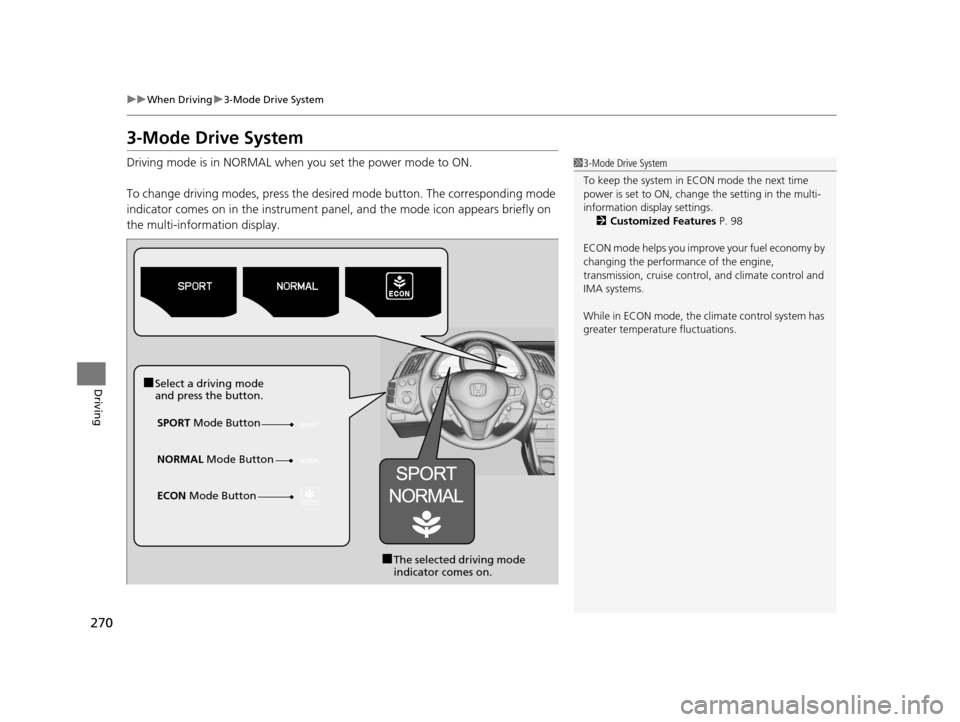
To change driving modes, press the desired mode button. The corresponding mode
indicator comes on in the instrument panel, and the mode icon appears briefly on
the multi-information display.13-Mode Drive System
To keep the system in ECON mode the next time
power is set to ON, change the setting in the multi-
information disp lay settings.
2 Customized Features P. 98
ECON mode helps you improve your fuel economy by
changing the performance of the engine,
transmission, cruise contro l, and climate control and
IMA systems.
While in ECON mode, the climate control system has
greater temperature fluctuations.
■Select a driving mode
and press the button.
SPORT Mode Button
■The selected driving mode
indicator comes on.
NORMAL
Mode Button
ECON Mode Button
16 CR-Z-31SZT6500.book 270 ページ 2015年9月11日 金曜日 午前11時47分
Page 273 of 409
uuWhen Driving uPlus Sport System
272
Driving
■To cancel the Plus Sport System:
To cancel the ready-to -be activated system:
• Do not depress the accelerator pedal for more than five seconds while the Plus
Sport indicator is blinking.
• Press the button again.
• Depress the brake or clutch pedal.
u The Plus Sport indicator stops blinking.
To stop the system in operat ion, do any of the following:
• Release the accelerator pedal.
• Press the button again.
u The Plus Sport indicator stops blinking, then stays on, and the Plus Sport
READY indicator comes on.1To cancel the Plus Sport System:
The Plus Sport System automatically shuts itself off
with the system ready to be activated, or cancels if
the system is in operation when:
•You are making a sharp turn while driving.•The wheel speed between the front and rear, or
left and right ti res becomes signifi cantly different
due to an icy or wet, and slippery road.
The ambient meter changes color to red in NORMAL
and ECON mode while the system is in operation.
The Plus Sport System can momentarily help you
accelerate your vehicle. However, it is still your
responsibility to decide when to use the system. Drive
safely at speeds appropr iate for the conditions.
16 CR-Z-31SZT6500.book 272 ページ 2015年9月11日 金曜日 午前11時47分
Page 277 of 409
276
uuWhen Driving uVehicle Stability Assist (VSA® ), aka Electronic Stability Control (ESC), System
Driving
Vehicle Stability Assist (VSA®), aka Electronic
Stability Control (ESC), System
Helps to stabilize the vehicle during cornerin g if the vehicle turns more or less than
what was intended. It also assists in mainta ining traction on slippery surfaces. It does
so by regulating engine output and selectively applying the brakes.
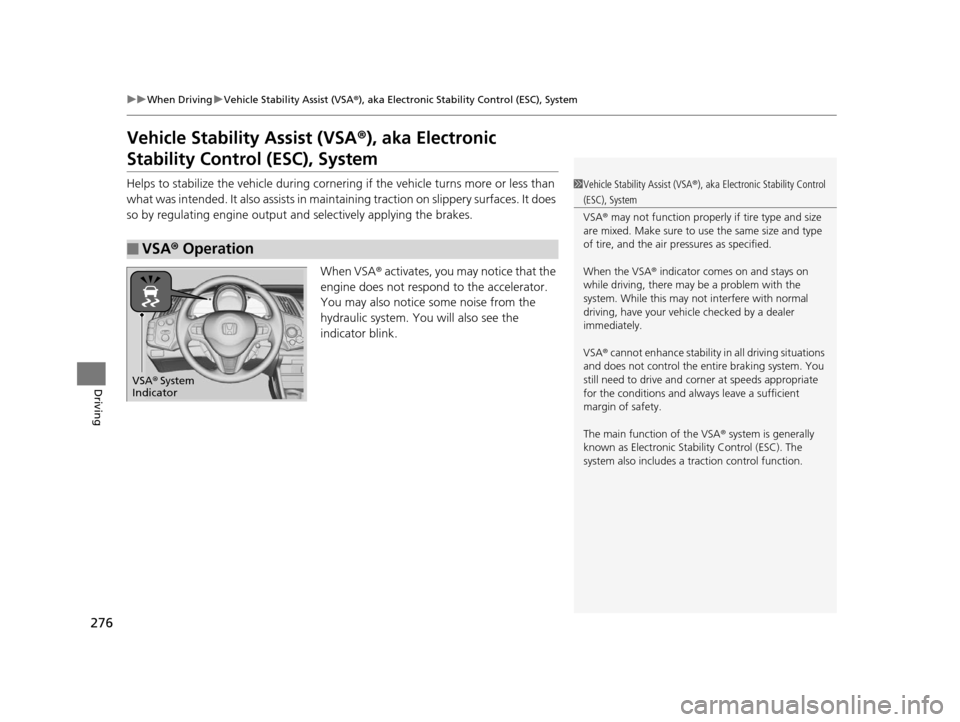
When VSA® activates, you may notice that the
engine does not respond to the accelerator.
You may also notice some noise from the
hydraulic system. You will also see the
indicator blink.
■VSA ® Operation
1 Vehicle Stability Assist (VSA ®), aka Electronic Stability Control
(ESC), System
VSA ® may not function properly if tire type and size
are mixed. Make sure to use the same size and type
of tire, and the air pr essures as specified.
When the VSA ® indicator comes on and stays on
while driving, there may be a problem with the
system. While this may not interfere with normal
driving, have your vehi cle checked by a dealer
immediately.
VSA ® cannot enhance stability in all driving situations
and does not control the entire braking system. You
still need to drive and corner at speeds appropriate
for the conditions and always leave a sufficient
margin of safety.
The main function of the VSA ® system is generally
known as Electronic Stab ility Control (ESC). The
system also includes a traction control function.
VSA® System
Indicator
16 CR-Z-31SZT6500.book 276 ページ 2015年9月11日 金曜日 午前11時47分
Page 280 of 409
279
uuWhen Driving uLaneWatchTM*
Driving
■Customizing the La neWatch settings
You can customize the following items using the audio/information screen.
• Show with Turn Signal : Selects whether LaneWatch monitor comes on when
you operate the turn signal light lever.
• Display Time after Turn Signal Off: Changes the remaining Lane Watch
display time after you pull the turn signal lever back.
• Reference Line : Selects whether the reference lines appear on the LaneWatch
monitor.
• Next Maneuver Pop up
*: Selects whether a turn direction screen of the
navigation system interr upts the LaneWatch display.
2Customized Features P. 202
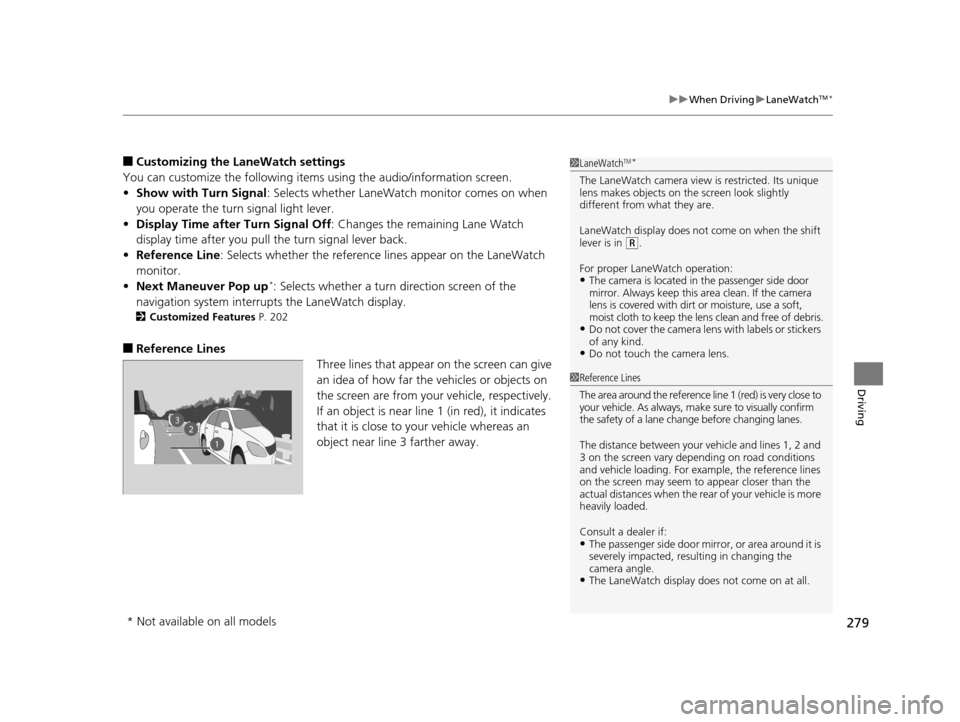
■Reference Lines
Three lines that appear on the screen can give
an idea of how far the vehicles or objects on
the screen are from your vehicle, respectively.
If an object is near line 1 (in red), it indicates
that it is close to your vehicle whereas an
object near line 3 farther away.
1LaneWatchTM*
The LaneWatch camera view is restricted. Its unique
lens makes objects on the screen look slightly
different from what they are.
LaneWatch display does not come on when the shift
lever is in
( R.
For proper LaneWatch operation:
•The camera is located in the passenger side door
mirror. Always keep this area clean. If the camera
lens is covered with dirt or moisture, use a soft,
moist cloth to keep the lens clean and free of debris.
•Do not cover the camera lens with labels or stickers
of any kind.
•Do not touch the camera lens.
23
1
1Reference Lines
The area around the reference line 1 (red) is very close to
your vehicle. As always, m ake sure to visually confirm
the safety of a lane chan ge before changing lanes.
The distance betwee n your vehicle and lines 1, 2 and
3 on the screen vary depending on road conditions
and vehicle loading. For ex ample, the reference lines
on the screen may seem to appear closer than the
actual distances when the rear of your vehicle is more
heavily loaded.
Consult a dealer if:
•The passenger side door mirr or, or area around it is
severely impacted, resulting in changing the
camera angle.
•The LaneWatch display doe s not come on at all.
* Not available on all models
16 CR-Z-31SZT6500.book 279 ページ 2015年9月11日 金曜日 午前11時47分
Page 284 of 409
283
uuWhen Driving uTire Pressure Monitoring System (TPMS) - Required Federal Explanation
Driving
Please note that the TPMS is not a substitute for proper tire
maintenance, and it is the driver 's responsibility to maintain
correct tire pressure, even if un der-inflation has not reached the
level to trigger illumination of th e TPMS low tire pressure telltale.
Your vehicle has also been equi pped with a TPMS malfunction
indicator to indicate when the system is not operating properly.
The TPMS malfunction indicator is combined with the low tire
pressure telltale. When the syst em detects a malfunction, the
telltale will flash fo r approximately one minute and then remain
continuously illumina ted. This sequence will continue upon
subsequent vehicle start-ups as long as the malfunction exists.
When the malfunction indicator is illuminated, the system may
not be able to detect or signal low tire pressure as intended.
TPMS malfunctions may occur for a variety of reasons, including
the installation of replacement or alternate tires or wheels on the
vehicle that prevent the TPMS from functioning properly.
Always check the TPMS malfunction telltale after replacing one or
more tires or wheels on your vehicle to ensure that the
replacement or alternate tires and wheels allow the TPMS to
continue to function properly.
16 CR-Z-31SZT6500.book 283 ページ 2015年9月11日 金曜日 午前11時47分
Page 336 of 409
335
uuChecking and Maintaining Tires uDOT Tire Quality Grading (U.S. Vehicles)
Maintenance
The traction grades, from highest to lowest, are AA, A, B, and C.
Those grades represent the tire's ability to stop on wet pavement
as measured under controlled conditions on specified
government test surfaces of asph alt and concrete. A tire marked
C may have poor traction performance.
The temperature grades are A (the highest), B, and C,
representing the tire's resistance to the generation of heat and its
ability to dissipate heat when te sted under controlled conditions
on a specified indoor laboratory test wheel. Sustained high
temperature can cause the material of the tire to degenerate and
reduce tire life, and ex cessive temperature can lead to sudden tire
failure. The grade C corresponds to a level of performance which
all passenger car tires must meet under the Federal Motor Vehicle
Safety Standard No. 109. Grades B and A represent higher levels
of performance on the laboratory test wheel than the minimum
required by law.
■Traction
■Temperature
1 Traction
Warning: The traction grade
assigned to this tire is based on
straight-ahead braking traction tests,
and does not include acceleration,
cornering, hydroplaning, or peak
traction characteristics.
1Temperature
Warning: The temperature grade for
this tire is establishe d for a tire that is
properly inflated and not
overloaded. Excessive speed,
underinflation, or excessive loading,
either separately or in combination,
can cause heat buildup and possible
tire failure.
16 CR-Z-31SZT6500.book 335 ページ 2015年9月11日 金曜日 午前11時47分
Page 363 of 409
362
Handling the Unexpected
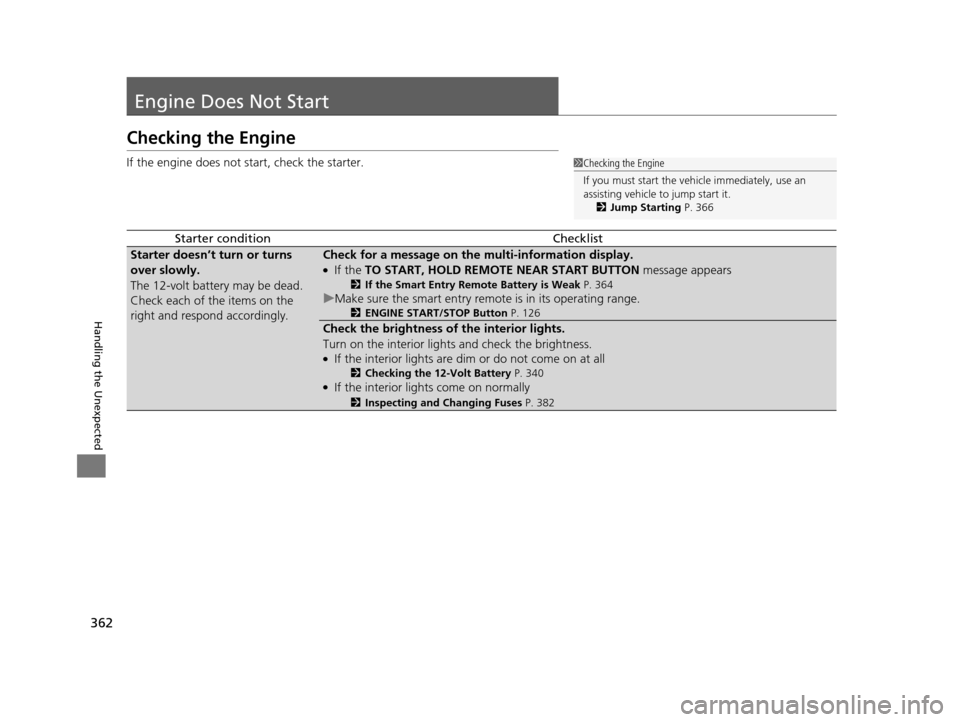
Engine Does Not Start
Checking the Engine
If the engine does not start, check the starter.
Starter conditionChecklist
Starter doesn’t turn or turns
over slowly.
The 12-volt battery may be dead.
Check each of the items on the
right and respond accordingly.Check for a message on the multi-information display.
●If the TO START, HOLD REMOTE NEAR START BUTTON message appears
2If the Smart Entry Remote Battery is Weak P. 364
uMake sure the smart entry remote is in its operating range.
2 ENGINE START/STOP Button P. 126
Check the brightness of the interior lights.
Turn on the interior lights and check the brightness.
●If the interior lights are dim or do not come on at all
2Checking the 12-Volt Battery P. 340●If the interior lights come on normally
2Inspecting and Changing Fuses P. 382
1Checking the Engine
If you must start the vehi cle immediately, use an
assisting vehicle to jump start it.
2 Jump Starting P. 366
16 CR-Z-31SZT6500.book 362 ページ 2015年9月11日 金曜日 午前11時47分
Page 364 of 409
363
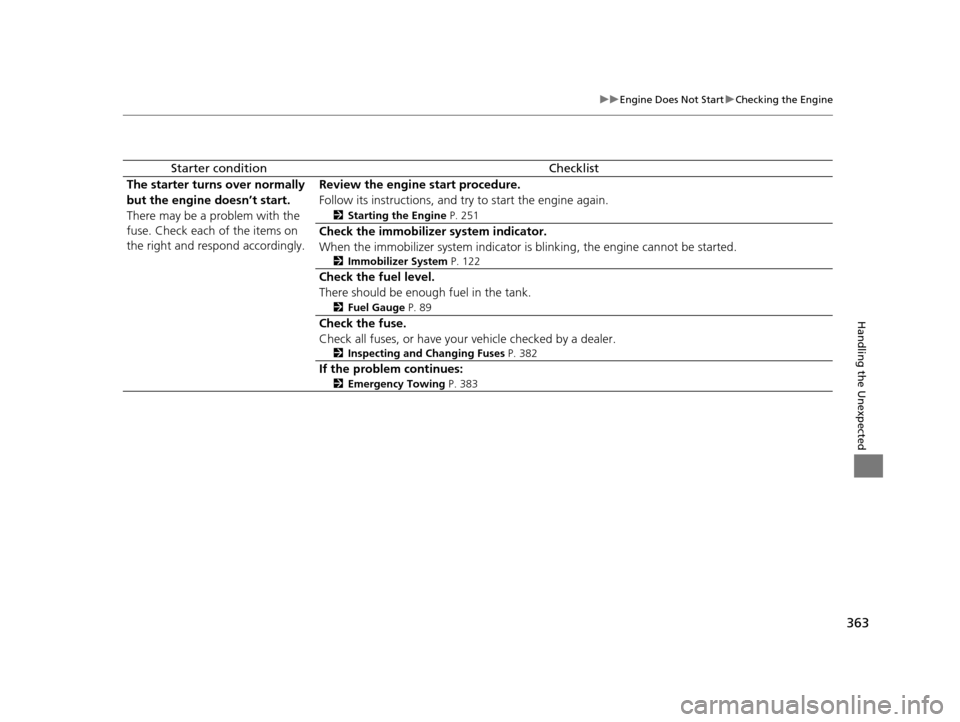
uuEngine Does Not Start uChecking the Engine
Handling the Unexpected
Starter conditionChecklist
The starter turns over normally
but the engine doesn’t start.
There may be a problem with the
fuse. Check each of the items on
the right and respond accordingly.Review the engine start procedure.
Follow its instructions, and try to start the engine again.
2 Starting the Engine P. 251
Check the immobilize r system indicator.
When the immobilizer system indicator is blinking, the engine cannot be started.
2 Immobilizer System P. 122
Check the fuel level.
There should be enough fuel in the tank.
2Fuel Gauge P. 89
Check the fuse.
Check all fuses, or have your vehicle checked by a dealer.
2Inspecting and Changing Fuses P. 382
If the problem continues:
2Emergency Towing P. 383
16 CR-Z-31SZT6500.book 363 ページ 2015年9月11日 金曜日 午前11時47分