buttons HONDA CR-Z 2016 1.G User Guide
[x] Cancel search | Manufacturer: HONDA, Model Year: 2016, Model line: CR-Z, Model: HONDA CR-Z 2016 1.GPages: 409, PDF Size: 19.68 MB
Page 185 of 409
184
uuAudio System Basic Operation uPlaying Internet Radio
Features
Playing Internet Radio
Connect a compatible phone through Bluetooth®.
2Phone Setup P. 220
You can also connect the phone using your dock connector to the USB port. Select
SOURCE to select Pandora ® mode.
*1:Some or all of the lists may not be displayed.
U.S. models
Compatible phones only1 Playing Internet Radio
Pandora ®, the Pandora logo, and the Pandora trade
dress are trademarks or registered trademarks of
Pandora Media, Inc., used with permission. Pandora
is currently available exclusively in the United States.
To find out if your phone is compatible with this
feature, visit www.handsfreelink.honda.com , or call
1-888-528-7876.
To use this service in your vehicle, the Pandora ® app
must first be installed on your phone. Visit
www.pandora.com . for more information.
Pandora ® on the iPhone will only play through the
USB cable or Bluetooth® Audio, you cannot play
Pandora ® through the HondaLink® Cable.
iPhone only
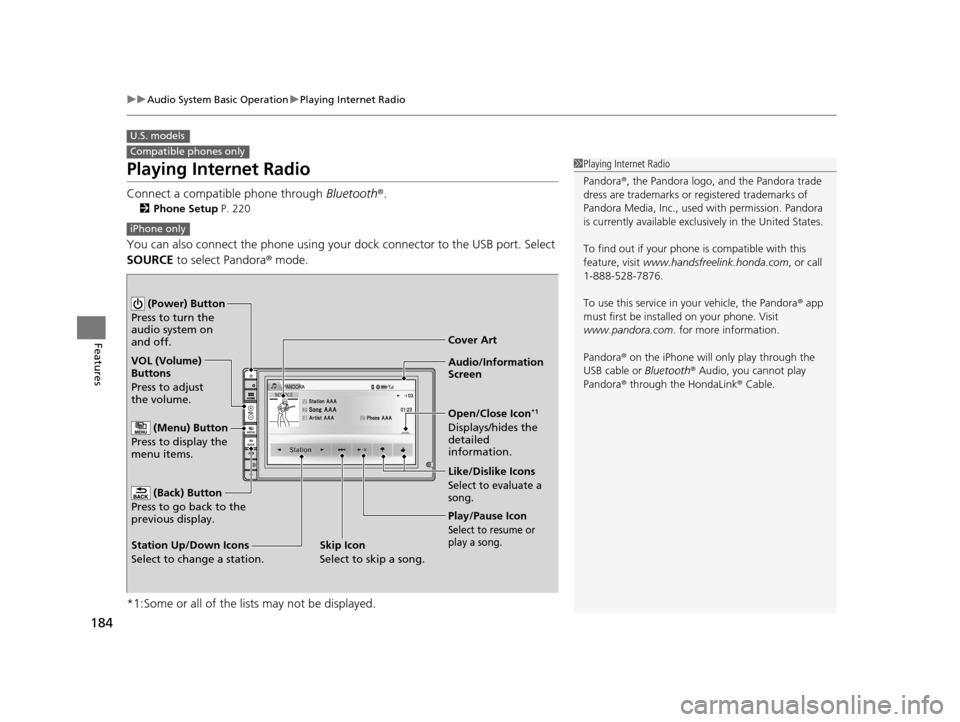
Audio/Information
Screen Cover Art
VOL (Volume)
Buttons
Press to adjust
the volume.
(Back) Button
Press to go back to the
previous display.
(Power) Button
Press to turn the
audio system on
and off.
(Menu) Button
Press to display the
menu items.
Play/Pause Icon
Select to resume or
play a song.
Open/Close Icon*1
Displays/hides the
detailed
information.
Station Up/Down Icons
Select to change a station. Like/Dislike Icons
Select to evaluate a
song.
Skip Icon
Select to skip a song.
16 CR-Z-31SZT6500.book 184 ページ 2015年9月11日 金曜日 午前11時47分
Page 187 of 409
186
uuAudio System Basic Operation uPlaying a USB Flash Drive
Features
Playing a USB Flash Drive
Your audio system reads and plays audio f iles on a USB flash drive in either MP3,
WMA or AAC*1 format.
Connect your USB flash drive to the USB port, then select the USB mode.
2USB Ports P. 161
*1:Only AAC format files recorded with iTunes are playable on this unit.
*2:Some or all of the lists may not be displayed.
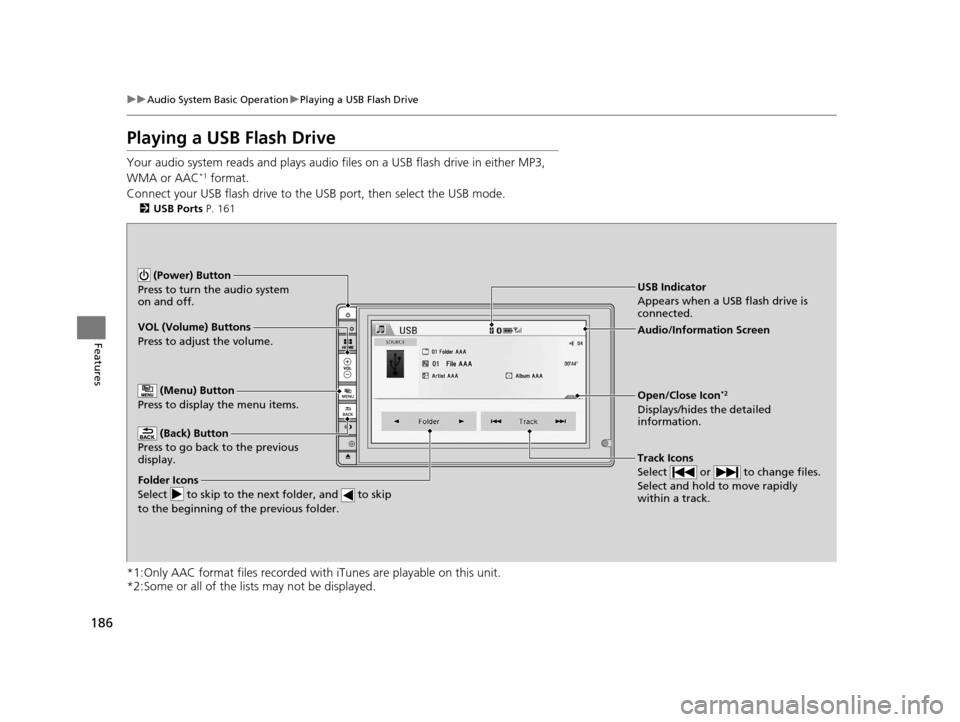
VOL (Volume) Buttons
Press to adjust the volume.
(Back) Button
Press to go back to the previous
display.
Track Icons
Select or to change files.
Select and hold to move rapidly
within a track.
(Power) Button
Press to turn the audio system
on and off.
Open/Close Icon*2
Displays/hides the detailed
information.
(Menu) Button
Press to display the menu items.
Folder Icons
Select to skip to the next folder, and to skip
to the beginning of the previous folder.
Audio/Information Screen
USB Indicator
Appears when a USB flash drive is
connected.
16 CR-Z-31SZT6500.book 186 ページ 2015年9月11日 金曜日 午前11時47分
Page 190 of 409
189
uuAudio System Basic Operation uPlaying Bluetooth ® Audio
Continued
Features
Playing Bluetooth ® Audio
Your audio system allows you to listen to music from your Bluetooth-compatible
phone.
This function is available when the phone is paired an d connected to the vehicle’s
Bluetooth ® HandsFreeLink ® (HFL) system.
2Phone Setup P. 220
*1:Depending on the Bluetooth® device you connect, some or all of the lists may not
be displayed.
1 Playing Bluetooth ® Audio
Not all Bluetooth -enabled phones with streaming
audio capabilities are compatible with the system.
For a list of compatible phones:
•U.S.: Visit www.handsfreelink.honda.com , or call
1-888-528-7876.
•Canada: Visit www.handsfreelink.ca , or call 1-888-
528-7876.
In some states, it may be illegal to operate devices
that use data while driving.
Only one phone can be used with HFL at a time.
When there are more than two paired phones in the
vehicle, the first paired phone the system finds is
automatically connected.
If more than one phone is paired to the HFL system,
there may be a delay before the system begins to play.
In some cases, the name of the artist, album, or track
may not appear correctly.
Some functions may not be available on some
devices.
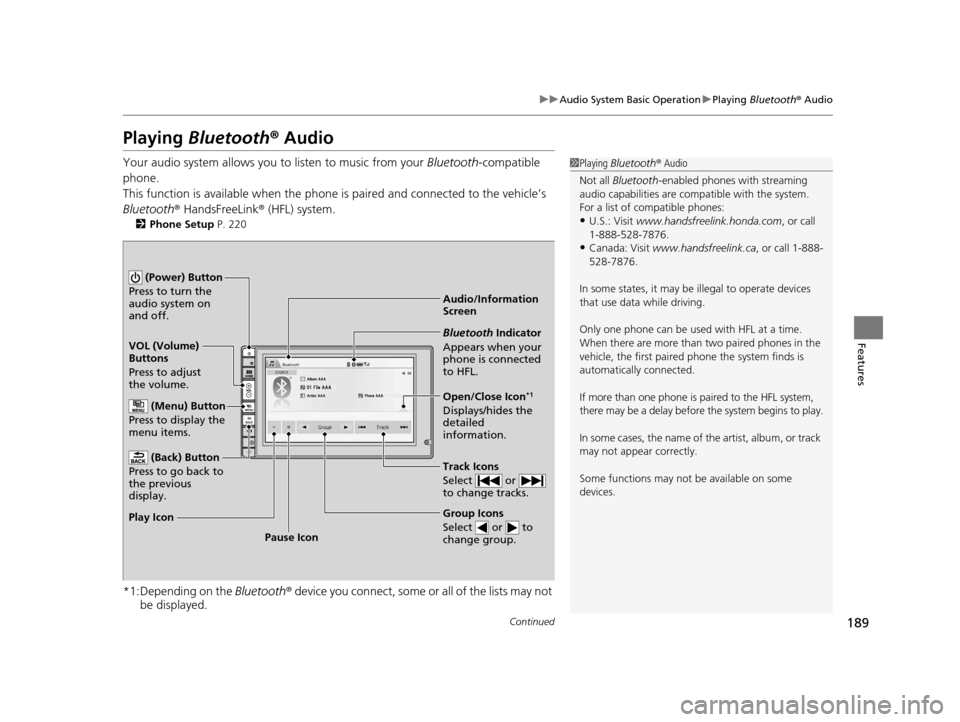
Audio/Information
Screen
VOL (Volume)
Buttons
Press to adjust
the volume.
(Back) Button
Press to go back to
the previous
display.
(Power) Button
Press to turn the
audio system on
and off.
(Menu) Button
Press to display the
menu items.
Group Icons
Select or to
change group.
Pause Icon
Play Icon
Bluetooth Indicator
Appears when your
phone is connected
to HFL.
Track Icons
Select or
to change tracks.
Open/Close Icon*1
Displays/hides the
detailed
information.
16 CR-Z-31SZT6500.book 189 ページ 2015年9月11日 金曜日 午前11時47分
Page 192 of 409
191
uuAudio System Basic Operation uPlaying a Video Using the HDMITM
Continued
Features
Playing a Video Using the HDMITM
Your audio system allows you to play videos from an HDMI-compatible device.
Connect the device, using an HDMITM cable, then select the HDMITM mode.
2 HDMITM Port P. 162
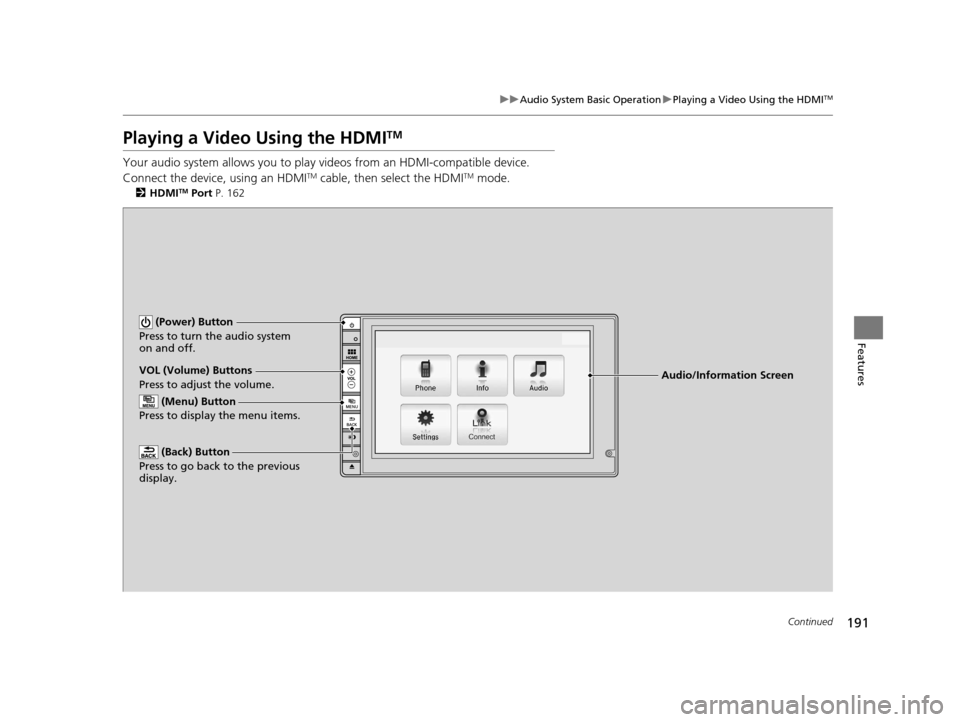
Audio/Information Screen
VOL (Volume) Buttons
Press to adjust the volume.
(Back) Button
Press to go back to the previous
display.
(Power) Button
Press to turn the audio system
on and off.
(Menu) Button
Press to display the menu items.
16 CR-Z-31SZT6500.book 191 ページ 2015年9月11日 金曜日 午前11時47分
Page 214 of 409
213Continued
Features
Bluetooth® HandsFreeLink ®
See the Navigation System Manual for how to operate the Bluetooth® HandsFreeLink® .
Bluetooth ® HandsFreeLink ® (HFL) allows you to place and receive phone calls using
your vehicle's audio system, without handling your cell phone.
Using HFL
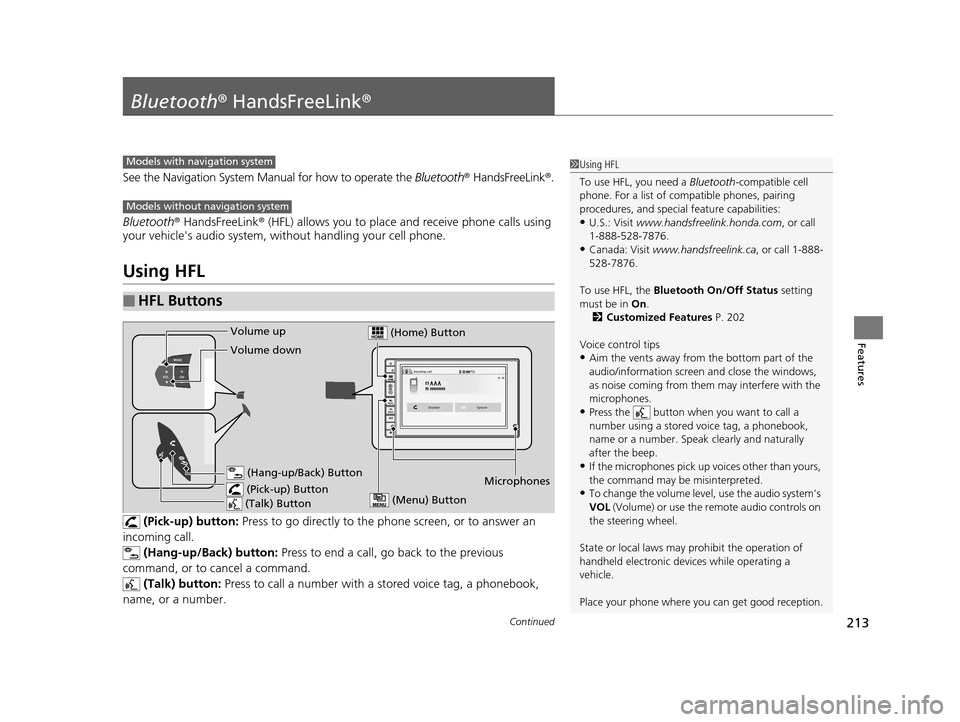
(Pick-up) button: Press to go directly to the p hone screen, or to answer an
incoming call. (Hang-up/Back) button: Press to end a call, go back to the previous
command, or to cancel a command.
(Talk) button: Press to call a number with a st ored voice tag, a phonebook,
name, or a number.
■HFL Buttons
Models with navigation system
Models without navigation system
1 Using HFL
To use HFL, you need a Bluetooth-compatible cell
phone. For a list of compatible phones, pairing
procedures, and special feature capabilities:
•U.S.: Visit www.handsfreelink.honda.com , or call
1-888-528-7876.
•Canada: Visit www.handsfreelink.ca , or call 1-888-
528-7876.
To use HFL, the Bluetooth On/Off Status setting
must be in On.
2 Customized Features P. 202
Voice control tips
•Aim the vents away from the bottom part of the
audio/information screen and close the windows,
as noise coming from them may interfere with the
microphones.
•Press the button when you want to call a
number using a stored voice tag, a phonebook,
name or a number. Speak clearly and naturally
after the beep.
•If the microphones pick up vo ices other than yours,
the command may be misinterpreted.
•To change the volume level, use the audio system's
VOL (Volume) or use the remote audio controls on
the steering wheel.
State or local laws may pr ohibit the operation of
handheld electronic devi ces while operating a
vehicle.
Place your phone where y ou can get good reception.Microphones
(Pick-up) Button (Hang-up/Back) Button
Volume up
(Talk) Button
Volume down
(Menu) Button
(Home) Button
16 CR-Z-31SZT6500.book 213 ページ 2015年9月11日 金曜日 午前11時47分
Page 234 of 409
Continued233
uuBluetooth ® HandsFreeLink ®u HFL Menus
Features
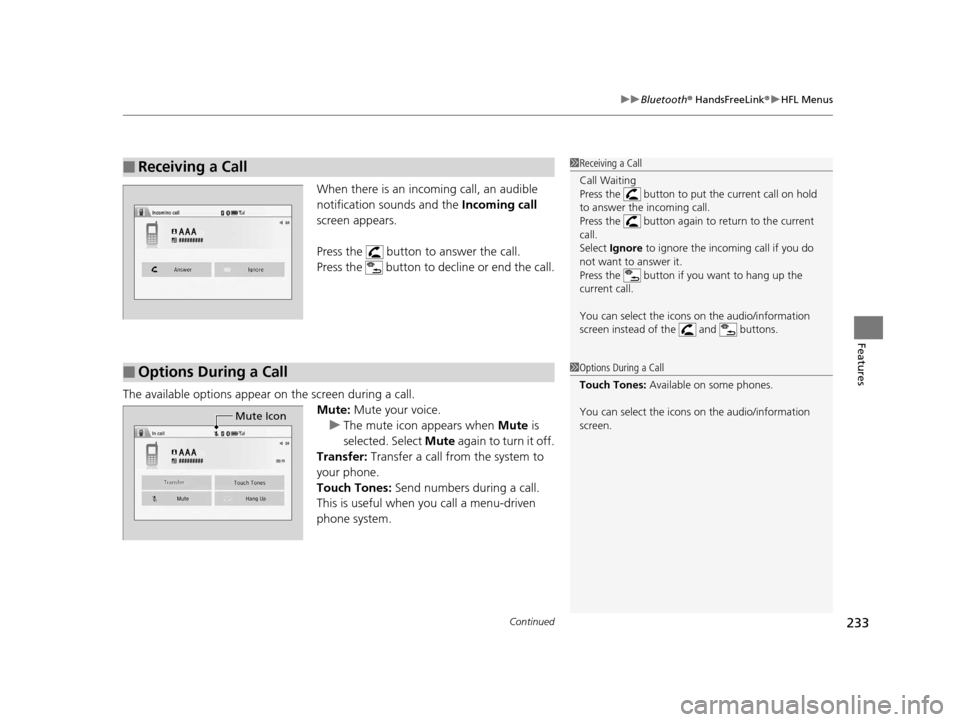
When there is an inco ming call, an audible
notification sounds and the Incoming call
screen appears.
Press the button to answer the call.
Press the button to decline or end the call.
The available options appear on the screen during a call.
Mute: Mute your voice.
u The mute icon appears when Mute is
selected. Select Mute again to turn it off.
Transfer: Transfer a call from the system to
your phone.
Touch Tones: Send numbers during a call.
This is useful when you call a menu-driven
phone system.
■Receiving a Call1 Receiving a Call
Call Waiting
Press the button to put the current call on hold
to answer the incoming call.
Press the button again to return to the current
call.
Select Ignore to ignore the incoming call if you do
not want to answer it.
Press the button if you want to hang up the
current call.
You can select the icons on the audio/information
screen instead of the and buttons.
■Options During a Call1 Options During a Call
Touch Tones: Available on some phones.
You can select the icons on the audio/information
screen.
Mute Icon
16 CR-Z-31SZT6500.book 233 ページ 2015年9月11日 金曜日 午前11時47分
Page 259 of 409
uuWhen Driving uShifting
258
Driving
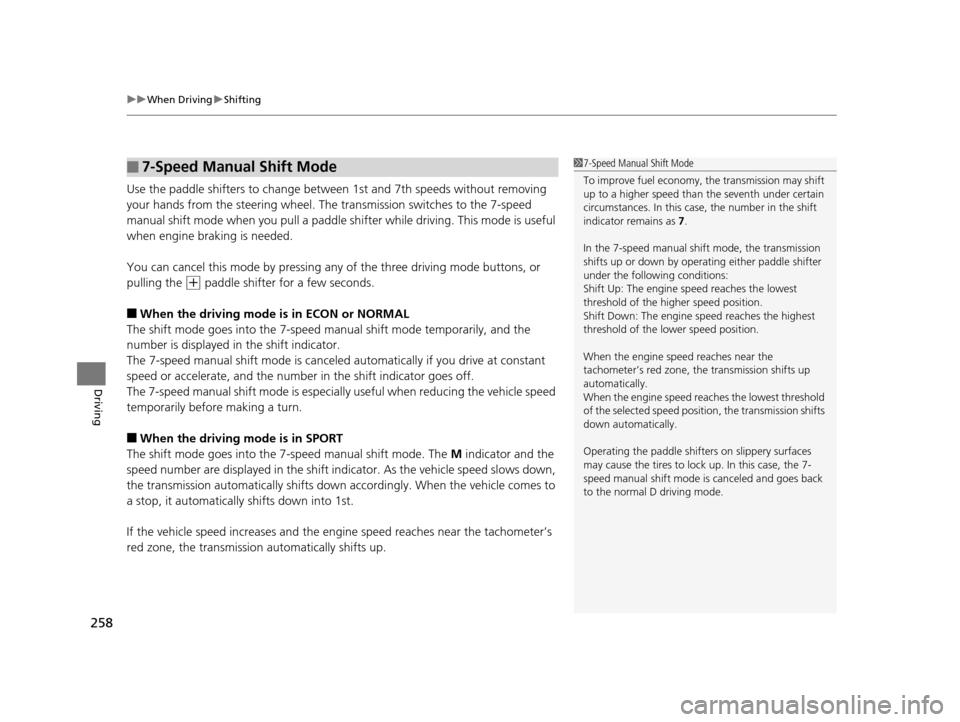
Use the paddle shifters to change between 1st and 7th speeds without removing
your hands from the steering wheel. The transmission switches to the 7-speed
manual shift mode when you pull a paddle shi fter while driving. This mode is useful
when engine braking is needed.
You can cancel this mode by pressing any of the three driving mode buttons, or
pulling the
(+ paddle shifter for a few seconds.
■When the driving mode is in ECON or NORMAL
The shift mode goes into the 7-speed ma nual shift mode temporarily, and the
number is displayed in the shift indicator.
The 7-speed manual shift mode is canceled automatically if you drive at constant
speed or accelerate, and the number in the shift indicator goes off.
The 7-speed manual shift mode is especially useful when reducing the vehicle speed
temporarily before making a turn.
■When the driving mode is in SPORT
The shift mode goes into the 7- speed manual shift mode. The M indicator and the
speed number are displayed in the shift indicator. As the vehicle speed slows down,
the transmission automatically shifts down accordingly. When the vehicle comes to
a stop, it automatically shifts down into 1st.
If the vehicle speed increases and the engi ne speed reaches near the tachometer’s
red zone, the transmission automatically shifts up.
■7-Speed Manual Shift Mode1 7-Speed Manual Shift Mode
To improve fuel economy, the transmission may shift
up to a higher speed than the seventh under certain
circumstances. In this case, the number in the shift
indicator remains as 7.
In the 7-speed manual shif t mode, the transmission
shifts up or down by operating either paddle shifter
under the following conditions:
Shift Up: The engine sp eed reaches the lowest
threshold of the hi gher speed position.
Shift Down: The engine sp eed reaches the highest
threshold of the lower speed position.
When the engine speed reaches near the
tachometer’s red zone, the transmission shifts up
automatically.
When the engine speed reaches the lowest threshold
of the selected speed positi on, the transmission shifts
down automatically.
Operating the paddle shifters on slippery surfaces
may cause the tires to lock up. In this case, the 7-
speed manual shift mode is canceled and goes back
to the normal D driving mode.
16 CR-Z-31SZT6500.book 258 ページ 2015年9月11日 金曜日 午前11時47分
Page 261 of 409
uuWhen Driving uShifting
260
Driving
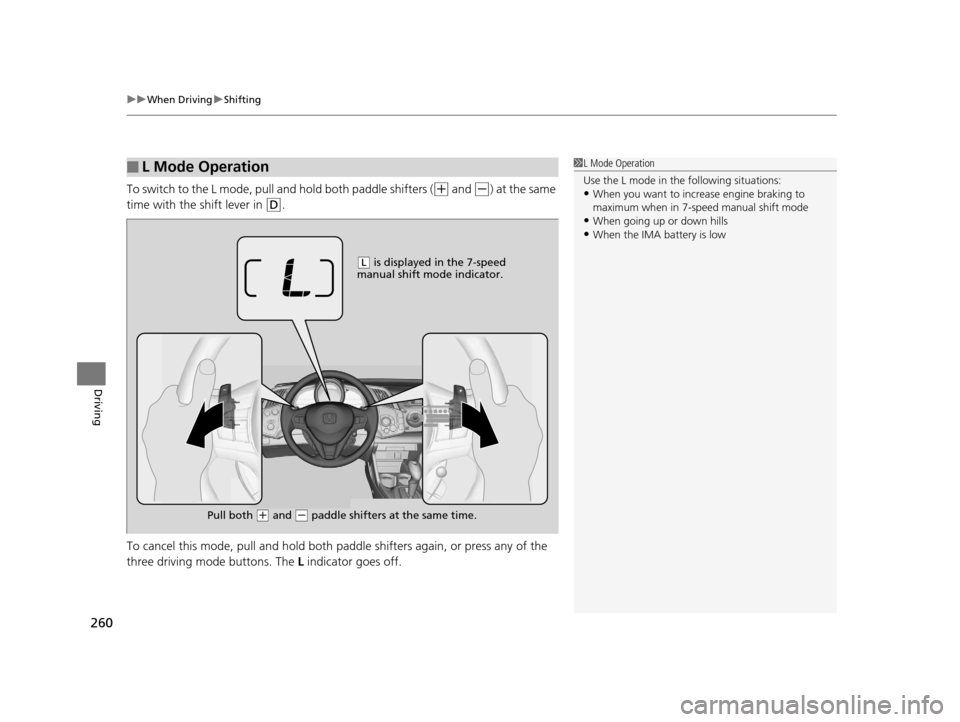
To switch to the L mode, pull and hold both paddle shifters ((+ and (-) at the same
time with the shift lever in
(D.
To cancel this mode, pull and hold both paddle shifters again, or press any of the
three driving mode buttons. The L indicator goes off.
■L Mode Operation1L Mode Operation
Use the L mode in the following situations:
•When you want to increa se engine braking to
maximum when in 7-speed manual shift mode
•When going up or down hills•When the IMA battery is low
( L is displayed in the 7-speed
manual shift mode indicator.
Pull both
( + and (- paddle shifters at the same time.
16 CR-Z-31SZT6500.book 260 ページ 2015年9月11日 金曜日 午前11時47分
Page 276 of 409
275
uuWhen Driving uCruise Control
Driving
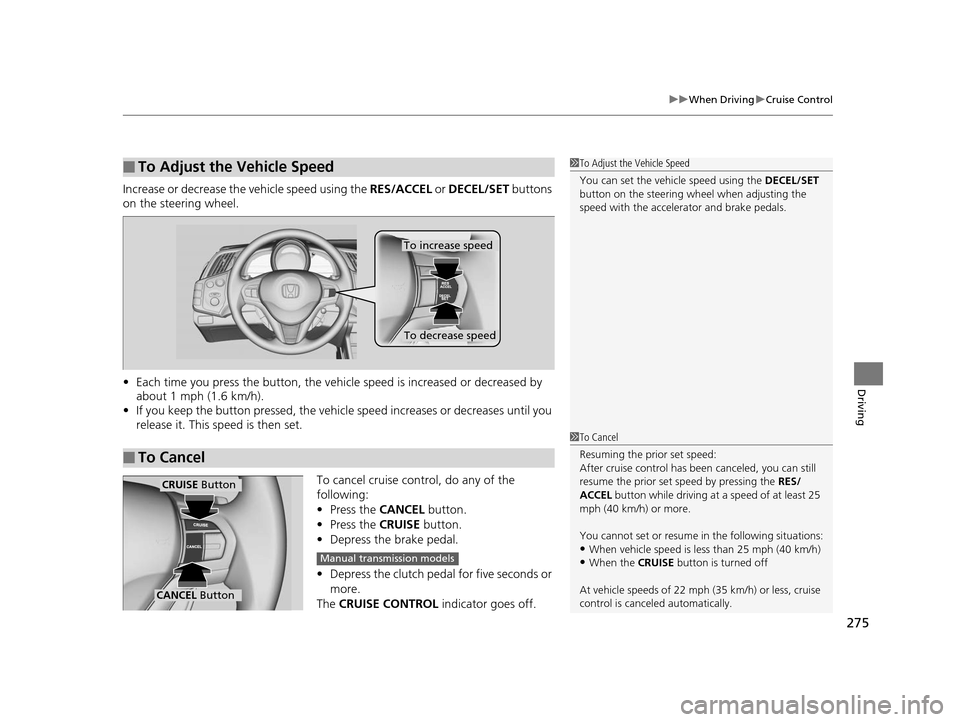
Increase or decrease the vehicle speed using the RES/ACCEL or DECEL/SET buttons
on the steering wheel.
• Each time you press the button, the vehicl e speed is increased or decreased by
about 1 mph (1.6 km/h).
• If you keep the button pressed, the vehicl e speed increases or decreases until you
release it. This speed is then set.
To cancel cruise control, do any of the
following:
• Press the CANCEL button.
• Press the CRUISE button.
• Depress the brake pedal.
• Depress the clutch pedal for five seconds or
more.
The CRUISE CONTROL indicator goes off.
■To Adjust the Vehicle Speed1To Adjust the Vehicle Speed
You can set the vehicle speed using the DECEL/SET
button on the steering wheel when adjusting the
speed with the accelera tor and brake pedals.
■To Cancel
To decrease speed
To increase speed
1To Cancel
Resuming the prior set speed:
After cruise control has be en canceled, you can still
resume the prior set speed by pressing the RES/
ACCEL button while driving at a speed of at least 25
mph (40 km/h) or more.
You cannot set or resume in the following situations:
•When vehicle speed is less than 25 mph (40 km/h)
•When the CRUISE button is turned off
At vehicle speeds of 22 m ph (35 km/h) or less, cruise
control is canceled automatically.
CRUISE Button
CANCEL Button
Manual transmission models
16 CR-Z-31SZT6500.book 275 ページ 2015年9月11日 金曜日 午前11時47分
Page 304 of 409
303Continued
Maintenance
Maintenance MinderTM
If the engine oil life is less than 15%, you will see the Maintenance Minder messages
appear on the multi-information display ev ery time you set the power mode to ON.
The messages notify you when to change the engine oil, or when to bring your
vehicle to a dealer for indicated maintenance services.
To Use Maintenance MinderTM
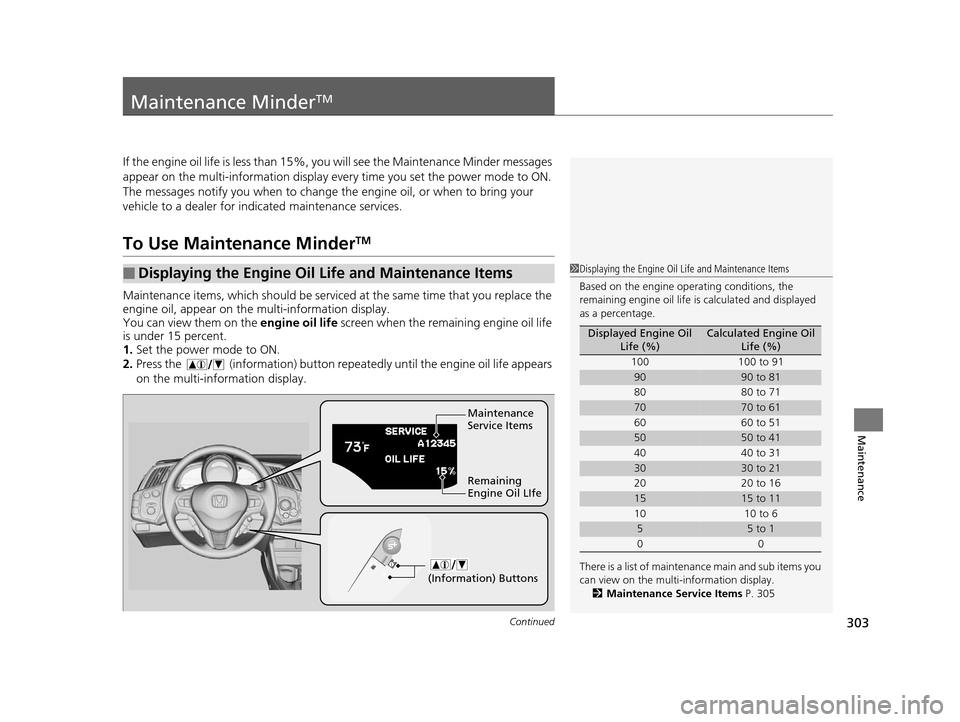
Maintenance items, which should be serviced at the same time that you replace the
engine oil, appear on the multi-information display.
You can view them on the engine oil life screen when the remaining engine oil life
is under 15 percent.
1. Set the power mode to ON.
2. Press the (information) button repeat edly until the engine oil life appears
on the multi-information display.
■Displaying the Engine Oil Life and Maintenance Items1 Displaying the Engine Oil Life and Maintenance Items
Based on the engine ope rating conditions, the
remaining engine oi l life is calculated and displayed
as a percentage.
There is a list of maintena nce main and sub items you
can view on the multi-information display.
2 Maintenance Service Items P. 305
Displayed Engine Oil
Life (%)Calculated Engine Oil Life (%)
100 100 to 91
9090 to 81
80 80 to 71
7070 to 61
60 60 to 51
5050 to 41
40 40 to 31
3030 to 21
20 20 to 16
1515 to 11
10 10 to 6
55 to 1
00
Maintenance
Service Items
Remaining
Engine Oil LIfe
(Information) Buttons
16 CR-Z-31SZT6500.book 303 ページ 2015年9月11日 金曜日 午前11時47分