key HONDA CR-Z 2016 1.G User Guide
[x] Cancel search | Manufacturer: HONDA, Model Year: 2016, Model line: CR-Z, Model: HONDA CR-Z 2016 1.GPages: 409, PDF Size: 19.68 MB
Page 115 of 409
uuLocking and Unlocking the Doors uLocking/Unlocking the Doors from the Outside
114
Controls
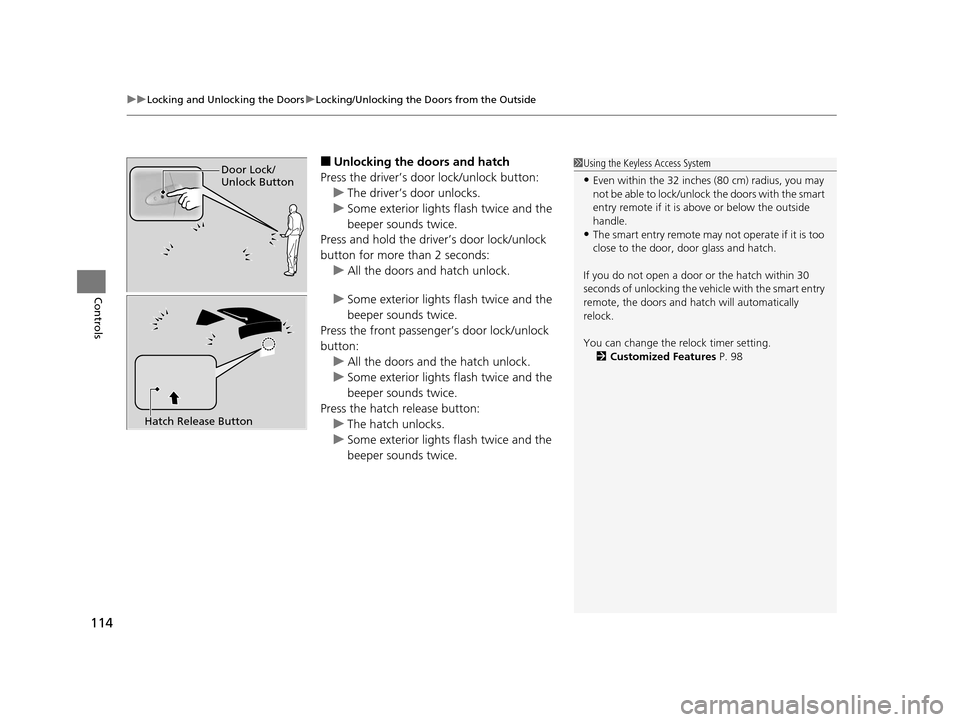
■Unlocking the doors and hatch
Press the driver’s door lock/unlock button: u The driver’s door unlocks.
u Some exterior lights flash twice and the
beeper sounds twice.
Press and hold the driver’s door lock/unlock
button for more than 2 seconds:
u All the doors and hatch unlock.
u Some exterior lights flash twice and the
beeper sounds twice.
Press the front passenger’s door lock/unlock
button: u All the doors and the hatch unlock.
u Some exterior lights flash twice and the
beeper sounds twice.
Press the hatch release button: u The hatch unlocks.
u Some exterior lights flash twice and the
beeper sounds twice.1Using the Keyless Access System
•Even within the 32 inches (80 cm) radius, you may
not be able to lock/unlock the doors with the smart
entry remote if it is a bove or below the outside
handle.
•The smart entry remote may not operate if it is too
close to the door, door glass and hatch.
If you do not open a door or the hatch within 30
seconds of unlocking the vehi cle with the smart entry
remote, the doors and hatch will automatically
relock.
You can change the relock timer setting. 2 Customized Features P. 98
Door Lock/
Unlock Button
Hatch Release Button
16 CR-Z-31SZT6500.book 114 ページ 2015年9月11日 金曜日 午前11時47分
Page 116 of 409
115
uuLocking and Unlocking the Doors uLocking/Unlocking the Doors from the Outside
Controls
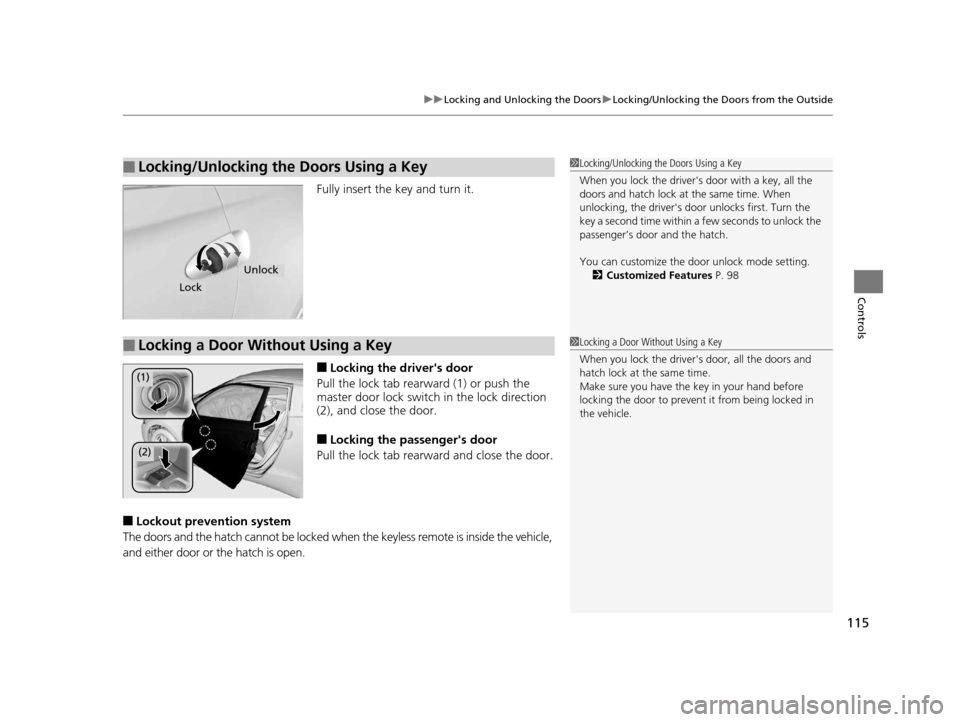
Fully insert the key and turn it.
■Locking the driver's door
Pull the lock tab rearward (1) or push the
master door lock switch in the lock direction
(2), and clos e the door.
■Locking the passenger's door
Pull the lock tab rearward and close the door.
■Lockout prevention system
The doors and the hatch cannot be locked when the keyless remote is inside the vehicle,
and either door or the hatch is open.
■Locking/Unlocking the Doors Using a Key1 Locking/Unlocking the Doors Using a Key
When you lock the driver's door with a key, all the
doors and hatch lock at the same time. When
unlocking, the driver's door unlocks first. Turn the
key a second time within a few seconds to unlock the
passenger’s door and the hatch.
You can customize the door unlock mode setting.
2 Customized Features P. 98
Lock
Unlock
■Locking a Door Without Using a Key1Locking a Door Without Using a Key
When you lock the driver's door, all the doors and
hatch lock at the same time.
Make sure you have the key in your hand before
locking the door to prevent it from being locked in
the vehicle.
(1)
(2)
16 CR-Z-31SZT6500.book 115 ページ 2015年9月11日 金曜日 午前11時47分
Page 123 of 409
122
Controls
Security System
Immobilizer System
The immobilizer system prevents a key that has not been pre-registered from
starting the engine. Each key contains electronic transmitters that use electronic
signals to verify the key.
Pay attention to the follo wing when pressing the ENGINE START/STOP button:
• Do not allow objects that emit strong radio waves near the ENGINE START/
STOP button.
• Make sure the key is not covered by or touching a metal object.
• Do not bring a key from another vehi cle's immobilizer system near the ENGINE
START/STOP button.
Security System Alarm
The security system alarm activates when the hatch, hood or doors are forcibly
opened. The alarm does not go off if the hatch or doors are opened with the key,
remote transmitter or smart entry system.
However, the alarm goes off when a door is opened with the key, then the shift
lever is moved out of
(P(Continuously variable transmission models) or the hood is
opened before the power mode is set to ON.
■When the security sy stem alarm activates
The horn sounds intermittently, and all of the exterior lights flash.
■To deactivate the security system alarm
Unlock the vehicle using the key or remote transmitter or the power mode is set to
ON. The system, along with the horn an d flashing lights, is deactivated.
1Immobilizer System
NOTICE
Leaving the key in the vehicl e can result in theft or
accidental movement of the vehicle.
Always take the key with you whenever you leave the
vehicle unattended.
Do not alter the system or add other devices to it.
Doing so may damage the system and make your
vehicle inoperable.
1 Security System Alarm
The security alarm continues for a maximum of two
minutes until the security system alarm deactivates.
16 CR-Z-31SZT6500.book 122 ページ 2015年9月11日 金曜日 午前11時47分
Page 124 of 409
123
uuSecurity System uSecurity System Alarm
Controls
■Setting the security system alarm
The security system alarm automatically sets when the following conditions have
been met:
• The power mode is set to VEHICLE OFF (LOCK).
• The hood is closed.
• Both doors and the hatch are locked with the key or the remote transmitter, or
smart entry system.
■When the security system alarm sets
The security system alarm indicator in the instrument panel blinks. When the
blinking interval changes after about 15 se conds, the security system alarm is set.
■To cancel the security system alarm
The security system alarm is canceled when the vehicle is unlocked using the key or
remote transmitter, or the power mode is set to ON. The security system alarm
indicator goes off at the same time or the power mode is set to ON.
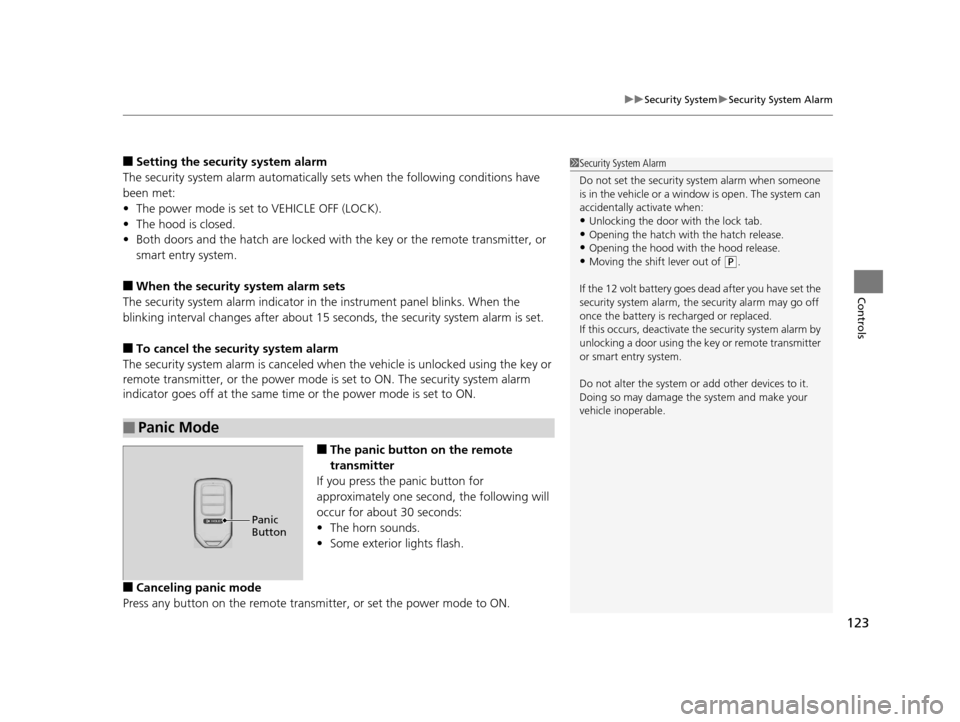
■The panic button on the remote
transmitter
If you press the panic button for
approximately one second, the following will
occur for about 30 seconds:
• The horn sounds.
• Some exterior lights flash.
■Canceling panic mode
Press any button on the remote transmi tter, or set the power mode to ON.
■Panic Mode
1Security System Alarm
Do not set the security system alarm when someone
is in the vehicle or a window is open. The system can
accidentally activate when:
•Unlocking the door with the lock tab.•Opening the hatch with the hatch release.
•Opening the hood with the hood release.
•Moving the shift lever out of ( P.
If the 12 volt battery goes dead after you have set the
security system alarm, the security alarm may go off
once the battery is re charged or replaced.
If this occurs, deactivate the security system alarm by
unlocking a door using the ke y or remote transmitter
or smart entry system.
Do not alter the system or add other devices to it.
Doing so may damage the system and make your
vehicle inoperable.
Panic
Button
16 CR-Z-31SZT6500.book 123 ページ 2015年9月11日 金曜日 午前11時47分
Page 129 of 409
uuOperating the Switches Around the Steering Wheel uENGINE START/STOP Button
128
Controls
If you open the driver’s doo r when the power mode is set to ACCESSORY, a warning
buzzer sounds.
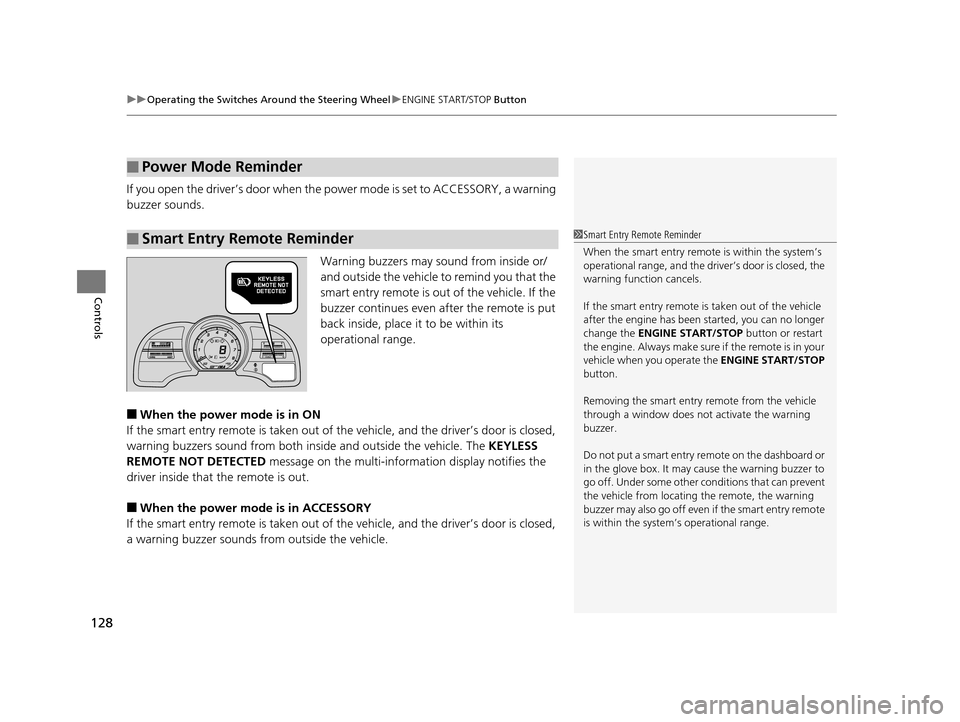
Warning buzzers may sound from inside or/
and outside the vehicle to remind you that the
smart entry remote is out of the vehicle. If the
buzzer continues even after the remote is put
back inside, place it to be within its
operational range.
■When the power mode is in ON
If the smart entry remote is taken out of th e vehicle, and the driver’s door is closed,
warning buzzers sound from both insi de and outside the vehicle. The KEYLESS
REMOTE NOT DETECTED message on the multi-information display notifies the
driver inside that the remote is out.
■When the power mode is in ACCESSORY
If the smart entry remote is taken out of th e vehicle, and the driver’s door is closed,
a warning buzzer sounds from outside the vehicle.
■Power Mode Reminder
■Smart Entry Remote Reminder1Smart Entry Remote Reminder
When the smart entry remote is within the system’s
operational range, and the driv er’s door is closed, the
warning function cancels.
If the smart entry remote is taken out of the vehicle
after the engine has been started, you can no longer
change the ENGINE START/STOP button or restart
the engin e. Always make sure if the remote is in your
vehicle when you operate the ENGINE START/STOP
button.
Removing the smart entry remote from the vehicle
through a window does not activate the warning
buzzer.
Do not put a smart entry re mote on the dashboard or
in the glove box. It may cause the warning buzzer to
go off. Under some other c onditions that can prevent
the vehicle from locating the remote, the warning
buzzer may also go off even if the smart entry remote
is within the system’s operational range.
16 CR-Z-31SZT6500.book 128 ページ 2015年9月11日 金曜日 午前11時47分
Page 204 of 409
203
uuCustomized Features u
Continued
Features
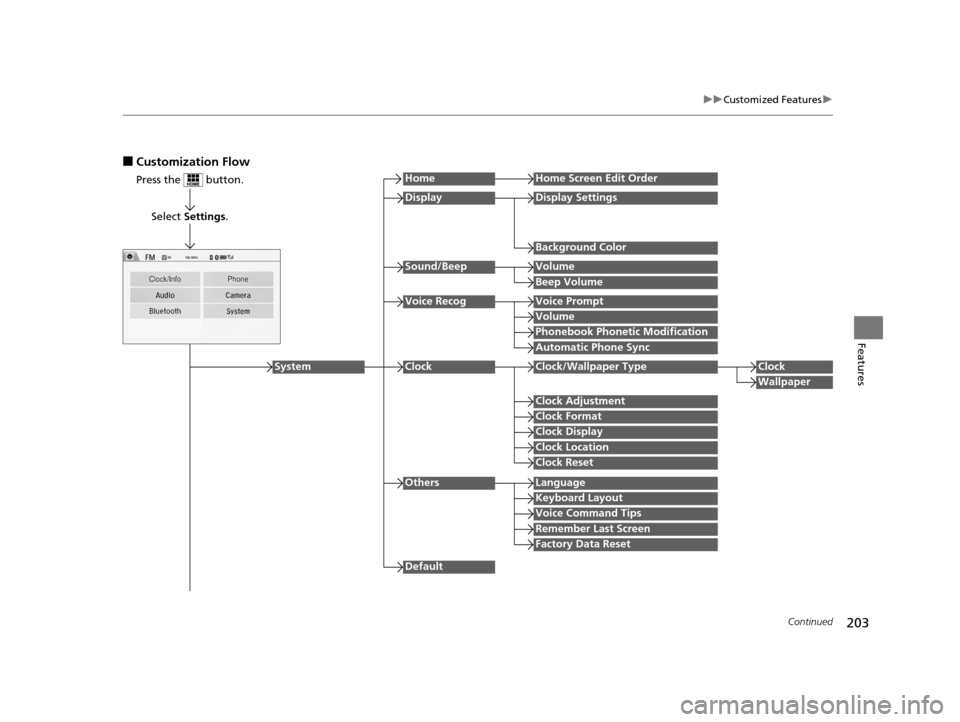
■Customization Flow
Press the button.
Select Settings .
HomeHome Screen Edit Order
Background Color
DisplayDisplay Settings
Beep Volume
Sound/BeepVolume
Volume
Voice RecogVoice Prompt
Automatic Phone Sync
Phonebook Phonetic Modification
Default
Factory Data Reset
Clock Format
ClockClock/Wallpaper TypeClock
Wallpaper
Clock Adjustment
Clock Display
Clock Location
Clock Reset
Keyboard Layout
OthersLanguage
Remember Last Screen
Voice Command Tips
System
16 CR-Z-31SZT6500.book 203 ページ 2015年9月11日 金曜日 午前11時47分
Page 208 of 409
207
uuCustomized Features u
Continued
Features
*1:Default Setting
Setup
GroupCustomizable FeaturesDescriptionSelectable Settings
System
Clock
Clock/
Wallpaper
Type
ClockChanges the clock display type.Analog /Digital*1/ Small
Digital /Off
Wallpaper
●Changes the wallpaper type.●Imports an image file for a new wallpaper.●Deletes an image file for a wallpaper.
2 Wallpaper Setup P. 171
Blank/Galaxy*1/Metallic
Clock AdjustmentAdjusts Clock.
2 Clock P. 108—
Clock FormatSelects the digital clock display from 12H to
24H.12H*1/24H
Clock DisplaySelects whether the clock display comes on.On*1/ Off
Clock LocationChanges the clock display layout.Upper Right*1/Upper Left /
Lower Right/ Lower Left/Off
Clock ResetCancels/Resets all customized items for clock
display as default.Yes /No
Others
LanguageChanges the display language.English*1/Français /Español
Keyboard LayoutSelects the on-screen keyboard type.Alphabet/ QWERTY*1
Voice Command Tips
Alerts you when manual control of the system
is disabled to prevent distraction while driving.
Only voice commands are available.
On*1/Off
Remember Last ScreenSelects whether the device remembers the last
screen.On /Off*1
Factory Data ResetResets all the settings to their factory default.
2 Defaulting All the Settings P. 212Yes/No
16 CR-Z-31SZT6500.book 207 ページ 2015年9月11日 金曜日 午前11時47分
Page 232 of 409
Continued231
uuBluetooth ® HandsFreeLink ®u HFL Menus
Features
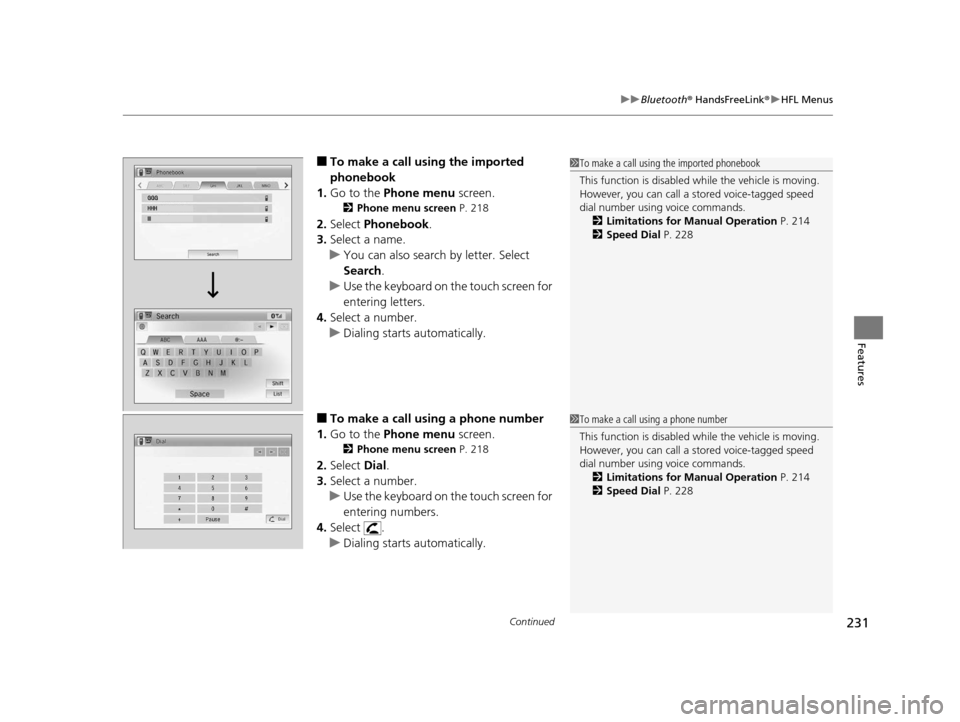
■To make a call us ing the imported
phonebook
1. Go to the Phone menu screen.
2Phone menu screen P. 218
2.Select Phonebook.
3. Select a name.
u You can also search by letter. Select
Search .
u Use the keyboard on the touch screen for
entering letters.
4. Select a number.
u Dialing starts automatically.
■To make a call using a phone number
1. Go to the Phone menu screen.
2Phone menu screen P. 218
2.Select Dial.
3. Select a number.
u Use the keyboard on the touch screen for
entering numbers.
4. Select .
u Dialing starts automatically.
1To make a call using the imported phonebook
This function is disabled while the vehicle is moving.
However, you can call a stored voice-tagged speed
dial number using voice commands. 2 Limitations for Manual Operation P. 214
2 Speed Dial P. 228
1To make a call using a phone number
This function is disabled while the vehicle is moving.
However, you can call a stored voice-tagged speed
dial number using voice commands. 2 Limitations for Manual Operation P. 214
2 Speed Dial P. 228
16 CR-Z-31SZT6500.book 231 ページ 2015年9月11日 金曜日 午前11時47分
Page 245 of 409
244
Driving
Before Driving
Driving Preparation
Check the following items before you start driving.
• Make sure there are no obstructions on th e windows, door mirrors, exterior
lights, or other parts of the vehicle.
u Remove any frost, snow, or ice.
u Remove any snow on the roof, as this can slip down and obstruct your field of
vision while driving. If frozen solid , remove ice once it has softened.
u When removing ice from around the wheel s, be sure not to damage the wheel
or wheel components.
• Make sure the hood is securely closed.
u If the hood opens while driving, your front view will be blocked.
• Make sure the tires are in good condition.
u Check air pressures, and check for damage and excessive wear.
2Checking and Maintaining Tires P. 331
•Make sure there are no people or ob jects behind or around the vehicle.
u There are blind spots from the inside.
■Exterior Checks1Exterior Checks
NOTICE
When doors are frozen s hut, use warm water around
the door edges to melt any ice. Do not try to force
them open, as this can damage the rubber trim
around the doors. When done, wipe dry to avoid
further freezing.
Do not pour warm water into the key cylinder.
You will be unable to insert the key if the water
freezes in the hole.
Heat from the engine and exhaust can ignite
flammable material s left under the hood, causing a
fire. If you've parked y our vehicle for an extended
period, inspect and remove any debris that may have
collected, such as dried grass and leaves that have
fallen or have been carried in for use as a nest by a
small animal. Also check under the hood for leftover
flammable materials after you or someone else has
performed maintenance on your vehicle.
16 CR-Z-31SZT6500.book 244 ページ 2015年9月11日 金曜日 午前11時47分
Page 343 of 409
342
Maintenance
Remote Transmitter Care
Replacing the Button Battery
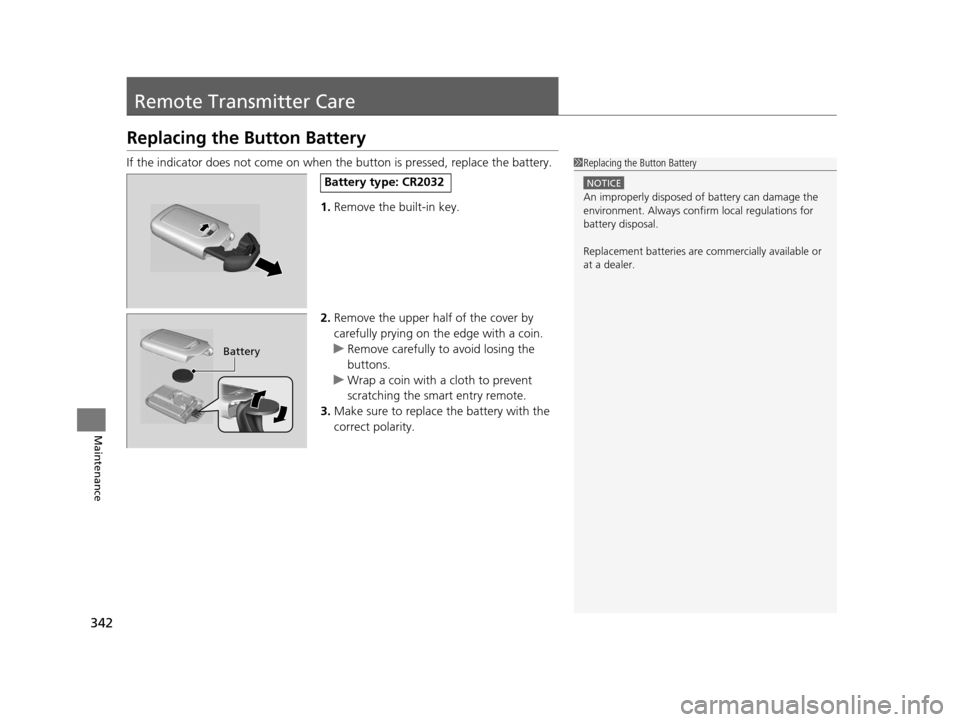
If the indicator does not come on when the button is pressed, replace the battery.
1. Remove the built-in key.
2. Remove the upper half of the cover by
carefully prying on the edge with a coin.
u Remove carefully to avoid losing the
buttons.
u Wrap a coin with a cloth to prevent
scratching the smart entry remote.
3. Make sure to replace the battery with the
correct polarity.1 Replacing the Button Battery
NOTICE
An improperly disposed of battery can damage the
environment. Always conf irm local regulations for
battery disposal.
Replacement batteries are commercially available or
at a dealer.
Battery type: CR2032
Battery
16 CR-Z-31SZT6500.book 342 ページ 2015年9月11日 金曜日 午前11時47分