light HONDA CR-Z 2016 1.G User Guide
[x] Cancel search | Manufacturer: HONDA, Model Year: 2016, Model line: CR-Z, Model: HONDA CR-Z 2016 1.GPages: 409, PDF Size: 19.68 MB
Page 29 of 409
28
Quick Reference Guide
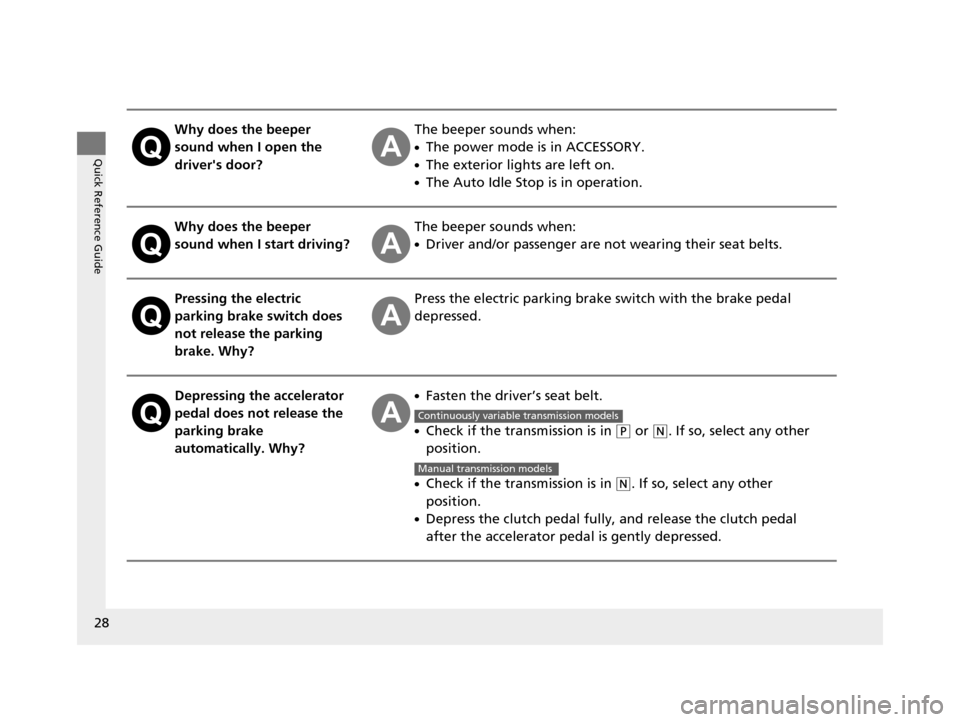
Why does the beeper
sound when I open the
driver's door?The beeper sounds when:
●The power mode is in ACCESSORY.
●The exterior lights are left on.
●The Auto Idle Stop is in operation.
Why does the beeper
sound when I start driving?The beeper sounds when:
●Driver and/or passenger are not wearing their seat belts.
Pressing the electric
parking brake switch does
not release the parking
brake. Why?Press the electric parking brake switch with the brake pedal
depressed.
Depressing the accelerator
pedal does not release the
parking brake
automatically. Why?●Fasten the driver’s seat belt.
●Check if the transmission is in (P or (N. If so, select any other
position.
●Check if the transmission is in (N. If so, select any other
position.
●Depress the clutch pedal fully, and release the clutch pedal
after the accelerator peda l is gently depressed.
Continuously variable transmission models
Manual transmission models
16 CR-Z-31SZT6500.book 28 ページ 2015年9月11日 金曜日 午前11時47分
Page 79 of 409
78
uuIndicators u
Instrument Panel
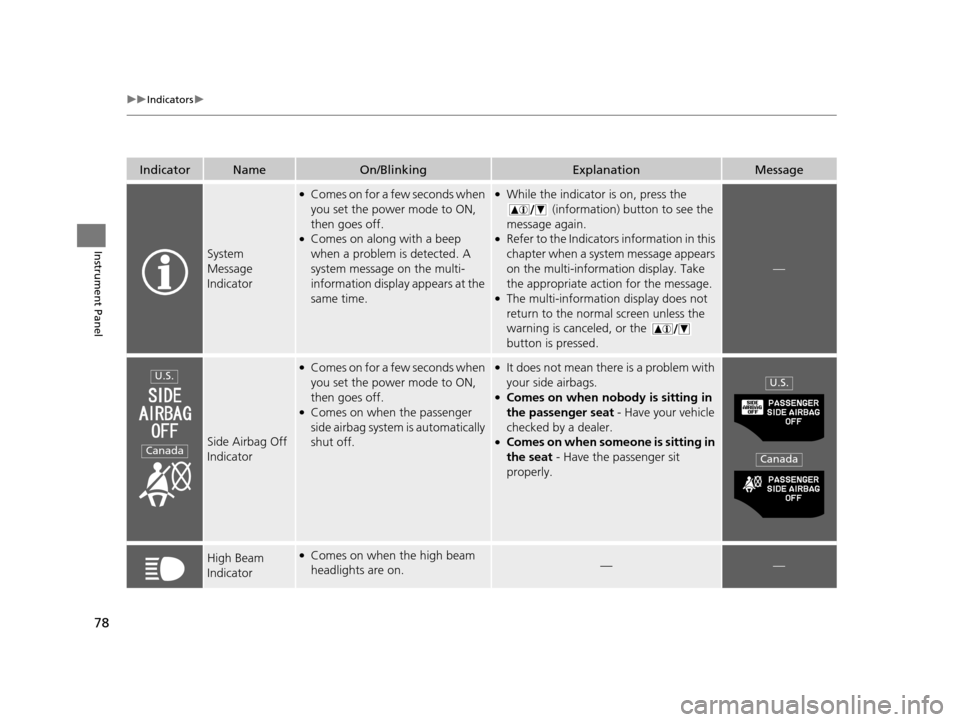
IndicatorNameOn/BlinkingExplanationMessage
System
Message
Indicator
●Comes on for a few seconds when
you set the power mode to ON,
then goes off.
●Comes on along with a beep
when a problem is detected. A
system message on the multi-
information display appears at the
same time.
●While the indicator is on, press the
(information) button to see the
message again.
●Refer to the Indicators information in this
chapter when a system message appears
on the multi-information display. Take
the appropriate action for the message.
●The multi-information display does not
return to the normal screen unless the
warning is canceled, or the
button is pressed.
—
Side Airbag Off
Indicator
●Comes on for a few seconds when
you set the power mode to ON,
then goes off.
●Comes on when the passenger
side airbag system is automatically
shut off.
●It does not mean there is a problem with
your side airbags.
●Comes on when nobody is sitting in
the passenger seat - Have your vehicle
checked by a dealer.
●Comes on when someone is sitting in
the seat - Have the passenger sit
properly.
High Beam
Indicator●Comes on when the high beam
headlights are on.——
U.S.
Canada
U.S.
Canada
16 CR-Z-31SZT6500.book 78 ページ 2015年9月11日 金曜日 午前11時47分
Page 80 of 409
79
uuIndicators u
Continued
Instrument Panel
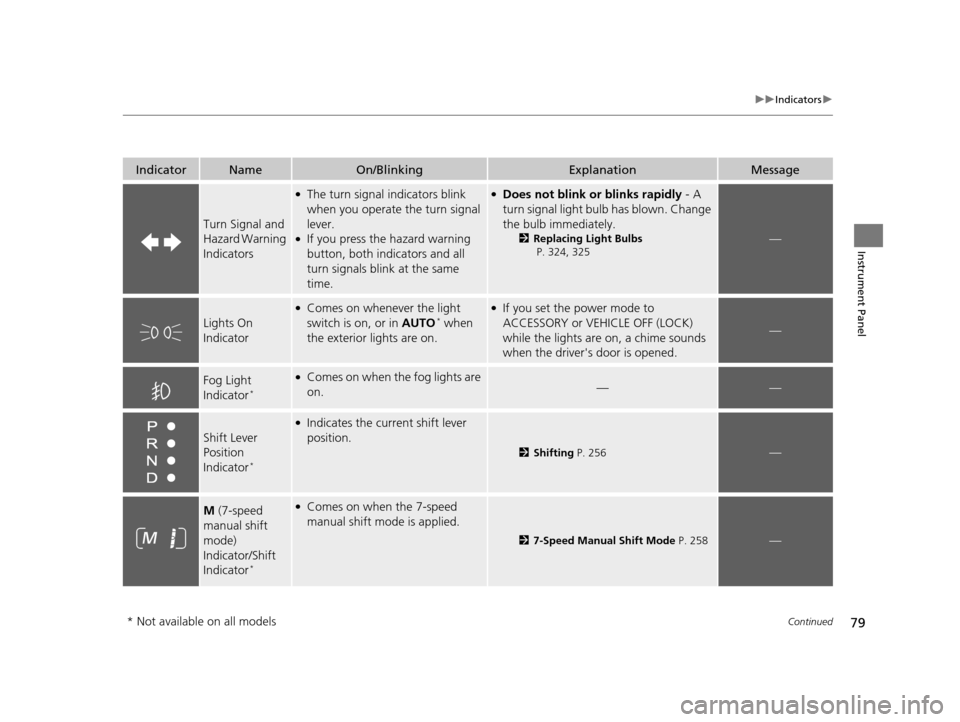
IndicatorNameOn/BlinkingExplanationMessage
Turn Signal and
Hazard Warning
Indicators
●The turn signal indicators blink
when you operate the turn signal
lever.
●If you press the hazard warning
button, both indi cators and all
turn signals blin k at the same
time.
●Does not blink or blinks rapidly - A
turn signal light bulb has blown. Change
the bulb immediately.
2 Replacing Light Bulbs
P. 324, 325 —
Lights On
Indicator
●Comes on whenever the light
switch is on, or in AUTO* when
the exterior lights are on.
●If you set the power mode to
ACCESSORY or VEHICLE OFF (LOCK)
while the lights are on, a chime sounds
when the driver's door is opened.
—
Fog Light
Indicator*
●Comes on when the fog lights are
on.——
Shift Lever
Position
Indicator
*
●Indicates the current shift lever
position.
2Shifting P. 256—
M (7-speed
manual shift
mode)
Indicator/Shift
Indicator
*
●Comes on when the 7-speed
manual shift mode is applied.
2 7-Speed Manual Shift Mode P. 258—
* Not available on all models
16 CR-Z-31SZT6500.book 79 ページ 2015年9月11日 金曜日 午前11時47分
Page 84 of 409
83
uuIndicators uMulti-Information Display Warning and Information Messages
Continued
Instrument Panel
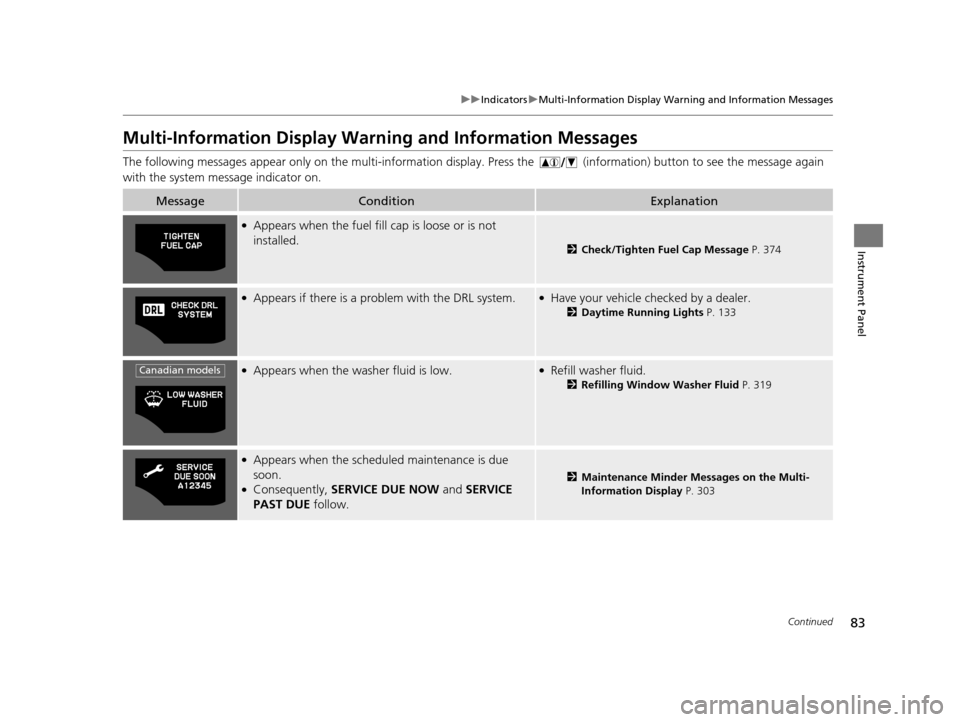
Multi-Information Display Warn ing and Information Messages
The following messages appear only on th e multi-information display. Press the (i nformation) button to see the message again
with the system message indicator on.
MessageConditionExplanation
●Appears when the fuel fill cap is loose or is not
installed.
2 Check/Tighten Fuel Cap Message P. 374
●Appears if there is a problem with the DRL system.●Have your vehicle checked by a dealer.
2Daytime Running Lights P. 133
●Appears when the washer fluid is low.●Refill washer fluid.
2Refilling Window Washer Fluid P. 319
●Appears when the scheduled maintenance is due
soon.
●Consequently, SERVICE DUE NOW and SERVICE
PAST DUE follow.2Maintenance Minder Messages on the Multi-
Information Display P. 303
Canadian models
16 CR-Z-31SZT6500.book 83 ページ 2015年9月11日 金曜日 午前11時47分
Page 100 of 409
99
uuGauges and Multi-Information Display uMulti-Information Display
Continued
Instrument Panel
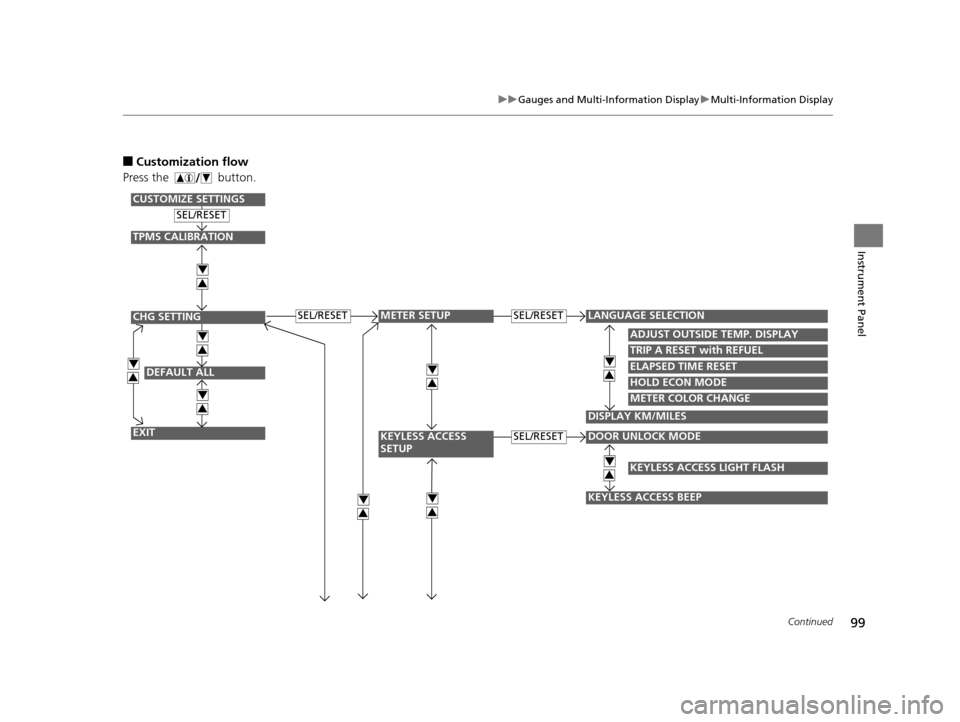
■Customization flow
Press the button.
DEFAULT ALL
EXIT
ADJUST OUTSIDE TEMP. DISPLAY
TRIP A RESET with REFUEL
ELAPSED TIME RESET
DOOR UNLOCK MODE
KEYLESS ACCESS BEEP
LANGUAGE SELECTIONSEL/RESET
SEL/RESET
SEL/RESET
SEL/RESET
METER SETUP
KEYLESS ACCESS
SETUP
CHG SETTING
CUSTOMIZE SETTINGS
HOLD ECON MODE
METER COLOR CHANGE
DISPLAY KM/MILES
4
3
4
3
4
3
4
3
4
3
4
3
TPMS CALIBRATION
4
3
KEYLESS ACCESS LIGHT FLASH
4
34
3
16 CR-Z-31SZT6500.book 99 ページ 2015年9月11日 金曜日 午前11時47分
Page 101 of 409
100
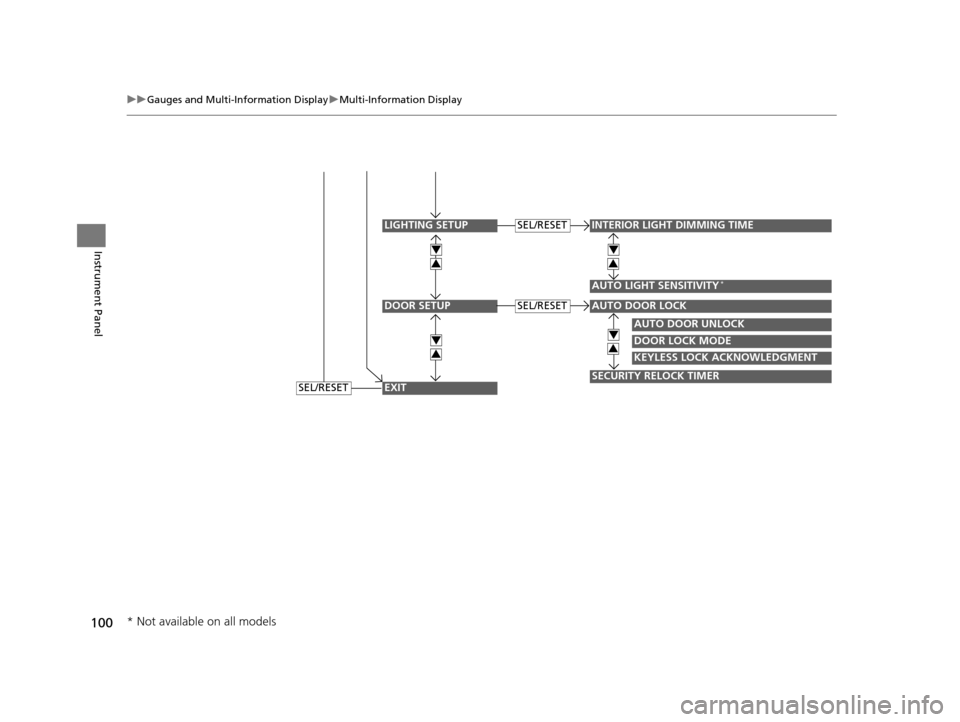
uuGauges and Multi-Information Display uMulti-Information Display
Instrument Panel
DOOR SETUP
INTERIOR LIGHT DIMMING TIME
AUTO LIGHT SENSITIVITY*
AUTO DOOR UNLOCK
DOOR LOCK MODE
KEYLESS LOCK ACKNOWLEDGMENT
SECURITY RELOCK TIMER
AUTO DOOR LOCK
SEL/RESET
SEL/RESET
LIGHTING SETUP
EXIT
4
3
4
3
4
3
4
3
SEL/RESET
* Not available on all models
16 CR-Z-31SZT6500.book 100 ページ 2015年9月11日 金曜日 午前11時47分
Page 103 of 409
102
uuGauges and Multi-Information Display uMulti-Information Display
Instrument Panel
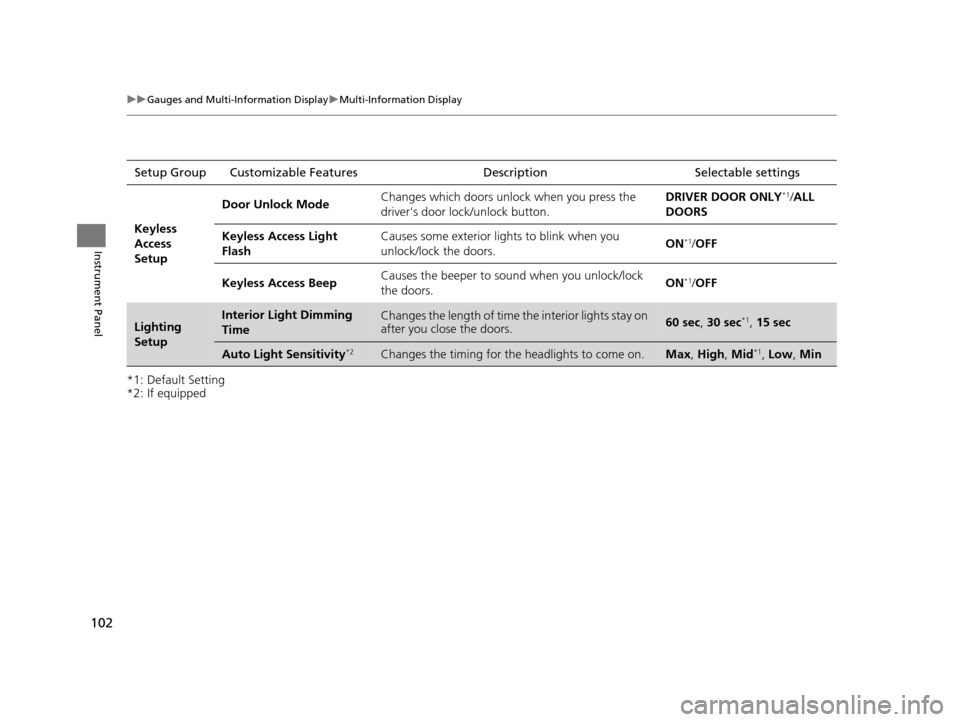
*1: Default Setting
*2: If equippedSetup Group Customizabl
e Features Description Selectable settings
Keyless
Access
Setup
Door Unlock ModeChanges which doors unlock when you press the
driver's door lock/unlock button.DRIVER DOOR ONLY*1/ALL
DOORS
Keyless Access Light
FlashCauses some exterior lights to blink when you
unlock/lock the doors.ON*1/ OFF
Keyless Access BeepCauses the beeper to sound when you unlock/lock
the doors.ON*1/OFF
Lighting
SetupInterior Light Dimming
TimeChanges the length of time the interior lights stay on
after you close the doors.60 sec, 30 sec*1, 15 sec
Auto Light Sensitivity*2Changes the timing for the headlights to come on.Max, High , Mid*1, Low , Min
16 CR-Z-31SZT6500.book 102 ページ 2015年9月11日 金曜日 午前11時47分
Page 104 of 409
103
uuGauges and Multi-Information Display uMulti-Information Display
Continued
Instrument Panel
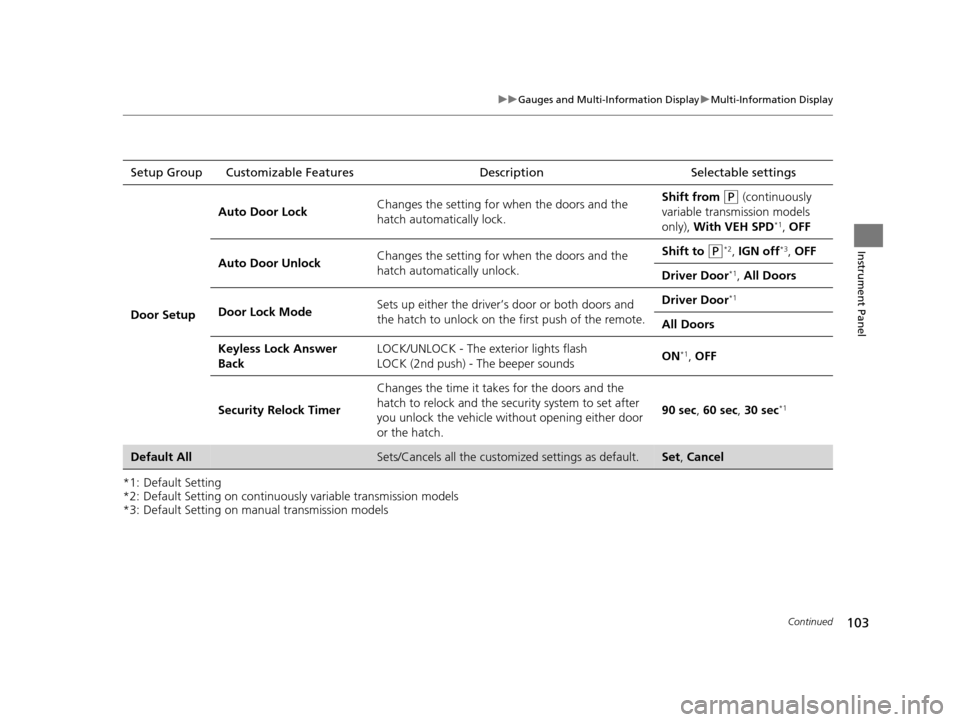
*1: Default Setting
*2: Default Setting on continuously variable transmission models
*3: Default Setting on manual transmission modelsSetup Group Customizable Features
Description Selectable settings
Door Setup
Auto Door LockChanges the setting for when the doors and the
hatch automatically lock.Shift from (P (continuously
variable transmission models
only), With VEH SPD
*1, OFF
Auto Door UnlockChanges the setting for when the doors and the
hatch automatically unlock.Shift to (P*2, IGN off*3, OFF
Driver Door*1, All Doors
Door Lock ModeSets up either the driver’s door or both doors and
the hatch to unlock on th e first push of the remote.Driver Door*1
All Doors
Keyless Lock Answer
BackLOCK/UNLOCK - The exterior lights flash
LOCK (2nd push) - The beeper soundsON*1, OFF
Security Relock Timer
Changes the time it takes for the doors and the
hatch to relock and the security system to set after
you unlock the vehicle without opening either door
or the hatch.
90 sec , 60 sec, 30 sec*1
Default AllSets/Cancels all the customiz ed settings as default.Set, Cancel
16 CR-Z-31SZT6500.book 103 ページ 2015年9月11日 金曜日 午前11時47分
Page 108 of 409
107
Controls
This chapter explains how to operate the various controls necessary for driving.
Clock.................................................. 108
Locking and Unlocking the Doors
Key Types and Functions .................. 109
Locking/Unlocking the Doors from the Outside .......................................... 112
Locking/Unlocking the Doors from the Inside ............................................. 116
Auto Door Locking/Unlocking .......... 118
Opening and Closing the Hatch....... 119
Security System Immobilizer System .......................... 122
Security System Alarm ...................... 122
Opening and Closing the Windows ..... 124
Operating the Switches Around the
Steering Wheel
ENGINE START/STOP Button............. 126
Turn Signals ..................................... 129
Light Switches.................................. 129
Fog Lights
*...................................... 133
Daytime Running Lights ................... 133
Wipers and Washers ........................ 134
Brightness Control ........................... 136
Rear Defogger/Heat ed Door Mirror
*
Button ........................................... 137
Adjusting the Steering Wheel........... 138 Adjusting the Mirrors
Interior Rearview Mirror ................... 139
Power Door Mirrors ......................... 140
Adjusting the Seats Adjusting the Seat Positions ............. 141
Interior Lights/Interior Convenience ItemsInterior Lights .................................. 146
Interior Convenience Items .............. 147
Climate Control System Using Automatic Climate Control .... 155
Automatic Climate Control Sensors ...... 157
* Not available on all models
16 CR-Z-31SZT6500.book 107 ページ 2015年9月11日 金曜日 午前11時47分
Page 110 of 409
109Continued
Controls
Locking and Unlocking the Doors
Key Types and Functions
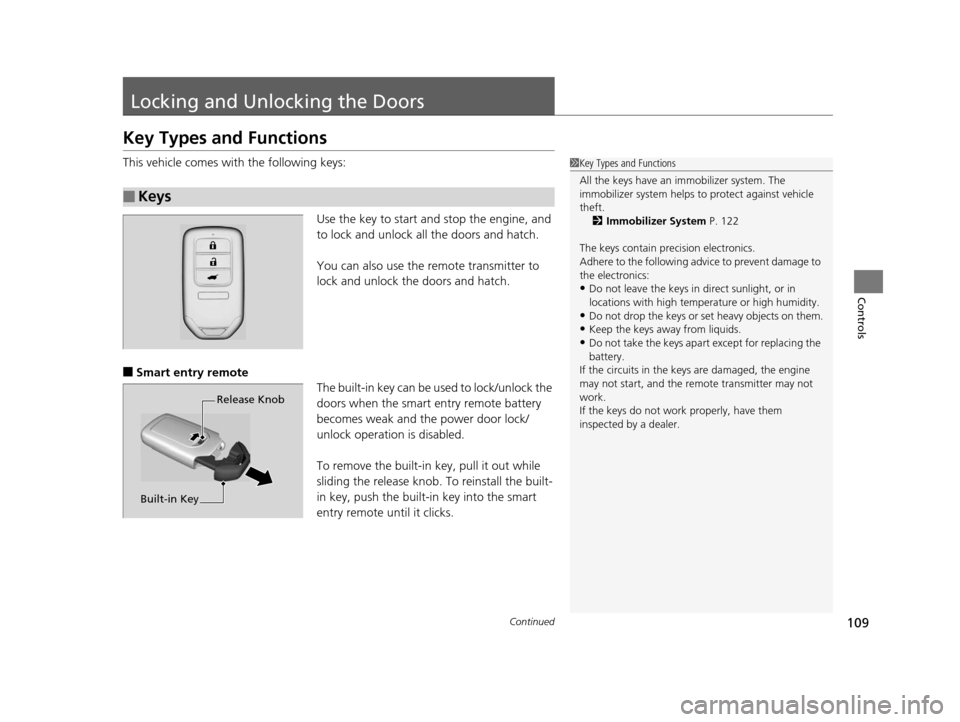
This vehicle comes with the following keys:
Use the key to start and stop the engine, and
to lock and unlock all the doors and hatch.
You can also use the remote transmitter to
lock and unlock the doors and hatch.
■Smart entry remote The built-in key can be used to lock/unlock the
doors when the smart entry remote battery
becomes weak and the power door lock/
unlock operation is disabled.
To remove the built-in key, pull it out while
sliding the release knob. To reinstall the built-
in key, push the built-in key into the smart
entry remote until it clicks.
■Keys
1 Key Types and Functions
All the keys have an immobilizer system. The
immobilizer system helps to protect against vehicle
theft. 2 Immobilizer System P. 122
The keys contain precision electronics.
Adhere to the following advi ce to prevent damage to
the electronics:
•Do not leave the keys in direct sunlight, or in
locations with high temperature or high humidity.
•Do not drop the keys or set heavy objects on them.
•Keep the keys away from liquids.
•Do not take the keys apart except for replacing the
battery.
If the circuits in the keys are damaged, the engine
may not start, and the remote transmitter may not
work.
If the keys do not work properly, have them
inspected by a dealer.
Release Knob
Built-in Key
16 CR-Z-31SZT6500.book 109 ページ 2015年9月11日 金曜日 午前11時47分