engine HONDA CR-Z 2016 1.G Owner's Manual
[x] Cancel search | Manufacturer: HONDA, Model Year: 2016, Model line: CR-Z, Model: HONDA CR-Z 2016 1.GPages: 409, PDF Size: 19.68 MB
Page 88 of 409
87
uuIndicators uMulti-Information Display Warning and Information Messages
Continued
Instrument Panel
MessageConditionExplanation
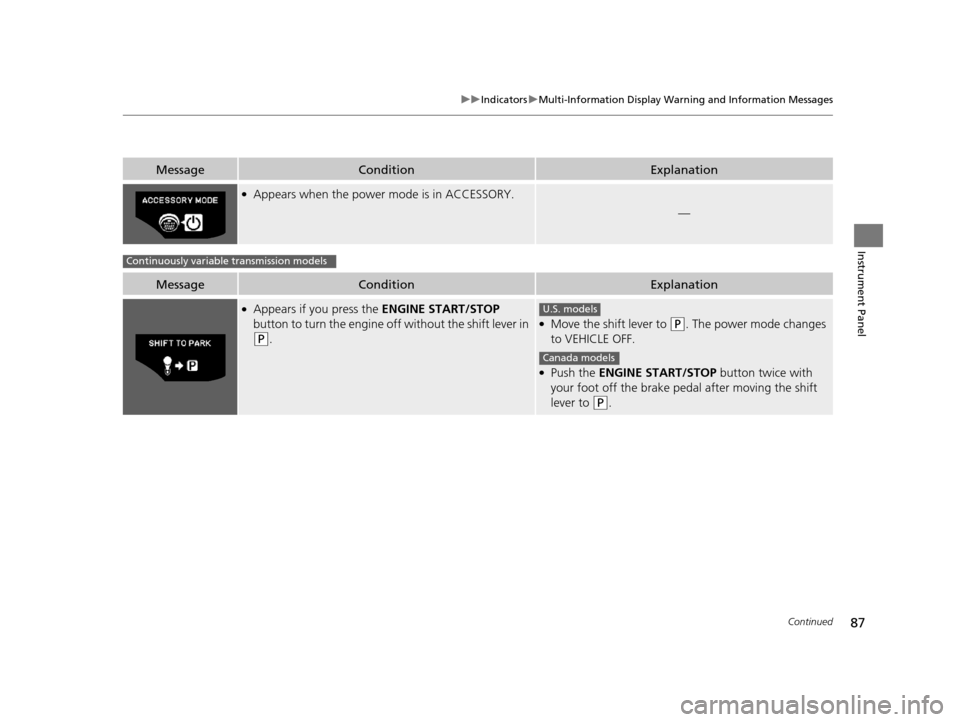
●Appears when the power mode is in ACCESSORY.
—
MessageConditionExplanation
●Appears if you press the ENGINE START/STOP
button to turn the engine off without the shift lever in
(P.
●Move the shift lever to (P. The power mode changes
to VEHICLE OFF.
●Push the ENGINE START/STOP button twice with
your foot off the brake pedal after moving the shift
lever to
(P.
Continuously variable transmission models
U.S. models
Canada models
16 CR-Z-31SZT6500.book 87 ページ 2015年9月11日 金曜日 午前11時47分
Page 89 of 409
88
uuIndicators uMulti-Information Display Warn ing and Information Messages
Instrument Panel
MessageConditionExplanation
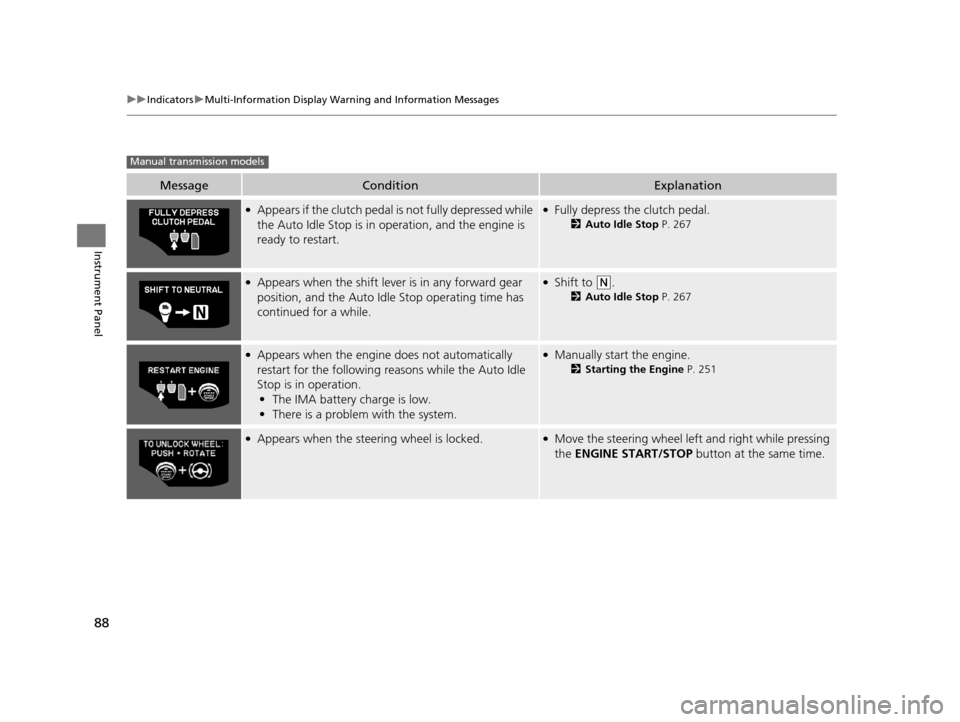
●Appears if the clutch pedal is not fully depressed while
the Auto Idle Stop is in operation, and the engine is
ready to restart.●Fully depress the clutch pedal.
2Auto Idle Stop P. 267
●Appears when the shift leve r is in any forward gear
position, and the Auto Idle Stop operating time has
continued for a while.●Shift to (N.
2 Auto Idle Stop P. 267
●Appears when the engine does not automatically
restart for the following re asons while the Auto Idle
Stop is in operation.
• The IMA battery charge is low.
• There is a problem with the system.●Manually start the engine.
2 Starting the Engine P. 251
●Appears when the steering wheel is locked.●Move the steering wheel left and right while pressing
the ENGINE START/STOP button at the same time.
Manual transmission models
16 CR-Z-31SZT6500.book 88 ページ 2015年9月11日 金曜日 午前11時47分
Page 90 of 409
89Continued
Instrument Panel
Gauges and Multi-Information Display
Gauges
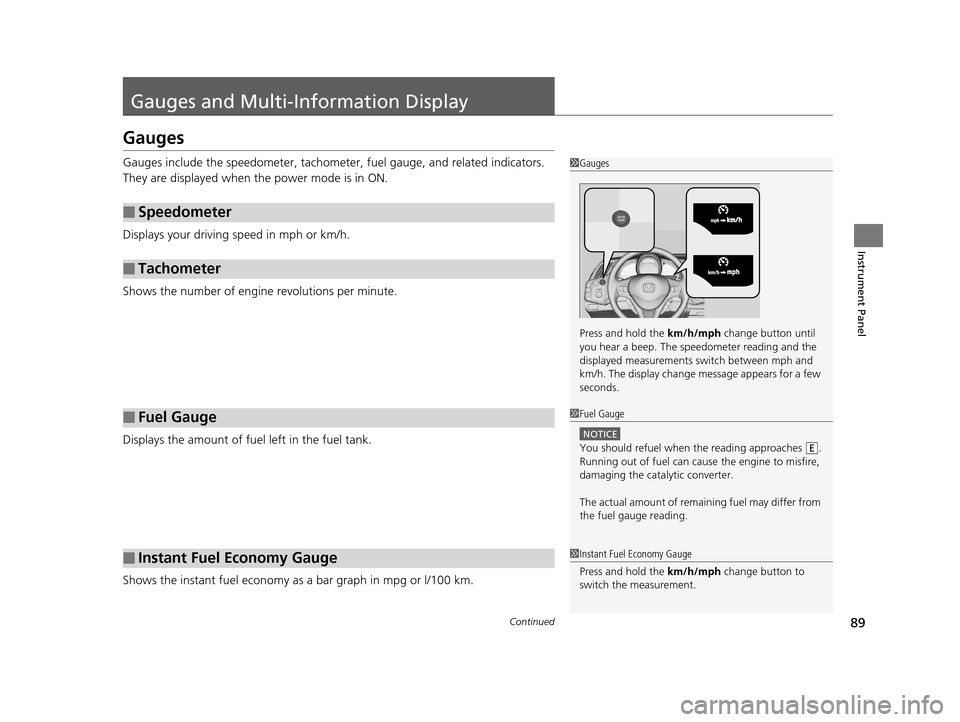
Gauges include the speedometer, tachometer, fuel gauge, and related indicators.
They are displayed when the power mode is in ON.
Displays your driving speed in mph or km/h.
Shows the number of engine revolutions per minute.
Displays the amount of fuel left in the fuel tank.
Shows the instant fuel economy as a bar graph in mpg or l/100 km.
■Speedometer
■Tachometer
■Fuel Gauge
■Instant Fuel Economy Gauge
1Gauges
Press and hold the km/h/mph change button until
you hear a beep. The speedometer reading and the
displayed measurements switch between mph and
km/h. The display change message appears for a few
seconds.
1 Fuel Gauge
NOTICE
You should refuel when the reading approaches .
Running out of fuel can cause the engine to misfire,
damaging the cata lytic converter.
The actual amount of remain ing fuel may differ from
the fuel gauge reading.E
1 Instant Fuel Economy Gauge
Press and hold the km/h/mph change button to
switch the measurement.
16 CR-Z-31SZT6500.book 89 ページ 2015年9月11日 金曜日 午前11時47分
Page 91 of 409
uuGauges and Multi-Information Display uGauges
90
Instrument Panel
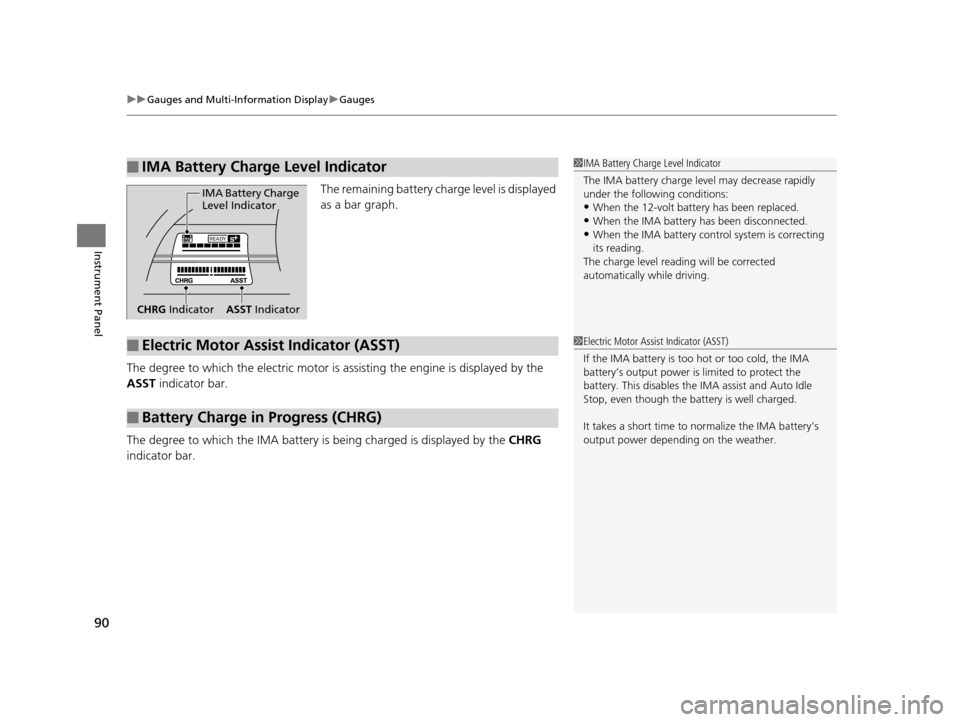
The remaining battery charge level is displayed
as a bar graph.
The degree to which the electric motor is as sisting the engine is displayed by the
ASST indicator bar.
The degree to which the IMA battery is being charged is displayed by the CHRG
indicator bar.
■IMA Battery Charge Level Indicator1 IMA Battery Charge Level Indicator
The IMA battery charge level may decrease rapidly
under the following conditions:
•When the 12-volt battery has been replaced.
•When the IMA battery has been disconnected.•When the IMA battery control system is correcting
its reading.
The charge level reading will be corrected
automatically while driving.READY
IMA Battery Charge
Level Indicator
CHRG Indicator ASST Indicator
■Electric Motor Assist Indicator (ASST)
■Battery Charge in Progress (CHRG)
1Electric Motor Assist Indicator (ASST)
If the IMA batter y is too hot or too cold, the IMA
battery’s output power is limited to protect the
battery. This disables the IMA assist and Auto Idle
Stop, even though the ba ttery is well charged.
It takes a short time to normalize the IMA battery’s
output power depending on the weather.
16 CR-Z-31SZT6500.book 90 ページ 2015年9月11日 金曜日 午前11時47分
Page 92 of 409
91
uuGauges and Multi-Information Display uMulti-Information Display
Continued
Instrument Panel
Multi-Information Display
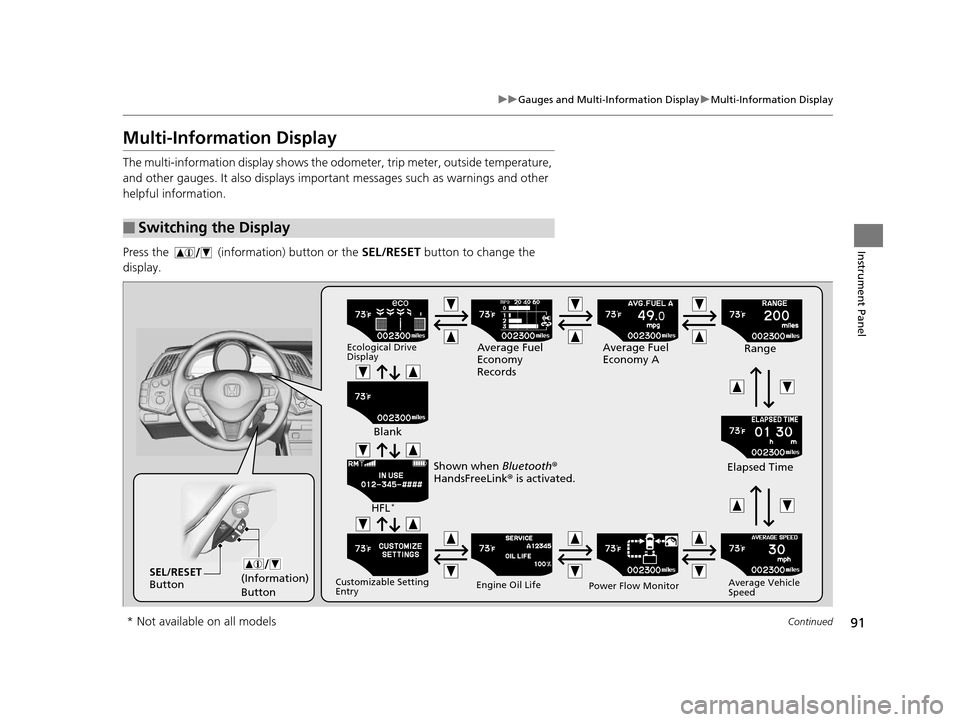
The multi-information display shows the odom eter, trip meter, outside temperature,
and other gauges. It also displays important messages such as warnings and other
helpful information.
Press the (information) button or the SEL/RESET button to change the
display.
■Switching the Display
(Information)
ButtonSEL/RESET
Button
Ecological Drive
DisplayAverage Fuel
Economy
Records Average Fuel
Economy A
Range
Elapsed Time
Average Vehicle
Speed
Power Flow Monitor
Engine Oil Life
Customizable Setting
Entry
HFL*
Blank
Shown when Bluetooth ®
HandsFreeLink ® is activated.
* Not available on all models
16 CR-Z-31SZT6500.book 91 ページ 2015年9月11日 金曜日 午前11時47分
Page 95 of 409
uuGauges and Multi-Information Display uMulti-Information Display
94
Instrument Panel
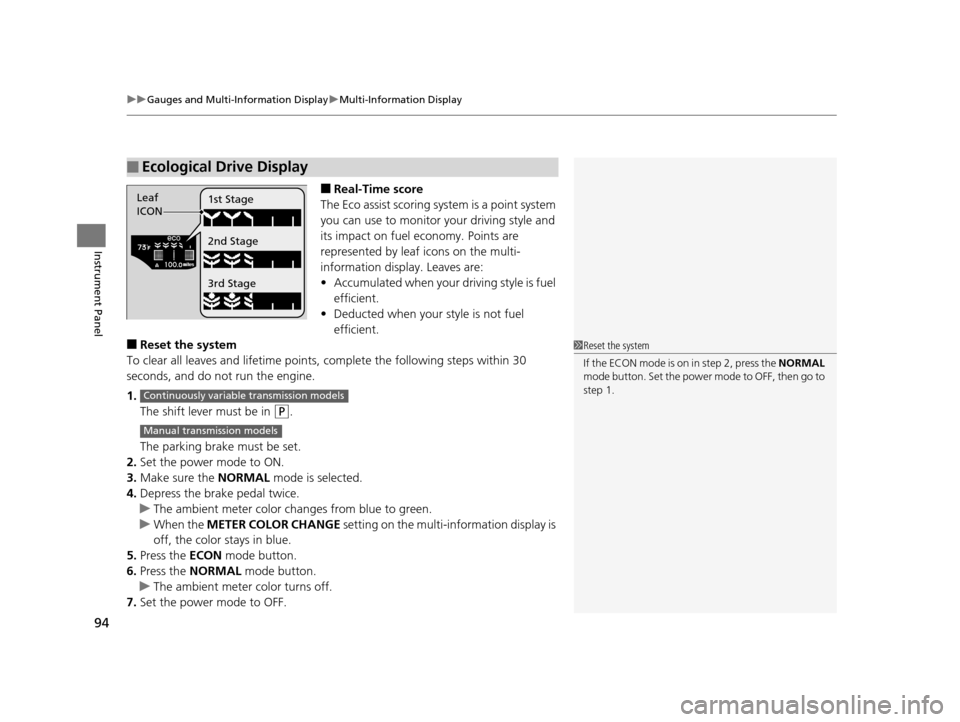
■Real-Time score
The Eco assist scoring system is a point system
you can use to monitor your driving style and
its impact on fuel economy. Points are
represented by leaf icons on the multi-
information displa y. Leaves are:
• Accumulated when your driving style is fuel
efficient.
• Deducted when your style is not fuel
efficient.
■Reset the system
To clear all leaves and lifetime points, complete the following steps within 30
seconds, and do not run the engine.
1. The shift lever must be in
(P.
The parking brake must be set.
2. Set the power mode to ON.
3. Make sure the NORMAL mode is selected.
4. Depress the brake pedal twice.
u The ambient meter color ch anges from blue to green.
u When the METER COLOR CHANGE setting on the multi-information display is
off, the color stays in blue.
5. Press the ECON mode button.
6. Press the NORMAL mode button.
u The ambient meter color turns off.
7. Set the power mode to OFF.
■Ecological Drive Display
Leaf
ICON 1st Stage
2nd Stage
3rd Stage
1
Reset the system
If the ECON mode is on in step 2, press the NORMAL
mode button. Set the power mode to OFF, then go to
step 1.
Continuously variable transmission models
Manual transmission models
16 CR-Z-31SZT6500.book 94 ページ 2015年9月11日 金曜日 午前11時47分
Page 97 of 409
uuGauges and Multi-Information Display uMulti-Information Display
96
Instrument Panel
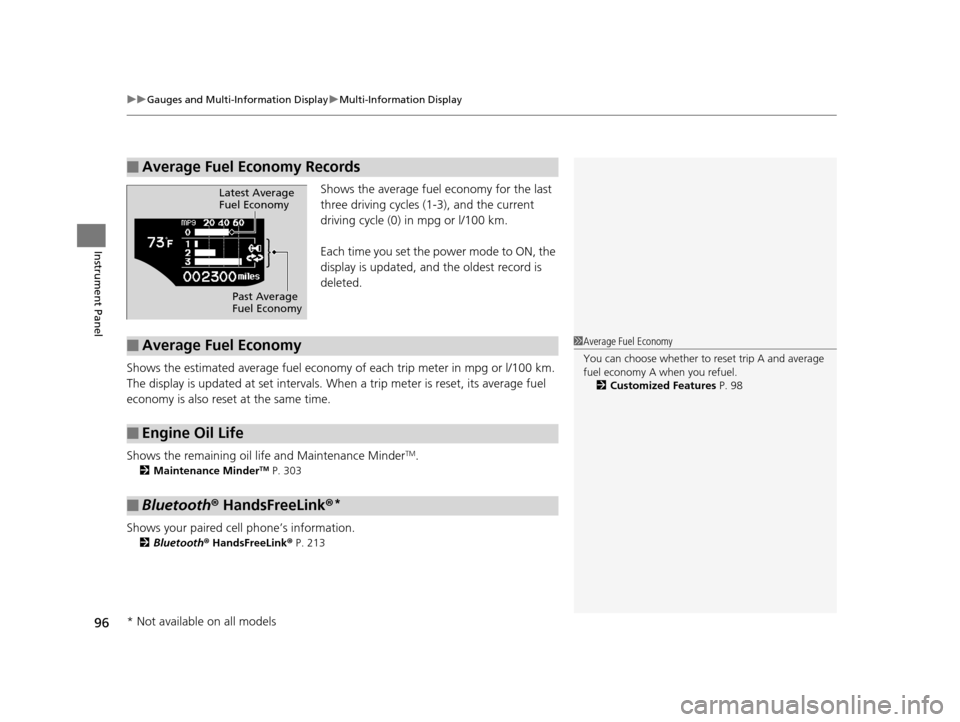
Shows the average fuel economy for the last
three driving cycles (1-3), and the current
driving cycle (0) in mpg or l/100 km.
Each time you set the power mode to ON, the
display is updated, and the oldest record is
deleted.
Shows the estimated average fuel economy of each trip meter in mpg or l/100 km.
The display is updated at set intervals. Wh en a trip meter is reset, its average fuel
economy is also reset at the same time.
Shows the remaining oil life and Maintenance Minder
TM.
2 Maintenance MinderTM P. 303
Shows your paired cell phone’s information.
2Bluetooth® HandsFreeLink ® P. 213
■Average Fuel Economy Records
Latest Average
Fuel Economy
Past Average
Fuel Economy
■Average Fuel Economy
■Engine Oil Life
■Bluetooth® HandsFreeLink ®*
1Average Fuel Economy
You can choose whether to reset trip A and average
fuel economy A when you refuel.
2 Customized Features P. 98
* Not available on all models
16 CR-Z-31SZT6500.book 96 ページ 2015年9月11日 金曜日 午前11時47分
Page 98 of 409
Continued97
uuGauges and Multi-Information Display uMulti-Information Display
Instrument Panel
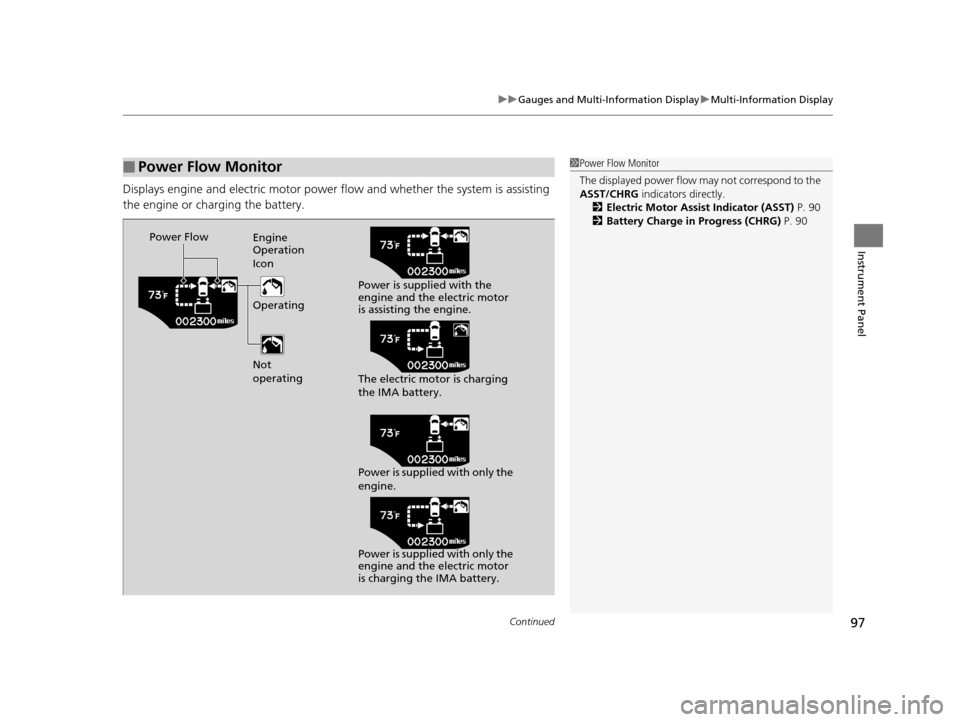
Displays engine and electric motor power flow and whether the system is assisting
the engine or charging the battery.
■Power Flow Monitor1Power Flow Monitor
The displayed power flow may not correspond to the
ASST/CHRG indicators directly.
2 Electric Motor Assist Indicator (ASST) P. 90
2 Battery Charge in Progress (CHRG) P. 90
Power Flow
Engine
Operation
Icon
Operating
Not
operating Power is supplied with the
engine and the electric motor
is assisting the engine.
The electric motor is charging
the IMA battery.
Power is supplied with only the
engine.
Power is supplied with only the
engine and the electric motor
is charging the IMA battery.
16 CR-Z-31SZT6500.book 97 ページ 2015年9月11日 金曜日 午前11時47分
Page 108 of 409
107
Controls
This chapter explains how to operate the various controls necessary for driving.
Clock.................................................. 108
Locking and Unlocking the Doors
Key Types and Functions .................. 109
Locking/Unlocking the Doors from the Outside .......................................... 112
Locking/Unlocking the Doors from the Inside ............................................. 116
Auto Door Locking/Unlocking .......... 118
Opening and Closing the Hatch....... 119
Security System Immobilizer System .......................... 122
Security System Alarm ...................... 122
Opening and Closing the Windows ..... 124
Operating the Switches Around the
Steering Wheel
ENGINE START/STOP Button............. 126
Turn Signals ..................................... 129
Light Switches.................................. 129
Fog Lights
*...................................... 133
Daytime Running Lights ................... 133
Wipers and Washers ........................ 134
Brightness Control ........................... 136
Rear Defogger/Heat ed Door Mirror
*
Button ........................................... 137
Adjusting the Steering Wheel........... 138 Adjusting the Mirrors
Interior Rearview Mirror ................... 139
Power Door Mirrors ......................... 140
Adjusting the Seats Adjusting the Seat Positions ............. 141
Interior Lights/Interior Convenience ItemsInterior Lights .................................. 146
Interior Convenience Items .............. 147
Climate Control System Using Automatic Climate Control .... 155
Automatic Climate Control Sensors ...... 157
* Not available on all models
16 CR-Z-31SZT6500.book 107 ページ 2015年9月11日 金曜日 午前11時47分
Page 110 of 409
109Continued
Controls
Locking and Unlocking the Doors
Key Types and Functions
This vehicle comes with the following keys:
Use the key to start and stop the engine, and
to lock and unlock all the doors and hatch.
You can also use the remote transmitter to
lock and unlock the doors and hatch.
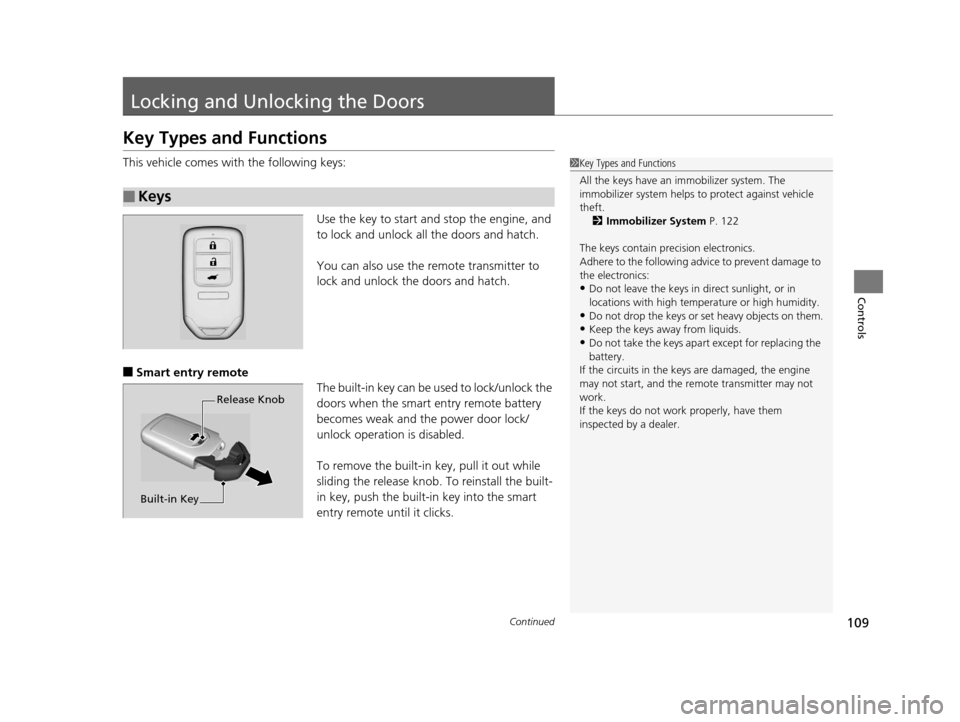
■Smart entry remote The built-in key can be used to lock/unlock the
doors when the smart entry remote battery
becomes weak and the power door lock/
unlock operation is disabled.
To remove the built-in key, pull it out while
sliding the release knob. To reinstall the built-
in key, push the built-in key into the smart
entry remote until it clicks.
■Keys
1 Key Types and Functions
All the keys have an immobilizer system. The
immobilizer system helps to protect against vehicle
theft. 2 Immobilizer System P. 122
The keys contain precision electronics.
Adhere to the following advi ce to prevent damage to
the electronics:
•Do not leave the keys in direct sunlight, or in
locations with high temperature or high humidity.
•Do not drop the keys or set heavy objects on them.
•Keep the keys away from liquids.
•Do not take the keys apart except for replacing the
battery.
If the circuits in the keys are damaged, the engine
may not start, and the remote transmitter may not
work.
If the keys do not work properly, have them
inspected by a dealer.
Release Knob
Built-in Key
16 CR-Z-31SZT6500.book 109 ページ 2015年9月11日 金曜日 午前11時47分