stop start HONDA CR-Z 2016 1.G Owner's Manual
[x] Cancel search | Manufacturer: HONDA, Model Year: 2016, Model line: CR-Z, Model: HONDA CR-Z 2016 1.GPages: 409, PDF Size: 19.68 MB
Page 129 of 409
uuOperating the Switches Around the Steering Wheel uENGINE START/STOP Button
128
Controls
If you open the driver’s doo r when the power mode is set to ACCESSORY, a warning
buzzer sounds.
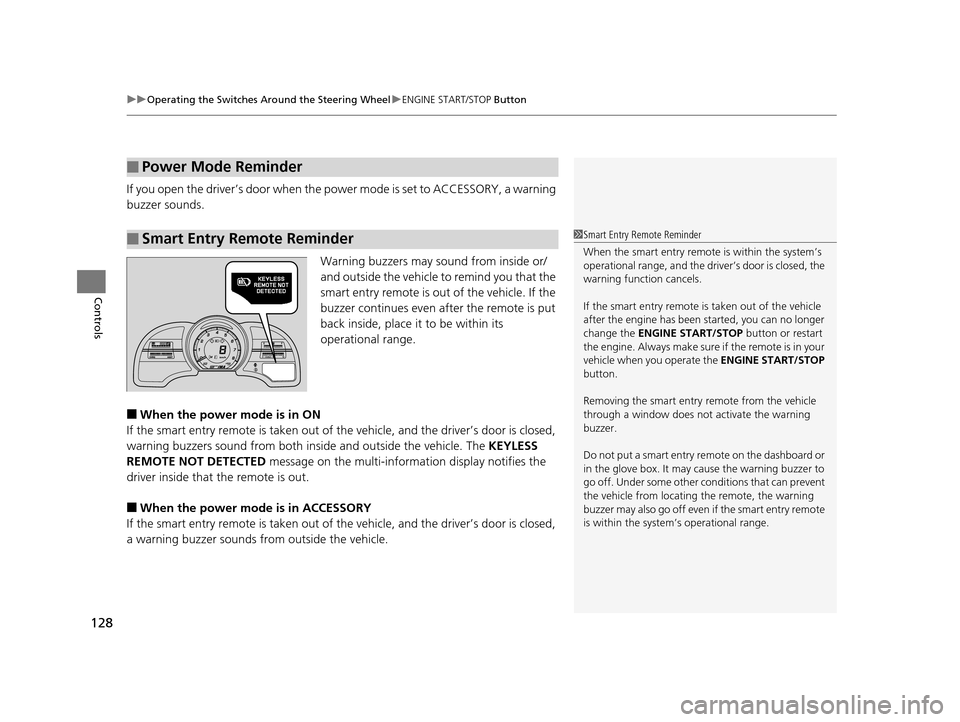
Warning buzzers may sound from inside or/
and outside the vehicle to remind you that the
smart entry remote is out of the vehicle. If the
buzzer continues even after the remote is put
back inside, place it to be within its
operational range.
■When the power mode is in ON
If the smart entry remote is taken out of th e vehicle, and the driver’s door is closed,
warning buzzers sound from both insi de and outside the vehicle. The KEYLESS
REMOTE NOT DETECTED message on the multi-information display notifies the
driver inside that the remote is out.
■When the power mode is in ACCESSORY
If the smart entry remote is taken out of th e vehicle, and the driver’s door is closed,
a warning buzzer sounds from outside the vehicle.
■Power Mode Reminder
■Smart Entry Remote Reminder1Smart Entry Remote Reminder
When the smart entry remote is within the system’s
operational range, and the driv er’s door is closed, the
warning function cancels.
If the smart entry remote is taken out of the vehicle
after the engine has been started, you can no longer
change the ENGINE START/STOP button or restart
the engin e. Always make sure if the remote is in your
vehicle when you operate the ENGINE START/STOP
button.
Removing the smart entry remote from the vehicle
through a window does not activate the warning
buzzer.
Do not put a smart entry re mote on the dashboard or
in the glove box. It may cause the warning buzzer to
go off. Under some other c onditions that can prevent
the vehicle from locating the remote, the warning
buzzer may also go off even if the smart entry remote
is within the system’s operational range.
16 CR-Z-31SZT6500.book 128 ページ 2015年9月11日 金曜日 午前11時47分
Page 135 of 409
134
uuOperating the Switches Around the Steering Wheel uWipers and Washers
Controls
Wipers and Washers
The windshield wipers and washers can be
used when the power mode is in ON.
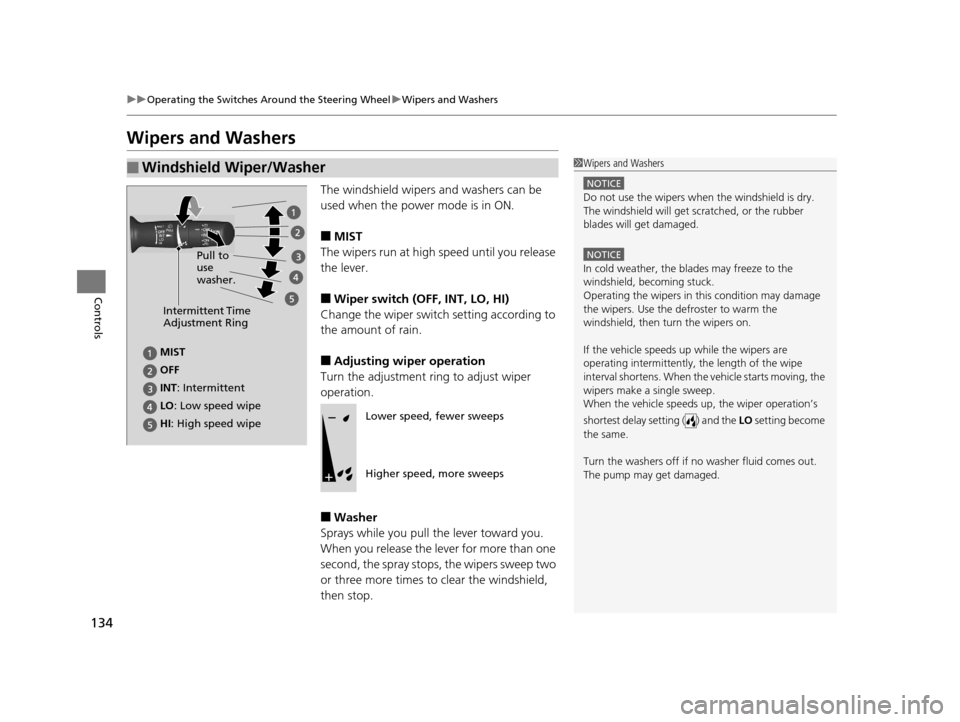
■MIST
The wipers run at high speed until you release
the lever.
■Wiper switch (OFF, INT, LO, HI)
Change the wiper switch setting according to
the amount of rain.
■Adjusting wiper operation
Turn the adjustment ri ng to adjust wiper
operation.
■Washer
Sprays while you pull the lever toward you.
When you release the lever for more than one
second, the spray stops, the wipers sweep two
or three more times to clear the windshield,
then stop.
■Windshield Wiper/Washer1 Wipers and Washers
NOTICE
Do not use the wipers when the windshield is dry.
The windshield will get sc ratched, or the rubber
blades will get damaged.
NOTICE
In cold weather, the blades may freeze to the
windshield, becoming stuck.
Operating the wipers in th is condition may damage
the wipers. Use the defroster to warm the
windshield, then turn the wipers on.
If the vehicle speeds up while the wipers are
operating intermittently, the length of the wipe
interval shortens. When the vehicle starts moving, the
wipers make a single sweep.
When the vehicle speeds up, the wiper operation’s
shortest delay setting ( ) and the LO setting become
the same.
Turn the washers off if no washer fluid comes out.
The pump may get damaged.
Intermittent Time
Adjustment Ring
HI: High speed wipe Pull to
use
washer.
LO
: Low speed wipe
INT: Intermittent OFF MISTLower speed, fewer sweeps
Higher speed, more sweeps
16 CR-Z-31SZT6500.book 134 ページ 2015年9月11日 金曜日 午前11時47分
Page 139 of 409
138
uuOperating the Switches Around the Steering Wheel uAdjusting the Steering Wheel
Controls
Adjusting the Steering Wheel
The steering wheel height and distance from your body can be adjusted so that you
can comfortably grip the steering wheel in an appropriate driving posture.
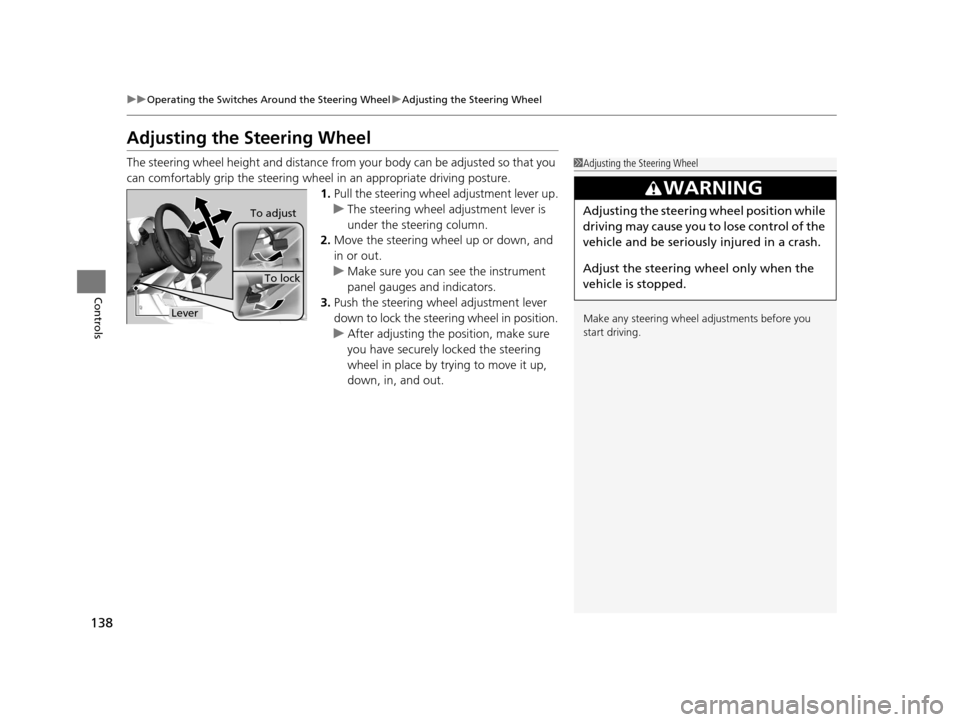
1.Pull the steering wheel adjustment lever up.
u The steering wheel adjustment lever is
under the steering column.
2. Move the steering wheel up or down, and
in or out.
u Make sure you can see the instrument
panel gauges and indicators.
3. Push the steering wheel adjustment lever
down to lock the steering wheel in position.
u After adjusting the position, make sure
you have securely locked the steering
wheel in place by trying to move it up,
down, in, and out.1Adjusting the Steering Wheel
Make any steering wheel adjustments before you
start driving.
3WARNING
Adjusting the steering wheel position while
driving may cause you to lose control of the
vehicle and be seriously injured in a crash.
Adjust the steering wheel only when the
vehicle is stopped.To adjust
To lock
Lever
16 CR-Z-31SZT6500.book 138 ページ 2015年9月11日 金曜日 午前11時47分
Page 156 of 409
155Continued
Controls
Climate Control System
Using Automatic Climate Control
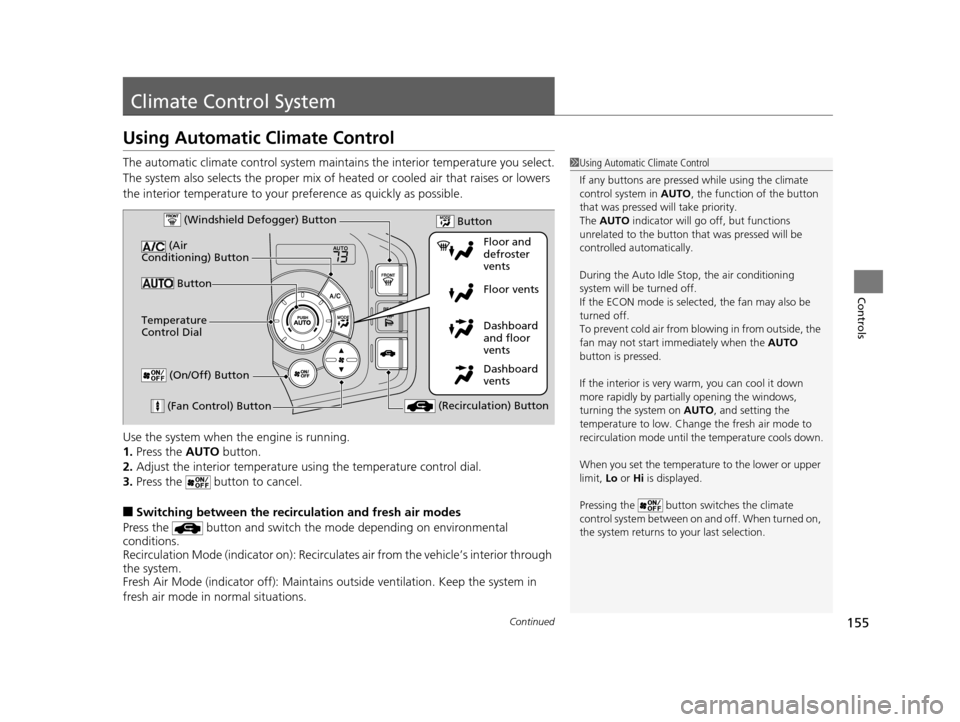
The automatic climate control system maintains the interior temperature you select.
The system also selects the proper mix of heat ed or cooled air that raises or lowers
the interior temperature to your pr eference as quickly as possible.
Use the system when the engine is running.
1. Press the AUTO button.
2. Adjust the interior temperature us ing the temperature control dial.
3. Press the button to cancel.
■Switching between the recirc ulation and fresh air modes
Press the button and switch the mode depending on environmental
conditions.
Recirculation Mode (indicator on): Recirculates air from the vehicle’s interior through
the system.
Fresh Air Mode (indicator off): Maintains outside ventilation. Keep the system in
fresh air mode in normal situations.
1 Using Automatic Climate Control
If any buttons are presse d while using the climate
control system in AUTO, the function of the button
that was pressed will take priority.
The AUTO indicator will go off, but functions
unrelated to the button th at was pressed will be
controlled automatically.
During the Auto Idle Stop, the air conditioning
system will be turned off.
If the ECON mode is selected, the fan may also be
turned off.
To prevent cold air from bl owing in from outside, the
fan may not start i mmediately when the AUTO
button is pressed.
If the interior is very warm, you can cool it down
more rapidly by partial ly opening the windows,
turning the system on AUTO, and setting the
temperature to low. Change the fresh air mode to
recirculation mode until the temperature cools down.
When you set the temperature to the lower or upper
limit, Lo or Hi is displayed.
Pressing the button switches the climate
control system between on and off. When turned on,
the system returns to your last selection.
Dashboard
vents Dashboard
and floor
vents Floor vents Floor and
defroster
vents
Button
(Air
Conditioning) Button
(Fan Control) Button (Recirculation) Button
Temperature
Control Dial (Windshield Defogger) Button
(On/Off) Button
Button
16 CR-Z-31SZT6500.book 155 ページ 2015年9月11日 金曜日 午前11時47分
Page 157 of 409
uuClimate Control System uUsing Automatic Climate Control
156
Controls
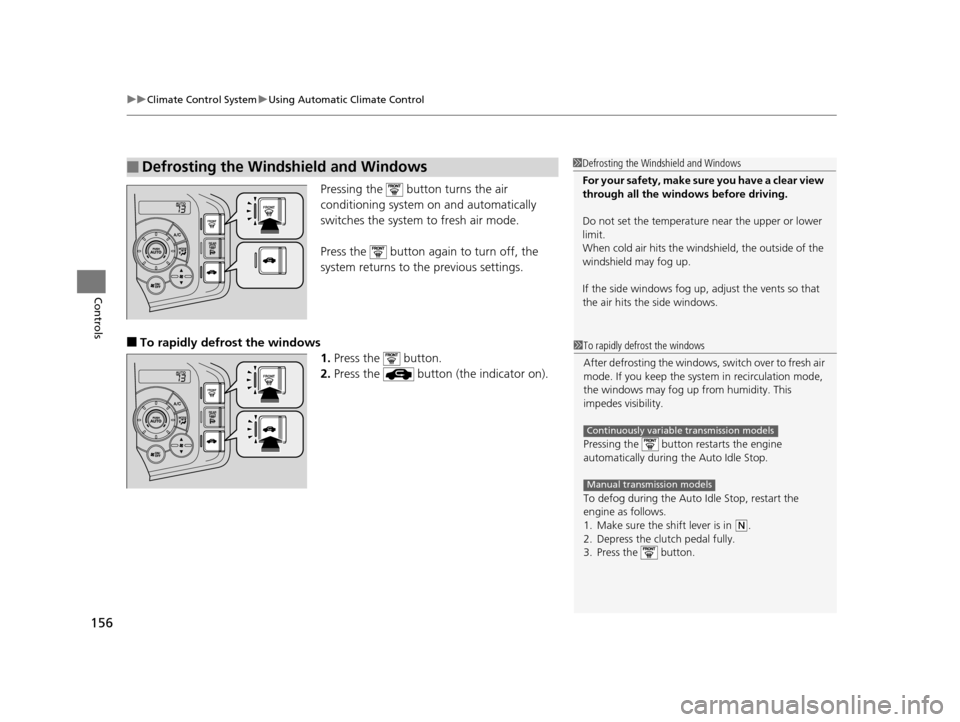
Pressing the button turns the air
conditioning system on and automatically
switches the system to fresh air mode.
Press the button again to turn off, the
system returns to the previous settings.
■To rapidly defrost the windows 1.Press the button.
2. Press the button (the indicator on).
■Defrosting the Windshield and Windows1Defrosting the Windshield and Windows
For your safety, make sure you have a clear view
through all the windows before driving.
Do not set the temperatur e near the upper or lower
limit.
When cold air hits the windshield, the outside of the
windshield may fog up.
If the side windows fog up, adjust the vents so that
the air hits th e side windows.
1To rapidly defrost the windows
After defrosting the windows, switch over to fresh air
mode. If you keep the syst em in recirculation mode,
the windows may fog up from humidity. This
impedes visibility.
Pressing the button re starts the engine
automatically during the Auto Idle Stop.
To defog during the Auto Idle Stop, restart the
engine as follows.
1. Make sure the shift lever is in
( N.
2. Depress the clutch pedal fully.
3. Press the button.
Continuously variable transmission models
Manual transmission models
16 CR-Z-31SZT6500.book 156 ページ 2015年9月11日 金曜日 午前11時47分
Page 235 of 409
uuBluetooth ® HandsFreeLink ®u HFL Menus
234
Features
HFL can display newly received text and e-ma il messages as well as 20 of the most
recently received messages on a connected cell phone. Each received message can
be read aloud and replied to using a fixed common phrase.
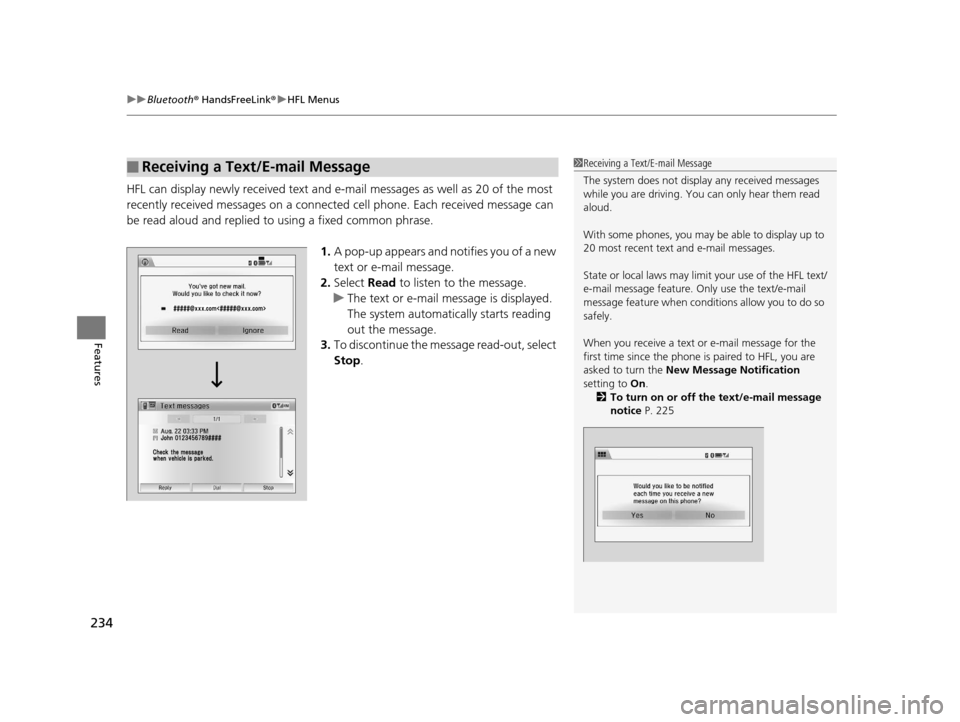
1.A pop-up appears and notifies you of a new
text or e-mail message.
2. Select Read to listen to the message.
u The text or e-mail message is displayed.
The system automatically starts reading
out the message.
3. To discontinue the message read-out, select
Stop .
■Receiving a Text/E-mail Message1Receiving a Text/E-mail Message
The system does not display any received messages
while you are driving. You can only hear them read
aloud.
With some phones, you may be able to display up to
20 most recent text and e-mail messages.
State or local laws may limit your use of the HFL text/
e-mail message feature. Only use the text/e-mail
message feature when conditions allow you to do so
safely.
When you receive a text or e-mail message for the
first time since the phone is paired to HFL, you are
asked to turn the New Message Notification
setting to On.
2 To turn on or off the text/e-mail message
notice P. 225
16 CR-Z-31SZT6500.book 234 ページ 2015年9月11日 金曜日 午前11時47分
Page 239 of 409
uuBluetooth ® HandsFreeLink ®u HFL Menus
238
Features
■Read or Stop reading a message
1. Go to the text or e-mail message screen.
u The system automatically starts reading
the message aloud.
2 Displaying Messages P. 236
2.Select Stop to stop reading.
Select Read again to start reading the
message from the beginning.
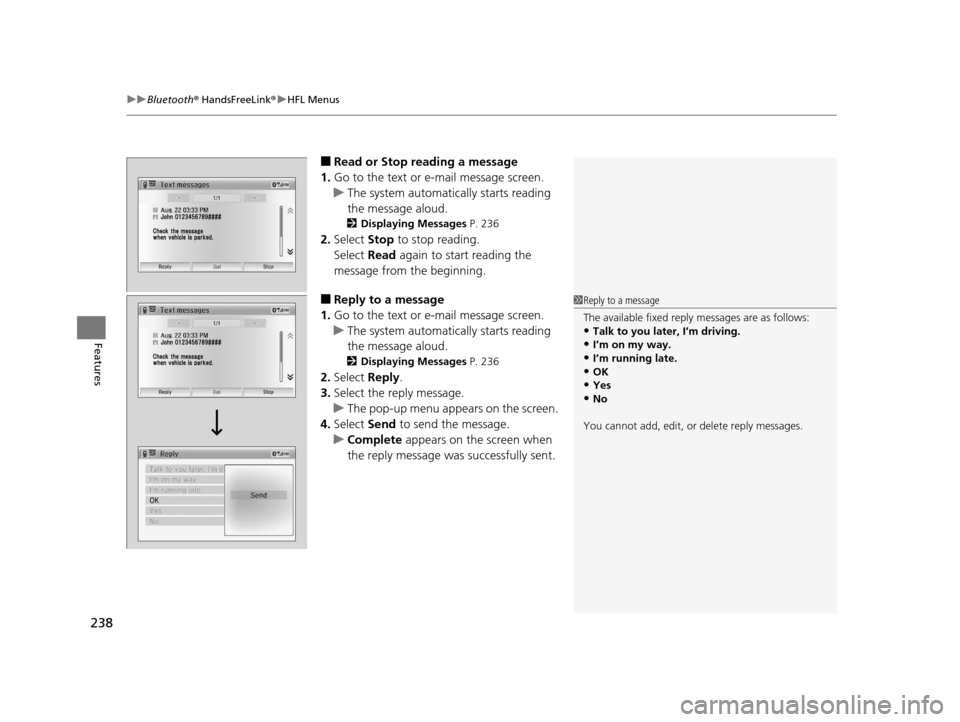
■Reply to a message
1. Go to the text or e-mail message screen.
u The system automatically starts reading
the message aloud.
2 Displaying Messages P. 236
2.Select Reply.
3. Select the reply message.
u The pop-up menu appears on the screen.
4. Select Send to send the message.
u Complete appears on the screen when
the reply message was successfully sent.
1 Reply to a message
The available fixed reply messages are as follows:
•Talk to you later, I’m driving.•I’m on my way.
•I’m running late.
•OK•Yes
•No
You cannot add, edit, or delete reply messages.
16 CR-Z-31SZT6500.book 238 ページ 2015年9月11日 金曜日 午前11時47分
Page 244 of 409
243
Driving
This chapter discusses driving, refueling, and information on items such as accessories.
Before DrivingDriving Preparation .............................. 244
Maximum Load Limit............................ 247
Towing a TrailerTowing Your Vehicle ............................ 250When DrivingStarting the Engine .............................. 251
Precautions While Driving..................... 254
Continuously Variable Transmission
*.... 255
Shifting ................................................ 256
Shifting ................................................ 261Continuously variable transmission models
Manual transmission models
Auto Idle Stop ..................................... 264
Auto Idle Stop ..................................... 267
3-Mode Drive System........................... 270
Plus Sport System ................................ 271
Cruise Control ..................................... 273
Vehicle Stability Assist (VSA ®), aka Electronic
Stability Control (ESC), System ........... 276
LaneWatch
TM*...................................... 278
Tire Pressure Monitoring System (TPMS) ........ 280
Tire Pressure Monitoring System (TPMS) - Required Federal Explanation ............. 282
Continuously variable transmission models
Manual transmission models
BrakingBrake System ........................................ 284
Anti-lock Brake System (ABS) ................ 288
Brake Assist System .............................. 289
Parking Your VehicleWhen Stopped ..................................... 290Multi-View Rear Camera .................. 291
Refueling
Fuel Information ................................... 293
How to Refuel ...................................... 294
Fuel EconomyImproving Fuel Economy....................... 296Accessories and Modifications ........ 297
* Not available on all models
16 CR-Z-31SZT6500.book 243 ページ 2015年9月11日 金曜日 午前11時47分
Page 253 of 409
uuWhen Driving uStarting the Engine
252
Driving
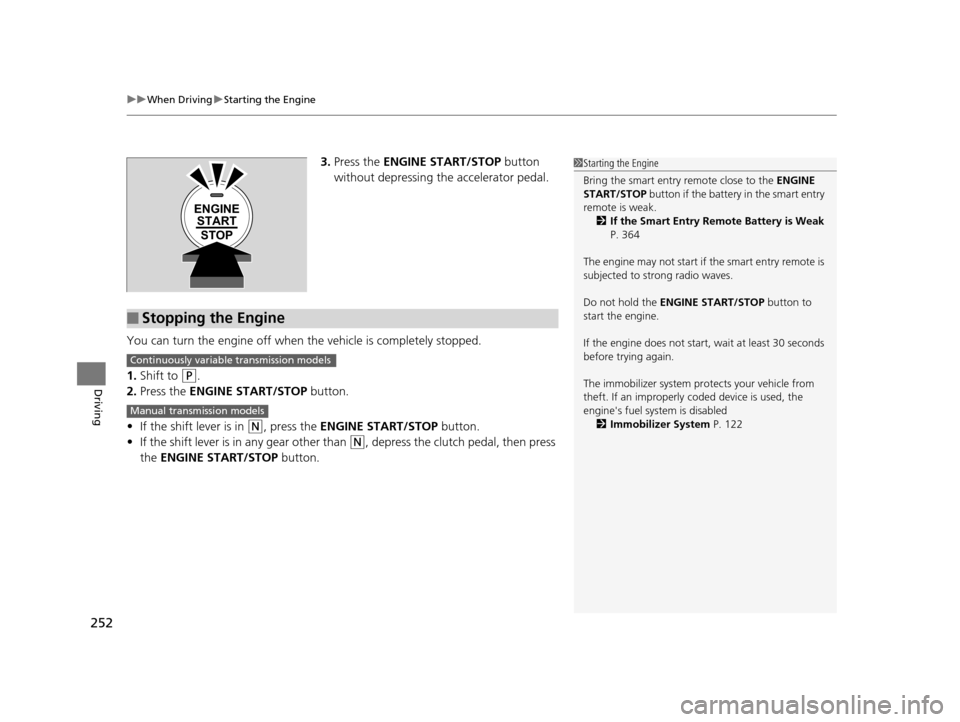
3. Press the ENGINE START/STOP button
without depressing the accelerator pedal.
You can turn the engine off when the vehicle is completely stopped.
1. Shift to
(P.
2. Press the ENGINE START/STOP button.
• If the shift lever is in
(N, press the ENGINE START/STOP button.
• If the shift lever is in any gear other than
(N, depress the clutch pedal, then press
the ENGINE START/STOP button.
1Starting the Engine
Bring the smart entry remote close to the ENGINE
START/STOP button if the battery in the smart entry
remote is weak.
2 If the Smart Entry Remote Battery is Weak
P. 364
The engine may not start if the smart entry remote is
subjected to strong radio waves.
Do not hold the ENGINE START/STOP button to
start the engine.
If the engine does not start, wait at least 30 seconds
before trying again.
The immobilizer system pr otects your vehicle from
theft. If an improperly c oded device is used, the
engine's fuel system is disabled 2 Immobilizer System P. 122
ENGINE
START
STOP
■Stopping the Engine
Continuously variable transmission models
Manual transmission models
16 CR-Z-31SZT6500.book 252 ページ 2015年9月11日 金曜日 午前11時47分
Page 264 of 409
263
uuWhen Driving uShifting
Driving
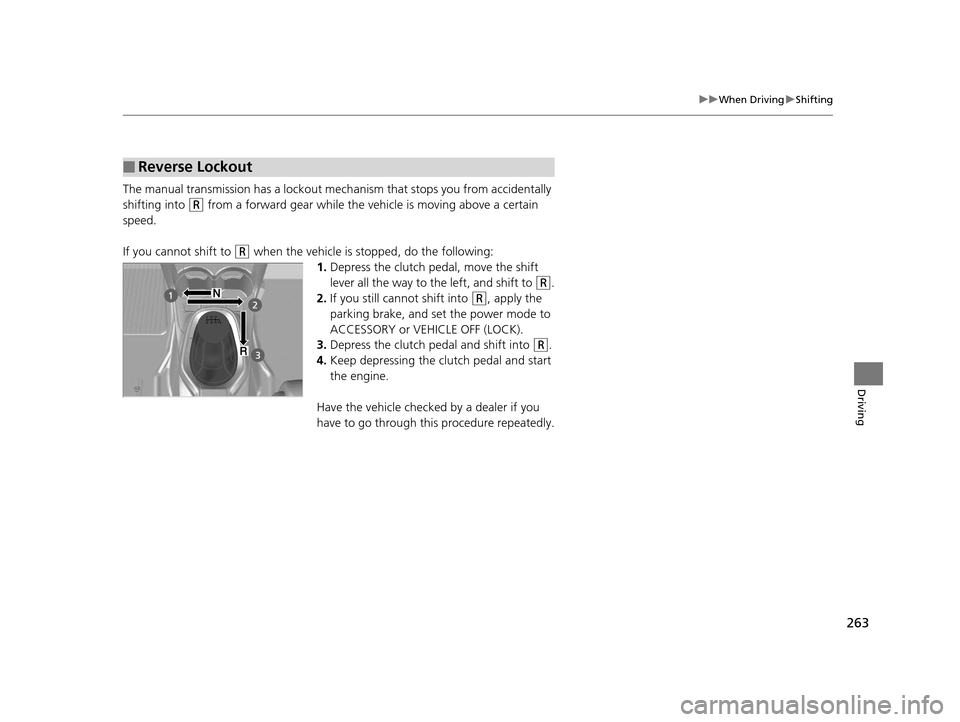
The manual transmission has a lockout mechanism that stops you from accidentally
shifting into
(R from a forward gear while the ve hicle is moving above a certain
speed.
If you cannot shift to
(R when the vehicle is stopped, do the following: 1.Depress the clutch pedal, move the shift
lever all the way to the left, and shift to
(R.
2. If you still cannot shift into
(R, apply the
parking brake, and set the power mode to
ACCESSORY or VEHICLE OFF (LOCK).
3. Depress the clutch pedal and shift into
(R.
4. Keep depressing the clutch pedal and start
the engine.
Have the vehicle checked by a dealer if you
have to go through this procedure repeatedly.
■Reverse Lockout
16 CR-Z-31SZT6500.book 263 ページ 2015年9月11日 金曜日 午前11時47分