sport mode HONDA CR-Z 2016 1.G Quick Guide
[x] Cancel search | Manufacturer: HONDA, Model Year: 2016, Model line: CR-Z, Model: HONDA CR-Z 2016 1.GPages: 64, PDF Size: 4.38 MB
Page 3 of 64
TABLE OF CONTENTS
INDEX
VISUAL INDEX
VOICE COMMAND INDEX
SAFETY
INFORMATION
CUSTOMER
INFORMATION
INSTRUMENT PANEL
SPECIFICATIONS
VEHICLE
CONTROLS
MAINTENANCE
AUDIO AND
CONNECTIVITY
HANDLING THE UNEXPECTED
BLUETOOTH®
HANDSFREELINK®
DRIVING
HONDALINK®
NAVIGATION
Honda Automobile Customer Service
Your authorized Honda dealer should be able to answer any questions you h\
ave
about your vehicle. However, if you are dissatisfied with the information you receive,
you can call Honda Automobile Customer Service (see page 111).
Call (800) 999-1009 (U.S.) or (888) 946-6329 (Canada)
Honda Roadside Assistance
24-hour emergency road service is available to you in the United States \
and Canada
throughout your 3-year/36,000-mile warranty term. Services include jump starting,
flat tire and lockout assistance, towing, and more (limitations apply\
).
Call (866) 864-5211 (U.S.) or (800) 465-7587 (Canada)
This Owner’s Guide is intended to help you quickly get acquainted with your
2016 Honda CR-Z. It provides basic information and instructions on technology and
convenience features, as well as emergency procedures and how to get ass\
istance.
This guide is for vehicles sold in the United States and Canada. It cove\
rs all CR-Z
models, so you may find descriptions of features and equipment that ar\
e not in your
vehicle. Images throughout this guide are from U.S. vehicles and represe\
nt features
and equipment that are available on some, but not all, models.
This guide is not intended to be a substitute for the Owner’s Manual. The Owner
Information CD enclosed in your glove box kit includes the Owner’s Manual,
Navigation Manual, and vehicle and tire warranties in electronic format.\
This
information can be viewed on a computer (PC
or Mac platform) and saved or printed
for your reference. You can also visit owners.honda.com (U.S.) or myhonda.ca
(Canada) to view the complete and most current information.
If you are the first registered owner of your vehicle, you may request\
a complimentary
printed copy of the Owner’s Manual, Navigation Manual, or Vehicle Warranty within
the first six months of vehicle purchase. To request a copy, visit owners.honda.com
(U.S.) and create or log in to your account. In Canada, please request\
a copy from
your Honda dealer.
American Honda Motor Company strives to be proactive in protecting our
environment and natural resources. By using electronic delivery for a co\
nsiderable
portion of the information typically found in a vehicle owner’s manual, we are further
reducing our impact on the environment.
INTRODUCTION TABLE OF CONTENTS
*if equipped
VISUAL INDEX .......................................1
Steering Wheel and Nearby Controls ...1
Dashboard and Other Controls
...........2
SAFETY INFORMATION
........................3
Important Safety Information
..............3
Seat Belts
............................................... 5
Airbags
.................................................... 8
Child Safety
.......................................... 13
Safety Label Locations
.......................18
Reporting Safety Defects
...................19
INSTRUMENT PANEL
.........................20
Malfunction Indicators
......................20
Condition Indicators
...........................22
On/Off Indicators
................................. 23
IMA Battery Charge Level
.................23
Multi-Information Display
.................24
VEHICLE CONTROLS
...........................26
Using the Remote T
ransmitter ..........26
Smart Entry System
.............................27
Door Operation
.................................... 28
Power Window Operation
................29
One-Touch Turn Signal
.......................29
Interior and Exterior Lights
...............30
Wiper Operation
.................................. 31
Adjusting the Seats
............................32
Rear Cargo
........................................... 35
Adjusting the Mirrors
.........................37
Adjusting the Steering Wheel
..........37
Climate Control System
....................38
Seat Heaters*
...................................... 38
Setting the Clock
................................. 39
Customized Features
..........................39
AUDIO AND CONNECTIVITY
.............40
Basic Audio Operation
.......................40HondaLink™
........................................
43
FM/AM Radio ......................................44
Compact Disc (CD)
.............................45
iPod
®......................................................46
USB Flash Drive .................................. 47
Bluetooth
® Audio ................................ 48
Pandora
® .............................................. 49
BLUETOOTH
® HANDSFREELINK® .... 50
Basic HFL Operation
........................... 50
Pairing a Phone
................................... 51
Making a Call
...................................... 52
HondaLink
® Assist .............................. 53
SMS T
ext Messaging and E-Mail* ...54
Siri
® Eyes Free ..................................... 55
NA
VIGATION*
...................................... 56
Basic Navigation Operation
.............56
Entering a Destination
.......................59
Routing
.................................................. 61
DRIVING
................................................ 62
Before Driving
..................................... 62
Maximum Load Limit
..........................64
Starting to Drive
.................................. 66
Shifting
.................................................. 67
Braking
................................................. 70
3-Mode Drive System
.........................71
Plus Sport System
............................... 72
Eco Assist™ System
...........................73
V
ehicle Stability Assist (VSA
®), aka
Electronic Stability Control (ESC)
System
................................................... 75
Cruise Control
...................................... 76
LaneW
atch™*
..................................... 77
Multi-View Rear Camera
................... 78
Refueling
.............................................. 79
Page 4 of 64
| 1
V
ISUAL
I
NDEX
INDEX
VOICE COMMAND
INDEX
CUSTOMER
INFORMATION
SPECIFICATIONS
MAINTENANCE
HANDLING THE UNEXPECTED
DRIVING
NAVIGATION
TABLE OF CONTENTS
VISUAL INDEX
SAFETY
INFORMATION
INSTRUMENT PANEL
VEHICLE
CONTROLS
AUDIO AND
CONNECTIVITY
BLUETOOTH®
HANDSFREELINK®
HONDALINK®
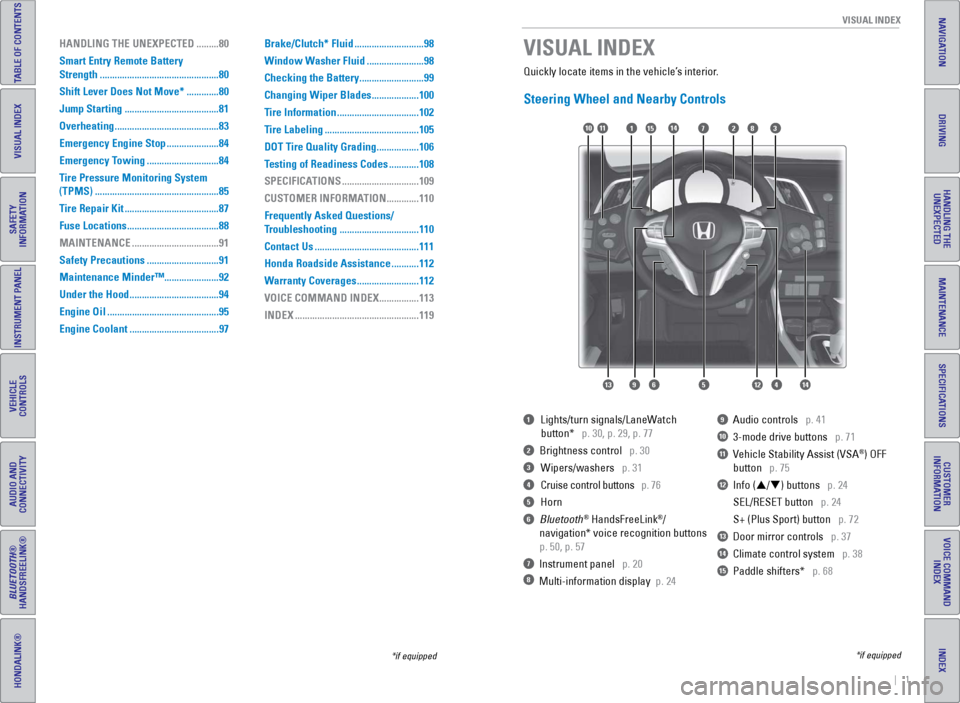
Quickly locate items in the vehicle’s interior.
Steering Wheel and Nearby Controls
1 Lights/turn signals/LaneW atch
button* p. 30, p. 29, p. 77
2 Brightness control p. 30
3 Wipers/washers p. 31
4 Cruise control buttons p. 76
5 Horn
6 Bluetooth® HandsFreeLink®/
navigation* voice recognition buttons
p. 50, p. 57
7 Instrument panel p. 20
8 Multi-information display p. 24
9 Audio controls p. 41
10 3-mode drive buttons p. 71
11 Vehicle Stability Assist (VSA®) OFF
button
p. 75
12 Info (p/q) buttons p. 24
SEL/RESET button
p. 24
S+ (Plus Sport) button
p. 72
13 Door mirror controls p. 37
14 Climate control system p. 38
15 Paddle shifters* p. 68
VISUAL INDEX
*if equipped
*if equipped
7
12564
10
13
14111283
914
15
HANDLING THE UNEXPECTED ......... 80
Smart Entry Remote Battery
Strength
................................................ 80
Shift Lever Does Not Move*
.............80
Jump Starting
...................................... 81
Overheating
.......................................... 83
Emergency Engine Stop
.....................84
Emergency Towing
.............................84
T
ire Pressure Monitoring System
(TPMS)
.................................................. 85
Tire Repair Kit
...................................... 87
Fuse Locations
..................................... 88
MAINTENANCE
................................... 91
Safety Precautions
.............................91
Maintenance Minder™......................92
Under the Hood
.................................... 94
Engine Oil
............................................. 95
Engine Coolant
.................................... 97Brake/Clutch* Fluid
............................
98
Window W asher Fluid .......................98
Checking the Battery
..........................99
Changing Wiper Blades
...................100
Tire Information
.................................102
T
ire Labeling ......................................105
DOT Tire Quality Grading
.................106
Testing of Readiness Codes
............108
SPECIFICATIONS
...............................109
CUSTOMER INFORMA
TION .............110
Frequently Asked Questions/
Troubleshooting
................................110
Contact Us
..........................................111
Honda Roadside Assistance
...........112
Warranty Coverages
.........................112
VOICE COMMAND INDEX
................113
INDEX
..................................................119
Page 10 of 64
12 || 13
S AFETY
S
AFETY
TABLE OF CONTENTS
INDEX
VISUAL INDEX
VOICE COMMAND
INDEX
SAFETY
INFORMATION
CUSTOMER
INFORMATION
INSTRUMENT PANEL
SPECIFICATIONS
VEHICLE
CONTROLS
MAINTENANCE
AUDIO AND
CONNECTIVITY
HANDLING THE UNEXPECTED
BLUETOOTH®
HANDSFREELINK®
DRIVING
HONDALINK®
NAVIGATION
Airbag Care
You do not need to, and should not, perform any maintenance on or replace\
any
airbag system components yourself. However, you should have your vehicle
inspected by a dealer in the following situations:
When the airbags have deployed
If an airbag has inflated, the control unit and other related parts mu\
st be replaced.
Similarly, once an automatic seat belt tensioner has been activated, it must be
replaced.
When the vehicle has been in a moderate-to-severe collision
Even if the airbags did not inflate, have your dealer inspect the foll\
owing: the
driver’s seat position sensor, weight sensors in the passenger’s seat, seat belt
tensioners, and each seat belt that was worn during the crash.
Do not remove or modify a front seat without first consulting a dealer
This would likely disable the driver’s seat position sensor or the weight sensors
in the passenger’s seat. If it is necessary to remove or modify a front seat to
accommodate a person with disabilities, contact a Honda dealer. For U.S.
vehicles, call Honda Automobile Customer Service at (800) 999-1009. Fo\
r Canadian
vehicles, call Honda Canada Customer Relations at (888) 946-6329.
Important Facts About Your AirbagsAlways wear your seat belt properly, and sit upright and as far back from the
steering wheel as possible while allowing full control of the vehicle. A\
passenger
should move their seat as far back from the dashboard as possible.
Do not place hard or sharp objects between yourself and a front airbag. Carrying
hard or sharp objects on your lap, or driving with a pipe or other sharp\
object in
your mouth, can result in injuries if your front airbag inflates.
Do not attach or place objects on the front airbag covers. Objects on the covers
marked SRS AIRBAG could interfere with the proper operation of the airbags or be
propelled inside the vehicle and hurt someone if the airbags inflate.
Do not attach accessories on or near the side airbags. They can interfere with the
proper operation of the airbags, or hurt someone if an airbag inflates\
.
Do not attach any objects to the side windows or roof pillars. They can interfere
with the proper operation of the side curtain airbags.
Do not cover or replace the front seat-back covers. This can prevent your side
airbags from properly deploying during a side impact.
An open glove box can cause serious injury to your passenger in a crash,\
even if the passenger is wearing the seat belt.
Always keep the glove box closed while driving.
WARNING
Child Safety
Each year, many children are injured or killed in vehicle crashes because they are
either unrestrained or not properly restrained. In fact, vehicle collisi\
ons are the
number one cause of death of children ages 12 and under.
The National Highway Traffic Safety Administration and Transport Canada
recommend that all children ages 12 and under be properly restrained in \
a rear seat.
Some states or provinces/territories have laws restricting where childre\
n may ride.
To reduce the number of child deaths and injuries, every state, Canadian \
province
and territory requires that infants and children be properly restrained \
when they ride
in a vehicle.
Since this vehicle does not have a back seat, Honda recommends that you \
do not
carry a child, age 12 or under, as a passenger because:•
An inflating front or side airbag can injure or kill a child sitting i\
n the pas
senger’s
seat.
•
A child in the passenger’
s seat is more likely to interfere with the driver’s ability
to safely control the vehicle.
•
Statistics show that children of all sizes and ages are safer when they \
ar
e
properly restrained in a rear seat. Because this vehicle does not have a\
rear
seat, we recommend that you do not carry a child age 12 or under in this\
vehicle.
•
Any child who is too small to wear a seat belt correctly must be restrai\
n
ed in an
approved child seat that is properly secured to the vehicle using either\
the lap
belt portion of the lap/shoulder belt.
In addition: •
Never hold a child on your lap because it is impossible to protect them \
in t
he
event of a collision.
•
Never put a seat belt over yourself and a child. During a crash, the bel\
t w
ould
likely press deep into the child and cause serious or fatal injuries.
•
Never let two children use the same seat belt. Both children could be ve\
r
y
seriously injured in a crash.
•
Do not allow children to operate the doors, windows, or seat adjusters.
•
Do not leave children in the vehicle unattended, especially in hot weath\
er when
the inside of the vehicle can get hot enough to kill them. They could al\
so act
ivate
vehicle controls, causing it to move unexpectedly.
Allowing a child to play with a seat belt or wrap one around their neck \
can
result in serious injury or death.
Instruct children not to play with any seat belt and make sure any unuse\
d
seat belt a child can reach is buckled, fully retracted, and locked.
WARNING
Page 13 of 64
18 || 19
S AFETY
S
AFETY
TABLE OF CONTENTS
INDEX
VISUAL INDEX
VOICE COMMAND
INDEX
SAFETY
INFORMATION
CUSTOMER
INFORMATION
INSTRUMENT PANEL
SPECIFICATIONS
VEHICLE
CONTROLS
MAINTENANCE
AUDIO AND
CONNECTIVITY
HANDLING THE UNEXPECTED
BLUETOOTH®
HANDSFREELINK®
DRIVING
HONDALINK®
NAVIGATION
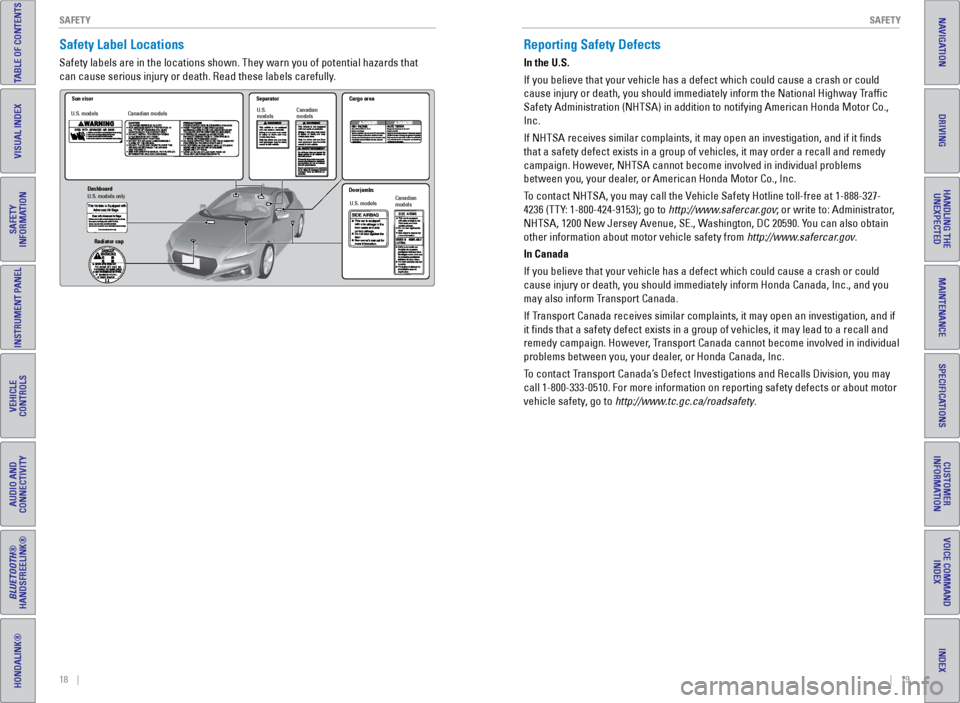
Safety Label Locations
Safety labels are in the locations shown. They warn you of potential haz\
ards that
can cause serious injury or death. Read these labels carefully.
Sun visor
Canadian models Separato
r
Canadian
models
U.S. models U.S.
models Cargo area
Doorjambs U.S. models Canadian
models
Dashboard
U.S. models onl
y
Radiator ca p
Reporting Safety Defects
In the U.S.
If you believe that your vehicle has a defect which could cause a crash \
or could
cause injury or death, you should immediately inform the National Highway Traffic
Safety Administration (NHTSA) in addition to notifying American Honda \
Motor Co.,
Inc.
If NHTSA receives similar complaints, it may open an investigation, and \
if it finds
that a safety defect exists in a group of vehicles, it may order a recal\
l and remedy
campaign. However, NHTSA cannot become involved in individual problems
between you, your dealer, or American Honda Motor Co., Inc.
To contact NHTSA, you may call the Vehicle Safety Hotline toll-free at 1-888-327-
4236 (TTY: 1-800-424-9153); go to http://www.safercar.gov; or write to: Administrator,
NHTSA, 1200 New Jersey Avenue, SE., Washington, DC 20590. You can also obtain
other information about motor vehicle safety from http://www.safercar.gov.
In Canada
If you believe that your vehicle has a defect which could cause a crash \
or could
cause injury or death, you should immediately inform Honda Canada, Inc.,\
and you
may also inform Transport Canada.
If Transport Canada receives similar complaints, it may open an investigation, and if
it finds that a safety defect exists in a group of vehicles, it may le\
ad to a recall and
remedy campaign. However, Transport Canada cannot become involved in individual
problems between you, your dealer, or Honda Canada, Inc.
To contact Transport Canada’s Defect Investigations and Recalls Division, you may
call 1-800-333-0510. For more information on reporting safety defects or\
about motor
vehicle safety, go to http://www.tc.gc.ca/roadsafety.
Page 15 of 64
22 || 23
I NSTRUMENT P
ANELI
NSTRUMENT P
ANEL
TABLE OF CONTENTS
INDEX
VISUAL INDEX
VOICE COMMAND
INDEX
SAFETY
INFORMATION
CUSTOMER
INFORMATION
INSTRUMENT PANEL
SPECIFICATIONS
VEHICLE
CONTROLS
MAINTENANCE
AUDIO AND
CONNECTIVITY
HANDLING THE UNEXPECTED
BLUETOOTH®
HANDSFREELINK®
DRIVING
HONDALINK®
NAVIGATION
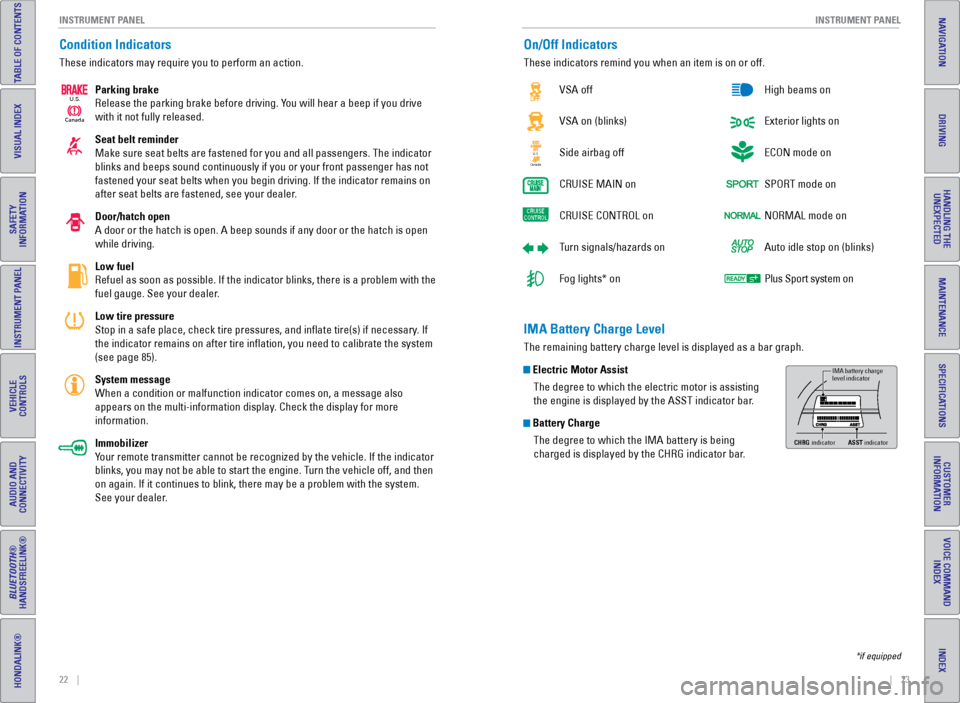
Condition Indicators
These indicators may require you to perform an action.
Parking brake
Release the parking brake before driving. You will hear a beep if you drive
with it not fully released.
Seat belt reminder
Make sure seat belts are fastened for you and all passengers. The indica\
tor
blinks and beeps sound continuously if you or your front passenger has not
fastened your seat belts when you begin driving. If the indicator remain\
s on
after seat belts are fastened, see your dealer.
Door/hatch open
A door or the hatch is open. A beep sounds if any door or the hatch is o\
pen
while driving.
Low fuel
Refuel as soon as possible. If the indicator blinks, there is a problem \
with the
fuel gauge. See your dealer.
Low tire pressure
Stop in a safe place, check tire pressures, and inflate tire(s) if n\
ecessary. If
the indicator remains on after tire inflation, you need to calibrate t\
he system
(see page 85).
System message
When a condition or malfunction indicator comes on, a message also
appears on the multi-information display. Check the display for more
information.
Immobilizer
Your remote transmitter cannot be recognized by the vehicle. If the indic\
ator
blinks, you may not be able to start the engine. Turn the vehicle off, and then
on again. If it continues to blink, there may be a problem with the syst\
em.
See your dealer.
Canada
U.S.
On/Off Indicators
These indicators remind you when an item is on or off.
VSA off
VSA on (blinks)
Side airbag off
CRUISE
MAIN on
CRUISE
CONTROL on
Turn signals/hazards on
Fog lights* on High beams on
Exterior lights on
ECON mode on
SPORT mode on
NORMAL mode on
Auto idle stop on (blinks)
Plus Sport system on
CanadaU.S.
*if equipped
IMA Battery Charge Level
The remaining battery charge level is displayed as a bar graph.
Electric Motor Assist
The degree to which the electric motor is assisting
the engine is displayed by the ASST indicator bar.
Battery ChargeThe degree to which the IMA battery is being
charged is displayed by the CHRG indicator bar.
IMA battery charge
level indicator
CHRG indicato rASST indicato r
Page 38 of 64
68 || 69
DRIVING
DRIVING
TABLE OF CONTENTS
INDEX
VISUAL INDEX
VOICE COMMAND
INDEX
SAFETY
INFORMATION
CUSTOMER
INFORMATION
INSTRUMENT PANEL
SPECIFICATIONS
VEHICLE
CONTROLS
MAINTENANCE
AUDIO AND
CONNECTIVITY
HANDLING THE UNEXPECTED
BLUETOOTH®
HANDSFREELINK®
DRIVING
HONDALINK®
NAVIGATION
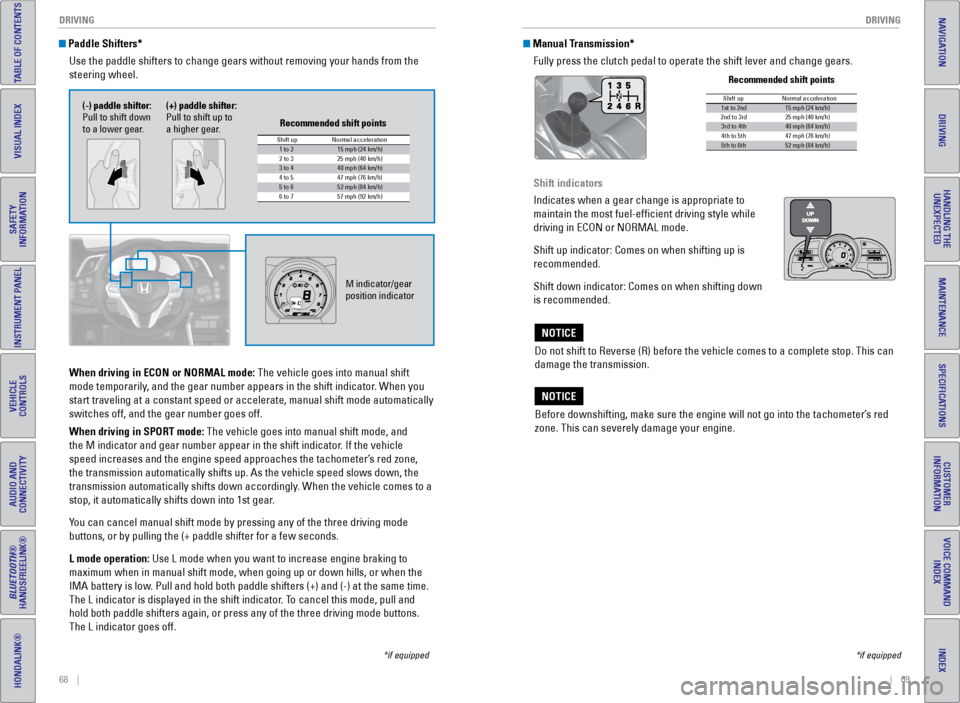
Paddle Shifters*
Use the paddle shifters to change gears without removing your hands from\
the
steering wheel.
*if equipped
When driving in ECON or NORMAL mode: The vehicle goes into manual shift
mode temporarily, and the gear number appears in the shift indicator. When you
start traveling at a constant speed or accelerate, manual shift mode aut\
omatically
switches off, and the gear number goes off.
When driving in SPORT mode: The vehicle goes into manual shift mode, and
the M indicator and gear number appear in the shift indicator. If the vehicle
speed increases and the engine speed approaches the tachometer’s red zone,
the transmission automatically shifts up. As the vehicle speed slows down, the
transmission automatically shifts down accordingly. When the vehicle comes to a
stop, it automatically shifts down into 1st gear.
You can cancel manual shift mode by pressing any of the three driving mod\
e
buttons, or by pulling the (+ paddle shifter for a few seconds.
L mode operation: Use L mode when you want to increase engine braking to
maximum when in manual shift mode, when going up or down hills, or when the
IMA battery is low. Pull and hold both paddle shifters (+) and (-) at the same time.
The L indicator is displayed in the shift indicator. To cancel this mode, pull and
hold both paddle shifters again, or press any of the three driving mode \
buttons.
The L indicator goes off.
M indicator/gear
position indicator
Shift up1 to 215 mph (24 km/h)
2 to 3 25 mph (40 km/h)
3 to 440 mph (64 km/h)
4 to 5
5 to 652 mph (84 km/h)
6 to 7 57 mph (92 km/h)
Normal acceleration
47 mph (76 km/h)
Recommended shift points
(-) paddle shifter:
Pull to shift down
to a lower gear. (+) paddle shifter:
Pull to shift up to
a higher gear.
Manual Transmission*
Fully press the clutch pedal to operate the shift lever and change gears\
.
Do not shift to Reverse (R) before the vehicle comes to a complete sto\
p. This can
damage the transmission.
NOTICE
Before downshifting, make sure the engine will not go into the tachomete\
r’s red
zone. This can severely damage your engine.
NOTICE
Shift up1st to 2nd15 mph (24 km/h)
2nd to 3rd 25 mph (40 km/h)
3rd to 4th40 mph (64 km/h)
4th to 5th 47 mph (76 km/h)
5th to 6th52 mph (84 km/h)
Normal acceleration
Recommended shift points
*if equipped
Shift indicators
Indicates when a gear change is appropriate to
maintain the most fuel-efficient driving style while
driving in ECON or NORMAL mode.
Shift up indicator: Comes on when shifting up is
recommended.
Shift down indicator: Comes on when shifting down
is recommended.
READY
Page 39 of 64
70 || 71
DRIVING
DRIVING
TABLE OF CONTENTS
INDEX
VISUAL INDEX
VOICE COMMAND
INDEX
SAFETY
INFORMATION
CUSTOMER
INFORMATION
INSTRUMENT PANEL
SPECIFICATIONS
VEHICLE
CONTROLS
MAINTENANCE
AUDIO AND
CONNECTIVITY
HANDLING THE UNEXPECTED
BLUETOOTH®
HANDSFREELINK®
DRIVING
HONDALINK®
NAVIGATION
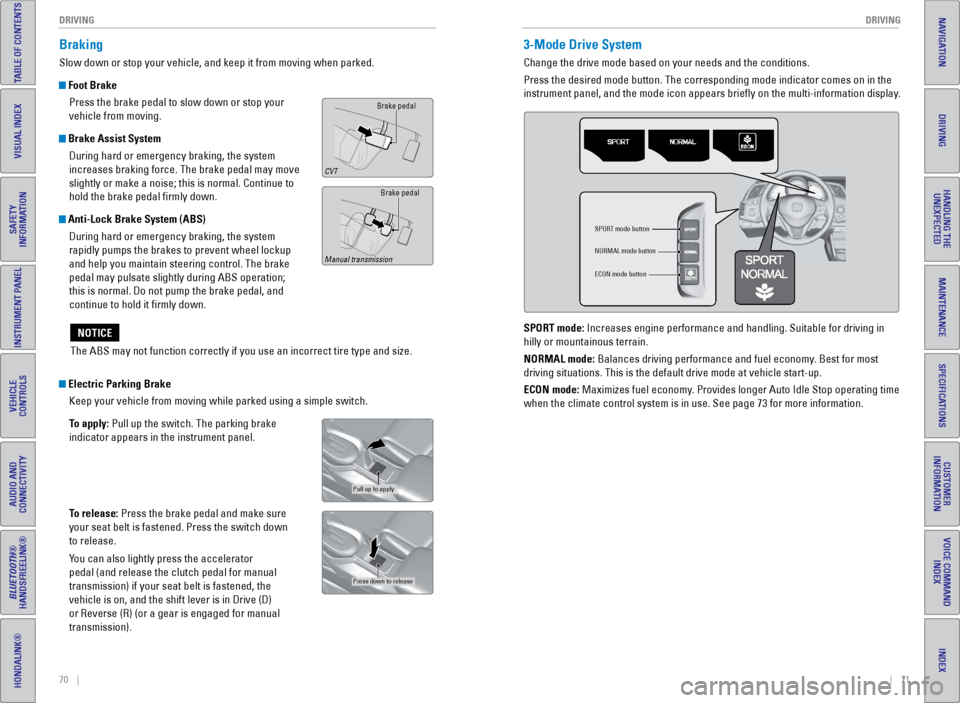
Braking
Slow down or stop your vehicle, and keep it from moving when parked.
Foot Brake
Press the brake pedal to slow down or stop your
vehicle from moving.
Brake Assist System During hard or emergency braking, the system
increases braking force. The brake pedal may move
slightly or make a noise; this is normal. Continue to
hold the brake pedal firmly down.
Anti-Lock Brake System (ABS) During hard or emergency braking, the system
rapidly pumps the brakes to prevent wheel lockup
and help you maintain steering control. The brake
pedal may pulsate slightly during ABS operation;
this is normal. Do not pump the brake pedal, and
continue to hold it firmly down.
Electric Parking Brake Keep your vehicle from moving while parked using a simple switch.
To apply: Pull up the switch. The parking brake
indicator appears in the instrument panel.
To release: Press the brake pedal and make sure
your seat belt is fastened. Press the switch down
to release.
You can also lightly press the accelerator
pedal (and release the clutch pedal for manual
transmission) if your seat belt is fastened, the
vehicle is on, and the shift lever is in Drive (D)
or Reverse (R) (or a gear is engaged for manual
transmission).
Brake pedal
CVT
Brake pedal
Manual transmission
Pull up to apply
Press down to release
The ABS may not function correctly if you use an incorrect tire type and\
size.
NOTICE
3-Mode Drive System
Change the drive mode based on your needs and the conditions.
Press the desired mode button. The corresponding mode indicator comes on\
in the
instrument panel, and the mode icon appears briefly on the multi-infor\
mation display.
SPORT mode button
NORMAL mode button
ECON mode button
SPORT mode: Increases engine performance and handling. Suitable for driving in
hilly or mountainous terrain.
NORMAL mode: Balances driving performance and fuel economy. Best for most
driving situations. This is the default drive mode at vehicle start-up.
ECON mode: Maximizes fuel economy. Provides longer Auto Idle Stop operating time
when the climate control system is in use. See page 73 for more information.
Page 40 of 64
72 || 73
DRIVING
DRIVING
TABLE OF CONTENTS
INDEX
VISUAL INDEX
VOICE COMMAND
INDEX
SAFETY
INFORMATION
CUSTOMER
INFORMATION
INSTRUMENT PANEL
SPECIFICATIONS
VEHICLE
CONTROLS
MAINTENANCE
AUDIO AND
CONNECTIVITY
HANDLING THE UNEXPECTED
BLUETOOTH®
HANDSFREELINK®
DRIVING
HONDALINK®
NAVIGATION
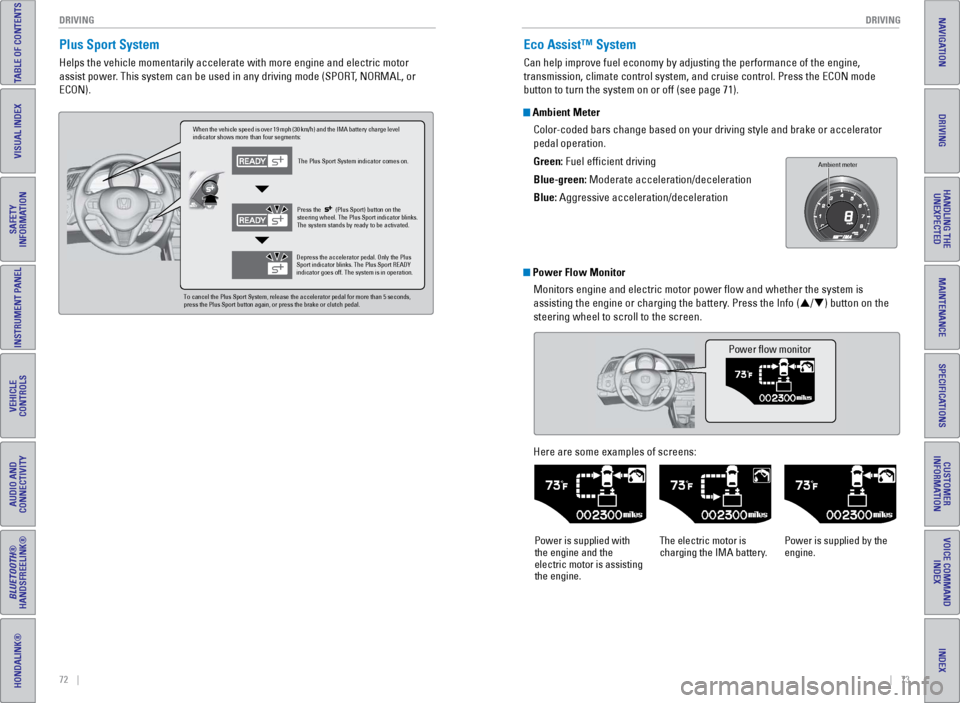
Plus Sport System
Helps the vehicle momentarily accelerate with more engine and electric m\
otor
assist power. This system can be used in any driving mode (SPORT, NORMAL, or
ECON).
When the vehicle speed is over 19 mph (30 km/h) and the IMA battery charge level
indicator shows more than four segments:
The Plus Sport System indicator comes on.
Depress the accelerator pedal. Only the Plus
Sport indicator blinks. The Plus Sport READY
indicator goes off. The system is in operation. Press the
(Plus Sport) button on th e
steering wheel. The Plus Sport indicator blinks.
The system stands by ready to be activated.
To cancel the Plus Sport System, release the accelerator pedal for more \
than 5 seconds,
press the Plus Sport button again, or press the brake or clutch pedal.
Eco Assist™ System
Can help improve fuel economy by adjusting the performance of the engine\
,
transmission, climate control system, and cruise control. Press the ECON\
mode
button to turn the system on or off (see page 71).
Ambient Meter
Color-coded bars change based on your driving style and brake or accelerator \
pedal operation.
Green: Fuel efficient driving
Blue-green: Moderate acceleration/deceleration
Blue: Aggressive acceleration/deceleration
Ambient mete r
Power Flow Monitor
Monitors engine and electric motor power flow and whether the system i\
s
assisting the engine or charging the battery. Press the Info (p/q) button on the
steering wheel to scroll to the screen.
Power flow monitor
Here are some examples of screens:
Power is supplied with
the engine and the
electric motor is assisting
the engine. The electric motor is
charging the IMA battery.
Power is supplied by the
engine.
Page 46 of 64
84 || 85
HANDLING THE UNEXPECTED
HANDLING THE UNEXPECTED
TABLE OF CONTENTS
INDEX
VISUAL INDEX
VOICE COMMAND
INDEX
SAFETY
INFORMATION
CUSTOMER
INFORMATION
INSTRUMENT PANEL
SPECIFICATIONS
VEHICLE
CONTROLS
MAINTENANCE
AUDIO AND
CONNECTIVITY
HANDLING THE UNEXPECTED
BLUETOOTH®
HANDSFREELINK®
DRIVING
HONDALINK®
NAVIGATION
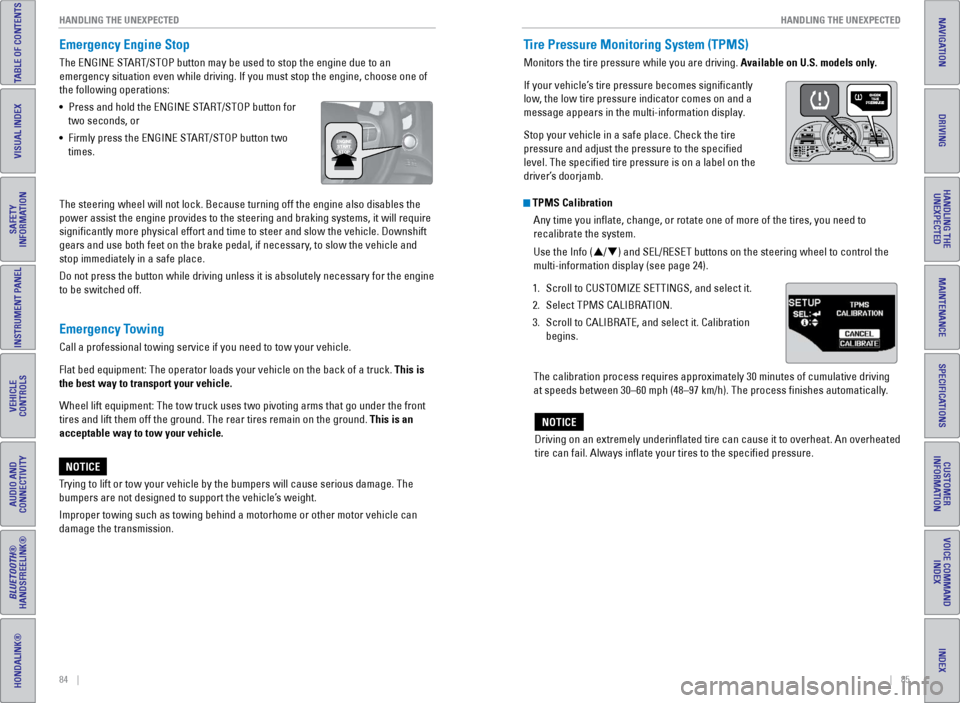
Emergency Engine Stop
The ENGINE START/STOP button may be used to stop the engine due to an
emergency situation even while driving. If you must stop the engine, cho\
ose one of
the following operations:
•
Press and hold the ENGINE ST
ART/STOP button for
two seconds, or
•
Firmly press the ENGINE ST
ART/STOP button two
times.
The steering wheel will not lock. Because turning off the engine also di\
sables the
power assist the engine provides to the steering and braking systems, it\
will require
significantly more physical effort and time to steer and slow the vehi\
cle. Downshift
gears and use both feet on the brake pedal, if necessary, to slow the vehicle and
stop immediately in a safe place.
Do not press the button while driving unless it is absolutely necessary \
for the engine
to be switched off.
Trying to lift or tow your vehicle by the bumpers will cause serious dama\
ge. The
bumpers are not designed to support the vehicle’s weight.
Improper towing such as towing behind a motorhome or other motor vehicle\
can
damage the transmission.
NOTICE
Emergency Towing
Call a professional towing service if you need to tow your vehicle.
Flat bed equipment: The operator loads your vehicle on the back of a tru\
ck. This is
the best way to transport your vehicle.
Wheel lift equipment: The tow truck uses two pivoting arms that go under\
the front
tires and lift them off the ground. The rear tires remain on the ground.\
This is an
acceptable way to tow your vehicle.
Tire Pressure Monitoring System (TPMS)
Monitors the tire pressure while you are driving. Available on U.S. models only.
If your vehicle’s tire pressure becomes significantly
low, the low tire pressure indicator comes on and a
message appears in the multi-information display.
Stop your vehicle in a safe place. Check the tire
pressure and adjust the pressure to the specified
level. The specified tire pressure is on a label on the
driver’s doorjamb.
TPMS Calibration Any time you inflate, change, or rotate one of more of the tires, you \
need to
recalibrate the system.
Use the Info (p/q) and SEL/RESET buttons on the steering wheel to control the
multi-information display (see page 24).
1.
Scroll to CUSTOMIZE SETTINGS, and select it.
2.
Select TPMS CALIBRA
TION.
3.
Scroll to CALIBRA
TE, and select it. Calibration
begins.
The calibration process requires approximately 30 minutes of cumulative driving
at speeds between 30–60 mph (48–97 km/h). The process finishes\
automatically.
Driving on an extremely underinflated tire can cause it to overheat. A\
n overheated
tire can fail. Always inflate your tires to the specified pressure.
NOTICE
READY
Page 56 of 64

104 || 105
MAINTENANCE
MAINTENANCE
TABLE OF CONTENTS
INDEX
VISUAL INDEX
VOICE COMMAND
INDEX
SAFETY
INFORMATION
CUSTOMER
INFORMATION
INSTRUMENT PANEL
SPECIFICATIONS
VEHICLE
CONTROLS
MAINTENANCE
AUDIO AND
CONNECTIVITY
HANDLING THE UNEXPECTED
BLUETOOTH®
HANDSFREELINK®
DRIVING
HONDALINK®
NAVIGATION
Tire Service Life
The life of your tires is dependent on many factors, including driving h\
abits, road
conditions, vehicle loading, inflation pressure, maintenance history, speed, and
environmental conditions (even when the tires are not in use).
In addition to regular inspections and inflation pressure maintenance,\
it is
recommended that you have annual inspections performed once the tires re\
ach
five years old. All tires, including the spare, should be removed from\
service after
10 years from the date of manufacture, regardless of their condition or \
state of
wear.
Winter TiresIf driving on snowy or frozen roads, mount all season tires marked “M\
+S”, snow
tires, or tire chains; reduce speed; and maintain sufficient distance \
between
vehicles when driving. For winter tires, select the size and load ranges\
that are the
same as the original tires, and mount them to all four wheels.
Tire ChainsBecause your vehicle has limited tire clearance, we strongly recommend u\
sing
the following chains:
Models with P195/55 R16 tires: Cable-type: SCC Radial Chain SC1030
Models with 205/45 R17 tires: Do not install tire chains.
Install tire chains on the front tires only. Mount chains as tightly as you can, and
make sure that they do not touch the brake lines or suspension.
Using the wrong chains, or not properly installing chains, can damage th\
e
brake lines and cause a crash in which you can be seriously injured or k\
illed.
Follow all instructions in this guide regarding the selection and use of\
tire
chains.
WARNING
Traction devices that are the wrong size or improperly installed can dama\
ge your
vehicle’s brake lines, suspension, body, and wheels. Stop driving if they are hitting
any part of the vehicle.
NOTICE
Tire Labeling
The tires that came on your vehicle have a number of markings. Those you\
should be aware of are described below.
Here is an example of what each marking means:
P195/55R16 86V
•
P: vehicle type (P indicates passenger
vehicle)
•
195: tire width in millimeters
•
55: aspect ratio (tire section height as a
percentage of its width)
•
R: tire construction code (radial)
•
16: rim diameter in inches
•
86: load index (code indicating maximum
load tire can carry)
•
H: speed symbol (code indicating maximum speed rating)
Tire Identification Number (TIN)The tire identification number
(TIN) is a group of numbers
and letters that look like the
example below. TIN is located
on the sidewall of the tire.
Glossary of Tire TerminologyCold Tire Pressure – The tire air pressure when the vehicle has been
parked for at least three hours or driven less than 1 mile (1.6 km).
Load Rating – The maximum load that a tire is rated to carry for a gi\
ven
inflation pressure.
Maximum Inflation Pressure – The maximum tire air pressure that the\
tire
can hold.
Maximum Load Rating – The load rating for a tire at the maximum
permissible inflation pressure for that tire.
Recommended Inflation Pressure – The cold tire inflation pressure\
recommended by the manufacturer.
Treadwear Indicators (TWI) – The projections within the principal gr\
ooves
designed to give a visual indication of the degrees of wear of the tread\
.
Tire size
Tire
identication
number (TIN)
Maximum
tire load
Maximum
tire pressure
Tire size
DOT B97R FW6X 2209\n
DOT: This in\ficat\bs t\nhat th\b tir\b m\b\bts all
r\bquir\bm\bnts of th\b U.S\n. D\bpartm\bnt of
Transportation.
B97R: Manufactur\br’s \ni\f\bntifcation mar
FW6X: Tir\b typ\b co\f\b
22 09: Dat\b of Transp\nortation
Year
Week