cooling HONDA CROSSTOUR 2013 1.G User Guide
[x] Cancel search | Manufacturer: HONDA, Model Year: 2013, Model line: CROSSTOUR, Model: HONDA CROSSTOUR 2013 1.GPages: 573, PDF Size: 25.21 MB
Page 420 of 573
419
uuTowing a TraileruTowing Your Vehicle
Driving
•Monitor your temperature gauge. If it nears the red (Hot) mark, turn off the
heating and cooling system *
/climate control system *
and reduce speed. Pull to the
side of the road safely to cool down the engine if necessary.
• Shift to the
(S or (d position if the transmission shifts frequently.
Towing Your Vehicle
Your vehicle is not designed to be towed behind a motor home. If your vehicle needs
to be towed in an emergency, refer to the emergency towing information.
2 Emergency Towing P. 542
■Driving in Hilly Terrain
* Not available on all models
Main MenuTable of contents
Page 421 of 573
420
Driving
When Driving
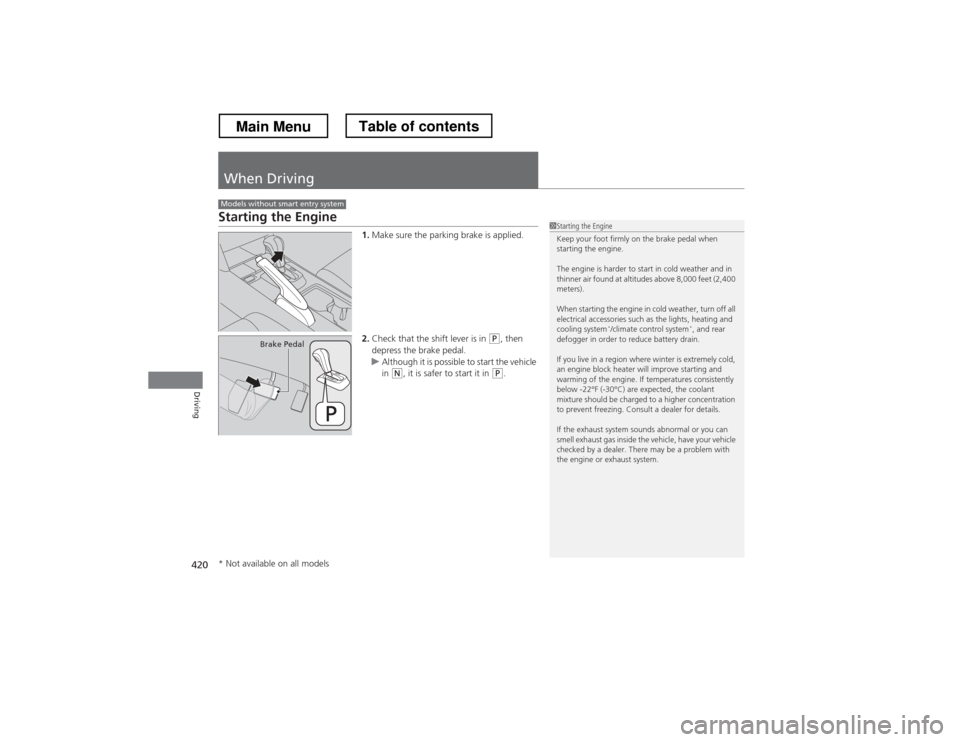
Starting the Engine1.Make sure the parking brake is applied.
2. Check that the shift lever is in
(P , then
depress the brake pedal.
uAlthough it is possible to start the vehicle
in (N , it is safer to start it in (P.
Models without smart entry system
1Starting the Engine
Keep your foot firmly on the brake pedal when
starting the engine.
The engine is harder to start in cold weather and in
thinner air found at altitudes above 8,000 feet (2,400 meters).
When starting the engine in cold weather, turn off all
electrical accessories such as the lights, heating and
cooling system *
/climate control system *
, and rear
defogger in order to reduce battery drain.
If you live in a region where winter is extremely cold,
an engine block heater will improve starting and
warming of the engine. If temperatures consistently
below -22°F (-30°C) are expected, the coolant
mixture should be charged to a higher concentration
to prevent freezing. Consult a dealer for details.
If the exhaust system sounds abnormal or you can
smell exhaust gas inside the vehicle, have your vehicle
checked by a dealer. There may be a problem with
the engine or exhaust system.
Brake Pedal
* Not available on all models
Main MenuTable of contents
Page 479 of 573
478
uuMaintenance Under the HooduEngine Coolant
Maintenance
Engine Coolant
This coolant is premixed with 50% antifreeze and 50% water. Do not add any
straight antifreeze or water.
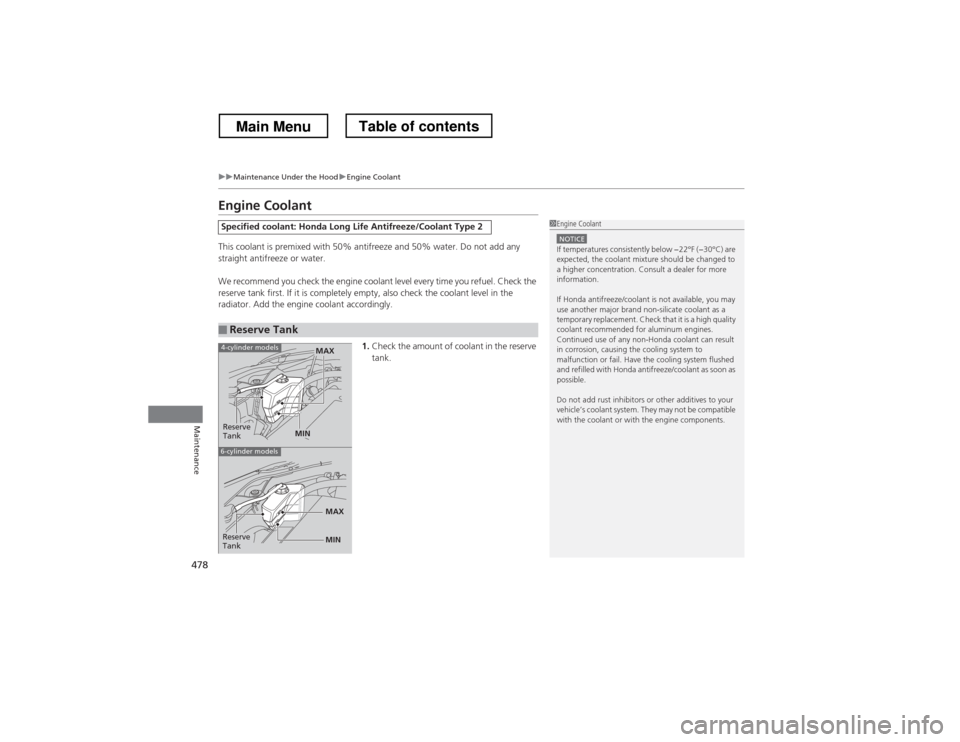
We recommend you check the engine coolant level every time you refuel. Check the
reserve tank first. If it is completely empty, also check the coolant level in the
radiator. Add the engine coolant accordingly.1.Check the amount of coolant in the reserve tank.
Specified coolant: Honda Long Life Antifreeze/Coolant Type 2
■Reserve Tank
1Engine Coolant
NOTICEIf temperatures consistently below −22°F (−30°C) are
expected, the coolant mixture should be changed to
a higher concentration. Consult a dealer for more information.
If Honda antifreeze/coolant is not available, you may
use another major brand non-silicate coolant as a
temporary replacement. Check that it is a high quality
coolant recommended for aluminum engines.
Continued use of any non-Honda coolant can result
in corrosion, causing the cooling system to
malfunction or fail. Have the cooling system flushed
and refilled with Honda antifreeze/coolant as soon as
possible.
Do not add rust inhibitors or other additives to your
vehicle’s coolant system. They may not be compatible
with the coolant or with the engine components.
Reserve
Tank
MAX
MIN
4-cylinder models
6-cylinder models
MIN
MAXReserve
Tank
Main MenuTable of contents
Page 480 of 573
479
uuMaintenance Under the HooduEngine Coolant
Maintenance
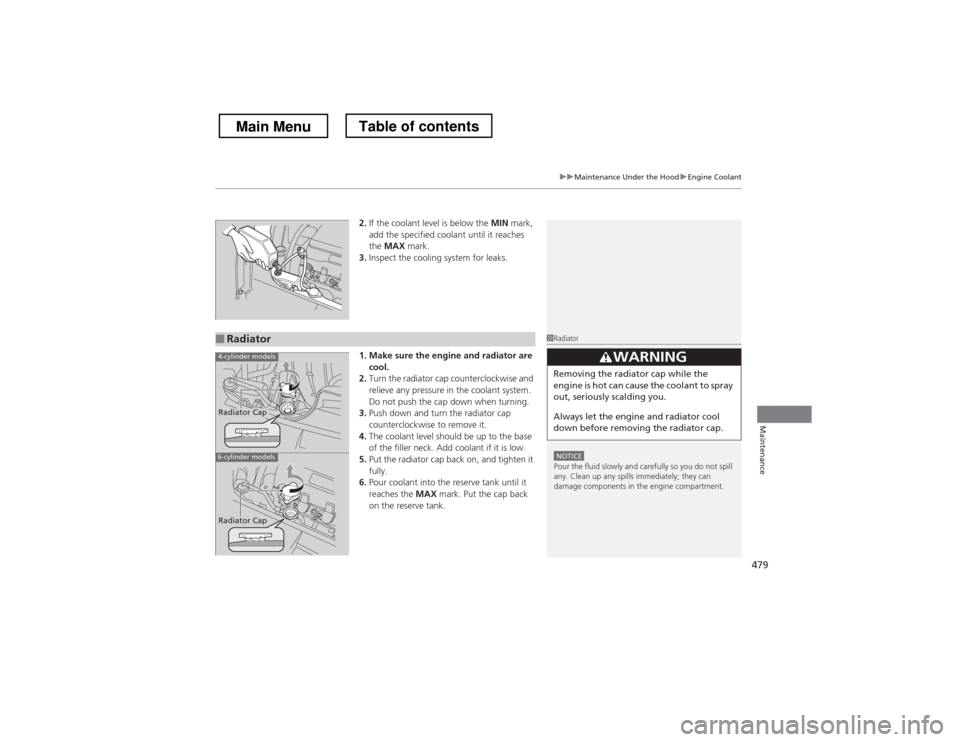
2.If the coolant level is below the MIN mark,
add the specified coolant until it reaches the MAX mark.
3. Inspect the cooling system for leaks.
1. Make sure the engine and radiator are cool.
2. Turn the radiator cap counterclockwise and
relieve any pressure in the coolant system.
Do not push the cap down when turning.
3. Push down and turn the radiator cap
counterclockwise to remove it.
4. The coolant level should be up to the base
of the filler neck. Add coolant if it is low.
5. Put the radiator cap back on, and tighten it fully.
6. Pour coolant into the reserve tank until it reaches the MAX mark. Put the cap back
on the reserve tank.
■Radiator1Radiator
NOTICEPour the fluid slowly and carefully so you do not spill
any. Clean up any spills immediately; they can
damage components in the engine compartment.
33WARNING
Removing the radiator cap while the
engine is hot can cause the coolant to spray
out, seriously scalding you.
Always let the engine and radiator cool
down before removing the radiator cap.
4-cylinder models
6-cylinder models
Radiator Cap
Radiator Cap
Main MenuTable of contents
Page 510 of 573
509
Maintenance
Heating and Cooling System*/Climate Control System* Maintenance
Dust and Pollen Filter
The heating and cooling system*
/climate control system *
is equipped with a dust
and pollen filter that collects pollen, dust, and other debris in the air. The
Maintenance Minder TM
messages will let you know when to replace the filter.
We recommend that you replace the dust and pollen filter sooner when using your
vehicle in areas with high concentrations of dust.
1Dust and Pollen Filter
If the airflow from the heating and cooling system *
/
climate control system *
deteriorates noticeably, and
the windows fog up easily, the filter may need to be
replaced. Please contact a dealer for replacement.
* Not available on all models
Main MenuTable of contents
Page 534 of 573
533
uuOverheatinguHow to Handle Overheating
Handling the Unexpected
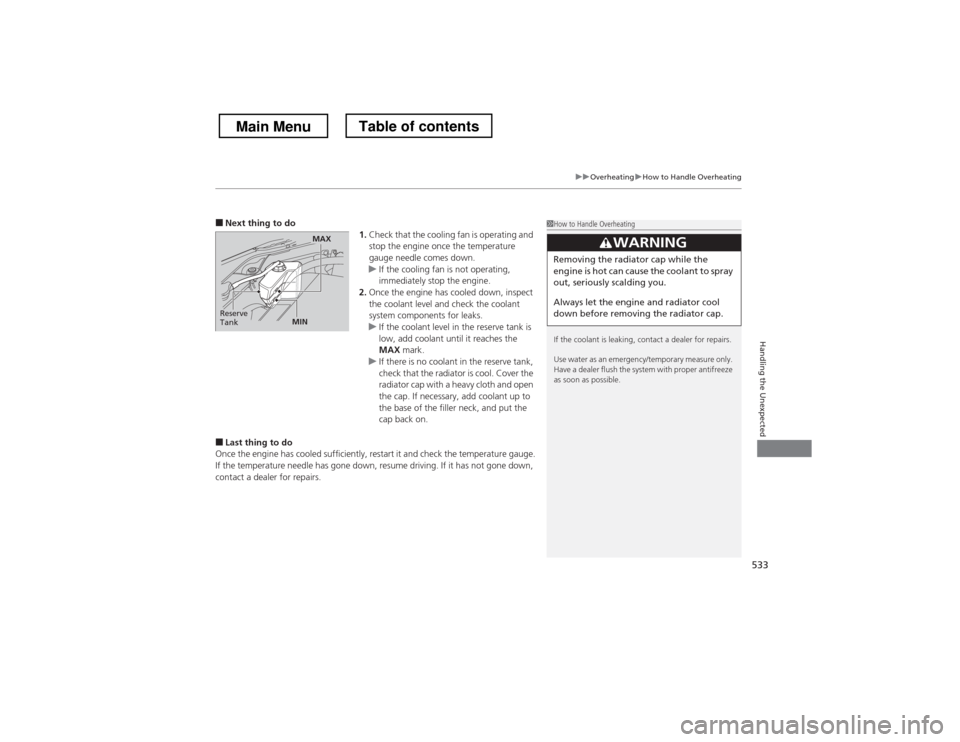
■Next thing to do
1.Check that the cooling fan is operating and
stop the engine once the temperature
gauge needle comes down.
uIf the cooling fan is not operating,
immediately stop the engine.
2. Once the engine has cooled down, inspect
the coolant level and check the coolant
system components for leaks.
uIf the coolant level in the reserve tank is
low, add coolant until it reaches the
MAX mark.
uIf there is no coolant in the reserve tank,
check that the radiator is cool. Cover the
radiator cap with a heavy cloth and open
the cap. If necessary, add coolant up to
the base of the filler neck, and put the
cap back on.
■ Last thing to do
Once the engine has cooled sufficiently, restart it and check the temperature gauge.
If the temperature needle has gone down, resume driving. If it has not gone down,
contact a dealer for repairs.
1How to Handle Overheating
If the coolant is leaking, contact a dealer for repairs.
Use water as an emergency/temporary measure only.
Have a dealer flush the system with proper antifreeze
as soon as possible.
3WARNING
Removing the radiator cap while the
engine is hot can cause the coolant to spray
out, seriously scalding you.
Always let the engine and radiator cool
down before removing the radiator cap.
Reserve
Tank
MAX
MIN
Main MenuTable of contents
Page 535 of 573
534
Handling the Unexpected
Indicator, Coming On/Blinking
If the Low Oil Pressure Indicator Comes On■Reasons for the indicator to come on
Comes on when the engine oil pressure is low. ■ What to do as soon as the indicator comes on
1. Immediately park the vehicle in a safe place.
2. If necessary, turn the hazard warning lights on.
■ What to do after parking the vehicle
1. Stop the engine and let it sit for about one minute.
2. Open the hood and check the oil level.
uAdd oil as necessary.
3. Start the engine and check the low oil pressure indicator.
uThe light goes out: Start driving again.uThe light does not go out within 10 seconds: Stop the engine and
contact a dealer for repairs immediately.
If the Charging System Indicator Comes On
■Reasons for the indicator to come on
Comes on when the battery is not being charged. ■ What to do when the indicator comes on
Turn off the heating and cooling system *
/climate control system *
, rear
defogger, and other electrical systems, and immediately contact a dealer for repairs.
1If the Low Oil Pressure Indicator Comes On
NOTICERunning the engine with low oil pressure can cause
serious mechanical damage almost immediately.
1If the Charging System Indicator Comes On
If you need to stop temporarily, do not turn off the
engine. Restarting the engine may rapidly discharge the battery.
* Not available on all models
Main MenuTable of contents
Page 566 of 573
565
Index
Glass (care)............................................... 513
Glove Box ................................................. 144
H
Halogen Bulbs .......................................... 486
Handling the Unexpected ....................... 515
HandsFreeLink ® (HFL) .............. 320, 332, 367
Auto Answer .................................. 347, 382
Automatic Import of Cellular
Phonebook and Call History .......... 349, 384
Automatic Transferring ................... 347, 382
Displaying Messages ....................... 362, 401
Editing User Name .................................. 381
HFL Buttons ............................ 320, 332, 367
HFL Menus.............................. 322, 334, 369
HFL Status Display ................... 321, 333, 368
Limitations for Manual Operation.... 333, 368
Making a Call ................................. 353, 393
Options During a Call...................... 359, 398
Phone Setup ........................... 324, 339, 373
Phonebook Phonetic Modification........... 388
Receiving a Call............................... 358, 397
Receiving a Text Message/E-mail ..... 360, 399
Ring Tone ....................................... 348, 383
Selecting a Mail Account................. 361, 400
Speed Dial ...................................... 350, 385
To Create a Security PIN .................. 346, 380
To Set Up a Text Message/E-mail Options ......................................... 344, 378
Hard Disc Drive (HDD) Audio .................. 242Hazard Warning Button
............................... 2
Head Restraints ......................................... 136
Headlights ................................................. 119
Aiming .................................................... 484
Automatic Operation ............................... 120
Dimming ......................................... 119, 122
Operating ................................................ 119
Heaters (Seat) ........................................... 153
Heating and Cooling System ................... 154
Cooling ................................................... 156
Defrosting the Windshield and Windows ............................................... 156
Dust and Pollen Filter ............................... 509
Heating ................................................... 155
HFL (HandsFreeLink ®)............... 320, 332, 367
High Beam Indicator .................................. 79
HomeLink ® Universal Transceiver ............ 318
I
Identification Numbers Engine and Transmission ......................... 550
Vehicle Identification ............................... 550
Ignition Switch .......................................... 114
Illumination Control ................................. 125
Knob ....................................................... 125
Immobilizer System .................................. 107
Indicator .................................................... 80
Indicators .................................................... 70
ABS (Anti-lock Brake System) ..................... 73
Charging System ............................... 71, 534 CRUISE CONTROL ............................. 81, 433
CRUISE MAIN .................................... 81, 432
Door and Trunk Open ............................... 74
Door Open ................................................ 31
EPS (Electric Power Steering) System .. 74, 536
Fog Light ................................................... 79
Forward Collision Warning (FCW) .............. 76
High Beam ................................................ 79
Immobilizer System ................................... 80
Lane Departure Warning (LDW) ................. 77
Lights On .................................................. 79
Low Fuel ................................................... 72
Low Oil Pressure ................................ 70, 534
Low Tire Pressure ...................... 75, 446, 447
Maintenance Minder ......................... 81, 465
Malfunction Indicator Lamp............... 71, 535
Parking Brake and Brake System ........ 70, 536
Seat Belt Reminder .............................. 33, 71
Security System Alarm ............................... 80
Side Airbag Off ................................... 52, 79
Smart Entry System ................................... 78
Starter System ........................................... 78
Supplemental Restraint System ............ 50, 73
TPMS ................................................ 75, 448
Transmission ............................................. 72
Turn Signal ................................................ 78
VSA
® (Vehicle Stability Assist)
System ............................................ 73, 442
VSA ® OFF .......................................... 73, 443
Washer Level ............................................. 81
Information .............................................. 545
Main Menu