camera HONDA CROSSTOUR 2013 1.G Owners Manual
[x] Cancel search | Manufacturer: HONDA, Model Year: 2013, Model line: CROSSTOUR, Model: HONDA CROSSTOUR 2013 1.GPages: 573, PDF Size: 25.21 MB
Page 1 of 573
Contents
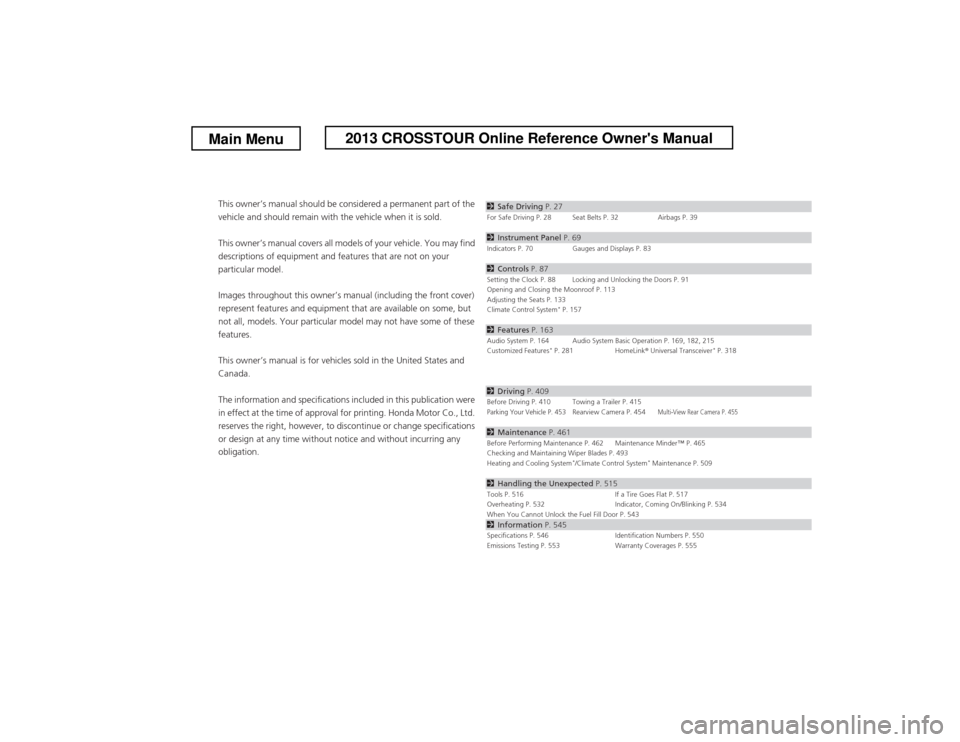
This owner’s manual should be considered a permanent part of the
vehicle and should remain with the vehicle when it is sold.
This owner’s manual covers all models of your vehicle. You may find
descriptions of equipment and features that are not on your
particular model.
Images throughout this owner’s manual (including the front cover)
represent features and equipment that are available on some, but
not all, models. Your particular model may not have some of these features.
This owner’s manual is for vehicles sold in the United States and Canada.
The information and specifications included in this publication were
in effect at the time of approval for printing. Honda Motor Co., Ltd.
reserves the right, however, to discontinue or change specifications
or design at any time without notice and without incurring any
obligation.2 Safe Driving P. 27For Safe Driving P. 28 Seat Belts P. 32 Airbags P. 39
2Instrument Panel P. 69Indicators P. 70 Gauges and Displays P. 83
2Controls P. 87Setting the Clock P. 88 Locking and Unlocking the Doors P. 91
Opening and Closing the Moonroof P. 113
Adjusting the Seats P. 133
Climate Control System *
P. 157
2 Features P. 163Audio System P. 164 Audio System Basic Operation P. 169, 182, 215
Customized Features *
P. 281 HomeLink ® Universal Transceiver *
P. 318
2 Driving P. 409Before Driving P. 410 Towing a Trailer P. 415Parking Your Vehicle P. 453Rearview Camera P. 454Multi-View Rear Camera P. 455
2Maintenance P. 461Before Performing Maintenance P. 462 Maintenance Minder
Page 7 of 573
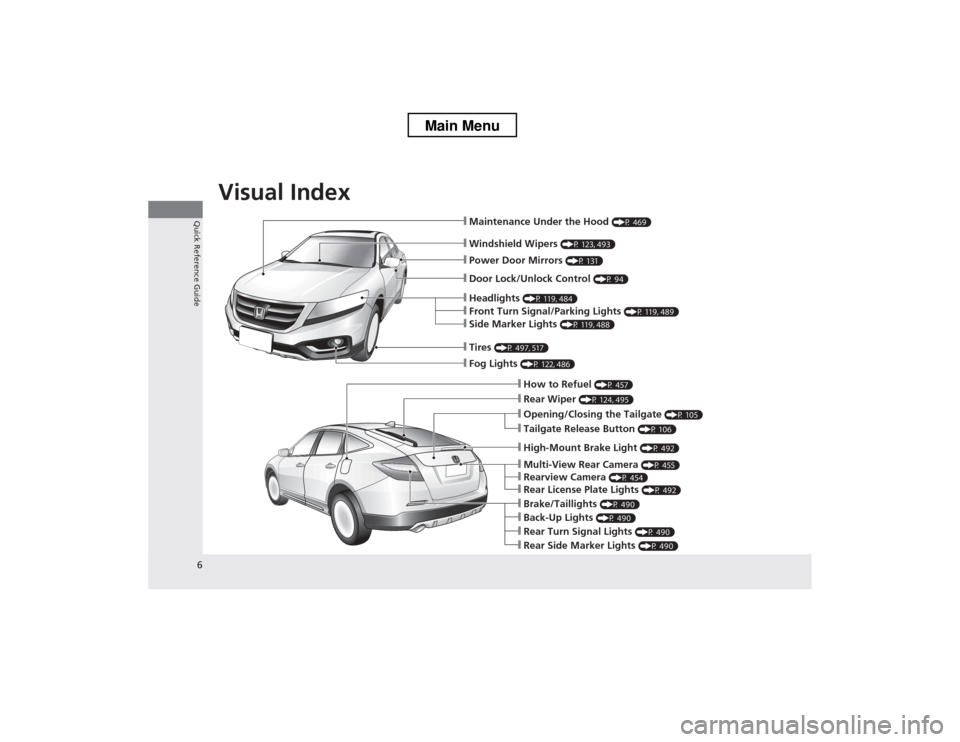
Visual Index
6
Quick Reference Guide
❙Windshield Wipers (P 123, 493)
❙Maintenance Under the Hood (P 469)
❙Fog Lights (P 122, 486)
❙Front Turn Signal/Parking Lights (P 119, 489)
❙Side Marker Lights (P 119, 488)
❙Tires (P 497, 517)
❙How to Refuel (P 457)
❙Opening/Closing the Tailgate (P 105)
❙Rear Wiper (P 124, 495)
❙Back-Up Lights (P 490)
❙Brake/Taillights (P 490)
❙Rear Turn Signal Lights (P 490)
❙Rear Side Marker Lights (P 490)
❙Multi-View Rear Camera (P 455)
❙Rearview Camera (P 454)
❙Rear License Plate Lights (P 492)
❙Headlights (P 119, 484)
❙Power Door Mirrors (P 131)
❙Door Lock/Unlock Control (P 94)
❙High-Mount Brake Light (P 492)
❙Tailgate Release Button (P 106)
Main Menu
Page 77 of 573
76
uuIndicatorsu
Instrument Panel
*1:Models with the smart entry system have an ENGINE START/STOP button instead of an ignition switch.
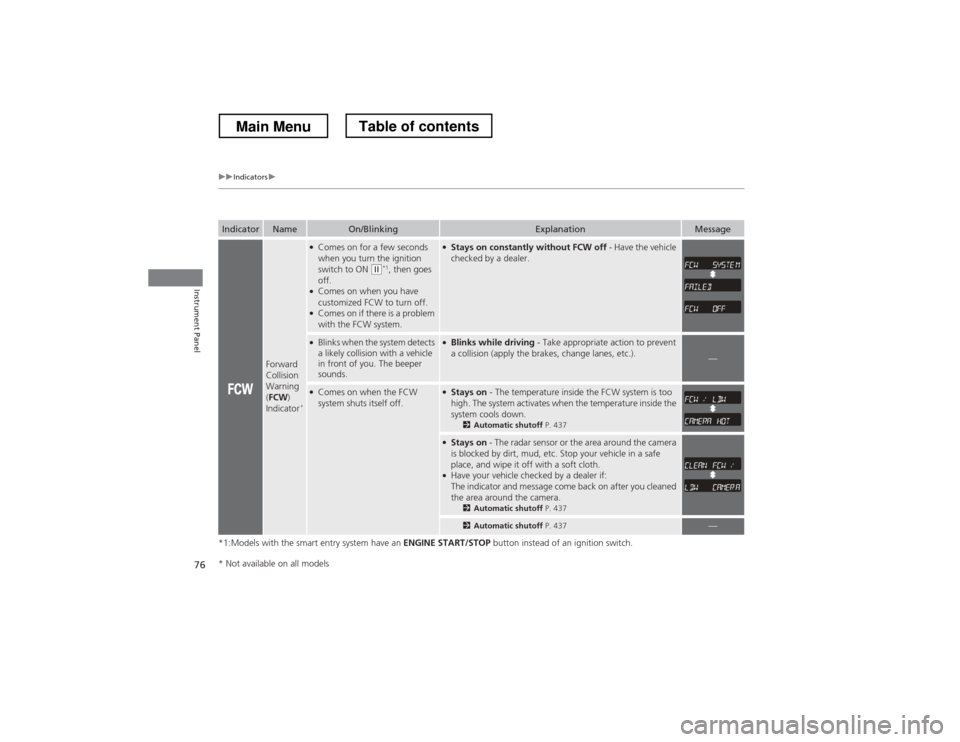
IndicatorNameOn/BlinkingExplanationMessage
Forward
Collision
Warning (FCW )
Indicator *
●
Comes on for a few seconds
when you turn the ignition
switch to ON
(w *1
, then goes
off.
● Comes on when you have
customized FCW to turn off.
● Comes on if there is a problem
with the FCW system.
●Stays on constantly without FCW off - Have the vehicle
checked by a dealer.
● Blinks when the system detects
a likely collision with a vehicle
in front of you. The beeper
sounds.●Blinks while driving - Take appropriate action to prevent
a collision (apply the brakes, change lanes, etc.).
—
● Comes on when the FCW
system shuts itself off.●Stays on - The temperature inside the FCW system is too
high. The system activates when the temperature inside the
system cools down. 2Automatic shutoff P. 437
●
Stays on - The radar sensor or the area around the camera
is blocked by dirt, mud, etc. Stop your vehicle in a safe
place, and wipe it off with a soft cloth.
● Have your vehicle checked by a dealer if:
The indicator and message come back on after you cleaned
the area around the camera.
2Automatic shutoff P. 437
2Automatic shutoff P. 437—
* Not available on all models
Main MenuTable of contents
Page 78 of 573
77
uuIndicatorsu
Continued
Instrument Panel
*1:Models with the smart entry system have an ENGINE START/STOP button instead of an ignition switch.
IndicatorNameOn/BlinkingExplanationMessage
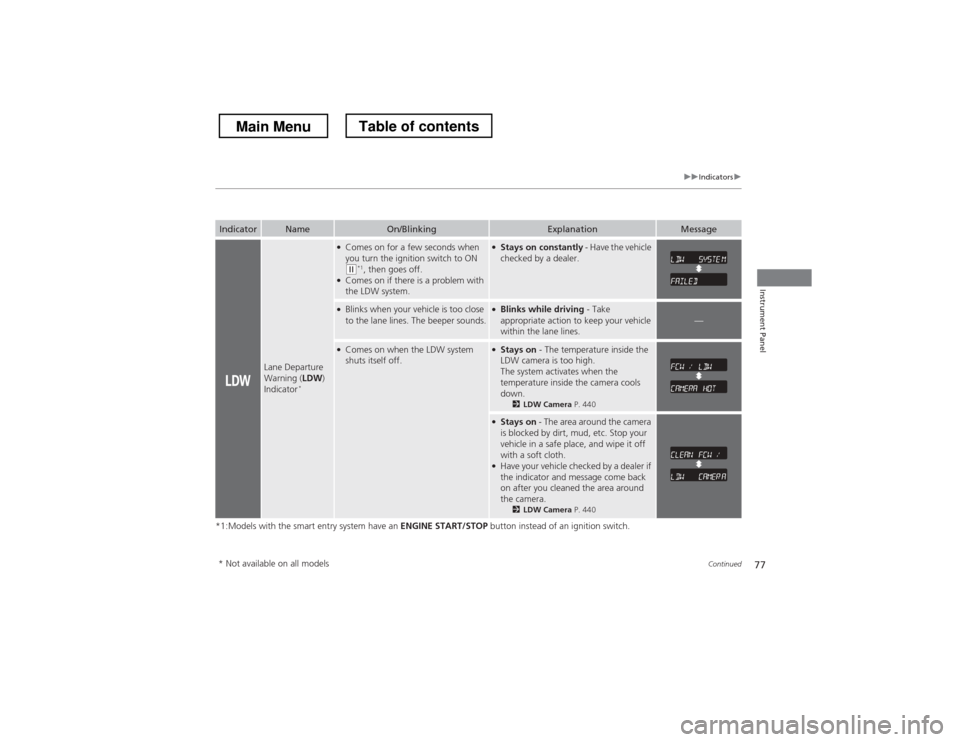
Lane Departure
Warning (LDW)
Indicator *
●
Comes on for a few seconds when
you turn the ignition switch to ON
(w *1
, then goes off.
● Comes on if there is a problem with
the LDW system.
● Stays on constantly - Have the vehicle
checked by a dealer.
● Blinks when your vehicle is too close
to the lane lines. The beeper sounds.● Blinks while driving - Take
appropriate action to keep your vehicle
within the lane lines.
—
● Comes on when the LDW system
shuts itself off.● Stays on - The temperature inside the
LDW camera is too high.
The system activates when the
temperature inside the camera cools
down. 2LDW Camera P. 440
●
Stays on - The area around the camera
is blocked by dirt, mud, etc. Stop your
vehicle in a safe place, and wipe it off with a soft cloth.
● Have your vehicle checked by a dealer if
the indicator and message come back
on after you cleaned the area around
the camera.
2LDW Camera P. 440
* Not available on all models
Main MenuTable of contents
Page 282 of 573
281
Continued
Features
Customized Features *
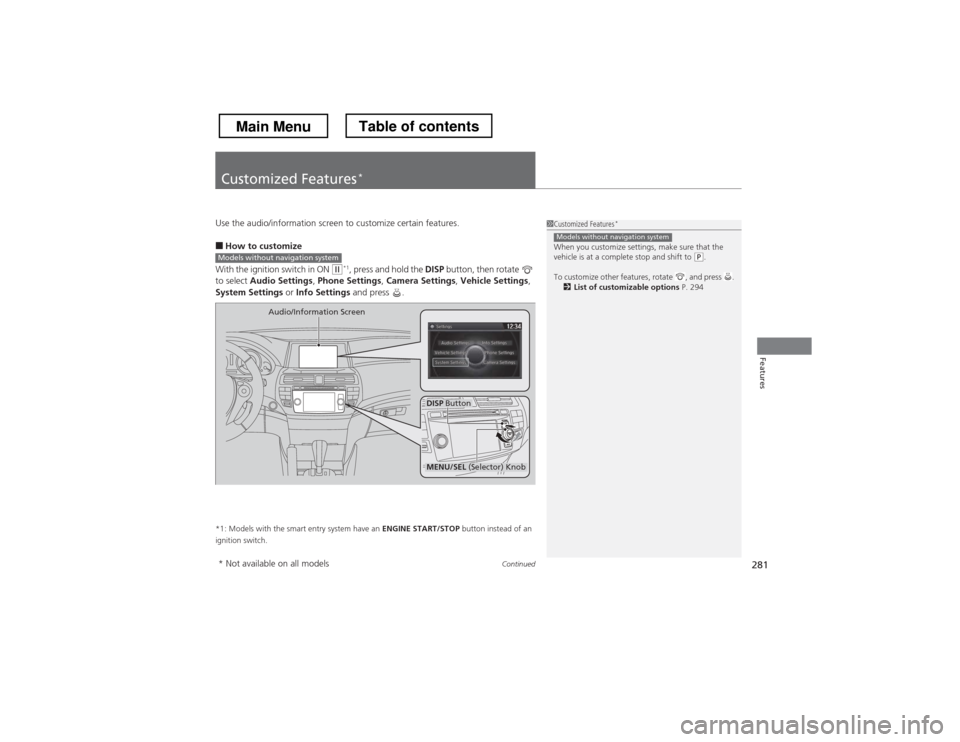
Use the audio/information screen to customize certain features. ■
How to customize
With the ignition switch in ON
(w *1
, press and hold the DISP button, then rotate
to select Audio Settings , Phone Settings , Camera Settings , Vehicle Settings ,
System Settings or Info Settings and press .
*1: Models with the smart entry system have an ENGINE START/STOP button instead of an
ignition switch.
1Customized Features *
When you customize settings, make sure that the
vehicle is at a complete stop and shift to
(P .
To customize other features, rotate , and press . 2 List of customizable options P. 294
Models without navigation system
Models without navigation system
DISP Button
Audio/Information Screen
MENU/SEL
(Selector) Knob
* Not available on all models
Main MenuTable of contents
Page 283 of 573
uuCustomized Features*u
282
Features
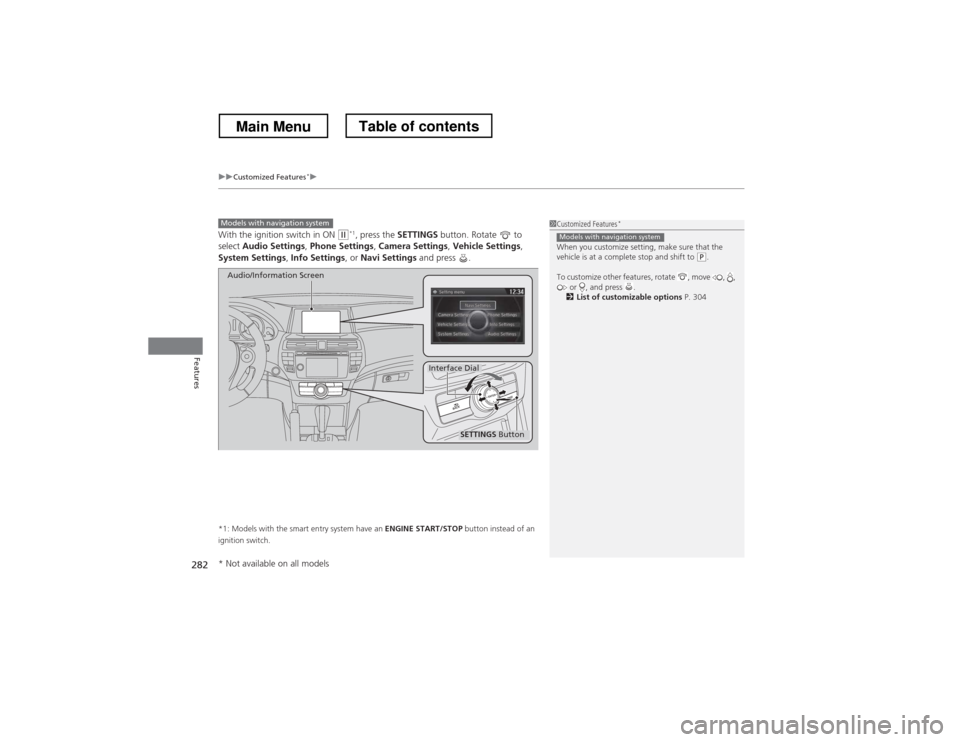
With the ignition switch in ON (w*1
, press the SETTINGS button. Rotate to
select Audio Settings , Phone Settings , Camera Settings , Vehicle Settings ,
System Settings , Info Settings , or Navi Settings and press .
*1: Models with the smart entry system have an ENGINE START/STOP button instead of an
ignition switch.
Models with navigation system
SETTINGS Button
Audio/Information Screen
Interface Dial
1Customized Features *
When you customize setting, make sure that the
vehicle is at a complete stop and shift to
(P .
To customize other features, rotate , move , , or , and press .
2 List of customizable options P. 304
Models with navigation system
* Not available on all models
Main MenuTable of contents
Page 288 of 573
287
uuCustomized Features*u
Continued
Features
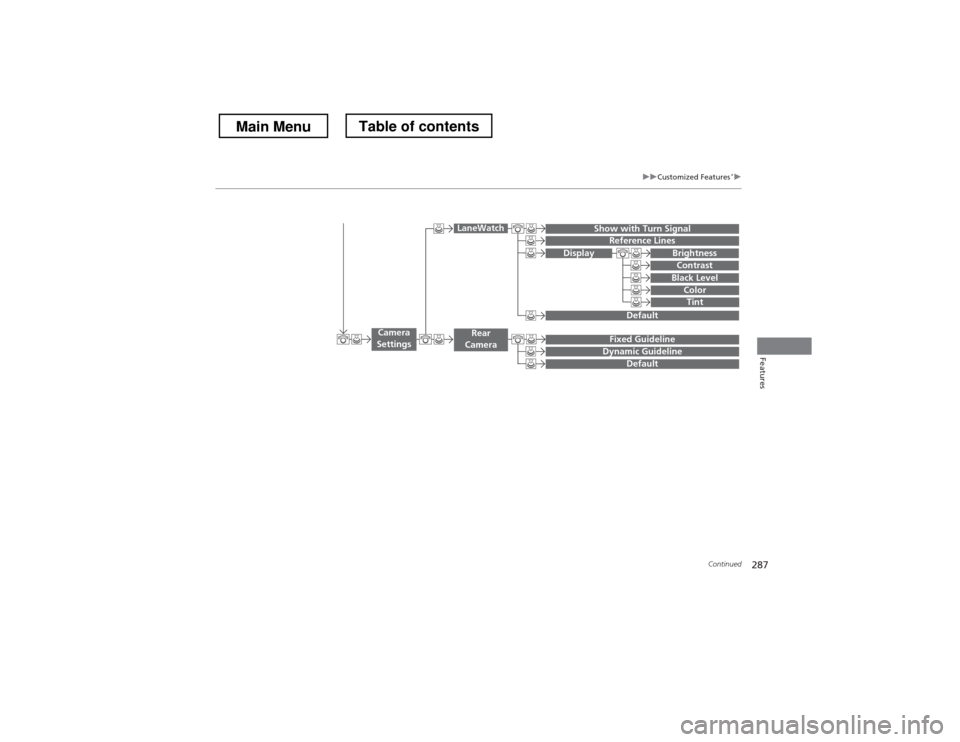
Display
Show with Turn SignalReference Lines
Default
Default
Fixed GuidelineDynamic Guideline
Camera
Settings
LaneWatch
Rear
Camera
Brightness
Contrast
Black Level
ColorTint
Main MenuTable of contents
Page 292 of 573
291
uuCustomized Features*u
Continued
Features
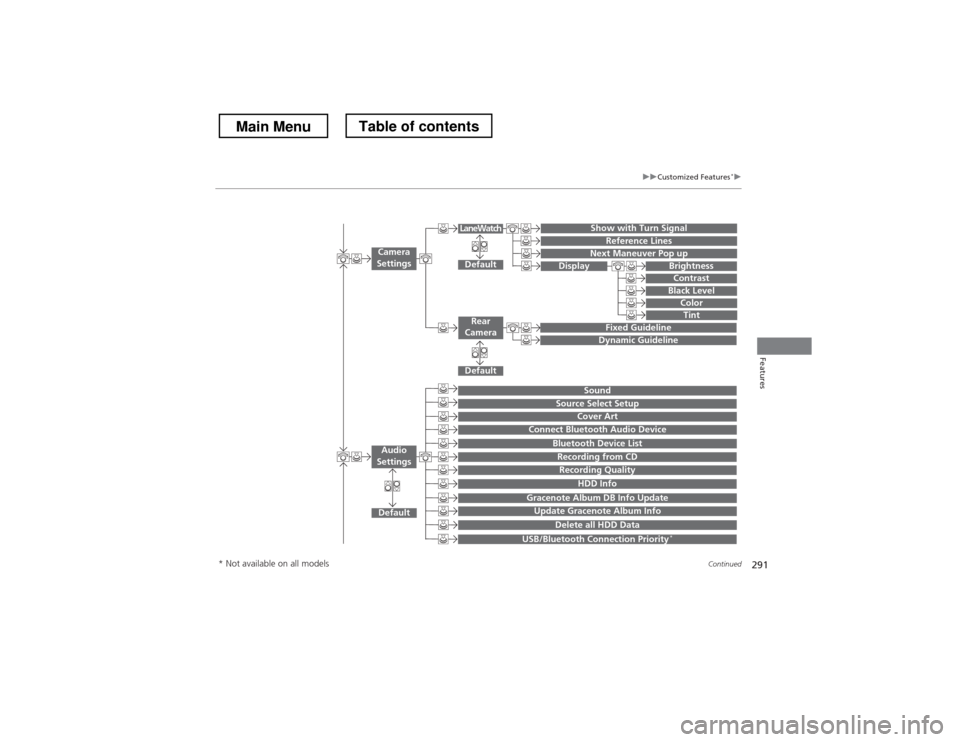
Show with Turn Signal
Reference Lines
Next Maneuver Pop up
Default
Fixed Guideline
Dynamic Guideline
Default
Default
Sound
Source Select Setup
Cover Art
Connect Bluetooth Audio Device
Bluetooth Device List
Recording from CD
Recording Quality
HDD Info
Gracenote Album DB Info Update
Update Gracenote Album Info
Delete all HDD Data
USB/Bluetooth Connection Priority *
Camera
Settings
Rear
Camera
LaneWatch
Audio
Settings
Display Brightness
Contrast
Black Level
ColorTint
* Not available on all models
Main MenuTable of contents
Page 304 of 573
303
uuCustomized Features*u
Continued
Features
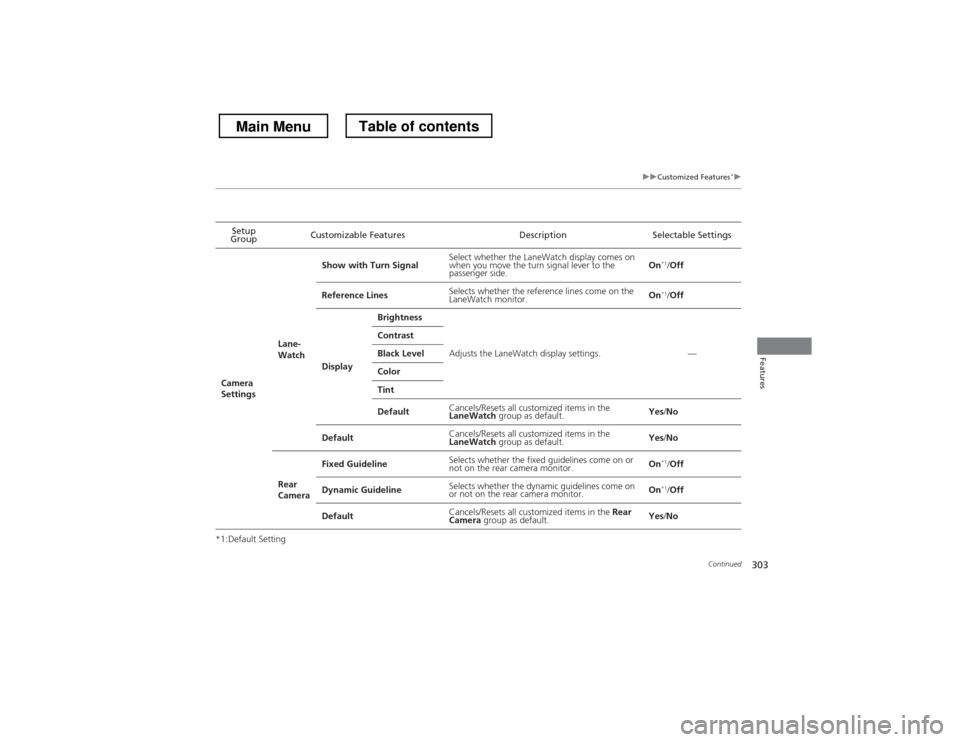
*1:Default SettingSetup
Group Customizable Features Description Selectable Settings
Camera
Settings Lane-WatchShow with Turn Signal
Select whether the LaneWatch display comes on
when you move the turn signal lever to the
passenger side.
On
*1
/Off
Reference Lines Selects whether the reference lines come on the
LaneWatch monitor. On
*1
/Off
Display Brightness
Adjusts the LaneWatch display settings. —
Contrast
Black Level
Color
Tint
Default
Cancels/Resets all customized items in the LaneWatch
group as default. Yes
/No
Default Cancels/Resets all customized items in the LaneWatch
group as default. Yes
/No
Rear
Camera Fixed Guideline
Selects whether the fixed guidelines come on or
not on the rear camera monitor. On
*1
/Off
Dynamic Guideline Selects whether the dynamic guidelines come on
or not on the rear camera monitor. On
*1
/Off
Default Cancels/Resets all customized items in the
Rear
Camera group as default. Yes
/No
Main MenuTable of contents
Page 311 of 573
310
uuCustomized Features*u
Features
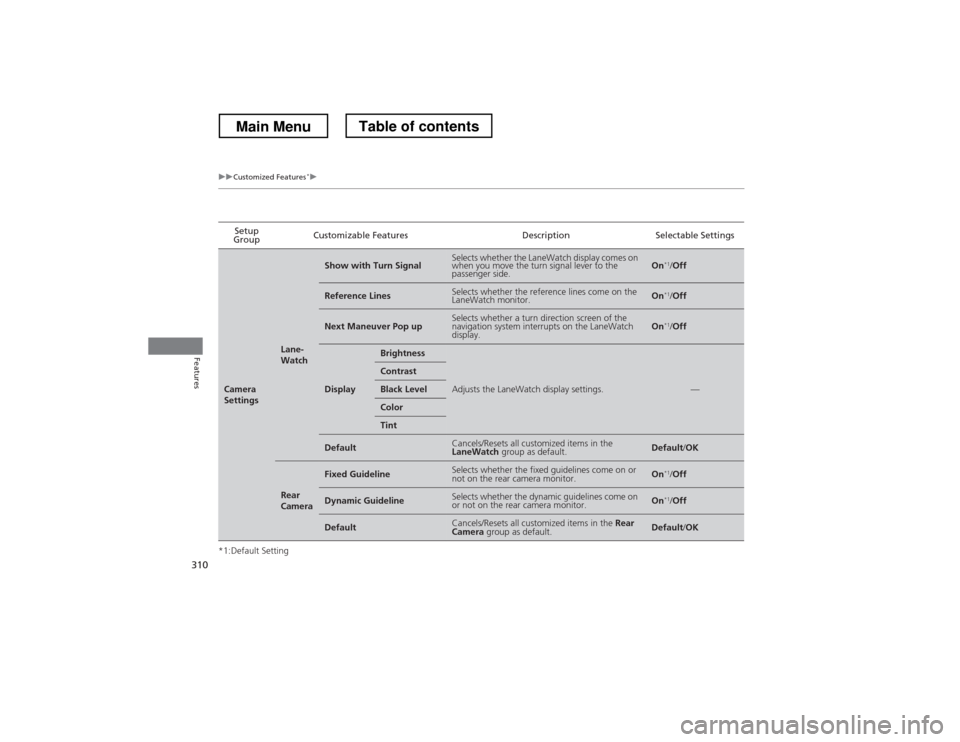
*1:Default SettingSetup
Group Customizable Features Description Selectable Settings
Camera
Settings
Lane-
Watch
Show with Turn SignalSelects whether the LaneWatch display comes on
when you move the turn signal lever to the
passenger side.On
*1
/Off
Reference LinesSelects whether the reference lines come on the
LaneWatch monitor.On *1
/Off
Next Maneuver Pop upSelects whether a turn direction screen of the
navigation system interrupts on the LaneWatch
display.On *1
/Off
Display
Brightness
Adjusts the LaneWatch display settings.—
Contrast
Black Level
Color
Tint
DefaultCancels/Resets all customized items in the LaneWatch group as default.Default/OK
Rear
Camera
Fixed GuidelineSelects whether the fixed guidelines come on or
not on the rear camera monitor.On *1
/Off
Dynamic GuidelineSelects whether the dynamic guidelines come on
or not on the rear camera monitor.On *1
/Off
DefaultCancels/Resets all customized items in the Rear
Camera group as default.Default/OK
Main MenuTable of contents