warning light HONDA CROSSTOUR 2013 1.G Owners Manual
[x] Cancel search | Manufacturer: HONDA, Model Year: 2013, Model line: CROSSTOUR, Model: HONDA CROSSTOUR 2013 1.GPages: 573, PDF Size: 25.21 MB
Page 9 of 573
8
Quick Reference Guide
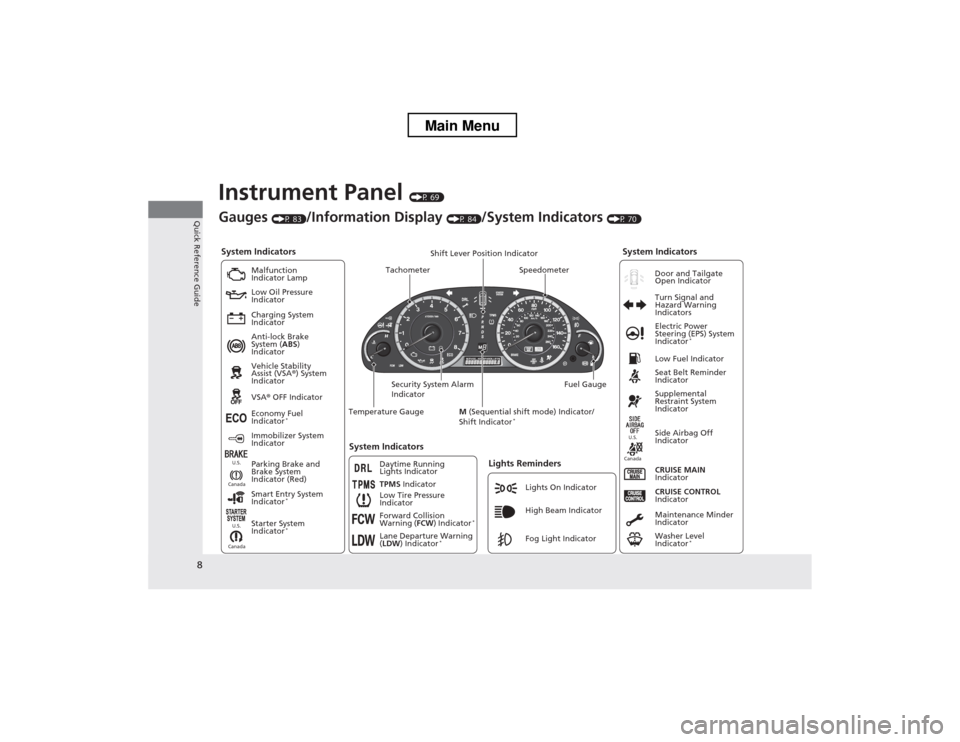
Instrument Panel (P 69)
System Indicators
Malfunction
Indicator Lamp
Low Oil Pressure
Indicator
Charging System
Indicator Anti-lock Brake
System ( ABS)
Indicator Vehicle Stability
Assist (VSA ®) System
Indicator VSA ® OFF Indicator
Low Tire Pressure
IndicatorLights Reminders
Lights On Indicator
High Beam Indicator
Fog Light Indicator
Immobilizer System
Indicator
Seat Belt Reminder
Indicator
System Indicators
CRUISE CONTROL
Indicator
Parking Brake and
Brake System
Indicator (Red) Supplemental
Restraint System
Indicator
Side Airbag Off
Indicator
CRUISE MAIN
Indicator
Tachometer Speedometer
Fuel Gauge
Security System Alarm
Indicator Shift Lever Position Indicator
Low Fuel Indicator
Gauges
(P 83)/Information Display (P 84)/System Indicators (P 70)
Economy Fuel
Indicator *
TPMS Indicator
Maintenance Minder
Indicator
Washer Level
Indicator*
Temperature Gauge
Electric Power
Steering (EPS) System
Indicator
*
Turn Signal and
Hazard Warning
Indicators
System Indicators
Canada U.S.Canada
U.S.
Starter System
Indicator
* Door and Tailgate Open Indicator
Smart Entry System
Indicator *
Canada U.S.Forward Collision
Warning (
FCW) Indicator *
Lane Departure Warning ( LDW ) Indicator *
M
(Sequential shift mode) Indicator/
Shift Indicator *
Daytime Running
Lights Indicator
Main Menu
Page 51 of 573
uuAirbagsuAirbag System Indicators
50
Safe Driving
■ When side curtain airbags deploy in a frontal collision
One or both side curtain airbags may inflate in a moderate-to-severe angled frontal
collision.
In this case, the side curtain airbags will deploy slightly after the front airbags.
Airbag System Indicators
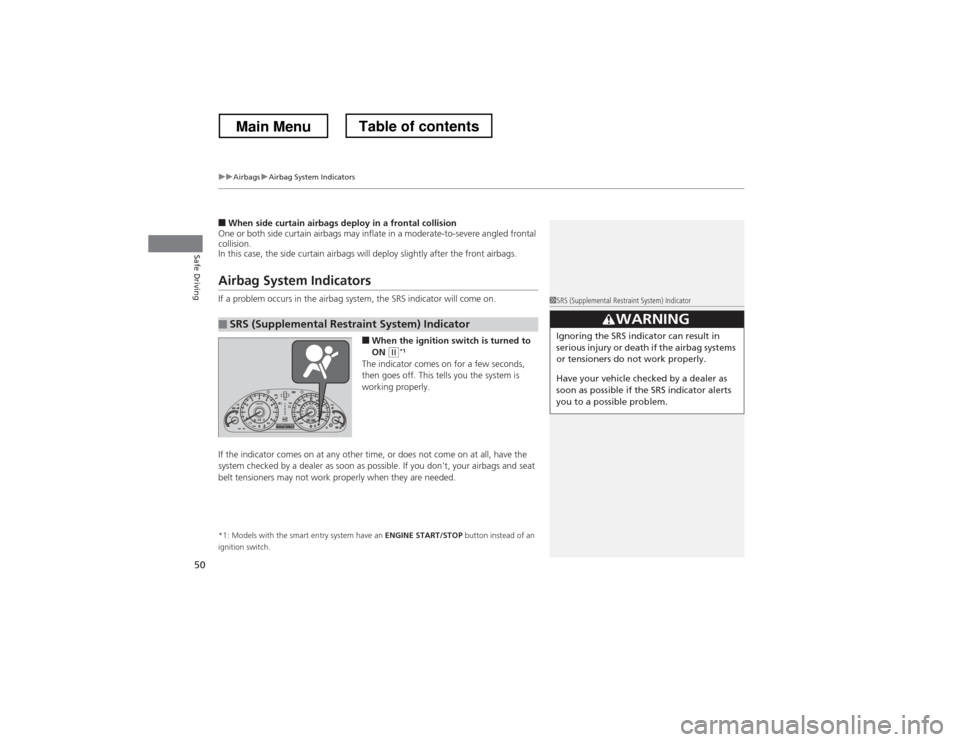
If a problem occurs in the airbag system, the SRS indicator will come on.
■When the ignition switch is turned to ON
(w *1
The indicator comes on for a few seconds,
then goes off. This tells you the system is
working properly.
If the indicator comes on at any other time, or does not come on at all, have the
system checked by a dealer as soon as possible. If you don’t, your airbags and seat
belt tensioners may not work properly when they are needed. *1: Models with the smart entry system have an ENGINE START/STOP button instead of an
ignition switch.
■SRS (Supplemental Restraint System) Indicator
1SRS (Supplemental Restraint System) Indicator
3WARNING
Ignoring the SRS indicator can result in
serious injury or death if the airbag systems
or tensioners do not work properly.
Have your vehicle checked by a dealer as
soon as possible if the SRS indicator alerts
you to a possible problem.
Main MenuTable of contents
Page 79 of 573
78
uuIndicatorsu
Instrument Panel
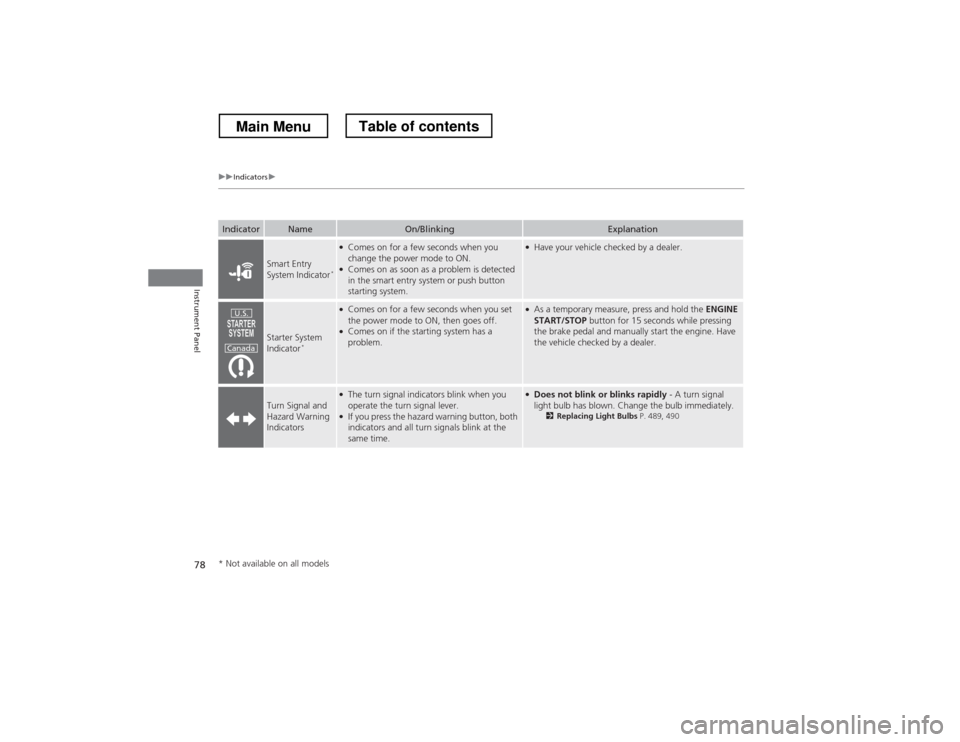
IndicatorNameOn/BlinkingExplanation
Smart Entry
System Indicator*
●
Comes on for a few seconds when you
change the power mode to ON.
● Comes on as soon as a problem is detected
in the smart entry system or push button
starting system.●Have your vehicle checked by a dealer.
Starter System
Indicator *
●
Comes on for a few seconds when you set
the power mode to ON, then goes off.
● Comes on if the starting system has a
problem.●As a temporary measure, press and hold the ENGINE
START/STOP button for 15 seconds while pressing
the brake pedal and manually start the engine. Have
the vehicle checked by a dealer.
Turn Signal and Hazard Warning Indicators
● The turn signal indicators blink when you
operate the turn signal lever.
● If you press the hazard warning button, both
indicators and all turn signals blink at the
same time.●Does not blink or blinks rapidly - A turn signal
light bulb has blown. Change the bulb immediately. 2Replacing Light Bulbs P. 489, 490
U.S.
Canada
* Not available on all models
Main MenuTable of contents
Page 111 of 573
110
Controls
Opening and Closing the Windows
Opening/Closing the Power Windows
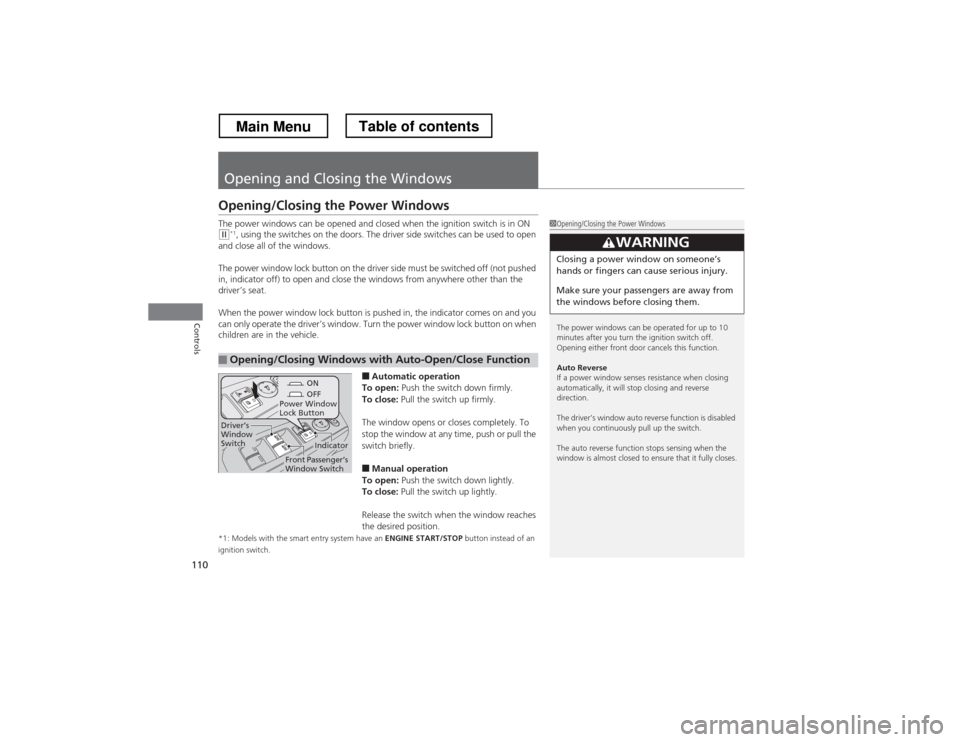
The power windows can be opened and closed when the ignition switch is in ON
(w*1
, using the switches on the doors. The driver side switches can be used to open
and close all of the windows.
The power window lock button on the driv er side must be switched off (not pushed
in, indicator off) to open and close the windows from anywhere other than the
driver’s seat.
When the power window lock button is pushed in, the indicator comes on and you
can only operate the driver’s window. Turn the power window lock button on when
children are in the vehicle.
■Automatic operation
To open: Push the switch down firmly.
To close: Pull the switch up firmly.
The window opens or closes completely. To
stop the window at any time, push or pull the
switch briefly. ■ Manual operation
To open: Push the switch down lightly.
To close: Pull the switch up lightly.
Release the switch when the window reaches
the desired position.
*1: Models with the smart entry system have an ENGINE START/STOP button instead of an
ignition switch.
■Opening/Closing Windows with Auto-Open/Close Function
1Opening/Closing the Power Windows
The power windows can be operated for up to 10
minutes after you turn the ignition switch off.
Opening either front door cancels this function.
Auto Reverse
If a power window senses resistance when closing
automatically, it will stop closing and reverse direction.
The driver’s window auto reverse function is disabled
when you continuously pull up the switch.
The auto reverse function stops sensing when the
window is almost closed to ensure that it fully closes.
3WARNING
Closing a power window on someone
Page 145 of 573
144
uuInterior Lights/Interior Convenience ItemsuInterior Convenience Items
Controls
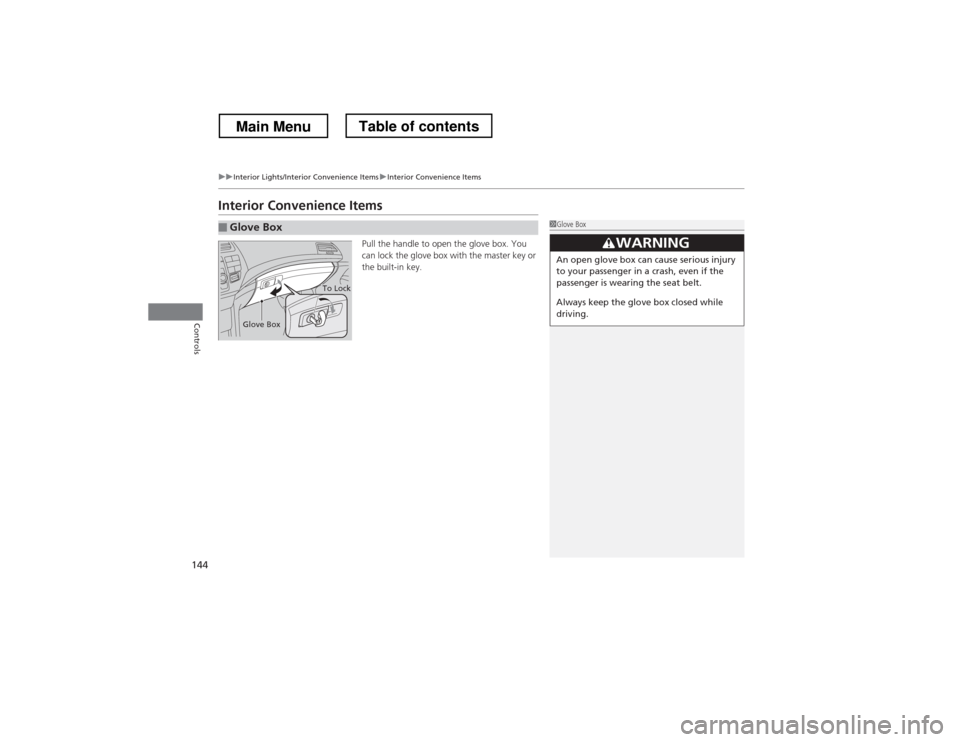
Interior Convenience ItemsPull the handle to open the glove box. You
can lock the glove box with the master key or
the built-in key.
■Glove Box1Glove Box
3WARNING
An open glove box can cause serious injury
to your passenger in a crash, even if the
passenger is wearing the seat belt.
Always keep the glove box closed while
driving.
Glove Box
To Lock
Main MenuTable of contents
Page 154 of 573
153
uuInterior Lights/Interior Convenience ItemsuInterior Convenience Items
Controls
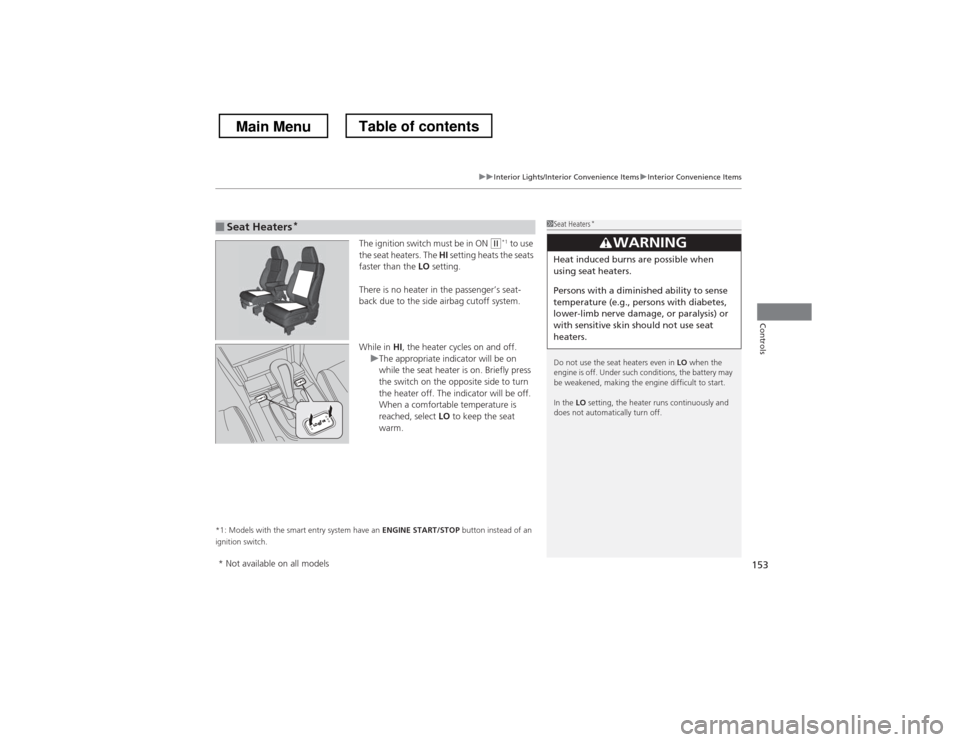
The ignition switch must be in ON (w*1
to use
the seat heaters. The HI setting heats the seats
faster than the LO setting.
There is no heater in the passenger’s seat-
back due to the side airbag cutoff system.
While in HI, the heater cycles on and off.
uThe appropriate indicator will be on
while the seat heater is on. Briefly press
the switch on the opposite side to turn
the heater off. The indicator will be off.
When a comfortable temperature is
reached, select LO to keep the seat
warm.
*1: Models with the smart entry system have an ENGINE START/STOP button instead of an
ignition switch.
■Seat Heaters *1Seat Heaters
*
Do not use the seat heaters even in LO when the
engine is off. Under such conditions, the battery may
be weakened, making the engine difficult to start. In the LO setting, the heater runs continuously and
does not automatically turn off.
3WARNING
Heat induced burns are possible when
using seat heaters.
Persons with a diminish ed ability to sense
temperature (e.g., persons with diabetes,
lower-limb nerve damage, or paralysis) or
with sensitive skin should not use seat
heaters.
* Not available on all models
Main MenuTable of contents
Page 285 of 573
284
uuCustomized Features*u
Features
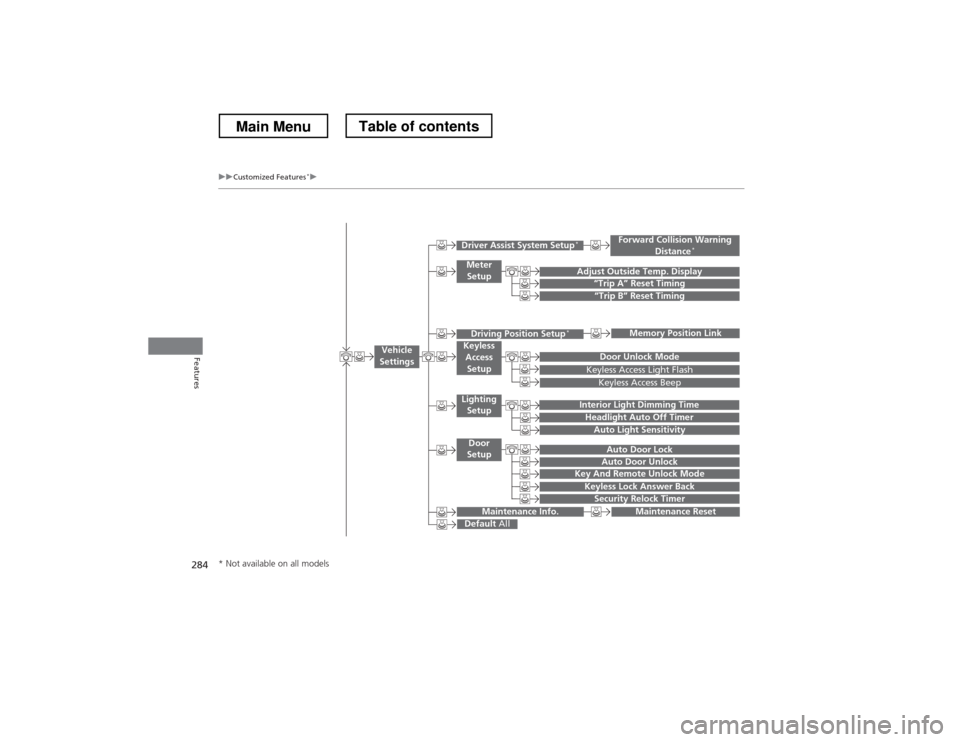
“Trip B” Reset Timing
Adjust Outside Temp. Display“Trip A” Reset Timing
Keyless Access Light Flash
Auto Light Sensitivity
Auto Door Lock
Auto Door Unlock
Forward Collision Warning
Distance *
Door Unlock Mode
Interior Light Dimming Time
Headlight Auto Off Timer
Memory Position Link
Key And Remote Unlock Mode
Keyless Lock Answer Back
Security Relock Timer
Maintenance Reset
Default
All
Vehicle
Settings
Driver Assist System Setup *
Meter
Setup
Driving Position Setup *Keyless
Access Setup
Lighting
Setup
Door
Setup
Maintenance Info.
Keyless Access Beep
* Not available on all models
Main MenuTable of contents
Page 291 of 573
290
uuCustomized Features*u
Features
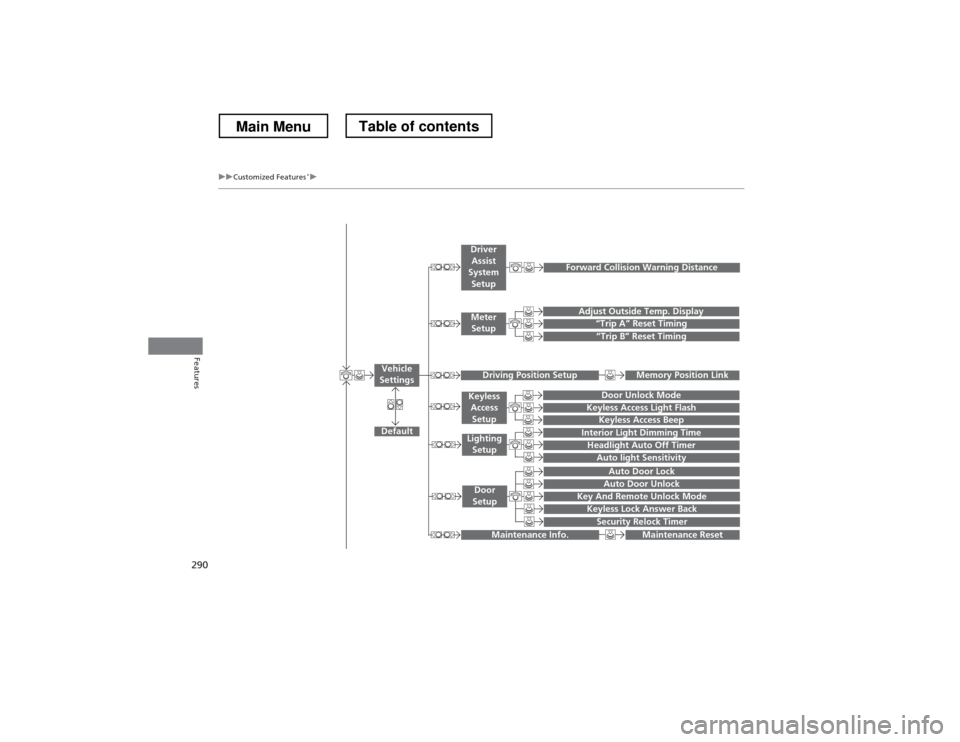
“Trip A” Reset Timing
“Trip B” Reset Timing
Adjust Outside Temp. Display
Forward Collision Warning Distance
Default
Memory Position Link
Door Unlock Mode
Keyless Access Light Flash
Interior Light Dimming Time
Headlight Auto Off Timer
Auto light Sensitivity
Key And Remote Unlock Mode
Keyless Lock Answer Back
Security Relock Timer
Auto Door Lock
Auto Door Unlock
Maintenance Reset
Vehicle
Settings
Meter Setup
Driver Assist
System Setup
Driving Position Setup
Keyless
Access Setup
Lighting
Setup
Door
Setup
Maintenance Info.
Keyless Access Beep
Main MenuTable of contents
Page 439 of 573
438
uuWhen DrivinguForward Collision Warning (FCW)*
Driving
FCW may not activate or may not detect a vehicle in front of your vehicle, and may activate even when you are aware of a vehicl
e ahead
of you, or when there is no vehicle ahead under the following conditions.
■FCW Limitations
Condition
● The distance between your vehicle and the vehicle ahead of you is too short.
● A vehicle cuts in front of you at a slow speed, and it brakes suddenly.
● A vehicle suddenly crosses in front of you.
● When either your vehicle or the vehicle ahead of you accelerates rapidly.
● The vehicle ahead of you is a motorcycle, a small vehicle, or a unique vehicle such as a tractor.
● When you drive off-road or on a mountain road, or curved and winding road for an extended period that makes it difficult for th e camera to properly
detect a vehicle in front of you.
● When there are pedestrians or animals in front of your vehicle.
● When you drive in bad weather (rain, fog, etc.).
● A heavy load in the rear or modifications to the suspension tilts your vehicle.
● An abnormal tire condition is detected (wrong tire size, flat tire, etc.).
● When the windshield is blocked by dirt, mud, leaves, wet snow, etc.
● When the temperature inside the system is high.
● A sudden change between light and dark such as an entrance or exit of a tunnel.
● You drive into the sunlight (e.g. at dawn or dusk).
● When the windshield is dirty or cloudy.
● When streetlights are perceived as the taillight of a vehicle in front of yours.
● When driving at night, the vehicle ahead of you is running with either taillight bulb burned out.
● When you drive in the shadows of trees, buildings, etc.
● When your vehicle is towing a trailer.
Main MenuTable of contents
Page 441 of 573
uuWhen DrivinguLane Departure Warning (LDW)*
440
Driving
The system begins to search for lane markings when all the following conditions are met: • The vehicle is traveling between at 40-90 mph (64-145 km/h).
• The vehicle is on a straight or slightly curved road.
• The turn signals are off.
• The brake pedal is not pressed.
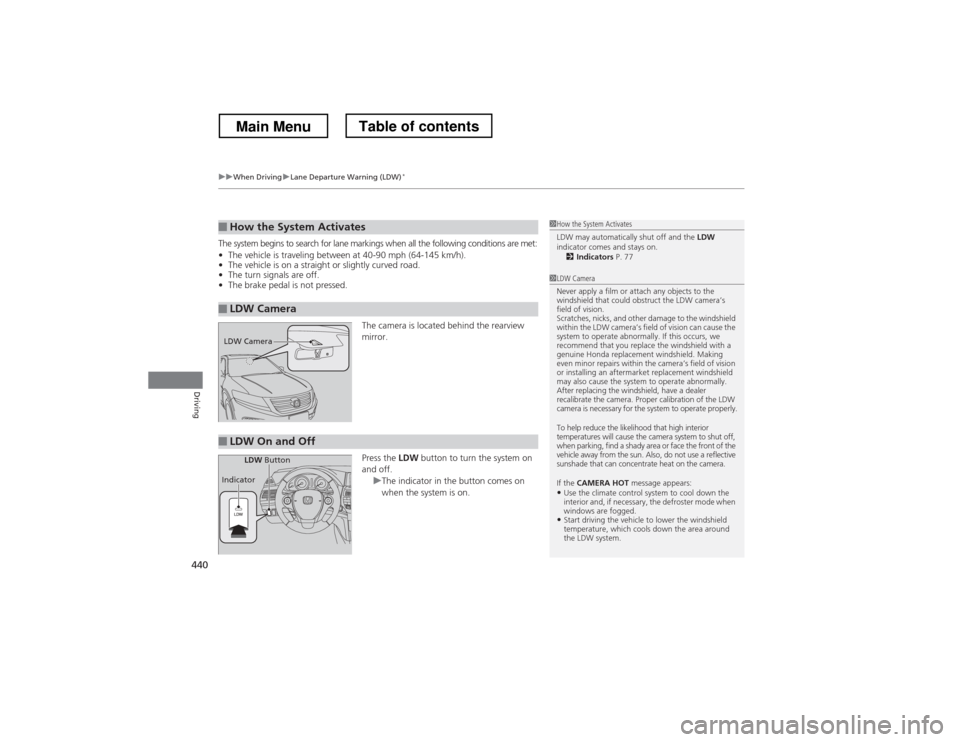
The camera is located behind the rearview mirror. Press the LDW button to turn the system on
and off.
uThe indicator in the button comes on
when the system is on.
■How the System Activates
■LDW Camera
1How the System Activates
LDW may automatically shut off and the LDW
indicator comes and stays on.
2 Indicators P. 77
1LDW Camera
Never apply a film or attach any objects to the
windshield that could obstruct the LDW camera’s
field of vision.
Scratches, nicks, and other damage to the windshield
within the LDW camera’s field of vision can cause the
system to operate abnormally. If this occurs, we
recommend that you replace the windshield with a
genuine Honda replacement windshield. Making
even minor repairs within the camera’s field of vision
or installing an aftermarket replacement windshield
may also cause the system to operate abnormally.
After replacing the windshield, have a dealer
recalibrate the camera. Proper calibration of the LDW
camera is necessary for the system to operate properly.
To help reduce the likelihood that high interior
temperatures will cause the camera system to shut off,
when parking, find a shady area or face the front of the
vehicle away from the sun. Also, do not use a reflective
sunshade that can concentrate heat on the camera.
If the CAMERA HOT message appears:
• Use the climate control system to cool down the
interior and, if necessary, the defroster mode when
windows are fogged.
• Start driving the vehicle to lower the windshield
temperature, which cools down the area around
the LDW system.
LDW Camera
■LDW On and Off
LDW Button
Indicator
Main MenuTable of contents