bluetooth HONDA CROSSTOUR 2014 1.G User Guide
[x] Cancel search | Manufacturer: HONDA, Model Year: 2014, Model line: CROSSTOUR, Model: HONDA CROSSTOUR 2014 1.GPages: 573, PDF Size: 21.2 MB
Page 215 of 573
uuAudio System Basic OperationuPlaying Bluetooth® Audio
214Features
1.Make sure that your phone is paired and
connected to HFL.
2.Select the Bluetooth® Audio mode.
If the phone is not recognized, another HFL-
compatible phone, which is not compatible
for Bluetooth® Audio, may already be
connected.
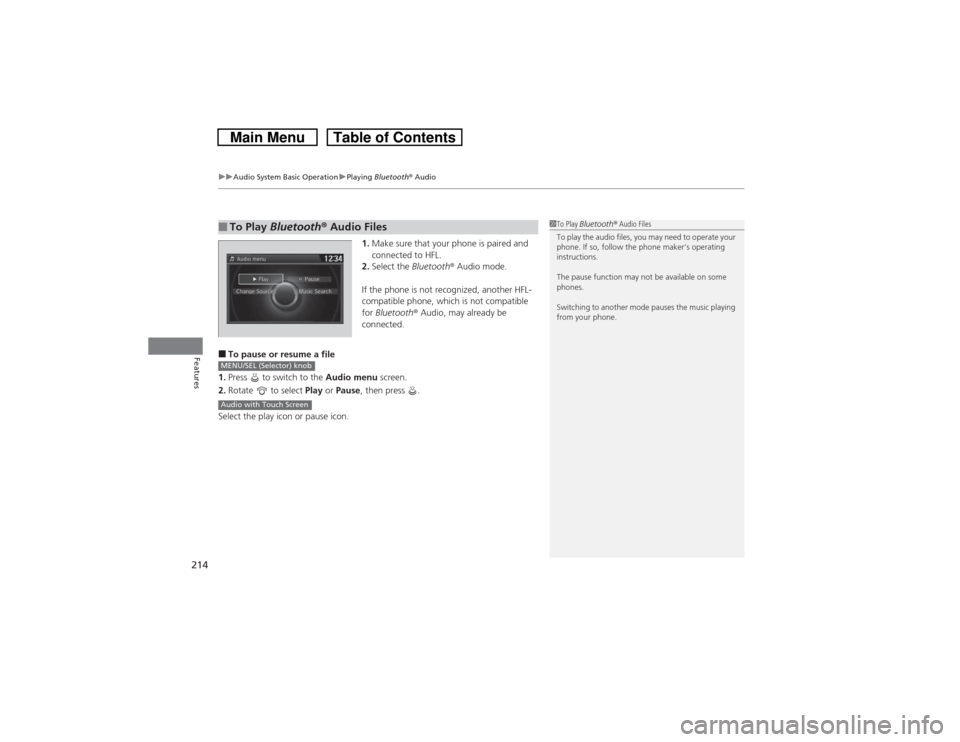
■To pause or resume a file
1.Press to switch to the Audio menu screen.
2.Rotate to select Play or Pause, then press .
Select the play icon or pause icon.■To Play Bluetooth® Audio Files
1To Play Bluetooth® Audio Files
To play the audio files, you may need to operate your
phone. If so, follow the phone maker’s operating
instructions.
The pause function may not be available on some
phones.
Switching to another mode pauses the music playing
from your phone.
MENU/SEL (Selector) knobAudio with Touch Screen
Page 220 of 573
219
uuAudio System Basic OperationuAudio/Information Screen
Continued
Features
■Audio
Shows the current audio information.■Navigation
Shows the navigation screen.
2 Refer to the Navigation System Manual
■Phone
Shows the HFL information.
2 Bluetooth® HandsFreeLink® P. 367
■Info
Shows the Trip Computer or Clock/Wallpaper and other information. Rotate
to select an item, then press .■Trip computer (Current Drive)
Shows the range, and instant and average fuel economy of the current trip, as well
as the average fuel economy from your last trip.■Trip computer (History of Trip A)
Shows the range, average fuel economy and distances traveled for the current trip, as well
as the average fuel economy and distances traveled during the last three driving cycles.
Each time you reset the trip meter A, the information on the display updates. The
history of the previous three driving cycles is kept.■Deleting the history manually
1.Move on the History of Trip A screen to select Delete History, then press .
2.You will receive a confirmation message on the screen. Rotate to select Yes,
then press .■Clock/Wallpaper
Shows a clock screen or an image you import.
Page 229 of 573
228
uuAudio System Basic OperationuVoice Control Operation
Features
■iPod commands
•iPod play
•iPod play track # (#: 1 to 30)
•iPod skip forward
•iPod skip back
•iPod track shuffle
*1
•iPod album shuffle
*1
•iPod track repeat
*1
•iPod normal play
•What am I listening to?
•Who am I listening to?
•Who is this?
•What’s playing?
•Who’s playing?
•What album is this?
*1: These commands toggle the function
on and off, so the command may not match
your intended action.
■USB commands
•USB play
•USB play track # (#: 1 to 30)
•USB skip forward
•USB skip back
•USB track random
*1
•USB track repeat
*1
•USB track scan
*1
•USB folder up
•USB folder down
•USB folder random
*1
•USB folder repeat
*1
•USB folder scan
*1
•USB normal play
*1: These commands toggle the function
on and off, so the command may not match
your intended action.
■Bluetooth® Audio commands
•Bluetooth Audio play
•Bluetooth Audio skip forward
•Bluetooth Audio skip back
•Bluetooth Audio group up
•Bluetooth Audio group down
•Bluetooth Audio pause
•Bluetooth Audio resume
•Bluetooth Audio track random
•Bluetooth Audio track repeat
NOTE:
Bluetooth® Audio commands may not work
on some phones or Bluetooth® Audio
devices.■AUX commands
•Auxiliary play
Page 261 of 573
260
uuAudio System Basic OperationuPlaying Internet Radio
Features
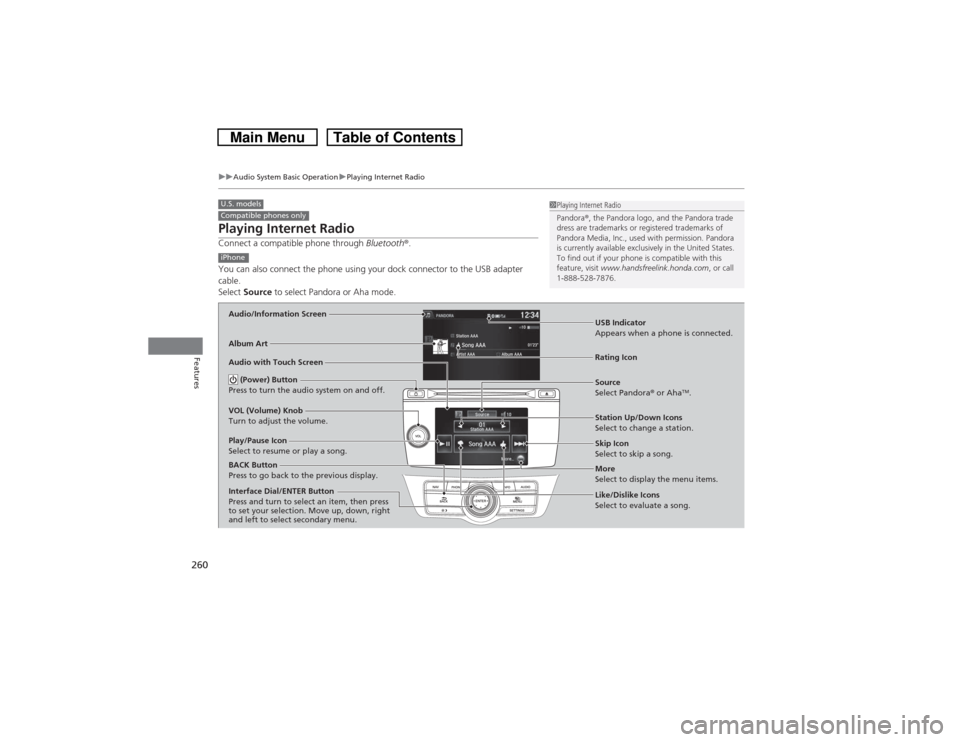
Playing Internet RadioConnect a compatible phone through Bluetooth®.
You can also connect the phone using your dock connector to the USB adapter
cable.
Select Source to select Pandora or Aha mode.U.S. modelsCompatible phones only
1Playing Internet Radio
Pandora®, the Pandora logo, and the Pandora trade
dress are trademarks or registered trademarks of
Pandora Media, Inc., used with permission. Pandora
is currently available exclusively in the United States.
To find out if your phone is compatible with this
feature, visit www.handsfreelink.honda.com, or call
1-888-528-7876.
iPhoneAudio/Information ScreenAlbum Art
USB Indicator
Appears when a phone is connected.Rating Icon
Audio with Touch Screen
BACK Button
Press to go back to the previous display.
Skip Icon
Select to skip a song.
More
Select to display the menu items. Station Up/Down Icons
Select to change a station. Source
Select Pandora® or Aha
TM.
Play/Pause Icon
Select to resume or play a song.
Like/Dislike Icons
Select to evaluate a song. (Power) Button
Press to turn the audio system on and off.
VOL (Volume) Knob
Turn to adjust the volume.Interface Dial/ENTER Button
Press and turn to select an item, then press
to set your selection. Move up, down, right
and left to select secondary menu.
Page 262 of 573
Continued
261
uuAudio System Basic OperationuPlaying Internet Radio
Features
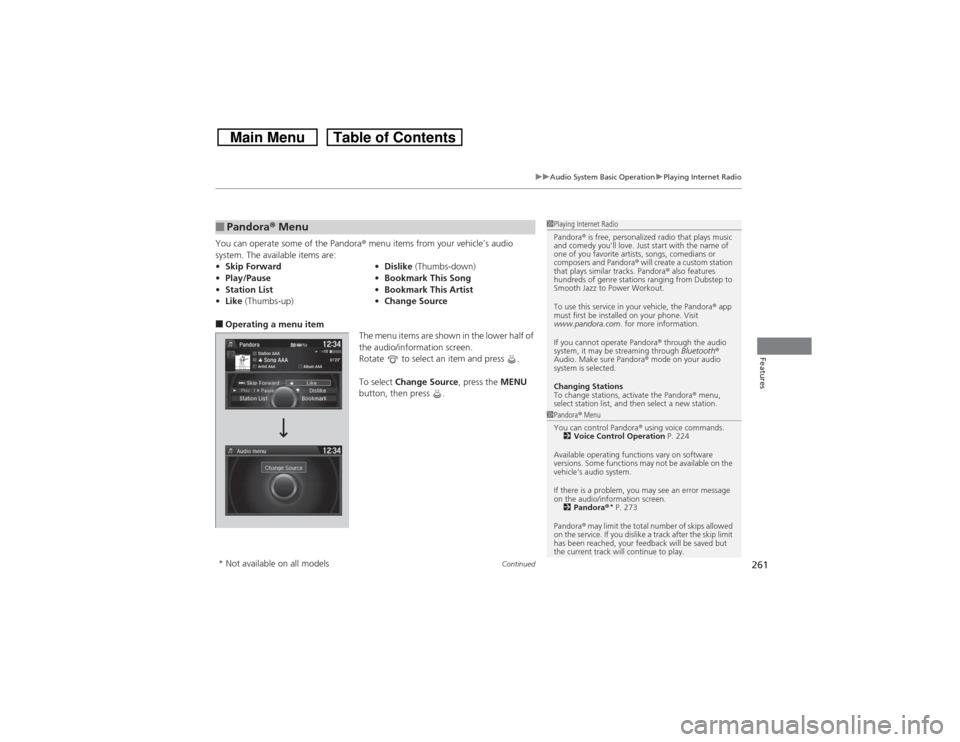
You can operate some of the Pandora® menu items from your vehicle’s audio
system. The available items are:■Operating a menu item
The menu items are shown in the lower half of
the audio/information screen.
Rotate to select an item and press .
To select Change Source, press the MENU
button, then press .■Pandora® Menu•Skip Forward•Dislike (Thumbs-down)
•Play/Pause•Bookmark This Song
•Station List•Bookmark This Artist
•Like (Thumbs-up)•Change Source
1Playing Internet Radio
Pandora® is free, personalized radio that plays music
and comedy you’ll love. Just start with the name of
one of you favorite artists, songs, comedians or
composers and Pandora® will create a custom station
that plays similar tracks. Pandora® also features
hundreds of genre stations ranging from Dubstep to
Smooth Jazz to Power Workout.
To use this service in your vehicle, the Pandora® app
must first be installed on your phone. Visit
www.pandora.com. for more information.
If you cannot operate Pandora® through the audio
system, it may be streaming through Bluetooth®
Audio. Make sure Pandora® mode on your audio
system is selected.
Changing Stations
To change stations, activate the Pandora® menu,
select station list, and then select a new station.1Pandora® Menu
You can control Pandora® using voice commands.
2Voice Control Operation P. 224
Available operating functions vary on software
versions. Some functions may not be available on the
vehicle’s audio system.
If there is a problem, you may see an error message
on the audio/information screen.
2Pandora®
* P. 273
Pandora® may limit the total number of skips allowed
on the service. If you dislike a track after the skip limit
has been reached, your feedback will be saved but
the current track will continue to play.
* Not available on all models
Page 267 of 573
266
uuAudio System Basic OperationuPlaying Bluetooth® Audio
Features
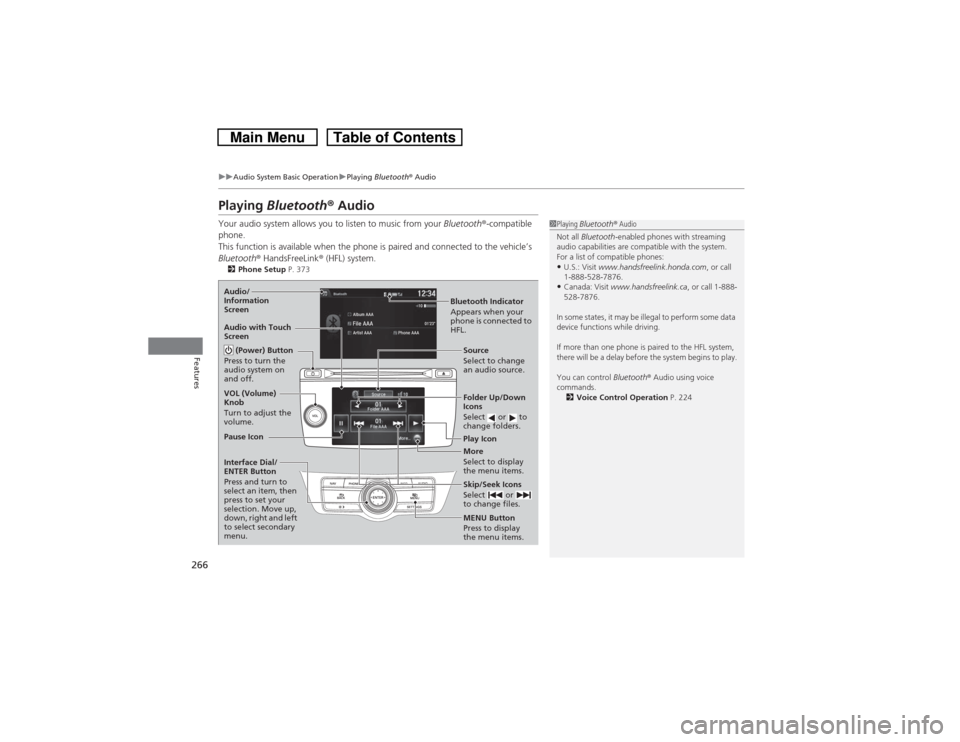
Playing Bluetooth® AudioYour audio system allows you to listen to music from your Bluetooth®-compatible
phone.
This function is available when the phone is paired and connected to the vehicle’s
Bluetooth® HandsFreeLink® (HFL) system.2Phone Setup P. 373
1Playing Bluetooth® Audio
Not all Bluetooth-enabled phones with streaming
audio capabilities are compatible with the system.
For a list of compatible phones:•U.S.: Visit www.handsfreelink.honda.com, or call
1-888-528-7876.•Canada: Visit www.handsfreelink.ca, or call 1-888-
528-7876.
In some states, it may be illegal to perform some data
device functions while driving.
If more than one phone is paired to the HFL system,
there will be a delay before the system begins to play.
You can control Bluetooth® Audio using voice
commands.
2Voice Control Operation P. 224
Bluetooth Indicator
Appears when your
phone is connected to
HFL. Audio/
Information
Screen
Audio with Touch
Screen
Play Icon Pause Icon
More
Select to display
the menu items. Source
Select to change
an audio source. (Power) Button
Press to turn the
audio system on
and off.VOL (Volume)
Knob
Turn to adjust the
volume.
Interface Dial/
ENTER Button
Press and turn to
select an item, then
press to set your
selection. Move up,
down, right and left
to select secondary
menu.
Skip/Seek Icons
Select or
to change files.MENU Button
Press to display
the menu items. Folder Up/Down
Icons
Select or to
change folders.
Page 268 of 573
267
uuAudio System Basic OperationuPlaying Bluetooth® Audio
Features
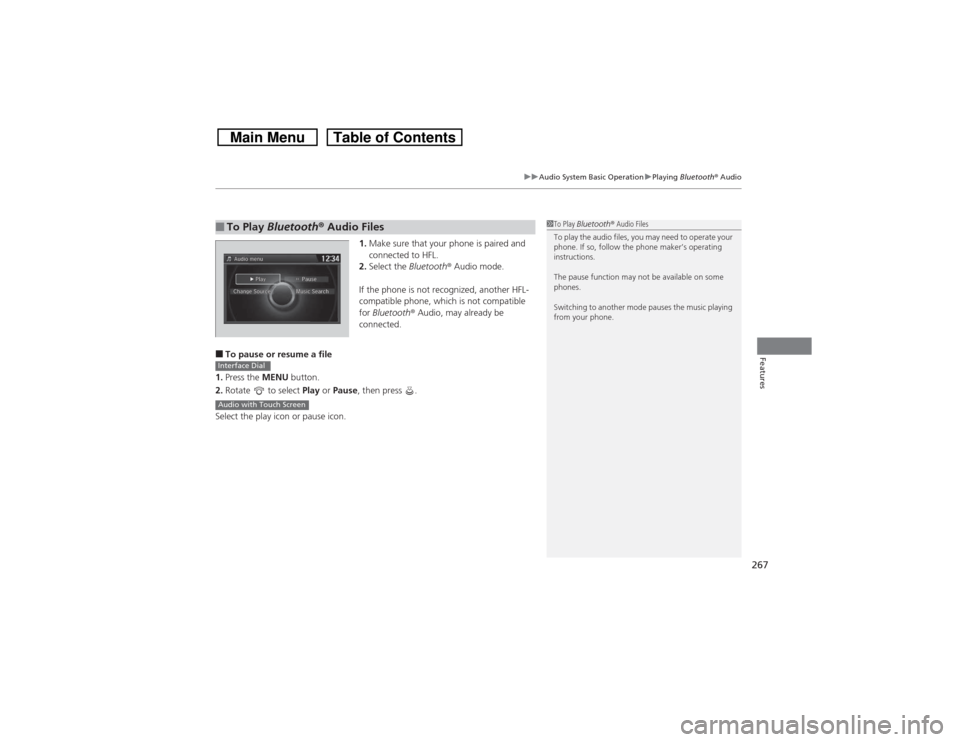
1.Make sure that your phone is paired and
connected to HFL.
2.Select the Bluetooth® Audio mode.
If the phone is not recognized, another HFL-
compatible phone, which is not compatible
for Bluetooth® Audio, may already be
connected.
■To pause or resume a file
1.Press the MENU button.
2.Rotate to select Play or Pause, then press .
Select the play icon or pause icon.■To Play Bluetooth® Audio Files
1To Play Bluetooth® Audio Files
To play the audio files, you may need to operate your
phone. If so, follow the phone maker’s operating
instructions.
The pause function may not be available on some
phones.
Switching to another mode pauses the music playing
from your phone.
Interface DialAudio with Touch Screen
Page 284 of 573
283
uuCustomized Features
*u
Continued
Features
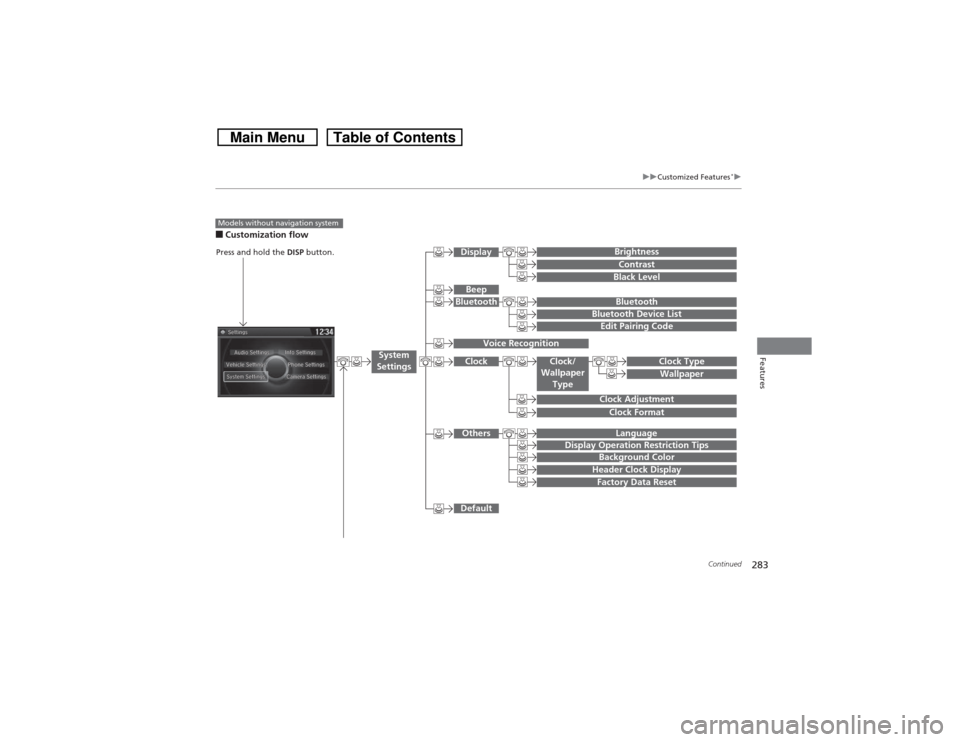
■Customization flowModels without navigation system
Clock FormatBackground ColorHeader Clock DisplayFactory Data ResetClock Adjustment
Press and hold the DISP button.
Language
Default
Edit Pairing Code
Bluetooth
Bluetooth Device List
BrightnessContrastBlack Level
Beep
Clock/
Wallpaper
Type
Clock TypeWallpaper
System
Settings
BluetoothDisplayClockOthers
Display Operation Restriction Tips
Voice Recognition
Page 286 of 573
285
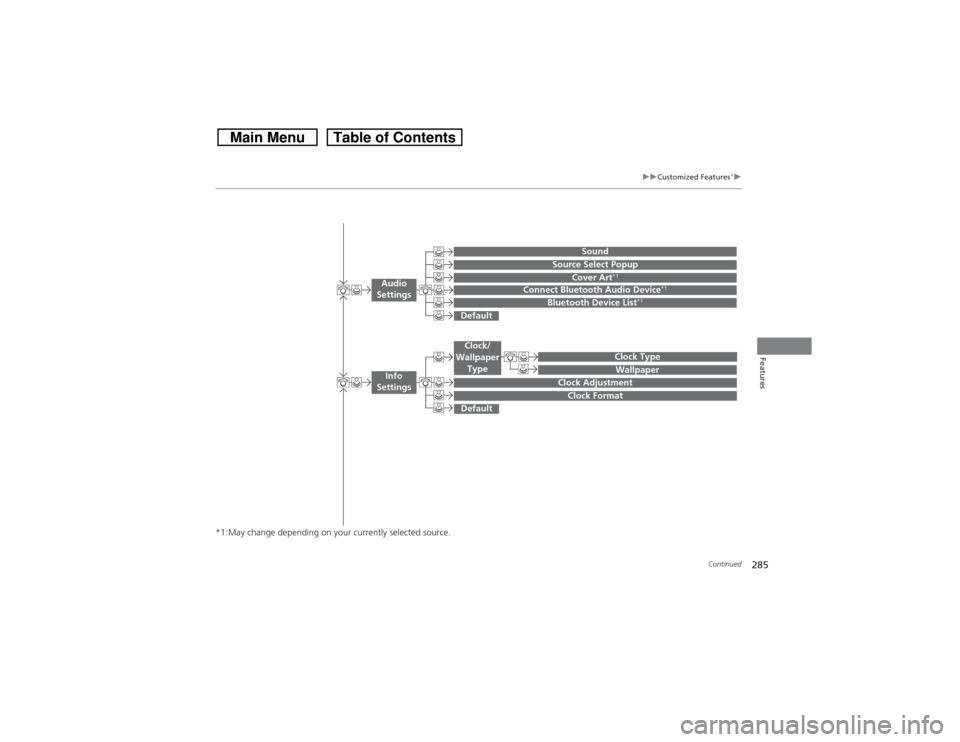
uuCustomized Features
*u
Continued
Features
*1:May change depending on your currently selected source.
Wallpaper
Source Select Popup
Clock Type
Sound
Default
Cover Art
*1
Connect Bluetooth Audio Device
*1
Bluetooth Device List
*1
Default
Clock AdjustmentClock Format
Audio
Settings
Clock/
Wallpaper
Type
Info
Settings
Page 287 of 573
286
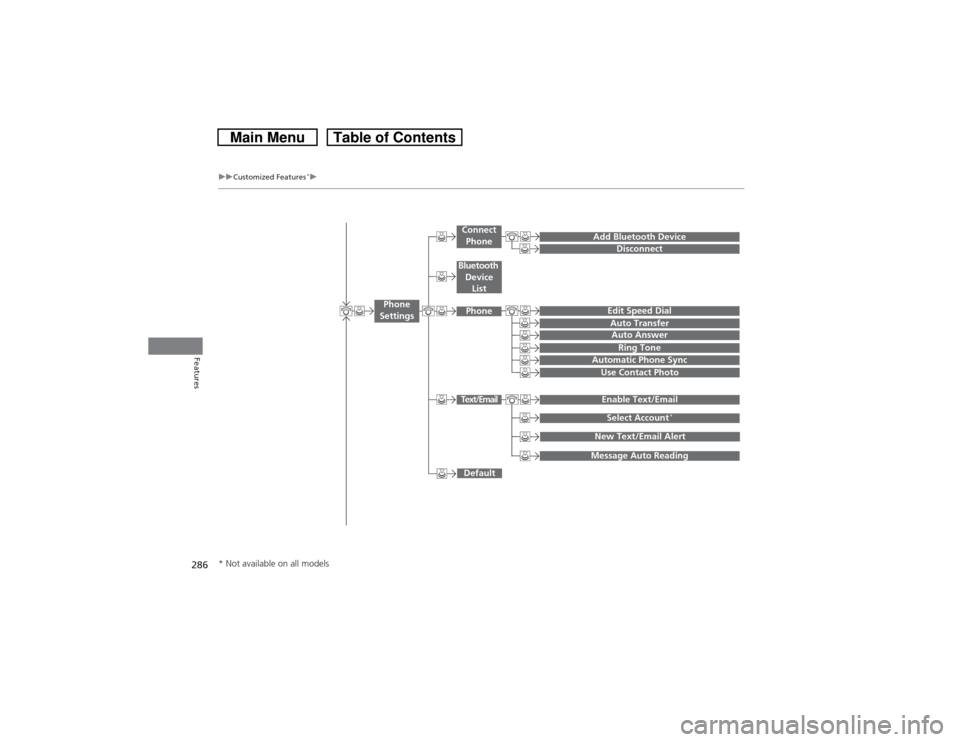
uuCustomized Features
*u
Features
Add Bluetooth Device
DisconnectEdit Speed DialAuto Transfer
Auto AnswerRing Tone
Automatic Phone Sync
Default
Use Contact PhotoEnable Text/EmailSelect Account
*
Message Auto ReadingNew Text/Email Alert
Phone
Settings
Connect
PhoneText/EmailBluetooth
Device
ListPhone
* Not available on all models