tailgate HONDA CROSSTOUR 2014 1.G User Guide
[x] Cancel search | Manufacturer: HONDA, Model Year: 2014, Model line: CROSSTOUR, Model: HONDA CROSSTOUR 2014 1.GPages: 573, PDF Size: 21.2 MB
Page 95 of 573
94
uuLocking and Unlocking the DoorsuLocking/Unlocking the Doors from the Outside
Controls
Locking/Unlocking the Doors from the Outside
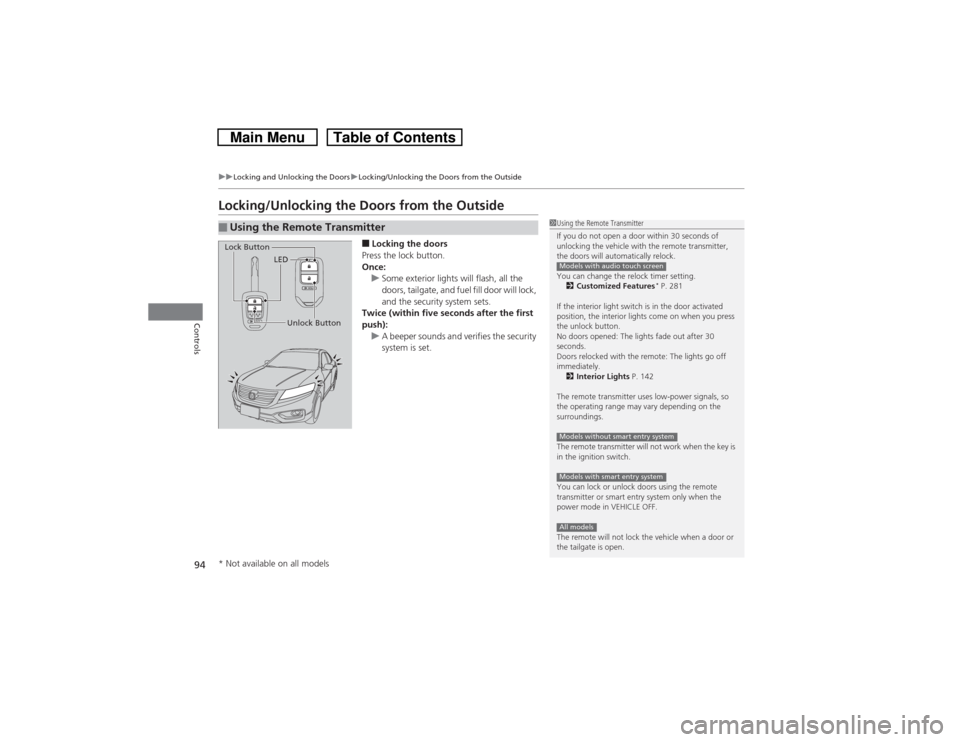
■Locking the doors
Press the lock button.
Once:
uSome exterior lights will flash, all the
doors, tailgate, and fuel fill door will lock,
and the security system sets.
Twice (within five seconds after the first
push):
uA beeper sounds and verifies the security
system is set.
■Using the Remote Transmitter
1Using the Remote Transmitter
If you do not open a door within 30 seconds of
unlocking the vehicle with the remote transmitter,
the doors will automatically relock.
You can change the relock timer setting.
2Customized Features
* P. 281
If the interior light switch is in the door activated
position, the interior lights come on when you press
the unlock button.
No doors opened: The lights fade out after 30
seconds.
Doors relocked with the remote: The lights go off
immediately.
2Interior Lights P. 142
The remote transmitter uses low-power signals, so
the operating range may vary depending on the
surroundings.
The remote transmitter will not work when the key is
in the ignition switch.
You can lock or unlock doors using the remote
transmitter or smart entry system only when the
power mode in VEHICLE OFF.
The remote will not lock the vehicle when a door or
the tailgate is open.
Models with audio touch screenModels without smart entry systemModels with smart entry systemAll models
LED
Unlock Button Lock Button
* Not available on all models
Page 96 of 573
Continued
95
uuLocking and Unlocking the DoorsuLocking/Unlocking the Doors from the Outside
Controls
■Unlocking the doors
Press the unlock button.
Once:
uSome exterior lights flash twice, and the driver’s door and fuel fill door unlock.
Twice:
uThe remaining doors and tailgate unlock.
1Using the Remote Transmitter
If the distance at which it works varies, the battery is
probably low.
If the LED does not come on when you press a
button, the battery is dead.
2Replacing the Button Battery P. 507
You can customize the door unlock mode setting.
2Customized Features
* P. 281
Models with audio touch screen
* Not available on all models
Page 97 of 573
uuLocking and Unlocking the DoorsuLocking/Unlocking the Doors from the Outside
96Controls
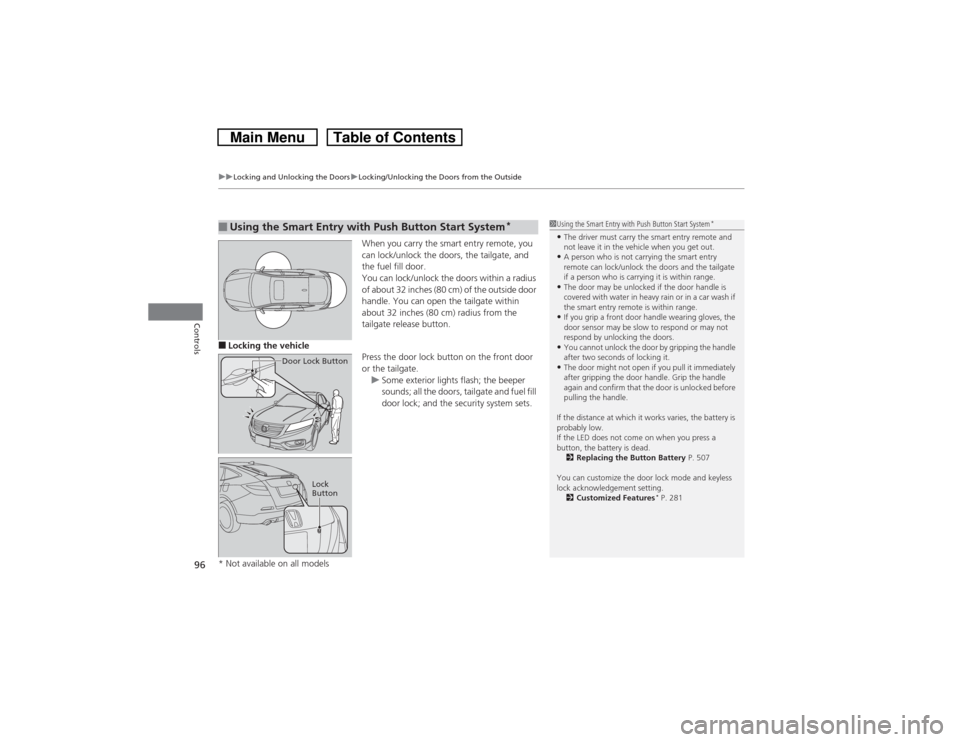
When you carry the smart entry remote, you
can lock/unlock the doors, the tailgate, and
the fuel fill door.
You can lock/unlock the doors within a radius
of about 32 inches (80 cm) of the outside door
handle. You can open the tailgate within
about 32 inches (80 cm) radius from the
tailgate release button.
■Locking the vehicle
Press the door lock button on the front door
or the tailgate.
uSome exterior lights flash; the beeper
sounds; all the doors, tailgate and fuel fill
door lock; and the security system sets.■Using the Smart Entry with Push Button Start System
*
Door Lock Button
Lock
Button
1Using the Smart Entry with Push Button Start System
*
•The driver must carry the smart entry remote and
not leave it in the vehicle when you get out.•A person who is not carrying the smart entry
remote can lock/unlock the doors and the tailgate
if a person who is carrying it is within range.•The door may be unlocked if the door handle is
covered with water in heavy rain or in a car wash if
the smart entry remote is within range.•If you grip a front door handle wearing gloves, the
door sensor may be slow to respond or may not
respond by unlocking the doors.•You cannot unlock the door by gripping the handle
after two seconds of locking it.•The door might not open if you pull it immediately
after gripping the door handle. Grip the handle
again and confirm that the door is unlocked before
pulling the handle.
If the distance at which it works varies, the battery is
probably low.
If the LED does not come on when you press a
button, the battery is dead.
2Replacing the Button Battery P. 507
You can customize the door lock mode and keyless
lock acknowledgement setting.
2Customized Features
* P. 281
* Not available on all models
Page 98 of 573
Continued
97
uuLocking and Unlocking the DoorsuLocking/Unlocking the Doors from the Outside
Controls
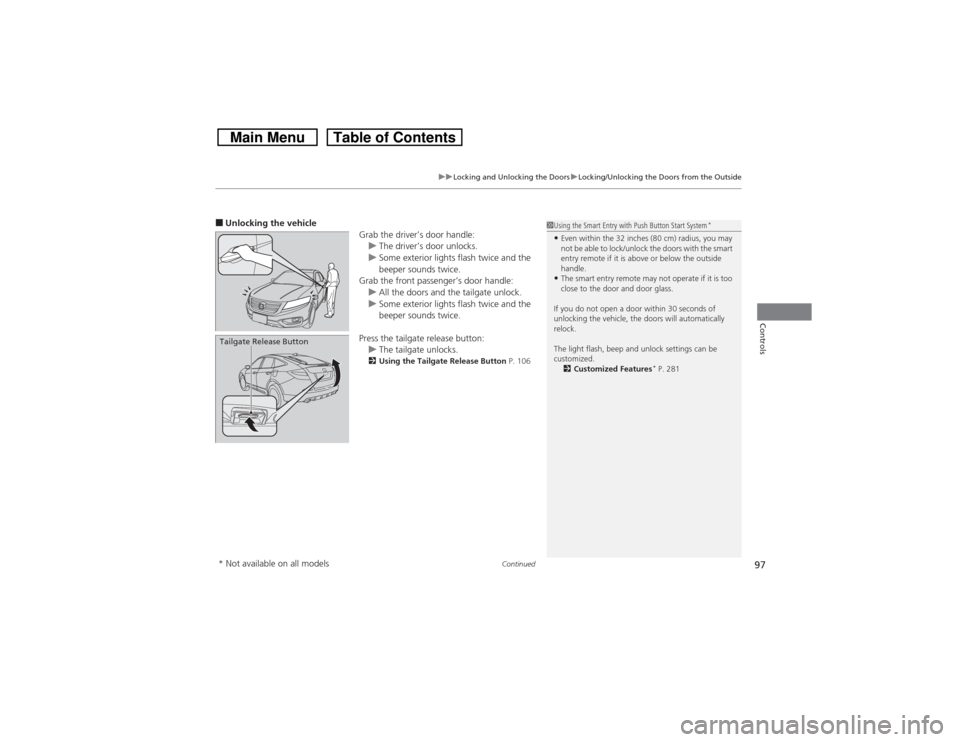
■Unlocking the vehicle
Grab the driver’s door handle:
uThe driver’s door unlocks.
uSome exterior lights flash twice and the
beeper sounds twice.
Grab the front passenger’s door handle:
uAll the doors and the tailgate unlock.
uSome exterior lights flash twice and the
beeper sounds twice.
Press the tailgate release button:
uThe tailgate unlocks.
2Using the Tailgate Release Button P. 106
Tailgate Release Button
1Using the Smart Entry with Push Button Start System
*
•Even within the 32 inches (80 cm) radius, you may
not be able to lock/unlock the doors with the smart
entry remote if it is above or below the outside
handle.•The smart entry remote may not operate if it is too
close to the door and door glass.
If you do not open a door within 30 seconds of
unlocking the vehicle, the doors will automatically
relock.
The light flash, beep and unlock settings can be
customized.
2Customized Features
* P. 281
* Not available on all models
Page 99 of 573
uuLocking and Unlocking the DoorsuLocking/Unlocking the Doors from the Outside
98Controls
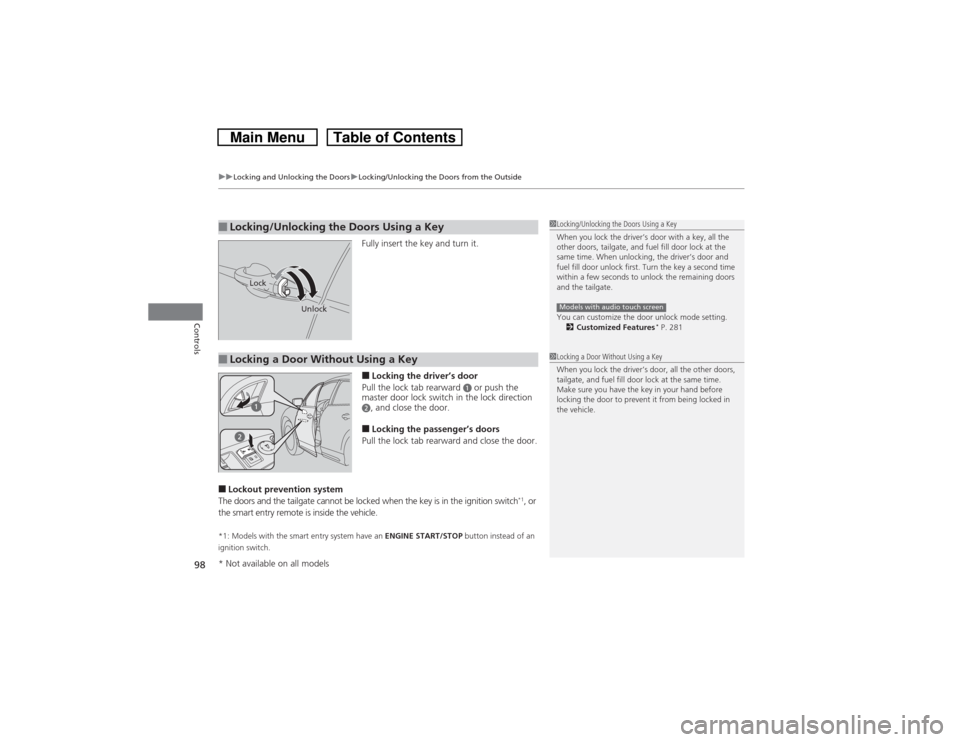
Fully insert the key and turn it.■Locking the driver’s door
Pull the lock tab rearward
a or push the
master door lock switch in the lock direction
b, and close the door.■Locking the passenger’s doors
Pull the lock tab rearward and close the door.
■Lockout prevention system
The doors and the tailgate cannot be locked when the key is in the ignition switch
*1, or
the smart entry remote is inside the vehicle.
*1: Models with the smart entry system have an ENGINE START/STOP button instead of an
ignition switch.■Locking/Unlocking the Doors Using a Key
1Locking/Unlocking the Doors Using a Key
When you lock the driver’s door with a key, all the
other doors, tailgate, and fuel fill door lock at the
same time. When unlocking, the driver’s door and
fuel fill door unlock first. Turn the key a second time
within a few seconds to unlock the remaining doors
and the tailgate.
You can customize the door unlock mode setting.
2Customized Features
* P. 281
Models with audio touch screen
Lock
Unlock
■Locking a Door Without Using a Key
1Locking a Door Without Using a Key
When you lock the driver’s door, all the other doors,
tailgate, and fuel fill door lock at the same time.
Make sure you have the key in your hand before
locking the door to prevent it from being locked in
the vehicle.
* Not available on all models
Page 100 of 573
99
uuLocking and Unlocking the DoorsuLocking/Unlocking the Doors from the Inside
Continued
Controls
Locking/Unlocking the Doors from the Inside
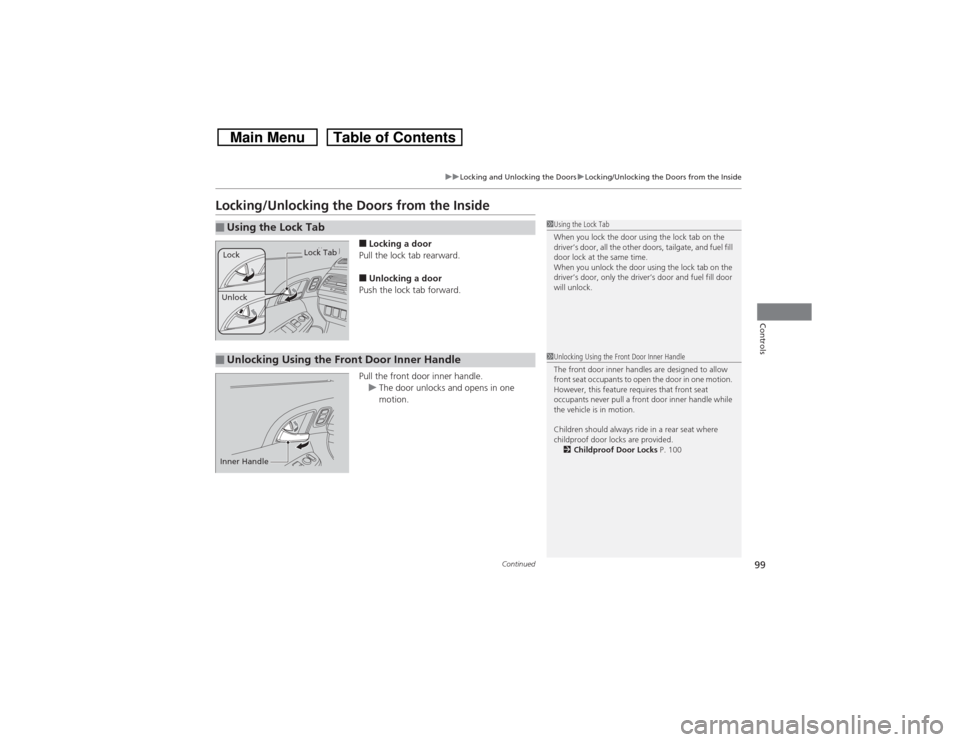
■Locking a door
Pull the lock tab rearward.■Unlocking a door
Push the lock tab forward.
Pull the front door inner handle.
uThe door unlocks and opens in one
motion.
■Using the Lock Tab
1Using the Lock Tab
When you lock the door using the lock tab on the
driver’s door, all the other doors, tailgate, and fuel fill
door lock at the same time.
When you unlock the door using the lock tab on the
driver’s door, only the driver’s door and fuel fill door
will unlock.
Unlock
Lock Tab
Lock
■Unlocking Using the Front Door Inner Handle
1Unlocking Using the Front Door Inner Handle
The front door inner handles are designed to allow
front seat occupants to open the door in one motion.
However, this feature requires that front seat
occupants never pull a front door inner handle while
the vehicle is in motion.
Children should always ride in a rear seat where
childproof door locks are provided.
2Childproof Door Locks P. 100
Inner Handle
Page 101 of 573
uuLocking and Unlocking the DoorsuChildproof Door Locks
100Controls
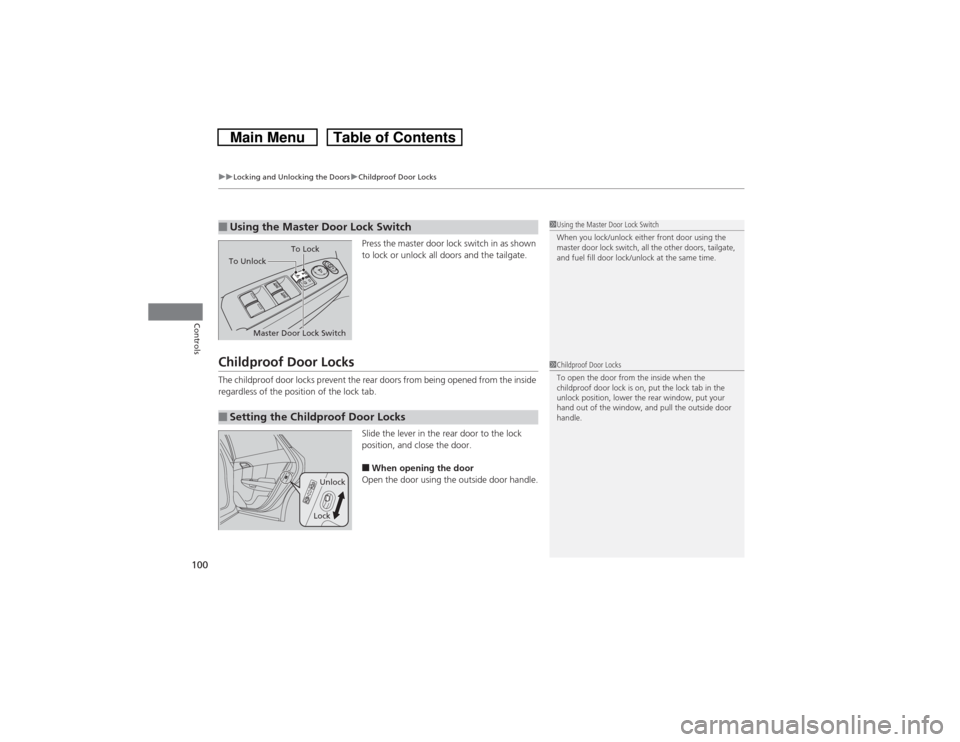
Press the master door lock switch in as shown
to lock or unlock all doors and the tailgate.
Childproof Door LocksThe childproof door locks prevent the rear doors from being opened from the inside
regardless of the position of the lock tab.
Slide the lever in the rear door to the lock
position, and close the door.
■When opening the door
Open the door using the outside door handle.
■Using the Master Door Lock Switch
1Using the Master Door Lock Switch
When you lock/unlock either front door using the
master door lock switch, all the other doors, tailgate,
and fuel fill door lock/unlock at the same time.
To Unlock
Master Door Lock SwitchTo Lock
■Setting the Childproof Door Locks
1Childproof Door Locks
To open the door from the inside when the
childproof door lock is on, put the lock tab in the
unlock position, lower the rear window, put your
hand out of the window, and pull the outside door
handle.
Unlock
Lock
Page 102 of 573
101
uuLocking and Unlocking the DoorsuAuto Door Locking/Unlocking
Controls
Auto Door Locking/UnlockingYour vehicle locks all doors and unlocks the driver’s door automatically when a
certain condition is met.■Drive lock modeAll doors and tailgate lock when the vehicle’s speed reaches about 10 mph (15 km/h).■Park unlock mode
The driver’s door unlocks when the shift lever is moved into
(P with the brake pedal
depressed.
■Auto Door Locking■Auto Door Unlocking
1Auto Door Locking/Unlocking
You can turn off or change to another auto door
locking/unlocking setting using the audio/
information screen.
2Customized Features
* P. 281
You can turn off or change to another auto door
locking/unlocking setting using the master door lock
switch.
2Customizing the Auto Door Locking/
Unlocking Setting
* P. 102
Models with audio/information screenModels without audio/information screen
* Not available on all models
Page 106 of 573
105Controls
Opening and Closing the TailgatePrecautions for Opening/Closing the TailgateAlways make sure individuals and objects are clear of the tailgate before opening or
closing it.■Opening the tailgate
•Open the tailgate all the way.
uIf it is not fully opened, the tailgate may begin to close under its own weight.
•Be careful when it is windy. The wind may cause the tailgate to close.■Closing the tailgate
Keep the tailgate closed while driving to:
uAvoid possible damage.
uPrevent exhaust gas from leaking into the vehicle.2Carbon Monoxide Gas P. 66
1Precautions for Opening/Closing the Tailgate
Be careful not to put your hands between the tailgate
and the cargo area when closing the gate.
When you are storing or picking up luggage from the
cargo area while the engine is idling, do not stand in
front of the exhaust pipe. You may get burned.
Do not allow any passenger in the cargo space. They
may get hurt during hard braking, a sudden
acceleration, or a crash.
Page 107 of 573
106
uuOpening and Closing the TailgateuUsing the Tailgate Release Button
Controls
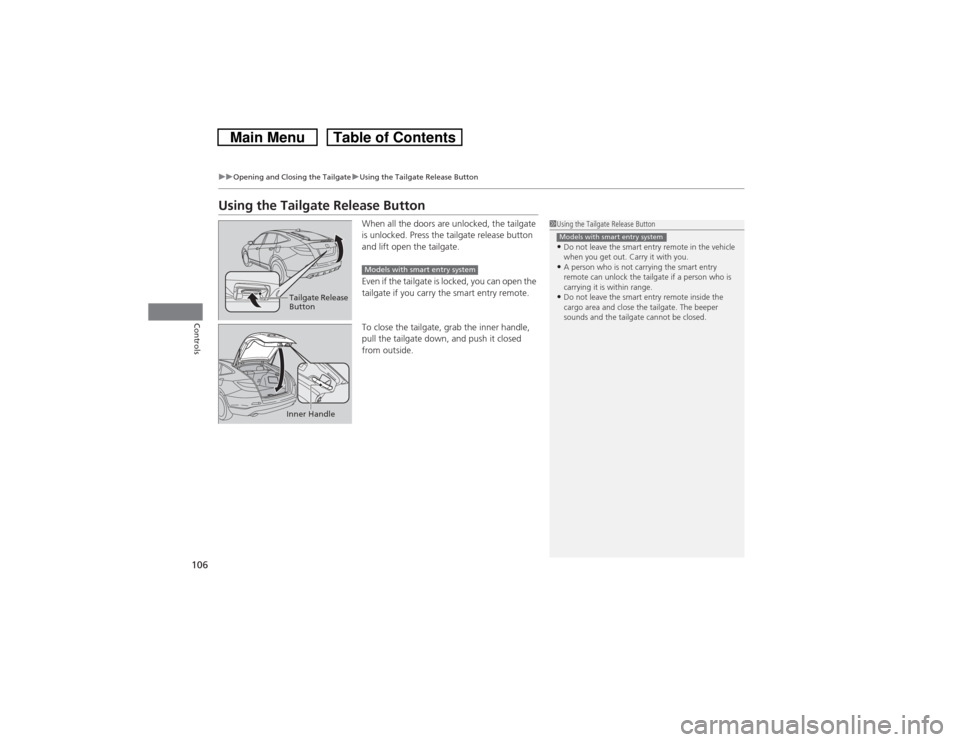
Using the Tailgate Release Button
When all the doors are unlocked, the tailgate
is unlocked. Press the tailgate release button
and lift open the tailgate.
Even if the tailgate is locked, you can open the
tailgate if you carry the smart entry remote.
To close the tailgate, grab the inner handle,
pull the tailgate down, and push it closed
from outside.
1Using the Tailgate Release Button•Do not leave the smart entry remote in the vehicle
when you get out. Carry it with you.•A person who is not carrying the smart entry
remote can unlock the tailgate if a person who is
carrying it is within range.•Do not leave the smart entry remote inside the
cargo area and close the tailgate. The beeper
sounds and the tailgate cannot be closed.Models with smart entry system
Tailgate Release
Button
Models with smart entry system
Inner Handle