tailgate HONDA CROSSTOUR 2014 1.G Owner's Manual
[x] Cancel search | Manufacturer: HONDA, Model Year: 2014, Model line: CROSSTOUR, Model: HONDA CROSSTOUR 2014 1.GPages: 573, PDF Size: 21.2 MB
Page 108 of 573
107
Continued
Controls
Security SystemImmobilizer SystemThe immobilizer system prevents a key that has not been pre-registered from
starting the engine. Each key contains electronic transmitters that use electronic
signals to verify the key.
Pay attention to the following when inserting the key into the ignition switch or
pressing the ENGINE START STOP button:
•Do not allow objects that emit strong radio waves near the ignition switch or the
ENGINE START STOP button.
•Make sure the key is not covered by or touching a metal object.
•Do not bring a key from another vehicle’s immobilizer system near the ignition
switch.Security System AlarmThe security system alarm activates when the doors, tailgate, or hood are opened
without the key, remote transmitter, or smart entry system.■When the security system alarm activates
The horn sounds intermittently and all of the exterior lights flash.■To deactivate the security system alarm
Unlock the vehicle using the key, remote transmitter or smart entry remote, or turn
the ignition switch to ON
(w*1. The system, along with the horn and flashing lights,
is deactivated.
*1: Models with the smart entry system have an ENGINE START/STOP button instead of an
ignition switch.
1Immobilizer SystemNOTICELeaving the ignition key in the vehicle can result in
theft or accidental movement of the vehicle.
Always take the ignition key with you whenever you
leave the vehicle unattended.
Do not alter the system or add other devices to it.
Doing so may damage the system and make your
vehicle inoperable.1Security System Alarm
The security alarm continues for a maximum of two
minutes until the security system deactivates.
Page 109 of 573
uuSecurity SystemuSecurity System Alarm
108Controls
■Setting the security system alarm
The security system alarm automatically sets when the following conditions have
been met:
•The ignition switch is in LOCK
(0*1, and the key has been removed from the
ignition switch.
•The hood and tailgate are closed.
•All doors are locked with the key, remote transmitter, or smart entry system.
■When the security system alarm sets
The security system alarm indicator in the instrument panel blinks. When the
blinking interval changes after about 15 seconds, the security system alarm is set.■To cancel the security system alarm
The security system alarm is canceled when the vehicle is unlocked using the key,
remote transmitter, or smart entry system, or the ignition switch is turned to ON (w*1. The security system alarm indicator goes off at the same time.
*1: Models with the smart entry system have an ENGINE START/STOP button instead of an
ignition switch.
1Security System Alarm
Do not set the security system alarm when someone
is in the vehicle or a window is open. The system can
accidentally activate when:•Unlocking the door with the lock tab or the master
door lock switch.
If the battery goes dead after you have set the
security system alarm, the security alarm may go off
once the battery is recharged or replaced.
If this occurs, deactivate the security system alarm by
unlocking a door using the key or remote transmitter.
Do not attempt to alter this system or add another
device to it.
Page 143 of 573
142Controls
Interior Lights/Interior Convenience ItemsInterior Lights
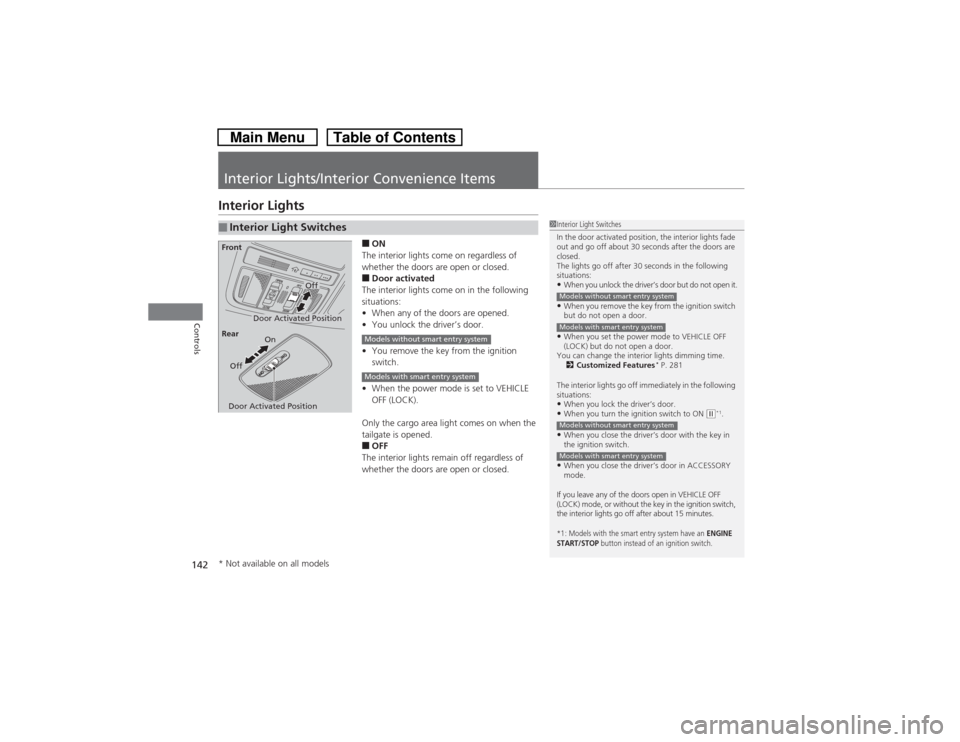
■ON
The interior lights come on regardless of
whether the doors are open or closed.■Door activated
The interior lights come on in the following
situations:
•When any of the doors are opened.
•You unlock the driver’s door.
•You remove the key from the ignition
switch.
•When the power mode is set to VEHICLE
OFF (LOCK).
Only the cargo area light comes on when the
tailgate is opened.■OFF
The interior lights remain off regardless of
whether the doors are open or closed.
■Interior Light Switches
1Interior Light Switches
In the door activated position, the interior lights fade
out and go off about 30 seconds after the doors are
closed.
The lights go off after 30 seconds in the following
situations:•When you unlock the driver’s door but do not open it.•When you remove the key from the ignition switch
but do not open a door.•When you set the power mode to VEHICLE OFF
(LOCK) but do not open a door.
You can change the interior lights dimming time.
2Customized Features
* P. 281
The interior lights go off immediately in the following
situations:
•When you lock the driver’s door.•When you turn the ignition switch to ON
(w*1.
•When you close the driver’s door with the key in
the ignition switch.•When you close the driver’s door in ACCESSORY
mode.
If you leave any of the doors open in VEHICLE OFF
(LOCK) mode, or without the key in the ignition switch,
the interior lights go off after about 15 minutes.*1: Models with the smart entry system have an
ENGINE
START/STOP
button instead of an ignition switch.
Models without smart entry systemModels with smart entry systemModels without smart entry systemModels with smart entry system
Door Activated Position
Off
FrontDoor Activated PositionOn
Off Rear
Models without smart entry systemModels with smart entry system
* Not available on all models
Page 144 of 573
143
uuInterior Lights/Interior Convenience ItemsuInterior Lights
Controls
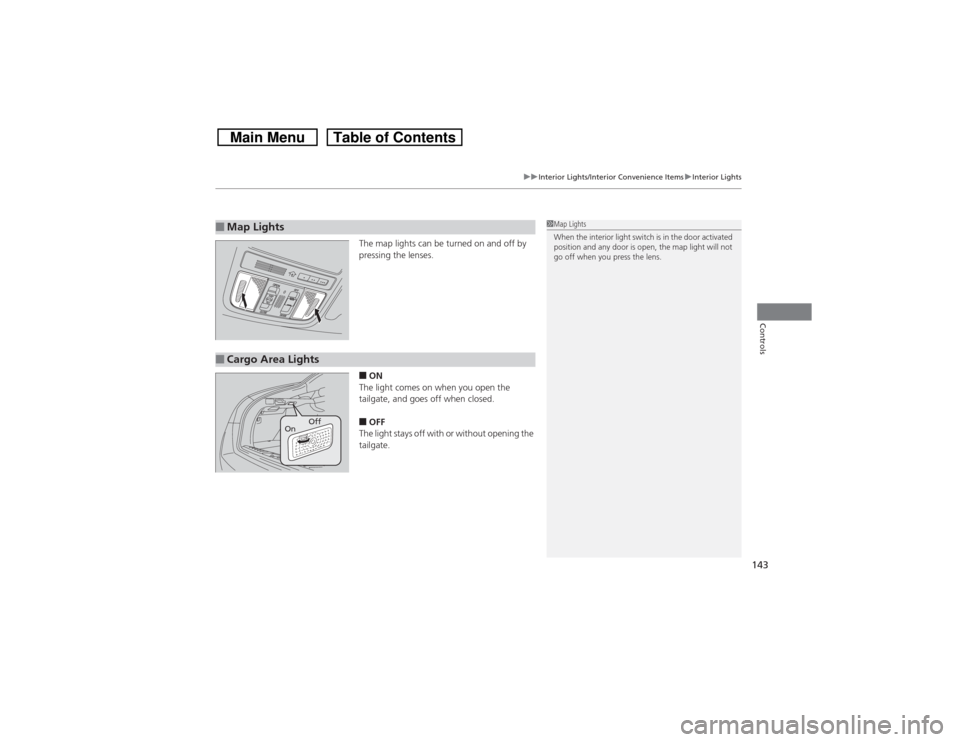
The map lights can be turned on and off by
pressing the lenses.■ON
The light comes on when you open the
tailgate, and goes off when closed.■OFF
The light stays off with or without opening the
tailgate.
■Map Lights
1Map Lights
When the interior light switch is in the door activated
position and any door is open, the map light will not
go off when you press the lens.
■Cargo Area Lights
Off
On
Page 299 of 573
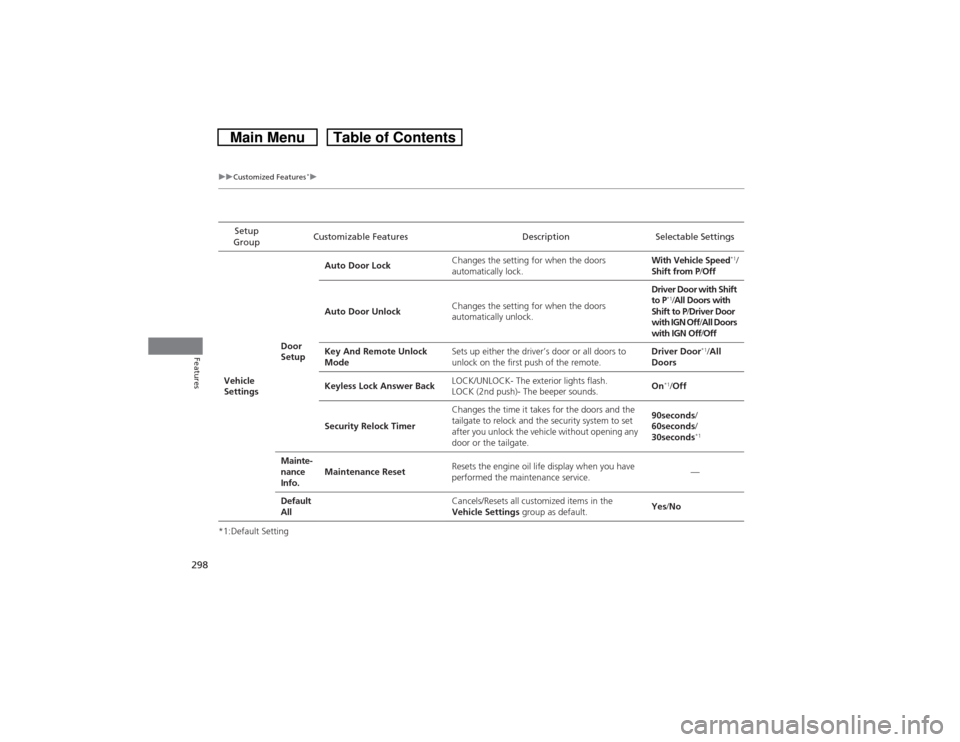
298
uuCustomized Features
*u
Features
*1:Default SettingSetup
GroupCustomizable Features Description Selectable Settings
Vehicle
SettingsDoor
SetupAuto Door LockChanges the setting for when the doors
automatically lock.With Vehicle Speed
*1/
Shift from P/Off
Auto Door UnlockChanges the setting for when the doors
automatically unlock.Driver Door with Shift
to P
*1/All Doors with
Shift to P/Driver Door
with IGN Off/All Doors
with IGN Off/Off
Key And Remote Unlock
ModeSets up either the driver’s door or all doors to
unlock on the first push of the remote.Driver Door
*1/All
Doors
Keyless Lock Answer BackLOCK/UNLOCK- The exterior lights flash.
LOCK (2nd push)- The beeper sounds.On
*1/Off
Security Relock TimerChanges the time it takes for the doors and the
tailgate to relock and the security system to set
after you unlock the vehicle without opening any
door or the tailgate.90seconds/
60seconds/
30seconds
*1
Mainte-
nance
Info.Maintenance ResetResets the engine oil life display when you have
performed the maintenance service.—
Default
All
Cancels/Resets all customized items in the
Vehicle Settings group as default.Yes/No
Page 310 of 573
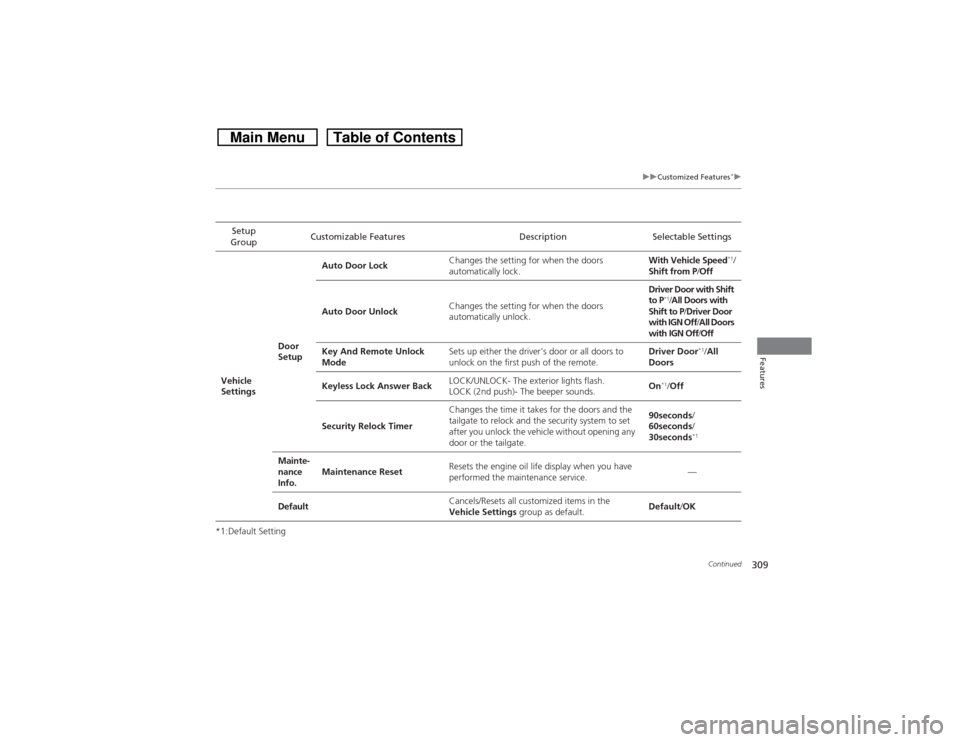
309
uuCustomized Features
*u
Continued
Features
*1:Default SettingSetup
GroupCustomizable Features Description Selectable Settings
Vehicle
SettingsDoor
SetupAuto Door LockChanges the setting for when the doors
automatically lock.With Vehicle Speed
*1/
Shift from P/Off
Auto Door UnlockChanges the setting for when the doors
automatically unlock.Driver Door with Shift
to P
*1/All Doors with
Shift to P/Driver Door
with IGN Off/All Doors
with IGN Off/Off
Key And Remote Unlock
ModeSets up either the driver’s door or all doors to
unlock on the first push of the remote.Driver Door
*1/All
Doors
Keyless Lock Answer BackLOCK/UNLOCK- The exterior lights flash.
LOCK (2nd push)- The beeper sounds.On
*1/Off
Security Relock TimerChanges the time it takes for the doors and the
tailgate to relock and the security system to set
after you unlock the vehicle without opening any
door or the tailgate.90seconds/
60seconds/
30seconds
*1
Mainte-
nance
Info.Maintenance ResetResets the engine oil life display when you have
performed the maintenance service.—
DefaultCancels/Resets all customized items in the
Vehicle Settings group as default.Default/OK
Page 412 of 573
Continued
411
uuBefore DrivinguDriving Preparation
Driving
•Store or secure all items on board properly.
uCarrying too much cargo, or improperly storing it, can affect your vehicle’s
handling, stability, stopping distance, and tires, and make it unsafe.
2Maximum Load Limit P. 413
•Do not pile items higher than the seat height.
uThey can block your view and may be thrown forward in the event of sudden
braking.
•Do not place anything in the front seat footwells. Make sure to secure the floor
mat.
uAn object or unsecured floor mat can interfere with your brake and accelerator
pedal operation while driving.
•If you have any animals on board, do not let them move around in the vehicle.
uThey may interfere with driving and a crash could occur.
•Securely close and lock all doors and the tailgate.
2Locking/Unlocking the Doors from the Inside P. 99
•Adjust your seating position properly.
uAdjust the head restraint, too.
2Adjusting the Seats P. 133
2Adjusting the Head Restraints P. 136
•Adjust the mirrors and steering wheel properly for your driving.
uAdjust them while sitting in the proper driving position.
2Adjusting the Steering Wheel P. 129
2Adjusting the Mirrors P. 130
■Interior Checks
1Interior Checks
The headlight aim is set by the factory, and does not
need to be adjusted. However, if you regularly carry
heavy items in the cargo area or tow a trailer, have
the aiming readjusted at a dealer or by a qualified
technician.
Page 516 of 573

515
Handling the Unexpected
This chapter explains how to handle unexpected troubles.
Tools
Types of Tools .................................. 516
If a Tire Goes Flat
Changing a Flat Tire ......................... 517
Engine Does Not Start
Checking the Engine ........................ 525If the Smart Entry Remote Battery is
Weak ..........................................526Emergency Engine Stop ................... 527
Jump Starting.................................... 528
Shift Lever Does Not Move.............. 531Overheating
How to Handle Overheating............. 532
Indicator, Coming On/Blinking
If the Low Oil Pressure Indicator Comes
On................................................ 534If the Charging System Indicator Comes
On ................................................. 534
If the Malfunction Indicator Lamp Comes
On or Blinks ................................... 535
If the Brake System Indicator (Red) Comes
On ................................................... 536If the Electric Power Steering (EPS) System
Indicator Comes On .............................536
If the Low Tire Pressure Indicator Comes
On ................................................. 537
If the TPMS Indicator Comes On ...... 537
Fuses
Fuse Locations ................................. 538
Inspecting and Changing Fuses ........ 541
Emergency Towing........................... 542
When You Cannot Unlock the Fuel Fill
Door................................................. 543
When You Cannot Open the Tailgate.. 544
Page 544 of 573
543Handling the Unexpected
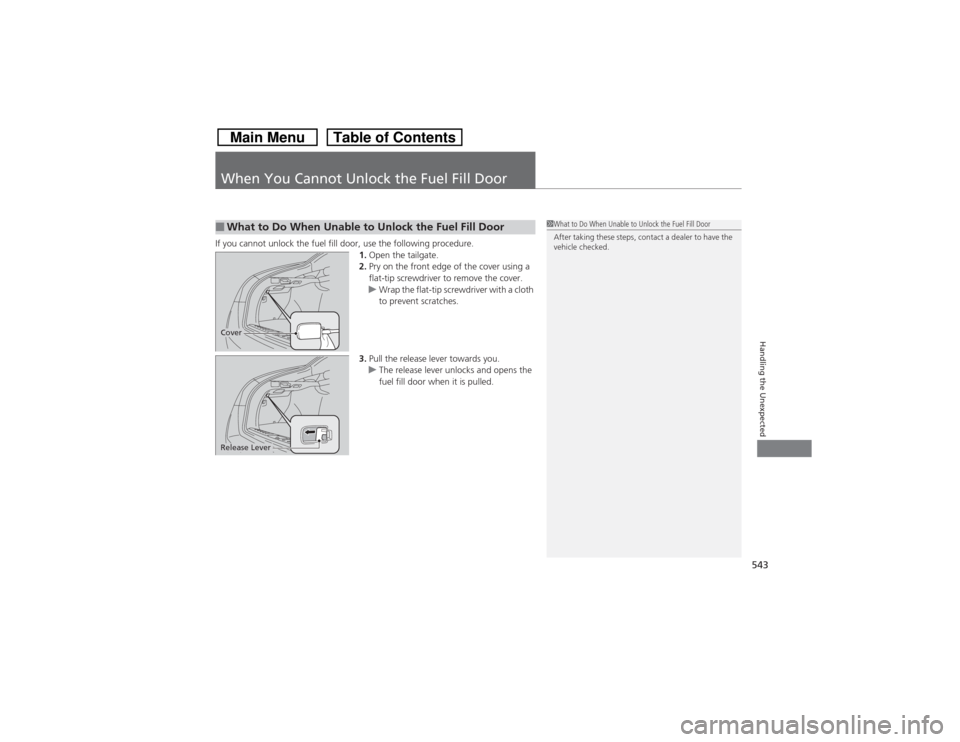
When You Cannot Unlock the Fuel Fill DoorIf you cannot unlock the fuel fill door, use the following procedure.
1.Open the tailgate.
2.Pry on the front edge of the cover using a
flat-tip screwdriver to remove the cover.
uWrap the flat-tip screwdriver with a cloth
to prevent scratches.
3.Pull the release lever towards you.
uThe release lever unlocks and opens the
fuel fill door when it is pulled.■What to Do When Unable to Unlock the Fuel Fill Door
1What to Do When Unable to Unlock the Fuel Fill Door
After taking these steps, contact a dealer to have the
vehicle checked.
CoverRelease Lever
Page 545 of 573
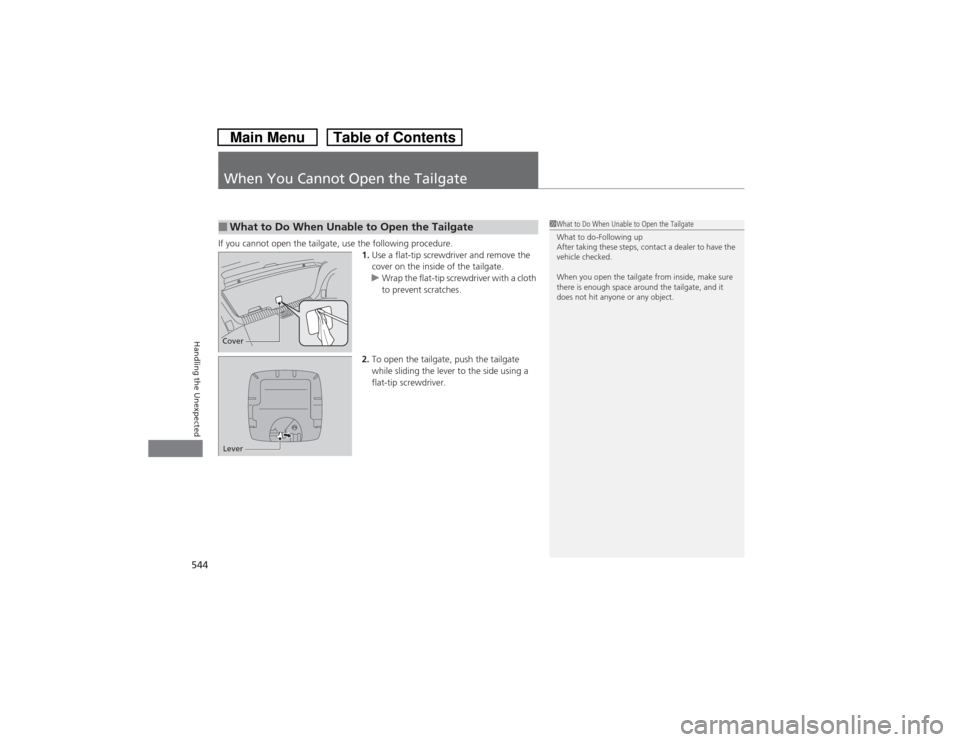
544Handling the Unexpected
When You Cannot Open the TailgateIf you cannot open the tailgate, use the following procedure.
1.Use a flat-tip screwdriver and remove the
cover on the inside of the tailgate.
uWrap the flat-tip screwdriver with a cloth
to prevent scratches.
2.To open the tailgate, push the tailgate
while sliding the lever to the side using a
flat-tip screwdriver.■What to Do When Unable to Open the Tailgate
1What to Do When Unable to Open the Tailgate
What to do-Following up
After taking these steps, contact a dealer to have the
vehicle checked.
When you open the tailgate from inside, make sure
there is enough space around the tailgate, and it
does not hit anyone or any object.
CoverLever