phone HONDA CROSSTOUR 2015 1.G Navigation Manual
[x] Cancel search | Manufacturer: HONDA, Model Year: 2015, Model line: CROSSTOUR, Model: HONDA CROSSTOUR 2015 1.GPages: 150, PDF Size: 6.61 MB
Page 68 of 150
67
Navigation
This section describes how to enter a destination, select a route to take,
and follow the route to your destination. It also describes how to change your route or destination along the way.
Entering a Destination........................... 68
Address ................................................. 70
Address Book ......................................... 76
Previous Destination ............................... 77
Place Category ....................................... 78
Place Name ............................................ 80
Place Phone Number .............................. 83
Download POI ........................................ 84
Scenic Route .......................................... 85
Intersection ............................................ 86
Map Input.............................................. 87
Coordinate ............................................ 89
Calculating the Route ............................. 90
Viewing the Routes ................................ 91 Driving to Your Destination
...................92
Viewing the Route ..................................92
Listening to Voice Guidance ....................96
Reaching a Waypoint ..............................97
Map Menu ................................................98
Displaying the Map Menu .......................98
Directions .............................................100
Traffic Rerouting™................................102
Changing Your Route ............................104
Pausing the Route .................................105
Canceling the Route .............................105
Adding Waypoints ................................106
Editing the Destination List ....................110
Taking a Detour ....................................112 Avoiding Area ...................................... 112
Changing Your Destination ................. 113
Find Nearest Place ................................ 113
Selecting a Destination on the Map ...... 114
Entering a New Destination .................. 115
Resuming Your Trip .............................. 116
Page 70 of 150
69
Entering a Destination
Navigation
•Go Home : Sets your home address as a destination.
2Going Home P. 10
• Place Category : Sets a destination by selecting a place/landmark.
2Place Category P. 78
• Place Name : Sets a destination by entering a place name.
2Place Name P. 80
• Place Phone No. : Sets a destination by entering the phone number of a place/
landmark.
2 Place Phone Number P. 83
• Download POI: Sets a destination by using a lis t of the imported POI (category
and places) data you created.
2 Download POI P. 84
• Scenic Route : Sets a destination by using a list of scenic roads for each state (U.S.
and Canada only).
2 Scenic Route P. 85
• Intersection : Sets a destination (intersectio n) by entering two streets.
2Intersection P. 86
• Map Input : Sets a destination by scrolling through the map.
2Map Input P. 87
• Coordinate: Sets a destination by entering latitude and longitude.
2 Coordinate P. 89
Page 84 of 150
83
Entering a DestinationPlace Phone Number
Navigation
Place Phone Number
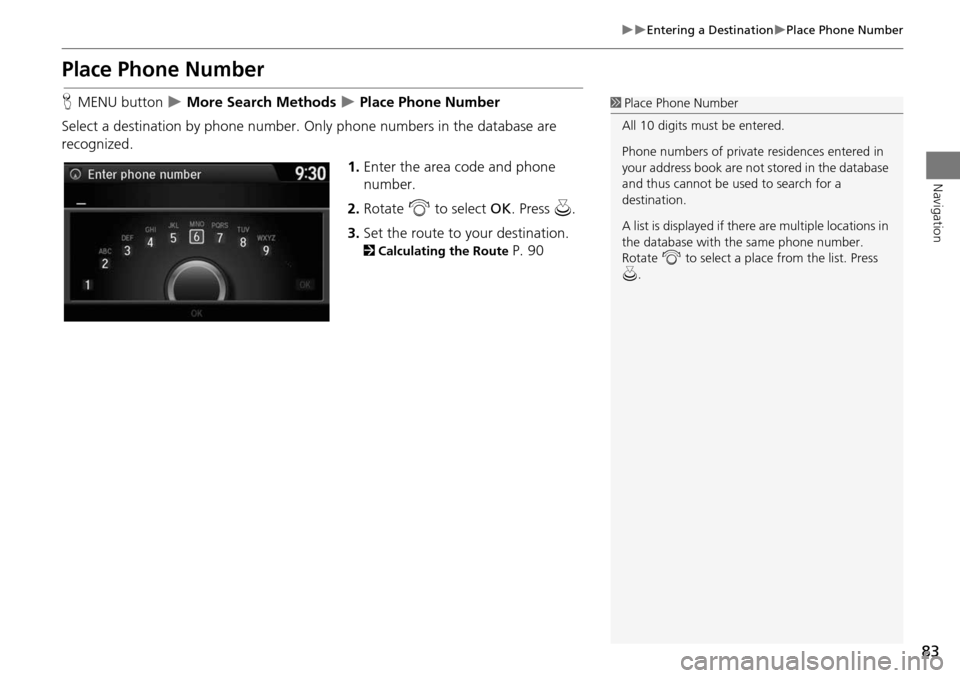
HMENU button More Search Methods Place Phone Number
Select a destination by phone number. On ly phone numbers in the database are
recognized.
1.Enter the area code and phone
number.
2. Rotate i to select OK. Press u.
3. Set the route to your destination.
2 Calculating the Route P. 90
1Place Phone Number
All 10 digits must be entered.
Phone numbers of private residences entered in
your address book are not stored in the database
and thus cannot be used to search for a
destination.
A list is displayed if there are multiple locations in
the database with the same phone number.
Rotate i to select a place from the list. Press
u .
Page 91 of 150
90
Navigation
Calculating the Route
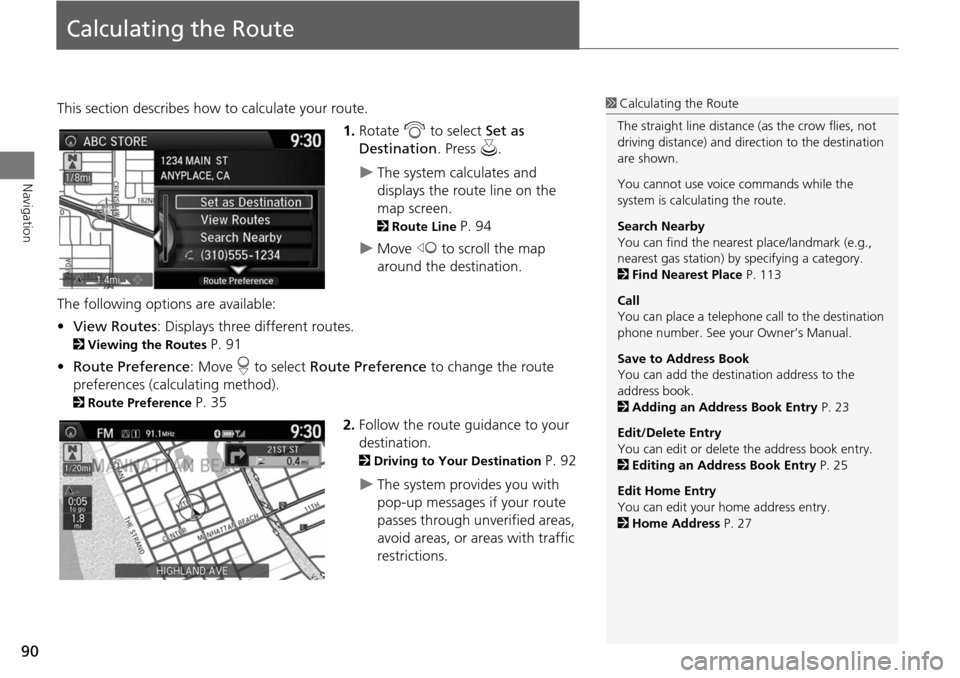
This section describes how to calculate your route.1.Rotate i to select Set as
Destination . Press u.
The system calculates and
displays the route line on the
map screen.
2Route Line P. 94
Move w to scroll the map
around the destination.
The following options are available:
• View Routes : Displays three different routes.
2Viewing the Routes P. 91
• Route Preference : Move r to select Route Preference to change the route
preferences (calculating method).
2 Route Preference P. 35
2.Follow the route guidance to your
destination.
2 Driving to Your Destination P. 92
The system provides you with
pop-up messages if your route
passes through unverified areas,
avoid areas, or areas with traffic
restrictions.
1Calculating the Route
The straight line distance (as the crow flies, not
driving distance) and dire ction to the destination
are shown.
You cannot use voice commands while the
system is calculating the route.
Search Nearby
You can find the nearest place/landmark (e.g.,
nearest gas station) by specifying a category.
2 Find Nearest Place P. 113
Call
You can place a telephone ca ll to the destination
phone number. See your Owner’s Manual.
Save to Address Book
You can add the destination address to the
address book.
2 Adding an Address Book Entry P. 23
Edit/Delete Entry
You can edit or delete the address book entry.
2 Editing an Address Book Entry P. 25
Edit Home Entry
You can edit your home address entry.
2 Home Address P. 27
Page 117 of 150
116
Navigation
Resuming Your Trip
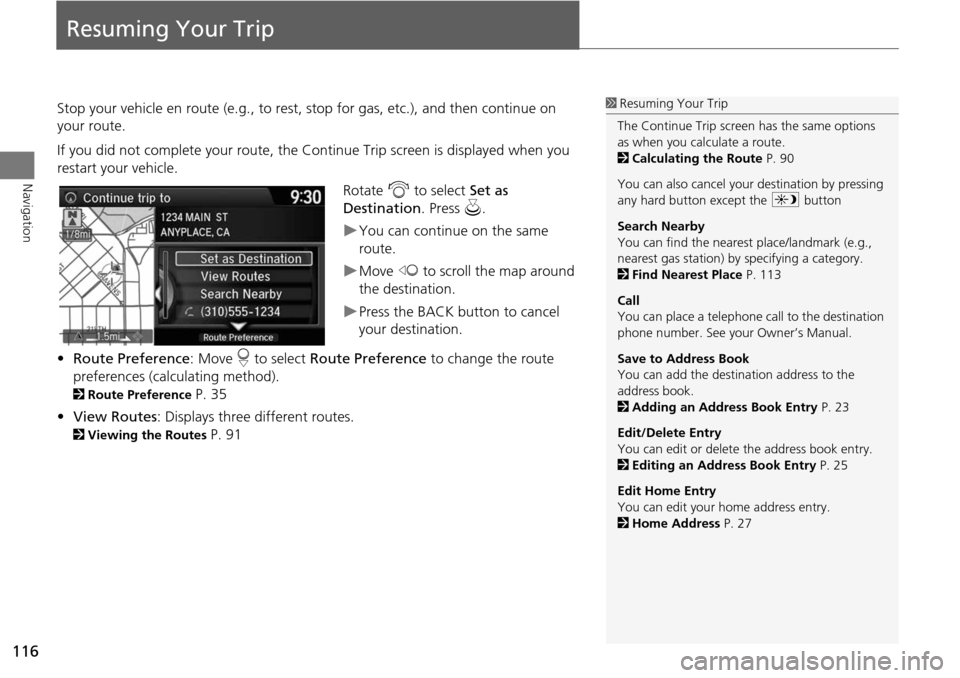
Stop your vehicle en route (e.g., to rest, stop for gas, etc.), and then continue on
your route.
If you did not complete your route, the Continue Trip screen is displayed when you
restart your vehicle.
Rotate i to select Set as
Destination . Press u.
You can continue on the same
route.
Move w to scroll the map around
the destination.
Press the BACK button to cancel
your destination.
• Route Preference : Move r to select Route Preference to change the route
preferences (calculating method).
2 Route Preference P. 35
• View Routes : Displays three different routes.
2Viewing the Routes P. 91
1Resuming Your Trip
The Continue Trip screen has the same options
as when you calculate a route.
2 Calculating the Route P. 90
You can also cancel your destination by pressing
any hard button except the a button
Search Nearby
You can find the nearest place/landmark (e.g.,
nearest gas station) by specifying a category.
2 Find Nearest Place P. 113
Call
You can place a telephone ca ll to the destination
phone number. See your Owner’s Manual.
Save to Address Book
You can add the destination address to the
address book.
2 Adding an Address Book Entry P. 23
Edit/Delete Entry
You can edit or delete the address book entry.
2 Editing an Address Book Entry P. 25
Edit Home Entry
You can edit your home address entry.
2 Home Address P. 27
Page 119 of 150
118
Troubleshooting
Troubleshooting
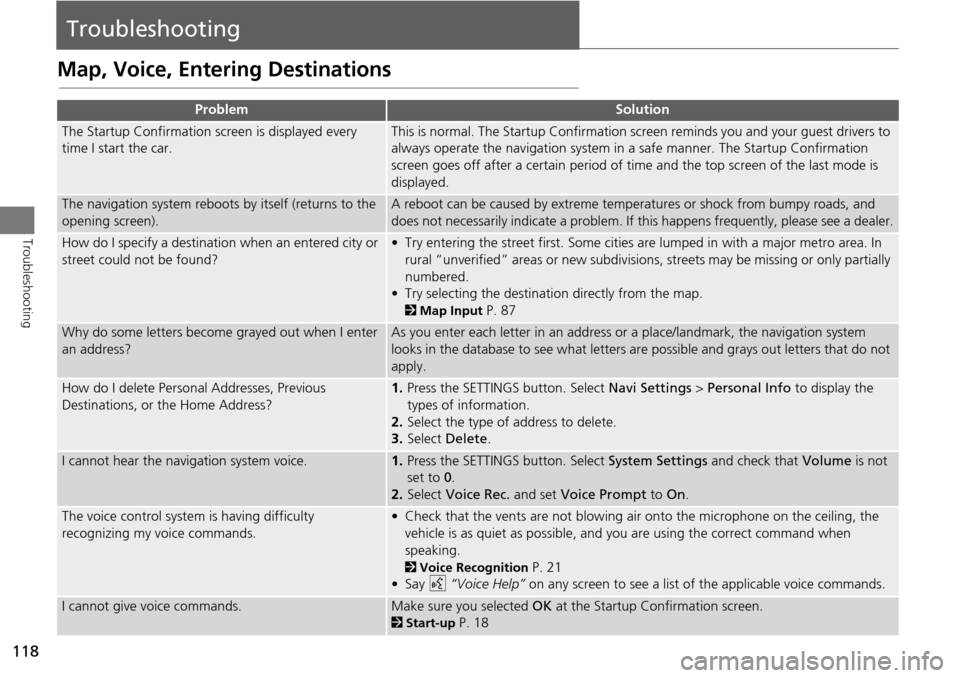
Map, Voice, Entering Destinations
ProblemSolution
The Startup Confirmation screen is displayed every
time I start the car.This is normal. The Startup Confirmation screen reminds you and your guest drivers to
always operate the navigation system in a safe manner. The Startup Confirmation
screen goes off after a certain period of time and the top screen of the last mode is
displayed.
The navigation system reboots by itself (returns to the
opening screen).A reboot can be caused by extreme temper atures or shock from bumpy roads, and
does not necessarily indicate a problem. If this happens frequently, please see a dealer.
How do I specify a destination when an entered city or
street could not be found?• Try entering the street first. Some cities are lumped in with a major metro area. In
rural “unverified” areas or new subdivisions, streets may be missing or only partially
numbered.
• Try selecting the destinati on directly from the map.
2Map Input P. 87
Why do some letters become grayed out when I enter
an address?As you enter each letter in an address or a place/landmark, the navigation system
looks in the database to see what letters are possible and grays out letters that do not
apply.
How do I delete Personal Addresses, Previous
Destinations, or the Home Address?1. Press the SETTINGS button. Select Navi Settings > Personal Info to display the
types of information.
2. Select the type of address to delete.
3. Select Delete .
I cannot hear the navigation system voice.1.Press the SETTINGS button. Select System Settings and check that Volume is not
set to 0 .
2. Select Voice Rec. and set Voice Prompt to On.
The voice control system is having difficulty
recognizing my voice commands.• Check that the vents are not blowing air onto the microphone on the ceiling, the
vehicle is as quiet as possible, and you are using the correct command when
speaking.
2 Voice Recognition P. 21
•Say d “Voice Help” on any screen to see a list of the applicable voice commands.
I cannot give voice commands.Make sure you selected OK at the Startup Confirmation screen.
2Start-up P. 18
Page 120 of 150
119
TroubleshootingMap, Voice, Entering Destinations
Troubleshooting
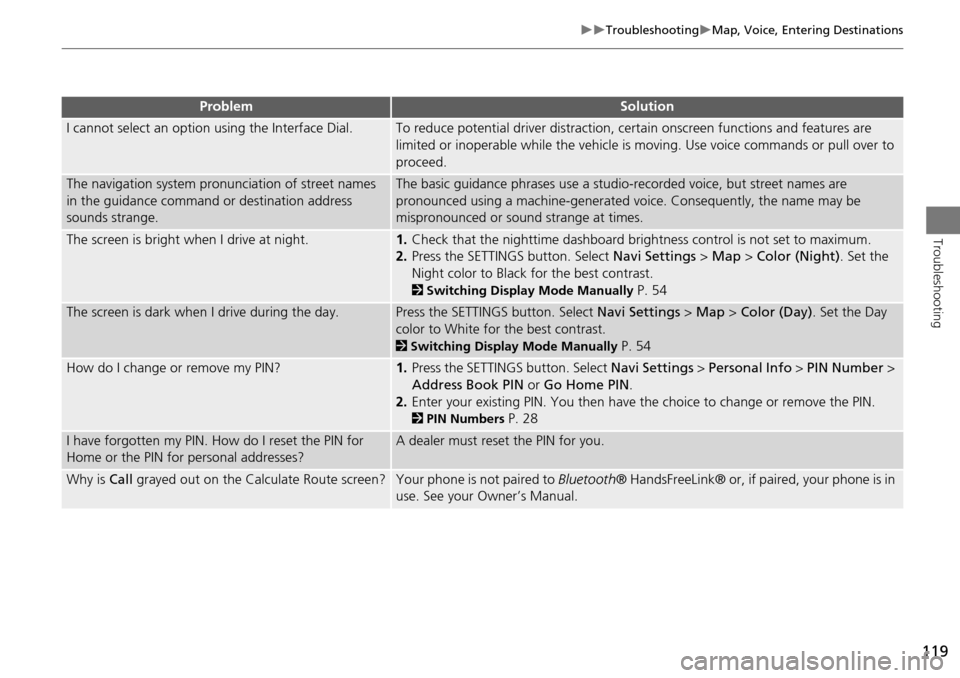
I cannot select an option using the Interface Dial.To reduce potential driver distraction, ce rtain onscreen functions and features are
limited or inoperable while the vehicle is moving. Use voice commands or pull over to
proceed.
The navigation system pronunciation of street names
in the guidance command or destination address
sounds strange.The basic guidance phrases use a studio- recorded voice, but street names are
pronounced using a machine-generated voice. Consequently, the name may be
mispronounced or sound strange at times.
The screen is bright when I drive at night.1. Check that the nighttime dashboard brig htness control is not set to maximum.
2. Press the SETTINGS button. Select Navi Settings > Map > Color (Night) . Set the
Night color to Black for the best contrast.
2 Switching Display Mode Manually P. 54
The screen is dark when I drive during the day.Press the SETTINGS button. Select Navi Settings > Map > Color (Day) . Set the Day
color to White for the best contrast.
2 Switching Display Mode Manually P. 54
How do I change or remove my PIN?1. Press the SETTINGS button. Select Navi Settings > Personal Info > PIN Number >
Address Book PIN or Go Home PIN.
2. Enter your existing PIN. Yo u then have the choice to change or remove the PIN.
2PIN Numbers P. 28
I have forgotten my PIN. How do I reset the PIN for
Home or the PIN for personal addresses?A dealer must reset the PIN for you.
Why is Call grayed out on the Calculate Route screen?Your phone is not paired to Bluetooth® HandsFreeLink® or, if paired, your phone is in
use. See your Owner’s Manual.
ProblemSolution
Page 122 of 150
121
TroubleshootingGuidance, Routing
Troubleshooting
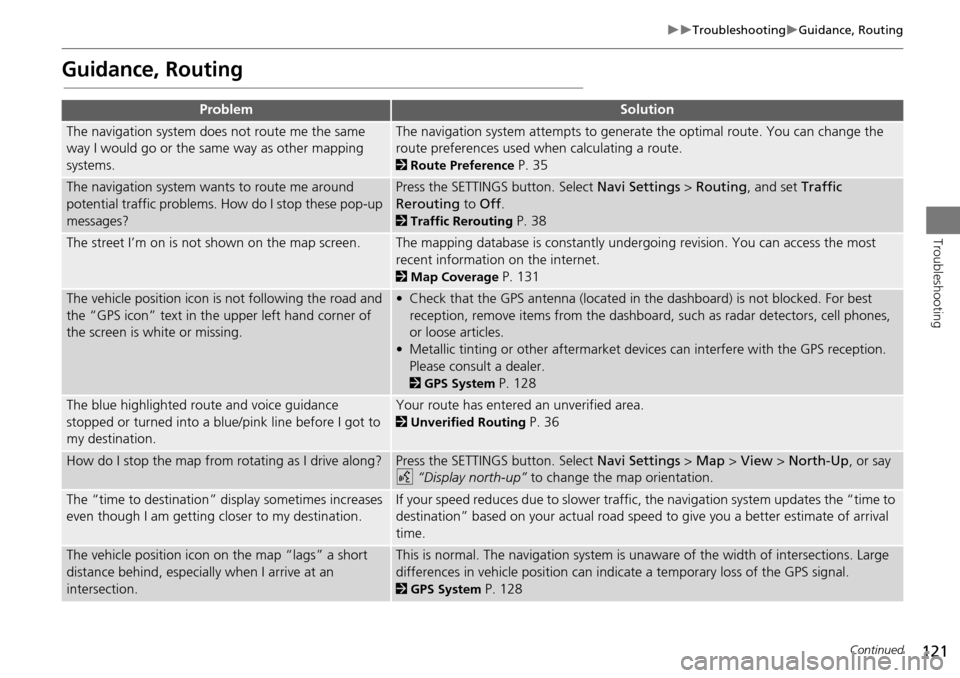
Guidance, Routing
ProblemSolution
The navigation system does not route me the same
way I would go or the same way as other mapping
systems.The navigation system attempts to generate the optimal route. You can change the
route preferences used when calculating a route.
2Route Preference P. 35
The navigation system wants to route me around
potential traffic problems. How do I stop these pop-up
messages?Press the SETTINGS button. Select Navi Settings > Routing , and set Traffic
Rerouting to Off .
2Traffic Rerouting P. 38
The street I’m on is not shown on the map screen.The mapping database is constantly undergoing revision. You can access the most
recent information on the internet.
2Map Coverage P. 131
The vehicle position icon is not following the road and
the “GPS icon” text in th e upper left hand corner of
the screen is white or missing.• Check that the GPS antenna (located in the dashboard) is not blocked. For best reception, remove items from the dashboard, such as radar detectors, cell phones,
or loose articles.
• Metallic tinting or other aftermarket devi ces can interfere with the GPS reception.
Please consult a dealer.
2 GPS System P. 128
The blue highlighted route and voice guidance
stopped or turned into a blue/pink line before I got to
my destination.Your route has entered an unverified area.
2Unverified Routing P. 36
How do I stop the map from rotating as I drive along?Press the SETTINGS button. Select Navi Settings > Map > View > North-Up , or say
d “Display north-up” to change the map orientation.
The “time to destination” display sometimes increases
even though I am getting closer to my destination.If your speed reduces due to slower traffic, the navigation system updates the “time to
destination” based on your actual road speed to give you a better estimate of arrival
time.
The vehicle position icon on the map “lags” a short
distance behind, especially when I arrive at an
intersection.This is normal. The navigation system is un aware of the width of intersections. Large
differences in vehicle position can indicate a temporary loss of the GPS signal.
2 GPS System P. 128
Continued
Page 129 of 150
128
Reference Information
System Limitations
GPS System
The signals received from the GPS satellites
are extremely weak (less than a millionth
of the strength of a local FM station) and
require an unobstructed view of the sky.
The GPS antenna is located in the
dashboard. The signal reception can easily
be interrupted or interfered with by the
following:
• Metallic window tint on the front or side
windows
• Cell phones, PDAs, or other electronic
devices docked in a cradle or lying loose
on the dashboard
• Remote starters or “hidden” vehicle
tracking systems mounted near the
navigation unit
• Audio electronic devices mounted near
the navigation unit
• Trees, tall buildings, freeway overpasses,
tunnels, or overhead electrical power
wires
The GPS is operated by the U.S.
Department of Defense. For security
reasons, there are certain inaccuracies built
into the GPS for wh ich the navigation
system must constantly compensate. This can cause occasional positioning errors of
up to several hundred feet.
Address Calculation
The destination icon shows only the
approximate location of a destination
address. This occurs if the number of
possible addresses is different from the
number of actual addresses on a block. For
example, the address 1425 on a 1400
block with 100 possible addresses
(because it is followed by the 1500 block)
will be shown a quarter of the way down
the block by the system. If there are only
25 actual addresses
on the block, the
actual location of address 1425 would be
at the end of the block.
Database
The digitized map database reflects
conditions as they existed at various points
in time before production. Accordingly,
your database may contain inaccurate or
incomplete data or information due to the
passage of time, road construction,
changing conditions, or other causes.
For example, some places/landmarks may
be missing when you search the database
because the name was misspelled, the
place was improperly categorized, or a
place/landmark is not yet in the database.
This is also true for police stations,
hospitals, and other public institutions. Do
not rely on the navigation system if you
need law enforcement or hospital services.
Always check with local information
sources.
Page 141 of 150
140
Voice Commands
Voice Commands
Navigation Commands
The system accepts these commands on a
map/guidance screen.Display voice portal
Display phone (equivalent to PHONE)
Display audio screen (equivalent to
AUDIO)
Display navigation (if en route, displays
the Route screen)
Display information (equivalent to INFO)
Display menu (equivalent to MENU. if en
route, displays Route Options)
Display setting (equivalent to SETTING)
Display map
Display map guide (when en route,
shows the next guidance point)
Cancel
What time is it?
What is today’s date?
Voice help (displays commands for
current screen)
Trip computer
Display clock
Display wallpaper
Traffic information
■ General Commands
Display current location (shows current
latitude, longitude, and elevation)
Display/Hide (specify icon type):
ATM
gas station
restaurant
post office
grocery store
lodging (hotel, motel)
parking garage
parking lot
school
hospital
freeway exit information
traffic
traffic speeds
traffic icons
traffic incidents
Go home
Register the current location (stores
current location in the Address Book)
■ Map Display Commands
Display north up
Display heading up
Display 3D map
Display zoom in
Display zoom out
Display (specify scale):
1/20 mile (80 m) scale
1/8 mile (200 m) scale
1/4 mile (400 m) scale
1/2 mile (800 m) scale
1 mile (1600 m) scale
2 mile (3 km) scale
5 mile (8 km) scale
15 mile (24 km) scale
50 mile (80 km) scale
150 mile (240 km) scale
350 mile (560 km) scale
1000 mile (1600 km) scale
Max zoom in
Max zoom out
■ Map Scale Commands