display HONDA CROSSTOUR 2015 1.G Owners Manual
[x] Cancel search | Manufacturer: HONDA, Model Year: 2015, Model line: CROSSTOUR, Model: HONDA CROSSTOUR 2015 1.GPages: 573
Page 402 of 573
Continued401
uuBluetooth ® HandsFreeLink ®u HFL Menus
Features
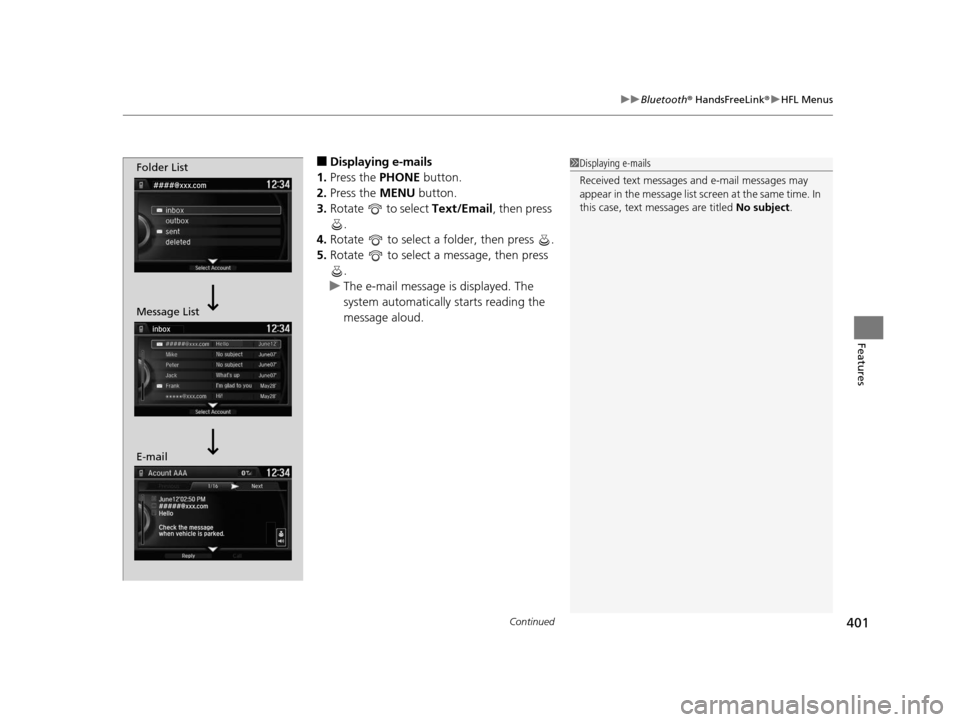
■Displaying e-mails
1. Press the PHONE button.
2. Press the MENU button.
3. Rotate to select Text/Email, then press
.
4. Rotate to select a folder, then press .
5. Rotate to select a message, then press
.
u The e-mail message is displayed. The
system automatically starts reading the
message aloud.1Displaying e-mails
Received text messages and e-mail messages may
appear in the message list screen at the same time. In
this case, text messages are titled No subject.Folder List
Message List
E-mail
15 CROSSTOUR-31TP66500.book 401 ページ 2014年7月31日 木曜日 午後3時23分
Page 403 of 573
uuBluetooth ® HandsFreeLink ®u HFL Menus
402
Features
■Read or stop re ading a message
1. Go to the text message or e-mail message
screen.
u The system automatically starts reading
the message aloud.
2 Displaying Messages P. 400
2.Press to stop reading.
Press again to start reading the message
from the beginning.
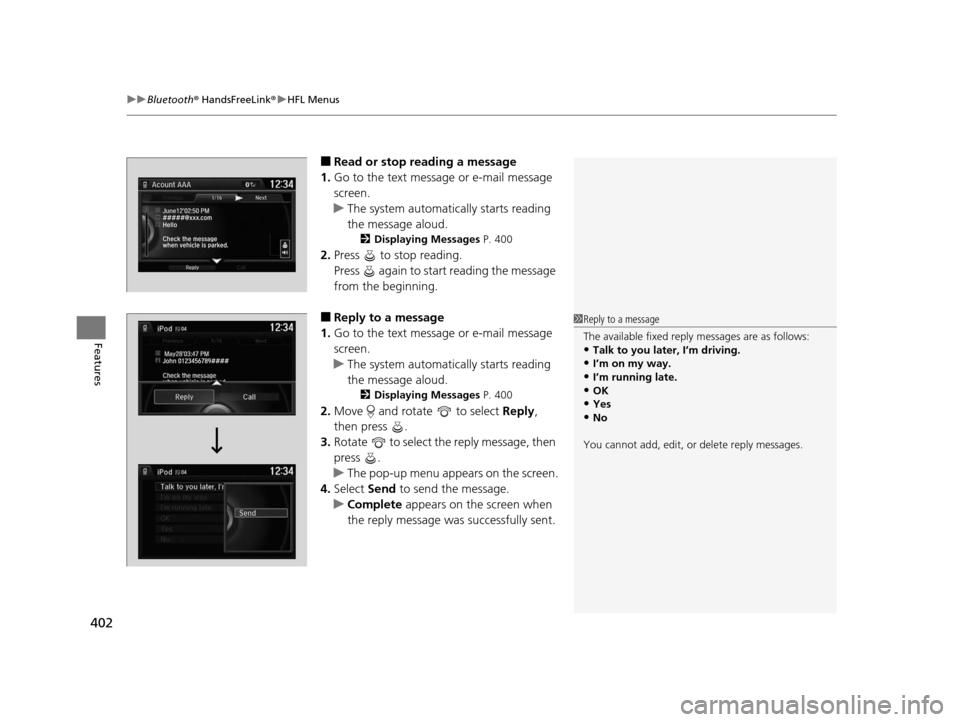
■Reply to a message
1. Go to the text message or e-mail message
screen.
u The system automatically starts reading
the message aloud.
2 Displaying Messages P. 400
2.Move and rotate to select Reply,
then press .
3. Rotate to select the reply message, then
press .
u The pop-up menu appears on the screen.
4. Select Send to send the message.
u Complete appears on the screen when
the reply message was successfully sent.
1 Reply to a message
The available fixed reply messages are as follows:
•Talk to you later, I’m driving.•I’m on my way.
•I’m running late.
•OK•Yes
•No
You cannot add, edit, or delete reply messages.
15 CROSSTOUR-31TP66500.book 402 ページ 2014年7月31日 木曜日 午後3時23分
Page 404 of 573
403
uuBluetooth ® HandsFreeLink ®u HFL Menus
Features
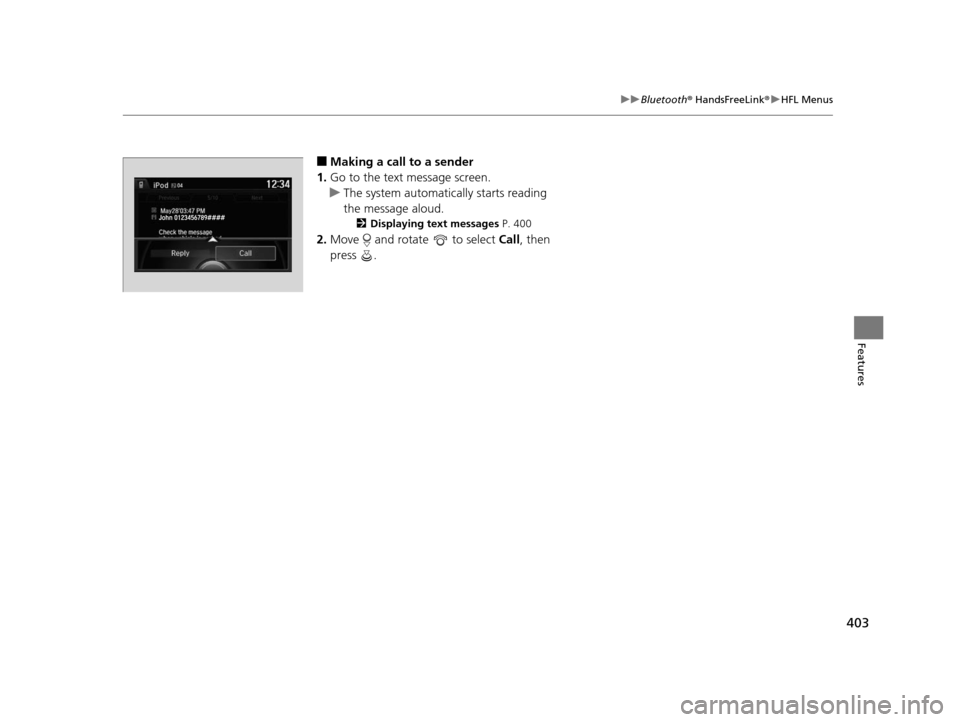
■Making a call to a sender
1. Go to the text message screen.
u The system automatically starts reading
the message aloud.
2 Displaying text messages P. 400
2.Move and rotate to select Call, then
press .
John 0123456789####
Reply Call
15 CROSSTOUR-31TP66500.book 403 ページ 2014年7月31日 木曜日 午後3時23分
Page 405 of 573
404
Features
Compass*
When you turn the ignition switch to ON (w, the compass self-calibrates, and the
compass display appears.
Compass Calibration
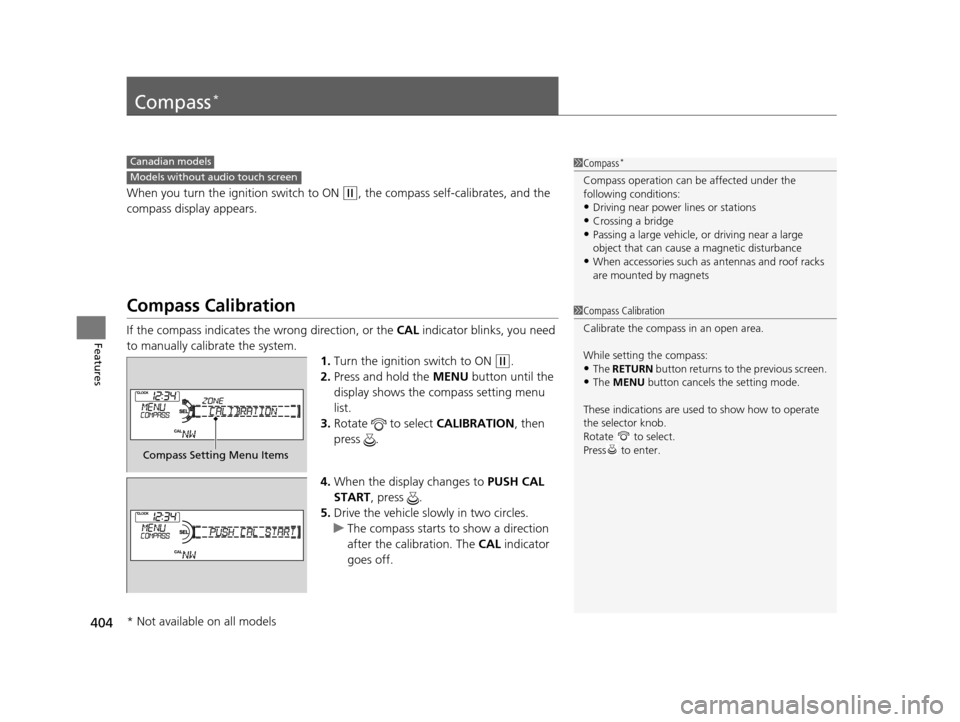
If the compass indicates the wrong direction, or the CAL indicator blinks, you need
to manually calibrate the system. 1.Turn the ignition switch to ON
(w.
2. Press and hold the MENU button until the
display shows the compass setting menu
list.
3. Rotate to select CALIBRATION, then
press .
4. When the display changes to PUSH CAL
START, press .
5. Drive the vehicle slowly in two circles.
u The compass starts to show a direction
after the calibration. The CAL indicator
goes off.
1 Compass*
Compass operation can be affected under the
following conditions:
•Driving near power lines or stations
•Crossing a bridge•Passing a large vehicle, or driving near a large
object that can cause a magnetic disturbance
•When accessories such as antennas and roof racks
are mounted by magnets
Canadian models
Models without audio touch screen
1 Compass Calibration
Calibrate the compass in an open area.
While setting the compass:
•The RETURN button returns to the previous screen.
•The MENU button cancels the setting mode.
These indications are used to show how to operate
the selector knob.
Rotate to select.
Press to enter.
Compass Setting Menu Items
* Not available on all models
15 CROSSTOUR-31TP66500.book 404 ページ 2014年7月31日 木曜日 午後3時23分
Page 406 of 573
405
uuCompass*uCompass Zone Selection
Features
Compass Zone Selection
1. Turn the ignition switch to ON (w.
2. Press and hold the MENU button until the
display shows the compass setting menu
list.
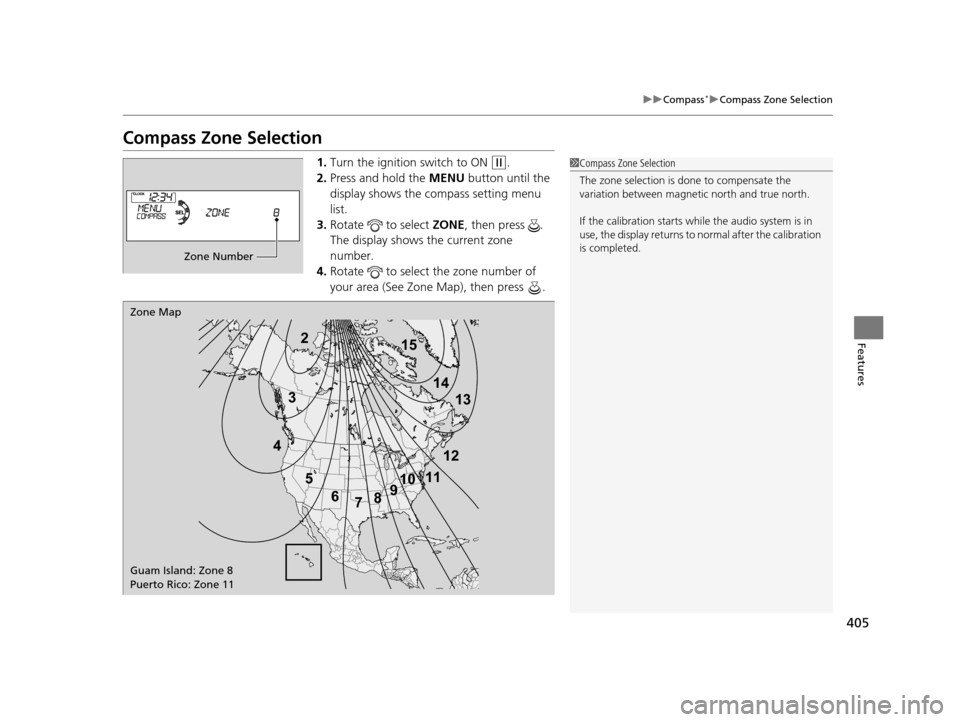
3. Rotate to select ZONE, then press .
The display shows the current zone
number.
4. Rotate to select the zone number of
your area (See Zone Map), then press .1Compass Zone Selection
The zone selection is done to compensate the
variation between magneti c north and true north.
If the calibration starts while the audio system is in
use, the display returns to normal after the calibration
is completed.
Zone Number
2
3
4 5678910
111213
14
15
Zone Map
Guam Island: Zone 8
Puerto Rico: Zone 11
15 CROSSTOUR-31TP66500.book 405 ページ 2014年7月31日 木曜日 午後3時23分
Page 407 of 573
406
Features
Compass*
When you turn the ignition switch to ON (w*1, the compass self-calibrates, and the
compass display appears.
Compass Calibration
If the compass indicates the wrong direction, or the CAL indicator blinks, you need
to manually calibrate the system. 1.Turn the ignition switch to ON
(w*1.
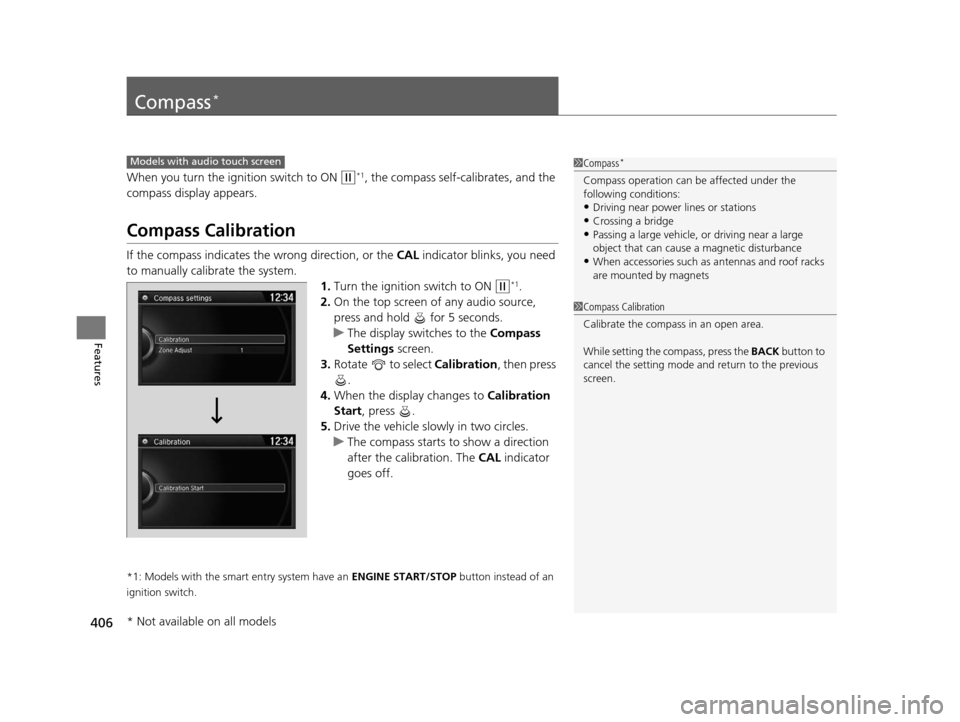
2. On the top screen of any audio source,
press and hold for 5 seconds.
u The display switches to the Compass
Settings screen.
3. Rotate to select Calibration , then press
.
4. When the display changes to Calibration
Start, press .
5. Drive the vehicle slowly in two circles.
u The compass starts to show a direction
after the calibration. The CAL indicator
goes off.
*1: Models with the smart entry system have an ENGINE START/STOP button instead of an
ignition switch.
Models with audio touch screen1 Compass*
Compass operation can be affected under the
following conditions:
•Driving near power lines or stations
•Crossing a bridge•Passing a large vehicle, or driving near a large
object that can cause a magnetic disturbance
•When accessories such as antennas and roof racks
are mounted by magnets
1 Compass Calibration
Calibrate the compass in an open area.
While setting the compass, press the BACK button to
cancel the setting mode a nd return to the previous
screen.
* Not available on all models
15 CROSSTOUR-31TP66500.book 406 ページ 2014年7月31日 木曜日 午後3時23分
Page 408 of 573
407
uuCompass*uCompass Zone Selection
Features
Compass Zone Selection
1. Turn the ignition switch to ON (w*1.
2. On the top screen of any audio source,
press and hold for 5 seconds.
u The display swit ches to the Compass
Settings screen.
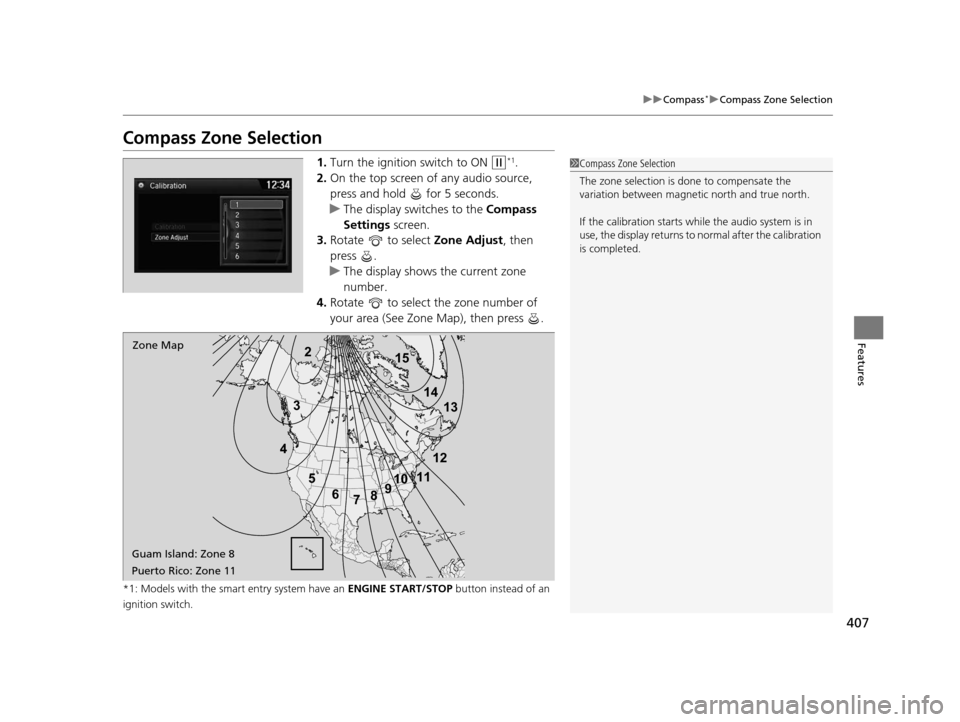
3. Rotate to select Zone Adjust, then
press .
u The display shows the current zone
number.
4. Rotate to select the zone number of
your area (See Zone Map), then press .
*1: Models with the smart entry system have an ENGINE START/STOP button instead of an
ignition switch.
2
3
4 5678910
111213
14
15Zone Map
Guam Island: Zone 8
Puerto Rico: Zone 11
1 Compass Zone Selection
The zone selection is done to compensate the
variation between magneti c north and true north.
If the calibration starts while the audio system is in
use, the display returns to normal after the calibration
is completed.
15 CROSSTOUR-31TP66500.book 407 ページ 2014年7月31日 木曜日 午後3時23分
Page 445 of 573
444
uuWhen Driving uLaneWatchTM*
Driving
LaneWatchTM*
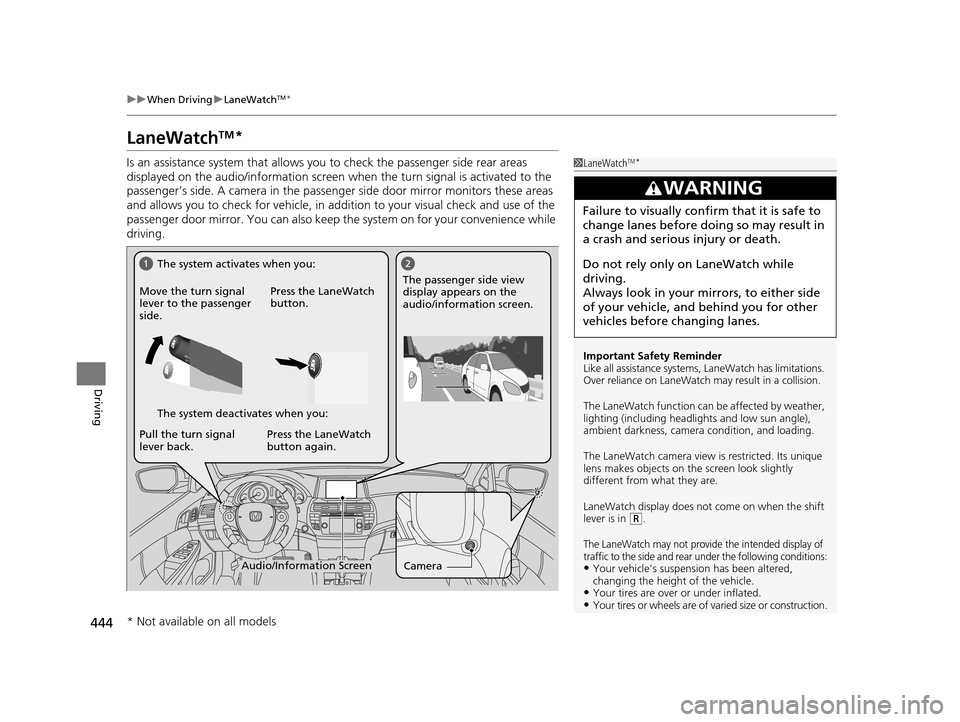
Is an assistance system that allows y ou to check the passenger side rear areas
displayed on the audio/information screen when the turn signal is activated to the
passenger’s side. A camera in the passenger side door mirror monitors these areas
and allows you to check for ve hicle, in addition to your visual check and use of the
passenger door mirror. You can also keep th e system on for your convenience while
driving.1 LaneWatchTM*
Important Safety Reminder
Like all assistance systems, LaneWatch has limitations.
Over reliance on LaneWatch may result in a collision.
The LaneWatch func tion can be affected by weather,
lighting (including headli ghts and low sun angle),
ambient darkness, camera condition, and loading.
The LaneWatch camera view is restricted. Its unique
lens makes objects on the screen look slightly
different from what they are.
LaneWatch display does not come on when the shift
lever is in
( R.
The LaneWatch may not provide the intended display of
traffic to the side and rear under the following conditions:
•Your vehicle’s suspension has been altered,
changing the height of the vehicle.
•Your tires are over or under inflated.•Your tires or wheels are of varied size or construction.
3WARNING
Failure to visually confirm that it is safe to
change lanes before doing so may result in
a crash and serious injury or death.
Do not rely only on LaneWatch while
driving.
Always look in your mi rrors, to either side
of your vehicle, and behind you for other
vehicles before changing lanes.
CameraAudio/Information Screen
Move the turn signal
lever to the passenger
side.
Press the LaneWatch
button.
Pull the turn signal
lever back. Press the LaneWatch
button again. The passenger side view
display appears on the
audio/information screen.
The system activates when you:
The system deactivates when you:
* Not available on all models
15 CROSSTOUR-31TP66500.book 444 ページ 2014年7月31日 木曜日 午後3時23分
Page 446 of 573
445
uuWhen Driving uLaneWatchTM*
Driving
■Customizing the La neWatch settings
You can customize the following items using the audio/information screen.
• Show with Turn Signal : Selects whether LaneWatch monitor comes on when
you operate the turn signal light lever.
• Reference Lines : Selects whether the reference lines appear on the LaneWatch
monitor.
• Next Maneuver Pop up
*: Selects whether a turn direction screen of the
navigation system interr upts the LaneWatch display.
• Display : Adjusts display settings.
2Customized Features* P. 280
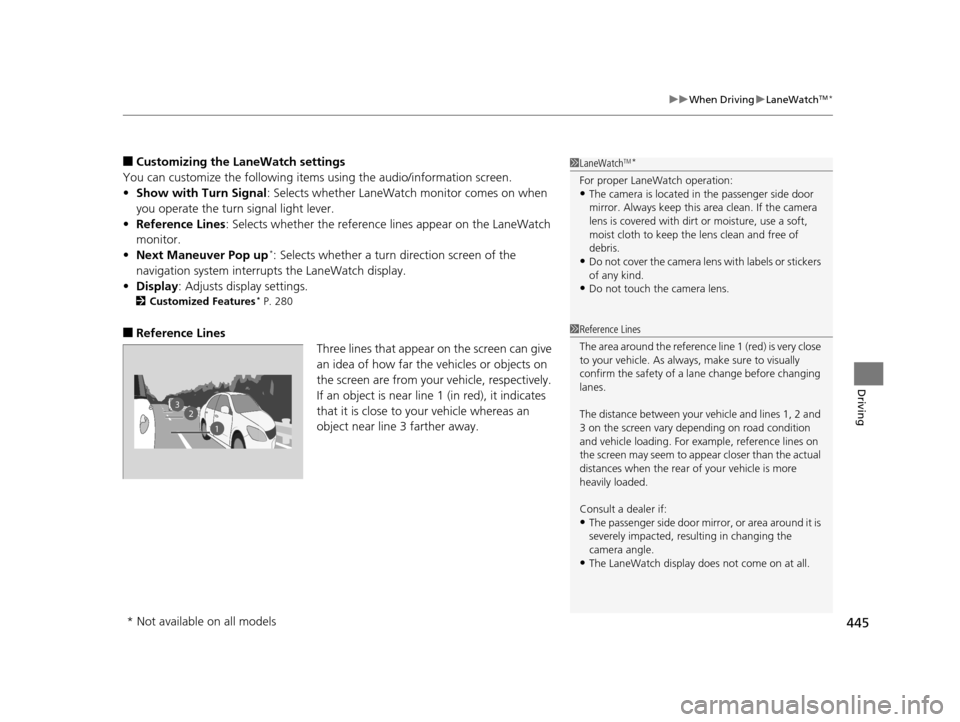
■Reference Lines
Three lines that appear on the screen can give
an idea of how far the vehicles or objects on
the screen are from your vehicle, respectively.
If an object is near line 1 (in red), it indicates
that it is close to your vehicle whereas an
object near line 3 farther away.
1LaneWatchTM*
For proper LaneWatch operation:•The camera is located in the passenger side door
mirror. Always keep this ar ea clean. If the camera
lens is covered with dirt or moisture, use a soft,
moist cloth to keep the lens clean and free of
debris.
•Do not cover the camera lens with labels or stickers
of any kind.
•Do not touch the camera lens.
23
1
1 Reference Lines
The area around the reference line 1 (red) is very close
to your vehicle. As always, make sure to visually
confirm the safety of a la ne change before changing
lanes.
The distance betwee n your vehicle and lines 1, 2 and
3 on the screen vary depending on road condition
and vehicle loading. For ex ample, reference lines on
the screen may seem to appear closer than the actual
distances when the rear of your vehicle is more
heavily loaded.
Consult a dealer if:
•The passenger side door mirr or, or area around it is
severely impacted, resulting in changing the
camera angle.
•The LaneWatch display doe s not come on at all.
* Not available on all models
15 CROSSTOUR-31TP66500.book 445 ページ 2014年7月31日 木曜日 午後3時23分
Page 449 of 573
448
uuWhen Driving uTire Pressure Monitoring System (TPMS) - Required Federal Explanation
Driving
Please note that the TPMS is not a substitute for proper tire
maintenance, and it is the driver ’s responsibility to maintain
correct tire pressure, even if un der-inflation has not reached the
level to trigger illumina tion of the TPMS low ti re pressure telltale.
Your vehicle has also been eq uipped with a TPMS malfunction
indicator to indicate when the sy stem is not operating properly.
The TPMS malfunction indicator is provided by a separate telltale,
which displays the symbol “TPMS” when illuminated.
When the malfunction indicator is illuminated,
the system may not be able to detect or signal low tire pressure as
intended.
TPMS malfunctions may occur for a variety of reasons, including
the installation of replacement or alternate tires or wheels on the
vehicle that prevent the TPMS from functioning properly.
Always check the TPMS malfunction telltale after replacing one or
more tires or wheels on your vehicle to ensure that the
replacement or alternate tires and wheels allow the TPMS to
continue to function properly.
15 CROSSTOUR-31TP66500.book 448 ページ 2014年7月31日 木曜日 午後3時23分