brake HONDA CROSSTOUR 2015 1.G User Guide
[x] Cancel search | Manufacturer: HONDA, Model Year: 2015, Model line: CROSSTOUR, Model: HONDA CROSSTOUR 2015 1.GPages: 573
Page 79 of 573
78
uuIndicators u
Instrument Panel
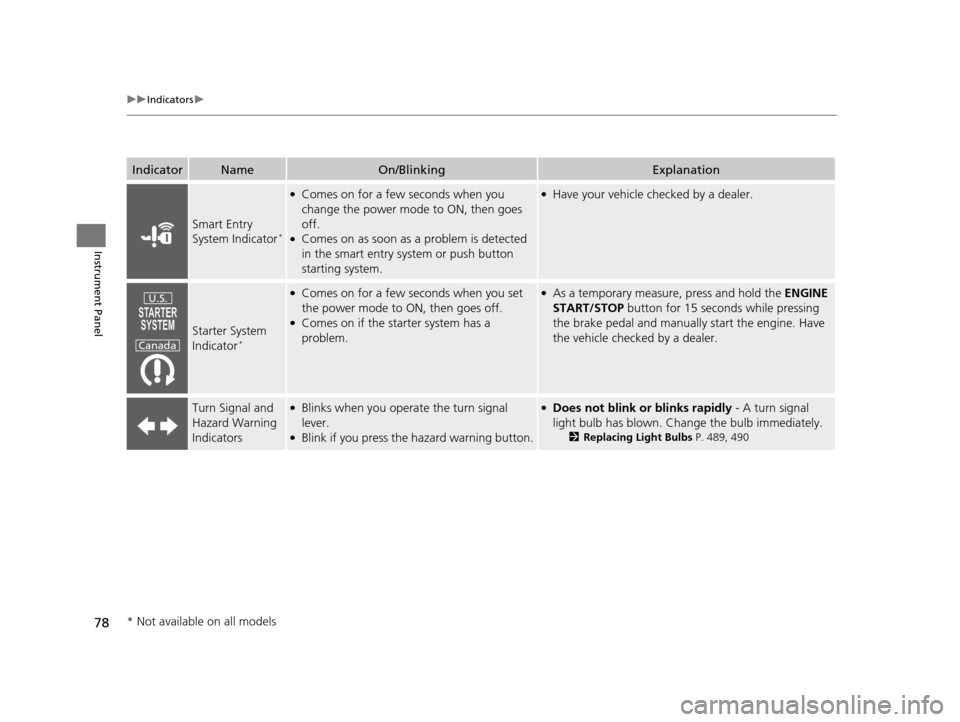
IndicatorNameOn/BlinkingExplanation
Smart Entry
System Indicator*
●Comes on for a few seconds when you
change the power mode to ON, then goes
off.
●Comes on as soon as a problem is detected
in the smart entry system or push button
starting system.
●Have your vehicle checked by a dealer.
Starter System
Indicator*
●Comes on for a few seconds when you set
the power mode to ON, then goes off.
●Comes on if the starter system has a
problem.
●As a temporary measure, press and hold the ENGINE
START/STOP button for 15 seconds while pressing
the brake pedal and manually start the engine. Have
the vehicle checked by a dealer.
Turn Signal and
Hazard Warning
Indicators●Blinks when you operate the turn signal
lever.
●Blink if you press the hazard warning button.
●Does not blink or blinks rapidly - A turn signal
light bulb has blown. Change the bulb immediately.
2Replacing Light Bulbs P. 489, 490
U.S.
Canada
* Not available on all models
15 CROSSTOUR-31TP66500.book 78 ページ 2014年7月31日 木曜日 午後3時23分
Page 102 of 573
101
uuLocking and Unlocking the Doors uAuto Door Locking/Unlocking
Controls
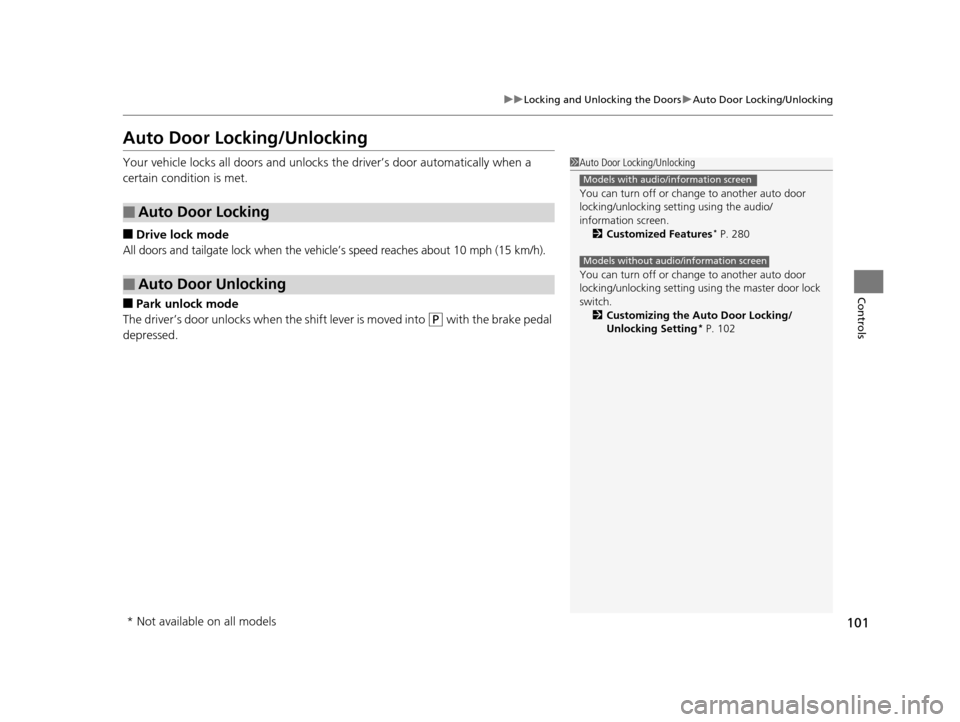
Auto Door Locking/Unlocking
Your vehicle locks all doors and unlocks the driver’s door automatically when a
certain condition is met.
■Drive lock mode
All doors and tailgate lock when the vehicle’s speed reaches about 10 mph (15 km/h).
■Park unlock mode
The driver’s door unlocks when the shift lever is moved into
(P with the brake pedal
depressed.
■Auto Door Locking
■Auto Door Unlocking
1 Auto Door Locking/Unlocking
You can turn off or cha nge to another auto door
locking/unlocking sett ing using the audio/
information screen. 2 Customized Features
* P. 280
You can turn off or cha nge to another auto door
locking/unlocking setting us ing the master door lock
switch. 2 Customizing the Auto Door Locking/
Unlocking Setting
* P. 102
Models with audio/information screen
Models without audio/information screen
* Not available on all models
15 CROSSTOUR-31TP66500.book 101 ページ 2014年7月31日 木曜日 午後3時23分
Page 103 of 573
102
uuLocking and Unlocking the Doors uCustomizing the Auto Door Locking/Unlocking Setting*
Controls
Customizing the Auto Door Locking/Unlocking Setting*
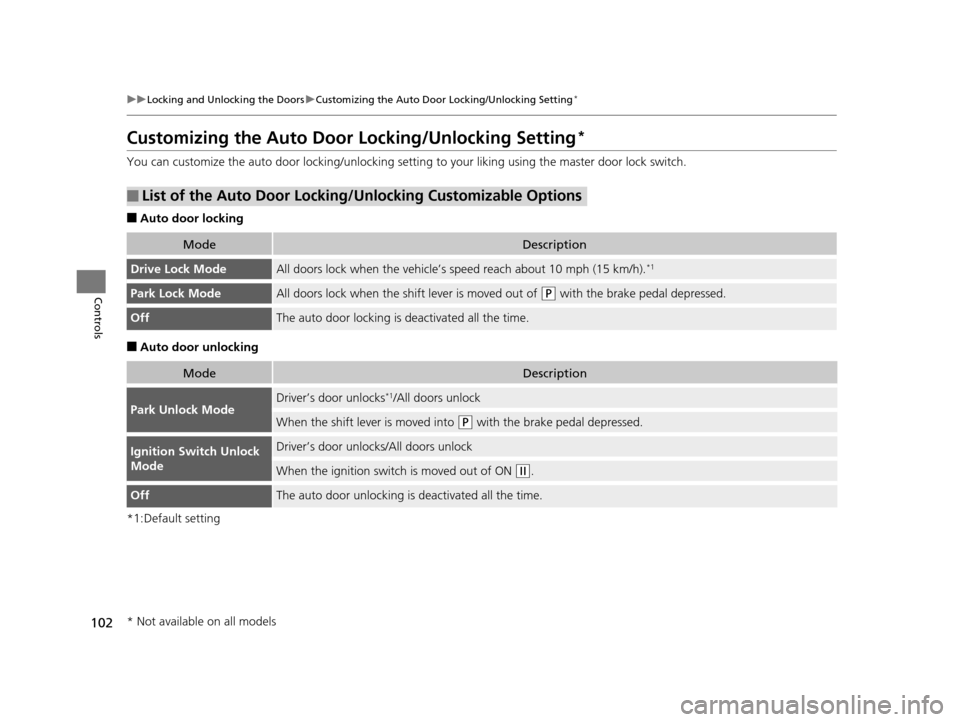
You can customize the auto door locking/unlocking setti ng to your liking using the master door lock switch.
■Auto door locking
■Auto door unlocking
*1:Default setting
■List of the Auto Door Locking/Unlocking Customizable Options
ModeDescription
Drive Lock ModeAll doors lock when the vehicle’s speed reach about 10 mph (15 km/h).*1
Park Lock ModeAll doors lock when the shift lever is moved out of (P with the brake pedal depressed.
OffThe auto door locking is deactivated all the time.
ModeDescription
Park Unlock ModeDriver’s door unlocks*1/All doors unlock
When the shift lever is moved into (P with the brake pedal depressed.
Ignition Switch Unlock
ModeDriver’s door unlocks/All doors unlock
When the ignition switch is moved out of ON (w.
OffThe auto door unlocking is deactivated all the time.
* Not available on all models
15 CROSSTOUR-31TP66500.book 102 ページ 2014年7月31日 木曜日 午後3時23分
Page 104 of 573
103
uuLocking and Unlocking the Doors uCustomizing the Auto Door Locking/Unlocking Setting*
Continued
Controls
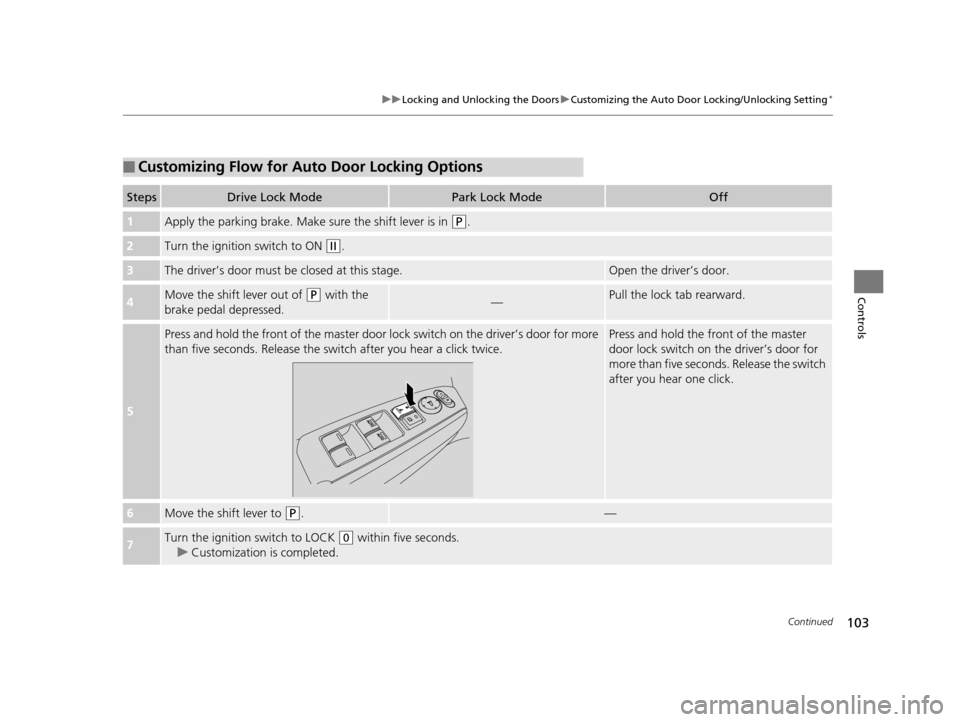
■Customizing Flow for Auto Door Locking Options
StepsDrive Lock ModePark Lock ModeOff
1Apply the parking brake. Make su re the shift lever is in (P.
2Turn the ignition switch to ON (w.
3The driver’s door must be closed at this stage.Open the driver’s door.
4Move the shift lever out of (P with the
brake pedal depressed.—Pull the lock tab rearward.
5
Press and hold the front of the master door lo ck switch on the driver’s door for more
than five seconds. Release the sw itch after you hear a click twice.Press and hold the front of the master
door lock switch on the driver’s door for
more than five seconds. Release the switch
after you hear one click.
6Move the shift lever to (P.—
7Turn the ignition switch to LOCK (0 within five seconds.
u Customization is completed.
15 CROSSTOUR-31TP66500.book 103 ページ 2014年7月31日 木曜日 午後3時23分
Page 105 of 573
104
uuLocking and Unlocking the Doors uCustomizing the Auto Door Locking/Unlocking Setting*
Controls
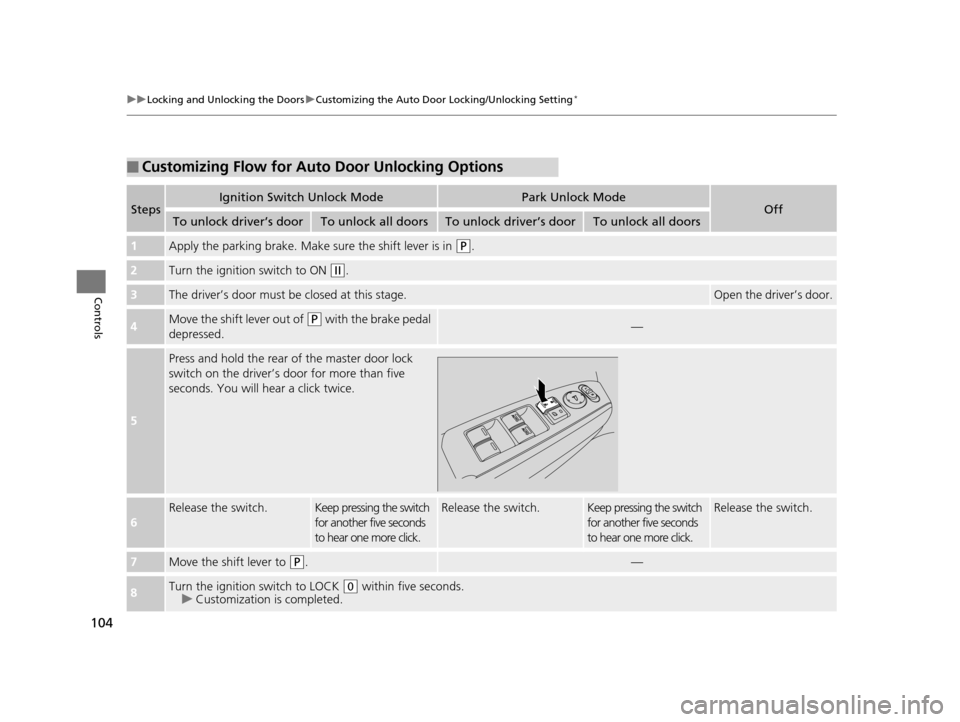
■Customizing Flow for Auto Door Unlocking Options
StepsIgnition Switch Unlock ModePark Unlock ModeOffTo unlock driver’s doorTo unlock all doorsTo unlock driver’s doorTo unlock all doors
1Apply the parking brake. Make sure the shift lever is in (P.
2Turn the ignition switch to ON (w.
3The driver’s door must be closed at this stage.Open the driver’s door.
4Move the shift lever out of (P with the brake pedal
depressed.—
5
Press and hold the rear of the master door lock
switch on the driver’s door for more than five
seconds. You will hear a click twice.
6
Release the switch.Keep pressing the switch
for another five seconds
to hear one more click.Release the switch.Keep pressing the switch
for another five seconds
to hear one more click.Release the switch.
7Move the shift lever to (P.—
8Turn the ignition switch to LOCK (0 within five seconds.
u Customization is completed.
15 CROSSTOUR-31TP66500.book 104 ページ 2014年7月31日 木曜日 午後3時23分
Page 116 of 573
115
uuOperating the Switches Around the Steering Wheel uENGINE START/STOP Button*
Continued
Controls
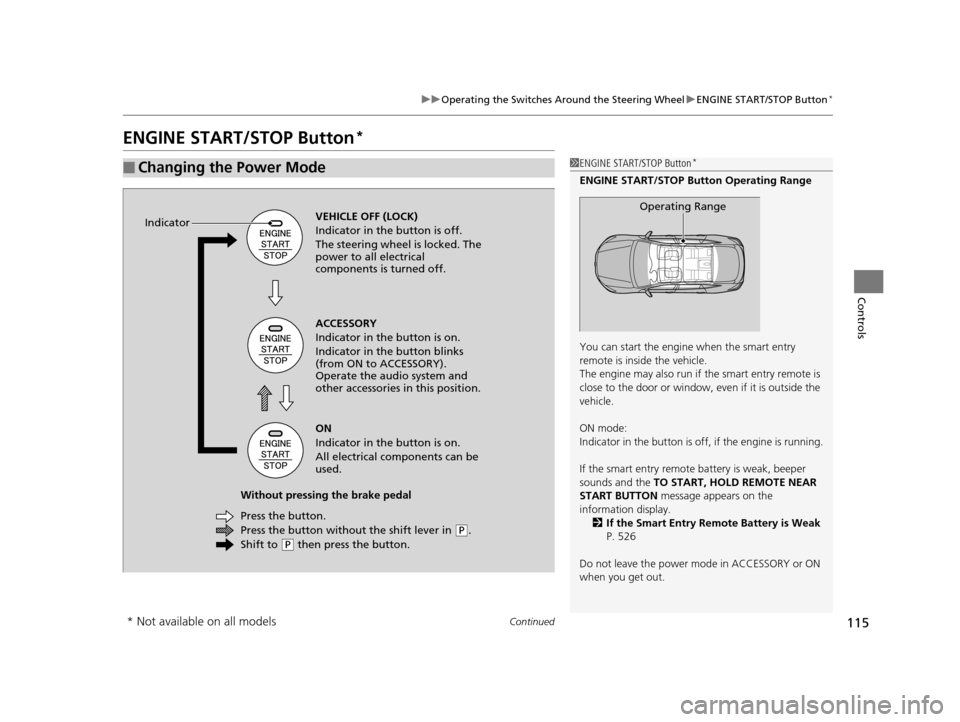
ENGINE START/STOP Button*
■Changing the Power Mode1ENGINE START/STOP Button*
ENGINE START/STOP Button Operating Range
You can start the engine when the smart entry
remote is inside the vehicle.
The engine may also run if the smart entry remote is
close to the door or window, ev en if it is outside the
vehicle.
ON mode:
Indicator in the button is of f, if the engine is running.
If the smart entry remote battery is weak, beeper
sounds and the TO START, HOLD REMOTE NEAR
START BUTTON message appears on the
information display. 2 If the Smart Entry Remote Battery is Weak
P. 526
Do not leave the power mode in ACCESSORY or ON
when you get out.
Operating RangeVEHICLE OFF (LOCK)
Indicator in the button is off.
The steering wheel is locked. The
power to all electrical
components is turned off.
Press the button without the shift lever in
( P.
Shift to
( P then press the button.
Press the button. Without pressing the brake pedal ACCESSORY
Indicator in the button is on.
Indicator in the button blinks
(from ON to ACCESSORY).
Operate the audio system and
other accessories in this position.
ON
Indicator in the button is on.
All electrical components can be
used.
Indicator
* Not available on all models
15 CROSSTOUR-31TP66500.book 115 ページ 2014年7月31日 木曜日 午後3時23分
Page 123 of 573
122
uuOperating the Switches Around the Steering Wheel uFog Lights
Controls
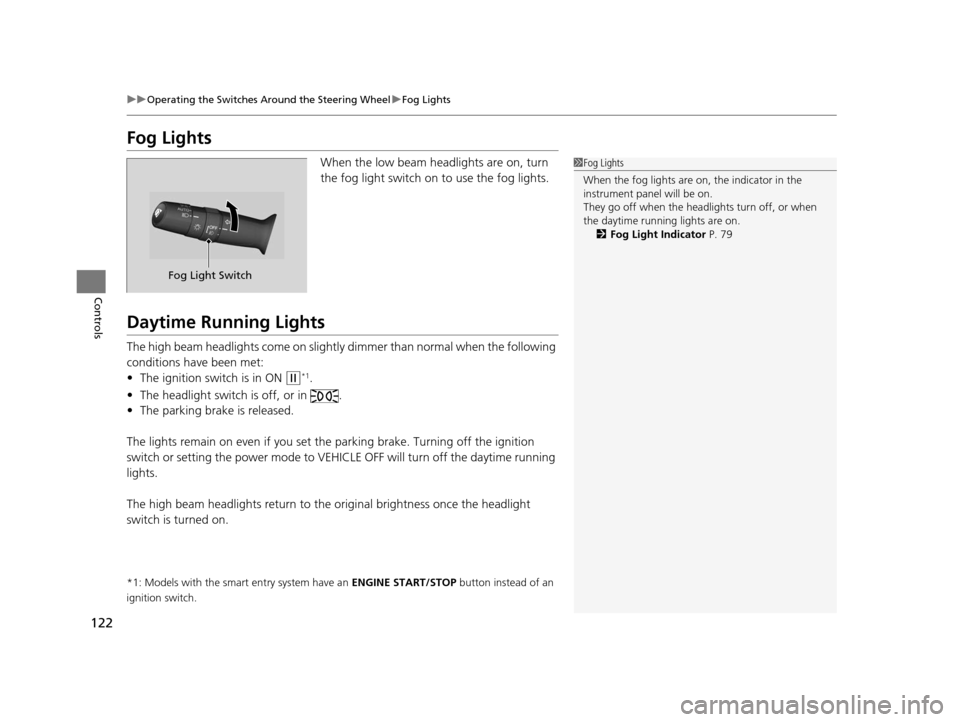
Fog Lights
When the low beam headlights are on, turn
the fog light switch on to use the fog lights.
Daytime Running Lights
The high beam headlights come on slightly dimmer than normal when the following
conditions have been met:
• The ignition switch is in ON
(w*1.
• The headlight switch is off, or in .
• The parking brake is released.
The lights remain on even if you set th e parking brake. Turning off the ignition
switch or setting the power mode to VEHI CLE OFF will turn off the daytime running
lights.
The high beam headlights re turn to the original brightness once the headlight
switch is turned on.
*1: Models with the smart entry system have an ENGINE START/STOP button instead of an
ignition switch.
1 Fog Lights
When the fog lights are on, the indicator in the
instrument pane l will be on.
They go off when the headlights turn off, or when
the daytime running lights are on. 2 Fog Light Indicator P. 79
Fog Light Switch
15 CROSSTOUR-31TP66500.book 122 ページ 2014年7月31日 木曜日 午後3時23分
Page 129 of 573
uuOperating the Switches Around the Steering Wheel uDriving Position Memory System*
128
Controls
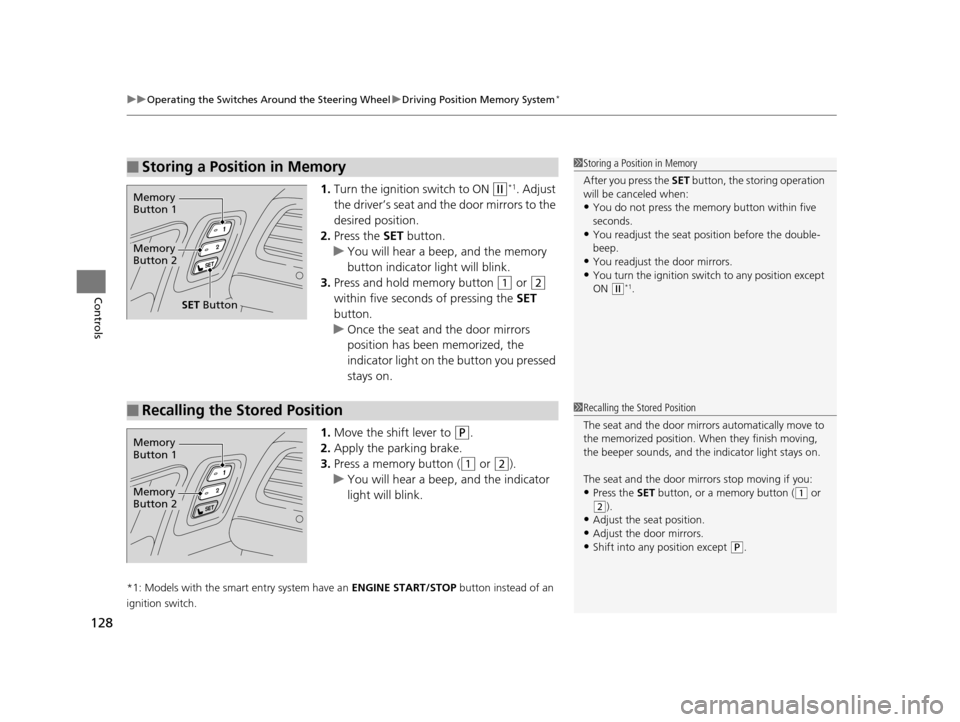
1. Turn the ignition switch to ON (w*1. Adjust
the driver’s seat and th e door mirrors to the
desired position.
2. Press the SET button.
u You will hear a beep, and the memory
button indicator light will blink.
3. Press and hold memory button
(1 or (2
within five seconds of pressing the SET
button.
u Once the seat and the door mirrors
position has been memorized, the
indicator light on the button you pressed
stays on.
1. Move the shift lever to
(P.
2. Apply the parking brake.
3. Press a memory button (
(1 or (2).
u You will hear a beep, and the indicator
light will blink.
*1: Models with the smart entry system have an ENGINE START/STOP button instead of an
ignition switch.
■Storing a Position in Memory1 Storing a Position in Memory
After you press the SET button, the storing operation
will be canceled when:
•You do not press the memory button within five
seconds.
•You readjust the seat position before the double-
beep.
•You readjust the door mirrors.•You turn the ignition switch to any position except
ON
( w*1.
Memory
Button 1
Memory
Button 2
SET Button
■Recalling the Stored Position1 Recalling the Stored Position
The seat and the door mirrors automatically move to
the memorized position. Wh en they finish moving,
the beeper sounds, and the indicator light stays on.
The seat and the door mirrors stop moving if you:
•Press the SET button, or a memory button ((1 or
(2).
•Adjust the seat position.•Adjust the door mirrors.
•Shift into any position except ( P.
Memory
Button 1
Memory
Button 2
15 CROSSTOUR-31TP66500.book 128 ページ 2014年7月31日 木曜日 午後3時23分
Page 140 of 573
139
uuAdjusting the Seats uRear Seats
Continued
Controls
Rear Seats
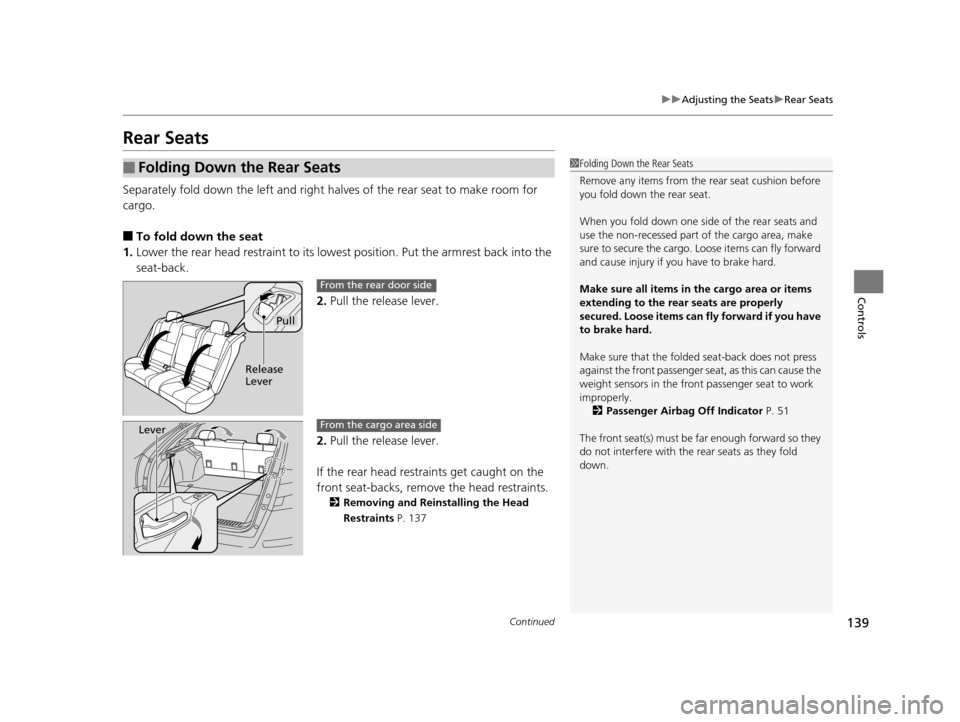
Separately fold down the left and right ha lves of the rear seat to make room for
cargo.
■To fold down the seat
1. Lower the rear head restraint to its lowest position. Put the armrest back into the
seat-back.
2.Pull the release lever.
2. Pull the release lever.
If the rear head restraints get caught on the
front seat-backs, remove the head restraints.
2Removing and Reinstalling the Head
Restraints P. 137
■Folding Down the Rear Seats1Folding Down the Rear Seats
Remove any items from the rear seat cushion before
you fold down the rear seat.
When you fold down one side of the rear seats and
use the non-recessed part of the cargo area, make
sure to secure the cargo. Loose items can fly forward
and cause injury if you have to brake hard.
Make sure all items in the cargo area or items
extending to the rear seats are properly
secured. Loose items can fly forward if you have
to brake hard.
Make sure that the folded seat-back does not press
against the front passenger seat, as this can cause the
weight sensors in the front passenger seat to work
improperly. 2 Passenger Airbag Off Indicator P. 51
The front seat(s) must be far enough forward so they
do not interfere with the rear seats as they fold
down.
Pull
Release
Lever
From the rear door side
LeverFrom the cargo area side
15 CROSSTOUR-31TP66500.book 139 ページ 2014年7月31日 木曜日 午後3時23分
Page 410 of 573
409
Driving
This chapter discusses driving, refueling, and information on items such as accessories.
Before Driving
Driving Preparation .......................... 410
Maximum Load Limit........................ 413
Towing a Trailer Towing Preparation .......................... 415
Driving Safely with a Trailer .............. 418
Towing Your Vehicle ........................ 419
When Driving Starting the Engine .......................... 420
Precautions While Driving................. 424
Automatic Transmission ................... 425
Shifting ............................................ 426 Cruise Control ................................. 432
Forward Collision Warning (FCW)*.. 435
Lane Departure Warning (LDW)*..... 439
Vehicle Stability Assist (VSA ®), aka
Electronic Stability Control (ESC),
System ....................................... 442
LaneWatchTM*.................................. 444
Tire Pressure Monitoring System (TPMS) .. 446
Tire Pressure Monitoring System (TPMS) -
Required Federal Explanation ......... 447
Braking Brake System ................................... 449 Anti-lock Brake System (ABS) ........... 451
Brake Assist System ......................... 452
Parking Your Vehicle When Stopped ................................ 453
Rearview Camera ............................. 454
Multi-View Rear Camera .................. 455
Refueling Fuel Information .............................. 456
How to Refuel ................................. 457
Fuel Economy .................................... 459
Improving Fuel Economy .................. 459
Accessories and Modifications ........ 460
* Not available on all models
15 CROSSTOUR-31TP66500.book 409 ページ 2014年7月31日 木曜日 午後3時23分