app HONDA CRV 2022 Owners Manual
[x] Cancel search | Manufacturer: HONDA, Model Year: 2022, Model line: CRV, Model: HONDA CRV 2022Pages: 692, PDF Size: 22.05 MB
Page 420 of 692
uuBluetooth ® HandsFreeLink ®u HFL Menus
418
Features
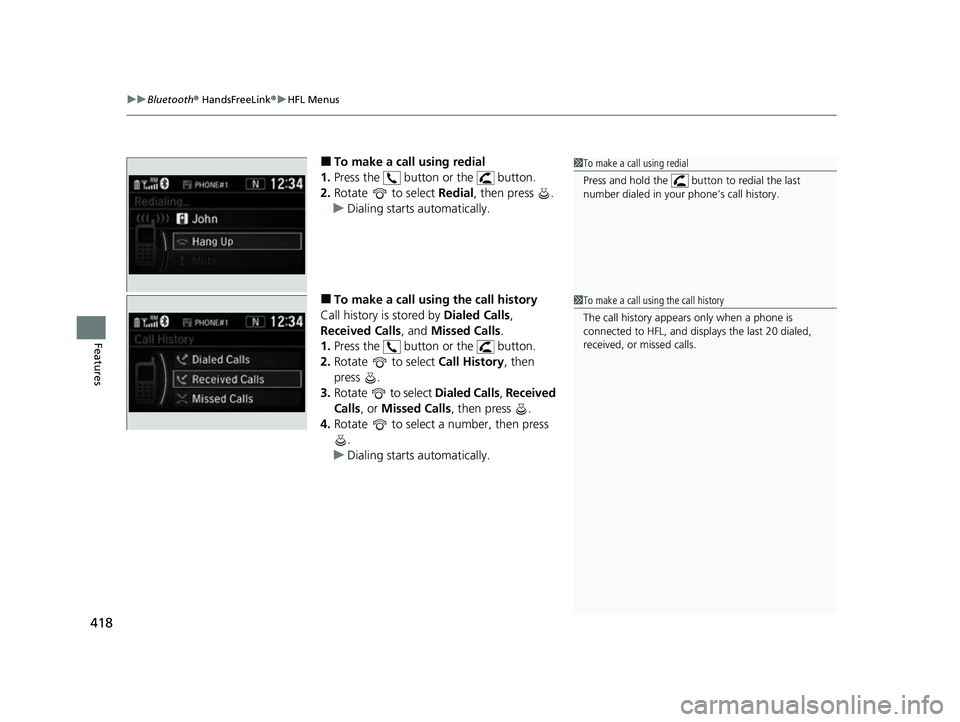
■To make a call using redial
1. Press the button or the button.
2. Rotate to select Redial, then press .
u Dialing starts automatically.
■To make a call usin g the call history
Call history is stored by Dialed Calls,
Received Calls , and Missed Calls .
1. Press the button or the button.
2. Rotate to select Call History, then
press .
3. Rotate to select Dialed Calls, Received
Calls , or Missed Calls, then press .
4. Rotate to select a number, then press
.
u Dialing starts automatically.
1To make a call using redial
Press and hold the butt on to redial the last
number dialed in your phone’s call history.
1 To make a call using the call history
The call history appears only when a phone is
connected to HFL, and disp lays the last 20 dialed,
received, or missed calls.
22 CR-V HEV ELP-31TPG6200.book 418 ページ 2021年6月30日 水曜日 午前11時6分
Page 422 of 692
uuBluetooth ® HandsFreeLink ®u HFL Menus
420
Features
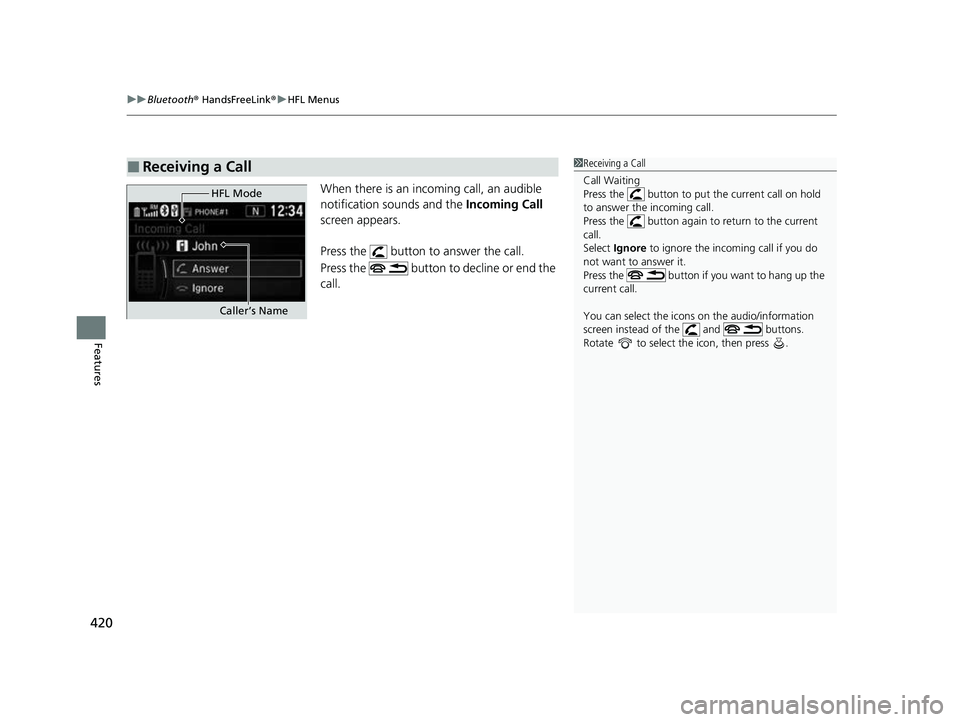
When there is an incoming call, an audible
notification sounds and the Incoming Call
screen appears.
Press the button to answer the call.
Press the button to decline or end the
call.
■Receiving a Call1Receiving a Call
Call Waiting
Press the button to put the current call on hold
to answer the incoming call.
Press the button again to return to the current
call.
Select Ignore to ignore the incoming call if you do
not want to answer it.
Press the button if y ou want to hang up the
current call.
You can select the icons on the audio/information
screen instead of the and buttons.
Rotate to select the icon, then press .
HFL Mode
Caller’s Name
22 CR-V HEV ELP-31TPG6200.book 420 ページ 2021年6月30日 水曜日 午前11時6分
Page 424 of 692
422
Features
Bluetooth® HandsFreeLink ®
Bluetooth® HandsFreeLink ® (HFL) allows you to place and receive phone calls using
your vehicle’s audio system, without handling your cell phone.
Using HFL
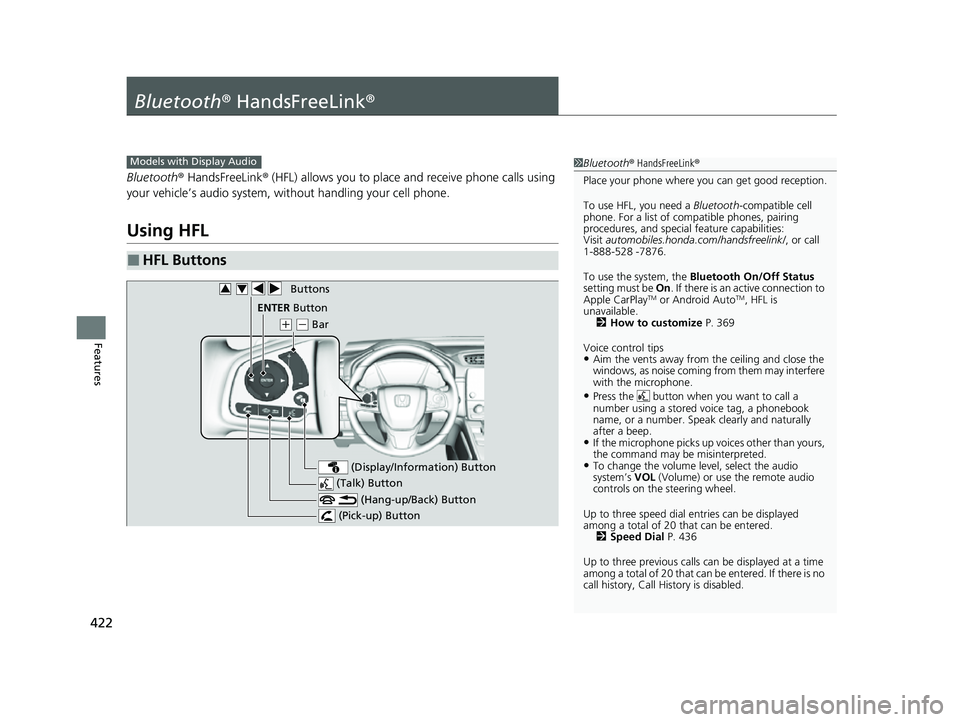
■HFL Buttons
1 Bluetooth ® HandsFreeLink ®
Place your phone where y ou can get good reception.
To use HFL, you need a Bluetooth-compatible cell
phone. For a list of compatible phones, pairing
procedures, and special feature capabilities:
Visit automobiles.honda.com/handsfreelink/ , or call
1-888-528 -7876.
To use the system, the Bluetooth On/Off Status
setting must be On. If there is an active connection to
Apple CarPlay
TM or Android AutoTM, HFL is
unavailable. 2 How to customize P. 369
Voice control tips
•Aim the vents away from the ceiling and close the
windows, as noise coming from them may interfere
with the microphone.
•Press the button when you want to call a
number using a stored voice tag, a phonebook
name, or a number. Spe ak clearly and naturally
after a beep.
•If the microphone picks up vo ices other than yours,
the command may be misinterpreted.
•To change the volume level, select the audio
system’s VOL (Volume) or use the remote audio
controls on the steering wheel.
Up to three speed dial entries can be displayed
among a total of 20 that can be entered. 2 Speed Dial P. 436
Up to three previous calls can be displayed at a time
among a total of 20 that can be entered. If there is no
call history, Call History is disabled.
Models with Display Audio
(Talk) Button
( + (- Bar
(Hang-up/Back) Button
(Pick-up) Button
ENTEq Button
(Display/Information) Button
Buttons34
22 CR-V HEV ELP-31TPG6200.book 422 ページ 2021年6月30日 水曜日 午前11時6分
Page 426 of 692
uuBluetooth ® HandsFreeLink ®u Using HFL
424
Features
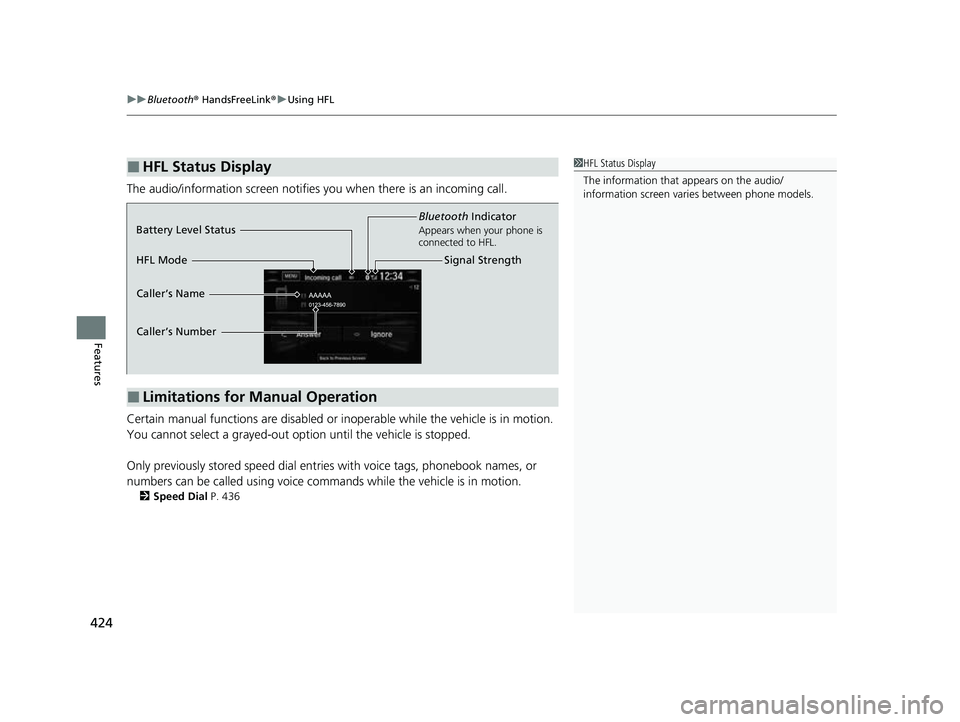
The audio/information screen notifies you when there is an incoming call.
Certain manual functions are disabled or i noperable while the vehicle is in motion.
You cannot select a grayed-out option until the vehicle is stopped.
Only previously stored speed dial entries with voice tags, phonebook names, or
numbers can be called using voice commands while the vehicle is in motion.
2 Speed Dial P. 436
■HFL Status Display1HFL Status Display
The information that appears on the audio/
information screen vari es between phone models.
■Limitations for Manual Operation
Bluetooth Indicator
Appears when your phone is
connected to HFL.
Signal Strength
HFL Mode Battery Level Status
Caller’s Name
Caller’s Number
22 CR-V HEV ELP-31TPG6200.book 424 ページ 2021年6月30日 水曜日 午前11時6分
Page 432 of 692
uuBluetooth ® HandsFreeLink ®u HFL Menus
430
Features
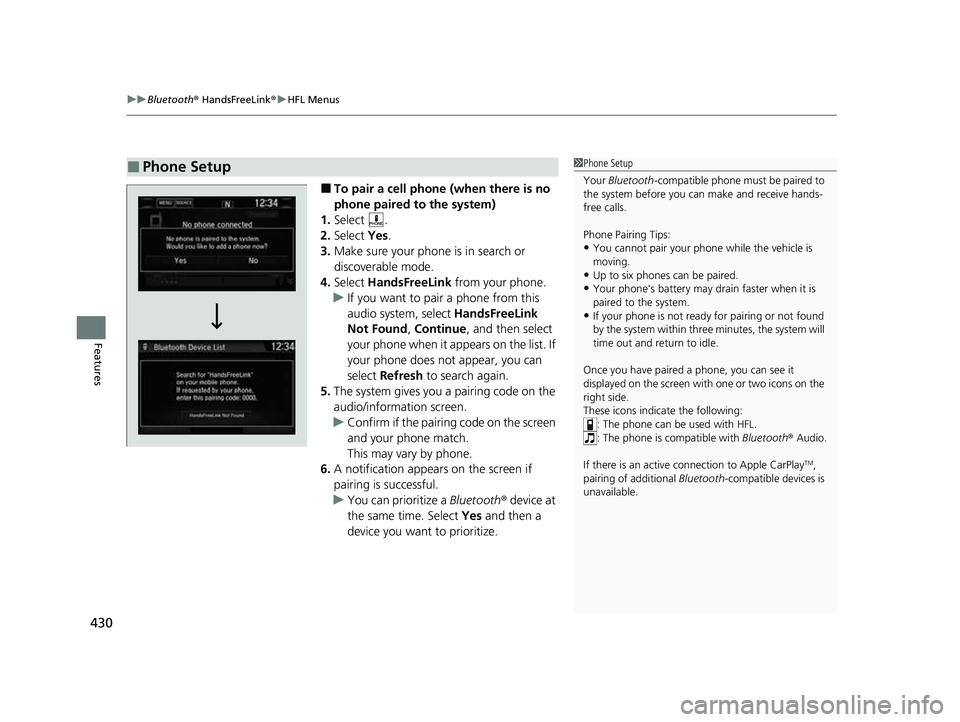
■To pair a cell phone (when there is no
phone paired to the system)
1. Select .
2. Select Yes.
3. Make sure your phone is in search or
discoverable mode.
4. Select HandsFreeLink from your phone.
u If you want to pair a phone from this
audio system, select HandsFreeLink
Not Found , Continue , and then select
your phone when it appears on the list. If
your phone does not appear, you can
select Refresh to search again.
5. The system gives you a pairing code on the
audio/information screen.
u Confirm if the pairing code on the screen
and your phone match.
This may vary by phone.
6. A notification appears on the screen if
pairing is successful.
u You can prioritize a Bluetooth ® device at
the same time. Select Yes and then a
device you want to prioritize.
■Phone Setup1 Phone Setup
Your Bluetooth -compatible phone must be paired to
the system before you ca n make and receive hands-
free calls.
Phone Pairing Tips:
•You cannot pair your phone while the vehicle is
moving.
•Up to six phones can be paired.
•Your phone's battery may dr ain faster when it is
paired to the system.
•If your phone is not ready for pairing or not found
by the system within three minutes, the system will
time out and return to idle.
Once you have paired a phone, you can see it
displayed on the screen with one or two icons on the
right side.
These icons indicate the following: : The phone can be used with HFL.
: The phone is compatible with Bluetooth® Audio.
If there is an active c onnection to Apple CarPlay
TM,
pairing of additional Bluetooth -compatible devices is
unavailable.
22 CR-V HEV ELP-31TPG6200.book 430 ページ 2021年6月30日 水曜日 午前11時6分
Page 434 of 692
432
uuBluetooth ® HandsFreeLink ®u HFL Menus
Features
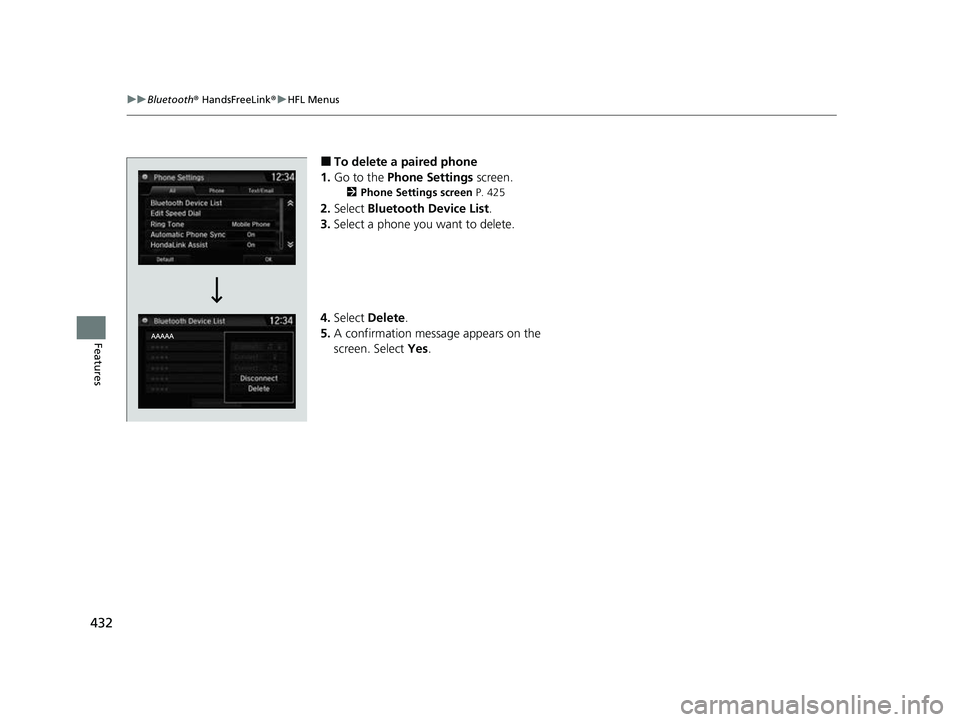
■To delete a paired phone
1. Go to the Phone Settings screen.
2Phone Settings screen P. 425
2.Select Bluetooth Device List .
3. Select a phone you want to delete.
4. Select Delete.
5. A confirmation message appears on the
screen. Select Yes.
22 CR-V HEV ELP-31TPG6200.book 432 ページ 2021年6月30日 水曜日 午前11時6分
Page 435 of 692
Continued433
uuBluetooth ® HandsFreeLink ®u HFL Menus
Features
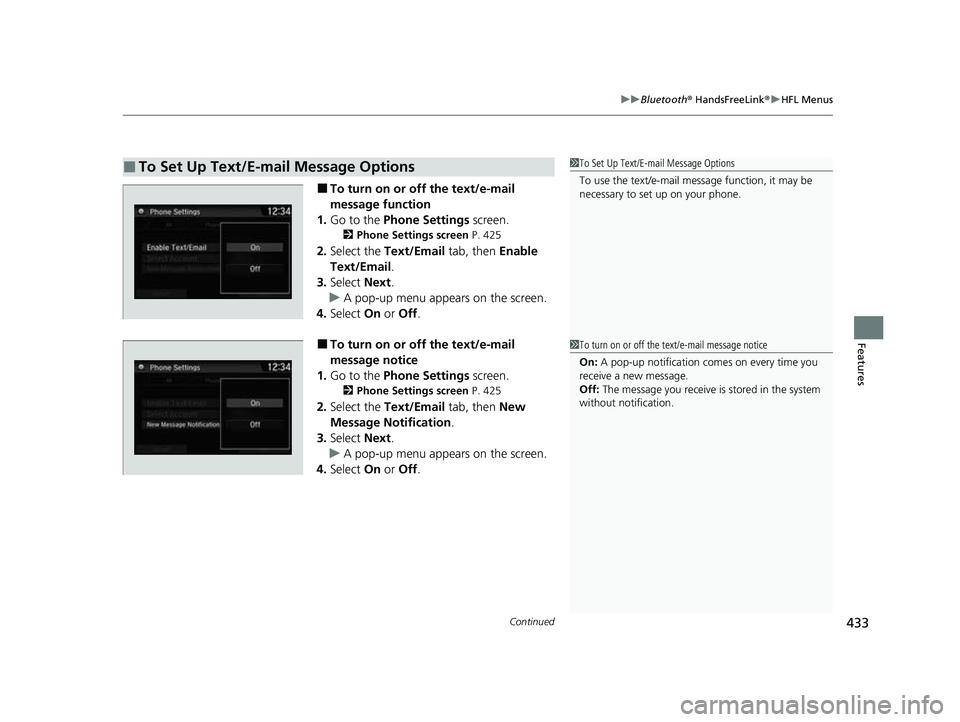
■To turn on or off the text/e-mail
message function
1. Go to the Phone Settings screen.
2Phone Settings screen P. 425
2.Select the Text/Email tab, then Enable
Text/Email .
3. Select Next.
u A pop-up menu appears on the screen.
4. Select On or Off .
■To turn on or off the text/e-mail
message notice
1. Go to the Phone Settings screen.
2Phone Settings screen P. 425
2.Select the Text/Email tab, then New
Message Notification .
3. Select Next.
u A pop-up menu appears on the screen.
4. Select On or Off .
■To Set Up Text/E-mail Message Options1To Set Up Text/E-mail Message Options
To use the text/e-mail message function, it may be
necessary to set up on your phone.
1To turn on or off the text/e-mail message notice
On: A pop-up notification comes on every time you
receive a new message.
Off: The message you receive is stored in the system
without not ification.
22 CR-V HEV ELP-31TPG6200.book 433 ページ 2021年6月30日 水曜日 午前11時6分
Page 439 of 692
Continued437
uuBluetooth ® HandsFreeLink ®u HFL Menus
Features
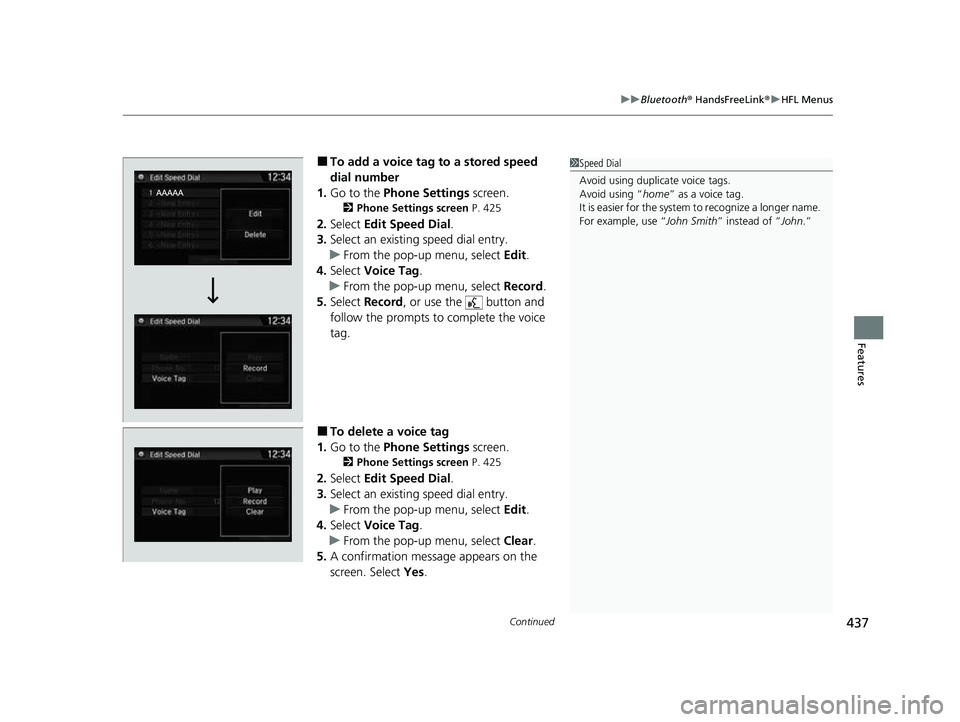
■To add a voice tag to a stored speed
dial number
1. Go to the Phone Settings screen.
2Phone Settings screen P. 425
2.Select Edit Speed Dial .
3. Select an existing speed dial entry.
u From the pop-up menu, select Edit.
4. Select Voice Tag .
u From the pop-up menu, select Record.
5. Select Record , or use the button and
follow the prompts to complete the voice
tag.
■To delete a voice tag
1. Go to the Phone Settings screen.
2Phone Settings screen P. 425
2.Select Edit Speed Dial .
3. Select an existing speed dial entry.
u From the pop-up menu, select Edit.
4. Select Voice Tag .
u From the pop-up menu, select Clear.
5. A confirmation message appears on the
screen. Select Yes.
1Speed Dial
Avoid using duplicate voice tags.
Avoid using “home ” as a voice tag.
It is easier for the system to recognize a longer name.
For example, use “ John Smith” instead of “John.”
22 CR-V HEV ELP-31TPG6200.book 437 ページ 2021年6月30日 水曜日 午前11時6分
Page 440 of 692
438
uuBluetooth ® HandsFreeLink ®u HFL Menus
Features
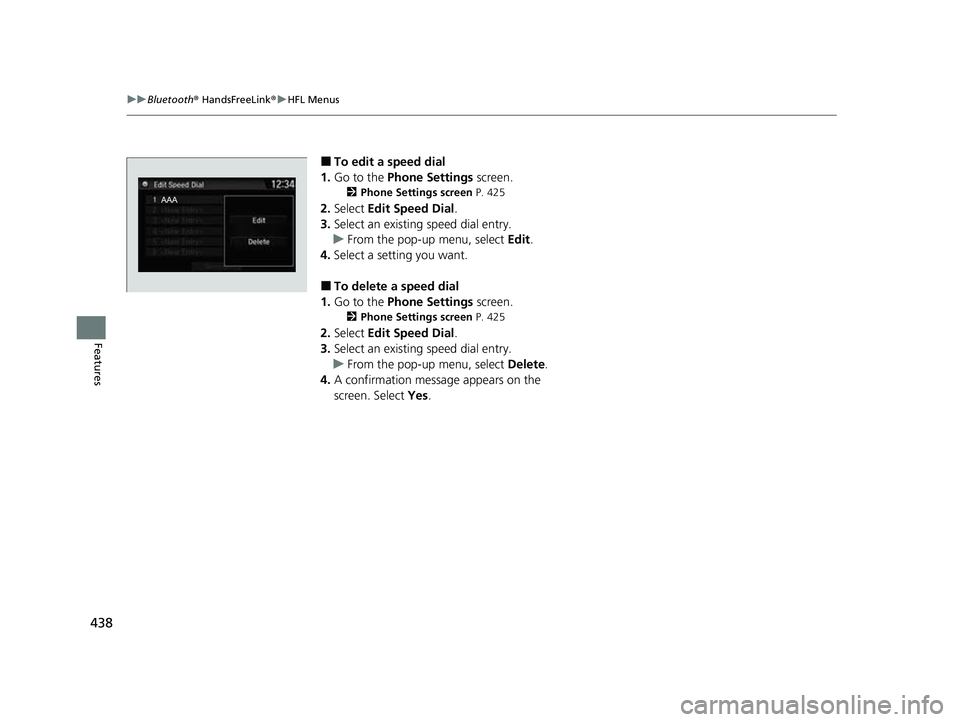
■To edit a speed dial
1. Go to the Phone Settings screen.
2Phone Settings screen P. 425
2.Select Edit Speed Dial .
3. Select an existing speed dial entry.
u From the pop-up menu, select Edit.
4. Select a setting you want.
■To delete a speed dial
1. Go to the Phone Settings screen.
2Phone Settings screen P. 425
2.Select Edit Speed Dial .
3. Select an existing speed dial entry.
u From the pop-up menu, select Delete.
4. A confirmation message appears on the
screen. Select Yes.
22 CR-V HEV ELP-31TPG6200.book 438 ページ 2021年6月30日 水曜日 午前11時6分
Page 442 of 692
![HONDA CRV 2022 Owners Manual 440
uuBluetooth ® HandsFreeLink ®u HFL Menus
Features
7. Select [New Voice Tag] .
8. Select a contact name you want to add to.
u The pop-up menu appears on the
screen.
9. Select Modify .
10. Usin](/img/13/58866/w960_58866-441.png "HONDA CRV 2022 Owners Manual 440
uuBluetooth ® HandsFreeLink ®u HFL Menus
Features
7. Select [New Voice Tag] .
8. Select a contact name you want to add to.
u The pop-up menu appears on the
screen.
9. Select Modify .
10. Usin")
440
uuBluetooth ® HandsFreeLink ®u HFL Menus
Features
7. Select [New Voice Tag] .
8. Select a contact name you want to add to.
u The pop-up menu appears on the
screen.
9. Select Modify .
10. Using Record or the button, follow
the prompts to complete the voice tag.
11. You will receive a confirmation message
on the screen, then select OK.
22 CR-V HEV ELP-31TPG6200.book 440 ページ 2021年6月30日 水曜日 午前11時6分