automatic transmission HONDA CRV 2022 User Guide
[x] Cancel search | Manufacturer: HONDA, Model Year: 2022, Model line: CRV, Model: HONDA CRV 2022Pages: 692, PDF Size: 22.05 MB
Page 358 of 692
356
uuGeneral Information on the Audio System uHonda App License Agreement
Features
I. Availability/Interruption. The SOFTWARE and certain SERVICES are made availa ble through your VEHICLE’s compatible multimedia
system when the VEHICLE is turned on. Certain SERVICES may be avai lable only through your compatible mobile device when it is within
the operating range of the VEHICLE and a wireless carrier. The availability of the SOFTWARE and SERVICES may be subject to tran smission
limitation or interruption, including but not limited to techni cal obsolesce or sunsetting of the hardware, software or firmwar e, inside of
or external to the Vehicle, required fo r data transmission or receipt. HONDA does not guarantee that the SOFTWARE, SERVICES, or any
portion thereof will be av ailable at all times or in all ar eas. You acknowledge and agree that HONDA is not responsible for performance
degradation, interruption or delays. You acknowledge that HONDA shall not be liable to you if the SOFTWARE or SERVICES in a given
location are not available. If the SOFTWARE or SERVICES are not available within your intended location, you agree that your sole remedy
shall be to cease using the SOFTWARE and SERVICES.
J. PRODUCT SUPPORT: Product support for the SOFTWARE is provided by HONDA. For product support, please refer to HONDA
instructions provided in the DOCUMENTATION. Should you have any que stions concerning this AGREEMENT, or if you desire to contact
HONDA for any other reason, please refer to the HONDA contact information provided in the DOCUMENTATION.
K. Termination and Transfer.
1. Termination. This AGREEMENT is effective until terminated by you or US . WE may terminate this AGREEMENT for any or no reason,
and with or without notice to you. Your rights under this AGRE EMENT will terminate automatically without notice from US if you fail to
comply with any term of this AGREEMENT. Up on termination of this AGREEMENT, you shall cease all use of the SOFTWARE and SERVICE S.
2. Transfer: You may permanently transfer your rights under this AGREEMENT only as part of a sale or transfer of the VEHICLE, provided
you retain no copies, you transfer all of the SOFTWARE and HO NDA SERVICES (including all component parts, the media and printed
materials, and any upgrades), and the recipi ent agrees to the terms of this AGREEMENT. You agree to notify HONDA upon the sale or
transfer of the VEHICLE. To contact HO NDA, please refer to the HONDA contact in formation provided in the DOCUMENTATION.
22 CR-V HEV ELP-31TPG6200.book 356 ページ 2021年6月30日 水曜日 午前11時6分
Page 478 of 692
476
uuWhen Driving uTransmission
Driving
Transmission
As with a conventional gasoline-powered vehicle with an automatic transmission,
this vehicle will creep.
Keep the brake pedal firmly depressed when stopped.
Quickly depressing the accelerator pedal while driving uphill may cause the vehicle
to react similar to an automatic transmission vehicle, unexpectedly increasing vehicle
speed. Depress the accelerator pedal carefully, especially on slippery roads and
curves.
■Creeping
■Kickdown
1 Precautions While Driving
If the power mode is set to ACCESSORY while
driving, the engine will shut down and all steering
and brake power assist functi ons will stop, making it
difficult to control the vehicle.
Do not select
( N while driving as you will lose
regenerative braking (and ac celeration) performance.
During the first 600 miles (1,000 km) of operation,
avoid sudden acceleration or full throttle operation so
as not to damage the engine or powertrain.
Avoid hard braking for the first 200 miles (300 km)
after purchasing your new vehicle or replacing the
brake pads or rotors, to allow for proper break-in.
1Driving Guidelines for Your Utility Vehicle
Failure to operate your vehi cle correctly might result
in a crash or a rollover. 2 Important Handling Information P. 44
2 Precautions While Driving P. 475
22 CR-V HEV ELP-31TPG6200.book 476 ページ 2021年6月30日 水曜日 午前11時6分
Page 482 of 692
uuWhen Driving uShifting
480
Driving
■When opening the driver’s door
If you open the driver’s door under the following conditions, the shift position
automatically changes to
(P.
• The vehicle is stationary with the power mode in ON, or moving at 1 mph (2 km/h)
or slower.
• The transmission is in other than
(P.
• You have unfastened the driver side seat belt.
u If you manually change the shift position from
(P with the brake pedal
depressed, the shift position w ill automatically return to
(P once you release
the brake pedal.
■When turning o ff the power mode
If you turn the power system off while the vehicle is stationary, and the transmission
is in other than
(P, the shift position automatically changes to (P.
1 When opening the driver’s door
While the system is designed to automatically change
the shift position to
(P under the described
conditions, in the interest of safety you should always
select
( P before opening the driver’s door.
Make sure to park the vehicle in a safe place.
2 When Stopped P. 559
If you want to drive the ve hicle after the shift position
has automatically changed to
( P under the described
conditions, close the door, fasten the seat belt,
depress the brake pedal, then change the shift
position.
If you leave the vehicle, turn off the power system
and lock the doors.
22 CR-V HEV ELP-31TPG6200.book 480 ページ 2021年6月30日 水曜日 午前11時6分
Page 483 of 692
![HONDA CRV 2022 User Guide Continued481
uuWhen Driving uShifting
Driving
■If you want to keep the transmission in (N position [car wash mode]
With the power system on:
1. Press and hold the brake pedal.
2. Press and release t](/img/13/58866/w960_58866-482.png "HONDA CRV 2022 User Guide Continued481
uuWhen Driving uShifting
Driving
■If you want to keep the transmission in (N position [car wash mode]
With the power system on:
1. Press and hold the brake pedal.
2. Press and release t")
Continued481
uuWhen Driving uShifting
Driving
■If you want to keep the transmission in (N position [car wash mode]
With the power system on:
1. Press and hold the brake pedal.
2. Press and release the
(N button.
u
(N (Neutral) hold mode will appear on the driver information interface.
3. Press the
(N button again and hold it for two seconds.
u The vehicle will enter car wash mode, which must be used when your vehicle
is pulled through a conveyor type automatic car wash where you or an
attendant do not remain in the vehicle.
If you want to cancel car wash mode, select a position other than
(N.
If the POWER button is presse d after car wash
mode has been activated, the power mode
will change to ACCESSORY and a message
will be displayed on the driver information
interface.
u For 15 minutes the transmission remains
in
(N with the power mode will remain
in ACCESSORY. After that, the
transmission automatically changes to
(P.
u Manually changing to
(P cancels
ACCESSORY mode. The
(P indicator
comes on and the power mode changes
to OFF. You must always put the
transmission into
(P when car wash
mode is no longer needed.
1 If you want to keep the transmission in (N position [car wash
mode]
To keep the vehicle in
(N position, you can also
follow this procedure:
While the power system is on, select
( N, and then
within five seconds, press the POWER button.
Note that the transmiss ion may not stay in
(N
position while any of the following indicators is on:
•Transmission system indicator.
•Malfunction indicator lamp.•Charging system indicator.
22 CR-V HEV ELP-31TPG6200.book 481 ページ 2021年6月30日 水曜日 午前11時6分
Page 494 of 692
492
uuWhen Driving uReal Time AWD with Intelligent Control SystemTM
Driving
Real Time AWD with In telligent Control SystemTM
Your vehicle is equipped with the AWD syst em. When the system senses a loss of
front wheel traction, it automatically transfe rs some power to the rear wheels. This
allows you to utilize all availabl e traction and may increase mobility.
You still need to exercise the same care when accelerating, steering, and braking
that you would in a two wheel drive vehicle.
If you excessively spin all four wheels an d overheat the AWD system, only the front
wheels receive power. Stop un til the system cools down.1Real Time AWD with In telligent Control SystemTM
NOTICE
Do not continuously spin the front tires of your
vehicle. Continuously spinning the front tires can
cause transmission or re ar differential damageM
The AWD system may not f unction properly if tire
type and size are mixed. Make sure to use the same
size and type of tire, and the air pressures as
specified.
2 Tire and Wheel Replacement P. 612
22 CR-V HEV ELP-31TPG6200.book 492 ページ 2021年6月30日 水曜日 午前11時6分
Page 554 of 692
uuBraking uBrake System
552
Driving
■Automatic parking brake feature operation
If the automatic parking brake feature has been activated:
• The parking brake is applied automatically when you set the power mode to OFF.
• To confirm that the parking brake is appl ied, check if the parking brake and brake
system indicator (red) is on.
2 Activating and deactivating the automatic parking brake feature P. 553
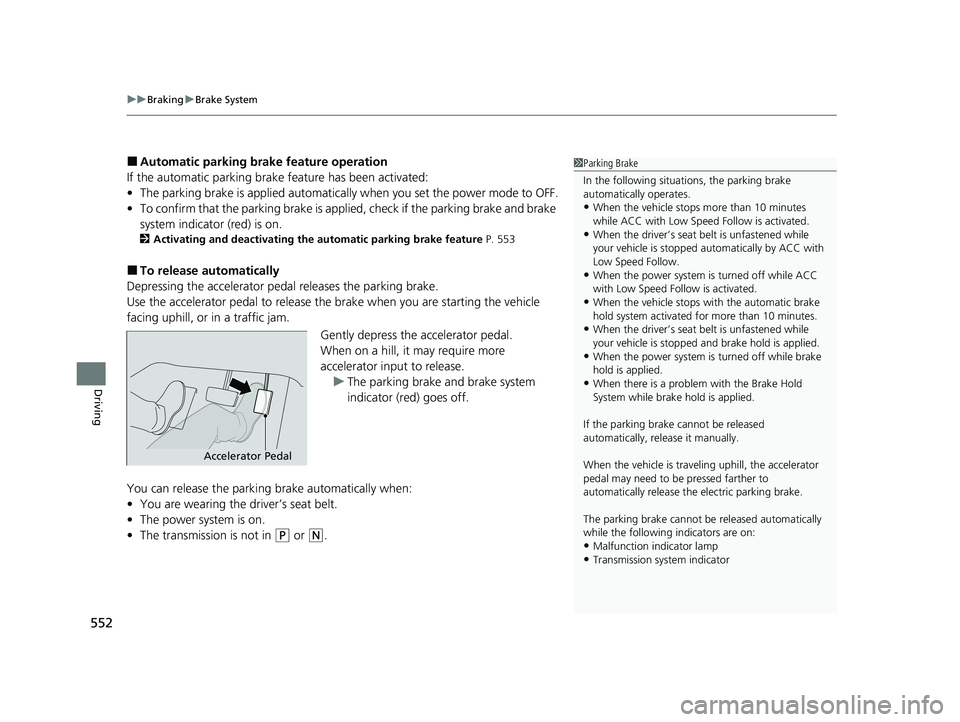
■To release automatically
Depressing the accelerator pedal releases the parking brake.
Use the accelerator pedal to release th e brake when you are starting the vehicle
facing uphill, or in a traffic jam.
Gently depress the accelerator pedal.
When on a hill, it may require more
accelerator input to release.u The parking brake and brake system
indicator (red) goes off.
You can release the parki ng brake automatically when:
• You are wearing the driver’s seat belt.
• The power system is on.
• The transmission is not in
(P or (N.
1Parking Brake
In the following situations, the parking brake
automatically operates.
•When the vehicle stops more than 10 minutes
while ACC with Low Speed Follow is activated.
•When the driver’s seat belt is unfastened while
your vehicle is stopped au tomatically by ACC with
Low Speed Follow.
•When the power system is turned off while ACC
with Low Speed Follow is activated.
•When the vehicle stops with the automatic brake
hold system activated for more than 10 minutes.
•When the driver’s seat belt is unfastened while
your vehicle is stopped and brake hold is applied.
•When the power system is turned off while brake
hold is applied.
•When there is a problem with the Brake Hold
System while brake hold is applied.
If the parking brake cannot be released
automatically, release it manually.
When the vehicle is travel ing uphill, the accelerator
pedal may need to be pressed farther to
automatically release the electric parking brake.
The parking brake cannot be released automatically
while the following indicators are on:
•Malfunction indicator lamp
•Transmission system indicator
Accelerator Pedal
22 CR-V HEV ELP-31TPG6200.book 552 ページ 2021年6月30日 水曜日 午前11時6分
Page 555 of 692
Continued553
uuBraking uBrake System
Driving
■Activating and deactivating the automatic parking brake feature
With the power mode is ON, carry out the following steps to either activate or
deactivate the automatic parking brake feature.
1. Put the transmission into
(P.
2. Without depressing the brake pedal, pull up the electric parking brake switch.
u Check that the parking brake and brake sy stem indicator (red) has come on.
3. Pull up and hold the electric parking br ake switch. When you hear a beeping
sound, release the switch and within 3 seconds pull up and hold the switch again.
4. When you hear a sound indicating that the procedure is completed, release the
switch.
u Two beeps indicates that the feature has been activated.
u One beep indicates that the feature has been deactivated.
u When you have completed activating the feature, the parking brake will
remain applied after you tu rn off the power system.
u To confirm that the parkin g brake is applied, check if the parking brake and
brake system indicator (red) is on.
If you need to temporarily deactivate the feature while putting your vehicle through
a conveyor type car wash. You can follow the procedure explained below.
1. Depress the brake pedal and bring the vehicle to a stop.
2. Set the power mode to VEHICLE OFF and then within 2 seconds push down the
electric parking brake switch.
u Activation and deactivation settings for the feature will not be affected.
u Before temporarily deactivating the feat ure, make sure to first turn off both
ACC with Low Speed Follow and the automatic brake hold system.
u To confirm that the parkin g brake is applied, check if the parking brake and
brake system indicator (red) is on.
1 Parking Brake
The parking brake may not be released automatically
while the following indicators are on:
•Parking brake and brake sy stem indicator (amber)
•VSA® system indicator•ABS indicator
•Supplemental restraint system indicator
In cold climates, the parking brake may freeze in
place if applied.
When parking the vehicle, chock the wheels and
make sure the automatic parking brake feature is
deactivated.
Also, when putting your vehicle through a conveyor-
type car wash or when ha ving your vehicle towed,
deactivate the automatic parking brake feature and
leave the parking brake released.
22 CR-V HEV ELP-31TPG6200.book 553 ページ 2021年6月30日 水曜日 午前11時6分
Page 557 of 692
Continued555
uuBraking uBrake System
Driving
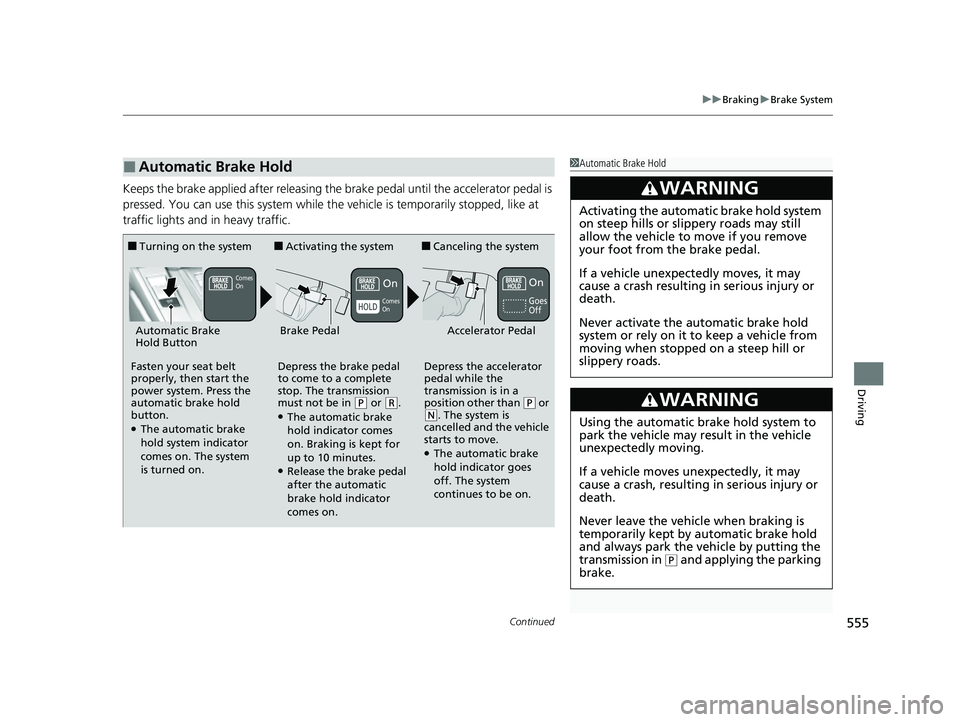
Keeps the brake applied after releasing the brake pedal until the accelerator pedal is
pressed. You can use this system while th e vehicle is temporarily stopped, like at
traffic lights and in heavy traffic.
■Automatic Brake Hold1 Automatic Brake Hold
3WARNING
Activating the automatic brake hold system
on steep hills or slippery roads may still
allow the vehicle to move if you remove
your foot from the brake pedal.
If a vehicle unexpectedly moves, it may
cause a crash resulting in serious injury or
death.
Never activate the automatic brake hold
system or rely on it to keep a vehicle from
moving when stopped on a steep hill or
slippery roads.
3WARNING
Using the automatic brake hold system to
park the vehicle may result in the vehicle
unexpectedly moving.
If a vehicle moves unexpectedly, it may
cause a crash, resulting in serious injury or
death.
Never leave the vehicle when braking is
temporarily kept by automatic brake hold
and always park the vehicle by putting the
transmission in
( P and applying the parking
brake.
■Turning on the system
Fasten your seat belt
properly, then start the
power system. Press the
automatic brake hold
button.
●The automatic brake
hold system indicator
comes on. The system
is turned on.
■Activating the system
Depress the brake pedal
to come to a complete
stop. The transmission
must not be in
( P or (R.●The automatic brake
hold indicator comes
on. Braking is kept for
up to 10 minutes.
●Release the brake pedal
after the automatic
brake hold indicator
comes on.
■Canceling the system
Depress the accelerator
pedal while the
transmission is in a
position other than
( P or (N. The system is
cancelled and the vehicle
starts to move.
●The automatic brake
hold indicator goes
off. The system
continues to be on.
Accelerator PedalBrake PedalAutomatic Brake
Hold Button
Goes
Off
On OnComes
On
Comes
On
22 CR-V HEV ELP-31TPG6200.book 555 ページ 2021年6月30日 水曜日 午前11時6分
Page 558 of 692
uuBraking uBrake System
556
Driving
■The system automatically cancels when:
• You engage the parking brake.
• You depress the brake pedal a nd put the transmission into
(P or (R.
■The system automatically cancels and the parking brake is applied when:
• Braking is kept for more than 10 minutes.
• The driver’s seat belt is unfastened.
• The power system is turned off.
• There is a problem with au tomatic brake hold system.
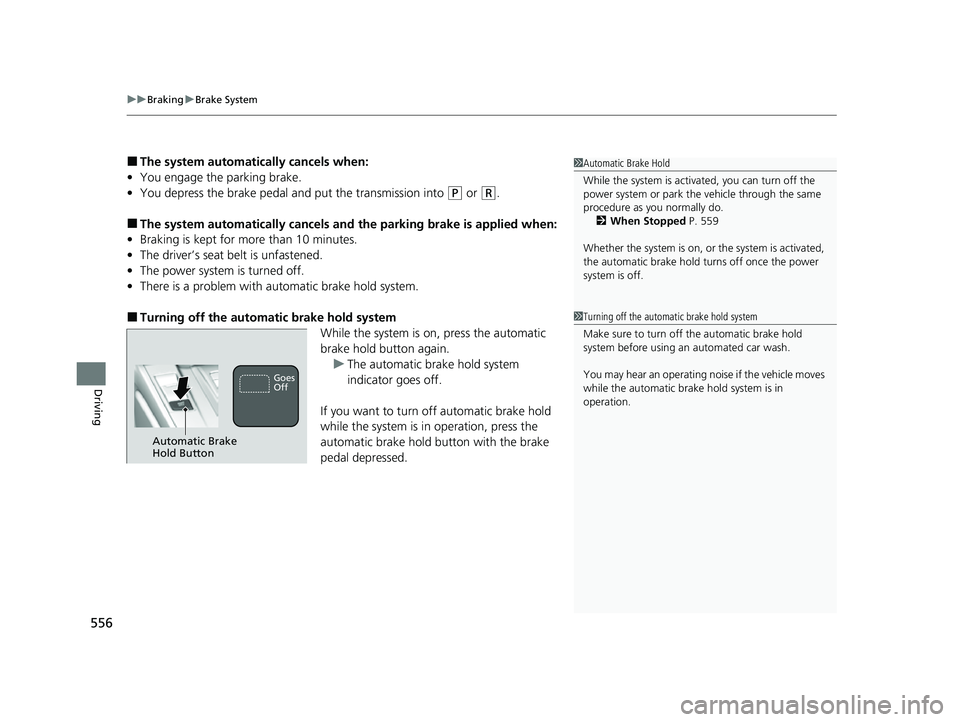
■Turning off the automatic brake hold system
While the system is on, press the automatic
brake hold button again.
u The automatic brake hold system
indicator goes off.
If you want to turn off automatic brake hold
while the system is in operation, press the
automatic brake hold button with the brake
pedal depressed.
1 Automatic Brake Hold
While the system is activated, you can turn off the
power system or park th e vehicle through the same
procedure as you normally do. 2 When Stopped P. 559
Whether the system is on, or the system is activated,
the automatic brake hold turns off once the power
system is off.
1 Turning off the automatic brake hold system
Make sure to turn off the automatic brake hold
system before using an automated car wash.
You may hear an operating noi se if the vehicle moves
while the automatic brake hold system is in
operation.
Automatic Brake
Hold Button
Goes
Off
22 CR-V HEV ELP-31TPG6200.book 556 ページ 2021年6月30日 水曜日 午前11時6分
Page 572 of 692

570
Driving
Multi-View Rear Camera
About Your Multi-View Rear Camera
The audio/information screen can display your vehicle’s rear view.
The display automatically changes to a rear view when the transmission is put into
(R.
■Multi-View Rear Camera Display Area
1About Your Multi-View Rear Camera
The rear camera view is restricted. You cannot see
the corner ends of the bumper or what is underneath
the bumper. Its unique le ns also makes objects
appear closer or farther than they actually are.
Visually confirm that it is safe to drive before backing
up. Certain conditions (such as weather, lighting, and
high temperatures) may also restrict the rear view. Do
not rely on the rearview display which does not give
you all information about conditions at the back of
your vehicle.
If the camera lens is cove red with dirt or moisture,
use a soft, moist cloth to keep the lens clean and free
of debris.
You can change the Fixed Guideline and Dynamic
Guideline settings. 2 Customized Features P. 369
Fixed Guideline
On: Guidelines appear when you put the
transmission into
( R.
Off: Guidelines do not appear.
Dynamic Guideline
On: Guidelines move accordi ng to the steering wheel
direction.
Off: Guidelines do not move.
Models with Display Audio
Guidelines Bumper Wide View Mode
Normal View Mode
Top Down View Mode
Approx.
39
inches
(1 m
)
Approx.
20 inches
(50 cm)
Tailgate
Open
Range
Camera
22 CR-V HEV ELP-31TPG6200.book 570 ページ 2021年6月30日 水曜日 午前11時6分