fuel HONDA CRV 2022 User Guide
[x] Cancel search | Manufacturer: HONDA, Model Year: 2022, Model line: CRV, Model: HONDA CRV 2022Pages: 692, PDF Size: 22.05 MB
Page 96 of 692
94
uuIndicators u
Instrument Panel
IndicatorNameOn/BlinkingExplanationMessage
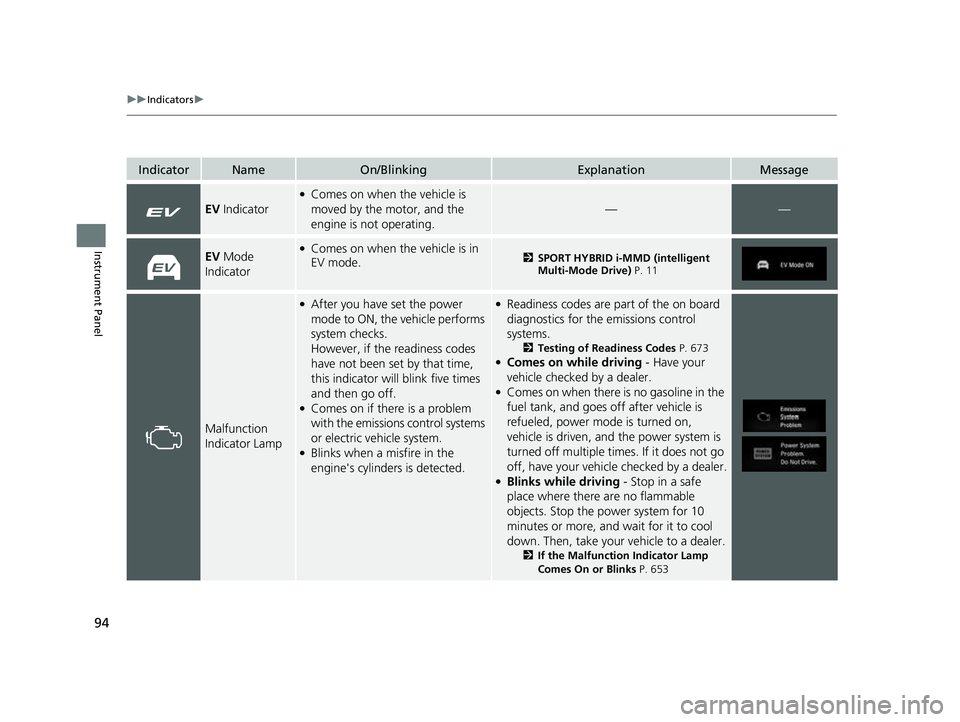
EV Indicator
●Comes on when the vehicle is
moved by the motor, and the
engine is not operating.
——
EV Mode
Indicator●Comes on when the vehicle is in
EV mode.2 SPORT HYBRID i-MMD (intelligent
Multi-Mode Drive) P. 11
Malfunction
Indicator Lamp
●After you have set the power
mode to ON, the vehicle performs
system checks.
However, if the readiness codes
have not been set by that time,
this indicator will blink five times
and then go off.
●Comes on if there is a problem
with the emissions control systems
or electric vehicle system.
●Blinks when a misfire in the
engine's cylinders is detected.
●Readiness codes are part of the on board
diagnostics for the emissions control
systems.
2Testing of Readiness Codes P. 673●Comes on while driving - Have your
vehicle checked by a dealer.
●Comes on when there is no gasoline in the
fuel tank, and goes off after vehicle is
refueled, power mode is turned on,
vehicle is driven, and the power system is
turned off multiple times. If it does not go
off, have your vehicl e checked by a dealer.
●Blinks while driving - Stop in a safe
place where there are no flammable
objects. Stop the power system for 10
minutes or more, and wait for it to cool
down. Then, take your vehicle to a dealer.
2If the Malfunction Indicator Lamp
Comes On or Blinks P. 653
22 CR-V HEV ELP-31TPG6200.book 94 ページ 2021年6月30日 水曜日 午前11時6分
Page 98 of 692
96
uuIndicators u
Instrument Panel
IndicatorNameOn/BlinkingExplanationMessage
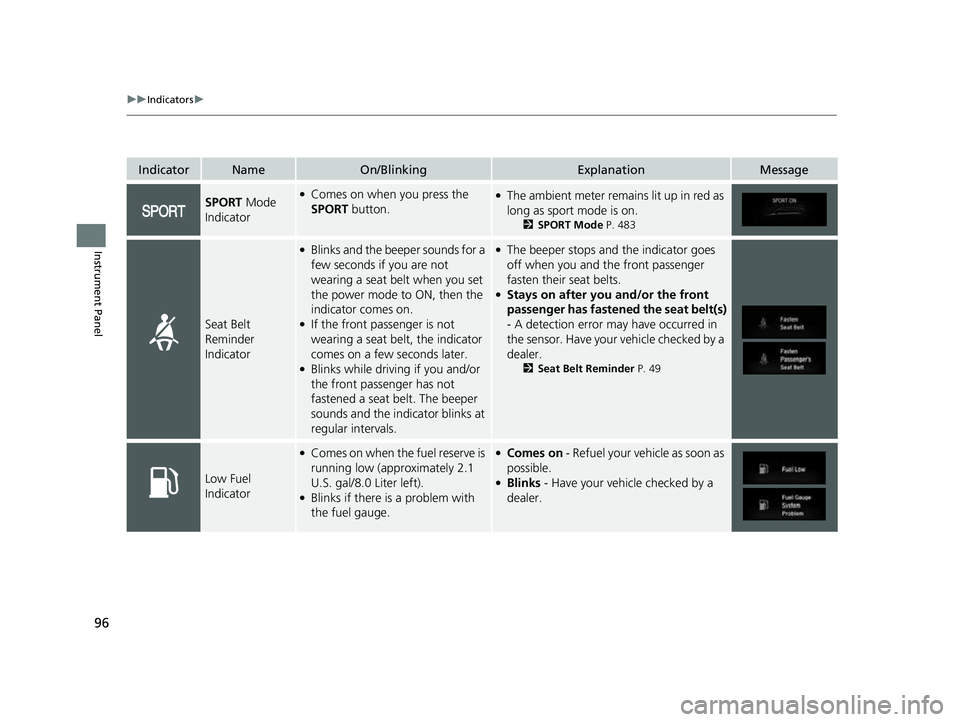
SPORT Mode
Indicator●Comes on when you press the
SPORT button.●The ambient meter remains lit up in red as
long as sport mode is on.
2SPORT Mode P. 483
Seat Belt
Reminder
Indicator
●Blinks and the beep er sounds for a
few seconds if you are not
wearing a seat belt when you set
the power mode to ON, then the
indicator comes on.
●If the front passenger is not
wearing a seat belt, the indicator
comes on a few seconds later.
●Blinks while driving if you and/or
the front passenger has not
fastened a seat belt. The beeper
sounds and the indicator blinks at
regular intervals.
●The beeper stops and the indicator goes
off when you and the front passenger
fasten their seat belts.
●Stays on after you and/or the front
passenger has fastened the seat belt(s)
- A detection error ma y have occurred in
the sensor. Have your vehicle checked by a
dealer.
2 Seat Belt Reminder P. 49
Low Fuel
Indicator
●Comes on when the fuel reserve is
running low (approximately 2.1
U.S. gal/8.0 Liter left).
●Blinks if there is a problem with
the fuel gauge.
●Comes on - Refuel your ve hicle as soon as
possible.
●Blinks - Have your vehicle checked by a
dealer.
22 CR-V HEV ELP-31TPG6200.book 96 ページ 2021年6月30日 水曜日 午前11時6分
Page 128 of 692
126
Instrument Panel
Gauges and Driver Information Interface
Gauges
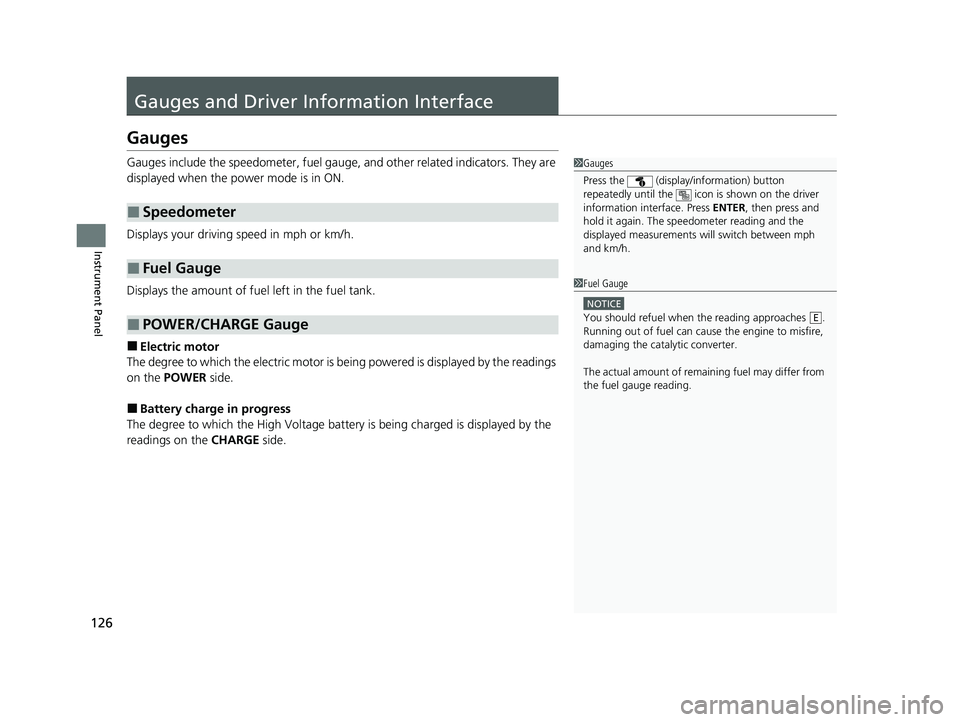
Gauges include the speedometer, fuel gauge, and other related indicators. They are
displayed when the power mode is in ON.
Displays your driving speed in mph or km/h.
Displays the amount of fuel left in the fuel tank.
■Electric motor
The degree to which the electric motor is being powered is displayed by the readings
on the POWER side.
■Battery charge in progress
The degree to which the High Voltage battery is being charged is displayed by the
readings on the CHARGE side.
■Speedometer
■Fuel Gauge
■POWER/CHARGE Gauge
1Gauges
Press the (display /information) button
repeatedly until the icon is shown on the driver
information interface. Press ENTER , then press and
hold it again. The spee dometer reading and the
displayed measurements wi ll switch between mph
and km/h.
1 Fuel Gauge
NOTICE
You should refuel when the reading approaches .
Running out of fuel can cause the engine to misfire,
damaging the cata lytic converter.
The actual amount of remain ing fuel may differ from
the fuel gauge reading.E
22 CR-V HEV ELP-31TPG6200.book 126 ページ 2021年6月30日 水曜日 午前11時6分
Page 130 of 692
128
uuGauges and Driver Information Interface uDriver Information Interface
Instrument Panel
Driver Information Interface
The driver information interface shows in formation such as the estimated travelable
distance and fuel economy of the vehicle. It also displays messages such as warnings
and other helpful information.
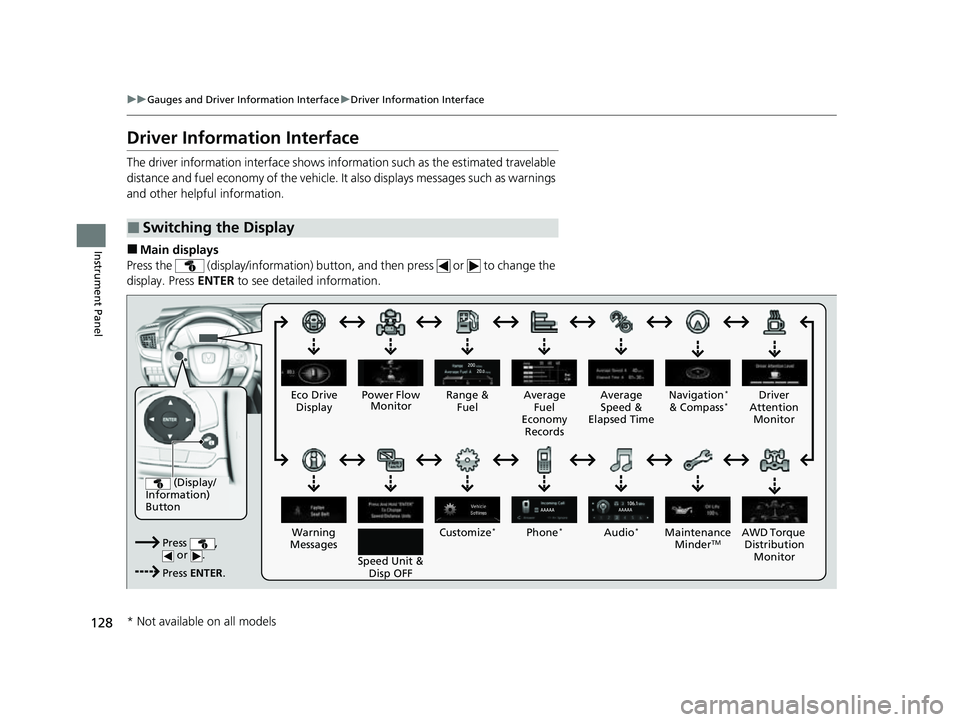
■Main displays
Press the (display/information) button, and then press or to change the
display. Press ENTER to see detailed information.
■Switching the Display
(Display/
Information)
Button
Press , or .
Press ENTER . Eco Drive
Display
Audio
*Phone*
Speed Unit & Disp OFF
Warning
Messages Average
Fuel
Economy Records
Driver
Attention Monitor
Range &
Fuel Average
Speed &
Elapsed Time Navigation*
& Compass*
Customize*
Power Flow Monitor
AWD Torque Distribution Monito r
Main
tenance
MinderTM
* Not available on all models
22 CR-V HEV ELP-31TPG6200.book 128 ページ 2021年6月30日 水曜日 午前11時6分
Page 132 of 692
uuGauges and Driver Information Interface uDriver Information Interface
130
Instrument Panel
■Resetting a trip meter
To reset a trip meter, display it, then pr ess and hold the knob. The trip meter is
reset to 0.0 .
Shows the estimated average fuel economy of each trip meter in mpg or l/100 km.
The display is updated at set intervals. When a trip meter is reset, the average fuel
economy is also reset.
Shows the estimated distance you can trave l on the remaining power and fuel. This
estimated distance is based on the vehicle’s current fuel economy.
Shows the time elapsed since Trip A or Trip B was reset.
Shows the average speed in mph or km/h since Trip A or Trip B was reset.
Shows the instant fuel economy as a bar graph in mpg or l/100 km.
■Average Fuel Economy
■Range
■Elapsed Time
■Average Speed
■Instant Fuel Economy Gauge
1Average Fuel Economy
You can change when to reset the average fuel
economy.
2 Customized Features P. 140, 369
1Elapsed Time
You can change when to reset the elapsed time.
2 Customized Features P. 140, 369
1Average Speed
You can change when to reset the average speed.
2 Customized Features P. 140, 369
22 CR-V HEV ELP-31TPG6200.book 130 ページ 2021年6月30日 水曜日 午前11時6分
Page 133 of 692
131
uuGauges and Driver Information Interface uDriver Information Interface
Continued
Instrument Panel
Shows the remaining oil life and Maintenance MinderTM.
2 Maintenance MinderTM P. 581
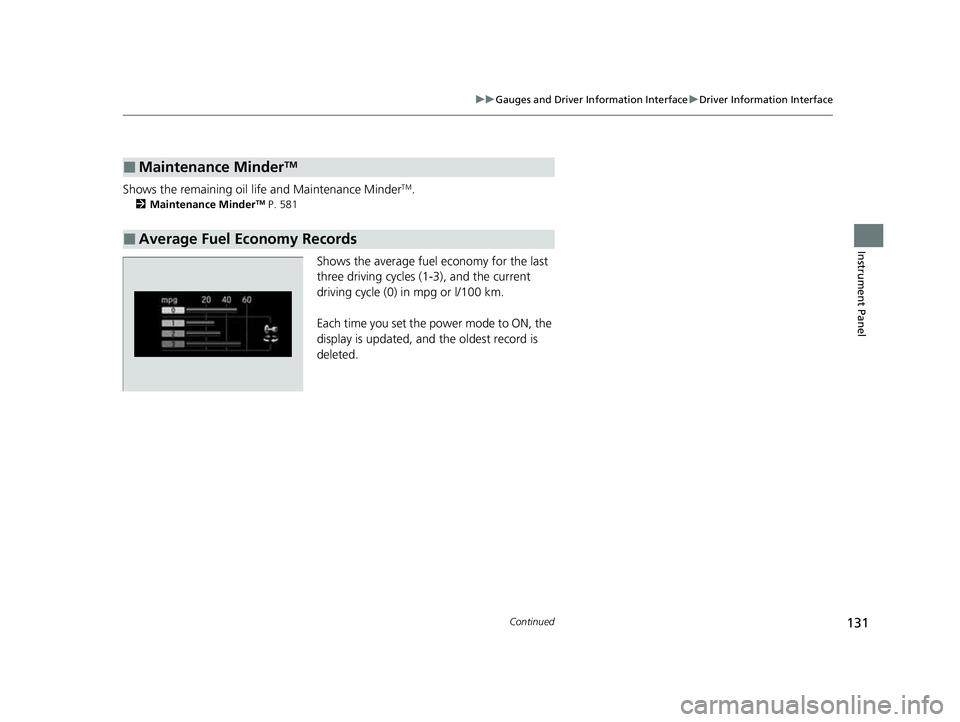
Shows the average fuel economy for the last
three driving cycles (1-3), and the current
driving cycle (0) in mpg or l/100 km.
Each time you set the power mode to ON, the
display is updated, and the oldest record is
deleted.
■Maintenance MinderTM
■Average Fuel Economy Records
22 CR-V HEV ELP-31TPG6200.book 131 ページ 2021年6月30日 水曜日 午前11時6分
Page 134 of 692
132
uuGauges and Driver Information Interface uDriver Information Interface
Instrument Panel
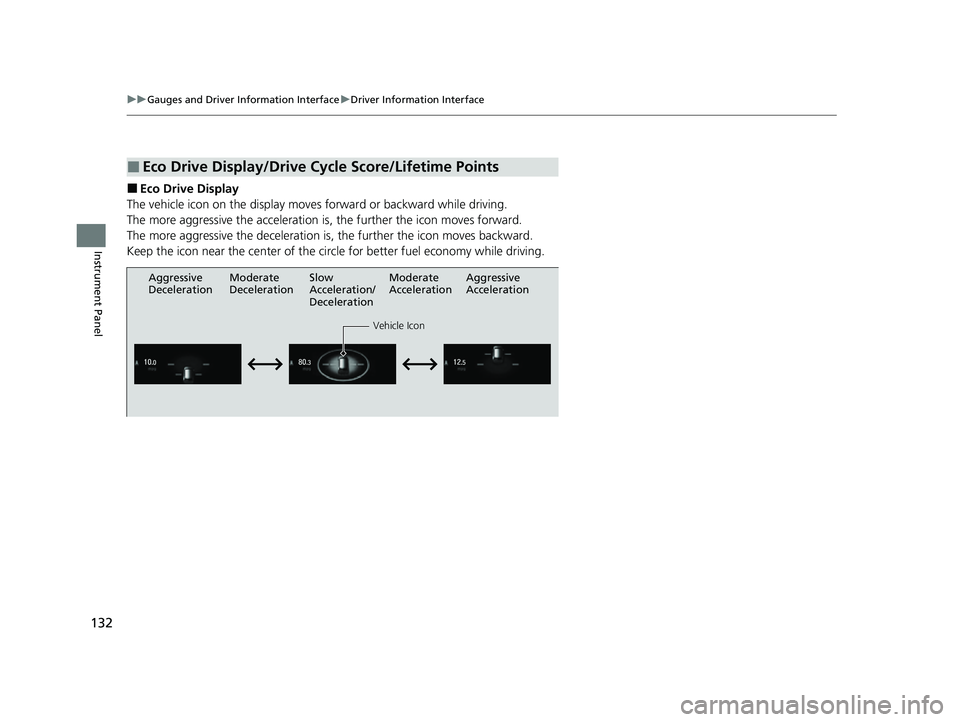
■Eco Drive Display
The vehicle icon on the display moves forward or backward while driving.
The more aggressive the acceleration is, the further the icon moves forward.
The more aggressive the deceleration is, the further the icon moves backward.
Keep the icon near the center of the circ le for better fuel economy while driving.
■Eco Drive Display/Drive Cycle Score/Lifetime Points
Aggressive
Deceleration
Vehicle Icon
Aggressive
Acceleration
Moderate
Deceleration Slow
Acceleration/
DecelerationModerate
Acceleration
22 CR-V HEV ELP-31TPG6200.book 132 ページ 2021年6月30日 水曜日 午前11時6分
Page 135 of 692
133
uuGauges and Driver Information Interface uDriver Information Interface
Continued
Instrument Panel
■Drive Cycle Score/Lifetime Points
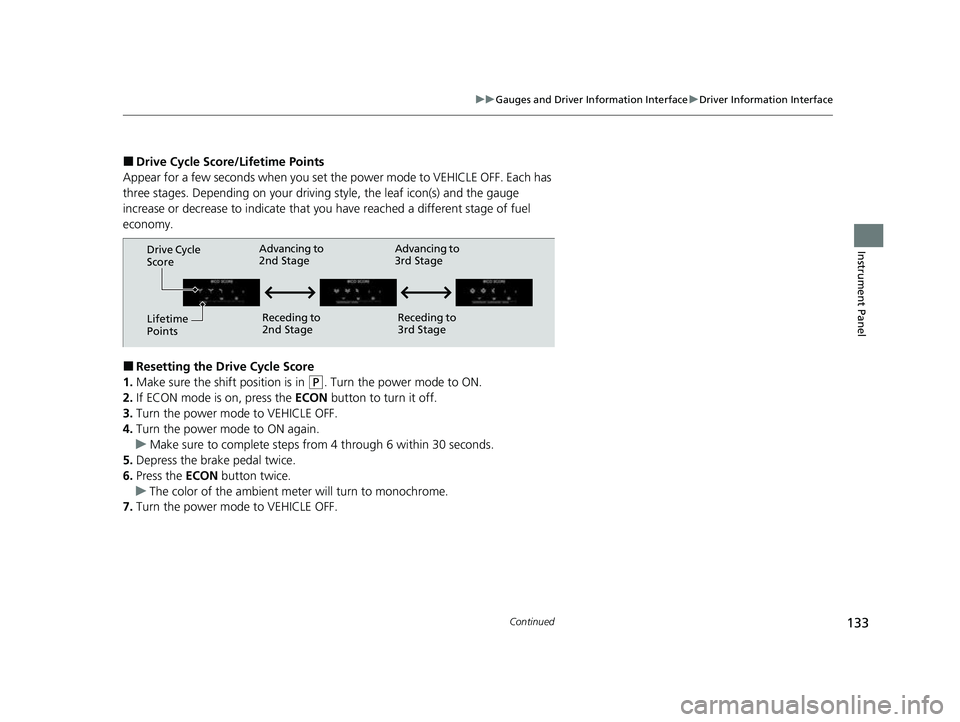
Appear for a few seconds when you set th e power mode to VEHICLE OFF. Each has
three stages. Depending on your driving style, the leaf icon(s) and the gauge
increase or decrease to indicate that yo u have reached a different stage of fuel
economy.
■Resetting the Drive Cycle Score
1. Make sure the shift position is in
(P. Turn the power mode to ON.
2. If ECON mode is on, press the ECON button to turn it off.
3. Turn the power mode to VEHICLE OFF.
4. Turn the power mode to ON again.
u Make sure to complete steps fro m 4 through 6 within 30 seconds.
5. Depress the brake pedal twice.
6. Press the ECON button twice.
u The color of the ambient mete r will turn to monochrome.
7. Turn the power mode to VEHICLE OFF.
Drive Cycle
Score
Lifetime
Points Advancing to
2nd Stage
Receding to
2nd Stage Advancing to
3rd Stage
Receding to
3rd Stage
22 CR-V HEV ELP-31TPG6200.book 133 ページ 2021年6月30日 水曜日 午前11時6分
Page 143 of 692
141
uuGauges and Driver Information Interface uDriver Information Interface
Continued
Instrument Panel
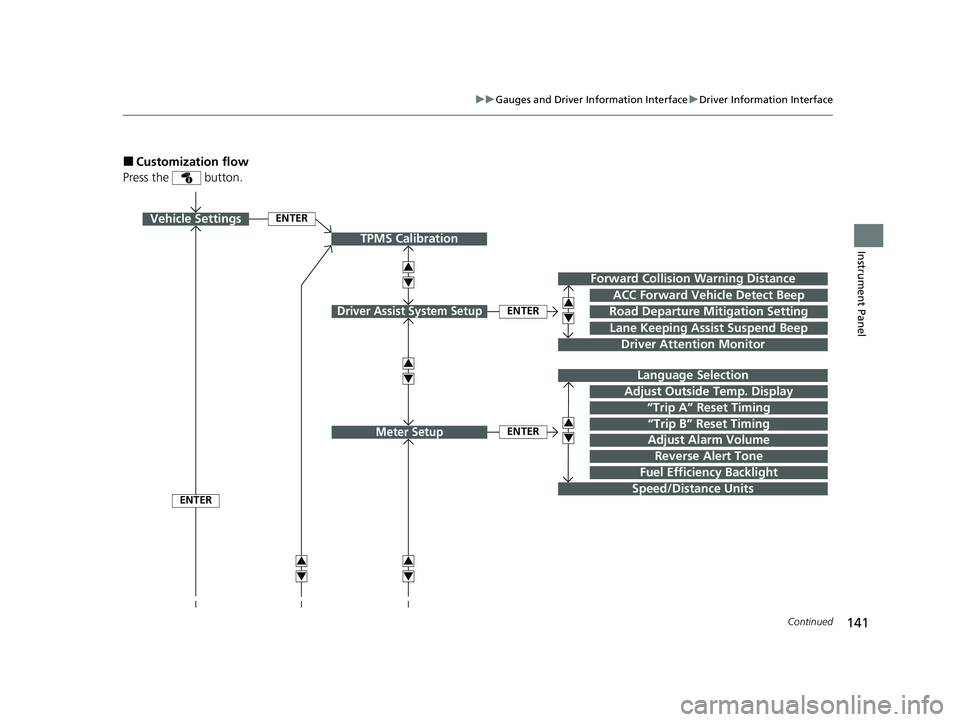
■Customization flow
Press the button.
ENTER
TPMS Calibration
Vehicle Settings
Lane Keeping Assist Suspend Beep
Forward Collision Warning Distance
Road Departure Mitigation Setting
Driver Attention Monitor
Driver Assist System SetupENTER
ACC Forward Vehicle Detect Beep
“Trip B” Reset Timing
Language Selection
“Trip A” Reset Timing
Adjust Alarm Volume
Speed/Distance Units
Reverse Alert Tone
Meter SetupENTER
Adjust Outside Temp. Display
3
4
3
4
3
4
3
4
3
4
3
4
ENTER
Fuel Efficiency Backlight
22 CR-V HEV ELP-31TPG6200.book 141 ページ 2021年6月30日 水曜日 午前11時6分
Page 146 of 692
144
uuGauges and Driver Information Interface uDriver Information Interface
Instrument Panel
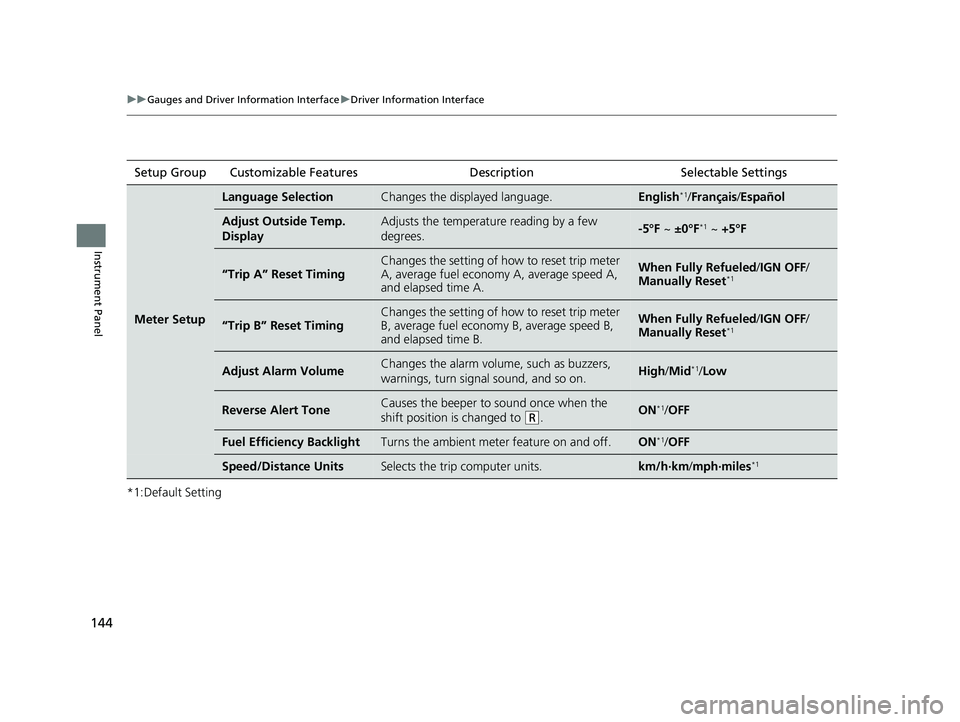
*1:Default SettingSetup Group Customizable Features
Description Selectable Settings
Meter Setup
Language SelectionChanges the displayed language.English*1/Français /Español
Adjust Outside Temp.
DisplayAdjusts the temperature reading by a few
degrees.-5°F ~ ±0°F*1 ~ +5°F
“Trip A” Reset TimingChanges the setting of how to reset trip meter
A, average fuel economy A, average speed A,
and elapsed time A.When Fully Refueled /IGN OFF /
Manually Reset*1
“Trip B” Reset Timing
Changes the setting of how to reset trip meter
B, average fuel economy B, average speed B,
and elapsed time B.When Fully Refueled /IGN OFF /
Manually Reset*1
Adjust Alarm VolumeChanges the alarm volume, such as buzzers,
warnings, turn signal sound, and so on.High /Mid*1/Low
Reverse Alert ToneCauses the beeper to sound once when the
shift position is changed to
(R.ON*1/OFF
Fuel Efficien cy BacklightTurns the ambient meter feature on and off.ON*1/OFF
Speed/Distance UnitsSelects the trip computer units.km/h∙km /mph∙miles*1
22 CR-V HEV ELP-31TPG6200.book 144 ページ 2021年6月30日 水曜日 午前11時6分