pairing phone HONDA CRV 2022 User Guide
[x] Cancel search | Manufacturer: HONDA, Model Year: 2022, Model line: CRV, Model: HONDA CRV 2022Pages: 692, PDF Size: 22.05 MB
Page 432 of 692
uuBluetooth ® HandsFreeLink ®u HFL Menus
430
Features
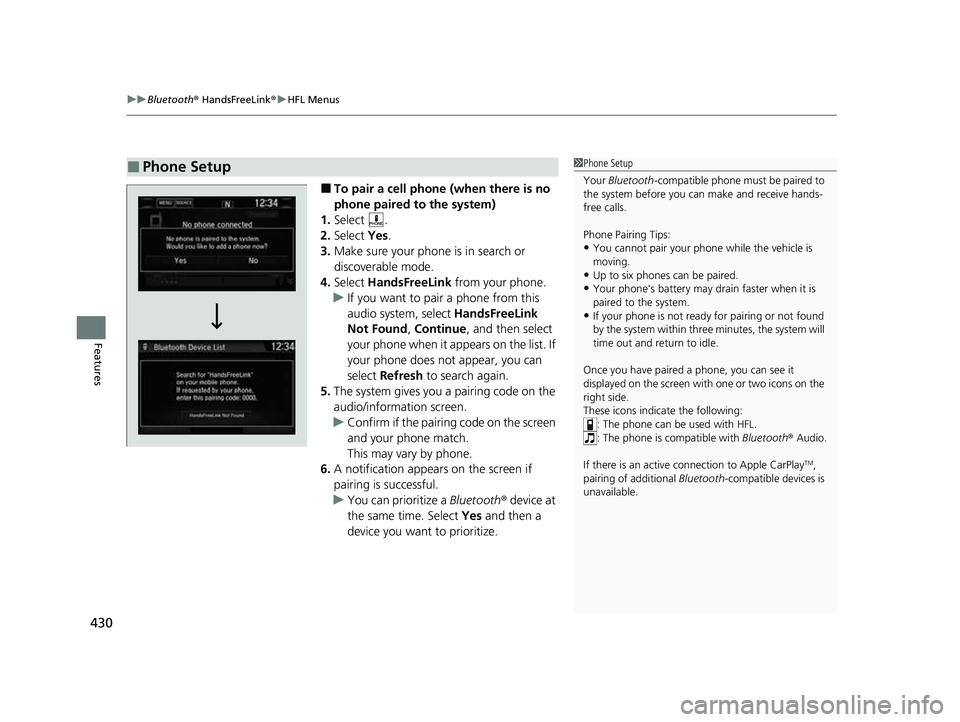
■To pair a cell phone (when there is no
phone paired to the system)
1. Select .
2. Select Yes.
3. Make sure your phone is in search or
discoverable mode.
4. Select HandsFreeLink from your phone.
u If you want to pair a phone from this
audio system, select HandsFreeLink
Not Found , Continue , and then select
your phone when it appears on the list. If
your phone does not appear, you can
select Refresh to search again.
5. The system gives you a pairing code on the
audio/information screen.
u Confirm if the pairing code on the screen
and your phone match.
This may vary by phone.
6. A notification appears on the screen if
pairing is successful.
u You can prioritize a Bluetooth ® device at
the same time. Select Yes and then a
device you want to prioritize.
■Phone Setup1 Phone Setup
Your Bluetooth -compatible phone must be paired to
the system before you ca n make and receive hands-
free calls.
Phone Pairing Tips:
•You cannot pair your phone while the vehicle is
moving.
•Up to six phones can be paired.
•Your phone's battery may dr ain faster when it is
paired to the system.
•If your phone is not ready for pairing or not found
by the system within three minutes, the system will
time out and return to idle.
Once you have paired a phone, you can see it
displayed on the screen with one or two icons on the
right side.
These icons indicate the following: : The phone can be used with HFL.
: The phone is compatible with Bluetooth® Audio.
If there is an active c onnection to Apple CarPlay
TM,
pairing of additional Bluetooth -compatible devices is
unavailable.
22 CR-V HEV ELP-31TPG6200.book 430 ページ 2021年6月30日 水曜日 午前11時6分
Page 433 of 692
Continued431
uuBluetooth ® HandsFreeLink ®u HFL Menus
Features
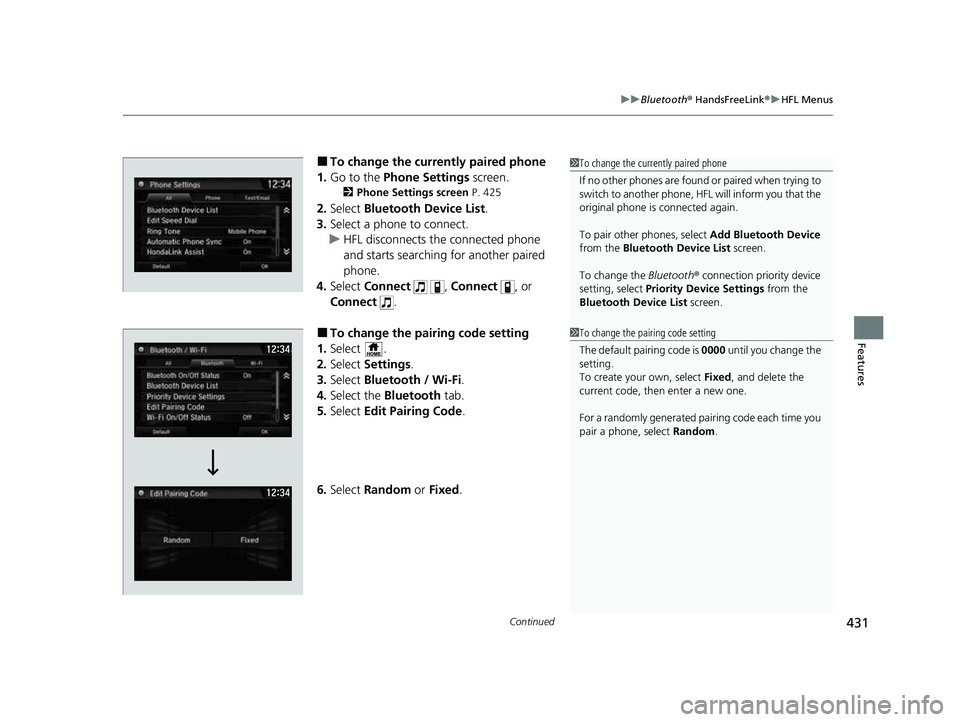
■To change the currently paired phone
1. Go to the Phone Settings screen.
2Phone Settings screen P. 425
2.Select Bluetooth Device List .
3. Select a phone to connect.
u HFL disconnects the connected phone
and starts searching for another paired
phone.
4. Select Connect , Connect , or
Connect .
■To change the pairing code setting
1. Select .
2. Select Settings .
3. Select Bluetooth / Wi-Fi .
4. Select the Bluetooth tab.
5. Select Edit Pairing Code .
6. Select Random or Fixed .
1To change the currently paired phone
If no other phones are found or paired when trying to
switch to another phone, HFL will inform you that the
original phone is connected again.
To pair other phones, select Add Bluetooth Device
from the Bluetooth Device List screen.
To change the Bluetooth ® connection priority device
setting, select Priority Device Settings from the
Bluetooth Device List screen.
1To change the pairing code setting
The default pairing code is 0000 until you change the
setting.
To create your own, select Fixed, and delete the
current code, then enter a new one.
For a randomly generated pair ing code each time you
pair a phone, select Random.
22 CR-V HEV ELP-31TPG6200.book 431 ページ 2021年6月30日 水曜日 午前11時6分