audio HONDA CRV 2022 Owner's Manual
[x] Cancel search | Manufacturer: HONDA, Model Year: 2022, Model line: CRV, Model: HONDA CRV 2022Pages: 692, PDF Size: 22.05 MB
Page 173 of 692
Continued171
uuTailgate uOpening/Closing the Power Tailgate*
Controls
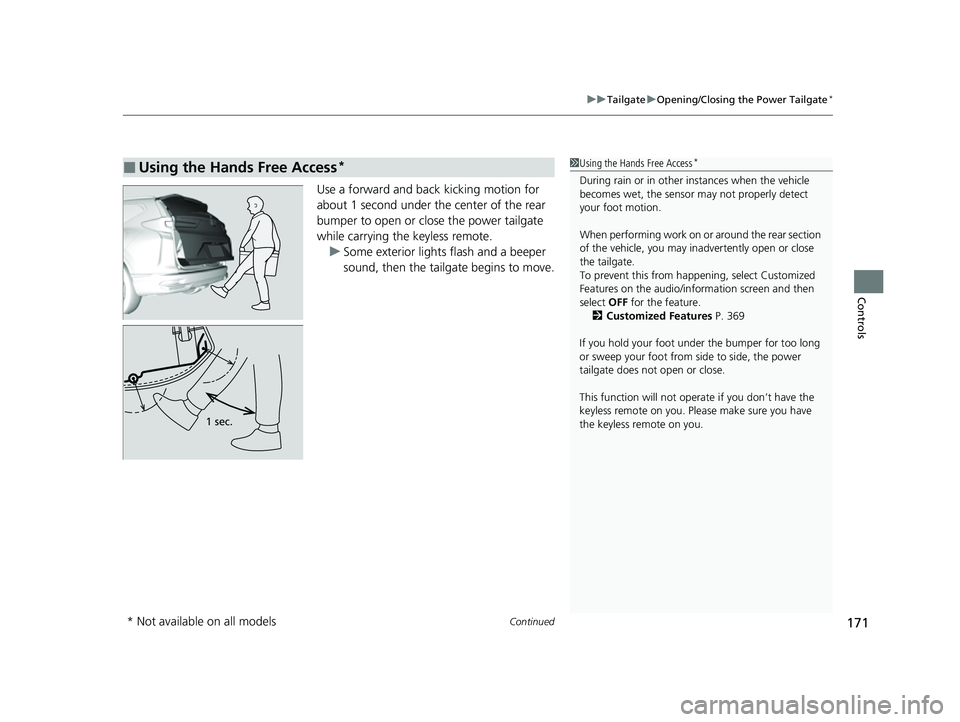
Use a forward and back kicking motion for
about 1 second under the center of the rear
bumper to open or close the power tailgate
while carrying the keyless remote.
u Some exterior lights flash and a beeper
sound, then the tailgate begins to move.
■Using the Hands Free Access*1Using the Hands Free Access*
During rain or in other instances when the vehicle
becomes wet, the sensor may not properly detect
your foot motion.
When performing work on or around the rear section
of the vehicle, you may in advertently open or close
the tailgate.
To prevent this from happe ning, select Customized
Features on the audio/information screen and then
select OFF for the feature.
2 Customized Features P. 369
If you hold your foot under the bumper for too long
or sweep your foot from side to side, the power
tailgate does not open or close.
This function will not opera te if you don’t have the
keyless remote on you. Please make sure you have
the keyless remote on you.
1 sec.
* Not available on all models
22 CR-V HEV ELP-31TPG6200.book 171 ページ 2021年6月30日 水曜日 午前11時6分
Page 180 of 692
178
Controls
Security System
Immobilizer System
This system prevents a key that has not been pre-registered from starting the power
system.
Pay attention to the follo wing when pressing the POWER button:
• Do not allow objects that emit strong radio waves near the POWER button.
• Make sure the key is not covered by or touching a metal object.
• Do not bring a key from another vehi cle’s immobilizer system near the POWER
button.
• Do not put the key near magnetic items. El ectronic device, such as televisions and
audio systems emit strong magnetic fields. Note that even a key chain can
become magnetic.
Security System Alarm*
The security system alarm activates when the tailgate, hood or doors are forcibly
opened. The alarm does not activate if the tailgate or doors are opened with the key,
remote transmitter or keyless access system.
However, the alarm activates if a door is opened with the key and then the hood is
opened before the power mode is set to ON.
■When the security sy stem alarm activates
The horn sounds intermittently, and some exterior lights flash.
1 Immobilizer System
NOTICE
Leaving the key in the vehicl e can result in theft or
accidental movement of the vehicle.
Always take the key with you whenever you leave the
vehicle unattendedM
Do not alter the system or add other devices to itM
Doing so may damage the system and make your
vehicle inoperableM
1 Security System Alarm*
The security system alarm continues for a maximum
of two minutes until the security system alarm
deactivates.
* Not available on all models
22 CR-V HEV ELP-31TPG6200.book 178 ページ 2021年6月30日 水曜日 午前11時6分
Page 188 of 692
186
Controls
Operating the Switches Around the Steering Wheel
POWER Button
■Changing the Power Mode1POWER Button
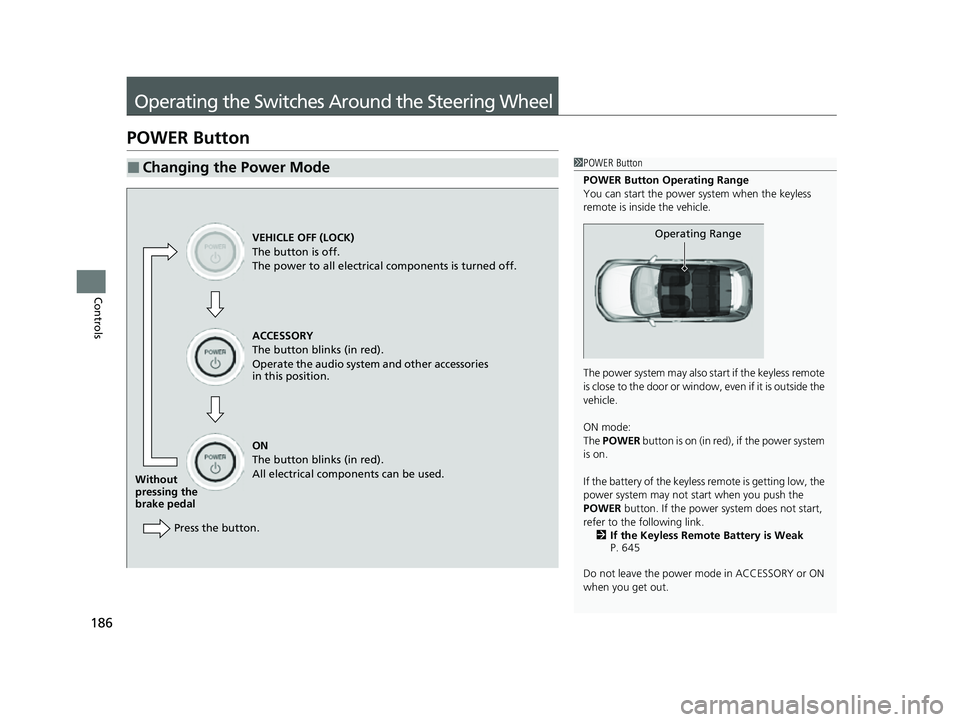
POWER Button Operating Range
You can start the power system when the keyless
remote is inside the vehicle.
The power system may also start if the keyless remote
i s c l o s e t o t h e d o o r o r w i n d o w , e v e n i f i t i s o u t s i d e t h e
vehicle.
ON mode:
The POWER button is on (in red), if the power system
is on.
If the battery of the keyless remote is getting low, the
power system may not start when you push the
POWER button. If the power system does not start,
refer to the following link. 2 If the Keyless Remote Battery is Weak
P. 645
Do not leave the power mode in ACCESSORY or ON
when you get out.
Operating RangeVEHICLE OFF (LOCK)
The button is off.
The power to all electrical components is turned off.
ACCESSORY
The button blinks (in red).
Operate the audio system and other accessories
in this position.
ON
The button blinks (in red).
All electrical components can be used.
Without
pressing the
brake pedal
Press the button.
22 CR-V HEV ELP-31TPG6200.book 186 ページ 2021年6月30日 水曜日 午前11時6分
Page 194 of 692
uuOperating the Switches Around the Steering Wheel uLight Switches
192
Controls
The headlights automatically come on when the wipers are used several times within
a certain number of intervals wi th the headlight switch in AUTO.
The headlights automatically go off a few minutes later if the wipers are stopped.
■Headlight Integration with Wipers
1Automatic Operation (aut omatic lighting control)
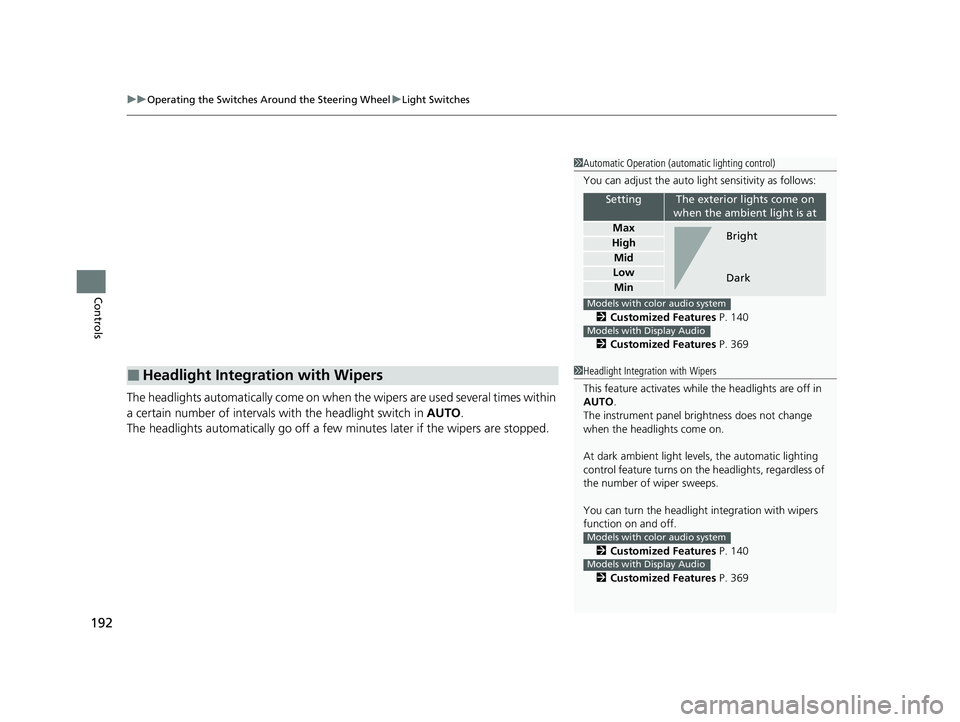
You can adjust the auto li ght sensitivity as follows:
2 Customized Features P. 140
2 Customized Features P. 369
SettingThe exterior lights come on
when the ambient light is at
Max
High
Mid
Low
Min
Bright
Dark
Models with color audio system
Models with Display Audio
1 Headlight Integration with Wipers
This feature activates while the headlights are off in
AUTO .
The instrument panel br ightness does not change
when the headlights come on.
At dark ambient light leve ls, the automatic lighting
control feature turns on the headlights, regardless of
the number of wiper sweeps.
You can turn the headlight integration with wipers
function on and off.
2 Customized Features P. 140
2 Customized Features P. 369
Models with color audio system
Models with Display Audio
22 CR-V HEV ELP-31TPG6200.book 192 ページ 2021年6月30日 水曜日 午前11時6分
Page 195 of 692
193
uuOperating the Switches Around the Steering Wheel uLight Switches
Controls
The headlights, all other exterior lights, and the instrument panel lights turn off 15
seconds after you set the power mode to VEHICLE OFF, take the keyless remote with
you, and close the driver’s door.
If you set the power mode to VEHICLE OFF with the headlight switch on, but do not
open the door, the lights turn off after 10 minu tes (3 minutes, if the switch is in the
AUTO position).
The lights turn on again when you unlock or open the driver’s door. If you unlock
the door, but do not open it within 15 seconds, the lights go off. If you open the
driver’s door, you will hear a reminder chime alerting you that the lights are on.
■Automatic Lighting Off Feature1 Automatic Lighting Off Feature
You can change the headlight auto off timer setting.
2 Customized Features P. 140
2 Customized Features P. 369
Models with color audio system
Models with Display Audio
22 CR-V HEV ELP-31TPG6200.book 193 ページ 2021年6月30日 水曜日 午前11時6分
Page 205 of 692
203
uuOperating the Switches Around the Steering Wheel uDriving Position Memory System*
Continued
Controls
Driving Position Memory System*
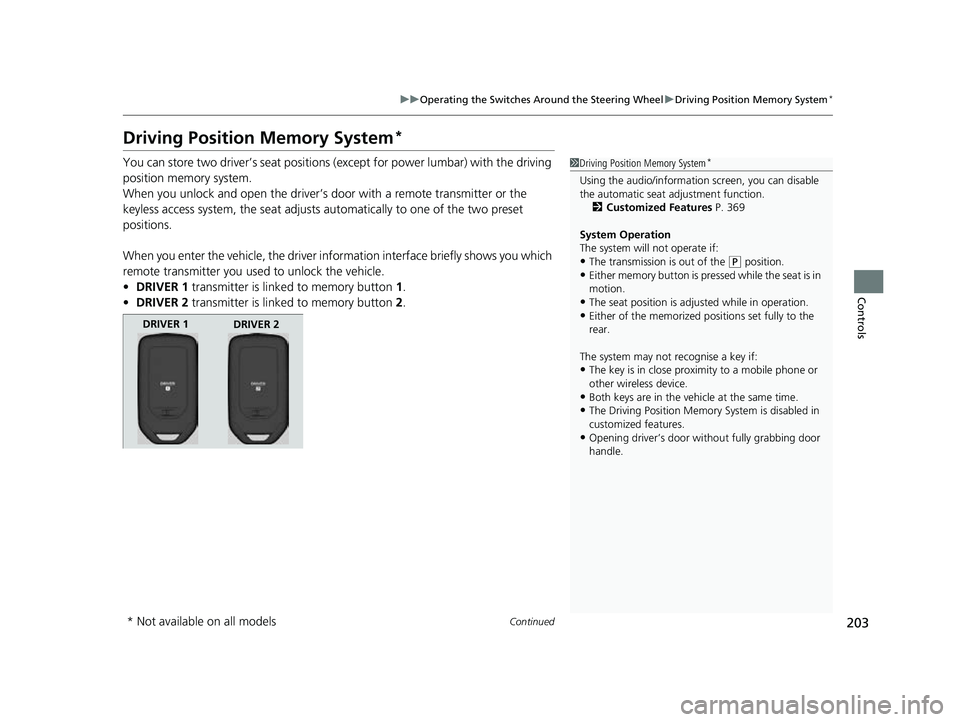
You can store two driver’s seat positions (except for power lumbar) with the driving
position memory system.
When you unlock and open the driver’s door with a remote transmitter or the
keyless access system, the seat adjusts automatically to one of the two preset
positions.
When you enter the vehicle, the driver in formation interface briefly shows you which
remote transmitter you used to unlock the vehicle.
• DRIVER 1 transmitter is linked to memory button 1.
• DRIVER 2 transmitter is linked to memory button 2.1 Driving Position Memory System*
Using the audio/informati on screen, you can disable
the automatic seat adjustment function.
2 Customized Features P. 369
System Operation
The system will not operate if:
•The transmission is out of the ( P position.•Either memory button is pressed while the seat is in
motion.
•The seat position is adju sted while in operation.•Either of the memorized pos itions set fully to the
rear.
The system may not recognise a key if:
•The key is in close proximity to a mobile phone or
other wireless device.
•Both keys are in the vehicle at the same time.
•The Driving Position Memory System is disabled in
customized features.
•Opening driver’s door wi thout fully grabbing door
handle.
DRIVER 1 DRIVER 2
* Not available on all models
22 CR-V HEV ELP-31TPG6200.book 203 ページ 2021年6月30日 水曜日 午前11時6分
Page 220 of 692
218
Controls
Interior Convenience Items
Interior Lights
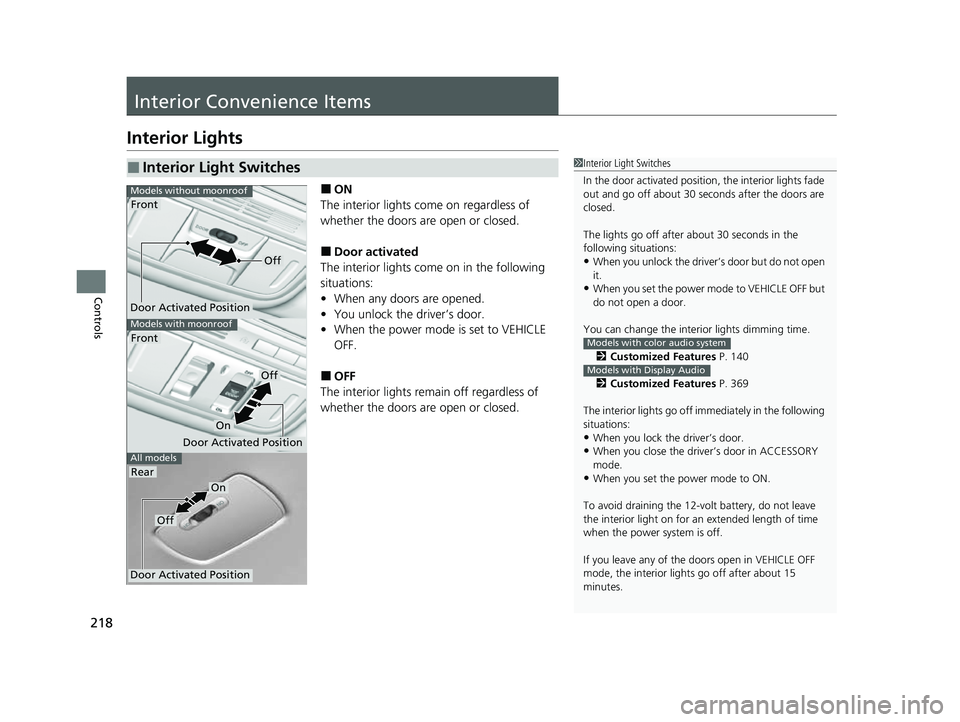
■ON
The interior lights come on regardless of
whether the doors are open or closed.
■Door activated
The interior lights come on in the following
situations:
• When any doors are opened.
• You unlock the driver’s door.
• When the power mode is set to VEHICLE
OFF.
■OFF
The interior lights remain off regardless of
whether the doors are open or closed.
■Interior Light Switches1 Interior Light Switches
In the door activated position, the interior lights fade
out and go off about 30 seconds after the doors are
closed.
The lights go off after about 30 seconds in the
following situations:
•When you unlock the driver’s door but do not open
it.
•When you set the power mode to VEHICLE OFF but
do not open a door.
You can change the interi or lights dimming time.
2 Customized Features P. 140
2 Customized Features P. 369
The interior lights go off im mediately in the following
situations:
•When you lock the driver’s door.
•When you close the driver’s door in ACCESSORY
mode.
•When you set the power mode to ON.
To avoid draining the 12-vo lt battery, do not leave
the interior light on for an extended length of time
when the power system is off.
If you leave any of the doors open in VEHICLE OFF
mode, the interior light s go off after about 15
minutes.
Models with color audio system
Models with Display Audio
All models
Models with moonroof
Front
Models without moonroof
Door Activated Position
Front
Rear
Door Activated Position
Off
On
Door Activated Position
Off
On
Off
22 CR-V HEV ELP-31TPG6200.book 218 ページ 2021年6月30日 水曜日 午前11時6分
Page 234 of 692
uuInterior Convenience Items uOther Interior Convenience Items
232
Controls
■FCC statement
RF Exposure Notice:
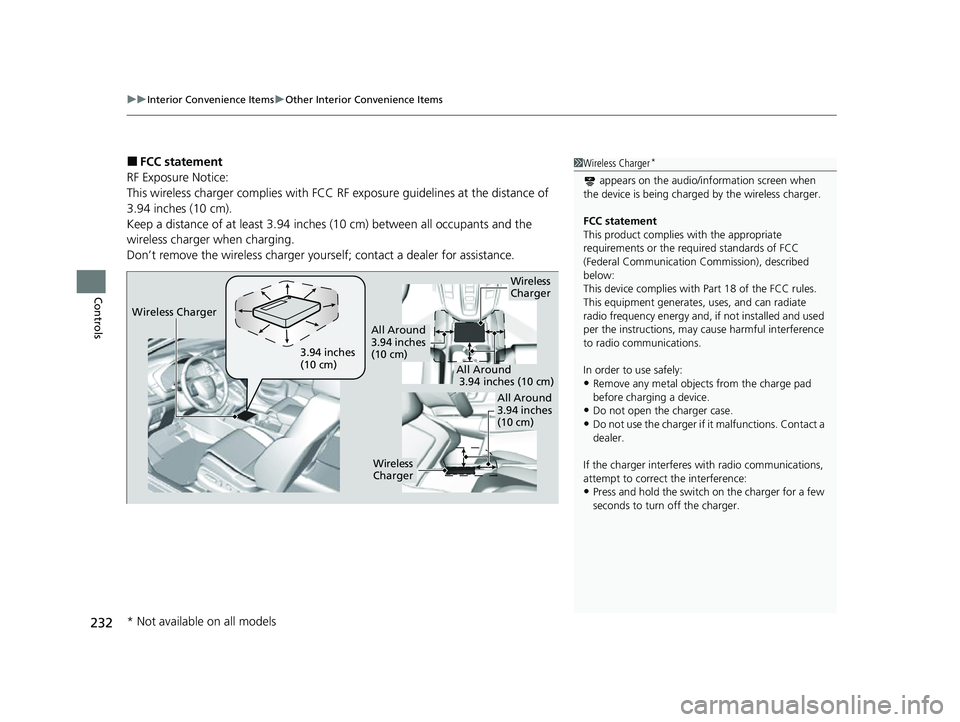
This wireless charger complies with FCC RF exposure guidelines at the distance of
3.94 inches (10 cm).
Keep a distance of at least 3.94 inches (10 cm) between all occupants and the
wireless charger when charging.
Don’t remove the wireless charger yourse lf; contact a dealer for assistance.1Wireless Charger*
appears on the audio/information screen when
the device is being charge d by the wireless charger.
FCC statement
This product complies with the appropriate
requirements or the requ ired standards of FCC
(Federal Communication Commission), described
below:
This device complies with Part 18 of the FCC rules.
This equipment generates, uses, and can radiate
radio frequency energy and, if not installed and used
per the instructions, may cause harmful interference
to radio communications.
In order to use safely:
•Remove any metal objects from the charge pad
before charging a device.
•Do not open the charger case.
•Do not use the charger if it malfunctions. Contact a
dealer.
If the charger interferes with radio communications,
attempt to correct the interference:
•Press and hold the switch on the charger for a few
seconds to turn off the charger.
Wireless
Charger
3.94 inches
(10 cm)
All Around
3.94 inches
(10 cm)
All Around
3.94 inches (10 cm)
All Around
3.94 inches
(10 cm)
Wireless
Charger
Wireless Charger
* Not available on all models
22 CR-V HEV ELP-31TPG6200.book 232 ページ 2021年6月30日 水曜日 午前11時6分
Page 239 of 692
Continued237
uuClimate Control System uUsing Automatic Climate Control
Controls
Use the system when the power system is on.
1. Press the AUTO button.
2. Adjust the interior temperature us ing the temperature control dial.
2. Adjust the interior temperature using the dr iver’s side or passenger’s side control
dial.
3. Press the (ON/OFF) button to cancel.1Using Automatic Climate Control
Press the CLIMATE button to display A/C, MODE, and
fan control information on th e audio/information screen
to operate manually. Select icon to turn
On or Off A/C,
change the vent mode, or change the fan speed.
If any buttons are presse d while using the climate
control system in auto, the function of the button
that was pressed will take priority.
The AUTO indicator will go off, but functions
unrelated to the button that were pressed will be
controlled automatically.
To prevent cold air from bl owing in from outside, the
fan may not start i mmediately when the AUTO
button is pressed.
If the interior is very warm, you can cool it down
more rapidly by partial ly opening the windows,
turning the system on auto, and setting the
temperature to low. Change the fresh mode to
recirculation mode until the temperature cools down.
When you set the temperat ure to the lower or upper
limit, Lo or Hi is displayed.
Pressing the button switches the climate
control system between on and off. When turned on,
the system returns to your last selection.
While ECON mode is active, the climate control
system may have reduced cooling performance.
Models with SYNC button
All models
Models without SYNC button
Models with SYNC button
All models
22 CR-V HEV ELP-31TPG6200.book 237 ページ 2021年6月30日 水曜日 午前11時6分
Page 245 of 692
243
Features
This chapter describes how to operate technology features.
Audio SystemAbout Your Audio System ................ 244
USB Port(s) ....................................... 245
Audio System Theft Protection ......... 247
Audio Remote Controls .................... 248
Audio System Basic Operation Audio/Information Screen ................ 252
Adjusting the Sound ........................ 256
Display Setup ................................... 257
Playing AM/FM Radio ....................... 258
Playing an iPod ................................ 260
Playing Pandora ®.............................. 263
Playing a USB Flash Drive ................. 265
Models with color audio system
Playing Bluetooth ® Audio................. 268
Siri ® Eyes Free .................................. 271
Audio System Basic Operation Audio/Information Screen ................ 273
Adjusting the Sound ........................ 294
Display Setup ................................... 295
Voice Control Operation .................. 297
Playing AM/FM Radio ....................... 301
Playing SiriusXM ® Radio ................... 305
Playing an iPod ................................ 312
Song By Voice
TM (SBV) ...................... 315
Playing Pandora ®............................. 319
Playing a USB Flash Drive ................. 321
Models with Display Audio
Playing Bluetooth ® Audio ................ 324
HondaLink ®..................................... 326
Wi-Fi Connection ............................. 331
Siri ® Eyes Free .................................. 332
Apple CarPlay
TM............................... 333
Android AutoTM............................... 336
Audio Error Messages ...................... 340
General Information on the Audio System ............................................. 345
Customized Features ................ 362, 369
HomeLink ® Universal Transceiver
*.. 395
Bluetooth® HandsFreeLink® ..... 398, 422
Compass
*.......................................... 456
* Not available on all models
22 CR-V HEV ELP-31TPG6200.book 243 ページ 2021年6月30日 水曜日 午前11時6分