brake HONDA CRV 2022 Owner's Manual
[x] Cancel search | Manufacturer: HONDA, Model Year: 2022, Model line: CRV, Model: HONDA CRV 2022Pages: 692, PDF Size: 22.05 MB
Page 118 of 692
116
uuIndicators uDriver Information Interface Wa rning and Information Messages
Instrument Panel
MessageConditionExplanation
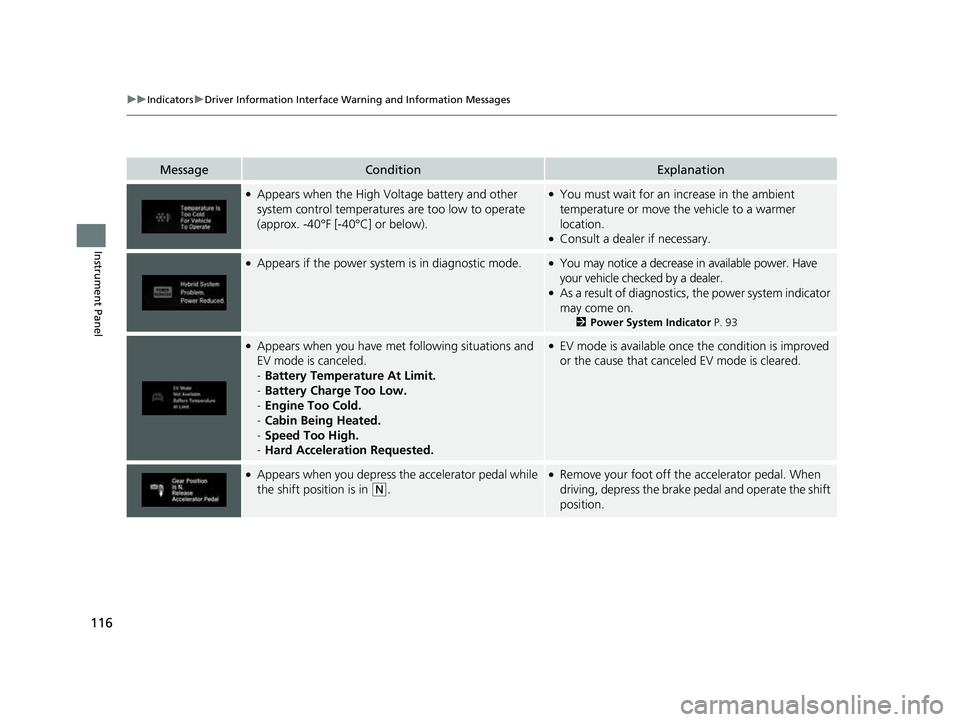
●Appears when the High Voltage battery and other
system control temperatures are too low to operate
(approx. -40°F [-40°C] or below).●You must wait for an increase in the ambient
temperature or move the vehicle to a warmer
location.
●Consult a dealer if necessary.
●Appears if the power system is in diagnostic mode.●You may notice a decrease in available power. Have
your vehicle checked by a dealer.
●As a result of diagnostics, the power system indicator
may come on.
2 Power System Indicator P. 93
●Appears when you have met following situations and
EV mode is canceled.
-Battery Temperature At Limit.
- Battery Charge Too Low.
- Engine Too Cold.
- Cabin Being Heated.
- Speed Too High.
- Hard Acceleration Requested.●EV mode is available once the condition is improved
or the cause that canceled EV mode is cleared.
●Appears when you depress the accelerator pedal while
the shift position is in
(N.
●Remove your foot off the accelerator pedal. When
driving, depress the brake pedal and operate the shift
position.
22 CR-V HEV ELP-31TPG6200.book 116 ページ 2021年6月30日 水曜日 午前11時6分
Page 123 of 692
121
uuIndicators uDriver Information Interface Wa rning and Information Messages
Continued
Instrument Panel
MessageConditionExplanation
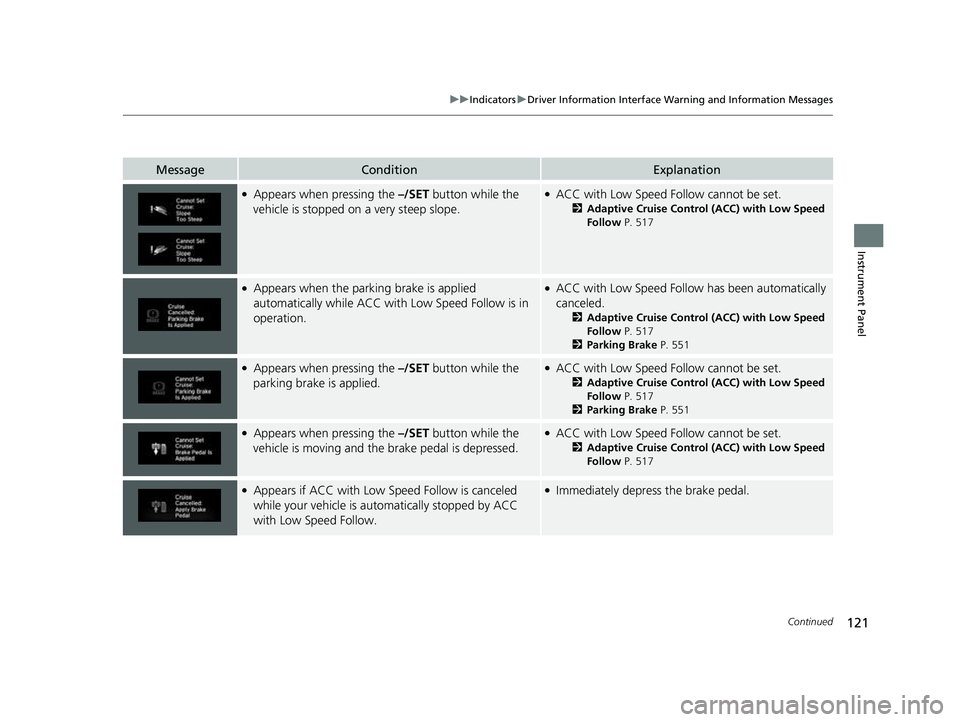
●Appears when pressing the –/SET button while the
vehicle is stopped on a very steep slope.●ACC with Low Speed Fo llow cannot be set.
2Adaptive Cruise Control (ACC) with Low Speed
Follow P. 517
●Appears when the parking brake is applied
automatically while ACC with Low Speed Follow is in
operation.●ACC with Low Speed Follow has been automatically
canceled.
2 Adaptive Cruise Control (ACC) with Low Speed
Follow P. 517
2 Parking Brake P. 551
●Appears when pressing the –/SET button while the
parking brake is applied.●ACC with Low Speed Fo llow cannot be set.
2Adaptive Cruise Control (ACC) with Low Speed
Follow P. 517
2 Parking Brake P. 551
●Appears when pressing the –/SET button while the
vehicle is moving and th e brake pedal is depressed.●ACC with Low Speed Fo llow cannot be set.
2Adaptive Cruise Control (ACC) with Low Speed
Follow P. 517
●Appears if ACC with Low Speed Follow is canceled
while your vehicle is au tomatically stopped by ACC
with Low Speed Follow.●Immediately depress the brake pedal.
22 CR-V HEV ELP-31TPG6200.book 121 ページ 2021年6月30日 水曜日 午前11時6分
Page 124 of 692
122
uuIndicators uDriver Information Interface Wa rning and Information Messages
Instrument Panel
MessageConditionExplanation
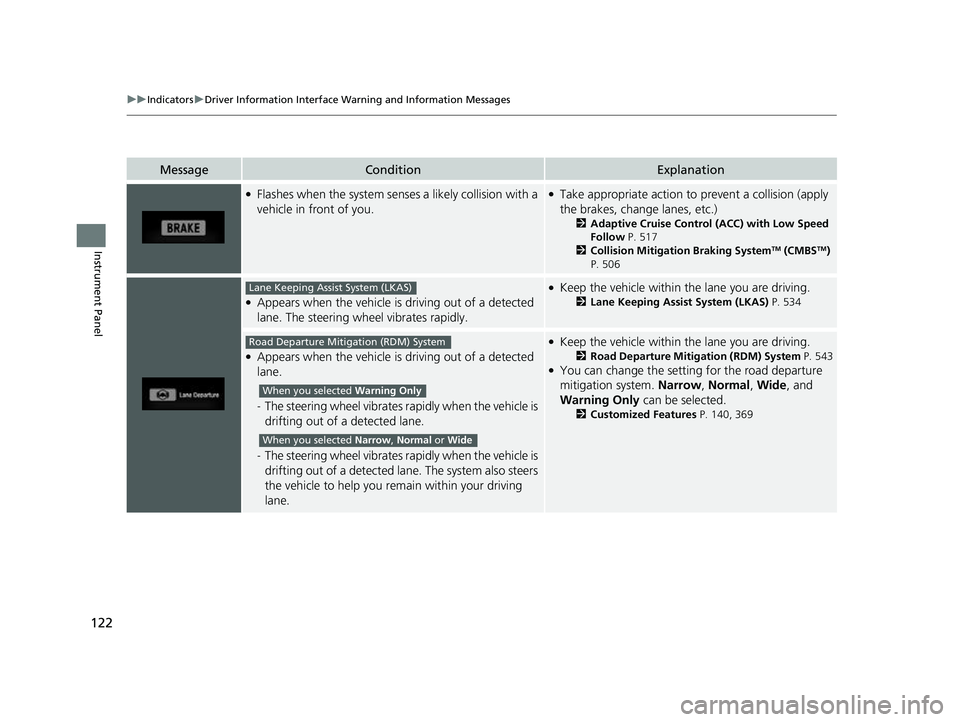
●Flashes when the system senses a likely collision with a
vehicle in front of you.●Take appropriate action to prevent a collision (apply
the brakes, change lanes, etc.)
2 Adaptive Cruise Control (ACC) with Low Speed
Follow P. 517
2 Collision Mitigation Braking System
TM (CMBSTM)
P. 506
●Appears when the vehicle is driving out of a detected
lane. The steering wheel vibrates rapidly.
●Keep the vehicle within the lane you are driving.
2 Lane Keeping Assist System (LKAS) P. 534
●Appears when the vehicle is driving out of a detected
lane.
-The steering wheel vibrates ra pidly when the vehicle is
drifting out of a detected lane.
- The steering wheel vibrates ra pidly when the vehicle is
drifting out of a detected lane. The system also steers
the vehicle to help you remain within your driving
lane.
●Keep the vehicle within the lane you are driving.
2 Road Departure Mitigation (RDM) System P. 543●You can change the setting for the road departure
mitigation system. Narrow, Normal, Wide , and
Warning Only can be selected.
2Customized Features P. 140, 369
Lane Keeping Assist System (LKAS)
Road Departure Mitigation (RDM) System
When you selected Warning Only
When you selected Narrow , Normal or Wide
22 CR-V HEV ELP-31TPG6200.book 122 ページ 2021年6月30日 水曜日 午前11時6分
Page 125 of 692
123
uuIndicators uDriver Information Interface Wa rning and Information Messages
Continued
Instrument Panel
MessageConditionExplanation
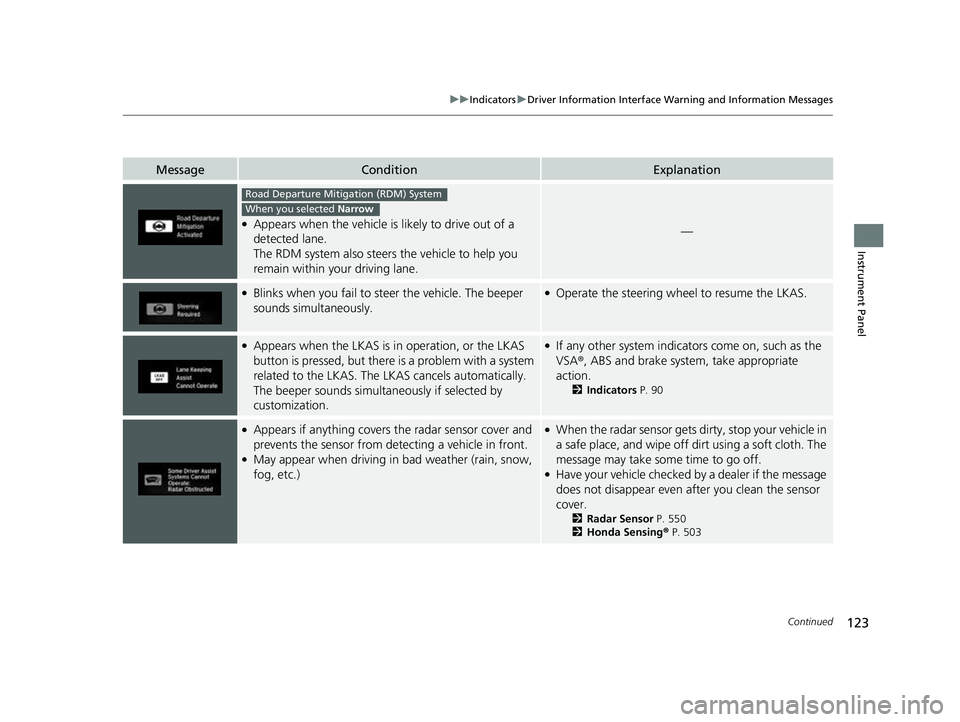
●Appears when the vehicle is likely to drive out of a
detected lane.
The RDM system also steers the vehicle to help you
remain within your driving lane.—
●Blinks when you fail to steer the vehicle. The beeper
sounds simultaneously.●Operate the steering whee l to resume the LKAS.
●Appears when the LKAS is in operation, or the LKAS
button is pressed, but there is a problem with a system
related to the LKAS. The LKAS cancels automatically.
The beeper sounds simultan eously if selected by
customization.●If any other system indicato rs come on, such as the
VSA ®, ABS and brake system, take appropriate
action.
2 Indicators P. 90
●Appears if anything covers the radar sensor cover and
prevents the sensor from detecting a vehicle in front.
●May appear when driving in bad weather (rain, snow,
fog, etc.)
●When the radar sensor gets dirty, stop your vehicle in
a safe place, and wipe off dirt using a soft cloth. The
message may take some time to go off.
●Have your vehicle checked by a dealer if the message
does not disappear even af ter you clean the sensor
cover.
2 Radar Sensor P. 550
2 Honda Sensing® P. 503
Road Departure Mitigation (RDM) System
When you selected Narrow
22 CR-V HEV ELP-31TPG6200.book 123 ページ 2021年6月30日 水曜日 午前11時6分
Page 135 of 692
133
uuGauges and Driver Information Interface uDriver Information Interface
Continued
Instrument Panel
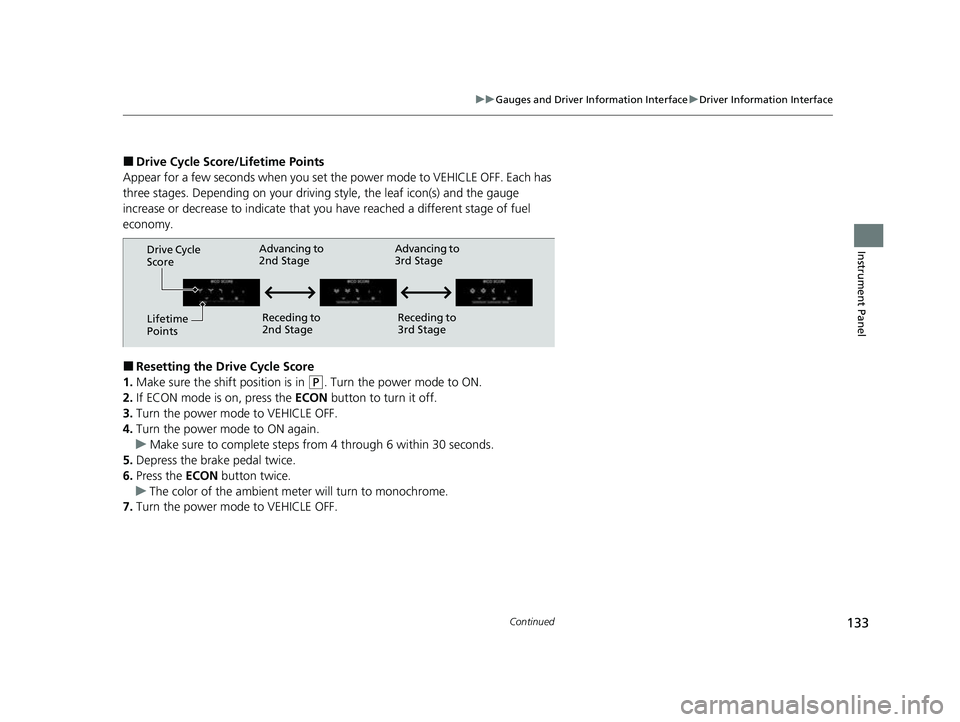
■Drive Cycle Score/Lifetime Points
Appear for a few seconds when you set th e power mode to VEHICLE OFF. Each has
three stages. Depending on your driving style, the leaf icon(s) and the gauge
increase or decrease to indicate that yo u have reached a different stage of fuel
economy.
■Resetting the Drive Cycle Score
1. Make sure the shift position is in
(P. Turn the power mode to ON.
2. If ECON mode is on, press the ECON button to turn it off.
3. Turn the power mode to VEHICLE OFF.
4. Turn the power mode to ON again.
u Make sure to complete steps fro m 4 through 6 within 30 seconds.
5. Depress the brake pedal twice.
6. Press the ECON button twice.
u The color of the ambient mete r will turn to monochrome.
7. Turn the power mode to VEHICLE OFF.
Drive Cycle
Score
Lifetime
Points Advancing to
2nd Stage
Receding to
2nd Stage Advancing to
3rd Stage
Receding to
3rd Stage
22 CR-V HEV ELP-31TPG6200.book 133 ページ 2021年6月30日 水曜日 午前11時6分
Page 188 of 692
186
Controls
Operating the Switches Around the Steering Wheel
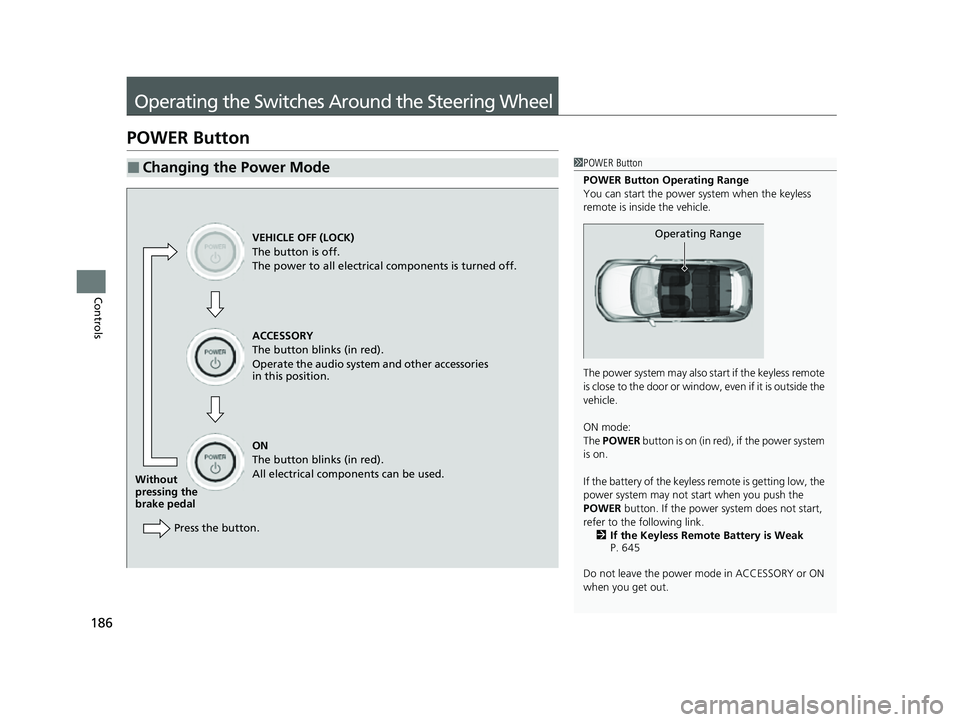
POWER Button
■Changing the Power Mode1POWER Button
POWER Button Operating Range
You can start the power system when the keyless
remote is inside the vehicle.
The power system may also start if the keyless remote
i s c l o s e t o t h e d o o r o r w i n d o w , e v e n i f i t i s o u t s i d e t h e
vehicle.
ON mode:
The POWER button is on (in red), if the power system
is on.
If the battery of the keyless remote is getting low, the
power system may not start when you push the
POWER button. If the power system does not start,
refer to the following link. 2 If the Keyless Remote Battery is Weak
P. 645
Do not leave the power mode in ACCESSORY or ON
when you get out.
Operating RangeVEHICLE OFF (LOCK)
The button is off.
The power to all electrical components is turned off.
ACCESSORY
The button blinks (in red).
Operate the audio system and other accessories
in this position.
ON
The button blinks (in red).
All electrical components can be used.
Without
pressing the
brake pedal
Press the button.
22 CR-V HEV ELP-31TPG6200.book 186 ページ 2021年6月30日 水曜日 午前11時6分
Page 196 of 692
194
uuOperating the Switches Around the Steering Wheel uFog Lights*
Controls
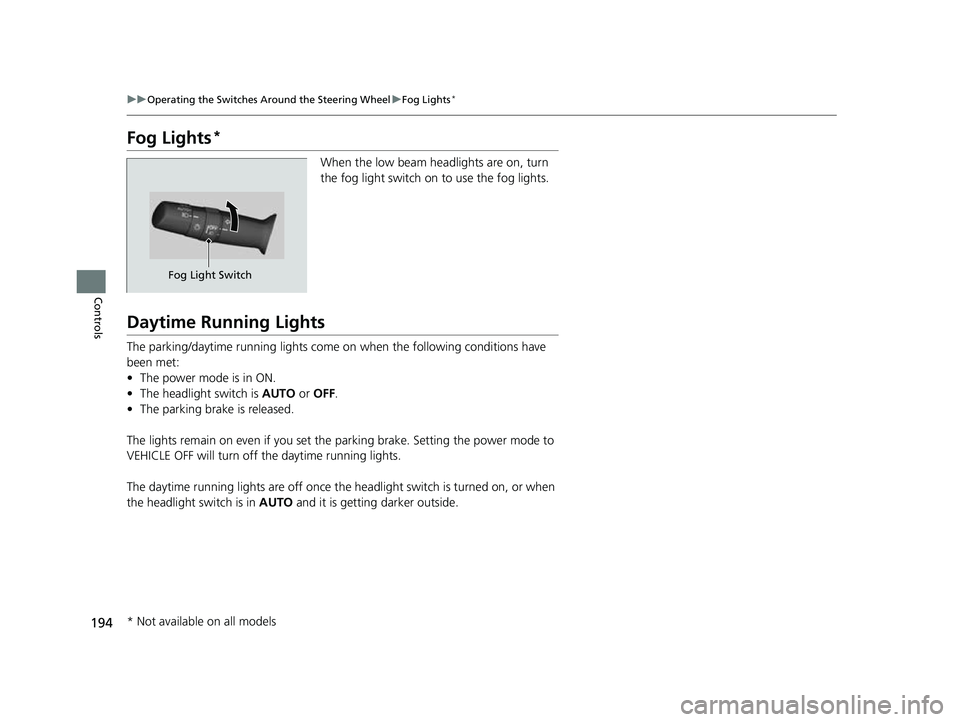
Fog Lights*
When the low beam headlights are on, turn
the fog light switch on to use the fog lights.
Daytime Running Lights
The parking/daytime running lights come on when the following conditions have
been met:
• The power mode is in ON.
• The headlight switch is AUTO or OFF .
• The parking brake is released.
The lights remain on even if you set the parking brake. Setting the power mode to
VEHICLE OFF will turn off the daytime running lights.
The daytime running lights are off once the headlight switch is turned on, or when
the headlight switch is in AUTO and it is getting darker outside.
Fog Light Switch
* Not available on all models
22 CR-V HEV ELP-31TPG6200.book 194 ページ 2021年6月30日 水曜日 午前11時6分
Page 206 of 692
uuOperating the Switches Around the Steering Wheel uDriving Position Memory System*
204
Controls
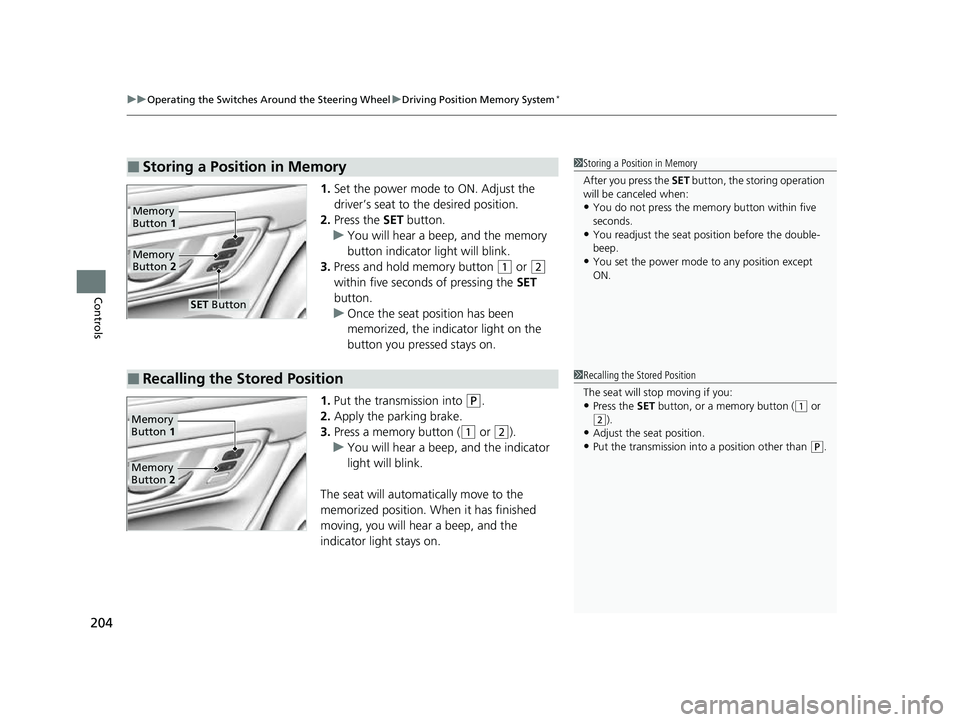
1. Set the power mode to ON. Adjust the
driver’s seat to the desired position.
2. Press the SET button.
u You will hear a beep, and the memory
button indicator light will blink.
3. Press and hold memory button
(1 or (2
within five seconds of pressing the SET
button.
u Once the seat position has been
memorized, the indicator light on the
button you pressed stays on.
1. Put the transmission into
(P.
2. Apply the parking brake.
3. Press a memory button (
(1 or (2).
u You will hear a beep, and the indicator
light will blink.
The seat will automatically move to the
memorized position. When it has finished
moving, you will hear a beep, and the
indicator light stays on.
■Storing a Position in Memory1 Storing a Position in Memory
After you press the SET button, the storing operation
will be canceled when:
•You do not press the memory button within five
seconds.
•You readjust the seat position before the double-
beep.
•You set the power mode to any position except
ON.
Memory
Button 1
Memory
Button 2
SET Button
■Recalling the Stored Position1Recalling the Stored Position
The seat will st op moving if you:
•Press the SET button, or a memory button ((1 or
(2).•Adjust the seat position.
•Put the transmission into a position other than ( P.
Memory
Button 1
Memory
Button 2
22 CR-V HEV ELP-31TPG6200.book 204 ページ 2021年6月30日 水曜日 午前11時6分
Page 215 of 692
213
uuSeats uRear Seats
Controls
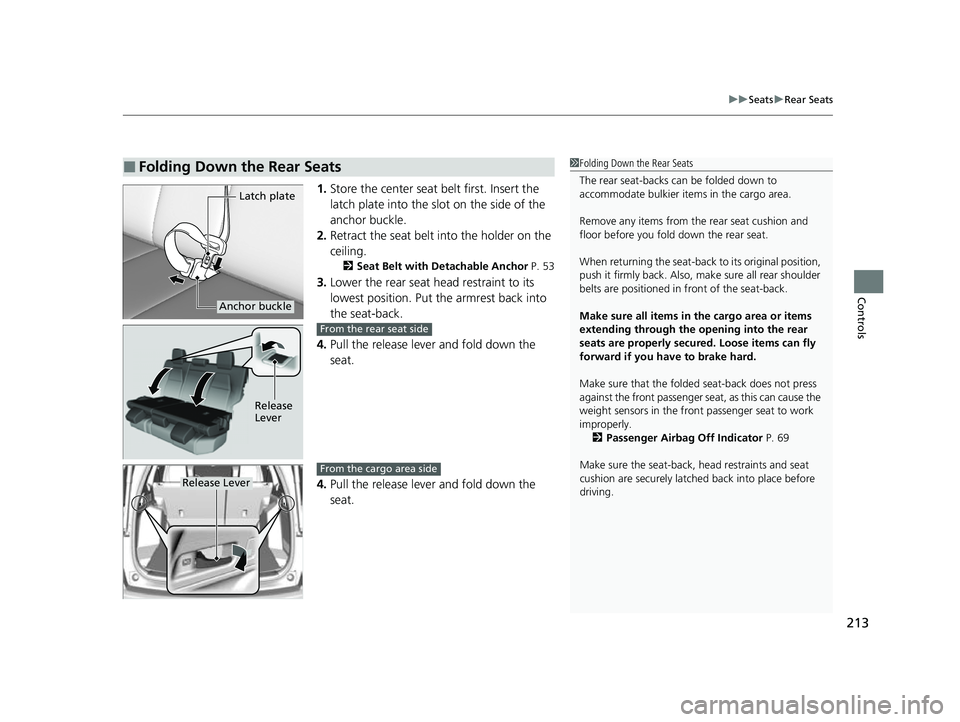
1. Store the center seat belt first. Insert the
latch plate into the slot on the side of the
anchor buckle.
2. Retract the seat belt into the holder on the
ceiling.
2 Seat Belt with Detachable Anchor P. 53
3.Lower the rear seat head restraint to its
lowest position. Put the armrest back into
the seat-back.
4. Pull the release lever and fold down the
seat.
4. Pull the release lever and fold down the
seat.
■Folding Down the Rear Seats
Latch plate
Anchor buckle
1Folding Down the Rear Seats
The rear seat-backs can be folded down to
accommodate bulkier items in the cargo area.
Remove any items from th e rear seat cushion and
floor before you fold down the rear seat.
When returning the seat-back to its original position,
push it firmly back. Also, m ake sure all rear shoulder
belts are positioned in front of the seat-back.
Make sure all items in the cargo area or items
extending through the opening into the rear
seats are properly secured. Loose items can fly
forward if you have to brake hard.
Make sure that the folded seat-back does not press
against the front passenger seat, as this can cause the
weight sensors in the front passenger seat to work
improperly. 2 Passenger Airbag Off Indicator P. 69
Make sure the seat-back, head restraints and seat
cushion are securely latche d back into place before
driving.
Release
Lever
From the rear seat side
Release Lever
From the cargo area side
22 CR-V HEV ELP-31TPG6200.book 213 ページ 2021年6月30日 水曜日 午前11時6分
Page 226 of 692
uuInterior Convenience Items uStorage Items
224
Controls
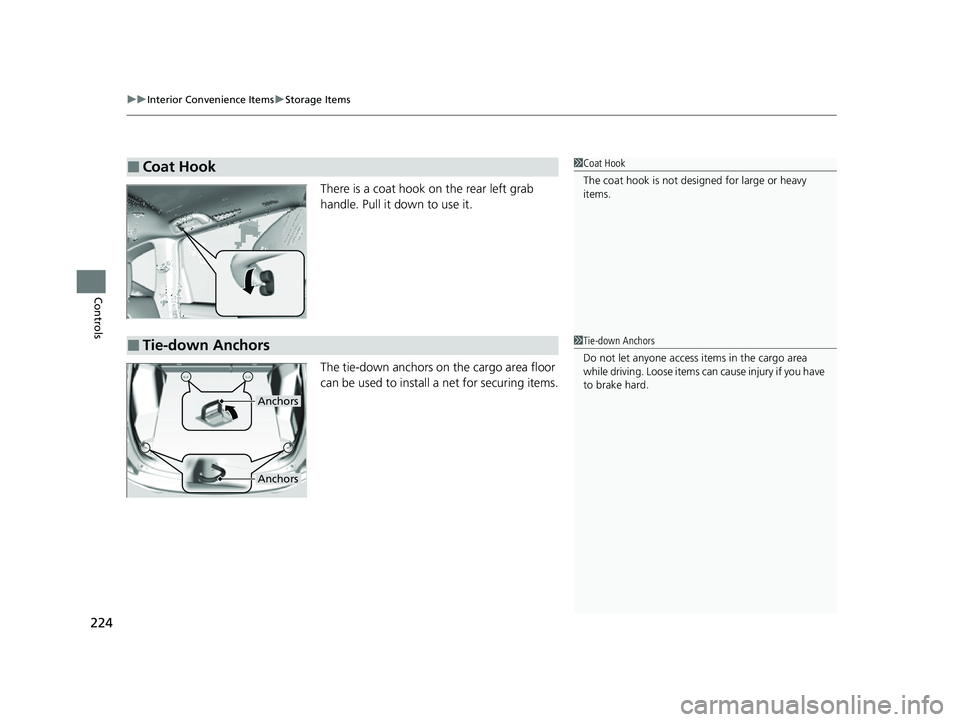
There is a coat hook on the rear left grab
handle. Pull it down to use it.
The tie-down anchors on the cargo area floor
can be used to install a net for securing items.
■Coat Hook1Coat Hook
The coat hook is not desi gned for large or heavy
items.
■Tie-down Anchors1 Tie-down Anchors
Do not let anyone access items in the cargo area
while driving. Loose items can cause injury if you have
to brake hard.
Anchors
Anchors
22 CR-V HEV ELP-31TPG6200.book 224 ページ 2021年6月30日 水曜日 午前11時6分