phone HONDA CRV 2022 Service Manual
[x] Cancel search | Manufacturer: HONDA, Model Year: 2022, Model line: CRV, Model: HONDA CRV 2022Pages: 692, PDF Size: 22.05 MB
Page 359 of 692
357
uuGeneral Information on the Audio System uHonda App License Agreement
Continued
Features
L. Changes to the SOFTWARE or SERVICES. WE may change, modify, or update the SOFT WARE or SERVICES from time to time. Unless
explicitly stated otherwise, any new featur es or services that augment or enhance the SOFTWARE or SERVICES in the future shall
respectively be considered part of the SOFTWARE or SERVICES and s ubject to this AGREEMENT. WE reserve the right at any time and from
time to time to interrupt, res trict, modify, suspend, discontinue, temporarily or permanently, the SOFTWARE or SERVICES (or any portion
thereof), with or without notice to you, and you agree that HONDA shall not be li able to you or to any third party for any modification,
suspension or discontinuance of the SOFTWARE or SERVICES.
M. ARBITRATION:
PLEASE READ THIS ARBITRATION PROVISION CAREFULLY TO UNDER STAND YOUR RIGHTS. YOU AGREE THAT ANY CLAIM THAT YOU
MAY HAVE IN THE FUTURE MUST BE RESOLVED THROUGH BIND ING ARBITRATION. YOU WAIVE THE RIGHT TO HAVE YOUR DISPUTE
HEARD IN COURT AND WAIVE THE RIGHT TO BRING CLASS CLAIMS. YOU UNDERSTAND THAT DISCOVERY AND APPEAL RIGHTS ARE
MORE LIMITED IN ARBITRATION.
Arbitration is a method of resolving a clai m, dispute or controversy without filing a lawsuit. By agreeing to arbitrate, the right to go to
court is waived and instead claims, disputes or controversies ar e submitted to binding arbitration. This provision sets forth the terms and
conditions of our agreement. YOU and HONDA agree and acknowle dge that this Agreement affects interstate commerce and the
Federal Arbitration Act (“FAA”) applies. By using the Software, Vehicle, or Services, YO U elect to have disputes resolved by arbitration.
YOU, HONDA or any involved third party may pursue a Claim. “Claim” means any dispute between YOU, HONDA, or any involved third
party relating to your use of the Software , the Vehicle, or the Services, this Agreement, or our relationship, including any
representations, omissions or warranties. “Claim” does not include personal injury or wrongful death claims. YOU or HONDA may s eek
remedies in small claims court or provisional judicial remedi es without arbitrating. In addition, notwithstanding anything here in to the
contrary, YOU or HONDA may seek equitable re lief in a court of competent jurisdiction.
YOU or HONDA may select arbitration with American Arbitration Asso ciation, JAMS or National Arbitration and Mediation. Contact
these sponsors for their rules. The hearing will be in the federa l district where YOU reside. If agreed, it may be by telephone or written
submissions. Filing and arbitrator fees to be paid per the sponsor rules. You may contact the sponsor for a fee waiver. If no fee waivers,
HONDA will pay filing and arbitrator fees up to $5,000, unless law requires more. Each party is responsible for other fees. Arbitrator
may award costs or fees to prevailing party, if permitted by law. HONDA will not seek fees, unless the claims are frivolous.
22 CR-V HEV ELP-31TPG6200.book 357 ページ 2021年6月30日 水曜日 午前11時6分
Page 361 of 692
359
uuGeneral Information on the Audio System uLegal Information on Apple CarPlayTM/Android AutoTM
Continued
Features
Models with Display Audio
Legal Information on Apple CarPlayTM/Android AutoTM
USE OF APPLE CARPLAY IS SUBJECT TO YOUR AGREEMENT TO THE CARPLAY TERMS OF USE, WHICH ARE INCLUDED AS PART OF THE
APPLE iOS TERMS OF USE. IN SUMMARY, THE CARPLAY TERMS OF USE DISCLAIM APPLE AND ITS SERVICE PROVIDERS’ LIABILITY IF THE
SERVICES FAIL TO PERFORM CORRECTLY OR ARE DISCONTINUED, STRICTLY LIMIT APPLE AND ITS SERVICE PROVIDERS’ OTHER
LIABILITIES, DESCRIBE THE KINDS OF USER INFORMATION (INCLUDING, FOR EXAMPL E, VEHICLE LOCATION, VEHICLE SPEED, AND
VEHICLE STATUS) BEING GATHERED AND STORED BY APPLE AND IT S SERVICE PROVIDERS, AND DISCLOSE CERTAIN POSSIBLE RISKS
ASSOCIATED WITH THE USE OF CARPLAY, INCLUDING THE POTENTIAL FOR DRIVER DISTRACTION. SEE APPLE’S PRIVACY POLICY FOR
DETAILS REGARDING APPLE'S USE AND HANDL ING OF DATA UPLOADED BY CARPLAY.
USE OF ANDROID AUTO IS SUBJECT TO YOUR AGREEMENT TO THE ANDROID AUTO TERMS OF USE WHICH MUST BE AGREED TO WHEN\
THE ANDROID AUTO APPLICATION IS DOWNLOADED TO YOUR ANDR OID PHONE. IN SUMMARY, THE ANDROID AUTO TERMS OF USE
DISCLAIM GOOGLE AND ITS SERVICE PROVIDERS’ LIABILITY IF THE SERVICES FAIL TO PERFORM CORRECTLY OR ARE DISCONTINUED,
STRICTLY LIMIT GOOGLE AND ITS SERVICE PROV IDERS’ OTHER LIABILITIES, DESCRIBE THE KINDS OF USER INFORMATION (INCLUDING,
FOR EXAMPLE, VEHICLE LOCATION, VEHI CLE SPEED, AND VEHICLE STATUS) BEING GATHERED AND STORED BY GOOGLE AND ITS
SERVICE PROVIDERS, AND DISCLOSE CERTAIN POSSIBLE RISKS ASSOCIATED WITH THE USE OF ANDROID AUTO, INCLUDING THE
POTENTIAL FOR DRIVER DISTRACTION. SEE GOOGLE’S PRIVACY PO LICY FOR DETAILS REGARDING GOOGLE’S USE AND HANDLING OF
DATA UPLOADED BY ANDROID AUTO.
■OWNER’S MANUAL LICENSE/LIABILITY STATEMENTS
22 CR-V HEV ELP-31TPG6200.book 359 ページ 2021年6月30日 水曜日 午前11時6分
Page 364 of 692
362
Features
Customized Features
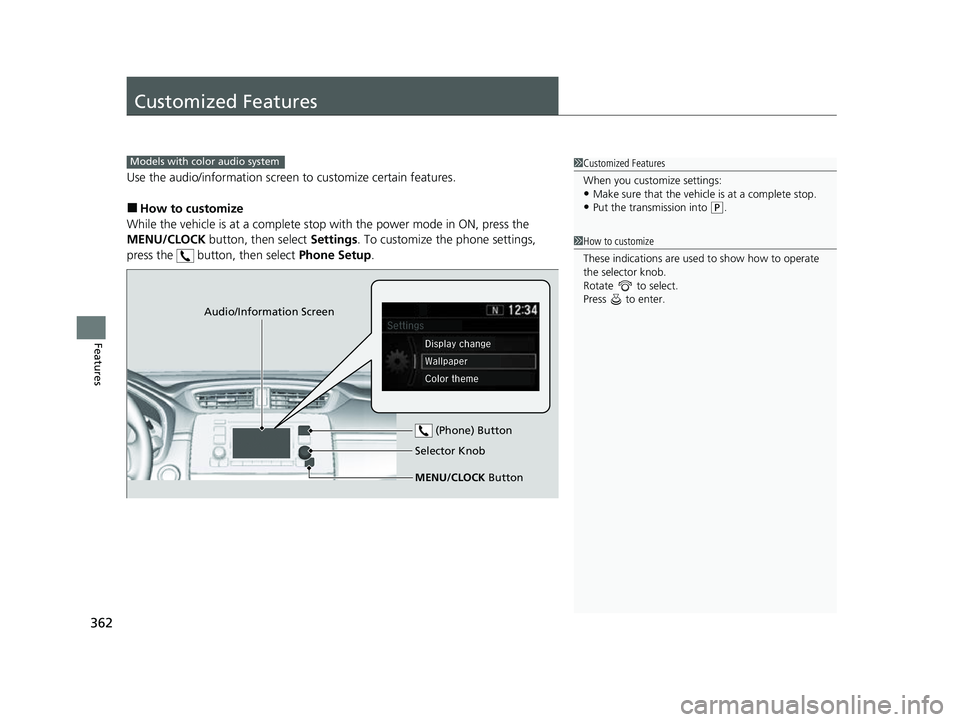
Use the audio/information screen to customize certain features.
■How to customize
While the vehicle is at a complete stop with the power mode in ON, press the
MENU/CLOCK button, then select Settings. To customize the phone settings,
press the button, then select Phone Setup.
Models with color audio system1Customized Features
When you customize settings:
•Make sure that the vehicle is at a complete stop.
•Put the transmission into (P.
1 How to customize
These indications are used to show how to operate
the selector knob.
Rotate to select.
Press to enter.
Audio/Information Screen
MENU/CLOCK Button Selector Knob (Phone) Button
22 CR-V HEV ELP-31TPG6200.book 362 ページ 2021年6月30日 水曜日 午前11時6分
Page 367 of 692
365
uuCustomized Features u
Continued
Features
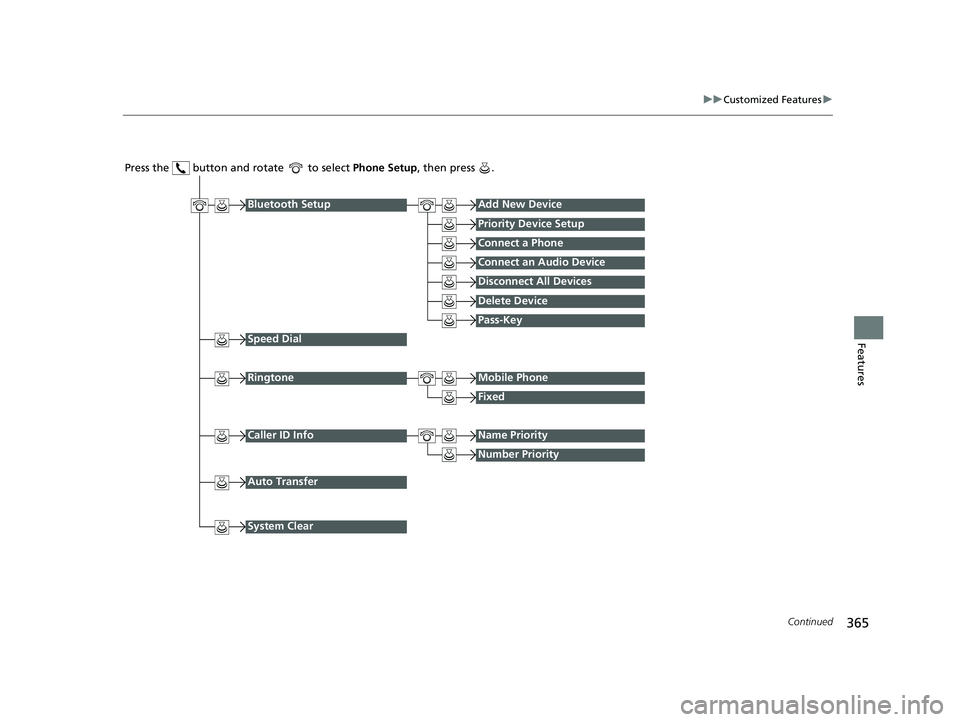
Press the button and rotate to select Phone Setup, then press .
RingtoneMobile Phone
Fixed
Bluetooth SetupAdd New Device
Priority Device Setup
Connect a Phone
Connect an Audio Device
Disconnect All Devices
Delete Device
Speed Dial
Caller ID InfoName Priority
Number Priority
System Clear
Pass-Key
Auto Transfer
22 CR-V HEV ELP-31TPG6200.book 365 ページ 2021年6月30日 水曜日 午前11時6分
Page 368 of 692
366
uuCustomized Features u
Features
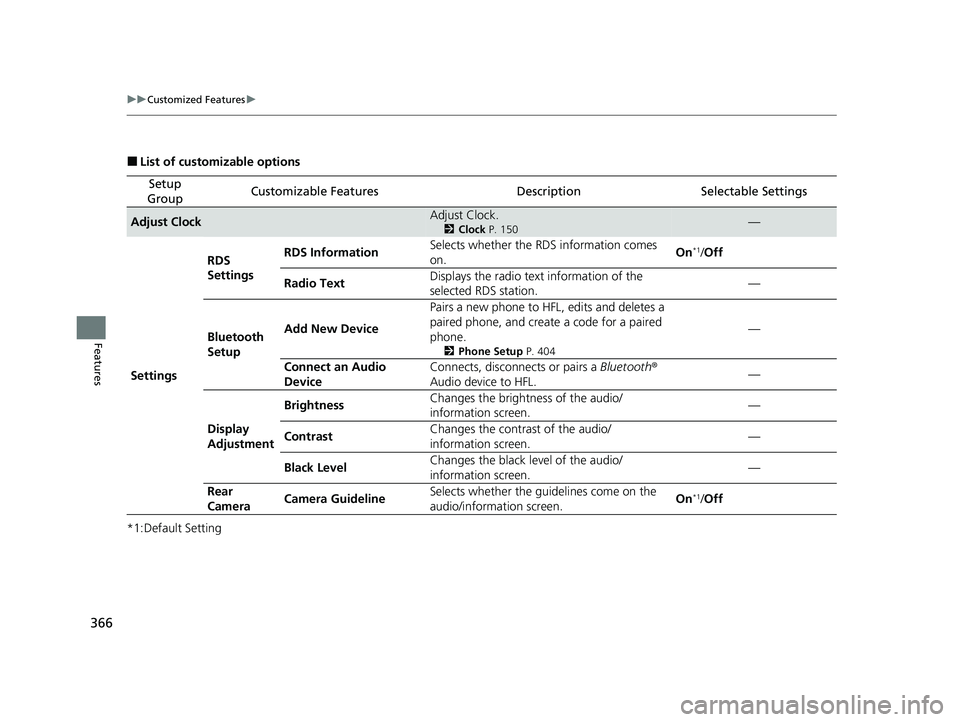
■List of customizable options
*1:Default Setting
Setup
GroupCustomizable FeaturesDescriptionSelectable Settings
Adjust ClockAdjust Clock.
2 Clock P. 150—
Settings RDS
Settings
RDS Information
Selects whether the RDS information comes
on. On
*1/
Off
Radio Text Displays the radio text information of the
selected RDS station. —
Bluetooth
Setup Add New Device
Pairs a new phone to HFL, edits and deletes a
paired phone, and create a code for a paired
phone.
2
Phone Setup P. 404
—
Connect an Audio
Device Connects, disconnects or pairs a
Bluetooth®
Audio device to HFL. —
Display
Adjustment Brightness
Changes the brightness of the audio/
information screen. —
Contrast Changes the contrast of the audio/
information screen.
—
Black Level Changes the black level of the audio/
information screen. —
Rear
Camera Camera Guideline
Selects whether the guidelines come on the
audio/information screen. On
*1/
Off
22 CR-V HEV ELP-31TPG6200.book 366 ページ 2021年6月30日 水曜日 午前11時6分
Page 370 of 692
368
uuCustomized Features u
Features
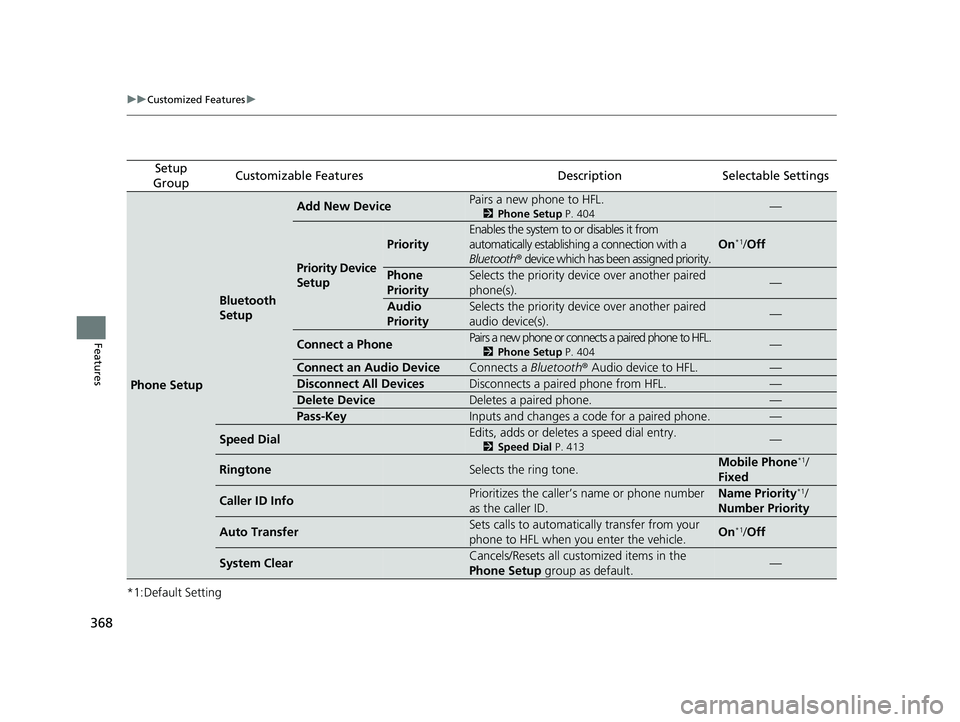
*1:Default Setting
Setup
GroupCustomizable FeaturesDescriptionSelectable Settings
Phone Setup
Bluetooth
Setup
Add New DevicePairs a new phone to HFL.
2 Phone Setup P. 404—
Priority Device
Setup
Priority
Enables the system to or disables it from
automatically establishi ng a connection with a
Bluetooth ® device which has been assigned priority.
On*1/Off
Phone
PrioritySelects the priority device over another paired
phone(s).—
Audio
PrioritySelects the priority device over another paired
audio device(s).—
Connect a PhonePairs a new phone or connects a paired phone to HFL.
2 Phone Setup P. 404—
Connect an Audio DeviceConnects a Bluetooth® Audio device to HFL.—
Disconnect All DevicesDisconnects a paired phone from HFL.—
Delete DeviceDeletes a paired phone.—
Pass-KeyInputs and changes a code for a paired phone.—
Speed DialEdits, adds or deletes a speed dial entry.
2Speed Dial P. 413—
RingtoneSelects the ring tone.Mobile Phone*1/
Fixed
Caller ID InfoPrioritizes the caller’s name or phone number
as the caller ID.Name Priority*1/
Number Priority
Auto TransferSets calls to automatically transfer from your
phone to HFL when you enter the vehicle.On*1/Off
System ClearCancels/Resets all customized items in the
Phone Setup group as default.—
22 CR-V HEV ELP-31TPG6200.book 368 ページ 2021年6月30日 水曜日 午前11時6分
Page 373 of 692
371
uuCustomized Features u
Continued
Features
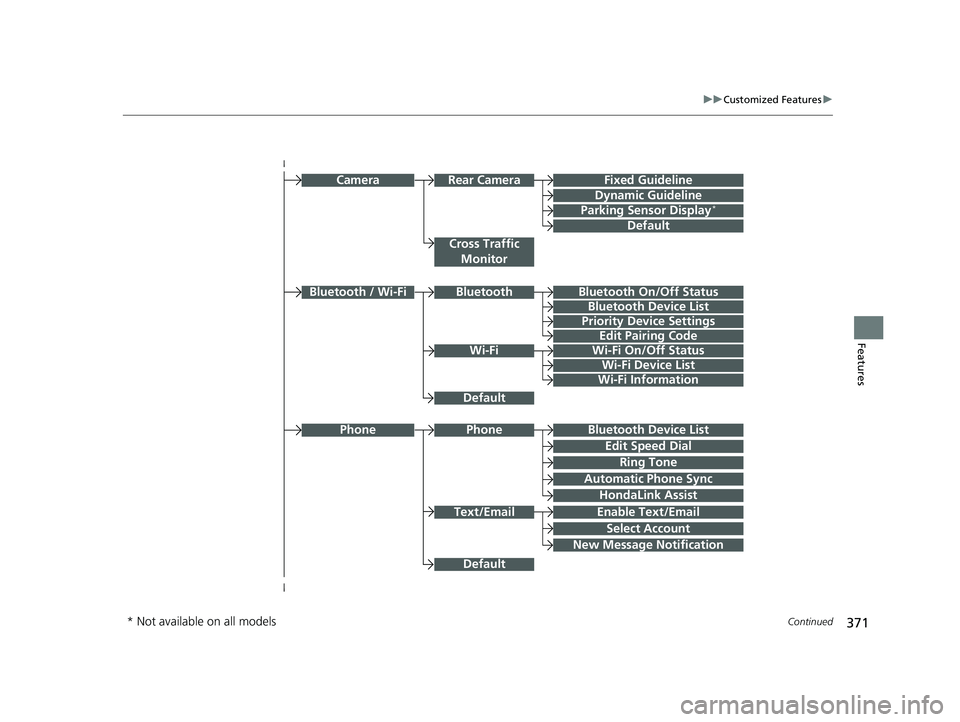
Bluetooth Device List
Priority Device Settings
Edit Pairing Code
Wi-Fi On/Off Status
Wi-Fi Device List
Wi-Fi
BluetoothBluetooth / Wi-Fi
Wi-Fi Information
Text/Email
Bluetooth Device List
Edit Speed Dial
Ring Tone
Phone
Automatic Phone Sync
HondaLink Assist
Enable Text/Email
Select Account
New Message Notification
Phone
Fixed Guideline
Dynamic Guideline
Rear CameraCamera
Parking Sensor Display*
Cross Traffic
Monitor
Default
Default
Default
Bluetooth On/Off Status
* Not available on all models
22 CR-V HEV ELP-31TPG6200.book 371 ページ 2021年6月30日 水曜日 午前11時6分
Page 376 of 692
374
uuCustomized Features u
Features
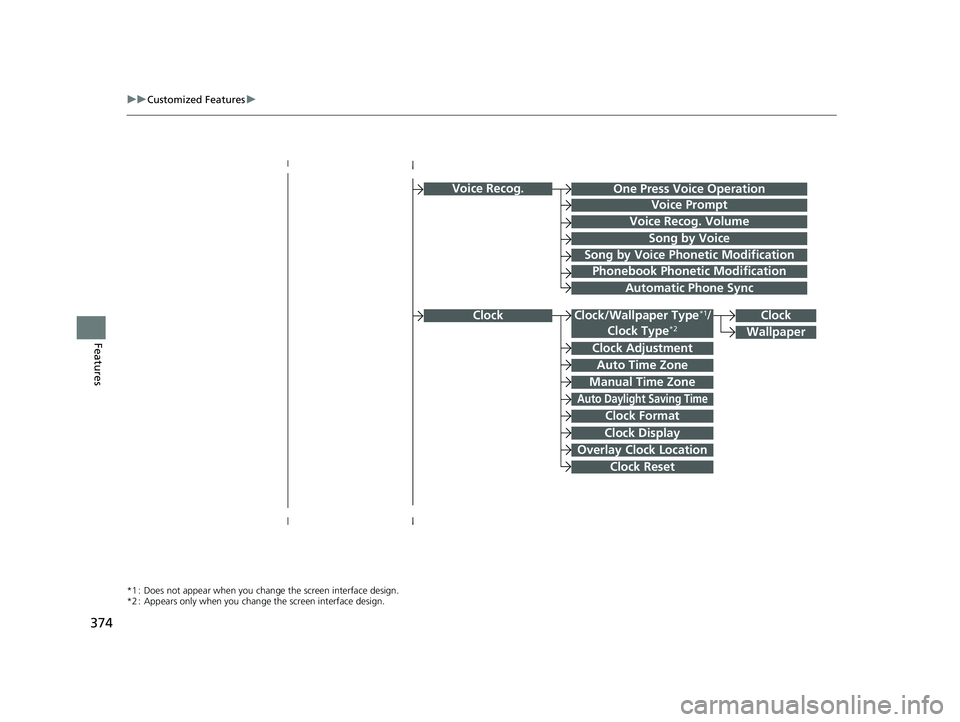
Voice Recog.
Voice Prompt
Voice Recog. Volume
Song by Voice
Song by Voice Phonetic Modification
Phonebook Phonetic Modification
Automatic Phone Sync
Clock Adjustment
Clock Format
Auto Time Zone
Manual Time Zone
Auto Daylight Saving Time
Clock Display
Overlay Clock Location
Clock Reset
Clock
Wallpaper
One Press Voice Operation
*1 : Does not appear when you chang e the screen interface design.
*2 : Appears only when you change the screen interface design.
Clock/Wallpaper Type*1/
Clock Type*2Clock
22 CR-V HEV ELP-31TPG6200.book 374 ページ 2021年6月30日 水曜日 午前11時6分
Page 379 of 692
377
uuCustomized Features u
Continued
Features
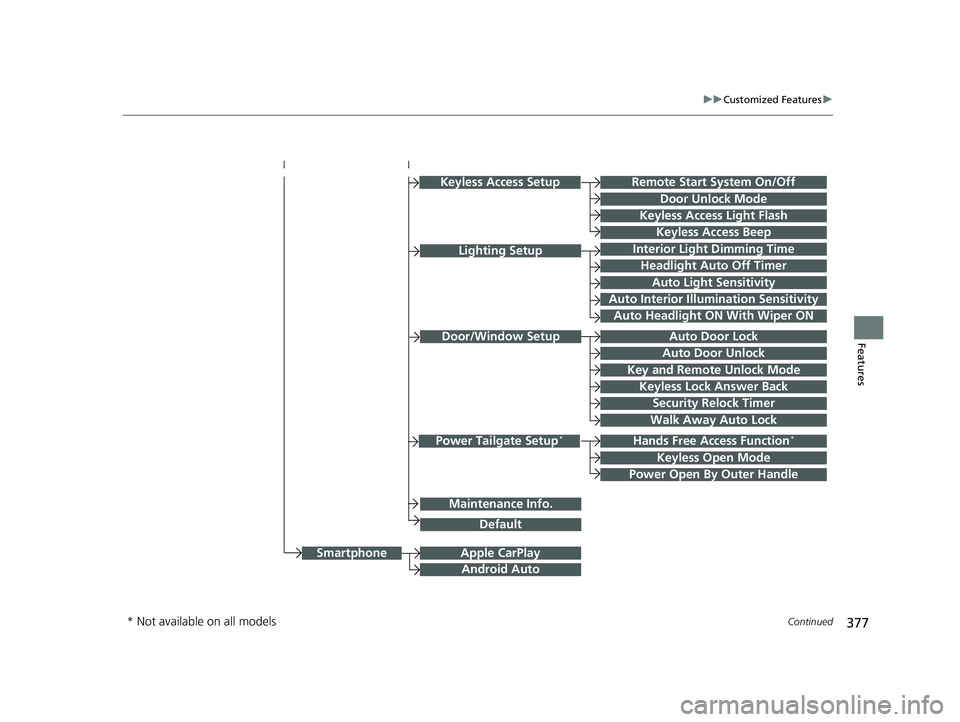
Hands Free Access Function*
Keyless Open Mode
Lighting SetupInterior Light Dimming Time
Headlight Auto Off Timer
Auto Light Sensitivity
Auto Interior Illumination Sensitivity
Auto Door Lock
Key and Remote Unlock Mode
Door/Window Setup
Apple CarPlay
Maintenance Info.
Android Auto
Keyless Lock Answer Back
Security Relock Timer
Walk Away Auto Lock
Keyless Access Setup
Keyless Access Light Flash
Door Unlock Mode
Remote Start System On/Off
Keyless Access Beep
Smartphone
Power Tailgate Setup*
Power Open By Outer Handle
Default
Auto Door Unlock
Auto Headlight ON With Wiper ON
* Not available on all models
22 CR-V HEV ELP-31TPG6200.book 377 ページ 2021年6月30日 水曜日 午前11時6分
Page 383 of 692
381
uuCustomized Features u
Continued
Features
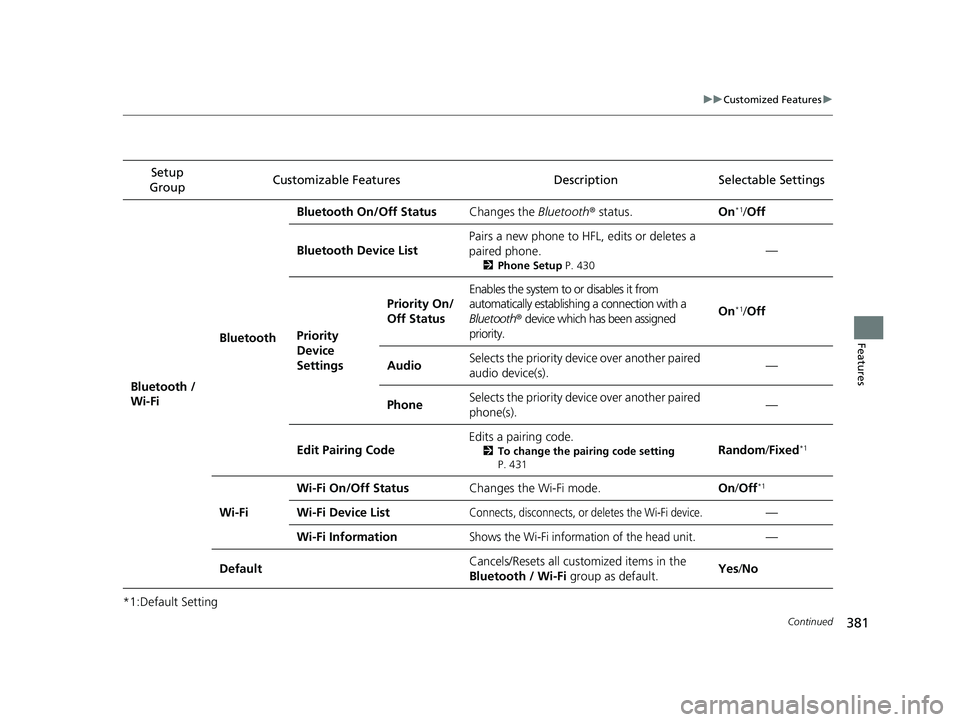
*1:Default SettingSetup
Group Customizable Features Descri
ption Selectable Settings
Bluetooth /
Wi-Fi BluetoothBluetooth On/Off Status
Changes the Bluetooth® status. On
*1/Off
Bluetooth Device List Pairs a new phone to HF
L, edits or deletes a
paired phone.
2 Phone Setup P. 430
—
Priority
Device
Settings
Priority On/
Off Status
Enables the system to or disables it from
automatically establishi ng a connection with a
Bluetooth ® device which has been assigned
priority.
On*1/ Off
AudioSelects the priority devi ce over another paired
audio device(s).—
PhoneSelects the priority devi ce over another paired
phone(s).—
Edit Pairing Code Edits a pairing code.
2
To change the pairing code setting
P. 431Random /Fixed*1
Wi-Fi Wi-Fi On/Off Status
Changes the Wi-Fi mode. On/Off
*1
Wi-Fi Device ListConnects, disconnects, or deletes the Wi-Fi device.—
Wi-Fi Information
Shows the Wi-Fi information of the head unit.—
Default Cancels/Resets all customized items in the
Bluetooth / Wi-Fi
group as default. Yes
/No
22 CR-V HEV ELP-31TPG6200.book 381 ページ 2021年6月30日 水曜日 午前11時6分