light HONDA CRV 2022 Workshop Manual
[x] Cancel search | Manufacturer: HONDA, Model Year: 2022, Model line: CRV, Model: HONDA CRV 2022Pages: 692, PDF Size: 22.05 MB
Page 220 of 692
218
Controls
Interior Convenience Items
Interior Lights
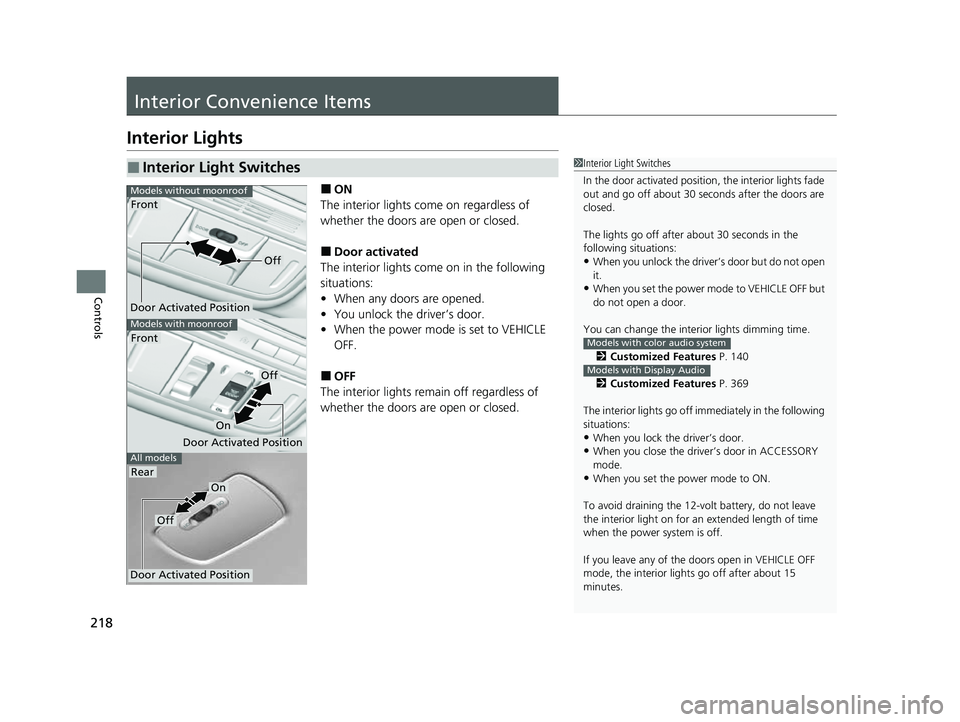
■ON
The interior lights come on regardless of
whether the doors are open or closed.
■Door activated
The interior lights come on in the following
situations:
• When any doors are opened.
• You unlock the driver’s door.
• When the power mode is set to VEHICLE
OFF.
■OFF
The interior lights remain off regardless of
whether the doors are open or closed.
■Interior Light Switches1 Interior Light Switches
In the door activated position, the interior lights fade
out and go off about 30 seconds after the doors are
closed.
The lights go off after about 30 seconds in the
following situations:
•When you unlock the driver’s door but do not open
it.
•When you set the power mode to VEHICLE OFF but
do not open a door.
You can change the interi or lights dimming time.
2 Customized Features P. 140
2 Customized Features P. 369
The interior lights go off im mediately in the following
situations:
•When you lock the driver’s door.
•When you close the driver’s door in ACCESSORY
mode.
•When you set the power mode to ON.
To avoid draining the 12-vo lt battery, do not leave
the interior light on for an extended length of time
when the power system is off.
If you leave any of the doors open in VEHICLE OFF
mode, the interior light s go off after about 15
minutes.
Models with color audio system
Models with Display Audio
All models
Models with moonroof
Front
Models without moonroof
Door Activated Position
Front
Rear
Door Activated Position
Off
On
Door Activated Position
Off
On
Off
22 CR-V HEV ELP-31TPG6200.book 218 ページ 2021年6月30日 水曜日 午前11時6分
Page 221 of 692
219
uuInterior Convenience Items uInterior Lights
Controls
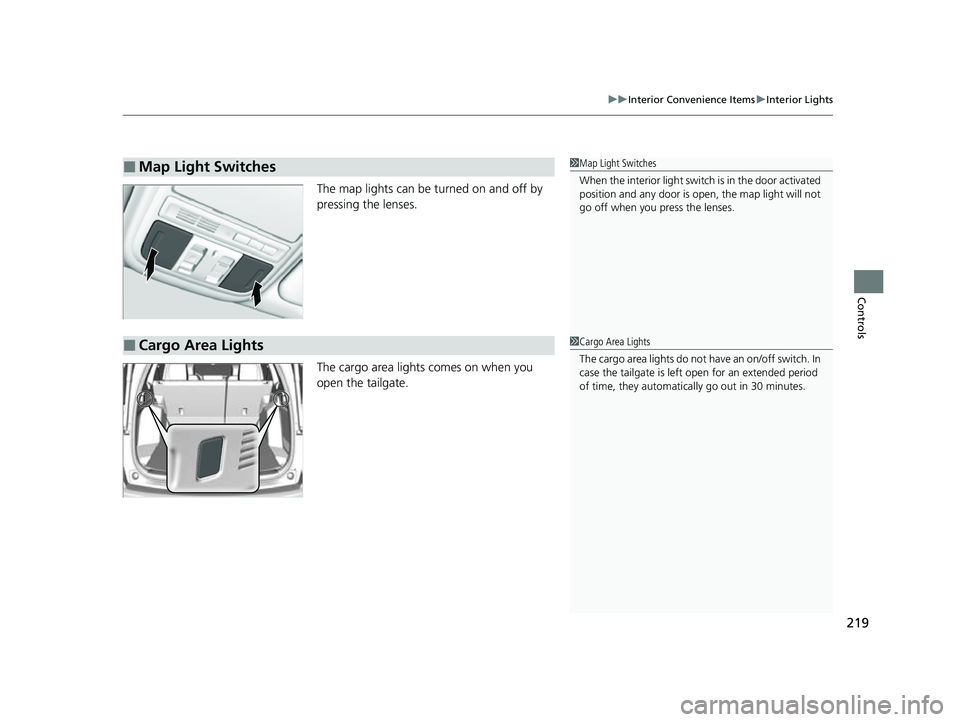
The map lights can be turned on and off by
pressing the lenses.
The cargo area lights comes on when you
open the tailgate.
■Map Light Switches1Map Light Switches
When the interior light swit ch is in the door activated
position and any door is open, the map light will not
go off when you press the lenses.
■Cargo Area Lights1 Cargo Area Lights
The cargo area lights do not have an on/off switch. In
case the tailgate is left open for an extended period
of time, they automatically go out in 30 minutes.
22 CR-V HEV ELP-31TPG6200.book 219 ページ 2021年6月30日 水曜日 午前11時6分
Page 227 of 692
Continued225
uuInterior Convenience Items uStorage Items
Controls
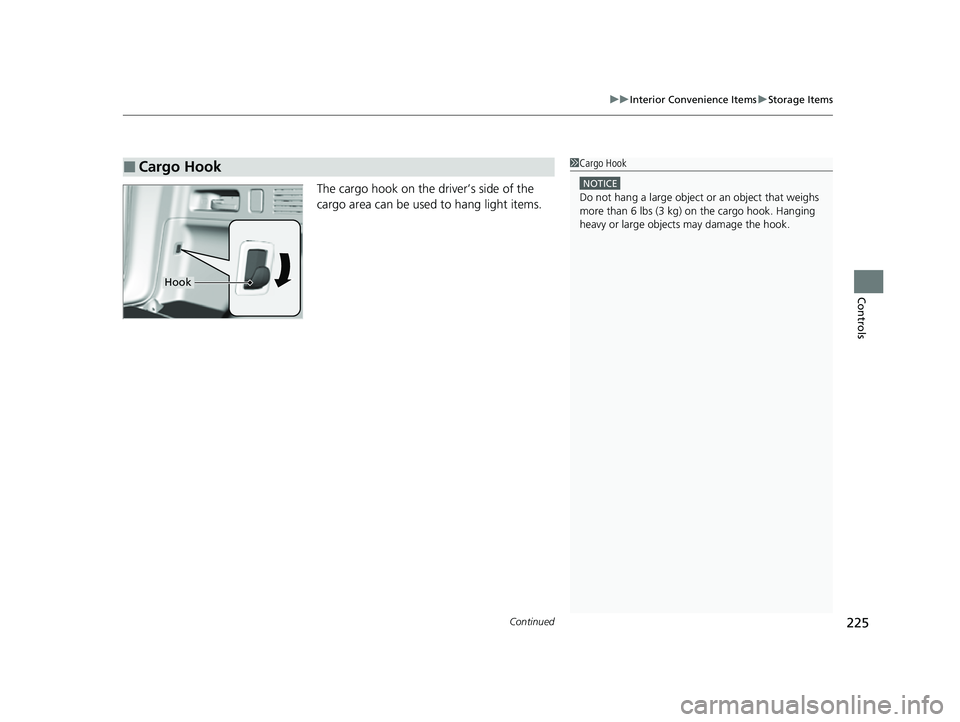
The cargo hook on the driver’s side of the
cargo area can be used to hang light items.
■Cargo Hook1Cargo Hook
NOTICE
Do not hang a large object or an object that weighs
more than 6 lbs (3 kg) on the cargo hook. Hanging
heavy or large objects may damage the hook.
Hook
22 CR-V HEV ELP-31TPG6200.book 225 ページ 2021年6月30日 水曜日 午前11時6分
Page 229 of 692
Continued227
uuInterior Convenience Items uStorage Items
Controls
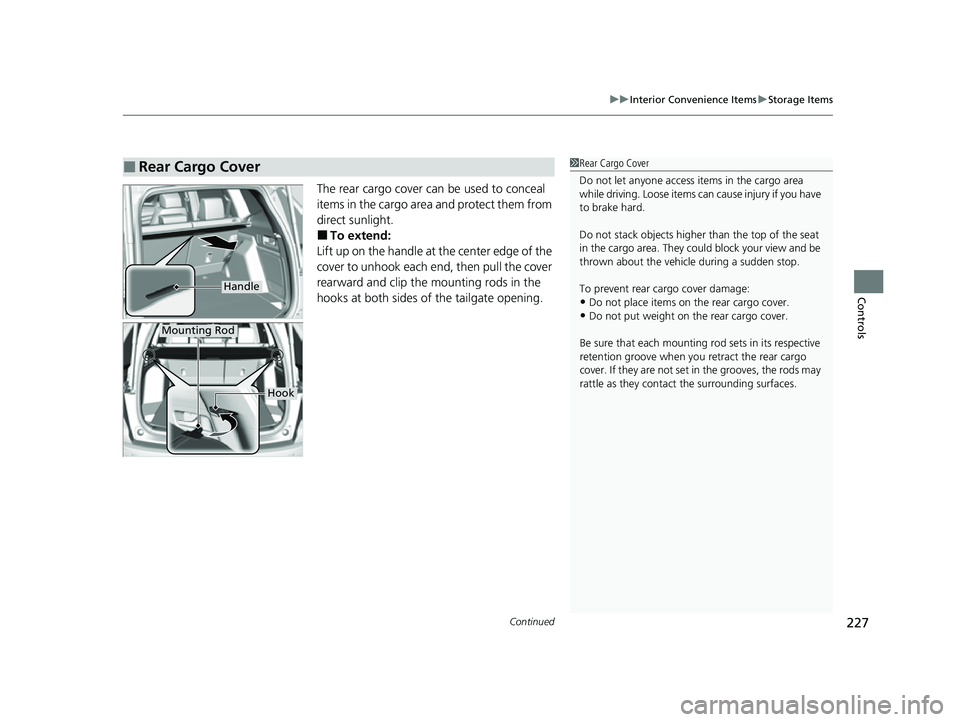
The rear cargo cover can be used to conceal
items in the cargo area and protect them from
direct sunlight.
■To extend:
Lift up on the handle at the center edge of the
cover to unhook each en d, then pull the cover
rearward and clip the mounting rods in the
hooks at both sides of the tailgate opening.
■Rear Cargo Cover1 Rear Cargo Cover
Do not let anyone access items in the cargo area
while driving. Loose items can cause injury if you have
to brake hard.
Do not stack objects higher than the top of the seat
in the cargo area. They could block your view and be
thrown about the vehicle during a sudden stop.
To prevent rear cargo cover damage:
•Do not place items on the rear cargo cover.•Do not put weight on the rear cargo cover.
Be sure that each mounting rod sets in its respective
retention groove when you retract the rear cargo
cover. If they are not set in the grooves, the rods may
rattle as they contac t the surrounding surfaces.
Handle
Mounting Rod
Hook
22 CR-V HEV ELP-31TPG6200.book 227 ページ 2021年6月30日 水曜日 午前11時6分
Page 231 of 692
229
uuInterior Convenience Items uOther Interior Convenience Items
Continued
Controls
Other Interior Convenience Items
The accessory power socket can be used when the power mode is in ACCESSORY or
ON.
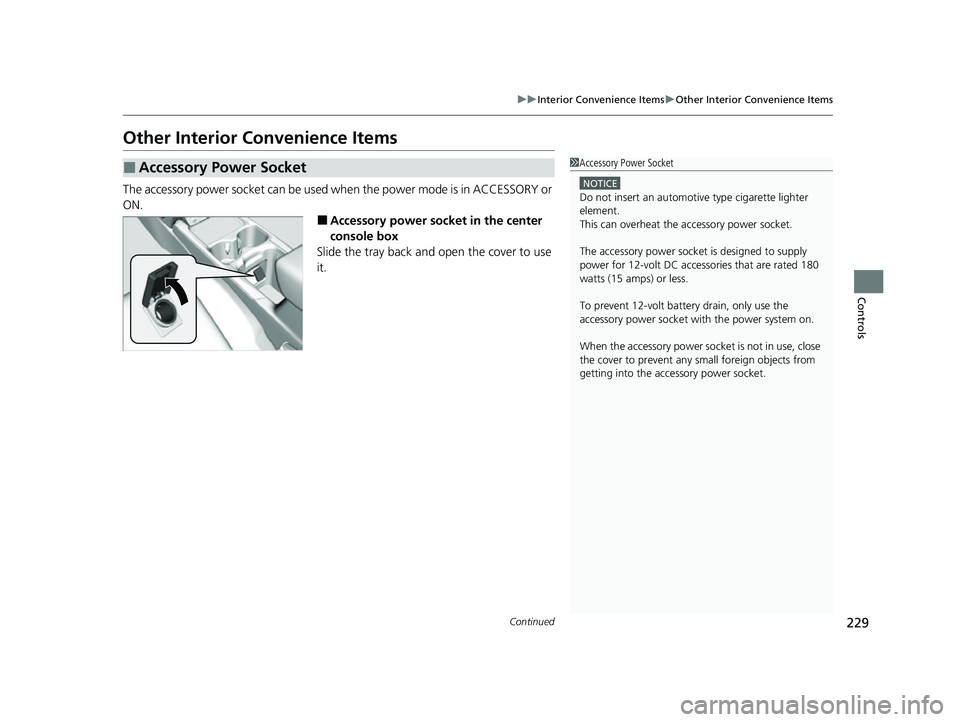
■Accessory power socket in the center
console box
Slide the tray back and open the cover to use
it.
■Accessory Power Socket1 Accessory Power Socket
NOTICE
Do not insert an automotive type cigarette lighter
element.
This can overheat the accessory power socket.
The accessory power socket is designed to supply
power for 12-volt DC accessories that are rated 180
watts (15 amps) or less.
To prevent 12-volt batte ry drain, only use the
accessory power socket with the power system on.
When the accessory power soc ket is not in use, close
the cover to prevent any small foreign objects from
getting into the accessory power socket.
22 CR-V HEV ELP-31TPG6200.book 229 ページ 2021年6月30日 水曜日 午前11時6分
Page 232 of 692
uuInterior Convenience Items uOther Interior Convenience Items
230
Controls
To use the wireless charger, the powe r mode must be in ACCESSORY or ON.
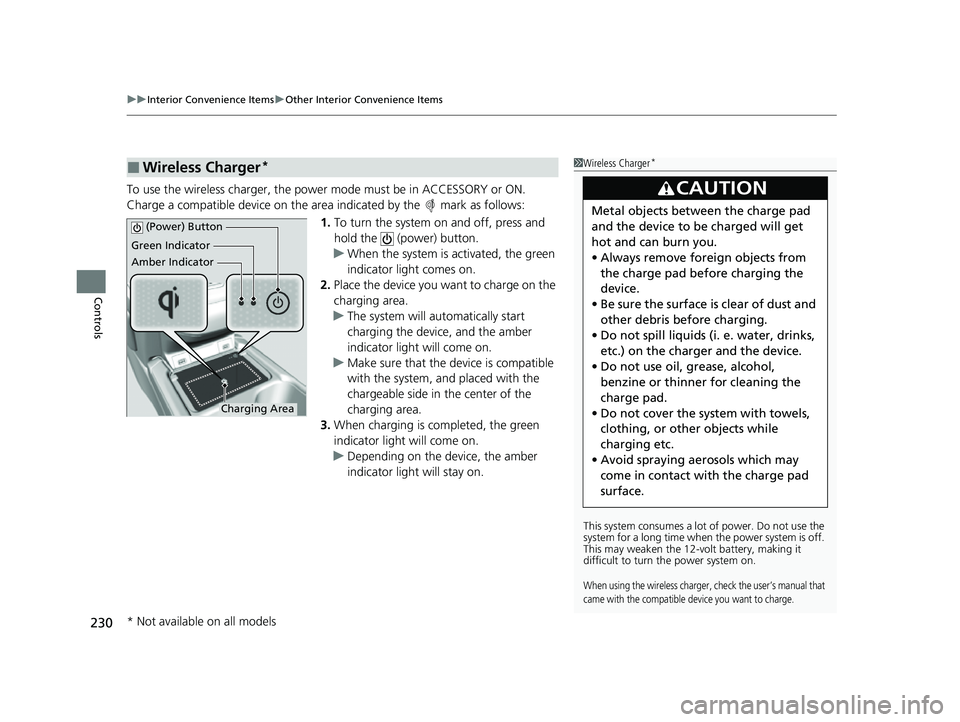
Charge a compatible device on the ar ea indicated by the mark as follows:
1. To turn the system on and off, press and
hold the (power) button.
u When the system is activated, the green
indicator light comes on.
2. Place the device you want to charge on the
charging area.
u The system will automatically start
charging the device, and the amber
indicator light will come on.
u Make sure that the device is compatible
with the system, a nd placed with the
chargeable side in the center of the
charging area.
3. When charging is completed, the green
indicator light will come on.
u Depending on the device, the amber
indicator light will stay on.
■Wireless Charger*1Wireless Charger*
This system consumes a lot of power. Do not use the
system for a long time when the power system is off.
This may weaken the 12-v olt battery, making it
difficult to turn the power system on.
When using the wireless charger, check the user’s manual that
came with the compatible device you want to charge.
3CAUTION
Metal objects between the charge pad
and the device to be charged will get
hot and can burn you.
• Always remove foreign objects from
the charge pad before charging the
device.
• Be sure the surface is clear of dust and
other debris before charging.
• Do not spill liquids (i. e. water, drinks,
etc.) on the charge r and the device.
• Do not use oil, grease, alcohol,
benzine or thinner for cleaning the
charge pad.
• Do not cover the system with towels,
clothing, or other objects while
charging etc.
• Avoid spraying aerosols which may
come in contact with the charge pad
surface.
Green Indicator
Amber Indicator
Charging Area
(Power) Button
* Not available on all models
22 CR-V HEV ELP-31TPG6200.book 230 ページ 2021年6月30日 水曜日 午前11時6分
Page 247 of 692
245
uuAudio System uUSB Port(s)
Continued
Features
USB Port(s)
Install the USB connector or the USB flash drive to the USB port.
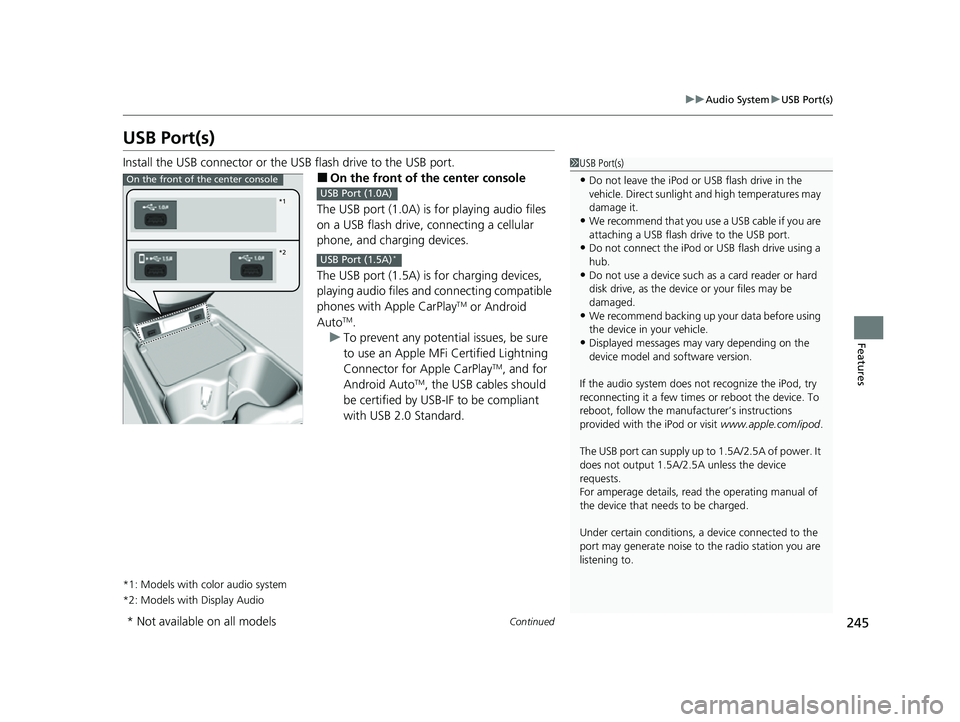
■On the front of the center console
The USB port (1.0A) is for playing audio files
on a USB flash drive, connecting a cellular
phone, and charging devices.
The USB port (1.5A) is for charging devices,
playing audio files and connecting compatible
phones with Apple CarPlay
TM or Android
AutoTM.
u To prevent any potenti al issues, be sure
to use an Apple MFi Certified Lightning
Connector for Apple CarPlay
TM, and for
Android AutoTM, the USB cables should
be certified by USB-IF to be compliant
with USB 2.0 Standard.
*1: Models with color audio system
*2: Models with Display Audio
1 USB Port(s)
•Do not leave the iPod or USB flash drive in the
vehicle. Direct sunlight and high temperatures may
damage it.
•We recommend that you us e a USB cable if you are
attaching a USB flash drive to the USB port.
•Do not connect the iPod or USB flash drive using a
hub.
•Do not use a device such as a card reader or hard
disk drive, as the device or your files may be
damaged.
•We recommend backing up yo ur data before using
the device in your vehicle.
•Displayed messages may vary depending on the
device model and software version.
If the audio system does not recognize the iPod, try
reconnecting it a few times or reboot the device. To
reboot, follow the manufac turer’s instructions
provided with the iPod or visit www.apple.com/ipod.
The USB port can supply up to 1.5A/2.5A of power. It
does not output 1.5A/2.5A unless the device
requests.
For amperage details, read the operating manual of
the device that ne eds to be charged.
Under certain condi tions, a device connected to the
port may generate noise to the radio station you are
listening to.
On the front of the center console
*1
*2
USB Port (1.0A)
USB Port (1.5A)*
* Not available on all models
22 CR-V HEV ELP-31TPG6200.book 245 ページ 2021年6月30日 水曜日 午前11時6分
Page 299 of 692
297
uuAudio System Basic Operation uVoice Control Operation
Continued
Features
Voice Control Operation
Your vehicle has a voice control syst em that allows hands-free operation.
The voice control system uses the (Talk) and (hang-up/back) buttons on
the steering wheel and a microphone near the map lights on the ceiling.
To achieve optimum voice recognition when using the voice control system:
• Make sure the correct screen is displa yed for the voice command that you are
using.
The system recognizes only certain commands.
Available voice commands.
2 Voice Portal Screen P. 298
•Close the windows and moonroof.
• Adjust the dashboard and side vents so air does not blow onto the microphone
on the ceiling.
• Speak clearly in a natural speaking vo ice without pausing between words.
• Reduce any background noise if possible. The system may misinterpret your
command if more than one person is speaking at the same time.
■Voice Recognition
1Voice Control Operation
When you press the button, a helpful prompt asks
what you would like to do. Press and release the
button again to bypass this prompt and give a
command.
1 Voice Recognition
The voice control system can only be used from the
driver’s seat because the microphone unit removes
noises from the front passenger’s side.
22 CR-V HEV ELP-31TPG6200.book 297 ページ 2021年6月30日 水曜日 午前11時6分
Page 372 of 692
370
uuCustomized Features u
Features
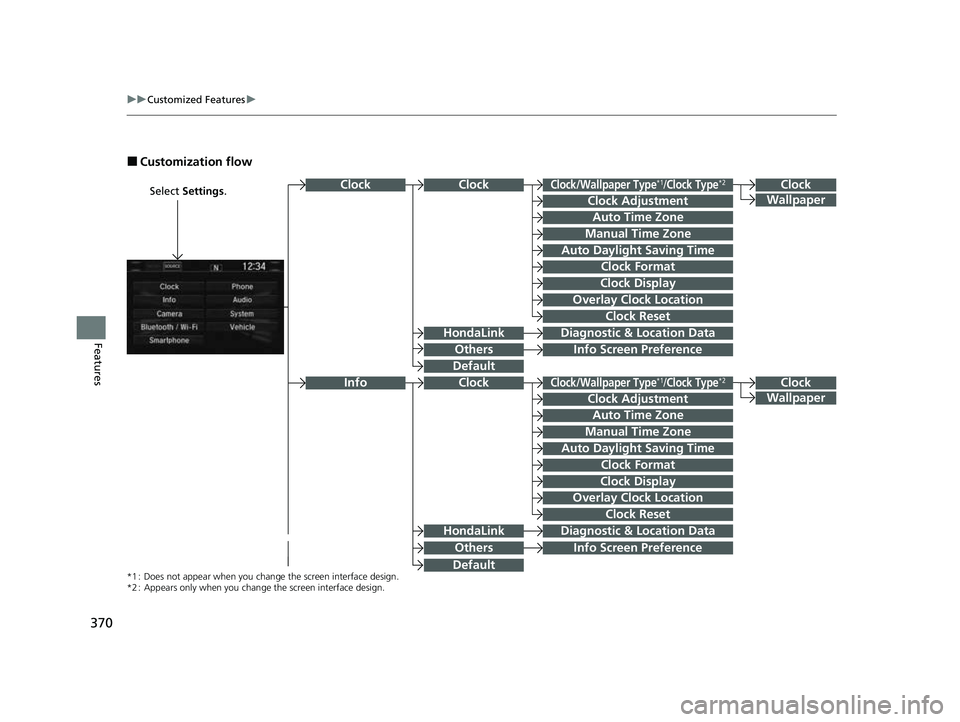
■Customization flow
Select Settings.Clock
Wallpaper
Others
Clock/Wallpaper Type*1/Clock Type*2
Clock Adjustment
Clock Format
ClockClock
Auto Time Zone
Manual Time Zone
Auto Daylight Saving Time
Clock Display
Overlay Clock Location
Clock Reset
Info Screen Preference
Clock
Wallpaper
Others
Clock/Wallpaper Type*1/Clock Type*2
Clock Adjustment
Clock Format
Clock
Auto Time Zone
Manual Time Zone
Auto Daylight Saving Time
Clock Display
Overlay Clock Location
Clock Reset
Info Screen Preference
Info
HondaLinkDiagnostic & Location Data
HondaLinkDiagnostic & Location Data
*1 : Does not appear when you chang e the screen interface design.
*2 : Appears only when you change the screen interface design.
Default
Default
22 CR-V HEV ELP-31TPG6200.book 370 ページ 2021年6月30日 水曜日 午前11時6分
Page 376 of 692
374
uuCustomized Features u
Features
Voice Recog.
Voice Prompt
Voice Recog. Volume
Song by Voice
Song by Voice Phonetic Modification
Phonebook Phonetic Modification
Automatic Phone Sync
Clock Adjustment
Clock Format
Auto Time Zone
Manual Time Zone
Auto Daylight Saving Time
Clock Display
Overlay Clock Location
Clock Reset
Clock
Wallpaper
One Press Voice Operation
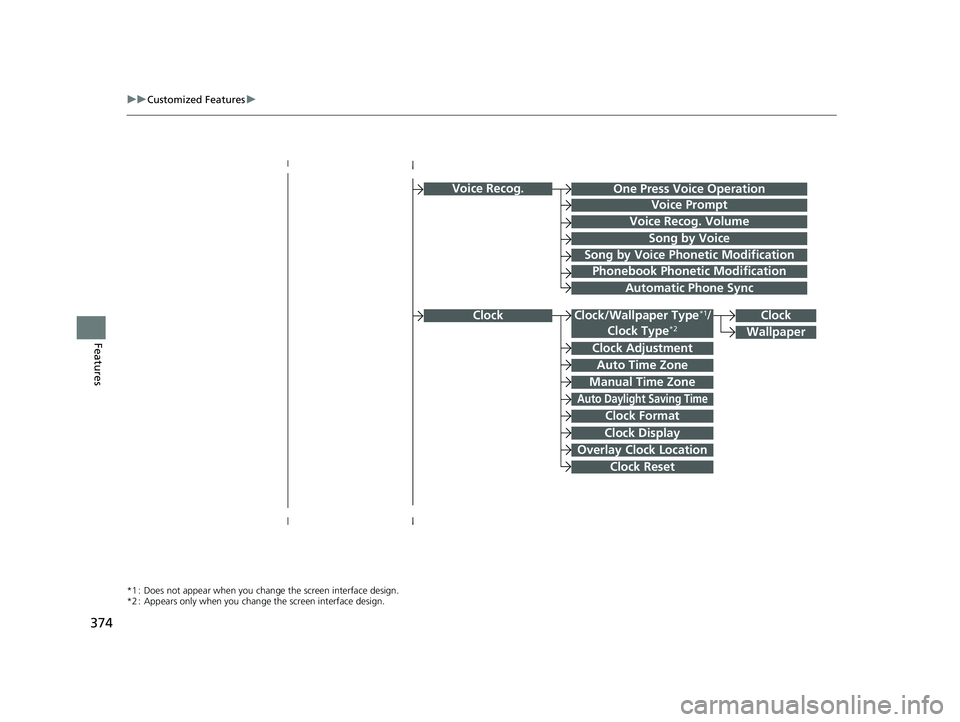
*1 : Does not appear when you chang e the screen interface design.
*2 : Appears only when you change the screen interface design.
Clock/Wallpaper Type*1/
Clock Type*2Clock
22 CR-V HEV ELP-31TPG6200.book 374 ページ 2021年6月30日 水曜日 午前11時6分