lock HONDA CRV 2022 Repair Manual
[x] Cancel search | Manufacturer: HONDA, Model Year: 2022, Model line: CRV, Model: HONDA CRV 2022Pages: 692, PDF Size: 22.05 MB
Page 186 of 692
uuWindows uOpening/Closing th e Power Windows
184
Controls
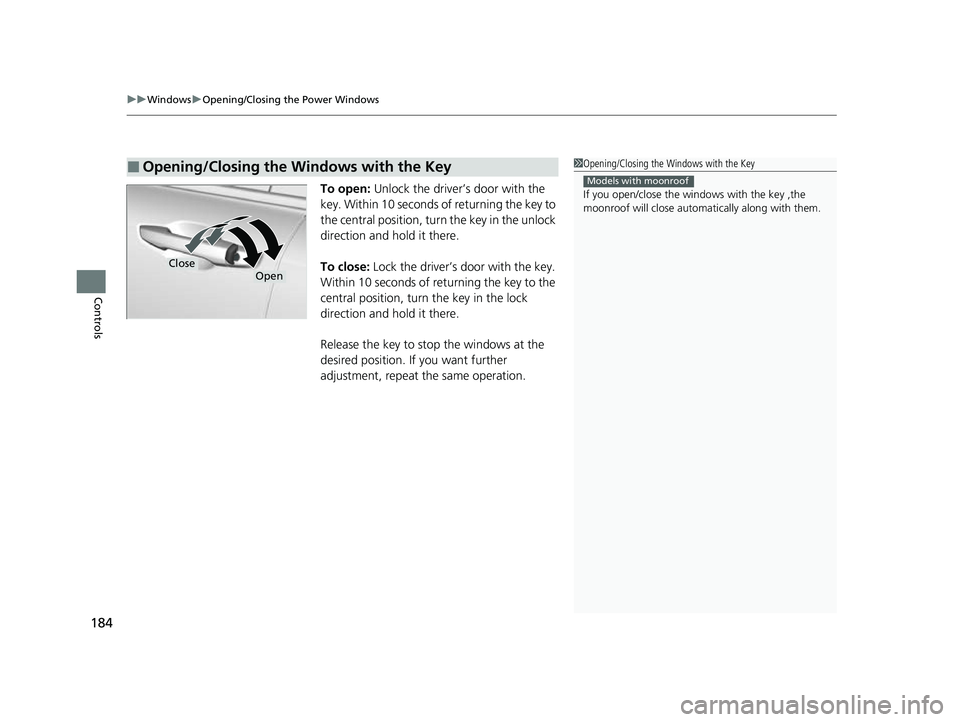
To open: Unlock the driver’s door with the
key. Within 10 seconds of returning the key to
the central position, turn the key in the unlock
direction and hold it there.
To close: Lock the driver’s door with the key.
Within 10 seconds of re turning the key to the
central position, turn the key in the lock
direction and hold it there.
Release the key to stop the windows at the
desired position. If you want further
adjustment, repeat the same operation.
■Opening/Closing the Windows with the Key1 Opening/Closing the Windows with the Key
If you open/close the wi ndows with the key ,the
moonroof will close automati cally along with them.
Models with moonroof
CloseOpen
22 CR-V HEV ELP-31TPG6200.book 184 ページ 2021年6月30日 水曜日 午前11時6分
Page 188 of 692
186
Controls
Operating the Switches Around the Steering Wheel
POWER Button
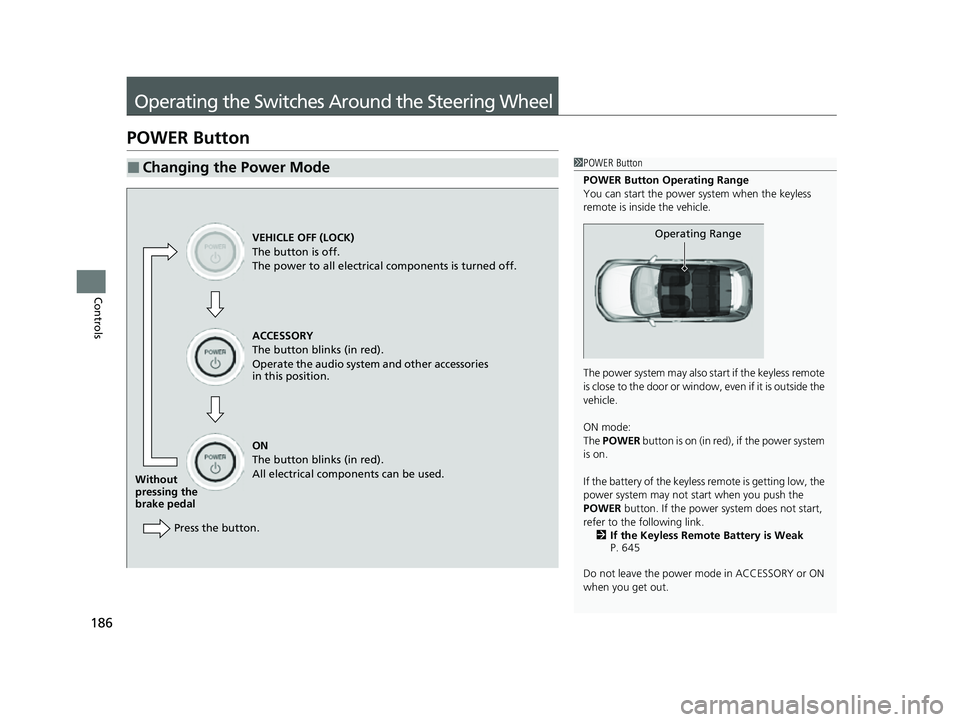
■Changing the Power Mode1POWER Button
POWER Button Operating Range
You can start the power system when the keyless
remote is inside the vehicle.
The power system may also start if the keyless remote
i s c l o s e t o t h e d o o r o r w i n d o w , e v e n i f i t i s o u t s i d e t h e
vehicle.
ON mode:
The POWER button is on (in red), if the power system
is on.
If the battery of the keyless remote is getting low, the
power system may not start when you push the
POWER button. If the power system does not start,
refer to the following link. 2 If the Keyless Remote Battery is Weak
P. 645
Do not leave the power mode in ACCESSORY or ON
when you get out.
Operating RangeVEHICLE OFF (LOCK)
The button is off.
The power to all electrical components is turned off.
ACCESSORY
The button blinks (in red).
Operate the audio system and other accessories
in this position.
ON
The button blinks (in red).
All electrical components can be used.
Without
pressing the
brake pedal
Press the button.
22 CR-V HEV ELP-31TPG6200.book 186 ページ 2021年6月30日 水曜日 午前11時6分
Page 189 of 692
187
uuOperating the Switches Around the Steering Wheel uPOWER Button
Continued
Controls
If you leave the vehicle for 30 to 60 minutes with the transmission in (P and the
power mode in ACCESSORY, the vehicle automa tically goes into the mode similar to
VEHICLE OFF (LOCK) to avoid draining the 12-volt battery.
If you open the driver’s door when the pow er mode is set to ACCESSORY, a warning
buzzer sounds.
■Automatic Power Off
■Power Mode Reminder
22 CR-V HEV ELP-31TPG6200.book 187 ページ 2021年6月30日 水曜日 午前11時6分
Page 193 of 692
Continued191
uuOperating the Switches Around the Steering Wheel uLight Switches
Controls
Automatic lighting control can be used when
the power mode is in ON.
When you turn the light switch to AUTO, the
headlights and other exterior lights will switch
on and off automatically depending on the
ambient brightness.
The headlights come on when you unlock a
door in dark areas with the headlight switch in
AUTO .
u Once you lock the door, the headlights
will go off.
■Automatic Operation (automatic lighting control)1Automatic Operation (aut omatic lighting control)
We recommend that you tu rn on the lights manually
when driving at night, in a de nse fog, or in dark areas
such as long tunnels or parking facilities.
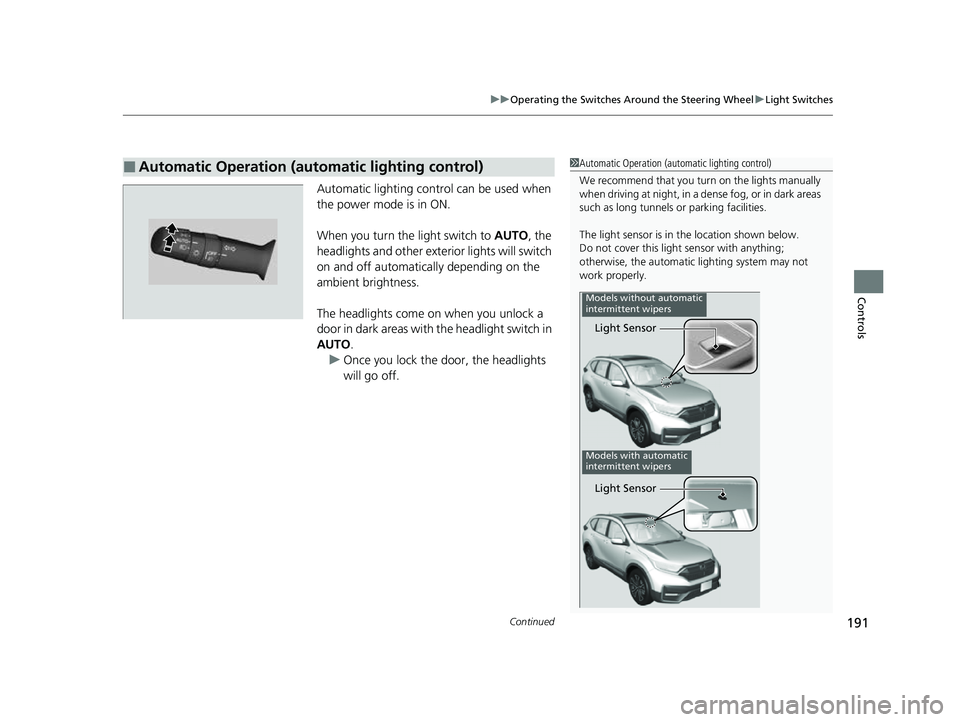
The light sensor is in the location shown below.
Do not cover this light sensor with anything;
otherwise, the automatic lighting system may not
work properly.
Light Sensor
Models without automatic
intermittent wipers
Models with automatic
intermittent wipers
Light Sensor
22 CR-V HEV ELP-31TPG6200.book 191 ページ 2021年6月30日 水曜日 午前11時6分
Page 195 of 692
193
uuOperating the Switches Around the Steering Wheel uLight Switches
Controls
The headlights, all other exterior lights, and the instrument panel lights turn off 15
seconds after you set the power mode to VEHICLE OFF, take the keyless remote with
you, and close the driver’s door.
If you set the power mode to VEHICLE OFF with the headlight switch on, but do not
open the door, the lights turn off after 10 minu tes (3 minutes, if the switch is in the
AUTO position).
The lights turn on again when you unlock or open the driver’s door. If you unlock
the door, but do not open it within 15 seconds, the lights go off. If you open the
driver’s door, you will hear a reminder chime alerting you that the lights are on.
■Automatic Lighting Off Feature1 Automatic Lighting Off Feature
You can change the headlight auto off timer setting.
2 Customized Features P. 140
2 Customized Features P. 369
Models with color audio system
Models with Display Audio
22 CR-V HEV ELP-31TPG6200.book 193 ページ 2021年6月30日 水曜日 午前11時6分
Page 205 of 692
203
uuOperating the Switches Around the Steering Wheel uDriving Position Memory System*
Continued
Controls
Driving Position Memory System*
You can store two driver’s seat positions (except for power lumbar) with the driving
position memory system.
When you unlock and open the driver’s door with a remote transmitter or the
keyless access system, the seat adjusts automatically to one of the two preset
positions.
When you enter the vehicle, the driver in formation interface briefly shows you which
remote transmitter you used to unlock the vehicle.
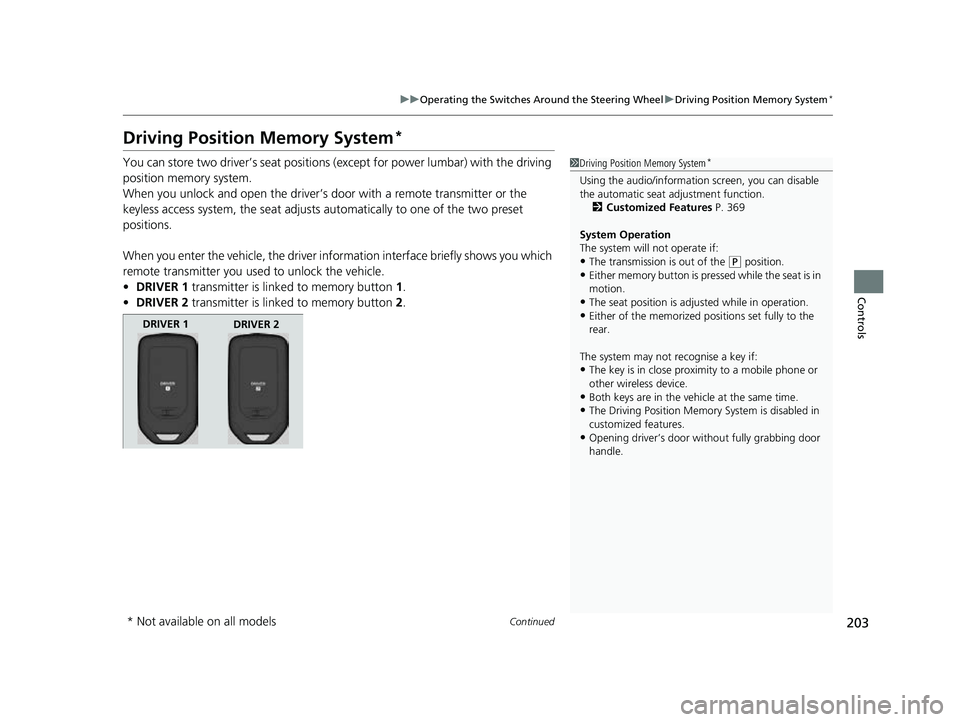
• DRIVER 1 transmitter is linked to memory button 1.
• DRIVER 2 transmitter is linked to memory button 2.1 Driving Position Memory System*
Using the audio/informati on screen, you can disable
the automatic seat adjustment function.
2 Customized Features P. 369
System Operation
The system will not operate if:
•The transmission is out of the ( P position.•Either memory button is pressed while the seat is in
motion.
•The seat position is adju sted while in operation.•Either of the memorized pos itions set fully to the
rear.
The system may not recognise a key if:
•The key is in close proximity to a mobile phone or
other wireless device.
•Both keys are in the vehicle at the same time.
•The Driving Position Memory System is disabled in
customized features.
•Opening driver’s door wi thout fully grabbing door
handle.
DRIVER 1 DRIVER 2
* Not available on all models
22 CR-V HEV ELP-31TPG6200.book 203 ページ 2021年6月30日 水曜日 午前11時6分
Page 207 of 692
205
uuOperating the Switches Around the Steering Wheel uAdjusting the Steering Wheel
Controls
Adjusting the Steering Wheel
The steering wheel height and distance from your body can be adjusted so that you
can comfortably grip the steering wheel in an appropriate driving posture.
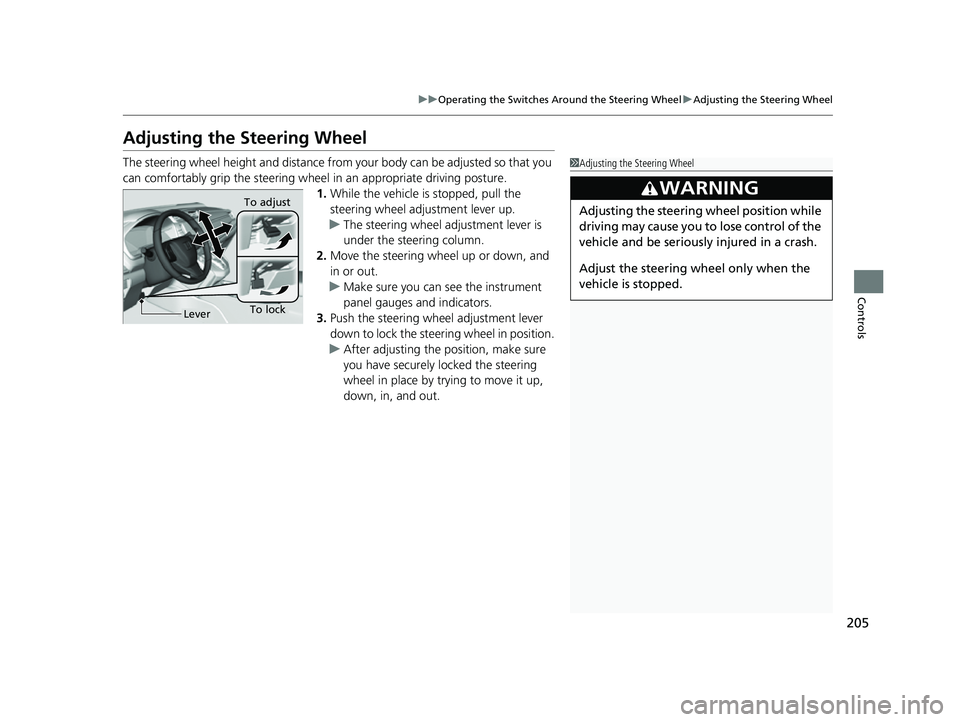
1. While the vehicle is stopped, pull the
steering wheel adjustment lever up.
u The steering wheel adjustment lever is
under the steering column.
2. Move the steering wheel up or down, and
in or out.
u Make sure you can see the instrument
panel gauges and indicators.
3. Push the steering wheel adjustment lever
down to lock the steering wheel in position.
u After adjusting the position, make sure
you have securely locked the steering
wheel in place by trying to move it up,
down, in, and out.1Adjusting the Steering Wheel
3WARNING
Adjusting the steering wheel position while
driving may cause you to lose control of the
vehicle and be seriously injured in a crash.
Adjust the steering wheel only when the
vehicle is stopped.
To lockLever To adjust
22 CR-V HEV ELP-31TPG6200.book 205 ページ 2021年6月30日 水曜日 午前11時6分
Page 212 of 692
uuSeats uFront Seats
210
Controls
■Adjusting the front manual seat(s)*1Adjusting the front manual seat(s)*
Once a seat is adjusted co rrectly, rock it back and
forth to make sure it is locked in position.
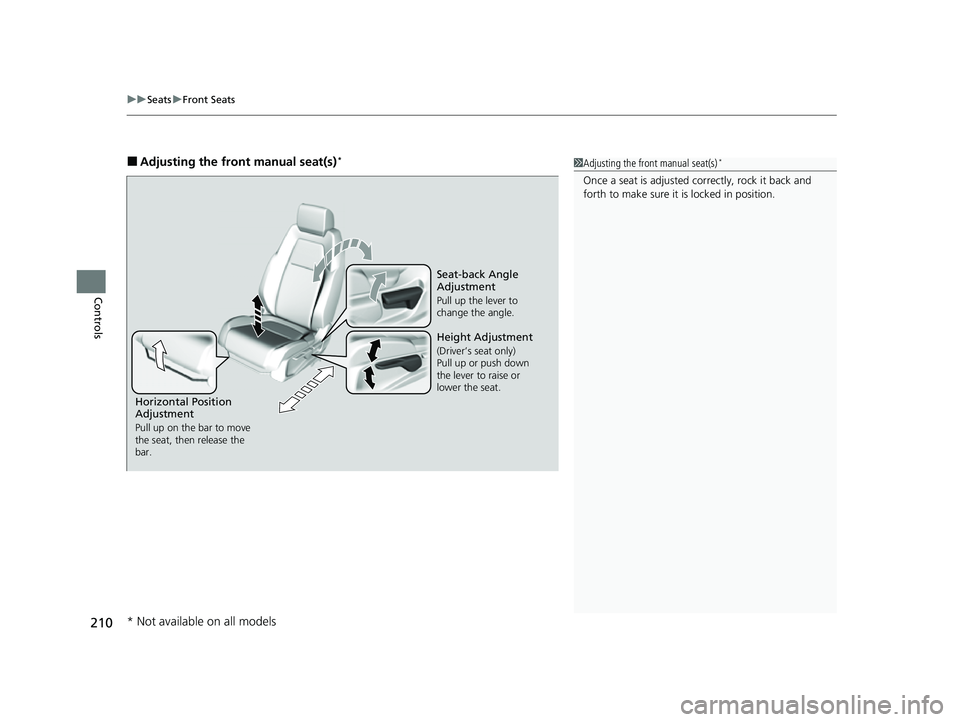
Horizontal Position
Adjustment
Pull up on the bar to move
the seat, then release the
bar.
Height Adjustment
(Driver’s seat only)
Pull up or push down
the lever to raise or
lower the seat.
Seat-back Angle
Adjustment
Pull up the lever to
change the angle.
* Not available on all models
22 CR-V HEV ELP-31TPG6200.book 210 ページ 2021年6月30日 水曜日 午前11時6分
Page 214 of 692
212
uuSeats uRear Seats
Controls
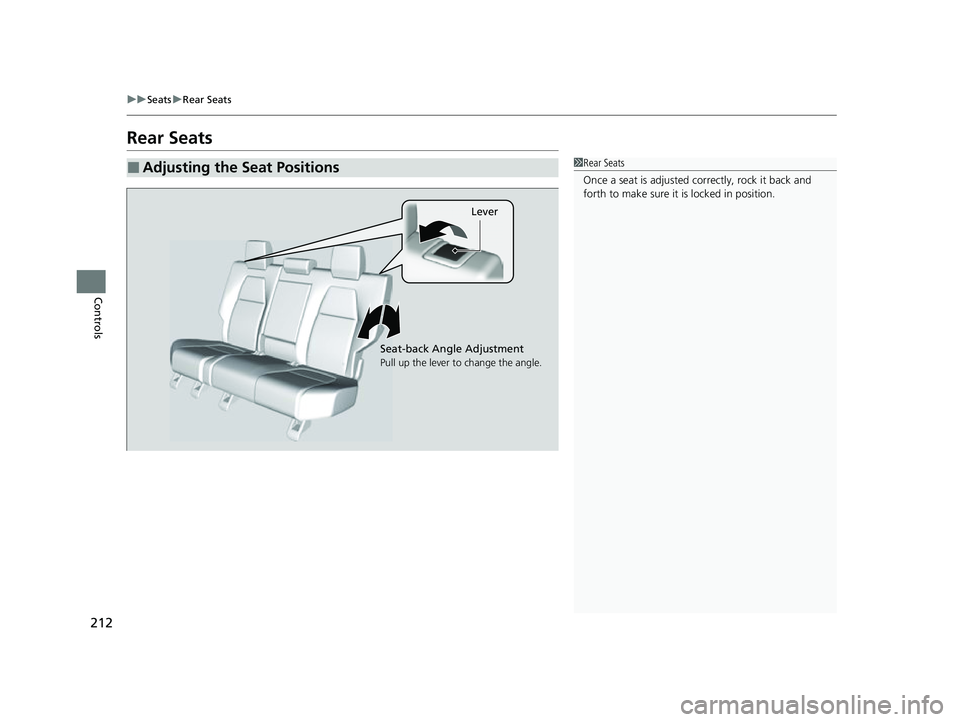
Rear Seats
■Adjusting the Seat Positions1Rear Seats
Once a seat is adjusted co rrectly, rock it back and
forth to make sure it is locked in position.
Lever
Seat-back Angle Adjustment
Pull up the lever to change the angle.
22 CR-V HEV ELP-31TPG6200.book 212 ページ 2021年6月30日 水曜日 午前11時6分
Page 218 of 692
uuSeats uHead Restraints
216
Controls
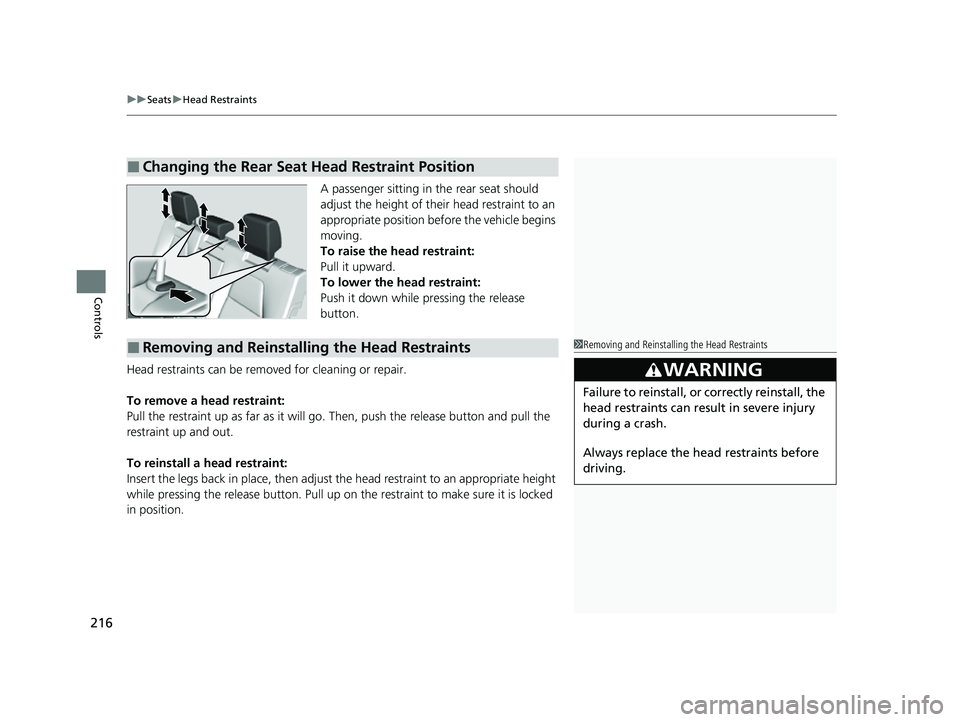
A passenger sitting in the rear seat should
adjust the height of their head restraint to an
appropriate position befo re the vehicle begins
moving.
To raise the head restraint:
Pull it upward.
To lower the head restraint:
Push it down while pressing the release
button.
Head restraints can be removed for cleaning or repair.
To remove a head restraint:
Pull the restraint up as far as it will go. Then, push the release button and pull the
restraint up and out.
To reinstall a head restraint:
Insert the legs back in place, then adjust the head restraint to an appropriate height
while pressing the release button. Pull up on the restraint to make sure it is locked
in position.
■Changing the Rear Seat Head Restraint Position
■Removing and Reinstalling the Head Restraints1 Removing and Reinstalling the Head Restraints
3WARNING
Failure to reinstall, or correctly reinstall, the
head restraints can result in severe injury
during a crash.
Always replace the he ad restraints before
driving.
22 CR-V HEV ELP-31TPG6200.book 216 ページ 2021年6月30日 水曜日 午前11時6分