instrument panel HONDA CRV 2022 Manual PDF
[x] Cancel search | Manufacturer: HONDA, Model Year: 2022, Model line: CRV, Model: HONDA CRV 2022Pages: 692, PDF Size: 22.05 MB
Page 191 of 692
189
uuOperating the Switches Around the Steering Wheel uTurn Signals
Controls
Turn Signals
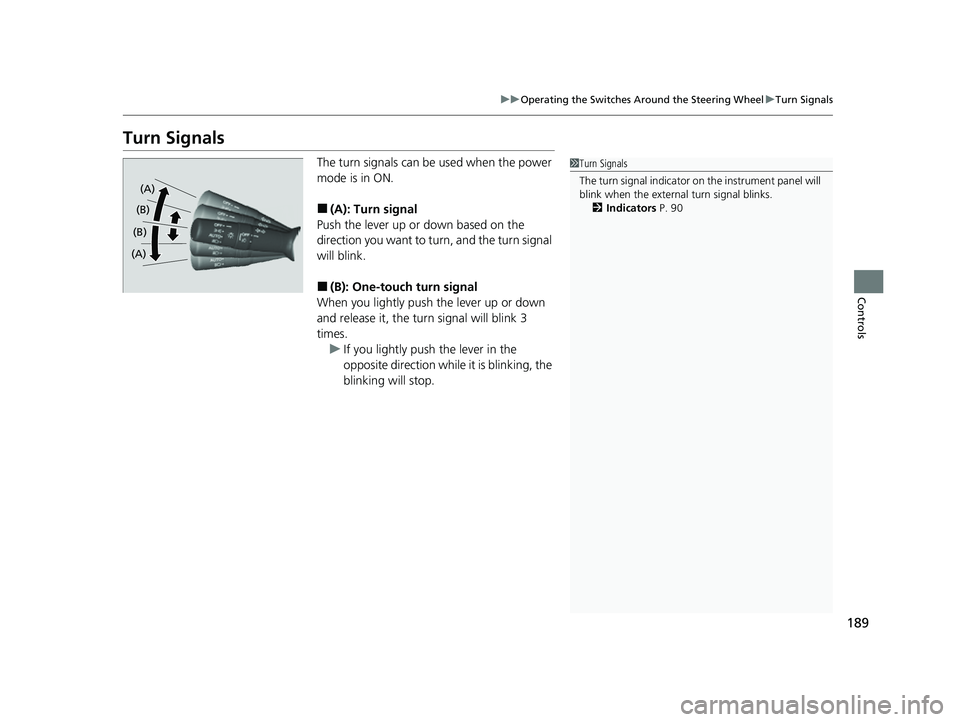
The turn signals can be used when the power
mode is in ON.
■(A): Turn signal
Push the lever up or down based on the
direction you want to turn, and the turn signal
will blink.
■(B): One-touc h turn signal
When you lightly push the lever up or down
and release it, the turn signal will blink 3
times. u If you lightly push the lever in the
opposite direction while it is blinking, the
blinking will stop.
1Turn Signals
The turn signal indicator on the instrument panel will
blink when the external turn signal blinks. 2 Indicators P. 90
(A)
(B) (B)
(A)
22 CR-V HEV ELP-31TPG6200.book 189 ページ 2021年6月30日 水曜日 午前11時6分
Page 194 of 692
uuOperating the Switches Around the Steering Wheel uLight Switches
192
Controls
The headlights automatically come on when the wipers are used several times within
a certain number of intervals wi th the headlight switch in AUTO.
The headlights automatically go off a few minutes later if the wipers are stopped.
■Headlight Integration with Wipers
1Automatic Operation (aut omatic lighting control)
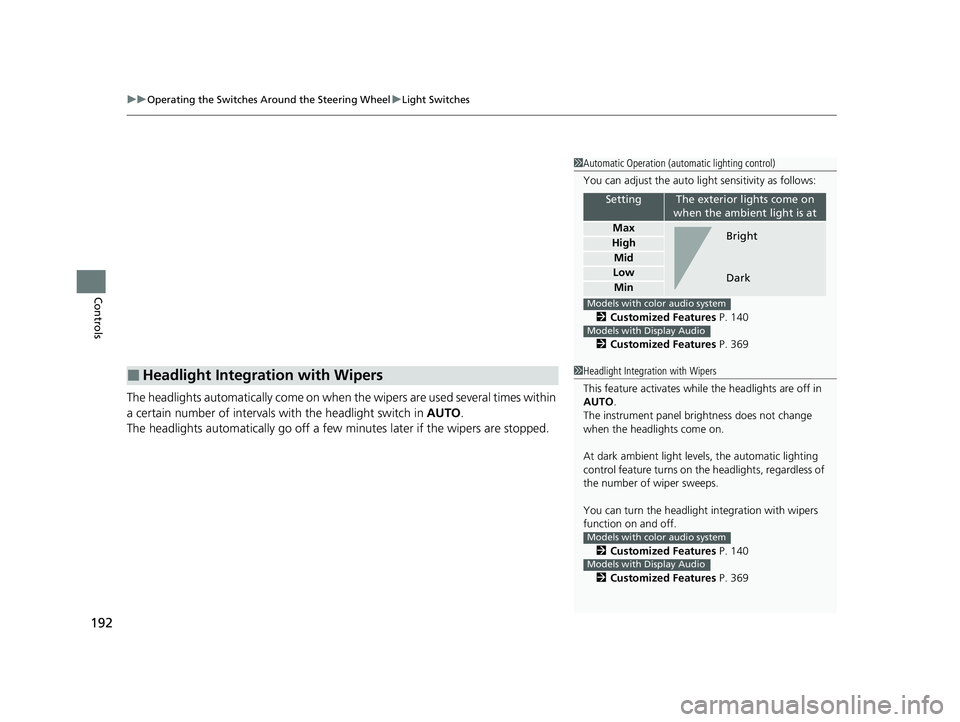
You can adjust the auto li ght sensitivity as follows:
2 Customized Features P. 140
2 Customized Features P. 369
SettingThe exterior lights come on
when the ambient light is at
Max
High
Mid
Low
Min
Bright
Dark
Models with color audio system
Models with Display Audio
1 Headlight Integration with Wipers
This feature activates while the headlights are off in
AUTO .
The instrument panel br ightness does not change
when the headlights come on.
At dark ambient light leve ls, the automatic lighting
control feature turns on the headlights, regardless of
the number of wiper sweeps.
You can turn the headlight integration with wipers
function on and off.
2 Customized Features P. 140
2 Customized Features P. 369
Models with color audio system
Models with Display Audio
22 CR-V HEV ELP-31TPG6200.book 192 ページ 2021年6月30日 水曜日 午前11時6分
Page 195 of 692
193
uuOperating the Switches Around the Steering Wheel uLight Switches
Controls
The headlights, all other exterior lights, and the instrument panel lights turn off 15
seconds after you set the power mode to VEHICLE OFF, take the keyless remote with
you, and close the driver’s door.
If you set the power mode to VEHICLE OFF with the headlight switch on, but do not
open the door, the lights turn off after 10 minu tes (3 minutes, if the switch is in the
AUTO position).
The lights turn on again when you unlock or open the driver’s door. If you unlock
the door, but do not open it within 15 seconds, the lights go off. If you open the
driver’s door, you will hear a reminder chime alerting you that the lights are on.
■Automatic Lighting Off Feature1 Automatic Lighting Off Feature
You can change the headlight auto off timer setting.
2 Customized Features P. 140
2 Customized Features P. 369
Models with color audio system
Models with Display Audio
22 CR-V HEV ELP-31TPG6200.book 193 ページ 2021年6月30日 水曜日 午前11時6分
Page 204 of 692
202
uuOperating the Switches Around the Steering Wheel uBrightness Control
Controls
Brightness Control
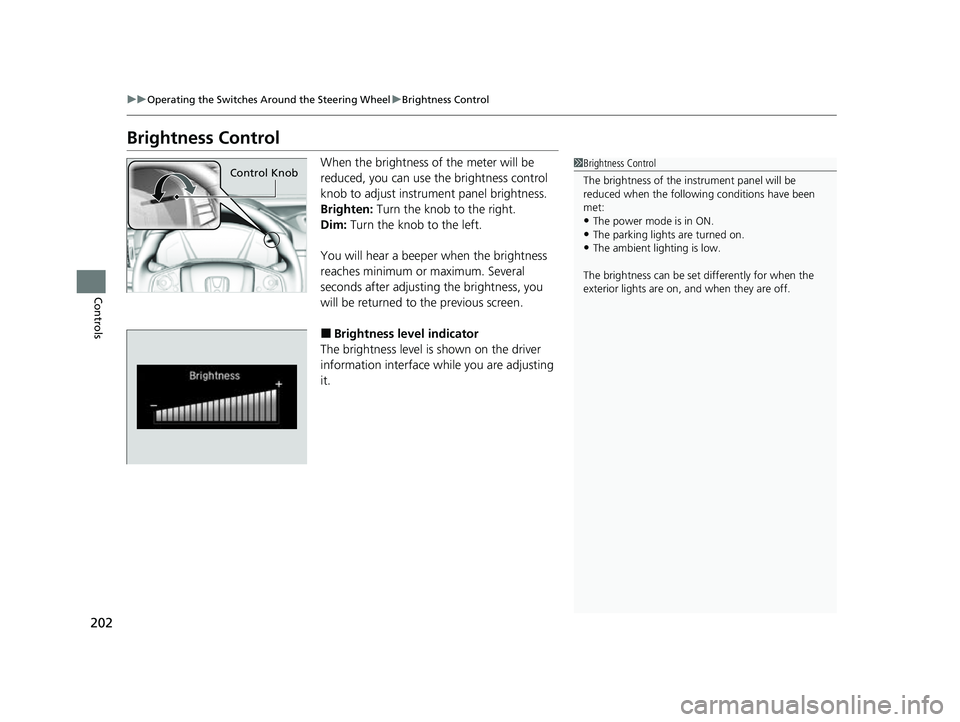
When the brightness of the meter will be
reduced, you can use the brightness control
knob to adjust instrument panel brightness.
Brighten: Turn the knob to the right.
Dim: Turn the knob to the left.
You will hear a beeper when the brightness
reaches minimum or maximum. Several
seconds after adjusting the brightness, you
will be returned to the previous screen.
■Brightness level indicator
The brightness level is shown on the driver
information interface wh ile you are adjusting
it.
1 Brightness Control
The brightness of the in strument panel will be
reduced when the followi ng conditions have been
met:
•The power mode is in ON.•The parking lights are turned on.
•The ambient lighting is low.
The brightness can be set differently for when the
exterior lights are on, and when they are off.
Control Knob
22 CR-V HEV ELP-31TPG6200.book 202 ページ 2021年6月30日 水曜日 午前11時6分
Page 207 of 692
205
uuOperating the Switches Around the Steering Wheel uAdjusting the Steering Wheel
Controls
Adjusting the Steering Wheel
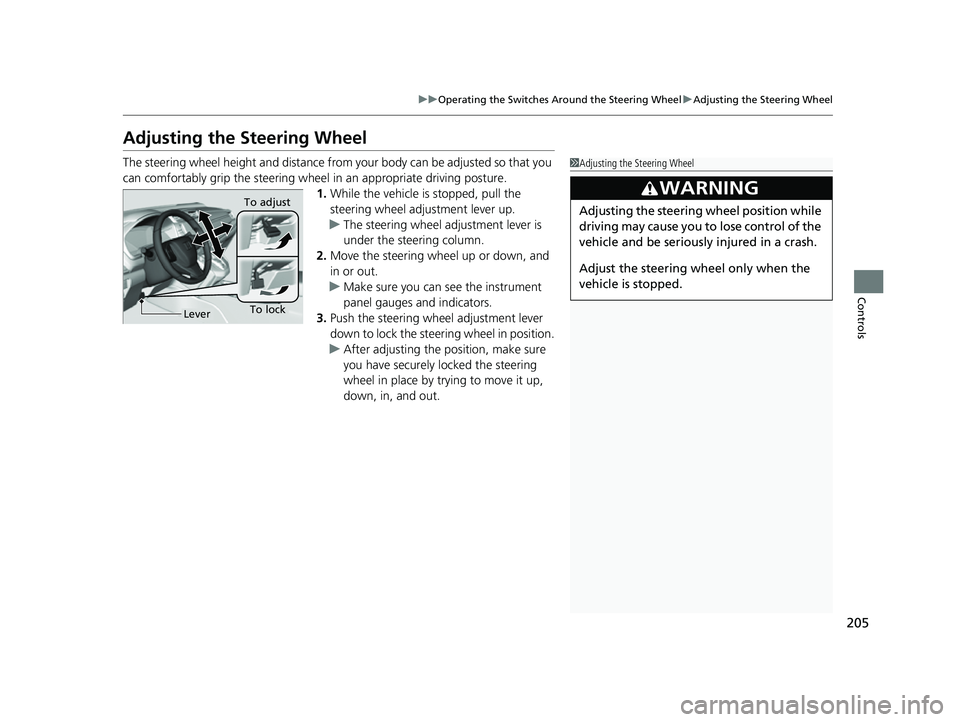
The steering wheel height and distance from your body can be adjusted so that you
can comfortably grip the steering wheel in an appropriate driving posture.
1. While the vehicle is stopped, pull the
steering wheel adjustment lever up.
u The steering wheel adjustment lever is
under the steering column.
2. Move the steering wheel up or down, and
in or out.
u Make sure you can see the instrument
panel gauges and indicators.
3. Push the steering wheel adjustment lever
down to lock the steering wheel in position.
u After adjusting the position, make sure
you have securely locked the steering
wheel in place by trying to move it up,
down, in, and out.1Adjusting the Steering Wheel
3WARNING
Adjusting the steering wheel position while
driving may cause you to lose control of the
vehicle and be seriously injured in a crash.
Adjust the steering wheel only when the
vehicle is stopped.
To lockLever To adjust
22 CR-V HEV ELP-31TPG6200.book 205 ページ 2021年6月30日 水曜日 午前11時6分
Page 278 of 692
276
uuAudio System Basic Operation uAudio/Information Screen
Features
■HondaLink
Displays the HondaLink ® screen.
2 HondaLink® P. 326
■Smartphone Connection
Displays the Apple CarPlayTM or Android AutoTM.
2 Apple CarPlayTM P. 333
2 Android AutoTM P. 336
■App List ( )
Adds or removes apps or widgets on the home screen.
2 Home Screen P. 284
■Instrument Panel
Selects from three customizable setting s for the driver information interface.
22 CR-V HEV ELP-31TPG6200.book 276 ページ 2021年6月30日 水曜日 午前11時6分
Page 280 of 692
uuAudio System Basic Operation uAudio/Information Screen
278
Features
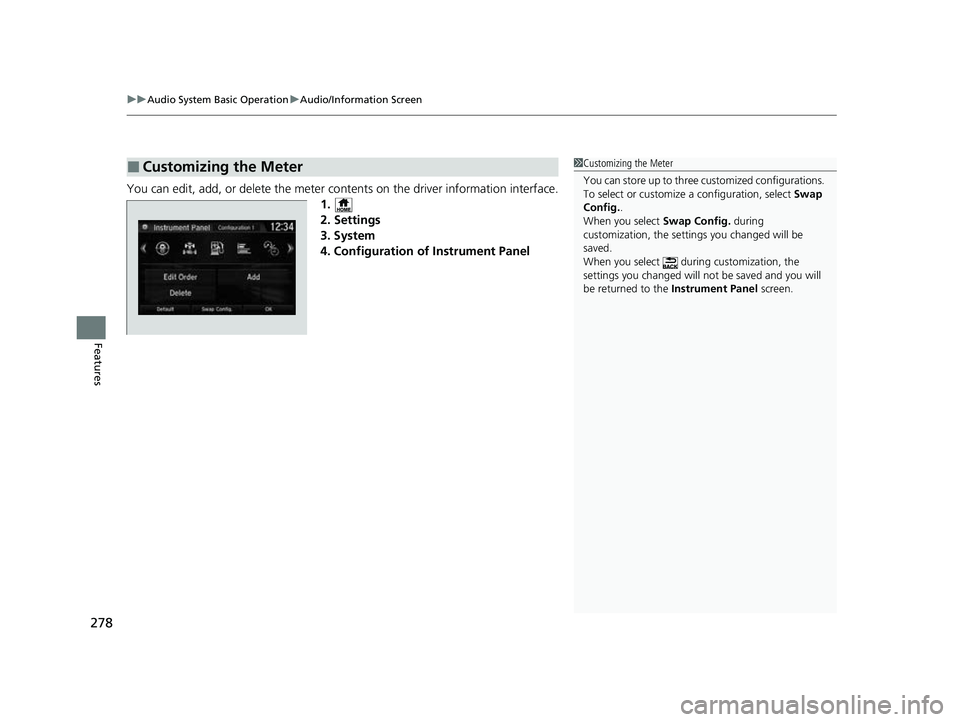
You can edit, add, or delete the meter co ntents on the driver information interface.
1.
2. Settings
3. System
4. Configuration of Instrument Panel
■Customizing the Meter1 Customizing the Meter
You can store up to three customized configurations.
To select or customize a configuration, select Swap
Config. .
When you select Swap Config. during
customization, the settings you changed will be
saved.
When you select during customization, the
settings you changed will not be saved and you will
be returned to the Instrument Panel screen.
22 CR-V HEV ELP-31TPG6200.book 278 ページ 2021年6月30日 水曜日 午前11時6分
Page 281 of 692
Continued279
uuAudio System Basic Operation uAudio/Information Screen
Features
■Editing order
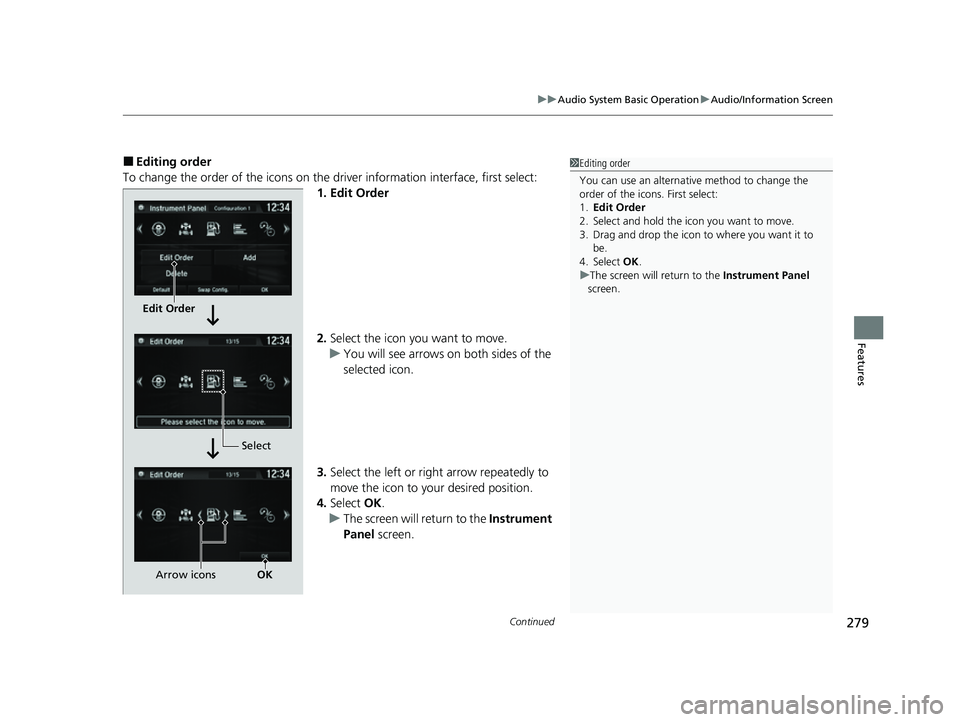
To change the order of the icons on the driver information interface, first select: 1. Edit Order
2.Select the icon you want to move.
u You will see arrows on both sides of the
selected icon.
3. Select the left or right arrow repeatedly to
move the icon to your desired position.
4. Select OK.
u The screen will return to the Instrument
Panel screen.1Editing order
You can use an alternative method to change the
order of the icons. First select:
1. Edit Order
2. Select and hold the icon you want to move.
3. Drag and drop the icon to where you want it to be.
4. Select OK .
u The screen will return to the Instrument Panel
screen.
Edit Order
Select
Arrow icons OK
22 CR-V HEV ELP-31TPG6200.book 279 ページ 2021年6月30日 水曜日 午前11時6分
Page 282 of 692
uuAudio System Basic Operation uAudio/Information Screen
280
Features
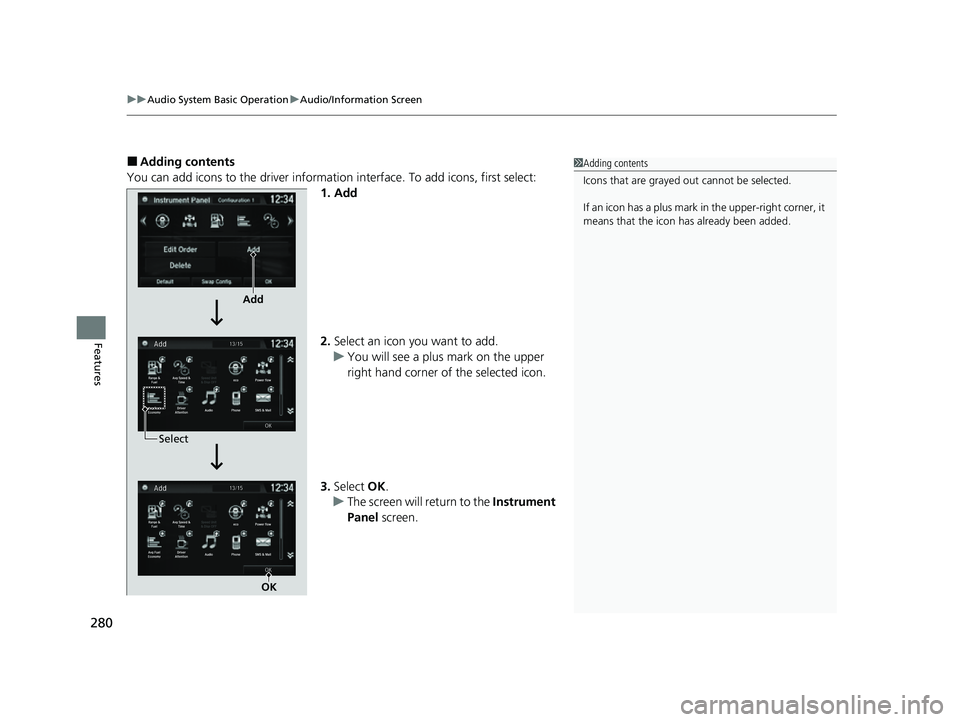
■Adding contents
You can add icons to the driver informati on interface. To add icons, first select:
1. Add
2. Select an icon you want to add.
u You will see a plus mark on the upper
right hand corner of the selected icon.
3. Select OK.
u The screen will return to the Instrument
Panel screen.1Adding contents
Icons that are grayed out cannot be selected.
If an icon has a plus mark in the upper-right corner, it
means that the icon ha s already been added.
Add
Select
OK
22 CR-V HEV ELP-31TPG6200.book 280 ページ 2021年6月30日 水曜日 午前11時6分
Page 283 of 692
Continued281
uuAudio System Basic Operation uAudio/Information Screen
Features
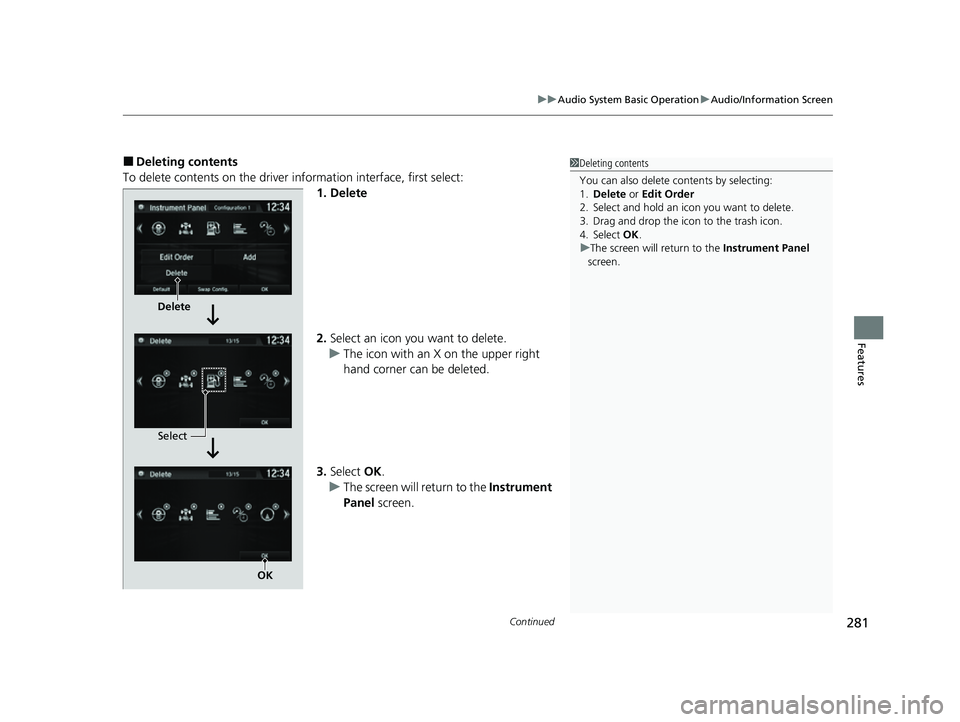
■Deleting contents
To delete contents on the driver information interface, first select:
1. Delete
2.Select an icon you want to delete.
u The icon with an X on the upper right
hand corner can be deleted.
3. Select OK.
u The screen will return to the Instrument
Panel screen.1Deleting contents
You can also delete c ontents by selecting:
1. Delete or Edit Order
2. Select and hold an icon you want to delete.
3. Drag and drop the icon to the trash icon.
4. Select OK .
u The screen will return to the Instrument Panel
screen.
Delete
Select
OK
22 CR-V HEV ELP-31TPG6200.book 281 ページ 2021年6月30日 水曜日 午前11時6分